
If you use Claude Code, Codex, or Cursor with anything that touches a real API, you have a problem: the agent needs credentials and your password manager wants to keep them locked up. The usual workarounds are bad. Paste an API key into a chat and it lands in a model context window forever. Drop secrets into a .env file and the agent’s bash tool will happily cat them and ship them somewhere. Most teams just lower their standards.
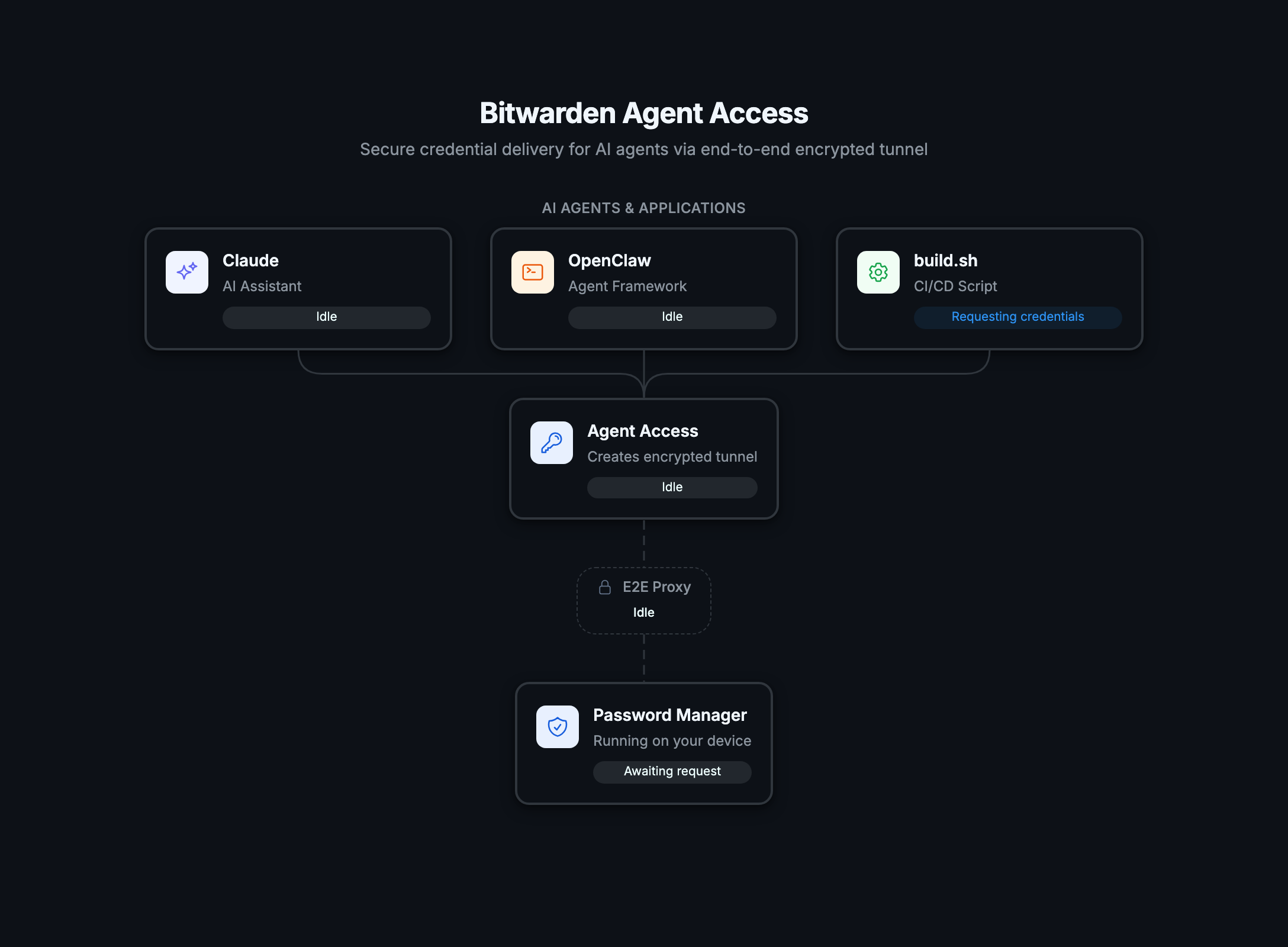
Bitwarden’s new open-source project, Agent Access, is the first serious attempt at fixing this. It is a credential-sharing protocol, a CLI (aac), and a Rust + Python SDK that builds an encrypted tunnel between your password manager and a remote process: an agent, a CI runner, a script. The agent gets the secrets it needs, scoped to a single domain or vault item, without ever seeing your vault.
This guide walks through what Agent Access ships, how to install it, how to use aac connect and aac run, how it fits into Claude Code, Codex, and Cursor workflows, and where it sits next to the credential-hygiene patterns covered in How to Secure AI Agent API Credentials.
What Agent Access is (one paragraph)
Agent Access is an open protocol plus reference implementation built by Bitwarden but designed for any password manager to adopt. The CLI (aac) creates an end-to-end encrypted tunnel using the Noise protocol. A “provider” listens for connection requests; a “consumer” (your agent, your script, your CI job) connects to the provider and asks for credentials by domain or by vault item ID. The provider decides what to send back. The consumer never sees the full vault. The provider never sees what the consumer does with the credentials. Audit trails live on both sides.
It is currently in early preview. The project README warns that “APIs and protocols are subject to change” and “we do not recommend inputting sensitive credentials directly into LLMs or AI agents.” The pattern Bitwarden recommends instead is the focus of half this guide: environment injection via aac run, which gets secrets into a process without exposing them to the agent’s context window.
Why this matters in 2026
AI coding agents have outgrown sandboxes. Claude Code, Codex, Cursor, and the rest now read your repo, run your tests, hit your APIs, deploy your code. Every one of those steps wants credentials. The Postman exposed-API-keys incident showed how badly credential hygiene scales when humans alone are sloppy; humans plus agents is worse.
The right answer is not “trust the agent more”; it is “give the agent less.” Agent Access does this at the protocol level: scoped credentials, encrypted in transit, fetched at runtime, gone when the process exits. Compare to current practice (API Key Management Tools covers the rest of the landscape) and Agent Access is the first thing built specifically for the agentic case.
Install
Pick your platform.
macOS (Apple Silicon)
curl -L https://github.com/bitwarden/agent-access/releases/latest/download/aac-macos-aarch64.tar.gz | tar xz
sudo mv aac /usr/local/bin/
macOS (Intel)
curl -L https://github.com/bitwarden/agent-access/releases/latest/download/aac-macos-x86_64.tar.gz | tar xz
sudo mv aac /usr/local/bin/
Linux (x86_64)
curl -L https://github.com/bitwarden/agent-access/releases/latest/download/aac-linux-x86_64.tar.gz | tar xz
sudo mv aac /usr/local/bin/
Windows (x86_64)
Download aac-windows-x86_64.zip from the latest release page and extract to any directory on your PATH.
Verify the install with aac --help. If the Bitwarden CLI (bw) is also on your PATH, aac will use it as the default credential provider; otherwise pass --provider example to use the built-in demo provider while you experiment.
Quick start: pair and fetch a credential
Two commands. Run aac listen on the machine that holds your vault, typically your laptop:
aac listen
The listener prints a pairing token. On the consumer side (the remote machine, the CI runner, or just another shell on the same host while you test), pair and fetch in one call:
aac connect --token <pairing-token> --domain github.com --output json
You get back something like:
{
  "credential": {
    "notes": null,
    "password": "alligator5",
    "totp": null,
    "uri": "https://github.com",
    "username": "example"
  },
  "domain": "github.com",
  "success": true
}
That JSON shape is the protocol’s stable contract. Your script can parse it however it likes. To fetch by vault item ID instead of domain:
aac connect --id <vault-item-id> --output json
--id and --domain are mutually exclusive; pick one. TOTP codes flow through the same payload when the vault item has one configured.
The killer feature: aac run for environment injection
aac connect is fine when your script knows how to handle JSON. The bigger pattern is aac run: it fetches a credential and runs your child process with the secrets injected as environment variables. Never to stdout, never to disk, never visible to whatever spawned aac.
Inject specific fields:
aac run --domain example.com --env DB_PASSWORD=password --env DB_USER=username -- psql
Inject every field with an AAC_ prefix:
aac run --domain example.com --env-all -- deploy.sh
Combine defaults with overrides:
aac run --domain example.com --env-all --env CUSTOM_PW=password -- deploy.sh
The available fields are username, password, totp, uri, notes, domain, and credential_id.
This is the pattern Bitwarden actively recommends for AI agent use: you point Claude Code or Codex at a script that calls aac run, and the secret never appears in the agent’s transcript. The model sees the command aac run --domain api.stripe.com --env-all -- ./deploy.sh, not the password. If the agent later asks “what’s the value of $STRIPE_API_KEY?” the answer is “I can’t see it” because it was scoped to the deploy.sh subprocess.
This is the same isolation principle covered in How to Secure AI Agent API Credentials, made concrete with a real tool.
Python and Rust SDKs
If a CLI invocation isn’t enough (say you’re embedding Agent Access in your own application), there are first-class bindings.
Python
from agent_access import RemoteClient

client = RemoteClient("python-remote")
client.connect(token="ABC-DEF-GHI")
cred = client.request_credential("example.com")
print(cred.username, cred.password)
client.close()
The Python module is PyO3-backed, so the heavy lifting stays in Rust and you get the same Noise protocol implementation under the hood.
Rust
The Rust SDK exposes the same RemoteClient interface as a first-class library. Reference implementations live under examples/rust-remote/ in the repo. Use it when you’re writing the consumer in Rust directly. Common in CLI tools, build runners, and any service that wants compiled-binary distribution.
For application teams already shipping API tooling, the SDK pattern fits cleanly next to HashiCorp Vault or Azure Key Vault integrations. Agent Access is not a replacement for those at the enterprise tier, but it is a better fit for the developer-laptop and CI-runner use cases.
Integrating with AI coding agents
Claude Code
Wire aac run into the script Claude Code calls. Example for a deploy task:
# deploy.sh
#!/usr/bin/env bash
aac run --domain prod.example.com --env-all -- ./run-deploy.sh
Add this script to your project, point your Claude Code workflow at it, and the agent calls ./deploy.sh with no credentials in the prompt. The Claude Code GitHub Actions integration extends the same pattern into CI: install aac in the runner, pair it with a Bitwarden vault provider running on a control plane, and your GitHub Actions inherit the scoped credentials at job time.
OpenAI Codex
The same pattern works for Codex’s CLI. Codex’s tool-call layer surfaces commands to the model; the script the model calls reaches into aac run and the secrets stay out of the model’s context. The recent Codex from your phone post covers Codex’s wider surface; this is the credentials angle that pairs with it.
Cursor
For Cursor’s terminal commands and Composer workflows, the same aac run-wrapped scripts work without modification. Cursor’s strength is local editing, so the listener typically runs on the same machine.
OpenClaw (Anthropic-ecosystem skill)
Agent Access ships an official OpenClaw skill out of the box (a SKILL.md lives in the repo). For teams using OpenClaw-style skills, this is the most polished integration today: the skill knows the protocol shape, fetches the credentials, and hands them to whatever downstream tool the skill exposes. The OpenClaw API keys guide covers the wider credential-management story for that ecosystem.
Security model in plain words
Three claims worth checking:
- End-to-end encryption via Noise. Traffic between consumer and provider is encrypted with the Noise protocol framework, the same handshake family WireGuard and Signal use. The transport layer is not the weakest link.
- Scoped credentials. The consumer only ever gets what it asked for (one domain or one vault item ID). It cannot enumerate the vault.
- No secrets on the consumer’s disk by default.
aac runpipes secrets through environment variables into a child process; nothing is written to a file, nothing surfaces in stdout, nothing lands in shell history.
What Agent Access does not protect against:
- A compromised consumer process. If the agent is malicious or compromised, scoped credentials still leak. The defense is scope, not the protocol.
- A compromised provider. If your Bitwarden vault itself is compromised, this layer does nothing for you.
- Inputting secrets into the LLM context window directly. The README is explicit on this: “we do not recommend inputting sensitive credentials directly into LLMs or AI agents.”
aac runis the workaround.
A common pattern: agent calls API, Apidog tests it
Here’s the loop most teams will settle into:
- Agent writes the code. Claude Code, Codex, or Cursor opens a PR touching an endpoint.
- CI runs the tests. Your test runner calls
aac runto fetch the API key, runs the test suite against a staging deployment. - Apidog verifies the contract. Apidog runs the OpenAPI contract test as a separate CI step, also via
aac run, also without the agent seeing the key.
The result: agent ships code, contract holds, secret never leaves the vault. The wider playbook on testing AI-driven changes is in How to test AI agents that call your APIs.
Limitations and warnings
- Early preview. APIs and protocols are subject to change. Don’t pin a production workflow to the v0 protocol without budget for a follow-up rewrite.
- Bitwarden CLI required by default. The default provider is
bw; install the Bitwarden CLI first, or pass--provider examplefor the demo provider while testing. - No config file yet. Agent Access is currently flag-driven. Repeated invocations need scripting around them.
- Don’t paste secrets into LLM prompts. Even with Agent Access installed, if you copy a credential into a chat window, no protocol can save you.
Common questions
Is Agent Access free?
Yes. The CLI, SDKs, and protocol are open source under the Bitwarden GitHub organization. You still pay for Bitwarden if you’re using it as your vault.
Does it work with password managers other than Bitwarden?
The protocol is designed to be vendor-neutral. The reference implementation ships with Bitwarden support and an example provider; other vendors are expected to ship their own providers over time.
Can I use it without a password manager at all?
For testing, yes; pass --provider example to use the built-in demo provider. For production, you need a real provider (Bitwarden today, others on the roadmap).
Does the consumer process need network access?
The consumer needs network access to reach the provider’s listener. Local-only setups work if listener and consumer are on the same host.
How is this different from a .env file?
A .env file sits on disk, gets checked into repos accidentally, and is readable by anything the agent can run. aac run keeps the secret in process memory only, scoped to the subprocess, gone when it exits.
Does it replace HashiCorp Vault or AWS Secrets Manager?
No. Enterprise vaults are still the right tool for service-to-service secrets at scale. Agent Access fills the developer-laptop and CI-runner gap, where a full enterprise vault is overkill.
Will Anthropic, OpenAI, or other agent vendors integrate this directly?
Not announced. The current integration model is “wrap your scripts in aac run.” Direct first-class support from the agent vendors is the natural next step but isn’t shipping yet.
Where do I report bugs or contribute?
The GitHub repo. Issues, PRs, and protocol discussions all happen there.
Try it now
Install aac, run aac listen on your laptop, run aac connect --provider example --domain test.com --output json from another terminal. Confirm the JSON comes back. That’s the smallest end-to-end loop. From there, replace the example provider with bw, wrap a real script in aac run, and stop pasting API keys into your AI agents.
Pair Agent Access with Apidog for the API testing side of the workflow, and you have a clean separation: vault holds the secret, Apidog tests the contract, the agent ships the code, and no credential leaves your machine in plain text.


