If you build AI agents that talk to other AI agents, you have already hit the same wall everyone else has: there is no clean way to inspect what one agent sends to another. Console logs lie, network tabs hide the structured fields, and bespoke test scripts rot fast. Apidog’s A2A Debugger fixes that for the Agent2Agent (A2A) protocol. Paste an Agent Card URL, click Connect, send a message, and read the reply in three views.
This guide walks through what the A2A Debugger does, how to wire up your first agent, what the request and response look like under the hood, and where it fits next to Apidog’s existing MCP server testing tools. If you need the upstream protocol context first, Apidog has a deeper read on MCP vs A2A that pairs well with this post.
What A2A is (in one paragraph)
A2A, short for Agent2Agent, is an open protocol for inter-agent communication. It defines how one agent advertises its capabilities (the Agent Card), how another agent connects to it, how messages and file attachments are exchanged, and how task status is reported back. Think of it as HTTP for agent-to-agent traffic: a thin, vendor-neutral spec that lets a LangGraph agent in your data pipeline ping a CrewAI agent owned by another team without either side knowing the other’s internals.
It is distinct from MCP (Model Context Protocol), which is about giving a single agent access to tools and resources. A2A is about agents talking to other agents. The MCP vs A2A breakdown is the cleanest read on the difference.
What the A2A Debugger gives you
The A2A Debugger lives inside Apidog. It is a visual workbench for testing A2A endpoints before you wire them into a production workflow. Key features:
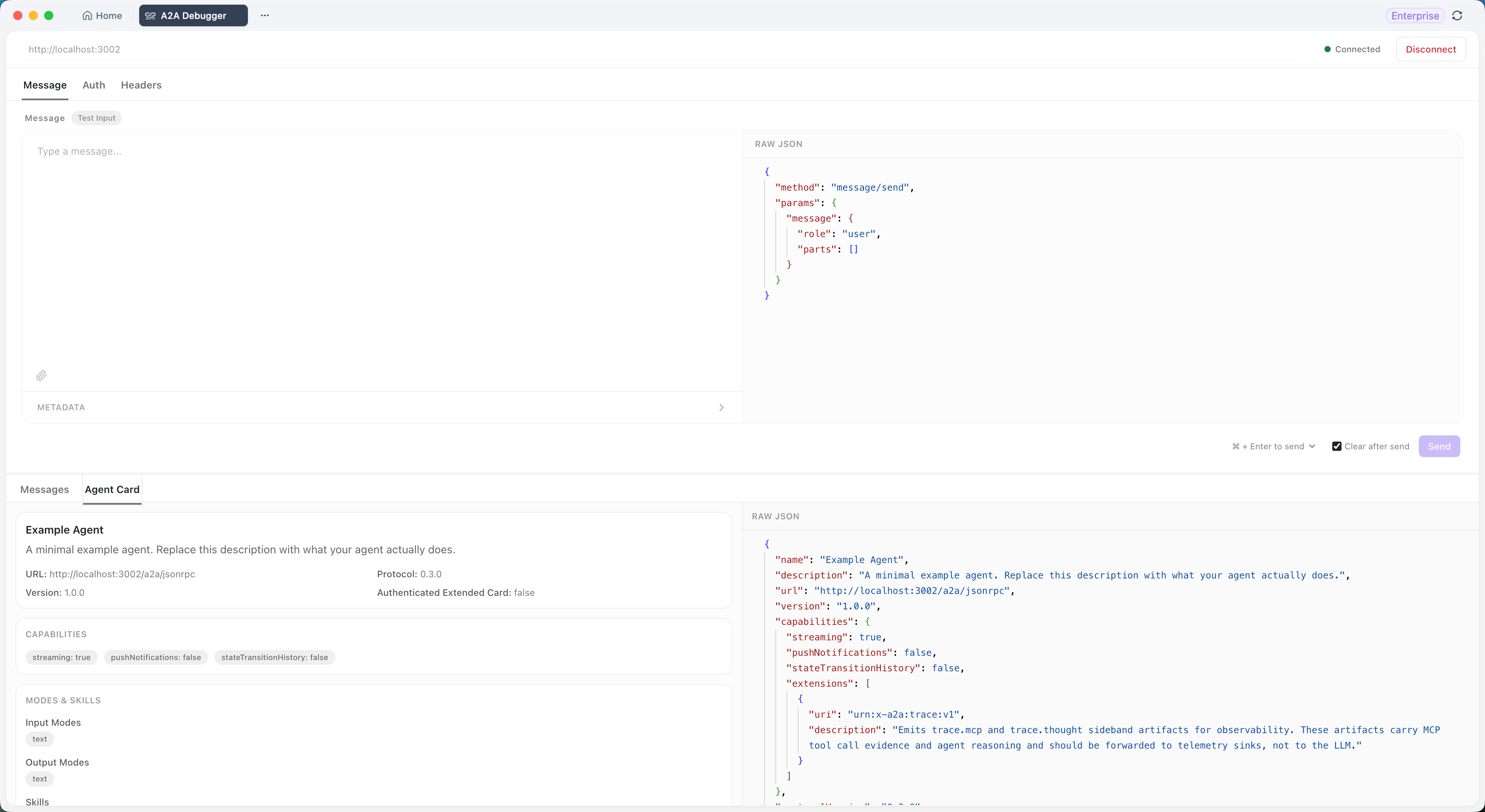
- Agent Card connection. Paste a URL, click Connect, see the agent’s name, description, capabilities, declared skills, and protocol version. If the card is malformed, the connection fails loudly so you can fix the manifest rather than chase ghosts.
- Message sending. Compose plain text, attach files (when the agent’s declared input types support them), and tack on custom metadata key-value pairs.
- Three response views. Preview renders structured output, Content shows the human-readable payload, and Raw Data dumps the full JSON for when you need to verify field names or escape characters.
- Authentication. Bearer Token, Basic Auth, and API Key via custom headers, all in the UI.
- Custom headers. Add gateway auth, business parameters, or whatever middleware your A2A endpoint expects.
- Session history. Every message you send sticks in a session log. Clear it when you start a new test.
You write zero curl commands. Apidog handles the JSON-RPC envelope, the SSE streaming (where the agent supports it), and the response parsing.
Step 1: Connect to your first A2A agent
You need three things before you open the debugger:
- Apidog installed and updated. The latest client is required; older versions don’t ship the A2A Debugger. Download Apidog if you don’t already have it.
- An Agent Card URL. This is the canonical entrypoint for any A2A-compliant agent. For local development it usually looks like
http://localhost:3000/.well-known/agent.json; for hosted agents, your platform vendor will give you the path. - Credentials (if the agent requires them). Bearer token, API key, or basic auth.
Open Apidog, head to the A2A Debugger page, and paste the Agent Card URL at the top. Click Connect. If the agent responds with a valid Agent Card, the status switches to Connected and the panel populates with the agent’s metadata: name, description, capabilities, declared skills, protocol version.
If it fails, the most common causes are:
- The URL is wrong or the agent is not running. Hit the URL in a browser to confirm a JSON payload comes back.
- The Agent Card is missing required fields. Compare against the A2A protocol spec on GitHub.
- The agent expects auth on the discovery endpoint. Add the auth in Apidog before clicking Connect.
Step 2: Send a test message
Once you’re connected, open the Messages tab. Type a prompt as you would in any chat interface. For example:
Summarize the last three customer feedback notes in our shared knowledge base, then draft a one-paragraph reply for the support team.
Optional additions before you hit Send:
- File attachment. Click the paperclip and select a file. The debugger checks the agent’s declared input types and rejects unsupported file types up front, so you don’t burn a round-trip on a 415.
- Custom metadata. Add key-value pairs like
priority: highortenant: acme-corp. These flow into the A2A request envelope and are visible to the agent if its handler reads them.
Click Send. Apidog wraps your prompt in the A2A message structure, ships it to the agent, and waits for the response.
Step 3: Read the response with three views
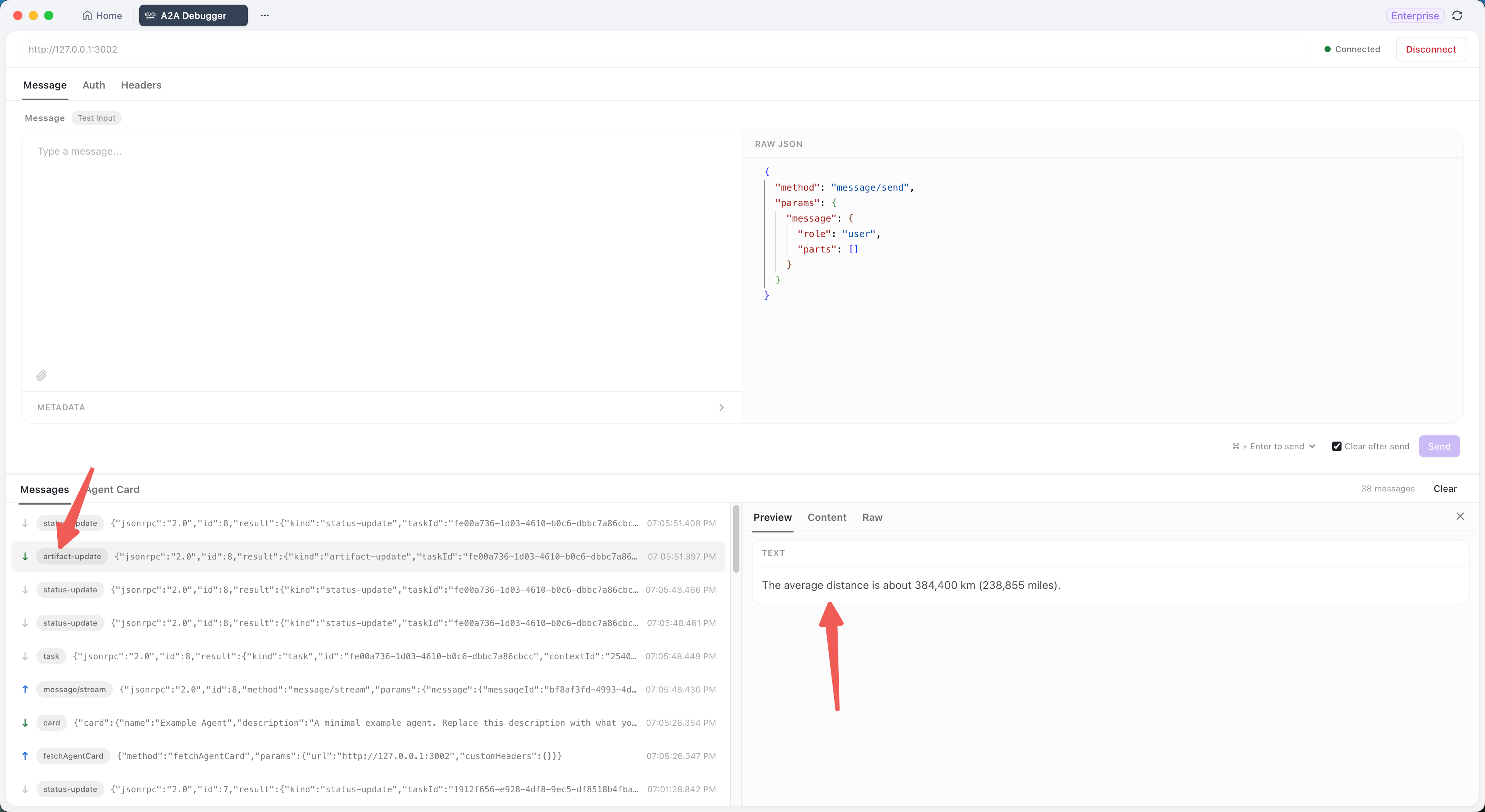
A2A responses can be plain strings, structured JSON, file references, or a mix. The debugger gives you three lenses on the same payload:
- Preview. Apidog renders structured fields as a tree. Useful when the agent returns nested objects (task ID, status, artifacts, history).
- Content. The human-readable body. If the agent returned text, this is what you’d show a user. If it returned a structured artifact with a
text/plainpart, this is the extracted text. - Raw Data. The full JSON-RPC payload. This is what to copy into a bug report when something is off, and what to compare against the spec when you’re verifying compliance.
Flip between the three. If Preview looks fine but Content is empty, the agent is probably returning a typed artifact that Apidog can render but doesn’t know how to flatten. If Raw Data shows an error code, the agent rejected the request and the message in error.message is your starting point.
Session history lives in the left panel. Every send becomes a turn you can scroll back to. Hit Clear when you start a new test and don’t want stale context to confuse the agent.
Authentication: three common patterns
Most production A2A endpoints sit behind some kind of auth. The debugger handles three patterns out of the gate:
Bearer Token
The most common pattern for hosted agents. In the auth panel, select Bearer Token and paste the token. Apidog adds Authorization: Bearer <token> to every request.
Authorization: Bearer sk-agent-7f3e9a...
Basic Auth
For agents protected by a username and password (common with internal/legacy systems). Select Basic Auth, enter both values, and Apidog computes the base64-encoded Authorization: Basic ... header.
API Key via custom header
When the agent expects a non-standard header name like X-Agent-Key, drop down to the Headers section and add it manually. Same flow for any gateway-specific header (CSRF tokens, tenant IDs, request signatures).
For longer-term thinking on agent credential hygiene, the Apidog AI agent credentials guide covers what to rotate, what to scope, and what never to commit.
Custom headers and metadata: when to use which
Two places hold “extra” data on an A2A request. They sound similar but go to different layers:
| Channel | Where it lives | Use it for |
|---|---|---|
| Custom Headers | HTTP request headers | Gateway auth, observability (X-Request-Id), feature flags |
| Metadata | A2A message payload | Per-message context the agent reads (priority, tenant, locale) |
Rule of thumb: if your reverse proxy or API gateway needs to see it, put it in headers. If the agent’s task handler needs it, put it in metadata. Mixing them up is the number-one source of “why did the agent ignore my hint” bugs.
A2A Debugger vs MCP server testing in Apidog
Apidog ships both an A2A Debugger and an MCP testing flow. They are different tools for different protocols:
| Tool | Protocol | Tests | Use when |
|---|---|---|---|
| A2A Debugger | Agent2Agent | Connectivity, message exchange, task status | Building multi-agent systems where agents call other agents |
| MCP server testing | Model Context Protocol | Tool calls, resource access, prompt templates | Building an MCP server that exposes tools/resources to an agent |
If you’re not sure which you need, the MCP vs A2A guide walks through the decision. The short version: MCP is what an agent uses to reach into external systems. A2A is what an agent uses to talk to another agent.
For the MCP side of the workflow, the MCP server testing playbook covers manual and automated paths in Apidog. Many teams end up using both surfaces because real-world agent systems combine A2A coordination with MCP tool access.
A common debugging pattern: round-trip a task
When you’re stuck on “the agent isn’t responding the way I expect,” walk through this loop:
- Open the A2A Debugger.
- Connect to the agent. Confirm the Agent Card shows the skill you expect.
- Send the smallest possible message that should trigger that skill. Use plain text first; add files and metadata only after the text path works.
- Read Raw Data, not Preview, the first time. You want to see exactly what the agent emitted.
- If the response is missing a field you expect, that’s a problem in the agent code, not the transport.
- If the response is well-formed but wrong, that’s a prompt or model problem, and you’ve already isolated transport from logic.
This is the same isolation-before-blame loop that the How to test AI agents that call your APIs post applies to the API side. Same principle: confirm the wire first, then debug the brain.
Where it fits in your AI workflow
Multi-agent systems are how a lot of serious AI work ships in 2026. The AI agents are the new API consumers post lays out the case for treating agent traffic as first-class. The Designing APIs for AI agents follow-up covers what changes in your API contract when the consumer is an LLM-driven agent rather than a human dev.
The A2A Debugger sits at the same layer as Apidog’s MCP Client visual debugger. Both are about giving you a window into traffic that is otherwise hidden inside agent SDKs. You wire your agent up, you can see what it does, you fix the bugs before they reach production.
Apidog is free to download and the A2A Debugger ships with the standard client; no separate license, no separate plan.
Common questions
Is the A2A Debugger free?
Yes. It’s bundled with the standard Apidog client. Download Apidog and the A2A Debugger appears in the side panel once you’re on a recent enough version.
Does it work with agents written in any framework?
It works with any agent that exposes a valid A2A Agent Card. The protocol is framework-agnostic, so LangGraph, CrewAI, AutoGen, and custom Python or Go agents all work as long as they speak the A2A spec.
Can I save sessions for later replay?
Sessions persist while the debugger is open. For long-term storage, copy the Raw Data output and save it in your test artifacts; full session export is on the roadmap.
How does it handle streaming responses?
When the agent supports SSE streaming (per the A2A spec), the debugger reads chunks as they arrive and updates Preview and Content in real time. Raw Data shows the assembled response when the stream closes.
What’s the difference between the metadata field and the headers section?
Headers are HTTP layer; metadata is A2A message layer. Headers reach the gateway and reverse proxy; metadata reaches the agent’s task handler. See the table earlier in this post.
Does Apidog log the agent’s responses to its servers?
No. Apidog operates as a local client. The traffic between your machine and the agent does not pass through Apidog infrastructure.
Can I use the A2A Debugger to test against a hosted agent on a different network?
Yes, as long as the network path is open. The debugger makes outbound HTTPS requests like any HTTP client would. If your agent is behind a VPN, you’ll need that VPN active.
Where do I report bugs or request features?
The Apidog feedback channel is the primary route; the A2A protocol GitHub repo is where the upstream spec evolves, so spec-level requests belong there.
Try it Now
Pick the simplest A2A agent you have access to. If you don’t have one yet, the A2A reference implementations include a sample server you can run locally in under five minutes. Paste its Agent Card URL into Apidog’s A2A Debugger, send a “hello” message, and watch the three response views populate. That’s the smallest end-to-end loop, and from there you scale up to real prompts, file attachments, and multi-agent workflows.
Pair the debugger with Apidog for the rest of your API and MCP work, and you have a single surface for the three protocols agent systems run on: HTTP, MCP, and A2A.