TL;DR
You can build and deploy a complete full-stack application in 2026 without spending a dollar. Google AI Studio’s new vibe coding experience (free tier) + Antigravity agent + Firebase free tier = working apps with authentication, databases, and hosting at zero cost. This guide shows you exactly how.
Introduction
Building a full-stack app used to mean credit cards everywhere. Vercel for hosting. Supabase or Railway for databases. Auth0 for authentication. Maybe a Heroku dyno for backend logic. By the time you’re done, you’re juggling five free tiers that each expire at different times.
Google just changed this game.
On March 19, 2026, Google AI Studio launched a new vibe coding experience that combines free AI code generation, free Firebase backends, and free hosting into a single workflow. No credit card required for the free tier.
What you’ll build: A real-time multiplayer app with authentication, database, and live hosting Total cost: $0 Time required: 1-2 hours Credit card: Not needed
The 2026 Free Stack: What You Actually Get
Before diving in, understand what’s genuinely free versus what requires payment.
Free Tier Breakdown
| Service | Free Tier Limits | What You Get |
|---|---|---|
| Google AI Studio | 60 requests/min, 1M tokens/day | Full vibe coding experience, Antigravity agent access |
| Firebase Authentication | 10K monthly active users | Email/password, Google, GitHub sign-in |
| Cloud Firestore | 1GB storage, 50K reads/day | Real-time database for your app |
| Firebase Hosting | 10GB storage, 360MB/day transfer | Global CDN for your frontend |
| Cloud Functions | 2M invocations/month | Serverless backend logic |
| Antigravity Agent | Included with AI Studio free tier | Persistent builds, multi-step edits |
What This Means in Practice
Your free app can handle:
- 10,000+ monthly active users
- 1GB of user data
- Millions of database reads
- Unlimited frontend traffic (within reason)
- 2 million backend function calls per month
This isn’t a crippled trial. This is production-ready infrastructure.
When You’ll Need to Pay
You’ll outgrow free tiers when:
- Users exceed 10K monthly active
- Database grows beyond 1GB
- You need advanced Firebase features (emulators, custom domains)
- AI Studio usage exceeds daily limits
For most side projects and MVPs, free tiers last months or years.
Step 1: Create Your Free Google AI Studio Account
No credit card. No trial period. Just sign up and start building.
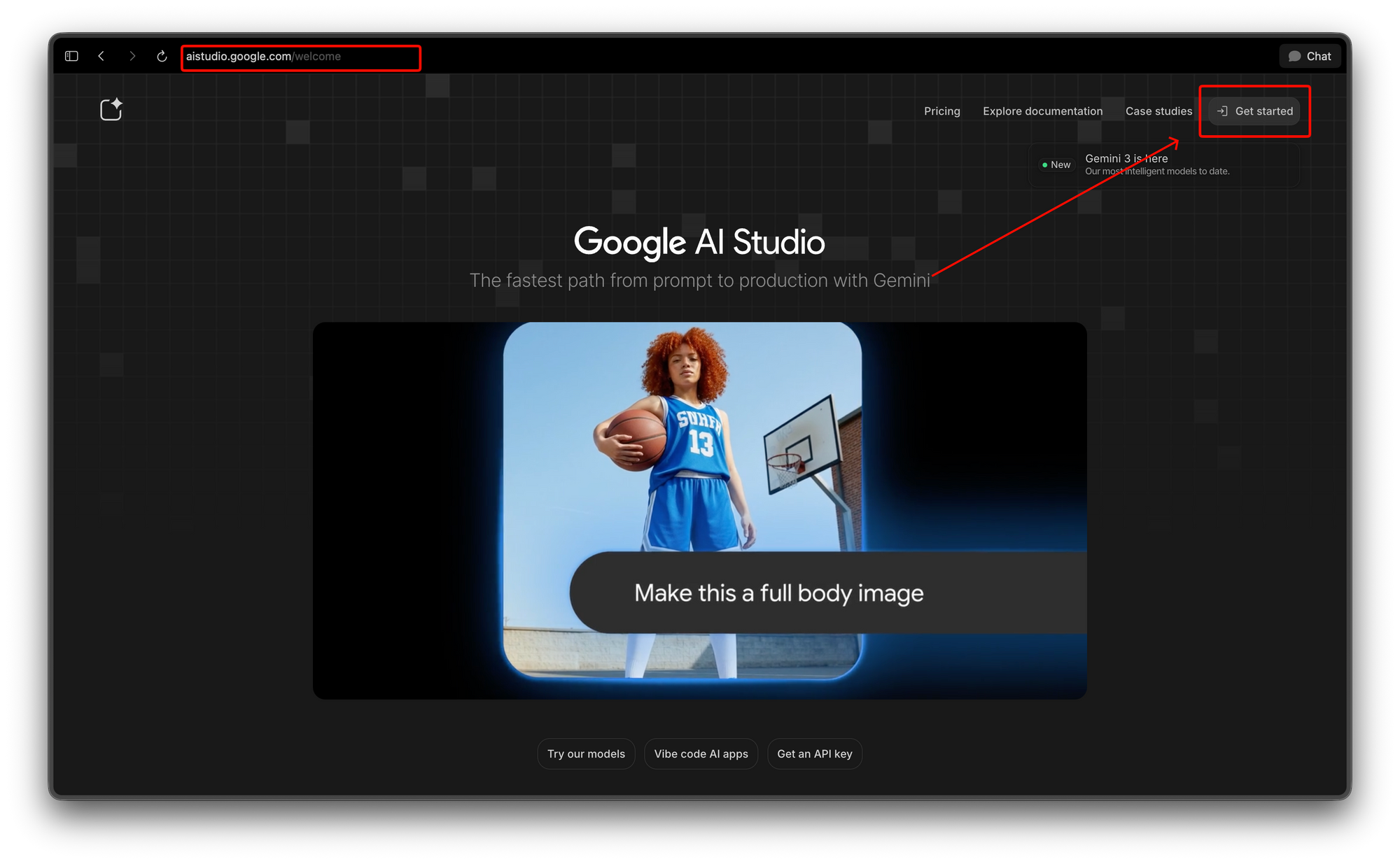
Sign Up Flow
- Visit aistudio.google.com
- Click “Sign in with Google”
- Use any Gmail account (create one if needed)
- Accept terms of service
- Land on the Projects dashboard
Time: 2 minutes Cost: $0
Step 2: Start Your First Vibe Coding Session
The prompt determines everything. Here’s how to structure it for free-tier success.
Prompt Template for Free Apps
Build a [type of app] that [core functionality].

Requirements:
- Must work on Firebase free tier (Spark Plan)
- No paid APIs or services
- Use free authentication (email/password or Google sign-in)
- Keep database under 1GB

Features:
- Feature 1
- Feature 2
- Feature 3

UI:
- Use shadcn/ui components
- Mobile-responsive
- Dark mode
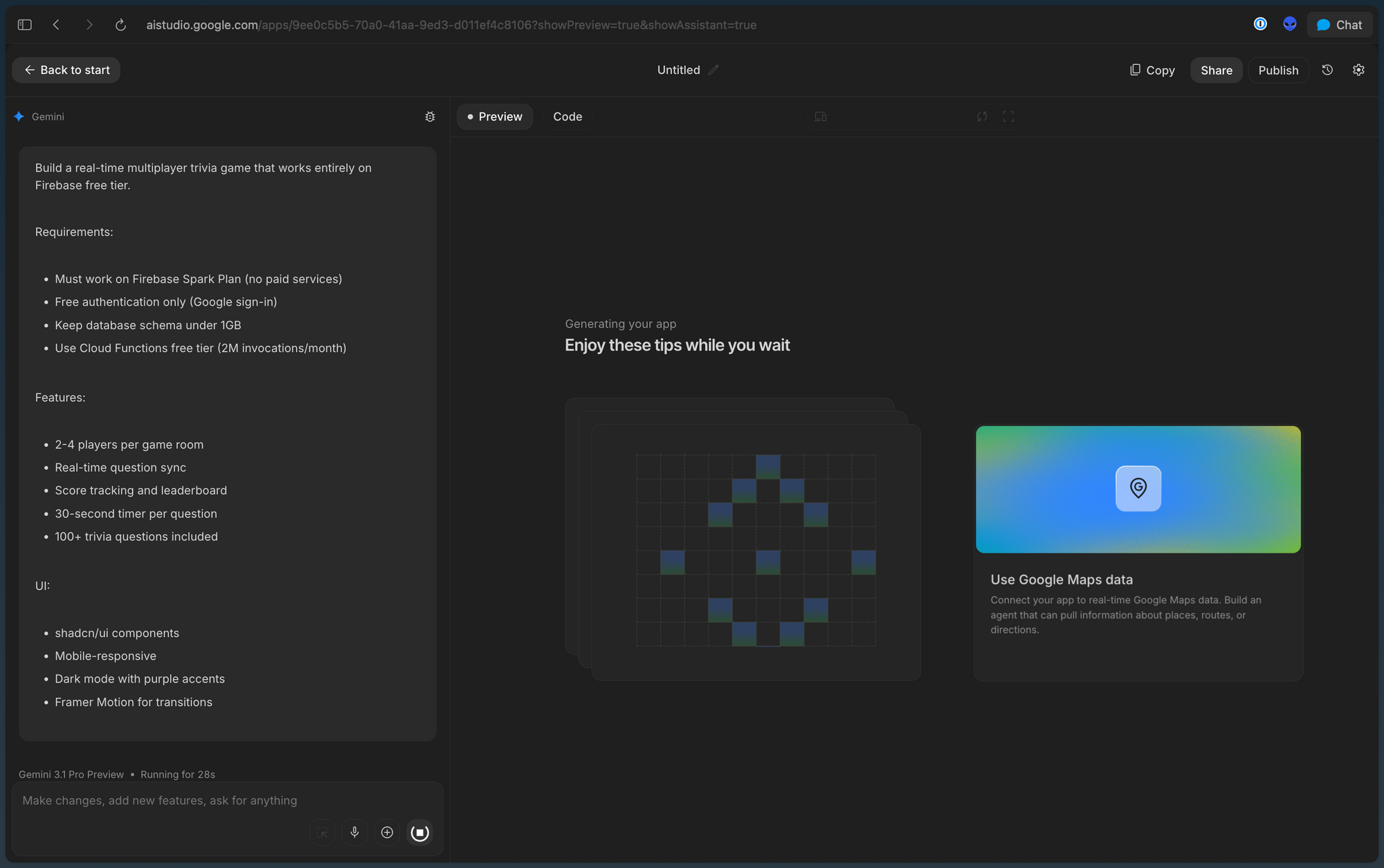
Example: Multiplayer Trivia App
Build a real-time multiplayer trivia game that works entirely on Firebase free tier.

Requirements:
- Must work on Firebase Spark Plan (no paid services)
- Free authentication only (Google sign-in)
- Keep database schema under 1GB
- Use Cloud Functions free tier (2M invocations/month)

Features:
- 2-4 players per game room
- Real-time question sync
- Score tracking and leaderboard
- 30-second timer per question
- 100+ trivia questions included

UI:
- shadcn/ui components
- Mobile-responsive
- Dark mode with purple accents
- Framer Motion for transitions
What the Agent Generates
The Antigravity agent creates:
- Frontend - React + TypeScript + shadcn/ui
- Backend - Firebase Cloud Functions
- Database - Firestore collections and security rules
- Auth - Google sign-in integration
- Hosting - Firebase Hosting configuration
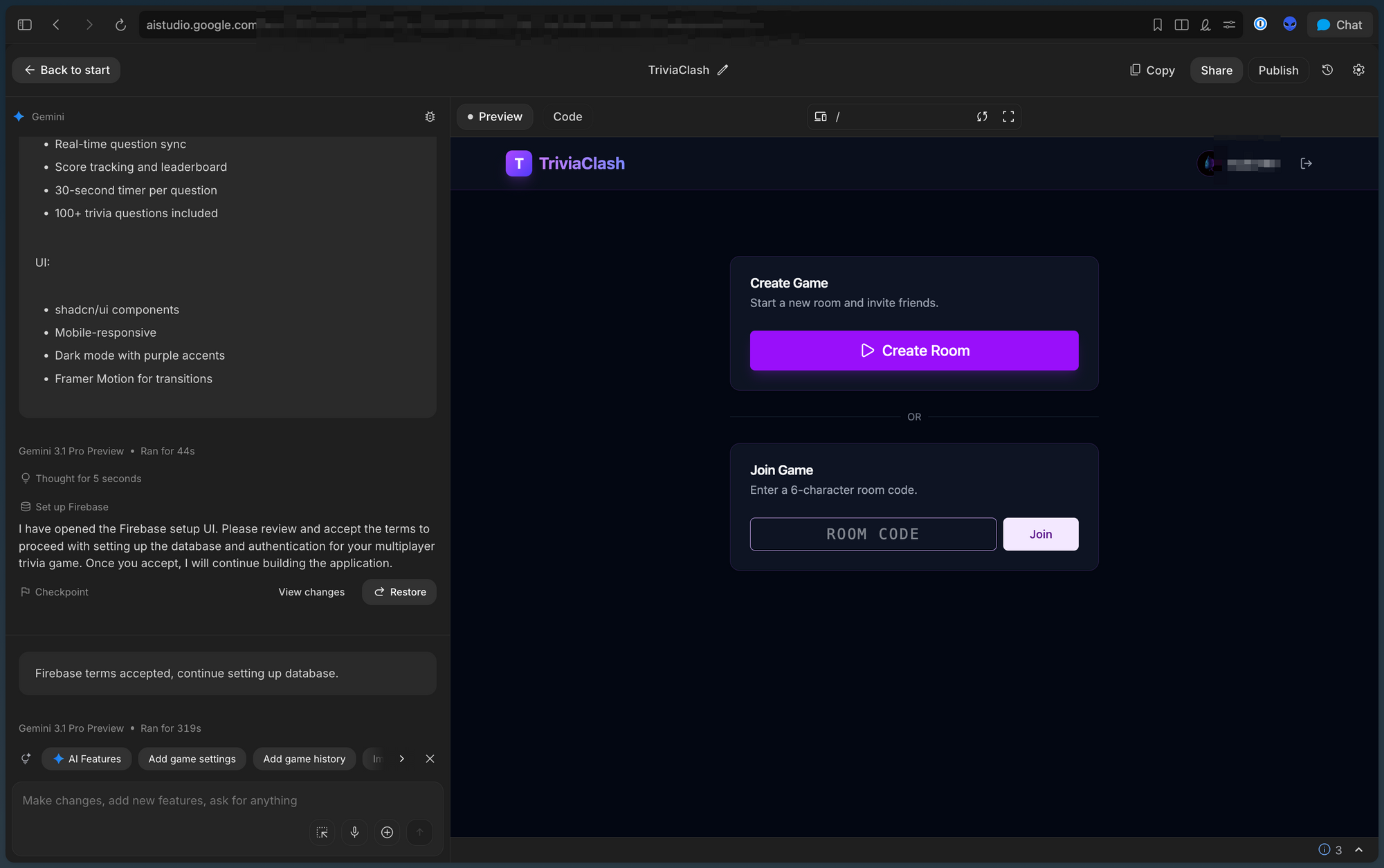
All configured for free tier limits.
Step 3: Deploy to Free Hosting
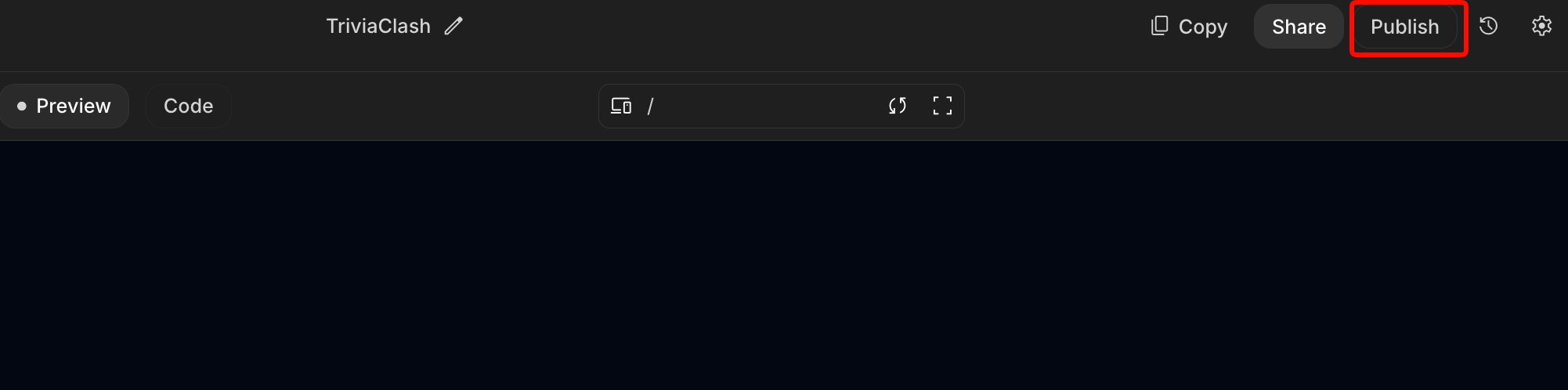
Deployment is automatic through the vibe coding interface.
Free Domain vs Custom Domain
Free: your-app.web.app (Firebase subdomain) Paid: your-app.com (requires $12-15/year for domain)
For learning and side projects, the free subdomain works perfectly.
Step 4: Add Free External Integrations
Your app needs data. These integrations are free:
Free API Integrations
| API | Free Tier | Use Case |
|---|---|---|
| Open Trivia Database | Unlimited | Trivia questions |
| The Cat API | Unlimited | Random cat images |
| JSONPlaceholder | Unlimited | Fake data for testing |
| PokeAPI | Unlimited | Pokemon data |
| OpenWeatherMap | 1K calls/day | Weather data |
Example: Add Free Trivia API
Prompt:
Add integration with the Open Trivia Database API (opentdb.com) to fetch unlimited free trivia questions. Cache questions in Firestore to reduce API calls.
The agent generates:
// src/services/triviaApi.ts
const API_BASE = 'https://opentdb.com/api.php';

export async function fetchTriviaQuestions(
  amount: number = 10,
  category?: string
) {
  const params = new URLSearchParams({
    amount: amount.toString(),
    type: 'multiple',
  });

  if (category) {
    params.append('category', category);
  }

  const response = await fetch(`${API_BASE}?${params}`);
  const data = await response.json();

  return data.results.map((q: any) => ({
    question: q.question,
    options: [...q.incorrect_answers, q.correct_answer].sort(),
    correctAnswer: q.correct_answer,
    category: q.category,
  }));
}
Free Authentication Options
| Provider | Free Tier | Setup Complexity |
|---|---|---|
| Firebase Auth (Email) | Unlimited | Easy |
| Firebase Auth (Google) | Unlimited | Easy |
| Firebase Auth (GitHub) | Unlimited | Easy |
| Firebase Auth (Anonymous) | Unlimited | Easiest |
Avoid paid auth providers like Auth0 (free tier expired in 2025).
Pro tip: Use Apidog’s free tier to validate your AI-generated API structure. Import the generated Firestore schema into Apidog’s API designer, create mock endpoints that mirror your Cloud Functions, and test your frontend against realistic responses before deploying. See the complete API mocking guide for examples.
Step 6: Monitor Your Free Tier Usage
Stay within free limits with basic monitoring.
Check Firebase Usage
- Visit console.firebase.google.com
- Select your project
- Click “Usage” in the left sidebar
- Review Spark Plan limits
Key Metrics to Watch
| Metric | Free Limit | Alert Threshold |
|---|---|---|
| Firestore Storage | 1GB | 800MB |
| Firestore Reads/day | 50K | 40K |
| Firestore Writes/day | 20K | 16K |
| Functions Invocations/month | 2M | 1.6M |
| Hosting Transfer/day | 360MB | 300MB |
| Auth Users | 10K/month | 8K |
Optimize Before Hitting Limits
If reads are high:
- Add client-side caching
- Batch read operations
- Use Firestore queries efficiently
If functions are high:
- Consolidate function logic
- Use scheduled functions instead of triggers
- Cache results in Firestore
If hosting transfer is high:
- Compress images
- Enable CDN caching
- Lazy-load components
Real Apps Built on Free Tiers
These applications work entirely on free infrastructure:
1. Multiplayer Trivia Game (This Guide)
- Users: Up to 10K monthly
- Database: Question + player data (~200MB)
- Functions: Game logic, score updates
- Cost: $0
2. Habit Tracking App
- Users: Up to 10K monthly
- Database: User habits, streaks (~500MB)
- Functions: Daily reminders, streak calculations
- Cost: $0
3. Real-Time Chat App
- Users: Up to 5K concurrent (message history stored)
- Database: Messages, user profiles (~800MB)
- Functions: Message routing, notifications
- Cost: $0
4. Collaborative Whiteboard
- Users: Up to 3K monthly active
- Database: Board states, drawings (~600MB)
- Functions: Real-time sync, export
- Cost: $0
Common Free Tier Pitfalls (And How to Avoid Them)
Pitfall 1: Accidentally Upgrading to Paid Firebase
Problem: Firebase prompts you to add billing for certain features.
Solution: Stay on Spark Plan by avoiding:
- Custom domain hosting (use
.web.appsubdomain) - Cloud Run (requires billing)
- Emulator Suite for production (use locally only)
If you see a billing prompt, click “Maybe Later.”
Pitfall 2: AI Studio Rate Limits
Problem: Free tier has 60 requests/minute, 1M tokens/day.
Solution:
- Work in focused sessions
- Use follow-up prompts instead of starting over
- Export code locally when generation completes
Pitfall 3: Firestore Query Costs
Problem: Poorly structured queries burn through free reads.
Solution:
// BAD: Reads entire collection
const snapshot = await getDocs(collection(db, 'messages'));

// GOOD: Query with limits
const snapshot = await getDocs(
  query(collection(db, 'messages'), limit(20))
);
Pitfall 4: Function Cold Starts
Problem: Free Cloud Functions have cold start delays (~1-2 seconds).
Solution:
- Keep functions small and focused
- Use minimum timeout (60 seconds)
- Consider client-side logic where possible
Where Apidog’s Free Tier Fits In
Google AI Studio builds your app. Apidog ensures it works correctly.
Free Apidog Features:
- API design with visual editor
- Mock server generation
- Automated test scenarios
- Team collaboration (up to 3 members)
Workflow:
- Design API schema in Apidog (free)
- Generate code with Google AI Studio (free)
- Test against Apidog mocks (free)
- Deploy to Firebase (free)
All steps cost nothing.
See How to Test REST APIs for the complete workflow.
When to Upgrade (And When Not To)
Stay Free When:
- Building side projects
- Validating an MVP
- Learning full-stack development
- Building portfolio projects
- Testing ideas before committing
Upgrade When:
- Revenue justifies costs
- Users exceed free limits consistently
- You need custom domains
- You need advanced monitoring
- Team collaboration requires paid features
Smart Upgrade Path
- Start free - Build and launch on free tiers
- Validate - Get real users and feedback
- Monetize - Add revenue stream (even small)
- Upgrade - Use revenue to pay for infrastructure
Never pay for infrastructure before you have users willing to pay for your product.
Conclusion
Building a full-stack app for free in 2026 isn’t just possible—it’s practical. Google AI Studio’s vibe coding experience, combined with Firebase’s generous free tier, means you can go from idea to deployed application without entering a credit card.
What you get for $0:
- AI-powered code generation with Antigravity agent
- Authentication for 10K monthly users
- 1GB database storage
- Global CDN hosting
- 2M serverless function invocations/month
- Real-time multiplayer support
What you need:
- A Google account
- An idea worth testing
The barrier to building software has never been lower. The question isn’t whether you can afford to build your app. It’s whether you can afford not to.
Next steps:
- Sign up at aistudio.google.com - no credit card
- Enable Firebase Spark Plan - automatic free tier
- Start your first vibe coding session with the prompt template above
- Deploy and share your free app
- Use Apidog’s free tier to test and document your APIs
FAQ
Is Google AI Studio completely free?
Google AI Studio offers a free tier with 60 requests per minute and 1 million tokens per day. This is sufficient for building multiple full-stack apps. Paid tiers start at $20/month for higher limits.
Does Firebase free tier really last forever?
Yes. Firebase Spark Plan has no expiration. You stay on free tier as long as you stay within usage limits. Many apps run on Spark Plan for years without needing upgrades.
Can I monetize apps built on free tiers?
Absolutely. Keep 100% of your revenue. Free tiers are meant to help developers build and launch. Google profits when you succeed and eventually upgrade.
What happens if I exceed free limits?
Firebase won’t charge you automatically. You’ll either:
- Get throttled until next billing cycle
- Receive a prompt to add billing
- Need to optimize usage or upgrade manually
Do I need a credit card to start?
No. Google AI Studio and Firebase Spark Plan both work without billing information. Add a card only when you choose to upgrade.
Can I use custom domains on free tier?
Firebase Hosting free tier includes the web.app subdomain. Custom domains require adding billing (but domain itself costs $12-15/year separately).
What’s the catch?
No catch. Google offers free tiers to:
- Build developer loyalty
- Capture future paying customers
- Grow the Firebase ecosystem
Your free app is someone else’s paid app. The infrastructure exists either way.
How long does it take to build a real app?
With vibe coding: 1-2 hours for MVP. Traditional development: 2-4 weeks. The difference is AI handles boilerplate while you focus on unique features.
Can I export code and self-host?
Yes. Export complete projects as ZIP or push to GitHub. Host anywhere: Vercel, Netlify, your own server. You own the generated code.
Is the generated code production-ready?
The agent generates working code following best practices. However, always:
- Review generated code
- Test thoroughly
- Add error handling for your specific use case
- Run security audits before handling sensitive data