
Cursor shipped Composer 2.5 on May 18, 2026, and the headline is hard to ignore: a coding model that matches Opus 4.7 and GPT-5.5 on real software benchmarks while costing under a dollar per task. If you write code for a living, that price-to-quality ratio changes how you plan your day.
This guide covers three things developers keep searching for: what Composer 2.5 actually is, how to access it inside Cursor, and how to use it well on production work. You’ll get the benchmark numbers, the pricing math, and a practical workflow that pairs the model with Apidog so the API code it writes is correct on the first run.
What is Cursor Composer 2.5?
Composer 2.5 is Cursor’s own agentic coding model, built to plan, edit files, run terminal commands, and verify its own work inside the Cursor editor. It’s the successor to Composer 2, and it moves the model from “fast autocomplete partner” to “agent that finishes long tasks without losing the thread.”
A few facts define it:
- It’s built on the open-source Moonshot Kimi K2.5 checkpoint, a roughly one-trillion-parameter base.
- Cursor put about 85% of the training compute budget into post-training and reinforcement learning, not just the base model.
- It trained on 25 times more synthetic tasks than Composer 2, including exercises where Cursor deletes a feature and the model has to rebuild it until tests pass.
The practical result is a model that holds context over long sessions. Composer 2 was quick but sometimes drifted on multi-step work. Composer 2.5 sustains effort across a long task, follows complex instructions more reliably, and calibrates how much work a request actually needs instead of over- or under-doing it.
If you want the deeper background on the model family, the Composer 2 guide explains the architecture that 2.5 builds on.
What changed under the hood
Three training ideas drive the jump:
- Targeted RL with textual feedback. Instead of one reward at the end of a task, Cursor writes a short hint describing the fix it wants, drops that hint into local context, and distills the behavior back into the model. This is how it learned to stop calling tools that aren’t available.
- Synthetic data at scale. The 25x increase in synthetic tasks gives the model far more practice on realistic repository work, verified by tests rather than vibes.
- A sharded Muon optimizer with dual-mesh HSDP. This is training infrastructure, not a feature you touch, but it’s why Cursor could train a 1T-parameter model with a 0.2-second optimizer step. Faster training loops mean more iterations on quality.
You don’t need to memorize any of that to use the model. It matters because it explains why Composer 2.5 feels steadier on the kind of long, messy tasks that broke earlier agents.
Composer 2.5 benchmarks: how good is it really?
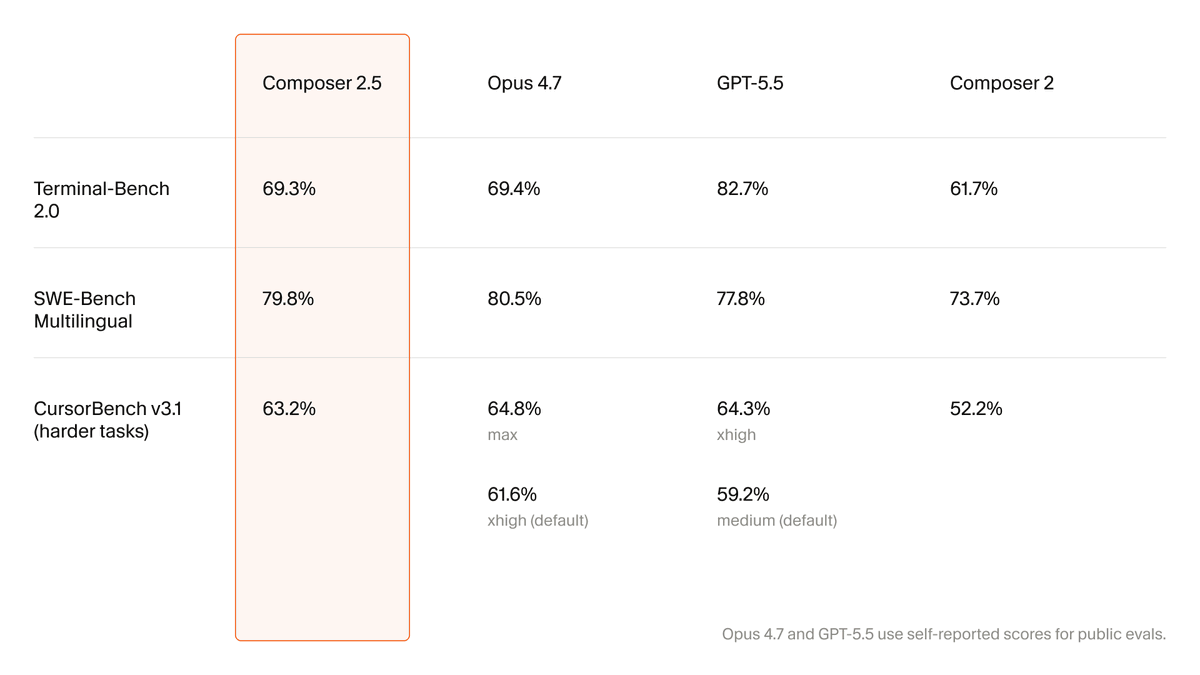
Cursor reports scores on three suites and compares them to Opus 4.7 and GPT-5.5. Here’s the picture:
| Benchmark | Composer 2.5 | Opus 4.7 | GPT-5.5 |
|---|---|---|---|
| SWE-bench Multilingual | 79.8% | 80.5% | 77.8% |
| Terminal-Bench 2.0 | 69.3% | 69.4% | 82.7% |
| CursorBench v3.1 | 63.2% | 64.8% (max) / 61.6% (default) | 59.2% (default) |
Read it carefully and the story is consistent. On SWE-bench Multilingual, a standard test of fixing real GitHub issues across languages, Composer 2.5 lands at 79.8%, within a point of Opus 4.7 and ahead of GPT-5.5. That’s a big move from Composer 2’s 73.7%. On CursorBench, Cursor’s own task suite, it edges past Opus 4.7’s default setting.
The one place it trails is Terminal-Bench 2.0, where GPT-5.5 leads at 82.7%. If your work is heavy on long terminal sequences, keep that in mind.
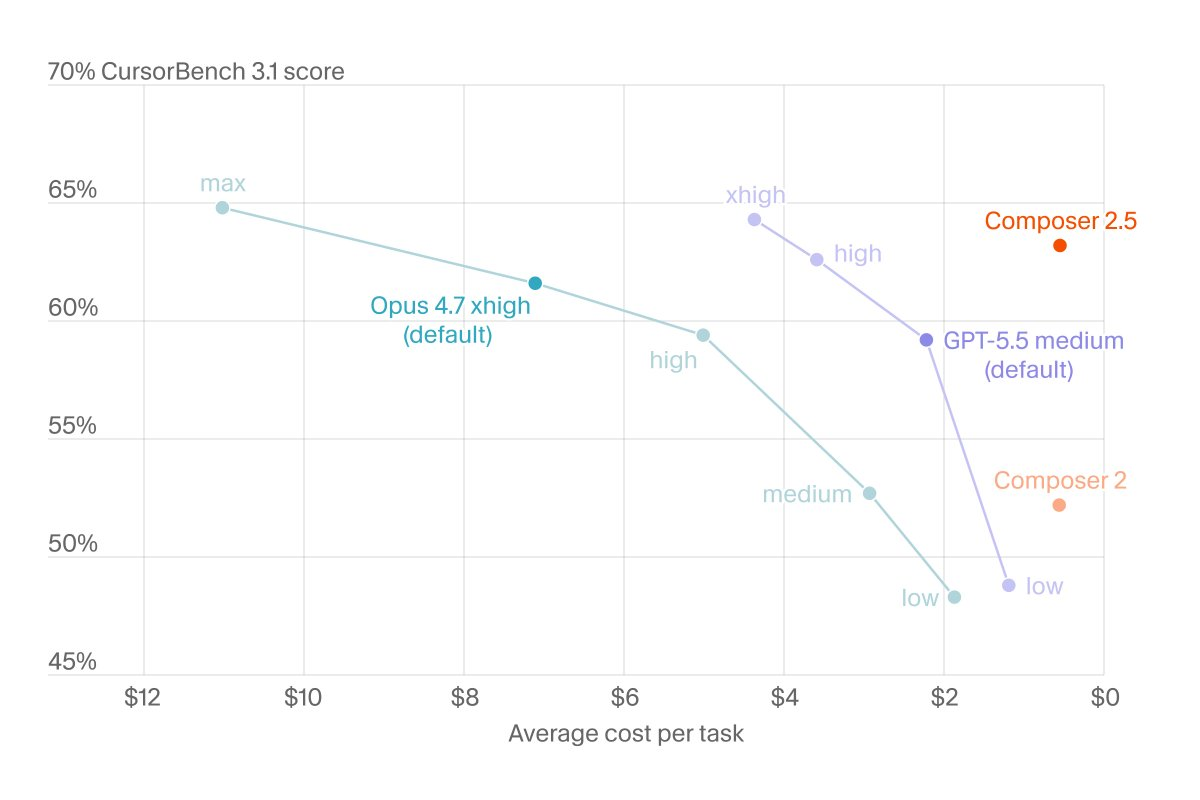
The number that reframes everything is cost per task. Cursor reports roughly 63% on CursorBench at under $1 average cost per task, while Opus 4.7 and GPT-5.5 run several dollars per task for similar or worse results; some comparisons put competitor costs as high as eleven dollars. Independent coverage from The Decoder reached the same read: near-frontier quality at a fraction of the price.
So Composer 2.5 isn’t the single best model on every chart. It’s the model that gets you 95% of frontier quality for roughly a tenth of the cost, which is the trade most teams want.
How much does Composer 2.5 cost?
Cursor offers two variants at two price points:
| Variant | Input | Output | When to use it |
|---|---|---|---|
| Standard | $0.50 / M tokens | $2.50 / M tokens | Default for most agent work; best cost efficiency |
| Fast | $3.00 / M tokens | $15.00 / M tokens | Latency-sensitive work; same intelligence, lower wait |
The fast variant gives you the same model quality with lower latency, and it’s the default in the product. It’s still priced below the fast tiers of other frontier models.
How you’re billed depends on your plan:
- Individual plans (Pro and similar) include a standalone Composer usage pool with generous included usage, so most solo developers won’t touch the per-token rate day to day.
- Team and enterprise plans are charged at the API rate directly.
- Launch promo: Cursor doubled Composer 2.5 usage for the first week after release, so early adopters get extra runway to test it.
For a fuller breakdown of how Cursor meters models, see the Cursor Composer pricing guide. If you’re trying to run it without spending, the Composer for free walkthrough covers the included-usage path.
How to access Cursor Composer 2.5
Getting to the model takes about a minute.
- Update Cursor. Composer 2.5 needs a recent build. Open Cursor, check for updates (Cursor menu on macOS, Help menu elsewhere), and restart if an update installs.
- Sign in to a plan that includes it. Pro and Business plans include Composer usage. A free account can still try it through included allowances, but heavy use needs a paid plan.
- Open the model picker. Start a chat or agent session, then open the model dropdown. Pick
composer-2.5. You’ll usually see the fast variant selected by default. - Confirm agent mode. Composer is built for agent work, so use Agent mode rather than plain chat to get file edits, terminal access, and tool use.
That’s the whole setup. The model has access to every agent tool Cursor exposes: reading and editing files, running terminal commands, and calling tools. The official Composer 2.5 model docs list the current defaults if Cursor changes them.
If you’ve used Cursor before but not its agent, the Cursor 2.0 overview is a good primer on how the agent surface works.
How to use Composer 2.5 effectively
Access is easy. Getting strong output takes a little technique.
Let it run long tasks. Composer 2.5’s main upgrade is sustained performance. Give it a real task with a clear end state (“add pagination to the orders endpoint and update the tests”) instead of micromanaging one line at a time. It’s trained to keep going until tests pass.
Write the success condition into the prompt. The model was trained against test verification. If you tell it how you’ll judge done (“all existing tests stay green and the new endpoint returns 422 on invalid input”), it self-corrects toward that target.
Pick the right variant. Use the standard variant for cost-sensitive batch work and the fast variant when you’re iterating live and waiting on each response. The quality is the same; you’re only trading latency for cost.
Keep its context honest. Agentic models are strong, but they still guess when they don’t know an API’s real shape. That’s the failure mode worth engineering around, and it’s where your API tooling matters.
Composer 2.5 plus your API workflow
Most real coding tasks touch an API. Ask Composer 2.5 to “write a client for our payments service” and it will produce clean-looking code; the risk is that the endpoints, fields, and auth match what the model assumes rather than what your service actually exposes. Wrong but confident code is slower than no code.
Two practices fix this:
First, feed the model your real API spec instead of letting it guess. The Apidog MCP server connects your Apidog API specification directly to Cursor, so Composer 2.5 generates request code, types, and tests against your actual schema. If you run other agents too, the best MCP servers for Cursor roundup covers complementary options.
Second, verify the generated calls before they reach a teammate’s branch. Drop the endpoints Composer 2.5 wrote into Apidog, send real requests, check status codes and response shapes, and turn the working calls into automated tests and mock servers. The model writes the first draft; Apidog confirms it behaves. That loop, generate against a real spec, then test against a real server, is what keeps agent speed from turning into debugging debt.
Composer 2.5 vs the competition
Quick orientation if you’re choosing a daily driver:
- vs Opus 4.7: Near-identical on SWE-bench Multilingual and CursorBench, far cheaper per task. Opus still leads at the absolute top of CursorBench’s max setting.
- vs GPT-5.5: Composer 2.5 wins on SWE-bench Multilingual and CursorBench; GPT-5.5 leads clearly on Terminal-Bench 2.0.
- vs Claude Code: Different shape of tool. Composer 2.5 lives in the Cursor editor; Claude Code is a terminal agent. The Claude Code vs Cursor comparison breaks down which fits which workflow.
- vs GitHub Copilot: Copilot is strongest as inline completion; Composer 2.5 is built for multi-file agent tasks. The Cursor vs GitHub Copilot guide goes deeper.
Cursor also said it’s training a much larger model with xAI using about ten times the compute, so 2.5 is a checkpoint on a steeper curve, not the ceiling.
Frequently asked questions
Is Composer 2.5 free? There’s no fully free tier, but individual plans include a Composer usage pool that covers normal daily work, and Cursor doubled usage for the launch week. The Composer for free guide explains how far the included allowance goes.
Is Composer 2.5 better than Composer 2? Yes, measurably. SWE-bench Multilingual rose from 73.7% to 79.8%, and the model holds context far better on long tasks. The Composer 2 guide is the baseline it improved on.
What model is Composer 2.5 based on? It’s built on Moonshot’s open-source Kimi K2.5 checkpoint, then heavily post-trained by Cursor with reinforcement learning and synthetic tasks.
Which variant should I pick, standard or fast? Same intelligence, different latency and price. Use standard for cost-efficient batch work, fast when you’re iterating live.
Does Composer 2.5 work with API specs and MCP? Yes. It supports Cursor’s full agent tool set, including MCP. Connect your API spec through the Apidog MCP server so it codes against your real schema.
The bottom line
Composer 2.5 is the clearest sign yet that “frontier-quality coding” and “expensive” are decoupling. You get roughly Opus 4.7-level results on real software tasks for well under a dollar per task, inside an editor built for agent work. Update Cursor, pick composer-2.5 in the model dropdown, and give it real multi-step tasks instead of one-liners.
Pair it with a tight verification loop and the speed actually compounds. Generate API code against your real specification, then Download Apidog to send live requests, confirm the responses, and lock the working calls into automated tests and mocks. Fast code you’ve verified beats fast code you have to debug.