TL;DR
Claude Opus 4.7 (claude-opus-4-7) is Anthropic’s most capable GA model. It supports a 1M token context window, 128K max output, adaptive thinking, a new xhigh effort level, task budgets, high-res vision (3.75 MP), and tool use. This guide covers API setup, authentication, and working code examples in Python, TypeScript, and cURL for every major capability.
Introduction
Anthropic released Claude Opus 4.7 on April 16, 2026. It’s the most powerful model in the Claude family and the go-to choice for complex reasoning, autonomous agents, and vision-heavy workflows.
If you’ve used the Claude API before, most of the interface is familiar. But Opus 4.7 introduces several new capabilities and breaking changes that require code updates. Extended thinking budgets are gone. Sampling parameters (temperature, top_p, top_k) are gone. The thinking mode now only supports adaptive thinking, and it’s off by default.
This guide walks you through every step: getting your API key, making your first request, using adaptive thinking, sending high-resolution images, setting up tool use, configuring task budgets, and streaming responses. Every example is tested and ready to copy. You’ll also see how to debug and test your API calls with Apidog, which makes inspecting multi-turn tool-use conversations far easier than parsing raw JSON.
Getting Started
Get Your API Key
- Sign up at console.anthropic.com
- Navigate to API Keys in the dashboard
- Click Create Key and copy the key
- Store it as an environment variable:
export ANTHROPIC_API_KEY="sk-ant-your-key-here"
Install the SDK
Python:
pip install anthropic
TypeScript/Node.js:
npm install @anthropic-ai/sdk
API Endpoint
All requests go to:
POST https://api.anthropic.com/v1/messages
Required headers:
x-api-key: YOUR_API_KEY
anthropic-version: 2023-06-01
content-type: application/json
Basic Text Request
The simplest API call. Send a message, get a response.
Python:
import anthropic

client = anthropic.Anthropic()

message = client.messages.create(
    model="claude-opus-4-7",
    max_tokens=1024,
    messages=[
        {"role": "user", "content": "Explain how HTTP/2 server push works in three sentences."}
    ]
)

print(message.content[0].text)
TypeScript:
import Anthropic from "@anthropic-ai/sdk";

const client = new Anthropic();

const message = await client.messages.create({
  model: "claude-opus-4-7",
  max_tokens: 1024,
  messages: [
    { role: "user", content: "Explain how HTTP/2 server push works in three sentences." }
  ],
});

console.log(message.content[0].text);
cURL:
curl https://api.anthropic.com/v1/messages \
  -H "x-api-key: $ANTHROPIC_API_KEY" \
  -H "anthropic-version: 2023-06-01" \
  -H "content-type: application/json" \
  -d '{
    "model": "claude-opus-4-7",
    "max_tokens": 1024,
    "messages": [
      {"role": "user", "content": "Explain how HTTP/2 server push works in three sentences."}
    ]
  }'
Adaptive Thinking
Adaptive thinking is the only supported thinking mode on Opus 4.7. It lets Claude dynamically allocate reasoning tokens based on task complexity. It’s off by default — you must enable it explicitly.
Python:
message = client.messages.create(
    model="claude-opus-4-7",
    max_tokens=16384,
    thinking={
        "type": "adaptive",
        "display": "summarized"  # optional: see thinking output
    },
    messages=[
        {"role": "user", "content": "Analyze this algorithm's time complexity and suggest optimizations:\n\ndef find_pairs(arr, target):\n    result = []\n    for i in range(len(arr)):\n        for j in range(i+1, len(arr)):\n            if arr[i] + arr[j] == target:\n                result.append((arr[i], arr[j]))\n    return result"}
    ]
)

for block in message.content:
    if block.type == "thinking":
        print("Thinking:", block.thinking)
    elif block.type == "text":
        print("Response:", block.text)
Key points:
"type": "adaptive"enables thinking. Don’t setbudget_tokens— that returns a 400 error now"display": "summarized"makes thinking content visible in the response. Default is"omitted"- Combine with the
effortparameter to control reasoning depth
Using the Effort Parameter
message = client.messages.create(
    model="claude-opus-4-7",
    max_tokens=16384,
    thinking={"type": "adaptive"},
    output_config={"effort": "xhigh"},  # xhigh | high | medium | low
    messages=[
        {"role": "user", "content": "Review this pull request for security vulnerabilities..."}
    ]
)
Effort levels for Opus 4.7:
| Level | Best for |
|---|---|
xhigh |
Coding, agentic tasks, complex reasoning |
high |
Most intelligence-sensitive work |
medium |
Balanced speed vs. quality |
low |
Simple tasks, fast responses |
High-Resolution Vision
Opus 4.7 accepts images up to 2,576 pixels on the long edge (3.75 megapixels). Coordinates map 1:1 to actual pixels.
Python — analyze an image from URL:
message = client.messages.create(
    model="claude-opus-4-7",
    max_tokens=4096,
    messages=[
        {
            "role": "user",
            "content": [
                {
                    "type": "image",
                    "source": {
                        "type": "url",
                        "url": "https://example.com/architecture-diagram.png"
                    }
                },
                {
                    "type": "text",
                    "text": "Describe this architecture diagram. List every service and the connections between them."
                }
            ]
        }
    ]
)

print(message.content[0].text)
Python — analyze a local image with base64:
import base64

with open("screenshot.png", "rb") as f:
    image_data = base64.standard_b64encode(f.read()).decode("utf-8")

message = client.messages.create(
    model="claude-opus-4-7",
    max_tokens=4096,
    messages=[
        {
            "role": "user",
            "content": [
                {
                    "type": "image",
                    "source": {
                        "type": "base64",
                        "media_type": "image/png",
                        "data": image_data
                    }
                },
                {
                    "type": "text",
                    "text": "What UI bugs do you see in this screenshot?"
                }
            ]
        }
    ]
)
Higher-resolution images consume more tokens. If you don’t need full fidelity, resize images before sending to reduce costs.
Tool Use (Function Calling)
Tool use lets Claude call functions you define. Opus 4.7 tends to use fewer tool calls by default, preferring reasoning. Raise the effort level to increase tool usage.
Python:
import json

tools = [
    {
        "name": "get_weather",
        "description": "Get current weather for a city. Returns temperature, conditions, and humidity.",
        "input_schema": {
            "type": "object",
            "properties": {
                "city": {
                    "type": "string",
                    "description": "City name, e.g. 'San Francisco'"
                },
                "units": {
                    "type": "string",
                    "enum": ["celsius", "fahrenheit"],
                    "description": "Temperature unit"
                }
            },
            "required": ["city"]
        }
    }
]

messages = [
    {"role": "user", "content": "What's the weather like in Tokyo right now?"}
]

# First call — Claude requests a tool
response = client.messages.create(
    model="claude-opus-4-7",
    max_tokens=1024,
    tools=tools,
    messages=messages,
)

# Process tool calls
if response.stop_reason == "tool_use":
    messages.append({"role": "assistant", "content": response.content})

    tool_results = []
    for block in response.content:
        if block.type == "tool_use":
            # Execute your function here
            result = {"temperature": 22, "conditions": "Partly cloudy", "humidity": 65}

            tool_results.append({
                "type": "tool_result",
                "tool_use_id": block.id,
                "content": json.dumps(result)
            })

    messages.append({"role": "user", "content": tool_results})

    # Second call — Claude uses the tool result
    final_response = client.messages.create(
        model="claude-opus-4-7",
        max_tokens=1024,
        tools=tools,
        messages=messages,
    )
    print(final_response.content[0].text)
Agentic Loop Pattern
For autonomous agents that run multiple tool calls in sequence:
def run_agent(system_prompt: str, tools: list, user_message: str) -> str:
    messages = [{"role": "user", "content": user_message}]

    while True:
        response = client.messages.create(
            model="claude-opus-4-7",
            max_tokens=16384,
            system=system_prompt,
            tools=tools,
            thinking={"type": "adaptive"},
            output_config={"effort": "xhigh"},
            messages=messages,
        )

        messages.append({"role": "assistant", "content": response.content})

        if response.stop_reason != "tool_use":
            return "".join(
                block.text for block in response.content
                if hasattr(block, "text")
            )

        tool_results = []
        for block in response.content:
            if block.type == "tool_use":
                result = execute_tool(block.name, block.input)
                tool_results.append({
                    "type": "tool_result",
                    "tool_use_id": block.id,
                    "content": result,
                })

        messages.append({"role": "user", "content": tool_results})
Task Budgets (Beta)
Task budgets give Claude a token allowance for an entire agentic loop. The model sees a running countdown and wraps up work as the budget is consumed.
response = client.beta.messages.create(
    model="claude-opus-4-7",
    max_tokens=128000,
    output_config={
        "effort": "high",
        "task_budget": {"type": "tokens", "total": 128000},
    },
    messages=[
        {"role": "user", "content": "Review the codebase and propose a refactor plan."}
    ],
    betas=["task-budgets-2026-03-13"],
)
Key constraints:
- Minimum budget: 20,000 tokens
- Advisory, not a hard cap — Claude may overshoot
- Different from
max_tokens(hard ceiling the model can’t see) - Requires beta header
task-budgets-2026-03-13
Streaming Responses
Stream responses for real-time output in chat interfaces.
Python:
with client.messages.stream(
    model="claude-opus-4-7",
    max_tokens=4096,
    messages=[
        {"role": "user", "content": "Write a Python function to parse CSV files with error handling."}
    ]
) as stream:
    for text in stream.text_stream:
        print(text, end="", flush=True)
TypeScript:
const stream = await client.messages.stream({
  model: "claude-opus-4-7",
  max_tokens: 4096,
  messages: [
    { role: "user", content: "Write a Python function to parse CSV files with error handling." }
  ],
});

for await (const event of stream) {
  if (event.type === "content_block_delta" && event.delta.type === "text_delta") {
    process.stdout.write(event.delta.text);
  }
}
If you enabled adaptive thinking with display: "summarized", thinking blocks stream first, followed by the text response. Without display: "summarized", users see a pause during thinking followed by the text output.
Prompt Caching
Reduce costs for repeated context (system prompts, long documents) by caching them.
response = client.messages.create(
    model="claude-opus-4-7",
    max_tokens=1024,
    system=[
        {
            "type": "text",
            "text": "You are a senior code reviewer. Review code for security vulnerabilities, performance issues, and best practices violations...",
            "cache_control": {"type": "ephemeral"}
        }
    ],
    messages=[
        {"role": "user", "content": "Review this function:\n\ndef process_user_input(data):\n    return eval(data)"}
    ]
)
Cache pricing for Opus 4.7:
| Operation | Cost |
|---|---|
| 5-min cache write | $6.25 / MTok (1.25x base) |
| 1-hour cache write | $10 / MTok (2x base) |
| Cache read/hit | $0.50 / MTok (0.1x base) |
A single cache read pays for the 5-minute cache write. Two reads pay for the 1-hour write.
Multi-Turn Conversations
Maintain context across turns by appending to the messages array.
messages = []

# Turn 1
messages.append({"role": "user", "content": "I need to build a REST API for a todo app."})

response = client.messages.create(
    model="claude-opus-4-7",
    max_tokens=4096,
    messages=messages,
)

messages.append({"role": "assistant", "content": response.content})

# Turn 2
messages.append({"role": "user", "content": "Add authentication with JWT tokens."})

response = client.messages.create(
    model="claude-opus-4-7",
    max_tokens=4096,
    messages=messages,
)
Testing Your API Calls with Apidog
Building a Claude API integration involves complex payloads: multi-turn messages, tool definitions, tool results, base64 images, and streaming responses. A tool like Apidog simplifies debugging and testing.
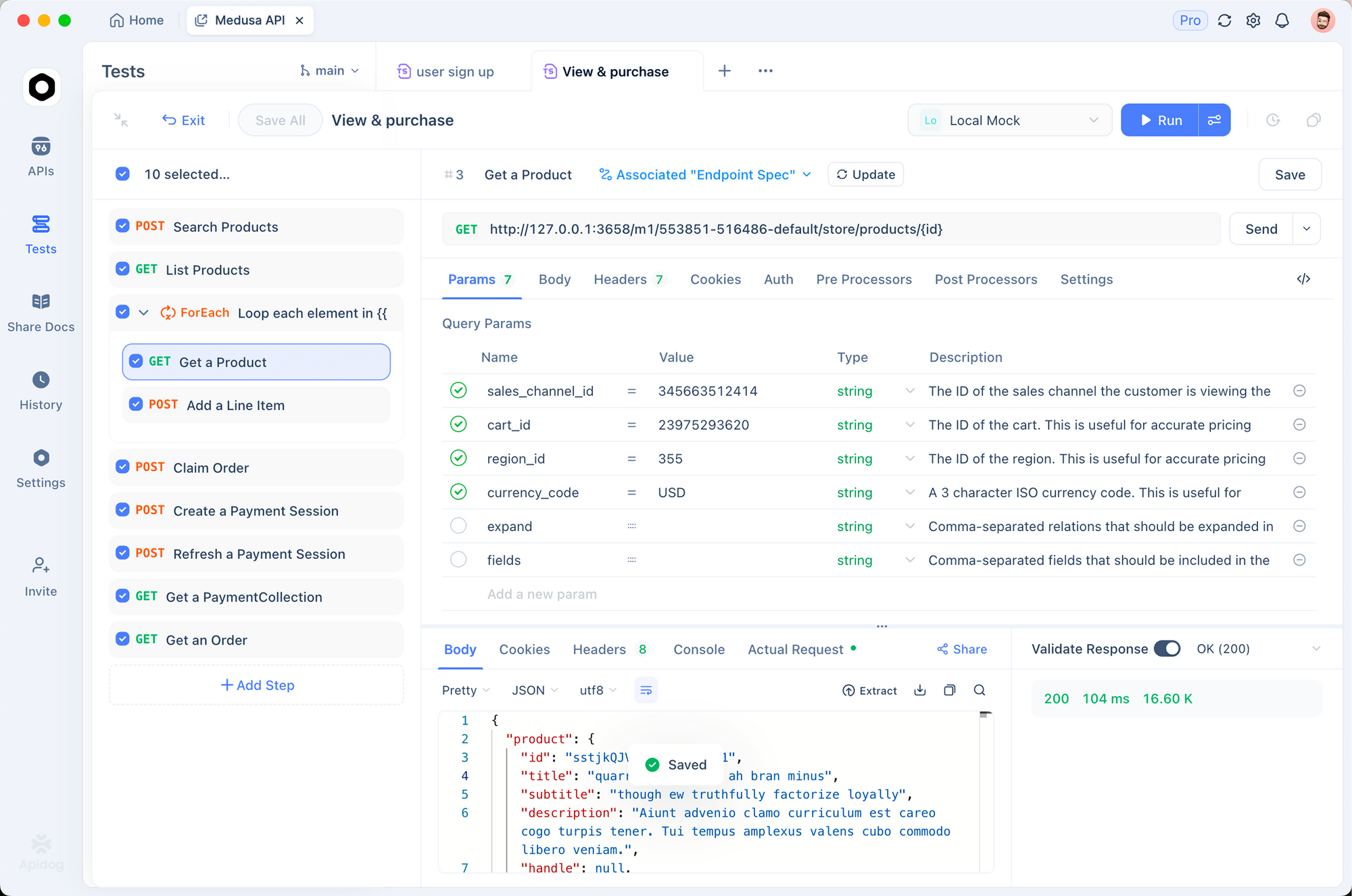
Set up your environment:
- Create a new project in Apidog and add the Claude Messages API endpoint
- Store your
ANTHROPIC_API_KEYin environment variables - Set the required headers (
x-api-key,anthropic-version,content-type)
Test tool-use flows:
Apidog lets you chain requests, so you can simulate a complete tool-use loop: send the initial message, inspect Claude’s tool call, build the tool result, and send it back. The visual request/response inspector shows exactly what’s in each payload.
Compare models:
Run the same prompts against claude-opus-4-6 and claude-opus-4-7 to compare token counts, response quality, and latency. Apidog’s test runner makes A/B comparisons repeatable.
Validate schemas:
Define JSON schemas for your expected response format and let Apidog automatically validate that Claude’s responses match. This catches regressions when you change prompts or switch models.
Common Errors and Fixes
| Error | Cause | Fix |
|---|---|---|
400: thinking.budget_tokens not supported |
Using extended thinking syntax | Switch to thinking: {"type": "adaptive"} |
400: temperature not supported |
Setting non-default sampling params | Remove temperature, top_p, top_k |
400: max_tokens exceeded |
New tokenizer produces more tokens | Increase max_tokens (up to 128,000) |
| 429: Rate limited | Too many requests | Implement exponential backoff; check your tier limits |
| Blank thinking blocks | Default thinking display is "omitted" |
Add display: "summarized" to thinking config |
Pricing Reference
| Usage | Cost |
|---|---|
| Input tokens | $5 / MTok |
| Output tokens | $25 / MTok |
| Batch input | $2.50 / MTok |
| Batch output | $12.50 / MTok |
| Cache reads | $0.50 / MTok |
| 5-min cache writes | $6.25 / MTok |
| 1-hour cache writes | $10 / MTok |
Note: Opus 4.7’s new tokenizer may use up to 35% more tokens for the same text compared to Opus 4.6. Use the /v1/messages/count_tokens endpoint to estimate costs before production deployment.
If you want to go beyond text generation and let the same model interact with a desktop UI directly,Claude's computer use capability gives Opus 4.7 the ability to control applications on your Mac with natural language commands.
Conclusion
Claude Opus 4.7 is the most capable model in the Claude family. The API is largely compatible with Opus 4.6, but the removal of extended thinking budgets and sampling parameters requires code changes. The new capabilities — adaptive thinking, xhigh effort, task budgets, and high-res vision — give you more control over how the model reasons and how much it costs.
Start with the basic text request, add adaptive thinking for complex tasks, and layer in tool use and task budgets as your agent grows. Use Apidog to test your integration, validate payloads, and compare performance across model versions.