TL;DR
Cloudflare APIs let you manage DNS, zones, Workers, security, and analytics programmatically. Authenticate with API tokens (recommended) or global keys, call api.cloudflare.com/client/v4, and handle rate limits gracefully. For testing, use Apidog to validate DNS changes, test Worker deployments, and automate configuration across environments.
Introduction
Cloudflare sits in front of millions of websites. It handles DNS, CDN, DDoS protection, WAF, Workers serverless functions, and more. Managing all that through the dashboard works for small setups. But at scale, you need automation.
The Cloudflare API covers everything the dashboard does. You can create zones, update DNS records, configure page rules, deploy Workers, manage SSL settings, and pull analytics. All programmatically.
Developers use Cloudflare’s API for:
- Infrastructure as code (Terraform, Pulumi)
- CI/CD pipeline integration
- Multi-zone management
- Automated DNS updates
- Worker deployments
Test Cloudflare APIs with Apidog - free
By the end of this guide, you’ll be able to:
- Authenticate with Cloudflare API tokens
- Manage zones and DNS records
- Deploy and manage Workers
- Configure security settings
- Pull analytics and logs
Authentication
Cloudflare offers two authentication methods. Use API tokens, not global keys.
Method 1: API tokens (recommended)
API tokens are scoped to specific permissions. If a token is compromised, damage is limited.
Create a token:
- Go to Cloudflare Dashboard → My Profile → API Tokens
- Create Token
- Choose a template (Edit zone DNS, Workers deployment, etc.) or custom
- Set specific zones or all zones
- Copy the token
Use the token:
curl -X GET "https://api.cloudflare.com/client/v4/user/tokens/verify" \
  -H "Authorization: Bearer YOUR_API_TOKEN"
Method 2: Global API key (not recommended)
The global key has full account access. Avoid using it.
curl -X GET "https://api.cloudflare.com/client/v4/user" \
  -H "X-Auth-Email: your-email@example.com" \
  -H "X-Auth-Key: YOUR_GLOBAL_API_KEY"
Response format
All Cloudflare API responses follow this structure:
{
  "result": { ... },
  "success": true,
  "errors": [],
  "messages": []
}
Always check success before processing result.
Zone management
Zones represent domains in Cloudflare.
List zones
curl -X GET "https://api.cloudflare.com/client/v4/zones" \
  -H "Authorization: Bearer YOUR_API_TOKEN"
Response:
{
  "result": [
    {
      "id": "023e105f4ecef8ad9ca31a8372d0c353",
      "name": "example.com",
      "status": "active",
      "paused": false,
      "type": "full",
      "development_mode": 0,
      "name_servers": [
        "ns1.cloudflare.com",
        "ns2.cloudflare.com"
      ],
      "original_name_servers": [
        "ns1.example.com"
      ],
      "original_registrar": null
    }
  ],
  "success": true
}
Create a zone
curl -X POST "https://api.cloudflare.com/client/v4/zones" \
  -H "Authorization: Bearer YOUR_API_TOKEN" \
  -H "Content-Type: application/json" \
  -d '{
    "name": "newdomain.com",
    "account": {
      "id": "ACCOUNT_ID"
    },
    "type": "full"
  }'
Get zone details
curl -X GET "https://api.cloudflare.com/client/v4/zones/ZONE_ID" \
  -H "Authorization: Bearer YOUR_API_TOKEN"
DNS record management
DNS records map domain names to IP addresses and services.
List DNS records
curl -X GET "https://api.cloudflare.com/client/v4/zones/ZONE_ID/dns_records" \
  -H "Authorization: Bearer YOUR_API_TOKEN"
Create a DNS record
curl -X POST "https://api.cloudflare.com/client/v4/zones/ZONE_ID/dns_records" \
  -H "Authorization: Bearer YOUR_API_TOKEN" \
  -H "Content-Type: application/json" \
  -d '{
    "type": "A",
    "name": "www",
    "content": "192.0.2.1",
    "ttl": 3600,
    "proxied": true
  }'
Record types:
A- IPv4 addressAAAA- IPv6 addressCNAME- Alias to another domainMX- Mail serverTXT- Text records (SPF, DKIM, verification)NS- Name server
Update a DNS record
curl -X PUT "https://api.cloudflare.com/client/v4/zones/ZONE_ID/dns_records/RECORD_ID" \
  -H "Authorization: Bearer YOUR_API_TOKEN" \
  -H "Content-Type: application/json" \
  -d '{
    "type": "A",
    "name": "www",
    "content": "192.0.2.2",
    "ttl": 3600,
    "proxied": true
  }'
Delete a DNS record
curl -X DELETE "https://api.cloudflare.com/client/v4/zones/ZONE_ID/dns_records/RECORD_ID" \
  -H "Authorization: Bearer YOUR_API_TOKEN"
Cloudflare Workers
Workers run JavaScript at the edge, close to users.
List Workers
curl -X GET "https://api.cloudflare.com/client/v4/accounts/ACCOUNT_ID/workers/scripts" \
  -H "Authorization: Bearer YOUR_API_TOKEN"
Upload a Worker
curl -X PUT "https://api.cloudflare.com/client/v4/accounts/ACCOUNT_ID/workers/scripts/my-worker" \
  -H "Authorization: Bearer YOUR_API_TOKEN" \
  -H "Content-Type: application/javascript" \
  --data-binary @worker.js
Worker example:
export default {
  async fetch(request, env, ctx) {
    const url = new URL(request.url)

    if (url.pathname === '/api/hello') {
      return new Response(JSON.stringify({ message: 'Hello from the edge!' }), {
        headers: { 'Content-Type': 'application/json' }
      })
    }

    return fetch(request)
  }
}
Bind a route
curl -X POST "https://api.cloudflare.com/client/v4/zones/ZONE_ID/workers/routes" \
  -H "Authorization: Bearer YOUR_API_TOKEN" \
  -H "Content-Type: application/json" \
  -d '{
    "pattern": "example.com/api/*",
    "script": "my-worker"
  }'
Worker KV namespace
Store data accessible from Workers:
curl -X POST "https://api.cloudflare.com/client/v4/accounts/ACCOUNT_ID/storage/kv/namespaces" \
  -H "Authorization: Bearer YOUR_API_TOKEN" \
  -H "Content-Type: application/json" \
  -d '{
    "title": "my-kv-namespace"
  }'
Security and WAF
Page rules
curl -X POST "https://api.cloudflare.com/client/v4/zones/ZONE_ID/pagerules" \
  -H "Authorization: Bearer YOUR_API_TOKEN" \
  -H "Content-Type: application/json" \
  -d '{
    "targets": [
      {
        "target": "url",
        "constraint": {
          "operator": "matches",
          "value": "example.com/*"
        }
      }
    ],
    "actions": [
      {
        "id": "ssl",
        "value": "flexible"
      },
      {
        "id": "cache_level",
        "value": "aggressive"
      }
    ]
  }'
Firewall rules
curl -X POST "https://api.cloudflare.com/client/v4/zones/ZONE_ID/firewall/rules" \
  -H "Authorization: Bearer YOUR_API_TOKEN" \
  -H "Content-Type: application/json" \
  -d '{
    "filter": {
      "expression": "ip.geoip.country eq \"CN\"",
      "paused": false
    },
    "action": "block",
    "description": "Block traffic from China"
  }'
Rate limiting
curl -X POST "https://api.cloudflare.com/client/v4/zones/ZONE_ID/rate_limits" \
  -H "Authorization: Bearer YOUR_API_TOKEN" \
  -H "Content-Type: application/json" \
  -d '{
    "disabled": false,
    "description": "Rate limit API endpoints",
    "match": {
      "request": {
        "methods": ["POST"],
        "url_pattern": "*/api/*"
      }
    },
    "threshold": 100,
    "period": 60,
    "action": {
      "mode": "ban",
      "timeout": 600
    }
  }'
Analytics and logs
Zone analytics
curl -X GET "https://api.cloudflare.com/client/v4/zones/ZONE_ID/analytics/dashboard?since=-1440&continuous=true" \
  -H "Authorization: Bearer YOUR_API_TOKEN"
Response:
{
  "result": {
    "totals": {
      "requests": {
        "all": 1000000,
        "cached": 800000,
        "uncached": 200000
      },
      "bandwidth": {
        "all": 50000000000,
        "cached": 40000000000
      },
      "threats": {
        "all": 5000
      },
      "pageviews": {
        "all": 250000
      }
    }
  }
}
Zone logs (Logpush)
Enable Logpush to send logs to your storage:
curl -X POST "https://api.cloudflare.com/client/v4/zones/ZONE_ID/logpush/jobs" \
-H "Authorization: Bearer YOUR_API_TOKEN" \
-H "Content-Type: application/json" \
-d '{
"name": "My Logpush Job",
"destination_conf": "s3://my-bucket/logs?region=us-east-1",
"dataset": "http_requests",
"logpull_options": "fields=ClientIP,ClientRequestPath,EdgeResponseStatus×tamps=rfc3339"
}'
Testing with Apidog
Cloudflare changes affect production traffic. Test thoroughly.
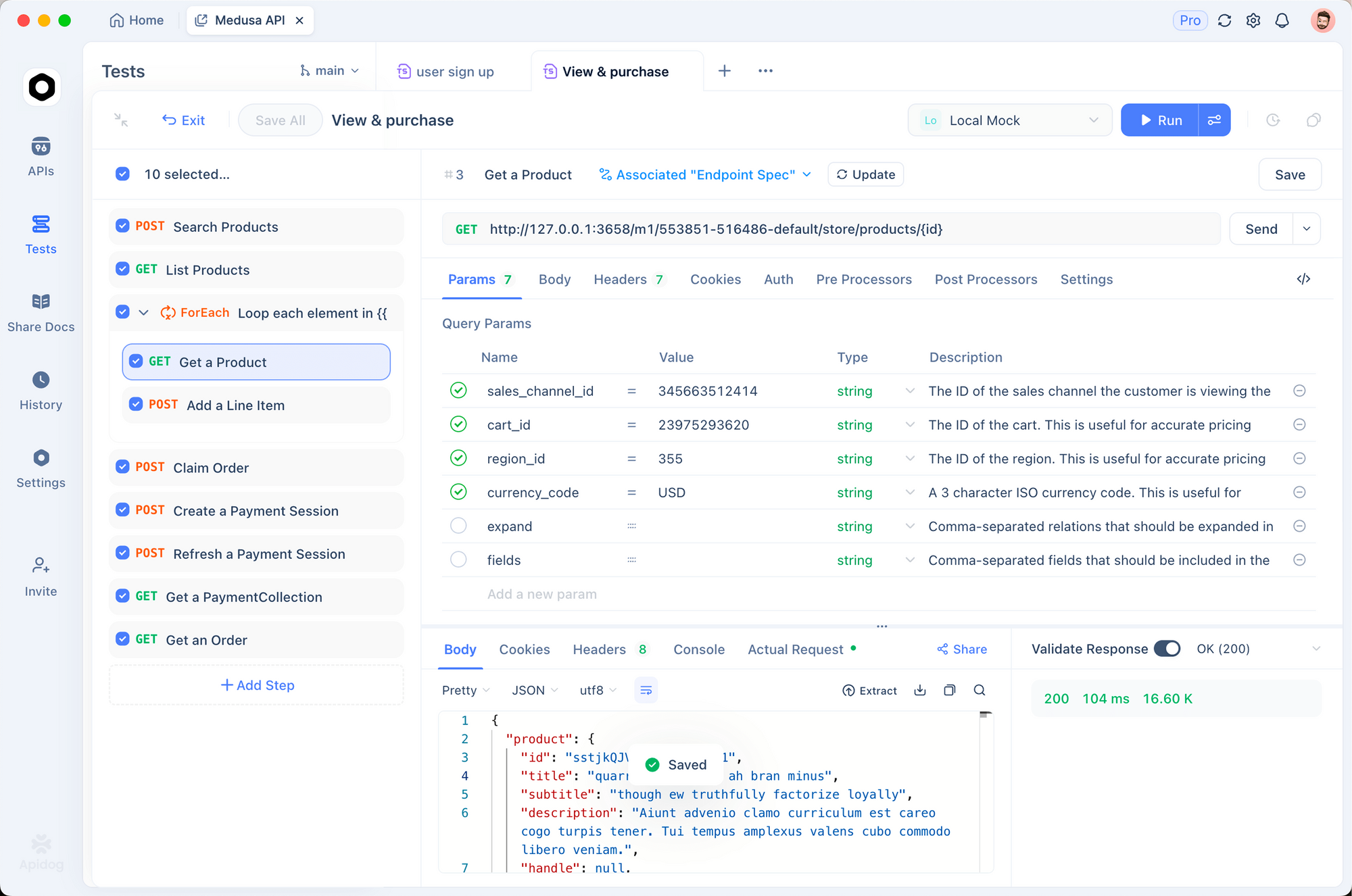
1. Environment setup
CLOUDFLARE_API_TOKEN: your_token
CLOUDFLARE_ACCOUNT_ID: abc123
ZONE_ID: xyz789
BASE_URL: https://api.cloudflare.com/client/v4
2. Validate responses
pm.test('Request was successful', () => {
  const response = pm.response.json()
  pm.expect(response.success).to.be.true
  pm.expect(response.errors).to.be.empty
})

pm.test('DNS record created correctly', () => {
  const response = pm.response.json()
  pm.expect(response.result.type).to.eql('A')
  pm.expect(response.result.name).to.eql('www')
  pm.expect(response.result.proxied).to.be.true
})
3. Test Worker deployments
Save Worker scripts as files in Apidog and test uploads:
pm.test('Worker uploaded', () => {
  const response = pm.response.json()
  pm.expect(response.result.id).to.eql('my-worker')
})
Test Cloudflare APIs with Apidog - free
Common errors and fixes
403 Forbidden
Cause: Token lacks required permission.
Fix: Check token permissions in Cloudflare dashboard. DNS edits need Zone:DNS:Edit. Workers need Account:Workers:Edit.
1003: Invalid or missing zone
Cause: Zone ID doesn’t exist or token can’t access it.
Fix: Verify zone ID in the URL and check token scope includes this zone.
81057: Record already exists
Cause: DNS record with same name and type exists.
Fix: Use PUT to update instead of POST to create, or delete first.
Rate limit exceeded
Cause: Too many requests (default 1200/5 minutes).
Fix: Implement backoff and batch operations.
async function updateRecords(records) {
  for (const record of records) {
    try {
      await updateRecord(record)
      await sleep(100) // Rate limit buffer
    } catch (error) {
      if (error.status === 429) {
        await sleep(60000) // Wait a minute
        await updateRecord(record) // Retry
      }
    }
  }
}
Alternatives and comparisons
| Feature | Cloudflare | AWS Route 53 | Fastly |
|---|---|---|---|
| DNS API | ✓ | ✓ | ✓ |
| CDN API | ✓ | CloudFront API | ✓ |
| Edge functions | Workers | Lambda@Edge | Compute@Edge |
| WAF API | ✓ | AWS WAF | ✓ |
| Free tier | Generous | Pay per use | Limited |
| Response format | JSON | XML/JSON | JSON |
Cloudflare’s API is more unified than AWS’s fragmented services. Workers provide more flexibility than Lambda@Edge.
Real-world use cases
Multi-tenant SaaS. A platform creates Cloudflare zones automatically when customers add custom domains. Workers handle routing, DNS records are created via API, and SSL certificates provision automatically.
Blue-green deployments. An engineering team uses DNS record updates to switch traffic between environments. The API updates A records during deployment, with instant propagation through Cloudflare’s network.
DDoS response automation. A security team monitors traffic via analytics API. When attack patterns emerge, firewall rules are added via API to block malicious IPs, reducing response time from hours to seconds.
Wrapping up
Here’s what you’ve learned:
- Authenticate with API tokens for scoped access
- Manage zones and DNS records programmatically
- Deploy Workers for edge computing
- Configure security with firewall rules and rate limiting
- Pull analytics and configure log shipping
- Test with Apidog before applying to production
FAQ
What’s the difference between a zone and a domain?A zone is Cloudflare’s representation of a domain. When you add a domain to Cloudflare, you create a zone. The zone ID is used in API calls for that domain.
How do I find my zone ID?Go to Cloudflare Dashboard → select your domain → Overview → scroll down to API section. The zone ID is shown there.
Can I use Cloudflare API without a paid plan?Yes. Most API features work on free plans. Workers have a generous free tier. Some advanced features (advanced WAF rules, Logpush) require paid plans.
How long do DNS changes take?Changes via API are immediate in Cloudflare’s system. Propagation to Cloudflare nameservers takes seconds. Global propagation depends on TTL and recursive resolvers, typically minutes.
What’s the rate limit?Default: 1200 requests per 5 minutes per token. Check X-RateLimit-Remaining header. Enterprise plans have higher limits.
Can I manage multiple accounts with one token?No. Tokens are scoped to one account. For multiple accounts, create separate tokens or use user-level tokens with access to multiple accounts.
How do Workers differ from Lambda?Workers run at Cloudflare’s edge locations (300+ cities), not in specific regions. Cold starts are minimal. They’re ideal for request/response manipulation, not long-running processes.
Can I use the API to purge cache?Yes:
curl -X POST "https://api.cloudflare.com/client/v4/zones/ZONE_ID/purge_cache" \
  -H "Authorization: Bearer YOUR_API_TOKEN" \
  -H "Content-Type: application/json" \
  -d '{
    "files": ["https://example.com/style.css"]
  }'