TL;DR
Supabase CLI runs a full Supabase stack on your machine using Docker: PostgreSQL, Auth, Storage, and Edge Functions. Install it with brew install supabase/tap/supabase, run supabase init and supabase start to spin up a local environment, then use supabase db push and supabase functions deploy to ship to production. It’s the fastest way to build and test Supabase backends without touching the cloud.
Introduction
73% of backend bugs get caught in production because developers skip local testing. With Supabase CLI, that’s no longer an excuse. You get a full production-equivalent environment running on your machine in under 5 minutes.
Here’s the real problem: most developers either test directly in production (risky) or spend hours configuring local environments that never quite match the cloud (frustrating). Supabase CLI solves both. It gives you a Docker-based local stack that mirrors production exactly, so what works locally works in production.
Test your Supabase APIs with Apidog - free
By the end of this guide, you’ll be able to:
- Set up a complete local Supabase environment in minutes
- Manage database schema changes with version-controlled migrations
- Build and test Edge Functions locally before deploying
- Deploy to production with a single command
Why local Supabase development breaks without the CLI
If you’ve tried building a Supabase app without the CLI, you know the pain. Here are three scenarios that happen constantly.
The “test in production” trap. You make a schema change directly in the Supabase dashboard. It works. You push your frontend. Three days later, a teammate pulls the repo and their app breaks because their database doesn’t have the new column.
The environment mismatch. You set up a local PostgreSQL instance, manually recreate your Supabase schema, and spend two hours debugging why Row Level Security policies behave differently locally. They don’t behave differently. You missed a policy.
The “works on my machine” problem. Your Edge Function works in the Supabase dashboard editor but fails in production because you tested with hardcoded values instead of real environment variables.
These aren’t edge cases. Schema drift (local and remote databases getting out of sync) is the #1 reported issue for teams using Supabase. The CLI fixes all three problems:
- Migrations keep schema changes version-controlled and reproducible
- The local Docker stack mirrors production exactly, same PostgreSQL version, same RLS engine
- Local function serving tests Edge Functions with real environment variables
How Supabase CLI works
The local stack
When you run supabase start, the CLI spins up a Docker Compose stack with these services:
| Service | Port | Purpose |
|---|---|---|
| PostgreSQL | 54322 | Your database |
| PostgREST | 54321 | Auto-generated REST API |
| GoTrue | 54321/auth | Authentication service |
| Realtime | 54321/realtime | WebSocket subscriptions |
| Storage | 54321/storage | File storage |
| Studio | 54323 | Visual dashboard |
| Inbucket | 54324 | Email testing (catches all emails locally) |
| Edge Runtime | 54321/functions | Deno-based function runner |
This is the same stack running in Supabase Cloud. On your machine.
Installation
macOS:
brew install supabase/tap/supabase
Windows (Scoop):
scoop bucket add supabase https://github.com/supabase/scoop-bucket.git
scoop install supabase
Linux / npm:
npm install -g supabase
Verify it worked:
supabase --version
# supabase 1.x.x
Docker Desktop must be running before you use supabase start. If you skip this, you’ll get a confusing error about Docker daemon not being available.Project setup
mkdir my-project && cd my-project
supabase init
This creates:
supabase/
├── config.toml       # Ports, auth settings, storage config
├── seed.sql          # Dev data loaded on every db reset
└── migrations/       # Schema version history
Starting the local stack
supabase start
The first run downloads about 1GB of Docker images. After that, starts take around 10 seconds.
API URL: http://localhost:54321
DB URL:  postgresql://postgres:postgres@localhost:54322/postgres
Studio:  http://localhost:54323
anon key: eyJhbGciOiJIUzI1NiIsInR5cCI6IkpXVCJ9...
Copy the anon key into your .env.local file. You’ll need it for your frontend.
Database management with migrations
Migrations are the core of the CLI workflow. Every schema change becomes a versioned SQL file tracked in Git. No more “who changed the database and when.”
Creating your first migration
supabase migration new create_posts_table
# Creates: supabase/migrations/20260324120000_create_posts_table.sql
Edit the file:
-- Create posts table with RLS from the start
CREATE TABLE posts (
  id          UUID DEFAULT gen_random_uuid() PRIMARY KEY,
  user_id     UUID REFERENCES auth.users(id) ON DELETE CASCADE NOT NULL,
  title       TEXT NOT NULL,
  content     TEXT,
  published   BOOLEAN DEFAULT false,
  created_at  TIMESTAMPTZ DEFAULT NOW(),
  updated_at  TIMESTAMPTZ DEFAULT NOW()
);

-- Enable Row Level Security
ALTER TABLE posts ENABLE ROW LEVEL SECURITY;

-- Anyone can read published posts
CREATE POLICY "Anyone can read published posts"
  ON posts FOR SELECT
  USING (published = true);

-- Users manage their own posts
CREATE POLICY "Users manage own posts"
  ON posts FOR ALL
  USING (auth.uid() = user_id);

-- Auto-update updated_at on every change
CREATE OR REPLACE FUNCTION update_updated_at()
RETURNS TRIGGER AS $$
BEGIN
  NEW.updated_at = NOW();
  RETURN NEW;
END;
$$ LANGUAGE plpgsql;

CREATE TRIGGER posts_updated_at
  BEFORE UPDATE ON posts
  FOR EACH ROW EXECUTE FUNCTION update_updated_at();
Apply it:
supabase migration up
Generating TypeScript types
After every schema change, regenerate your types:
supabase gen types typescript --local > src/types/database.ts
Your frontend gets full type safety:
import { Database } from '@/types/database'

type Post = Database['public']['Tables']['posts']['Row']
type NewPost = Database['public']['Tables']['posts']['Insert']

// Now your editor catches type errors before runtime
const createPost = async (post: NewPost) => {
  const { data, error } = await supabase
    .from('posts')
    .insert(post)
    .select()
    .single()
  return data
}
Seeding development data
Edit supabase/seed.sql:
-- Test users (bypasses auth for local dev)
INSERT INTO auth.users (id, email) VALUES
  ('00000000-0000-0000-0000-000000000001', 'alice@example.com'),
  ('00000000-0000-0000-0000-000000000002', 'bob@example.com');

-- Test posts
INSERT INTO posts (user_id, title, content, published) VALUES
  ('00000000-0000-0000-0000-000000000001', 'Getting started with Supabase', 'Here is what I learned...', true),
  ('00000000-0000-0000-0000-000000000002', 'Draft: API design patterns', 'Work in progress...', false);
Reset and reseed anytime:
supabase db reset
This drops everything, reruns all migrations, and loads your seed data. Run it every morning to start fresh.
Testing Supabase APIs with Apidog
Once your local Supabase is running, you have a fully functional REST API at http://localhost:54321. Supabase auto-generates endpoints for every table via PostgREST. Testing these manually with curl gets tedious fast, especially when you need to test RLS policies with different user tokens.
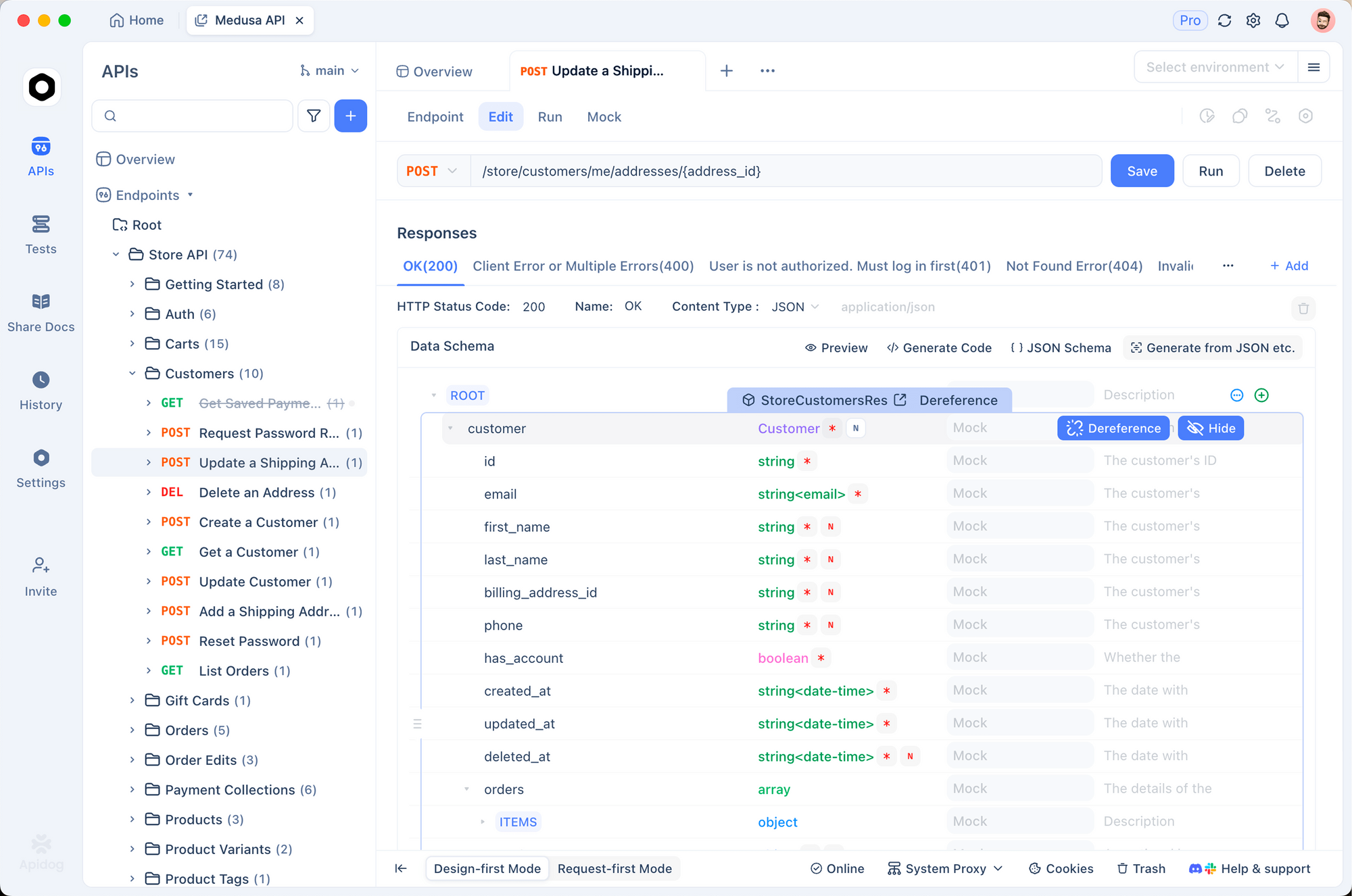
Apidog connects directly to your local Supabase instance. You can:
- Save requests as reusable collections
- Test the same endpoint as different users by switching environments
- Add assertions (“response contains at least 1 post”) and run them as a test suite
- Share API documentation with your team automatically
Setting up Apidog with local Supabase:
- Create a new project in Apidog
- Set base URL:
http://localhost:54321 - Add environment variable:
anon_key = your-local-anon-key - Add Authorization header:
Bearer {{anon_key}}
Testing the posts endpoint:
GET http://localhost:54321/rest/v1/posts?published=eq.true
Authorization: Bearer {{anon_key}}
apikey: {{anon_key}}
Save this as a request, add an assertion that the response contains at least one post, and run it every time you change your RLS policies. You’ll catch broken policies before they reach production.
Start testing your Supabase APIs with Apidog
Edge functions: build and test locally
Edge Functions run on Deno at the edge, close to your users. They’re perfect for webhooks, background jobs, and API endpoints that need server-side logic.
Create a function
supabase functions new send-welcome-email
This creates supabase/functions/send-welcome-email/index.ts:
import { serve } from 'https://deno.land/std@0.168.0/http/server.ts'
import { createClient } from 'https://esm.sh/@supabase/supabase-js@2'

serve(async (req) => {
  const { user_id } = await req.json()

  // Service role bypasses RLS - use carefully
  const supabase = createClient(
    Deno.env.get('SUPABASE_URL')!,
    Deno.env.get('SUPABASE_SERVICE_ROLE_KEY')!
  )

  const { data: profile } = await supabase
    .from('profiles')
    .select('email, full_name')
    .eq('id', user_id)
    .single()

  // Your email sending logic here
  console.log(`Sending welcome email to ${profile?.email}`)

  return new Response(
    JSON.stringify({ success: true }),
    { headers: { 'Content-Type': 'application/json' } }
  )
})
Test locally with hot reload
supabase functions serve
The function server watches for file changes and reloads automatically. Test it:
curl -X POST http://localhost:54321/functions/v1/send-welcome-email \
  -H "Authorization: Bearer YOUR_ANON_KEY" \
  -H "Content-Type: application/json" \
  -d '{"user_id": "00000000-0000-0000-0000-000000000001"}'
Deploy to production
# Deploy one function
supabase functions deploy send-welcome-email

# Deploy all functions
supabase functions deploy
Advanced techniques and proven approaches
Secrets management
Never hardcode API keys in your functions. Use secrets:
# Set production secrets
supabase secrets set RESEND_API_KEY=re_xxx STRIPE_KEY=sk_live_xxx

# List all secrets
supabase secrets list

# Remove a secret
supabase secrets unset STRIPE_KEY
Access them in functions:
const resendKey = Deno.env.get('RESEND_API_KEY')
// Never: const resendKey = 're_xxx'
Database branching
Working on a big schema change? Create an isolated branch:
supabase branches create feature-payments
supabase branches switch feature-payments

# Make changes, test, then merge
supabase branches merge feature-payments
This keeps your main development database clean while you experiment.
Common mistakes to avoid
Editing the database directly in Studio. Always use migrations. Direct edits don’t get tracked and your teammates won’t have them.
Committing .env files. Use supabase secrets set for production. Add .env* to your .gitignore.
Skipping supabase db reset after pulling. When you pull teammates’ changes, their new migrations need to run locally. Reset to apply them.
Not regenerating types after schema changes. Your TypeScript types go stale the moment you add a column. Make type generation part of your migration workflow.
Deploying functions without local testing. Always run supabase functions serve and test with real requests before deploying.
Using service role key in frontend code. The service role key bypasses RLS. It belongs only in Edge Functions and server-side code, never in your browser.
Performance tips
# Skip services you don't need to save memory
supabase start --exclude-studio --exclude-inbucket

# Check what's using resources
docker stats
Alternatives and comparisons
| Feature | Supabase CLI | Firebase CLI | PlanetScale CLI |
|---|---|---|---|
| Local database | Full PostgreSQL | Emulator only | Cloud only |
| Migrations | SQL files in Git | No native support | Branching |
| Edge Functions | Deno runtime | Cloud Functions | Not included |
| Auth locally | Full GoTrue | Emulator | Not included |
| Open source | Fully open | Proprietary | Proprietary |
| Type generation | Built-in | Manual | Manual |
Firebase’s local emulator is good for quick prototyping but doesn’t give you a real PostgreSQL instance. PlanetScale’s branching model is excellent for schema changes but you’re always working against the cloud. Supabase CLI wins for teams that want a fully open-source, PostgreSQL-native local development experience.
Real-world use cases
SaaS application with multi-tenant data. A fintech startup manages 47 migrations across three environments (dev, staging, prod). RLS policies get tested locally with different user roles before any code reaches production. Result: zero schema-related production incidents in six months.
E-commerce order processing. An e-commerce team uses Edge Functions for Stripe webhook processing. They test webhook payloads locally using supabase functions serve with real Stripe test events. Deployment time dropped from 2 hours to 15 minutes.
Mobile app backend. A React Native team generates TypeScript types after every migration and shares them as an internal npm package. Frontend and backend stay in sync automatically. No more “what fields does this endpoint return?” questions in Slack.
Wrapping up
Here’s what you can do now:
- Set up a complete local Supabase environment in minutes
- Use migrations to version-control every schema change
- Test Edge Functions locally with hot reload
- Generate TypeScript types automatically from your schema
- Deploy with
supabase db pushandsupabase functions deploy - Test your APIs with Apidog before shipping to production
The workflow pays off immediately. Your team ships faster, catches bugs earlier, and never deals with schema drift again.
Your next steps:
- Install:
brew install supabase/tap/supabase - Run
supabase initin your project - Create your first migration
- Set up Apidog to test your local endpoints
- Deploy to production with confidence
Test your Supabase APIs with Apidog - free
FAQ
Do I need Docker to use Supabase CLI?Yes. Docker Desktop must be running before supabase start. The CLI uses Docker Compose to run the full stack locally. If Docker isn’t running, you’ll get a “Cannot connect to Docker daemon” error.
How do I sync my local database with production?Use supabase db pull to generate a migration from your remote schema, then supabase db push to apply local migrations to production. Run supabase db reset locally after pulling to make sure your environment matches.
Can I use Supabase CLI without a Supabase Cloud account?Yes. You can use the CLI entirely locally for development without a cloud account. You only need supabase login and supabase link when you’re ready to deploy to production.
How do I handle migration conflicts in a team?Pull the latest Git changes and run supabase db reset before creating new migrations. Use descriptive migration names and communicate with your team when making breaking schema changes.
What’s the difference between supabase db push and supabase migration up?supabase migration up applies pending migrations to your local database. supabase db push applies them to your remote (production) project. Always test locally first.
Can I use Supabase CLI with an existing project?Yes. Run supabase link --project-ref YOUR_PROJECT_ID to link to an existing project, then supabase db pull to generate migrations from your current remote schema.
How do I test RLS policies locally?Use Supabase Studio at http://localhost:54323 to switch between user roles, or test via API with different JWT tokens. Apidog makes this easy: create multiple environments with different user tokens and run the same requests as different users.
Is Supabase CLI free?Yes. The CLI is free and open source. Local development costs nothing. You pay for Supabase Cloud resources only when you deploy to production.