Qwen-Image-2.0 is one of the most interesting image generation models available to developers right now. Released on February 10, 2026, this 7B-parameter system merges previously separate generation and editing pipelines into a single omni architecture. It can produce high-quality visuals from text prompts, follow style and composition constraints, and support practical generation tasks that product teams care about.
What Is Qwen-Image-2.0 and Why Does It Matter Technically?
Qwen-Image-2.0 represents a significant architectural evolution. Engineers combine an 8B Qwen3-VL encoder with a 7B diffusion decoder to process inputs and synthesize 2048×2048 pixel outputs. This design enables native 2K resolution without upscaling artifacts that plague many competing systems. Furthermore, the unified training merges text-to-image generation and image-to-image editing into one forward pass. Developers therefore avoid pipeline fragmentation and maintain higher consistency across tasks.
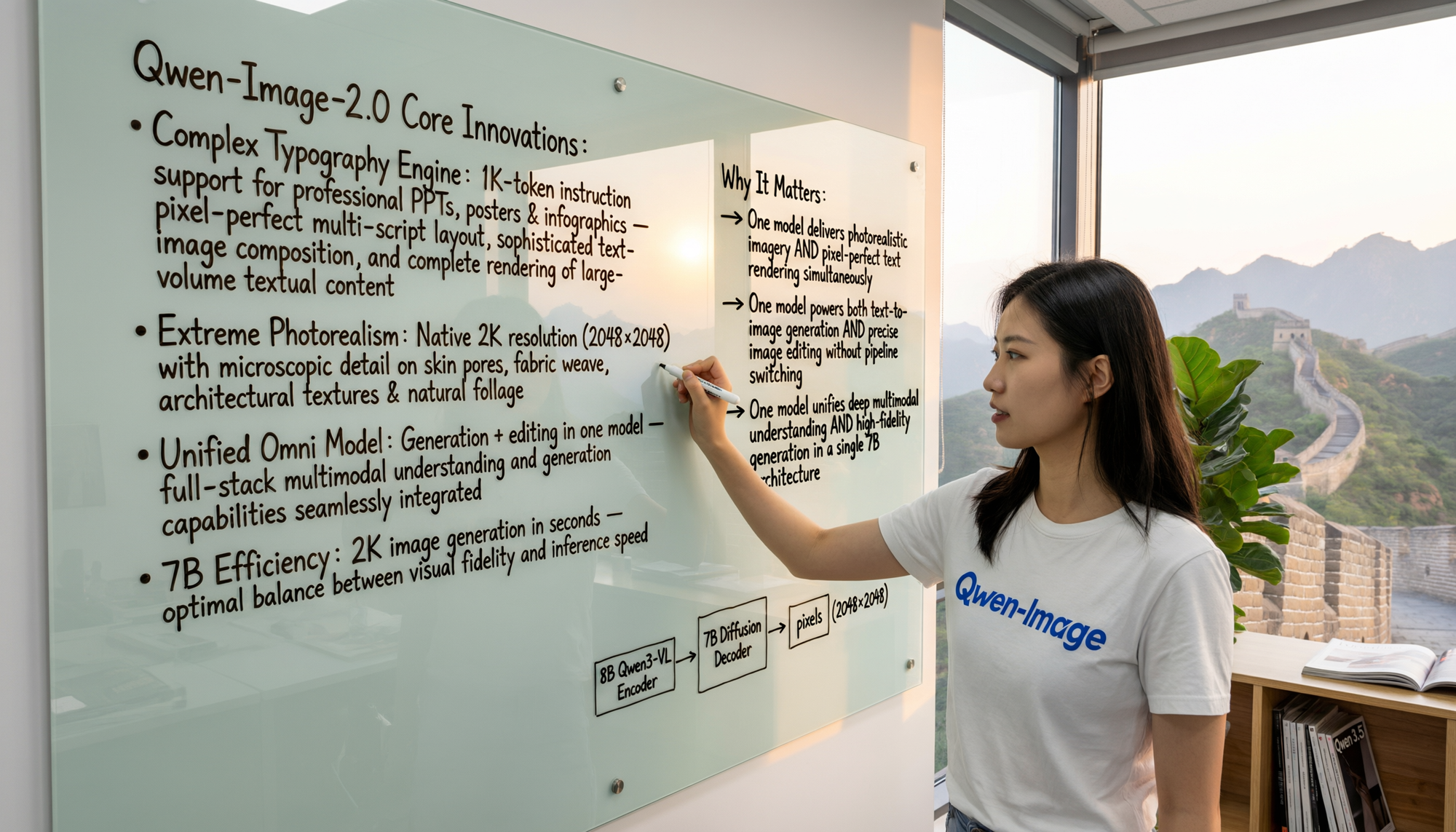
The model excels at semantic adherence because the VL encoder deeply understands both visual and textual modalities. Practitioners input prompts up to 1,000 tokens and receive outputs that preserve complex layouts, accurate typography across multiple scripts, and precise spatial relationships. For instance, the system renders bilingual infographics, speech bubbles in comics, or handwritten text on whiteboards with pixel-level alignment. In contrast to earlier models that treated text as decorative overlays, Qwen-Image-2.0 integrates textual understanding directly into the generation process. Consequently, outputs exhibit fewer character distortions even in dense textual compositions.
Additionally, photorealism reaches new levels through enhanced texture modeling. The diffusion decoder captures microscopic details such as skin pores, fabric weaves, leaf veins, and architectural reflections. Engineers who require production assets appreciate this fidelity because it reduces post-processing time. The lighter 7B footprint also delivers faster inference—often generating 2K images in seconds on standard cloud hardware—while preserving quality that rivals larger models.
Qwen-Image-2.0 builds directly on prior releases. The original Qwen-Image emphasized accurate text rendering, and the 2512 variant boosted detail fidelity. Editing capabilities evolved separately through single- and multi-image consistency improvements. The 2.0 release unifies these tracks. Practitioners therefore access a single model that handles both creative generation and precise manipulation without context switching.
Key Features of Qwen-Image-2.0 That Drive Technical Adoption
Professionals prioritize several capabilities when evaluating image models. Qwen-Image-2.0 delivers on multiple fronts simultaneously. First, native 2K resolution (2048×2048) eliminates the need for external super-resolution steps. Developers generate assets at final size and maintain sharpness across print and digital media.
Second, the model supports 1k-token instruction following for intricate layouts. Engineers craft detailed prompts that specify grid structures, color palettes, icon placements, and textual hierarchies. The system adheres closely because the encoder processes long contexts without degradation. Moreover, typography rendering spans diverse styles—from modern sans-serif in infographics to classical Chinese calligraphy on ink scrolls. Practitioners achieve professional results for posters, PPT slides, calendars, and comic panels without manual corrections.
Third, photorealism extends to complex scenes involving people, environments, and materials. The decoder models subsurface scattering, specular highlights, and environmental interactions accurately. Consequently, generated images integrate seamlessly into real-world pipelines for marketing, e-commerce, or film pre-visualization.
Fourth, the unified editing mode accepts one or more reference images alongside textual instructions. Users merge photos of the same subject into natural composites, inscribe poetry directly onto scenes, or blend cartoon elements into photorealistic backgrounds while preserving original details. This cross-dimensional editing capability stems from shared latent representations between generation and editing paths. Engineers therefore prototype variations rapidly without retraining or external tools.
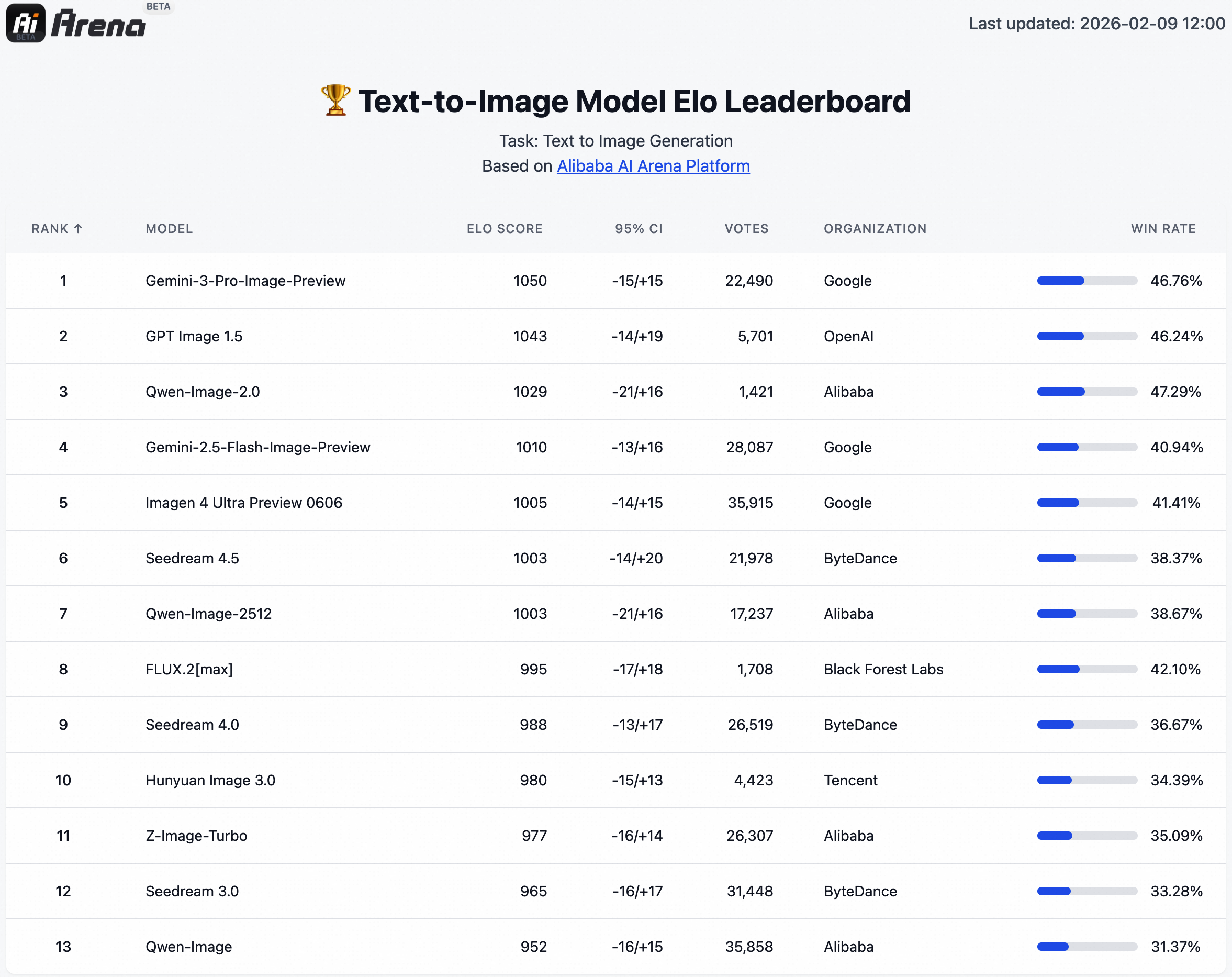
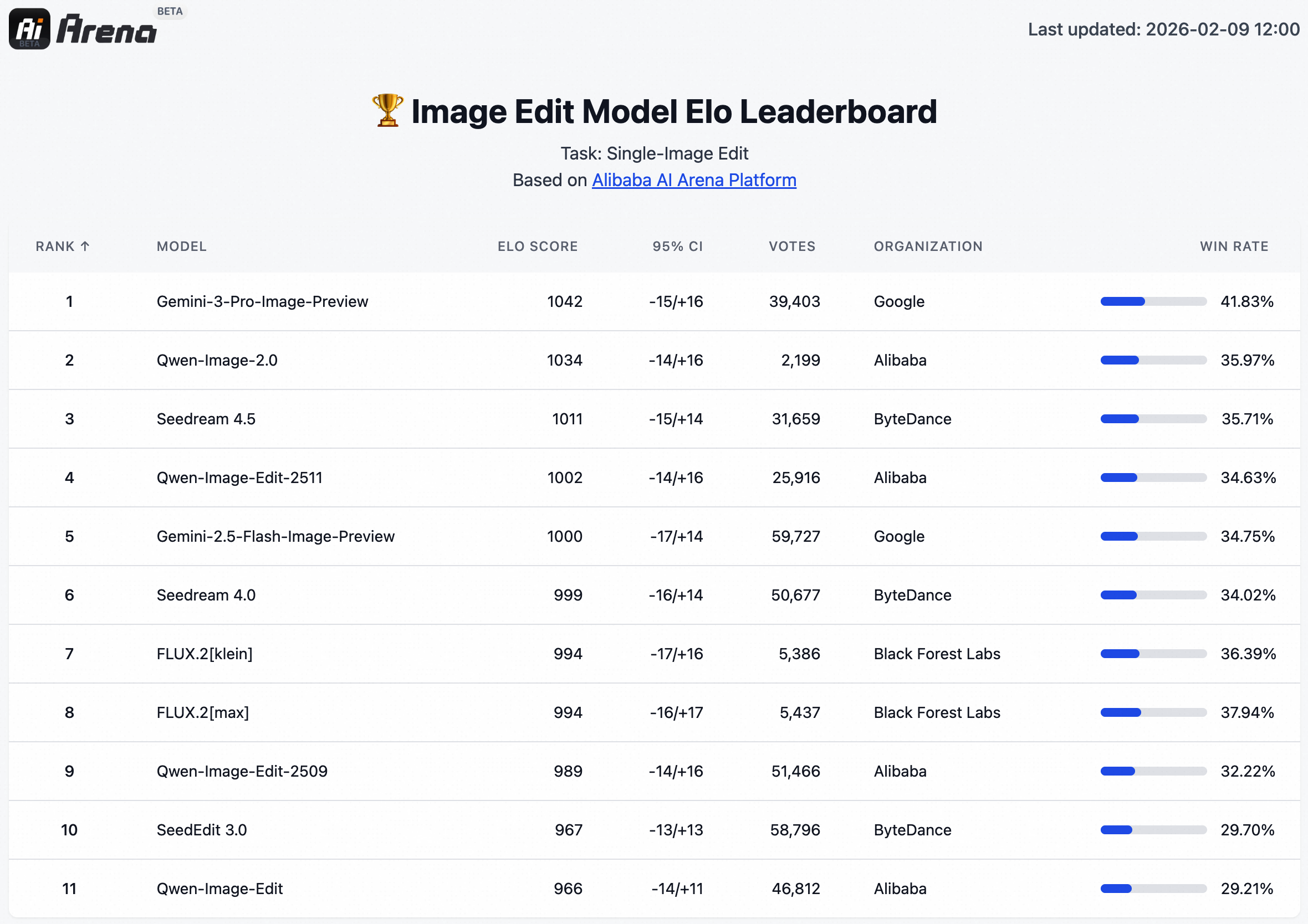
Finally, efficiency characteristics make deployment practical. The smaller parameter count reduces hosting costs and latency. Blind testing on AI Arena platforms confirms superior performance in unified benchmarks. Practitioners who compare Qwen-Image-2.0 against fragmented alternatives consistently report higher workflow productivity.
Accessing Qwen-Image-2.0 via the Web Interface
Most users begin with the accessible web experience at Qwen Chat.
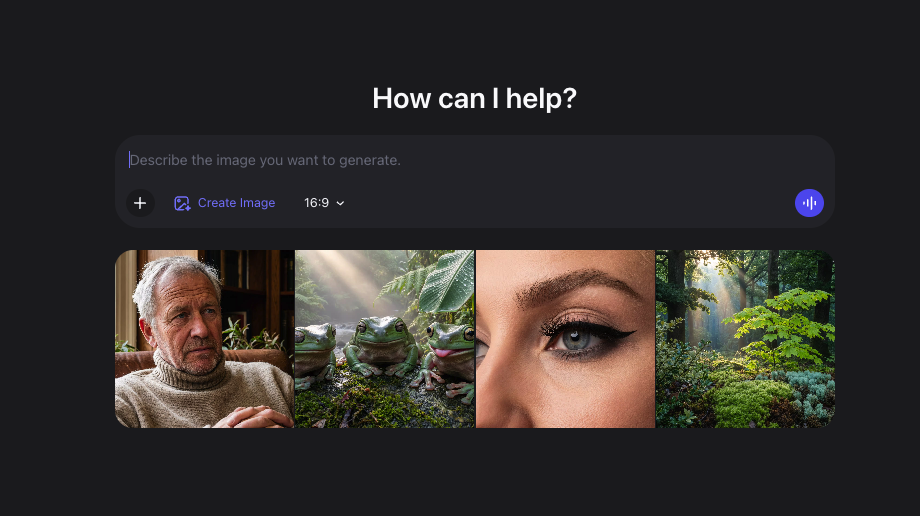
Practitioners type detailed descriptions and optionally upload reference images for editing tasks. The system exposes controls for aspect ratio—such as 16:9 for cinematic outputs or 1:1 for social media assets. Users also specify the number of variations and quality modifiers within the prompt itself, such as “ultra-high-definition natural photography.” After submission, generation completes in seconds, and outputs appear with download options and regeneration controls.
The chat format encourages iterative refinement. Engineers append follow-up instructions like “increase contrast on the foreground elements” or “change the calligraphy style to slender gold.” This conversational approach accelerates experimentation because the model maintains session context for editing operations. Furthermore, mobile access through the Qwen app extends these capabilities to on-the-go prototyping.
Login via Alibaba Cloud credentials unlocks higher quotas and history persistence. Technical users appreciate the seamless transition from web experimentation to API production because prompts and parameters transfer directly.
Advanced Prompt Engineering Techniques for Qwen-Image-2.0
Effective prompts drive superior results. Engineers structure inputs hierarchically: begin with overall composition, specify style and mood, detail subjects and their interactions, then refine textual elements. Rich descriptors improve adherence because the VL encoder processes nuanced language.
For photorealism, practitioners include lighting references, camera specifications, and material properties: “wide-angle photograph of a modern office whiteboard with handwritten project metrics in black marker, soft natural window light, shallow depth of field, 50mm lens, f/2.8.” The model responds with accurate reflections and text placement.
Infographic prompts leverage layout keywords: “clean 2-column AB testing report infographic, left column control group metrics in blue, right column variant in green, central conclusion box, icons aligned to grid, bilingual headers.” Precise alignment emerges naturally due to the 1k-token capacity.
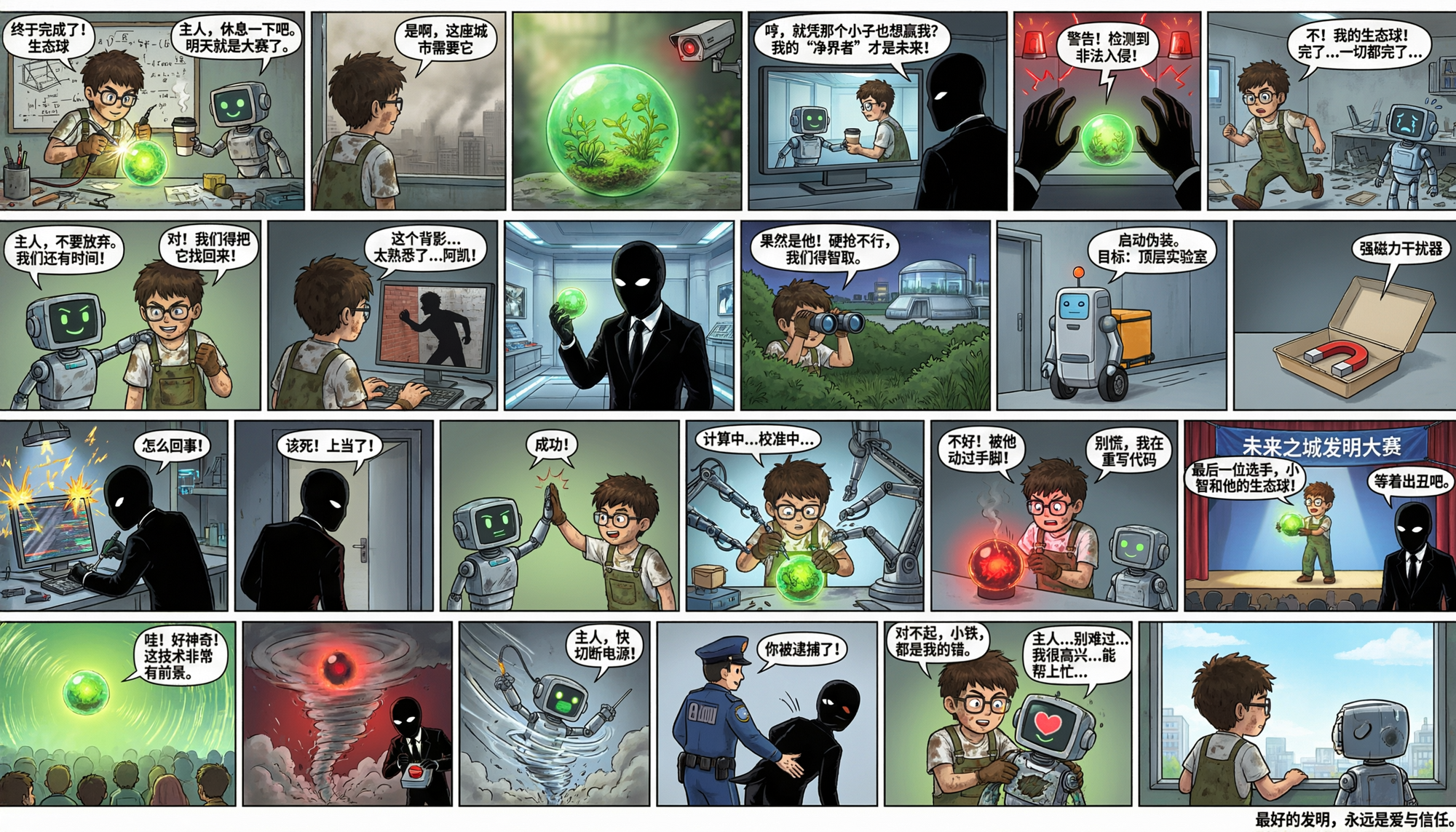
Calligraphy and artistic styles require cultural specificity: “vertical Song ci poem rendered in slender gold calligraphy on minimalist ink wash scroll, subtle mountain background, traditional seal stamps in lower corner.” The system preserves stroke accuracy and compositional balance.
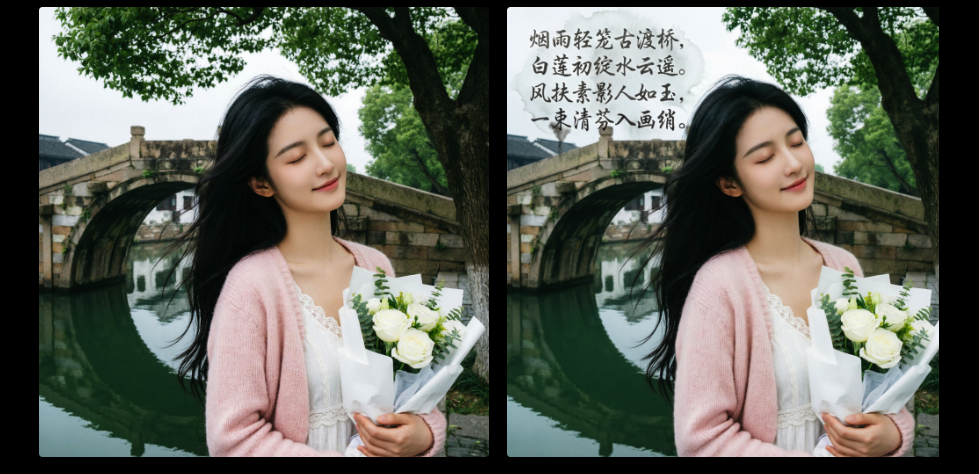
When editing, reference images precede instructions. Engineers upload bases and append directives like “inscribe this exact poem in classical kaishu script across the sky without obscuring main elements.” Iterative prompts refine outputs: “make the text larger and adjust kerning for better readability.”
Negative prompts, when supported, exclude undesired artifacts: “blurry, deformed text, low resolution, watermark.” Combining positive and negative guidance sharpens results. Furthermore, seed control enables reproducible experiments—critical for A/B testing visual variants in applications.
Practitioners who analyze successful prompts notice patterns: concrete nouns outperform vague adjectives, spatial prepositions guide composition, and quantitative descriptors (e.g., “four-panel comic grid”) enforce structure. Small adjustments—such as changing “beautiful landscape” to “mist-covered pine forest at dawn with volumetric god rays”—yield dramatically different yet more controlled outputs.
Editing Capabilities and Multi-Image Workflows
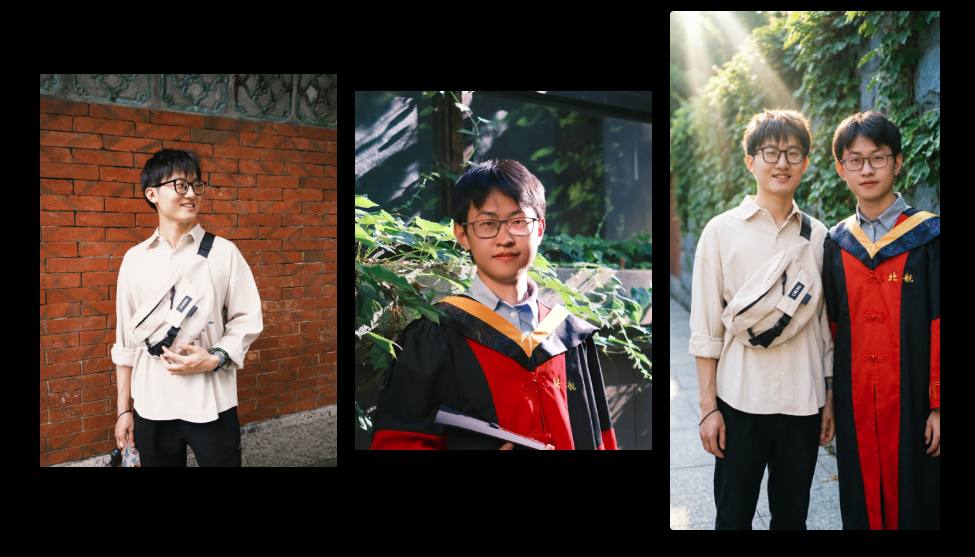
The unified architecture shines in editing scenarios. Engineers upload reference images and issue natural language commands. The model understands spatial relationships and preserves identity across modifications. For example, merging two portraits of the same person produces a cohesive group shot with matching skin tones and lighting.
Cross-dimensional edits blend styles creatively: “add flat cartoon characters to this realistic city street photo while keeping the background unchanged.” Seamless integration occurs because the encoder aligns latent spaces effectively.
Practitioners chain edits conversationally in the web interface or programmatically via API. Each step builds on prior outputs, maintaining consistency that fragmented tools struggle to achieve. Consequently, design teams prototype multiple variations efficiently before committing to final assets.
Best Practices, Troubleshooting, and Optimization
Technical users follow several guidelines to maximize Qwen-Image-2.0 performance. First, test prompts at lower resolutions or fewer steps during ideation, then scale to full 2K for finals. This conserves quota and accelerates iteration.
Monitor API response metadata for generation parameters and adjust guidance scales when outputs deviate from intent. Higher scales strengthen prompt adherence but may reduce diversity. Engineers balance these trade-offs based on use case.
Common issues include minor text errors in extremely long strings or slight layout shifts in dense compositions. Refining prompts with explicit positioning instructions—“text centered in top third, 120pt bold sans-serif”—resolves most cases. When photorealism falters, adding camera and lighting references helps.
Rate limits and costs require attention in production. Apidog’s analytics track usage patterns, enabling teams to optimize batching and caching strategies. Furthermore, implement retry logic with exponential backoff for transient errors.
For local experimentation or offline needs, practitioners explore compatible open-source pipelines, though full Qwen-Image-2.0 capabilities remain cloud-hosted. Hybrid approaches—using the API for final renders and lighter tools for drafts—balance cost and speed effectively.
Future Outlook and Continuous Improvement
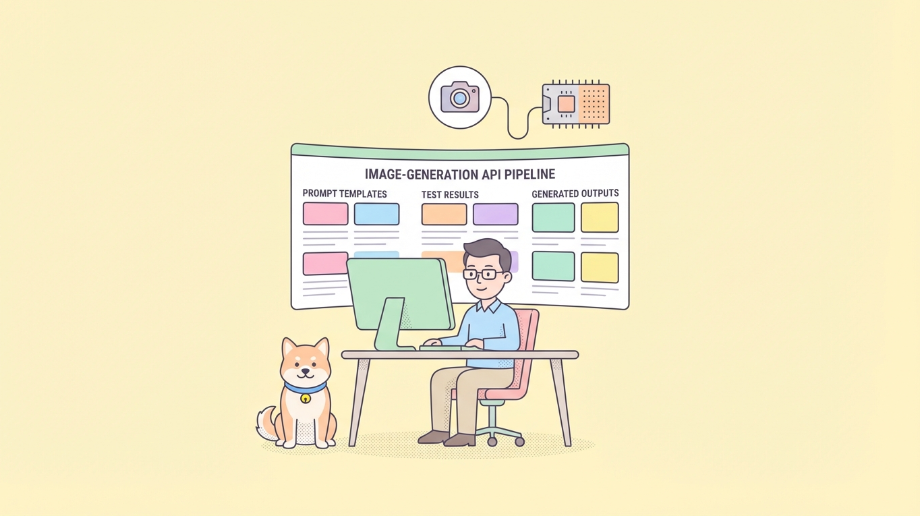
Qwen-Image-2.0 is strong enough for real product use, not just demos.
The winning approach is clear:
- Treat image generation as a production API dependency.
- Standardize prompts and presets.
- Add robust testing and failure handling.
- Build documentation and mocks from the same contract.
That combination gives you better output consistency, lower integration risk, and faster team delivery.
If you want to implement this workflow end-to-end, try it in Apidog—no credit card required—and run your first contract, mock, and test scenario in one place.
outputs often stems from attention to these precise implementation details.