TL;DR
Polymarket CLI is a Rust-based command-line tool that lets you browse prediction markets, place orders, manage positions, and interact with on-chain contracts directly from your terminal. Install via Homebrew or shell script, browse markets without a wallet, and trade using JSON output for automation. Requires a private key for trading operations. Supports table and JSON output formats for both human-readable and programmatic use.
Introduction
Prediction markets have emerged as powerful tools for forecasting real-world events, from election outcomes to crypto price movements. Polymarket, built on Polygon, offers one of the most liquid prediction markets with millions in trading volume. While the web interface is intuitive, developers often want programmatic access for automation, scripting, and building custom trading bots.
That's where Polymarket CLI comes in. This Rust-based command-line tool provides complete access to the Polymarket ecosystem from your terminal. Whether you want to browse markets, analyze order books, or execute trades automatically, Polymarket CLI delivers a robust interface that integrates seamlessly with shell scripts and automation workflows.
What is Polymarket?
Polymarket is a decentralized prediction market platform built on the Polygon blockchain. It allows users to trade on the outcomes of real-world events using USDC stablecoin. Markets are structured as yes/no questions, with prices representing the probability of an outcome (e.g., 52¢ means 52% probability).
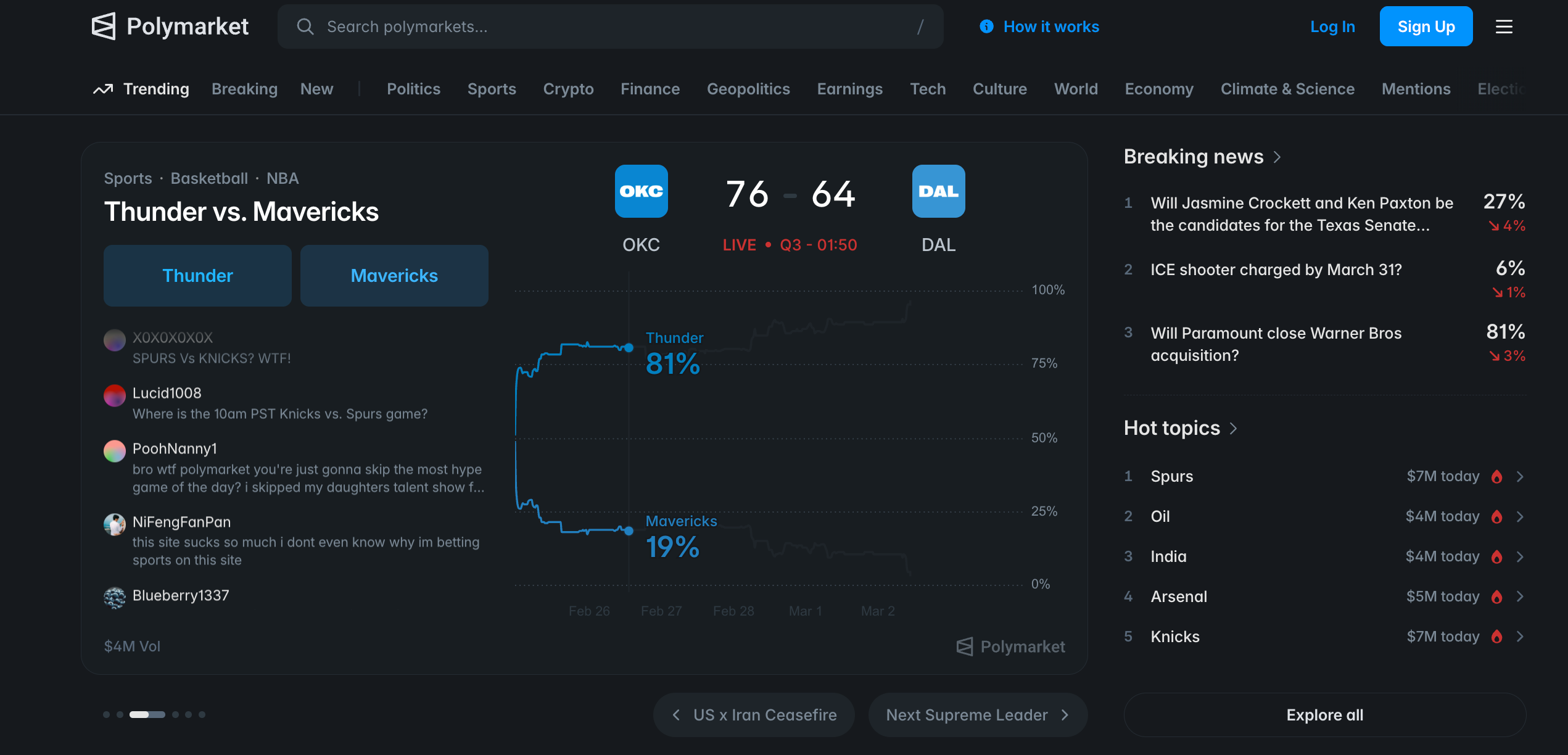
Key features of Polymarket include:
- Decentralized trading: Built on Polygon for fast, low-cost transactions
- Real-time markets: Thousands of markets covering politics, crypto, sports, and more
- Order book model: Central limit order book (CLOB) for price discovery
- Conditional tokens: ERC-1155 tokens representing outcome shares
- Rewards program: Traders can earn rewards based on trading volume
Polymarket CLI connects to these markets through a combination of off-chain APIs (for reading market data and placing orders) and on-chain contracts (for token operations like splitting, merging, and redeeming).
Installing Polymarket CLI
Polymarket CLI supports multiple installation methods. Choose the one that fits your environment.

Option 1: Homebrew (macOS / Linux)
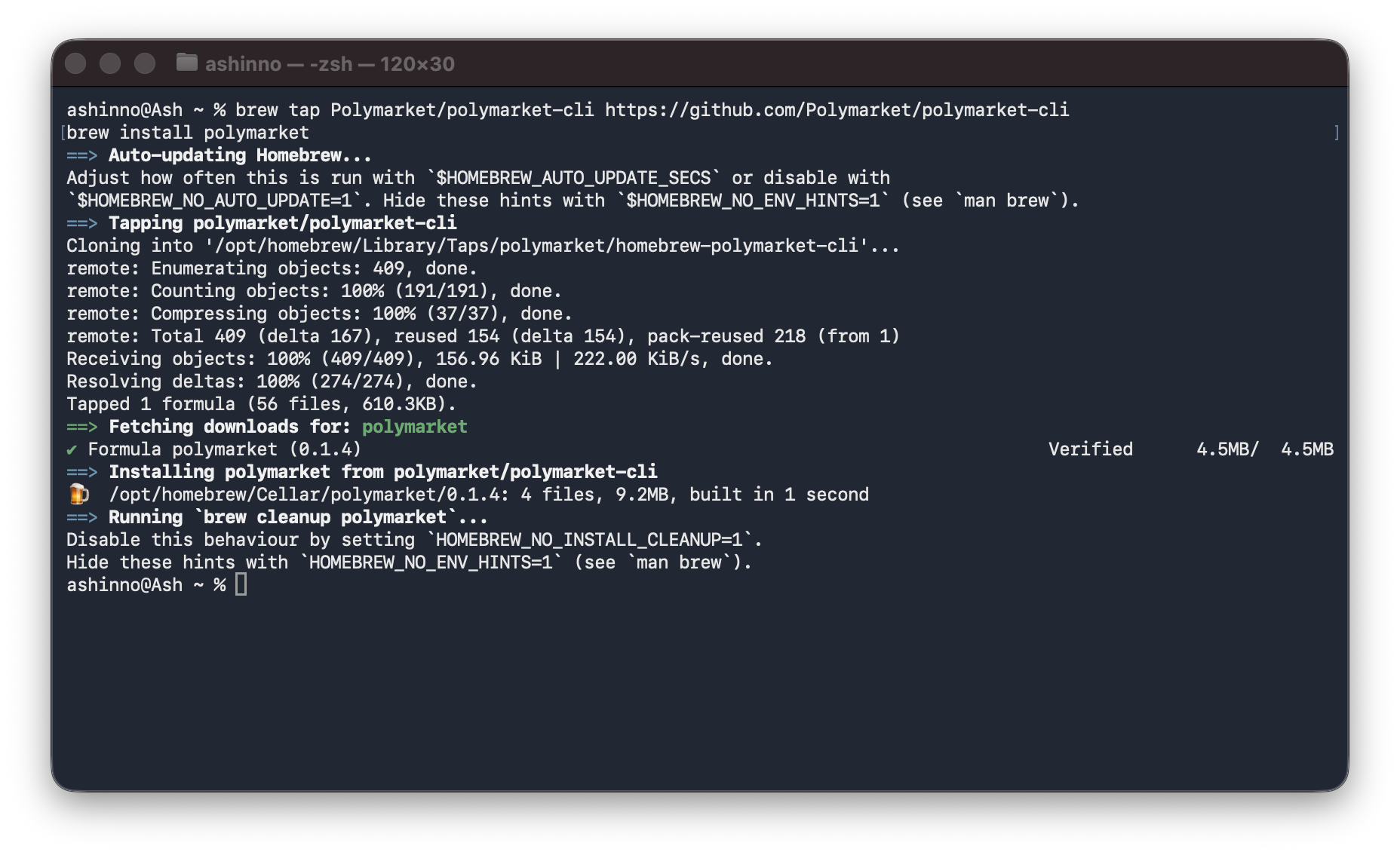
The easiest installation method uses Homebrew:
# Add the Polymarket tap
brew tap Polymarket/polymarket-cli https://github.com/Polymarket/polymarket-cli

# Install polymarket
brew install polymarket
Option 2: Shell Script (Linux/macOS)
For a quick one-liner installation:
curl -sSL https://raw.githubusercontent.com/Polymarket/polymarket-cli/main/install.sh | sh
This downloads the latest binary and installs it to your PATH.
Option 3: Build from Source (All Platforms)
If you have Rust installed, you can build from source:
git clone https://github.com/Polymarket/polymarket-cli
cd polymarket-cli
cargo install --path .
Verifying Installation
Check that the installation succeeded:
polymarket --version
polymarket --help
You should see version information and a help message with available commands.
Quick Start: Browse Markets Without a Wallet
One of the best features of Polymarket CLI is that you don't need a wallet to browse markets. This makes it perfect for research and monitoring before committing funds.
Browse Recent Markets
# List the 5 most recent markets
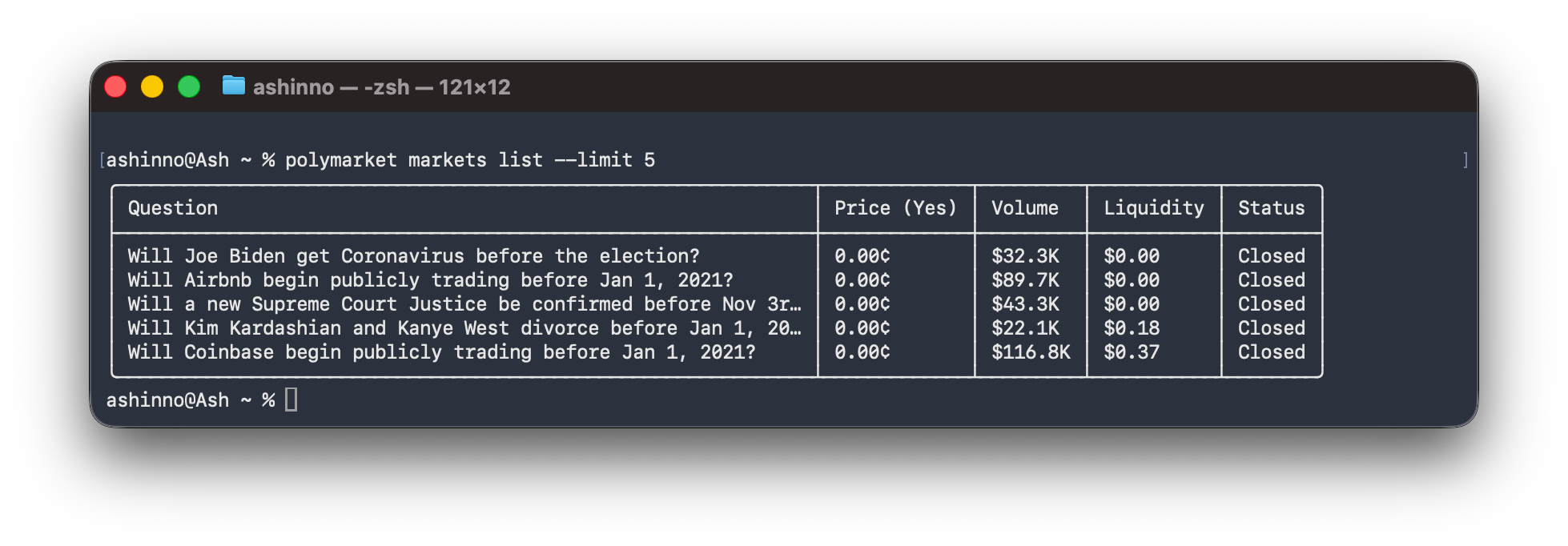
polymarket markets list --limit 5
Expected output:
Search for Specific Markets
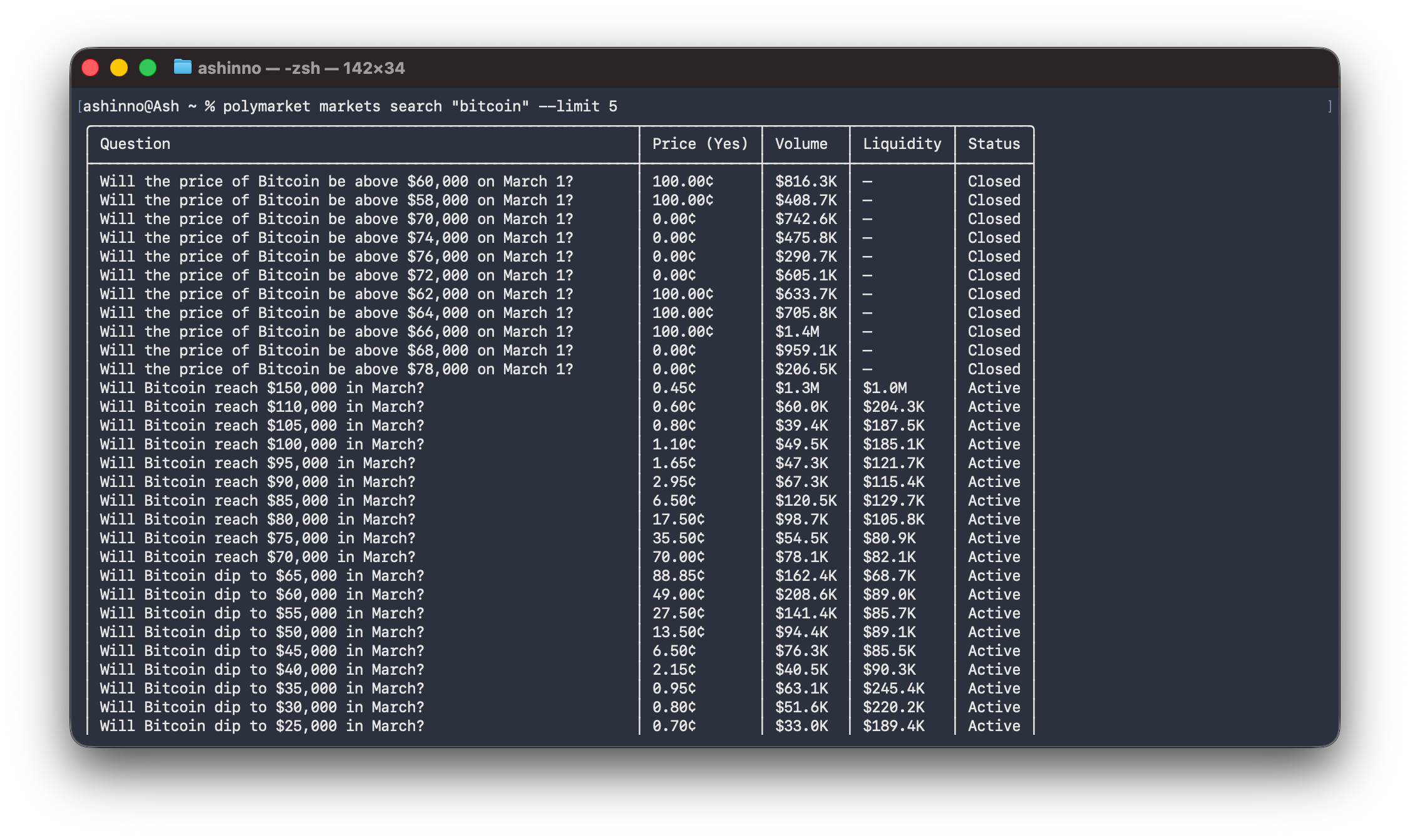
# Search for Bitcoin-related markets
polymarket markets search "bitcoin" --limit 5
Filter by Status and Volume
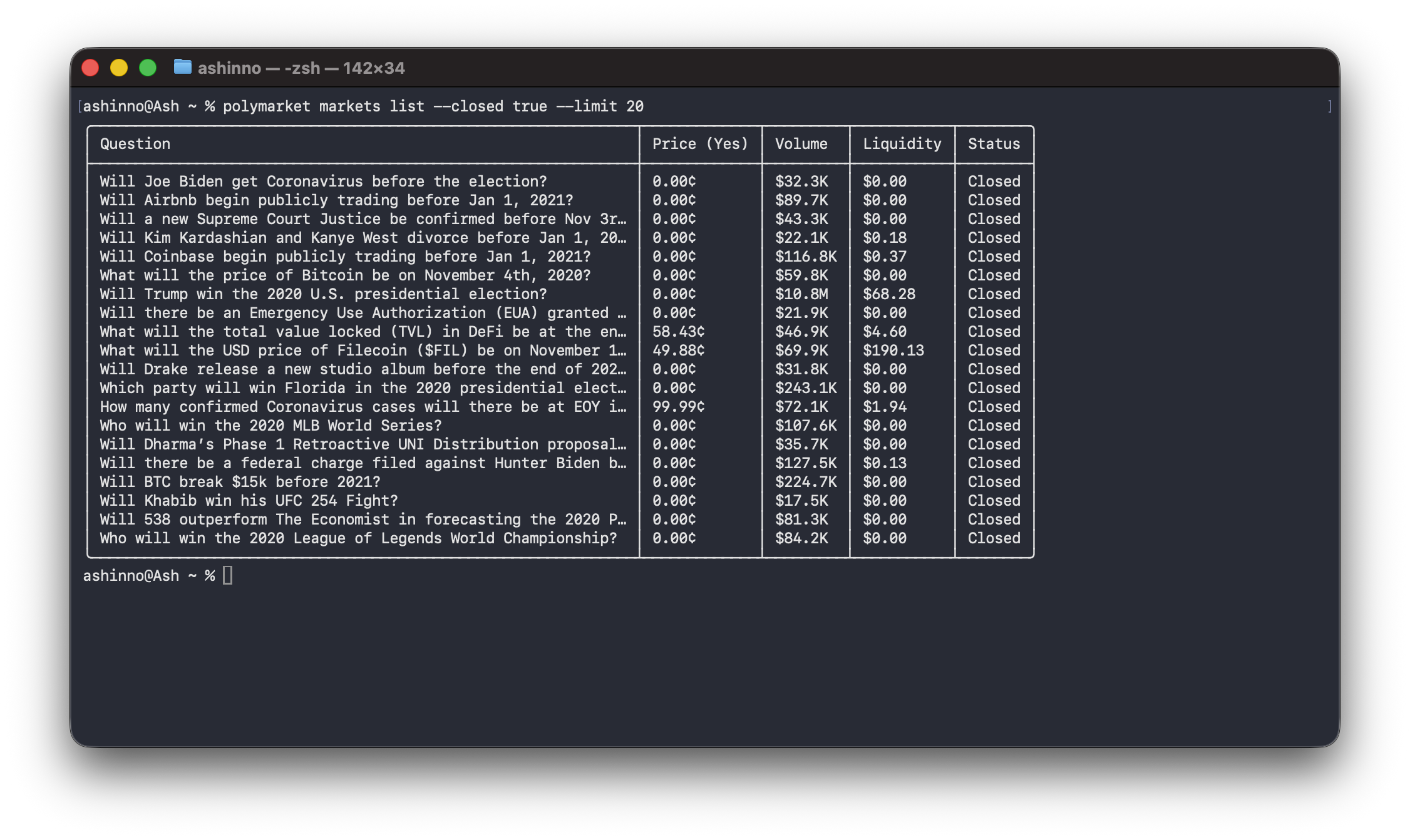
# List closed markets
polymarket markets list --closed true --limit 20
Browse Events
Events group related markets together. For example, the "2024 Election" event contains multiple markets about different aspects of the election.
# List recent events
polymarket events list --limit 10

# Filter events by tag
polymarket events list --tag politics --active true

# Get a specific event
polymarket events get 500
Wallet Setup and Configuration
While browsing doesn't require a wallet, trading does. Here's how to set up your wallet.
Creating a New Wallet
# Create a new wallet (generates random key, saves to config)
polymarket wallet create
This generates a new private key and stores it in your config file at ~/.config/polymarket/config.json.
Importing an Existing Wallet
If you already have a wallet with funds:
polymarket wallet import 0xYOUR_PRIVATE_KEY_HERE
Configuration File Location
The config file is stored at ~/.config/polymarket/config.json and looks like:
{
  "private_key": "0xabc123...",
  "chain_id": 137,
  "signature_type": "proxy"
}
Wallet Configuration Methods
You can provide your private key in three ways (checked in this order):
- CLI flag:
--private-key 0xabc... - Environment variable:
POLYMARKET_PRIVATE_KEY=0xabc... - Config file:
~/.config/polymarket/config.json
Signature Types
Polymarket supports three signature types:
| Type | Description |
|---|---|
proxy (default) | Uses Polymarket's proxy wallet system |
eoa | Signs directly with your key |
gnosis-safe | For multisig wallets |
Override per-command with --signature-type eoa.
Checking Wallet Status
# Show full wallet info
polymarket wallet show

# Print just the address
polymarket wallet address
Contract Approvals
Before trading, you need to approve the Polymarket contracts:
# Check current approvals (read-only)
polymarket approve check

# Approve all contracts (sends 6 on-chain transactions)
polymarket approve set
Note: Approving contracts requires MATIC for gas fees on Polygon.
Exploring Markets and Events
Let's dive deeper into market exploration commands.
Market Commands
# Get detailed market info
polymarket markets get will-bitcoin-hit-100k

# Get tags for a market
polymarket markets tags MARKET_ID

# List markets with various filters
polymarket markets list \
  --active true \
  --order volume_num \
  --limit 20 \
  --offset 10
Event Commands
# List events with filters
polymarket events list --active true --limit 10

# Get event tags
polymarket events tags EVENT_ID

# Series (recurring events like weekly markets)
polymarket series list --limit 10
polymarket series get SERIES_ID
Tag Commands
# List all tags
polymarket tags list

# Get specific tag info
polymarket tags get politics

# Find related tags
polymarket tags related politics
CLOB (Order Book) Commands
Check prices and order books without a wallet:
# Check API health
polymarket clob ok

# Get price for a token
polymarket clob price TOKEN_ID --side buy
polymarket clob midpoint TOKEN_ID

# Get spread
polymarket clob spread TOKEN_ID

# Get order book
polymarket clob book TOKEN_ID

# Last trade price
polymarket clob last-trade TOKEN_ID

# Price history
polymarket clob price-history TOKEN_ID --interval 1d --fidelity 30
Interval options: 1m, 1h, 6h, 1d, 1w, max
Trading on Polymarket
Now for the exciting part—placing trades. These commands require a configured wallet.
Placing Orders
# Place a limit order (buy 10 shares at $0.50)
polymarket clob create-order \
  --token TOKEN_ID \
  --side buy \
  --price 0.50 \
  --size 10

# Place a market order (buy $5 worth)
polymarket clob market-order \
  --token TOKEN_ID \
  --side buy \
  --amount 5

# Post multiple orders at once
polymarket clob post-orders \
  --tokens "TOKEN1,TOKEN2" \
  --side buy \
  --prices "0.40,0.60" \
  --sizes "10,10"
Order types: GTC (Good Till Cancel - default), FOK (Fill or Kill), GTD (Good Till Date), FAK (Fill and Kill)
Add --post-only for limit orders that only add liquidity.
Managing Orders
# View your orders
polymarket clob orders

# Get specific order details
polymarket clob order ORDER_ID

# Cancel a single order
polymarket clob cancel ORDER_ID

# Cancel multiple orders
polymarket clob cancel-orders "ORDER1,ORDER2"

# Cancel all orders for a market
polymarket clob cancel-market --market CONDITION_ID

# Cancel all orders
polymarket clob cancel-all
Checking Balances and Trades
# Check USDC balance
polymarket clob balance --asset-type collateral

# Check conditional token balance
polymarket clob balance --asset-type conditional --token TOKEN_ID

# View your trades
polymarket clob trades

# Update balance (refresh from chain)
polymarket clob update-balance --asset-type collateral
Rewards and API Keys
# Check rewards
polymarket clob rewards --date 2024-06-15
polymarket clob current-rewards

# Check if orders are scoring rewards
polymarket clob order-scoring ORDER_ID

# Create API key for programmatic access
polymarket clob create-api-key

# List your API keys
polymarket clob api-keys
On-Chain Operations
Polymarket CLI also supports direct interaction with on-chain contracts.
CTF (Conditional Token Framework) Operations
# Split $10 USDC into YES/NO tokens
polymarket ctf split --condition CONDITION_ID --amount 10

# Merge tokens back to USDC
polymarket ctf merge --condition CONDITION_ID --amount 10

# Redeem winning tokens after resolution
polymarket ctf redeem --condition CONDITION_ID
Note: On-chain operations require MATIC for gas on Polygon.
Bridge Operations
Deposit assets from other chains:
# Get deposit addresses for EVM, Solana, Bitcoin
polymarket bridge deposit YOUR_POLYGON_ADDRESS

# List supported chains and tokens
polymarket bridge supported-assets

# Check deposit status
polymarket bridge status DEPOSIT_ADDRESS
Portfolio Data
# View current positions
polymarket data positions YOUR_WALLET_ADDRESS

# View closed positions
polymarket data closed-positions YOUR_WALLET_ADDRESS

# Total portfolio value
polymarket data value YOUR_WALLET_ADDRESS

# Trade history
polymarket data trades YOUR_WALLET_ADDRESS --limit 50
Using JSON Output for Scripts
One of Polymarket CLI's most powerful features is JSON output, making it perfect for scripting and automation.
Basic JSON Output
# Get markets as JSON
polymarket -o json markets list --limit 10
Output:
[
  {"id": "12345", "question": "Will BTC hit $100k?", "outcomePrices": ["0.67", "0.33"], ...},
  {"id": "67890", "question": "Will ETH flip BTC?", "outcomePrices": ["0.12", "0.88"], ...}
]
Using with jq
# Extract just the questions
polymarket -o json markets list --limit 100 | jq '.[].question'

# Get specific price data
polymarket -o json clob midpoint TOKEN_ID | jq '.mid'

# Filter markets by volume
polymarket -o json markets list --limit 100 | jq '.[] | select(.volume_num > 1000000)'
Error Handling in Scripts
#!/bin/bash
# Example: Check balance with error handling

if ! result=$(polymarket -o json clob balance --asset-type collateral 2>/dev/null); then
  echo "Failed to fetch balance"
  exit 1
fi

balance=$(echo "$result" | jq -r '.balance')
echo "Your balance: $balance USDC"
Automating Market Monitoring
Create a simple market monitor:
#!/bin/bash
# monitor-market.sh - Monitor a specific market's price

TOKEN_ID=$1
INTERVAL=${2:-60}  # Default 60 seconds

while true; do
  clear
  echo "Monitoring market: $(date)"
  polymarket clob price $TOKEN_ID --side buy
  polymarket clob price $TOKEN_ID --side sell
  echo ""
  polymarket clob book $TOKEN_ID | head -20
  sleep $INTERVAL
done
Run it with: ./monitor-market.sh TOKEN_ID 30
Testing Polymarket API with Apidog
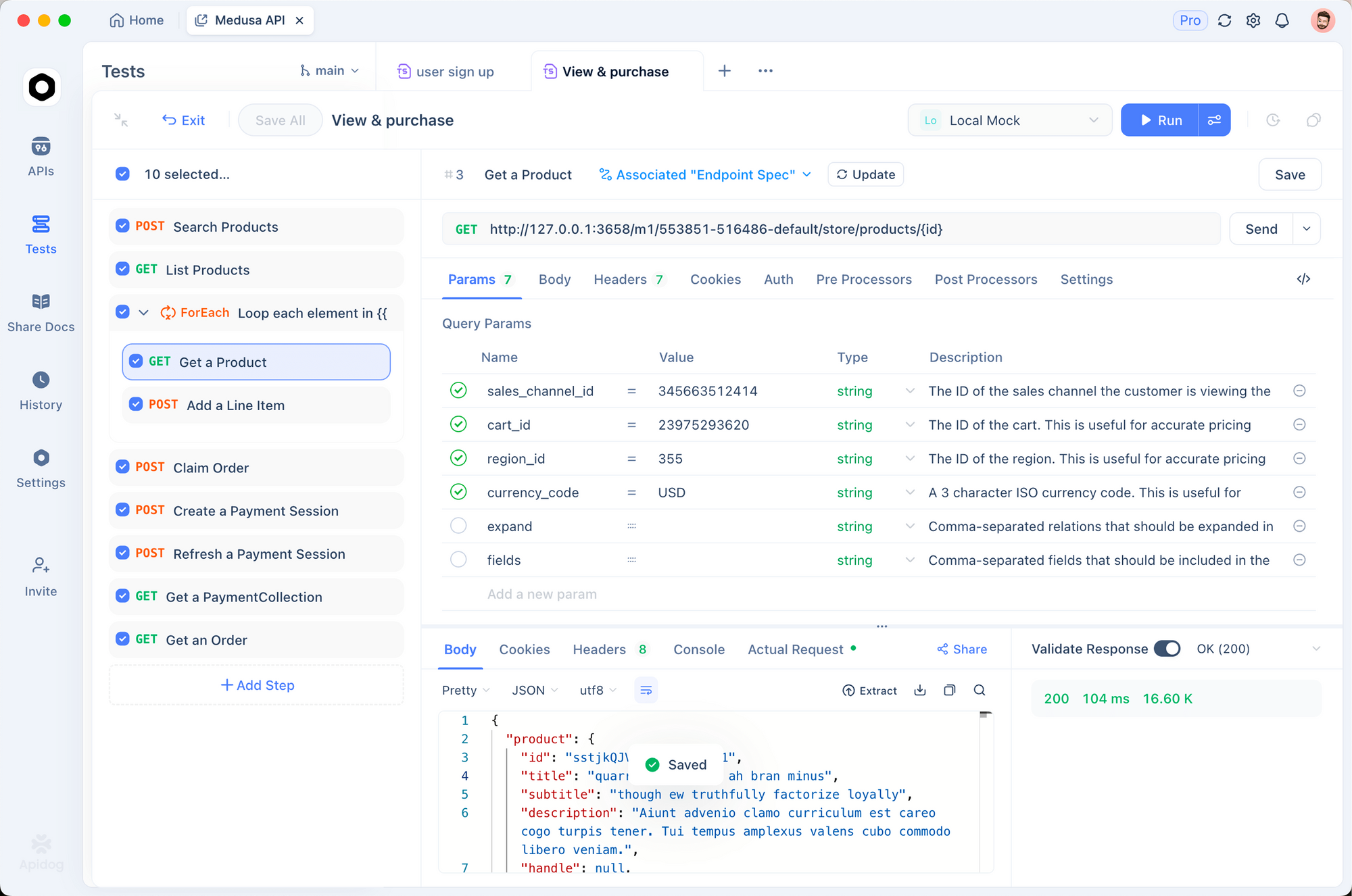
When building automated trading systems or integrating Polymarket into your applications, thorough API testing is essential. Apidog provides a powerful, all-in-one API development platform that makes testing prediction market APIs straightforward and efficient.
Why Use Apidog for Polymarket Integration?
Whether you're building a trading bot, a market analytics dashboard, or integrating Polymarket data into your application, Apidog offers several advantages:
- Visual API Client: Send requests and inspect responses without writing code
- Automated Testing: Create test suites to verify your trading logic
- Environment Variables: Manage API endpoints and credentials across dev/staging/prod
- Collaboration: Share API definitions with your team
Interactive Shell Mode
For interactive exploration, use the built-in shell:
polymarket shell
This opens an interactive REPL:
polymarket> markets list --limit 3
polymarket> clob book TOKEN_ID
polymarket> exit
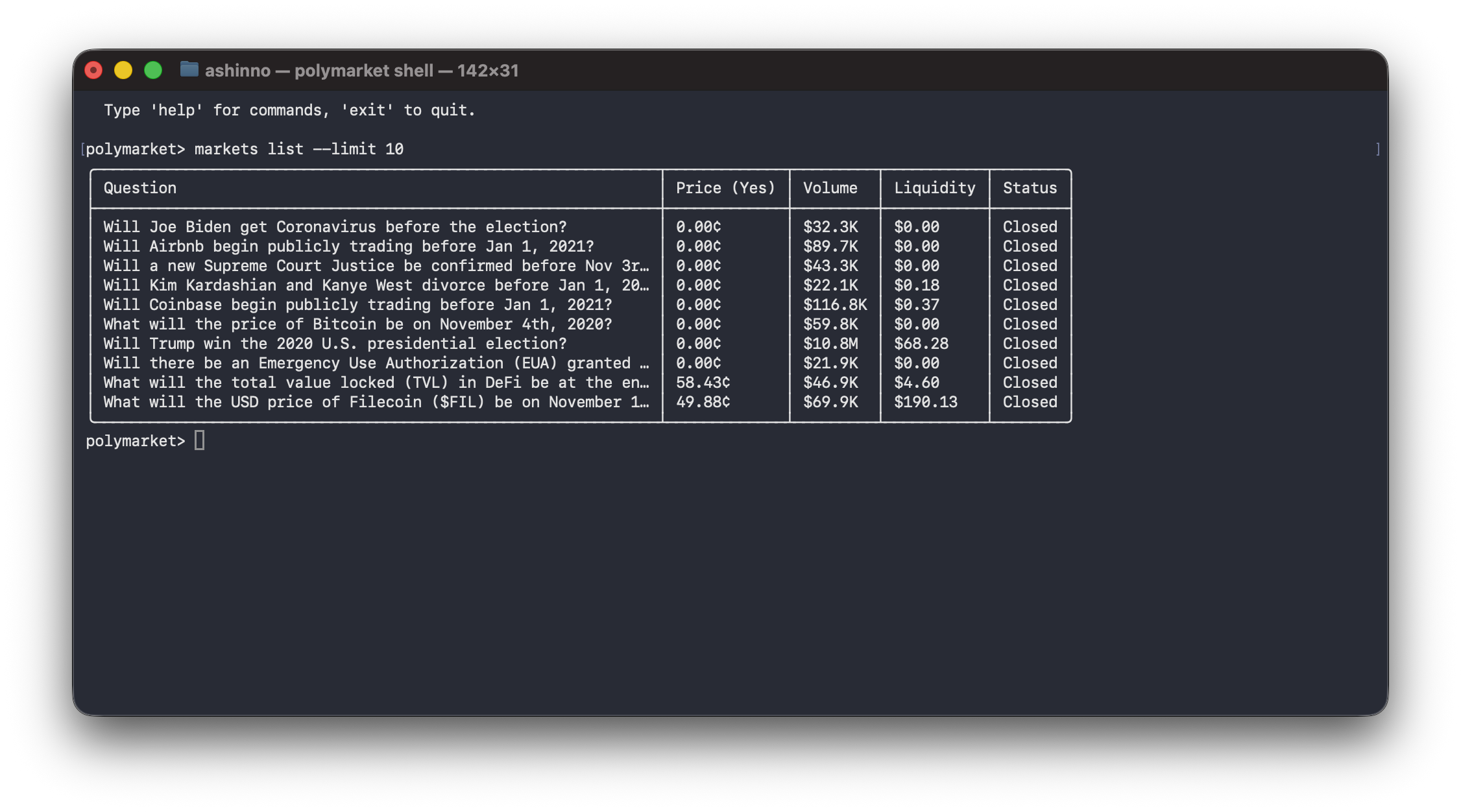
The shell supports command history, making it easy to experiment with different commands.
Common Workflows
Workflow 1: Research and Trade
# Step 1: Find interesting markets
polymarket markets search "bitcoin" --limit 10
polymarket markets get bitcoin-above-100k

# Step 2: Check order book and prices
polymarket clob book TOKEN_ID
polymarket clob price-history TOKEN_ID --interval 1d

# Step 3: Check your balance
polymarket clob balance --asset-type collateral

# Step 4: Place a trade
polymarket clob market-order --token TOKEN_ID --side buy --amount 10
Workflow 2: Portfolio Management
# View all positions
polymarket data positions YOUR_ADDRESS

# Check total value
polymarket data value YOUR_ADDRESS

# View trading history
polymarket data trades YOUR_ADDRESS --limit 50

# Check open orders
polymarket clob orders
Workflow 3: Programmatic Trading Bot
#!/bin/bash
# Simple bot: buy when price drops below threshold

TOKEN_ID="YOUR_TOKEN_ID"
THRESHOLD=0.45
AMOUNT=10

# Get current price
PRICE=$(polymarket -o json clob midpoint $TOKEN_ID | jq -r '.mid')

# Convert to decimal
PRICE_DECIMAL=$(echo "scale=2; $PRICE / 100" | bc)

if (( $(echo "$PRICE_DECIMAL < $THRESHOLD" | bc -l) )); then
  echo "Price ($PRICE_DECIMAL) below threshold ($THRESHOLD) - buying"
  polymarket clob market-order --token $TOKEN_ID --side buy --amount $AMOUNT
else
  echo "Price ($PRICE_DECIMAL) above threshold - holding"
fi
Security Considerations
When using Polymarket CLI, keep these security best practices in mind:
Private Key Security
- Never commit your private key to version control
- Use the config file rather than environment variables in shared environments
- Consider hardware wallet integration for large funds
- Use a separate wallet for CLI trading (not your main wallet)
Transaction Verification
- Always verify transaction details before confirming
- Start with small amounts to test your setup
- Keep your MATIC balance sufficient for gas fees
API Key Management
# Create dedicated API keys for scripts
polymarket clob create-api-key

# List and manage keys
polymarket clob api-keys

# Delete compromised keys
polymarket clob delete-api-key
Network Security
- Use the CLI over HTTPS (default)
- Be cautious when using private keys in cloud environments
- Consider using a VPN when trading from public networks
Conclusion
Polymarket CLI is a powerful tool for developers who want to interact with prediction markets programmatically. Whether you're a trader looking to automate strategies, a researcher analyzing market data, or a developer building trading bots, the CLI provides a robust interface to the Polymarket ecosystem.
Key takeaways from this guide:
- Install via Homebrew or shell script for quick setup
- Browse markets without a wallet for research
- Configure your wallet properly before trading
- Use JSON output for scripting and automation
- Always prioritize security when handling private keys
- Start with small trades to test your setup
- Use Apidog to test and validate your Polymarket API integrations
For more advanced use cases, consider combining Polymarket CLI with other tools like cron for scheduled tasks, jq for data processing, or custom bots built in Python or Node.js. When building your trading integration, use Apidog to thoroughly test all API endpoints before going live.
Try Apidog free to streamline your API testing workflow and build confidence in your Polymarket integrations.
FAQ
Is Polymarket CLI safe to use?
Polymarket CLI is experimental software. Use with caution and never use with large amounts of funds. Always verify transactions before confirming. The project is open source, so you can review the code yourself.
Do I need a wallet to browse markets?
No. Most commands (markets, events, CLOB prices, order books) work without a wallet. You only need a wallet for placing orders, checking balances, and on-chain operations.
What chains does Polymarket support?
Polymarket is built on Polygon (chain ID 137). The CLI handles both on-chain operations (requiring MATIC for gas) and off-chain order placement.
Can I use Polymarket CLI for automated trading?
Yes. The JSON output format makes it ideal for scripting. You can build automated trading bots using shell scripts, Python, or any language that can execute CLI commands and parse JSON.
How do I get help with Polymarket CLI?
Check the official GitHub repository for documentation and issue tracking.
Does Polymarket CLI support testnet?
The current version works with the main Polymarket deployment. For testnet support, check the GitHub repository for the latest information.
What's the difference between proxy and eoa signature types?
proxy (default) uses Polymarket's proxy wallet system, which can reduce gas costs. eoa signs directly with your private key. For most users, the default proxy type is recommended.
How do I update Polymarket CLI to the latest version?
Run polymarket upgrade to check for and install updates. For Homebrew installations, use brew update && brew upgrade polymarket.
Can I use Apidog to test Polymarket API calls?
Yes. Apidog is an excellent tool for testing prediction market APIs. Create a new project in Apidog, add your Polymarket endpoints, and use the visual client to send requests and inspect responses. Apidog's environment variables make it easy to manage different API credentials, and you can create automated test scenarios to verify your trading logic works correctly.