Developers constantly seek efficient, high-performance language models for building intelligent applications. The MiniMax M2.1 API stands out as a robust option, particularly for agentic workflows and complex coding tasks.
You start by understanding the model itself. Next, you explore access methods. Finally, you implement practical integrations.
What Is MiniMax M2.1 and Why Use Its API?
MiniMax M2.1 represents the latest advancement from MiniMax AI, released as an open-source model optimized for agentic capabilities. Developers leverage it to create autonomous applications that handle multilingual software development, multi-step planning, and tool usage with exceptional robustness.
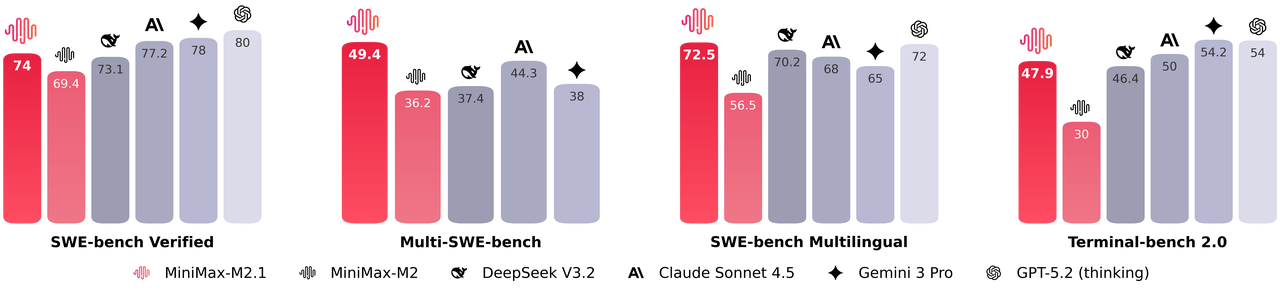
Furthermore, MiniMax M2.1 activates a compact set of parameters during inference, delivering near-frontier performance while maintaining low latency. It excels in benchmarks such as SWE-bench Verified and VIBE, often matching or surpassing proprietary models in coding stability and instruction following. Additionally, the model supports advanced demonstrations, including generating interactive 3D animations, native mobile apps, and real-time data dashboards.
You choose MiniMax M2.1 when you need transparency and controllability. Moreover, its open-source weights allow local deployment via Hugging Face, but the hosted API offers immediate access without infrastructure management.
MiniMax M2.1 vs GLM-4.7: Which Model Fits Your Needs?
Developers frequently compare MiniMax M2.1 to GLM-4.7, another leading open-weight contender from Z.ai. Both models target coding and reasoning, yet they differ in architecture, efficiency, and cost.
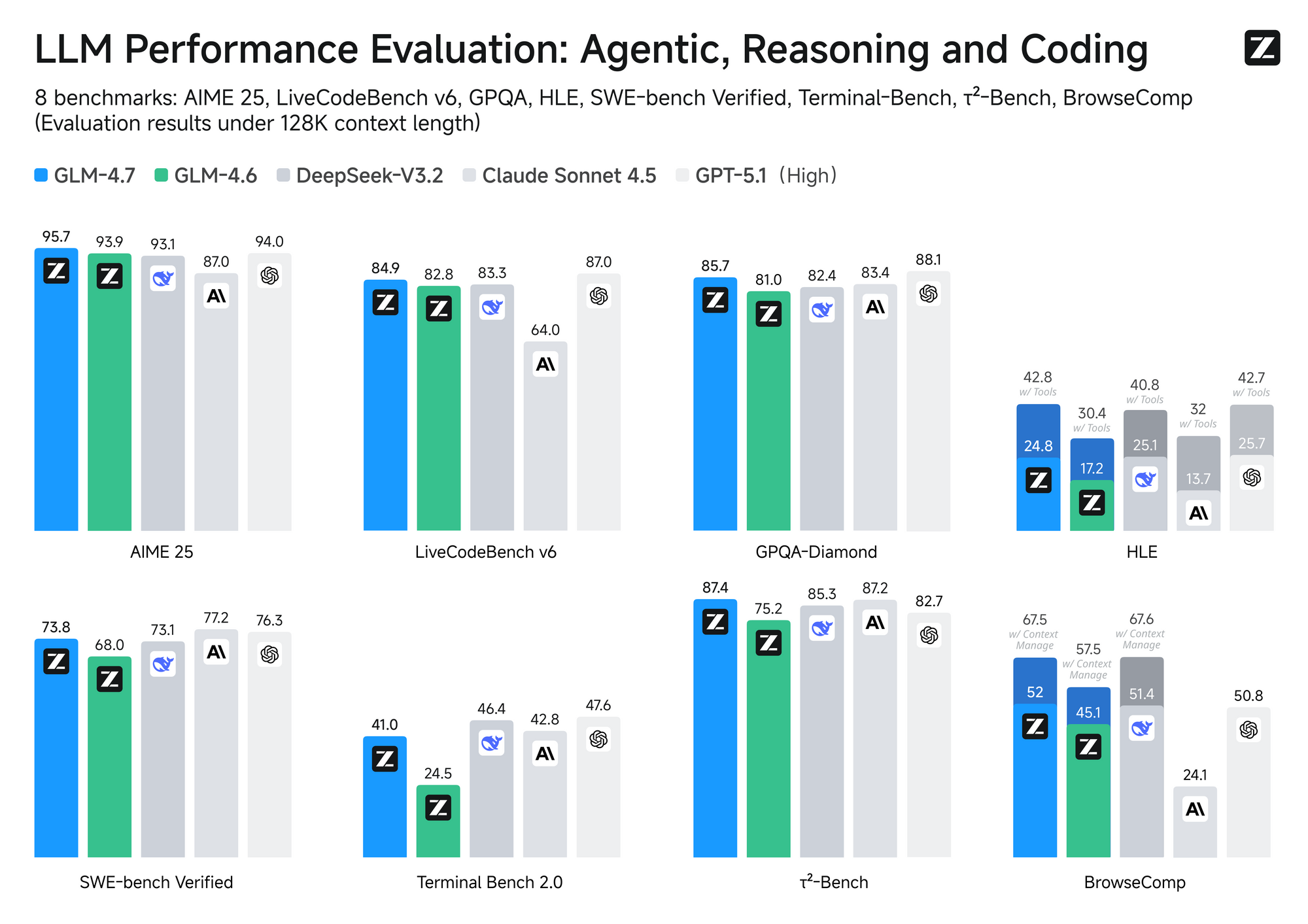
MiniMax M2.1 employs a Mixture-of-Experts (MoE) design with selective activation—typically around 10B active parameters from a larger pool. This approach ensures fast inference and lower operational costs. In contrast, GLM-4.7 utilizes a full MoE with 358B parameters, supporting a massive 200K token context window and native features like turn-level thinking control.
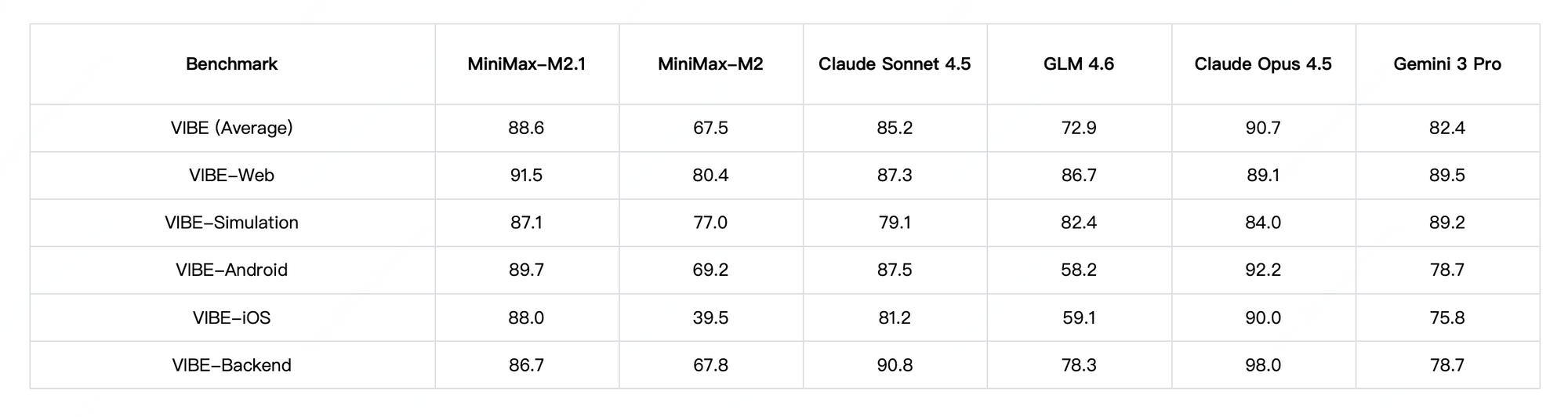
Performance-wise, MiniMax M2.1 shines in agentic tasks and long-horizon planning, achieving high scores on VIBE (88.6 average) and demonstrating superior stability in tool use. Community tests show it outperforming earlier GLM versions in creative coding and multi-tool autonomy. However, GLM-4.7 edges ahead in pure reasoning benchmarks and structured outputs, with strong results on SWE-bench (73.8%).
Pricing plays a key role. MiniMax models, including predecessors like M2, typically charge around $0.30–$0.315 per million input tokens and $1.20–$1.26 per million output tokens on the official platform. GLM-4.7, available via Z.ai or providers like OpenRouter, starts at approximately $0.44–$0.60 input and $1.74–$2.20 output per million tokens—often higher, though subscriptions reduce effective rates.
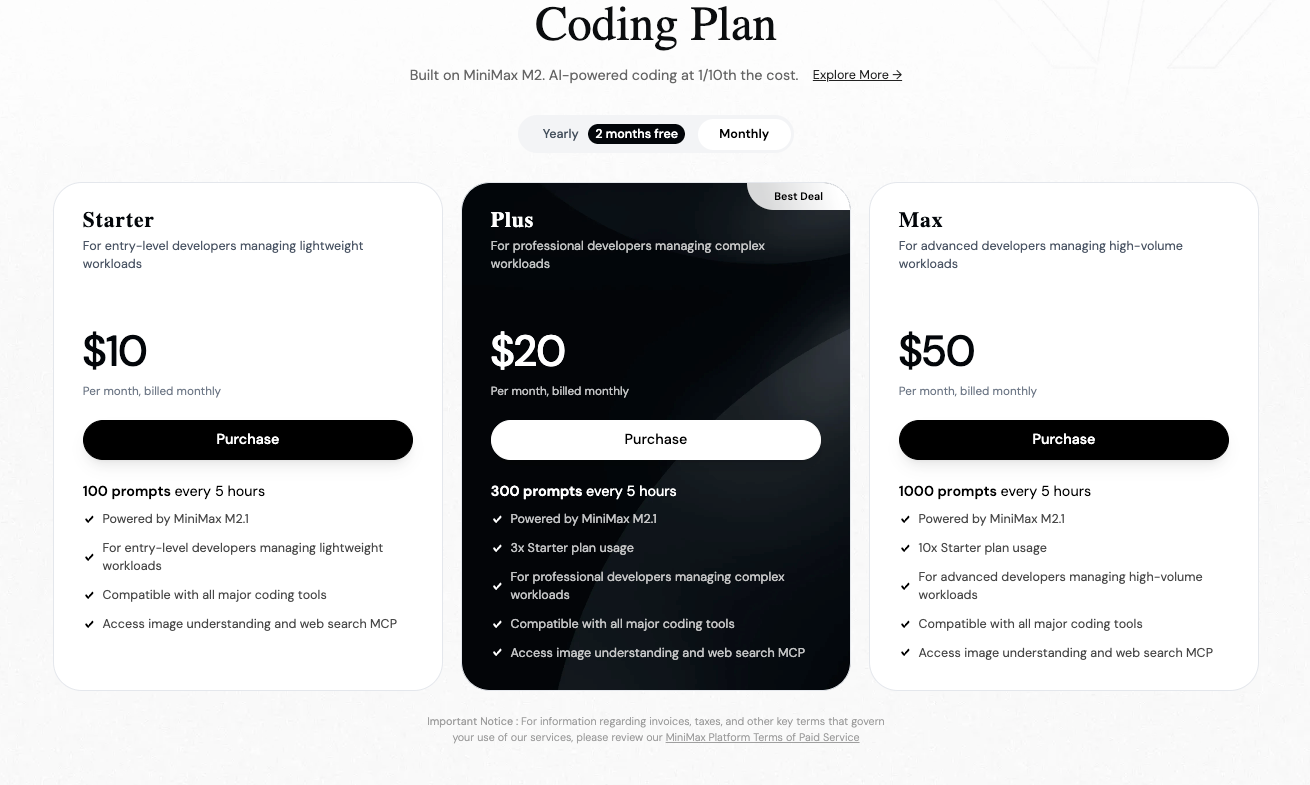
Consequently, you select MiniMax M2.1 for cost-efficient, high-speed agentic applications. Alternatively, you opt for GLM-4.7 when extended context or precise thinking modes prove essential.
How Do You Register for the MiniMax API Platform?
You begin access by creating an account on the MiniMax Open Platform. Sign up using your email or preferred method.
After verification, you log in and proceed to the dashboard. Here, you manage API keys and billing. The platform supports both global and region-specific endpoints, so you choose based on your location for optimal latency.
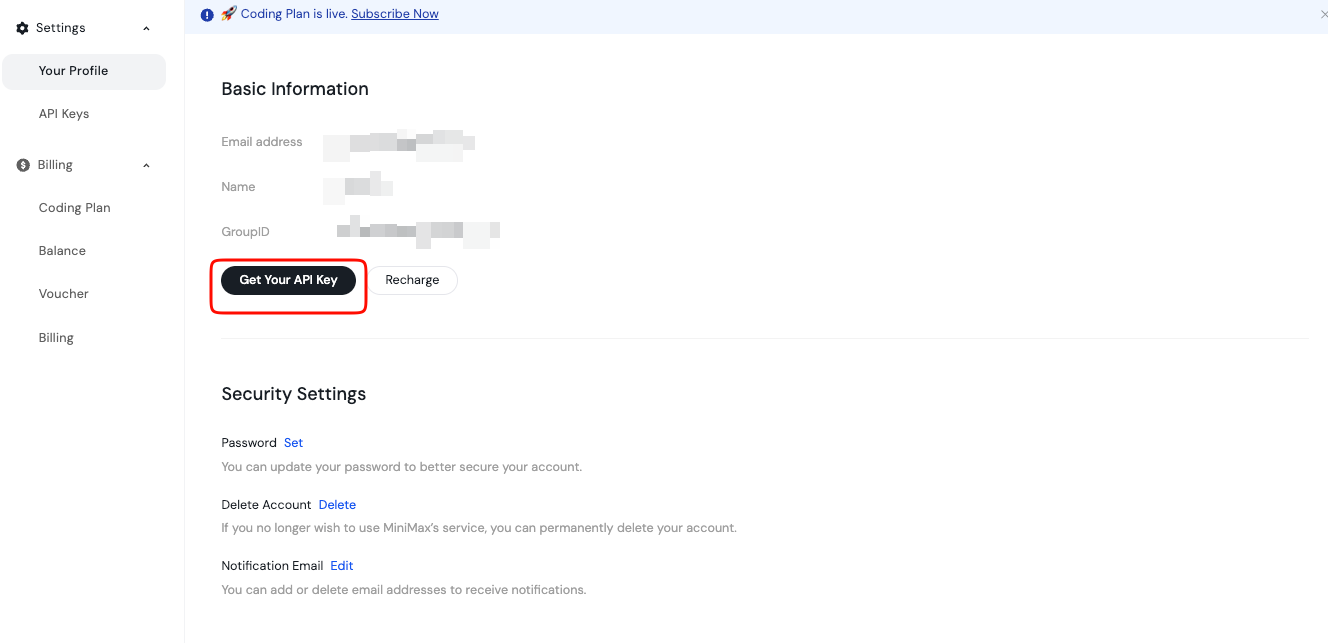
Additionally, you review the documentation sections early. They cover model availability, rate limits, and best practices. You store this key safely, perhaps in an environment variable or secret manager. Never expose it in client-side code.
Furthermore, you top up your balance if needed via the Billing page. MiniMax operates on a pay-as-you-go model, ensuring you control costs precisely.
What Is the MiniMax M2.1 API Endpoint and Request Structure?
The MiniMax API offers compatibility with popular formats, including OpenAI and Anthropic styles. For text generation with M2.1, you target the chat completions endpoint.
Typically, the base URL appears as https://api.minimax.io or a regional variant. You specify the model name, such as "MiniMax-M2.1", in your request payload.
A standard POST request includes headers for authorization and content type. You set Authorization: Bearer YOUR_API_KEY and Content-Type: application/json.
The body follows a messages array format, similar to other LLMs. You include system, user, and assistant roles as needed.
Moreover, you adjust parameters like temperature, max_tokens, top_p, and tool choices to fine-tune outputs.
How Do You Send Your First Request to MiniMax M2.1 API?
You test the API quickly using curl for verification.
Here is a basic example:
curl https://api.minimax.io/v1/chat/completions \
  -H "Authorization: Bearer YOUR_API_KEY" \
  -H "Content-Type: application/json" \
  -d '{
    "model": "MiniMax-M2.1",
    "messages": [
      {"role": "system", "content": "You are a helpful coding assistant."},
      {"role": "user", "content": "Write a Python function to calculate Fibonacci numbers."}
    ],
    "temperature": 0.7,
    "max_tokens": 512
  }'
This command returns a JSON response with the generated completion. You inspect the choices array for the assistant's reply.
Additionally, you enable streaming for real-time outputs by adding "stream": true.
How Can You Use Python to Interact with MiniMax M2.1 API?
Python developers prefer libraries for simplicity. Although MiniMax provides compatibility, you use the official OpenAI SDK with a custom base URL.
First, install the package:
pip install openai
Then, configure the client:
from openai import OpenAI

client = OpenAI(
    api_key="YOUR_API_KEY",
    base_url="https://api.minimax.io/v1"  # Adjust if needed
)

response = client.chat.completions.create(
    model="MiniMax-M2.1",
    messages=[
        {"role": "system", "content": "You are an expert developer."},
        {"role": "user", "content": "Explain agentic workflows."}
    ],
    temperature=0.8
)

print(response.choices[0].message.content)
This code handles requests efficiently. You extend it with error handling and retries for production use.
Why Use Apidog to Test and Manage MiniMax M2.1 API Calls?
Testing APIs manually becomes tedious as projects grow. Apidog simplifies this process significantly.
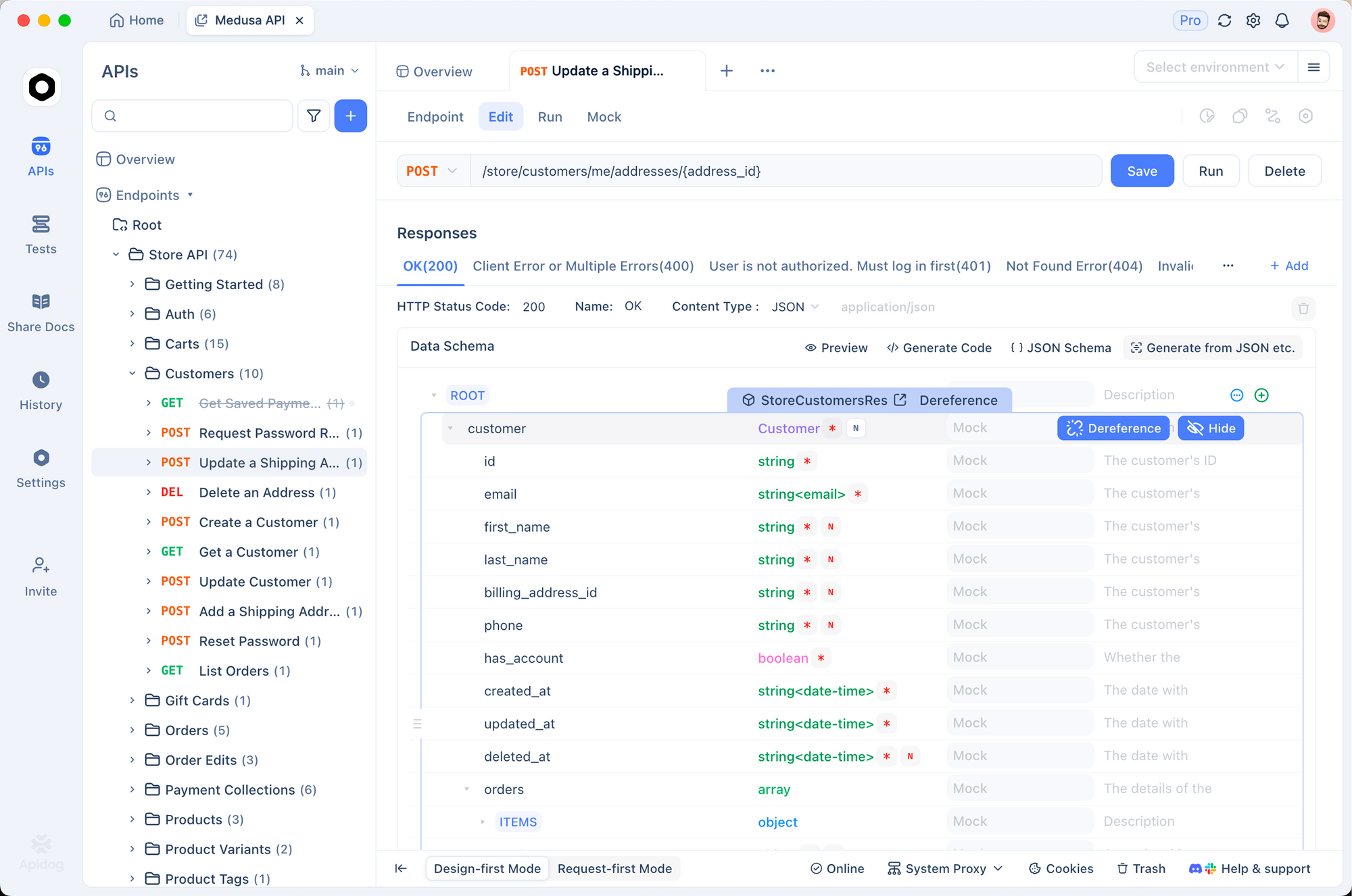
You import the MiniMax documentation or create collections manually in Apidog. Then, you set environment variables for your API key.
Apidog supports sending requests, viewing formatted responses, and mocking endpoints. Moreover, it generates client code in multiple languages automatically.
For instance, you debug token usage or streaming responses visually. This saves hours compared to raw curl commands.
Additionally, Apidog integrates with CI/CD pipelines, ensuring consistent API behavior.
How Do You Handle Tool Calling and Advanced Features in MiniMax M2.1?
MiniMax M2.1 supports native tool calling, crucial for agentic applications. You define tools in the request payload.
The model decides when to invoke them, returning structured calls. Your application executes the tools and appends results as assistant messages.
This loop enables multi-step reasoning. Furthermore, you leverage interleaved thinking for transparent reasoning traces.
What Are Best Practices for Rate Limits and Error Handling?
MiniMax enforces rate limits to maintain service quality. You monitor headers like x-ratelimit-remaining in responses.
Implement exponential backoff for retries on 429 errors. Additionally, you catch authentication failures (401) and invalid requests (400).
Logging requests and responses aids debugging. You track usage via the dashboard to avoid surprises.
Conclusion: Start Building with MiniMax M2.1 Today
You now possess the knowledge to access and utilize the MiniMax M2.1 API effectively. Register on the platform, generate your key, and send requests—whether via curl, Python, or Apidog.
This model empowers you to build sophisticated agents and coding tools at competitive costs. Experiment freely, compare with alternatives like GLM-4.7, and scale your projects.
Apidog enhances your workflow further by providing powerful testing tools. Download it for free and accelerate your development.