You’re building an app. Users need to sign in. Data needs to sync in real time. Files need storage. You could spin up servers, configure databases, and manage infrastructure for weeks. Or you could use Firebase.
Firebase powers over 1.5 million apps including The New York Times, Duolingo, and Alibaba. Developers choose it because it removes backend complexity. You focus on features, not server maintenance. But the Firebase API has quirks. Authentication flows confuse beginners. Database rules trip up experienced developers. Cloud Functions seem magical until you understand the triggers.
I’ve integrated Firebase into production apps serving millions of users. I’ve made every mistake possible: exposed service account keys, written inefficient queries, deployed broken functions. This guide distills those lessons.
You’ll learn authentication, database operations, Cloud Functions, and storage. You’ll see working code, not just theory. You’ll avoid the pitfalls that cause production fires.
What Is Firebase API and Why Does It Matter?
Firebase isn’t a single API. It’s a suite of backend services accessed through unified SDKs and REST endpoints.
Core Firebase Services
| Service | Purpose | API Type |
|---|---|---|
| Authentication | User sign-in and identity | SDK + REST |
| Firestore Database | NoSQL document database | SDK + REST |
| Realtime Database | JSON real-time sync | SDK + REST |
| Cloud Storage | File storage and CDN | SDK + REST |
| Cloud Functions | Serverless compute | Deployment CLI |
| Hosting | Static web hosting | Deployment CLI |
| Cloud Messaging | Push notifications | HTTP v1 API |
When Firebase Makes Sense
Firebase solves specific problems well:
Use Firebase when:
- You need real-time synchronization (chat, collaboration, live updates)
- You want serverless architecture (no infrastructure management)
- You’re building mobile or web apps (SDKs handle platform differences)
- You need offline support (SDKs cache data automatically)
- You want built-in authentication (Google, Apple, email, phone sign-in)
Skip Firebase when:
- You need complex relational queries (use PostgreSQL instead)
- You have strict data residency requirements (Firebase regions are limited)
- You need full SQL capabilities (Firestore query limitations exist)
- Cost at scale matters more than development speed (self-hosting cheaper)
The Firebase API Architecture
Firebase uses a hybrid approach:
┌─────────────────────────────────────────────────────────┐
│                    Your Application                      │
├─────────────────────────────────────────────────────────┤
│  Firebase SDK (Client)                                   │
│  - Auto-handles auth tokens                              │
│  - Manages offline cache                                 │
│  - Real-time listeners                                   │
└─────────────────────────────────────────────────────────┘
                          │
                          │ HTTPS + WebSocket
                          ▼
┌─────────────────────────────────────────────────────────┐
│                   Firebase Backend                       │
├──────────────┬──────────────┬──────────────┬────────────┤
│   Auth       │  Firestore   │   Storage    │ Functions  │
│   Service    │  Database    │   Service    │  Runtime   │
└──────────────┴──────────────┴──────────────┴────────────┘
Client SDKs abstract the HTTP layer. Under the hood, every operation translates to REST API calls with JWT authentication.
Firebase Authentication: Complete Setup
Authentication is your first Firebase integration. Get this wrong and everything else fails.
Step 1: Create Firebase Project
- Go to Firebase Console
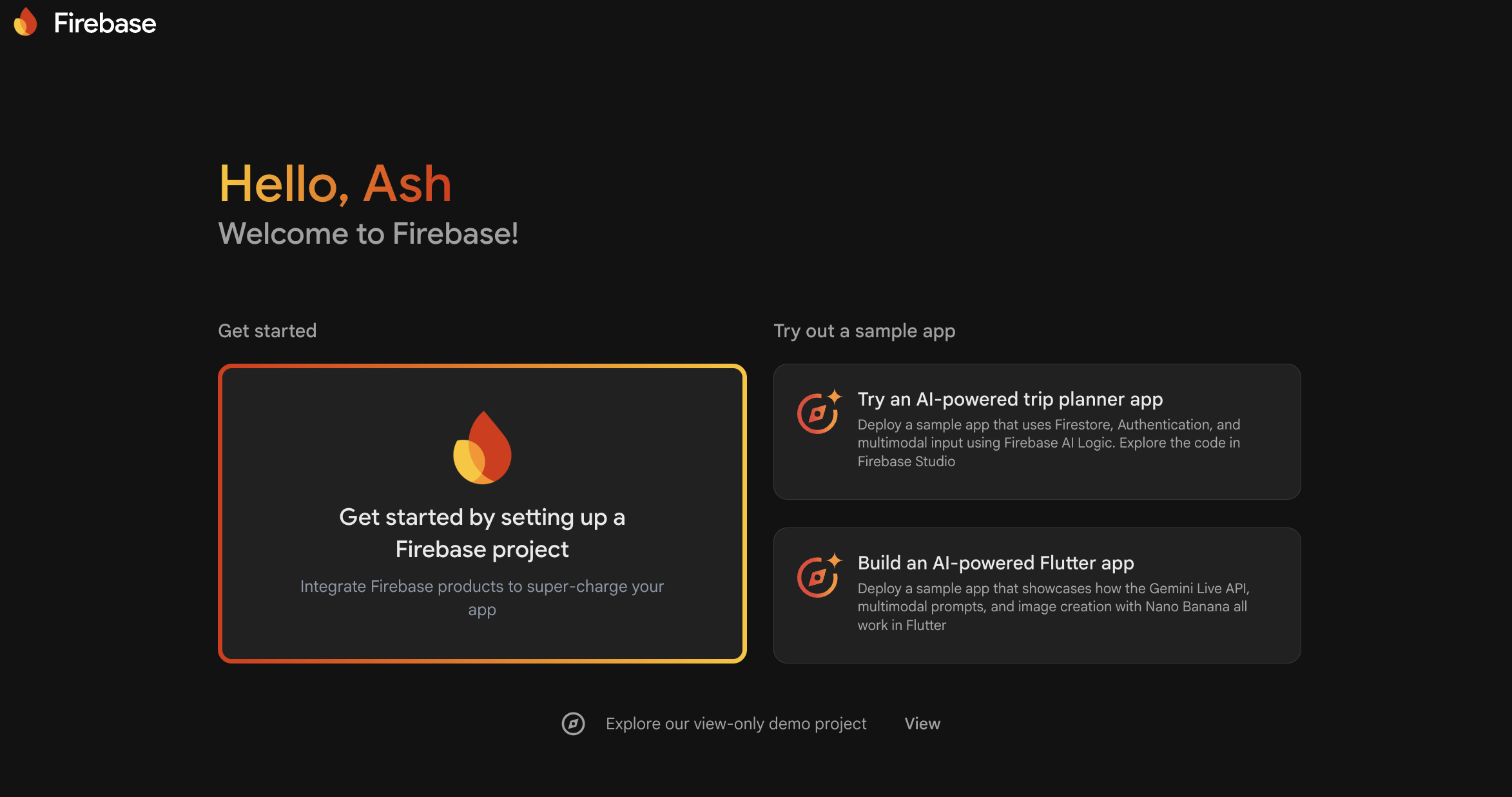
Click “Add project” and Enter project name (no spaces)
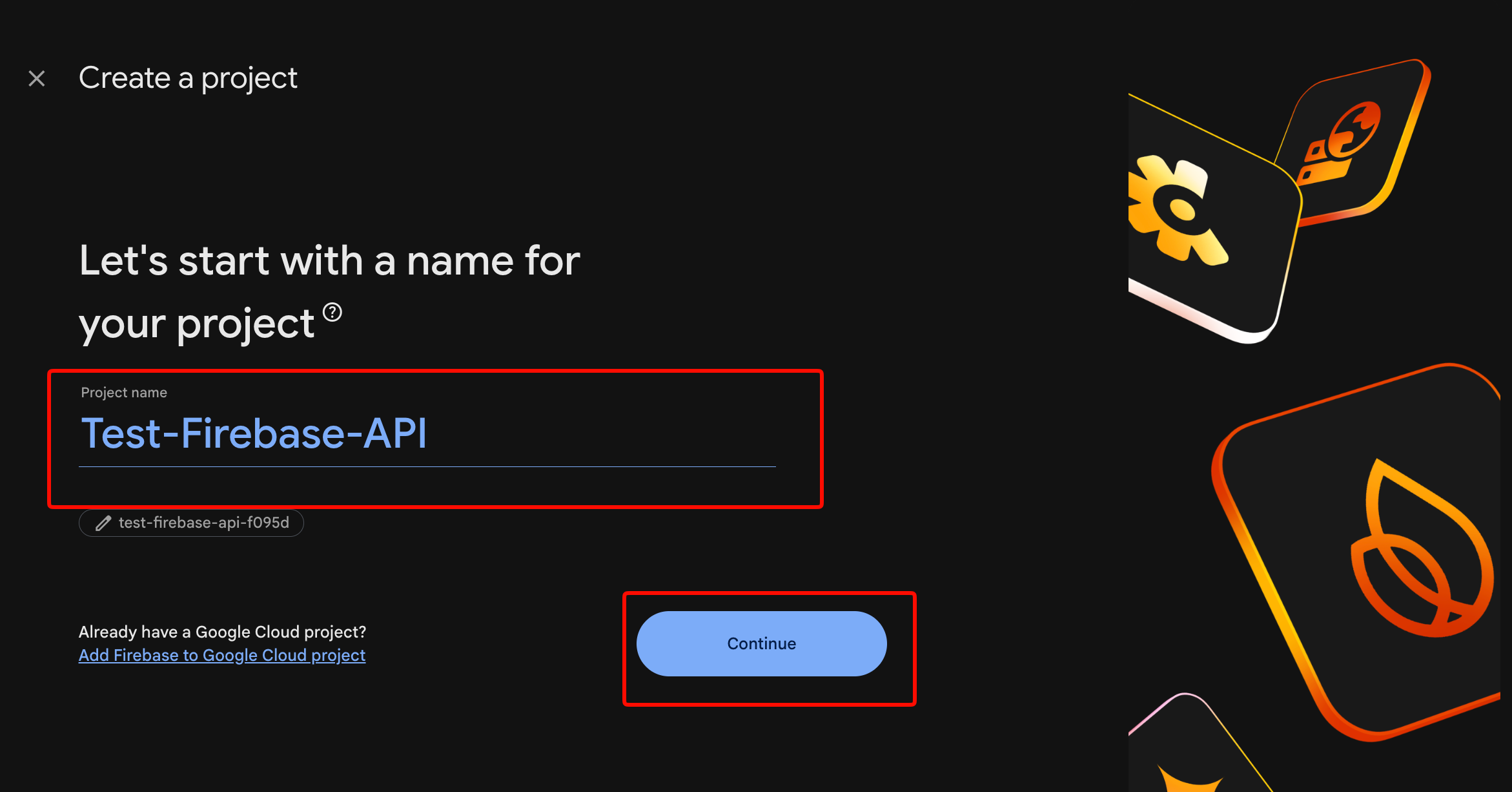
Enable Google Analytics (optional but recommended)
Click “Create project”
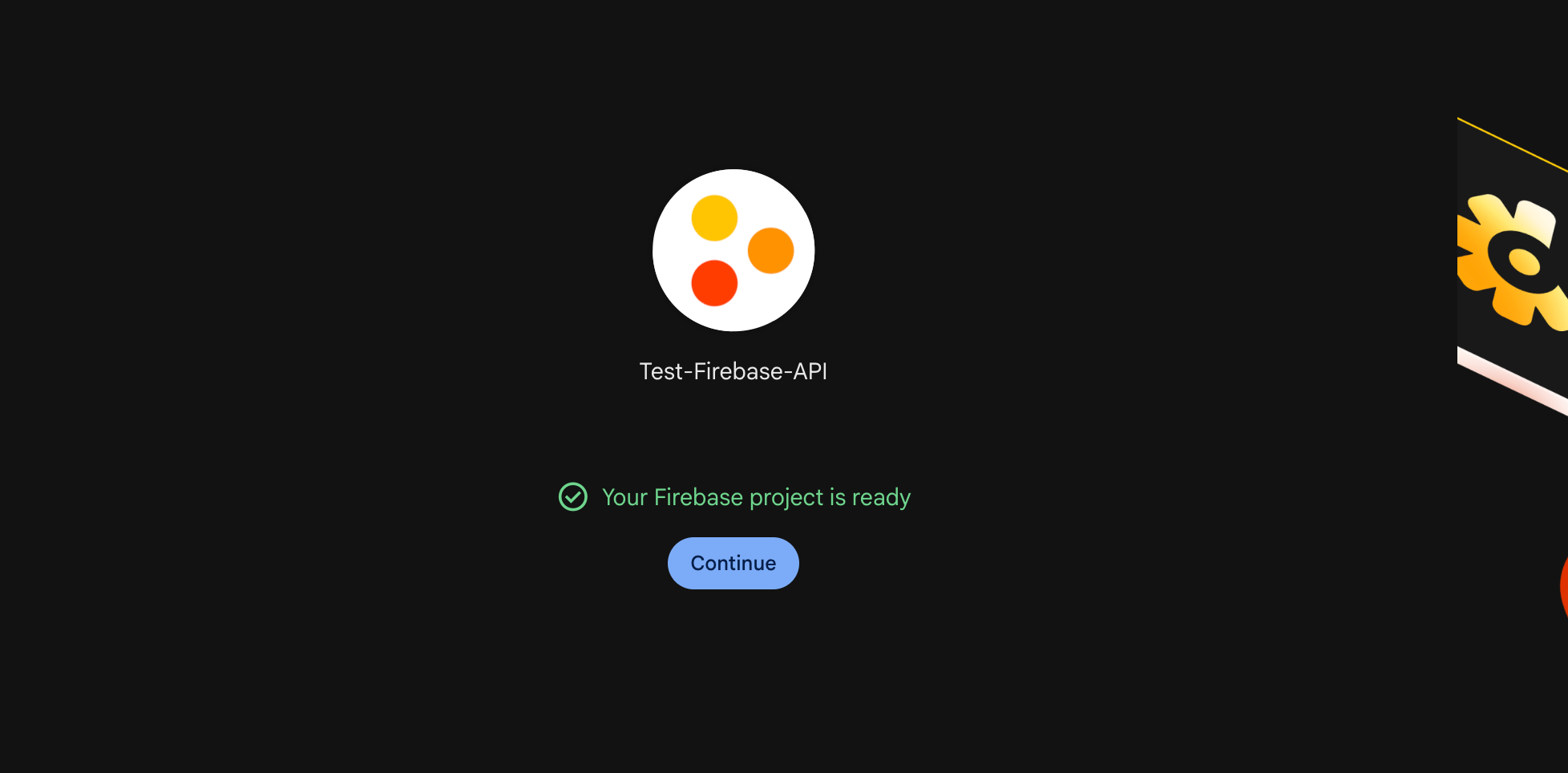
Wait 30 seconds for provisioning. You’ll see the project dashboard.
Step 2: Register Your App
For Web Apps:
// In Firebase Console > Project Settings > General
// Click "Add app" > Web icon

// Register web app
const firebaseConfig = {
  apiKey: "AIzaSyDxxxxxxxxxxxxxxxxxxxxxxxxxxxxx",
  authDomain: "your-app.firebaseapp.com",
  projectId: "your-app",
  storageBucket: "your-app.appspot.com",
  messagingSenderId: "123456789012",
  appId: "1:123456789012:web:abc123def456"
};

// Initialize Firebase
import { initializeApp } from 'firebase/app';
const app = initializeApp(firebaseConfig);
For iOS Apps:
Download GoogleService-Info.plist and add to Xcode project. Ensure “Target Membership” includes your app.
For Android Apps:
Download google-services.json and place in app/ directory. Add to build.gradle:
// Project-level build.gradle
buildscript {
    dependencies {
        classpath 'com.google.gms:google-services:4.4.0'
    }
}

// App-level build.gradle
plugins {
    id 'com.google.gms.google-services'
}
Step 3: Enable Authentication Methods
In Firebase Console > Authentication > Sign-in method:
- Email/Password: Enable for traditional sign-up
- Google: Add your SHA-1 certificate fingerprint (Android) or bundle ID (iOS)
- Apple: Required for iOS apps if you enable any social login
- Phone: Enable for SMS authentication (requires billing)
Step 4: Implement Authentication Flow
Email/Password Sign-Up:
import {
  createUserWithEmailAndPassword,
  getAuth,
  updateProfile
} from 'firebase/auth';

const auth = getAuth(app);

async function signUp(email, password, displayName) {
  try {
    const userCredential = await createUserWithEmailAndPassword(
      auth,
      email,
      password
    );

    // Set display name
    await updateProfile(userCredential.user, {
      displayName: displayName
    });

    console.log('User created:', userCredential.user.uid);
    return userCredential.user;
  } catch (error) {
    // Handle specific error codes
    switch (error.code) {
      case 'auth/email-already-in-use':
        throw new Error('This email is already registered');
      case 'auth/weak-password':
        throw new Error('Password must be at least 6 characters');
      case 'auth/invalid-email':
        throw new Error('Invalid email address');
      default:
        throw new Error('Sign up failed: ' + error.message);
    }
  }
}
Email/Password Sign-In:
import {
  signInWithEmailAndPassword,
  signOut
} from 'firebase/auth';

async function signIn(email, password) {
  try {
    const userCredential = await signInWithEmailAndPassword(
      auth,
      email,
      password
    );

    const user = userCredential.user;

    // Get ID token for API calls
    const idToken = await user.getIdToken();
    console.log('Auth token:', idToken);

    return user;
  } catch (error) {
    switch (error.code) {
      case 'auth/user-not-found':
        throw new Error('No account with this email');
      case 'auth/wrong-password':
        throw new Error('Incorrect password');
      case 'auth/too-many-requests':
        throw new Error('Too many attempts. Try again later');
      default:
        throw new Error('Sign in failed');
    }
  }
}

async function logOut() {
  await signOut(auth);
  console.log('User signed out');
}
Google Sign-In (Web):
import {
  GoogleAuthProvider,
  signInWithPopup
} from 'firebase/auth';

async function signInWithGoogle() {
  const provider = new GoogleAuthProvider();

  // Request additional scopes
  provider.addScope('email');
  provider.addScope('profile');

  try {
    const result = await signInWithPopup(auth, provider);
    const user = result.user;

    // Access Google OAuth token
    const credential = GoogleAuthProvider.credentialFromResult(result);
    const googleAccessToken = credential.accessToken;

    return user;
  } catch (error) {
    if (error.code === 'auth/popup-closed-by-user') {
      throw new Error('Sign-in cancelled');
    }
    throw new Error('Google sign-in failed');
  }
}
Step 5: Protect Routes with Auth State
import { onAuthStateChanged } from 'firebase/auth';

// Subscribe to auth state changes
onAuthStateChanged(auth, (user) => {
  if (user) {
    // User is signed in
    console.log('User:', user.email);
    // Redirect to dashboard
    window.location.href = '/dashboard';
  } else {
    // User is signed out
    console.log('No user');
    // Redirect to login
    window.location.href = '/login';
  }
});
Common Authentication Mistakes
Mistake 1: Not handling token refresh
Firebase SDK auto-refreshes tokens. But if you cache tokens server-side, they expire after 1 hour. Always verify tokens on each request or implement refresh logic.
Mistake 2: Exposing admin credentials in client code
Never use service account keys in client apps. Service accounts bypass security rules. Use them only in trusted server environments.
Mistake 3: Skipping email verification
import { sendEmailVerification } from 'firebase/auth';

async function sendVerificationEmail(user) {
  await sendEmailVerification(user);
  console.log('Verification email sent');
}

// Check verification status
if (!auth.currentUser.emailVerified) {
  console.log('Email not verified');
  // Restrict access
}
Firestore Database: Operations and Queries
Firestore is Firebase’s NoSQL database. Documents organize into collections. Queries scale automatically.
Data Structure
your-project (root)
└── users (collection)
    ├── userId123 (document)
    │   ├── name: "John"
    │   ├── email: "john@example.com"
    │   └── posts (subcollection)
    │       ├── postId1 (document)
    │       └── postId2 (document)
    └── userId456 (document)
Initialize Firestore
import { getFirestore } from 'firebase/firestore';

const db = getFirestore(app);
Create Documents
import {
  collection,
  addDoc,
  setDoc,
  doc
} from 'firebase/firestore';

// Option 1: Auto-generated ID
async function createUser(userData) {
  const docRef = await addDoc(collection(db, 'users'), userData);
  console.log('Document written with ID:', docRef.id);
  return docRef.id;
}

// Option 2: Custom ID
async function createUserWithId(userId, userData) {
  await setDoc(doc(db, 'users', userId), userData);
  console.log('Document written with custom ID:', userId);
}

// Usage
const userId = await createUser({
  name: 'Alice',
  email: 'alice@example.com',
  createdAt: new Date(),
  role: 'user'
});
Read Documents
import {
  getDoc,
  getDocs,
  query,
  where,
  orderBy,
  limit
} from 'firebase/firestore';

// Get single document
async function getUser(userId) {
  const docRef = doc(db, 'users', userId);
  const docSnap = await getDoc(docRef);

  if (docSnap.exists()) {
    return docSnap.data();
  } else {
    throw new Error('User not found');
  }
}

// Query with filters
async function getUsersByRole(role) {
  const q = query(
    collection(db, 'users'),
    where('role', '==', role),
    orderBy('createdAt', 'desc'),
    limit(10)
  );

  const querySnapshot = await getDocs(q);
  const users = [];

  querySnapshot.forEach((doc) => {
    users.push({ id: doc.id, ...doc.data() });
  });

  return users;
}

// Usage
const adminUsers = await getUsersByRole('admin');
console.log('Admin users:', adminUsers);
Update Documents
import {
  updateDoc,
  increment,
  arrayUnion,
  arrayRemove
} from 'firebase/firestore';

async function updateUser(userId, updates) {
  const userRef = doc(db, 'users', userId);
  await updateDoc(userRef, updates);
}

// Atomic operations
await updateUser('userId123', {
  loginCount: increment(1),
  tags: arrayUnion('premium', 'beta-tester'),
  lastLogin: new Date()
});

// Remove from array
await updateUser('userId123', {
  tags: arrayRemove('beta-tester')
});
Delete Documents
import { deleteDoc } from 'firebase/firestore';

async function deleteUser(userId) {
  await deleteDoc(doc(db, 'users', userId));
  console.log('User deleted');
}
Real-Time Listeners
import { onSnapshot } from 'firebase/firestore';

// Listen to single document
const unsubscribe = onSnapshot(
  doc(db, 'users', userId),
  (doc) => {
    console.log('User updated:', doc.data());
  },
  (error) => {
    console.error('Listen error:', error);
  }
);

// Listen to query results
const q = query(collection(db, 'posts'), where('published', '==', true));

const unsubscribeQuery = onSnapshot(q, (snapshot) => {
  const posts = snapshot.docs.map(doc => ({
    id: doc.id,
    ...doc.data()
  }));
  console.log('Published posts:', posts);
});

// Stop listening
unsubscribe();
unsubscribeQuery();
Firestore Security Rules
Without proper rules, anyone can read your data. Set rules in Firebase Console > Firestore > Rules:
rules_version = '2';
service cloud.firestore {
  match /databases/{database}/documents {

    // Helper function
    function isAuthenticated() {
      return request.auth != null;
    }

    function isOwner(userId) {
      return request.auth.uid == userId;
    }

    // Users collection
    match /users/{userId} {
      allow read: if isAuthenticated();
      allow create: if isAuthenticated() && isOwner(userId);
      allow update, delete: if isOwner(userId);
    }

    // Posts collection
    match /posts/{postId} {
      allow read: if true; // Public read
      allow create: if isAuthenticated();
      allow update, delete: if resource.data.authorId == request.auth.uid;
    }

    // Private subcollection
    match /users/{userId}/private/{document} {
      allow read, write: if isOwner(userId);
    }
  }
}
Query Limitations
Firestore has constraints:
- No OR queries (use
inwith array or multiple queries) - No wildcard searches (use Algolia or Meilisearch for full-text)
- Compound queries need indexes (Firestore auto-creates single-field)
- Limit to 30 disjunctions in
inqueries
Workaround for OR queries:
// Instead of: where('status', '==', 'active') OR where('status', '==', 'pending')

const activeQuery = query(
  collection(db, 'tasks'),
  where('status', '==', 'active')
);

const pendingQuery = query(
  collection(db, 'tasks'),
  where('status', '==', 'pending')
);

const [activeSnap, pendingSnap] = await Promise.all([
  getDocs(activeQuery),
  getDocs(pendingQuery)
]);

// Merge results in client
Cloud Functions: Serverless Backend Logic
Cloud Functions run backend code without managing servers. Trigger on database changes, HTTP requests, or scheduled events.
Setup
# Install Firebase CLI
npm install -g firebase-tools

# Login
firebase login

# Initialize functions in your project
firebase init functions

# Select: JavaScript, ESLint yes, Express.js no
HTTP Functions (API Endpoints)
// functions/index.js
const { onRequest } = require('firebase-functions/v2/https');
const admin = require('firebase-admin');

admin.initializeApp();
const db = admin.firestore();

// Public endpoint
exports.getPublicData = onRequest(async (req, res) => {
  res.set('Access-Control-Allow-Origin', '*');

  try {
    const snapshot = await db.collection('public').get();
    const data = snapshot.docs.map(doc => doc.data());
    res.json({ success: true, data });
  } catch (error) {
    res.status(500).json({ error: error.message });
  }
});

// Protected endpoint (verify auth token)
exports.getUserProfile = onRequest(async (req, res) => {
  res.set('Access-Control-Allow-Origin', '*');

  // Get token from Authorization header
  const authHeader = req.headers.authorization || '';
  const token = authHeader.split('Bearer ')[1];

  if (!token) {
    return res.status(401).json({ error: 'Unauthorized' });
  }

  try {
    // Verify token
    const decodedToken = await admin.auth().verifyIdToken(token);
    const userId = decodedToken.uid;

    // Get user data
    const userDoc = await db.collection('users').doc(userId).get();

    if (!userDoc.exists) {
      return res.status(404).json({ error: 'User not found' });
    }

    res.json({
      success: true,
      data: { id: userId, ...userDoc.data() }
    });
  } catch (error) {
    res.status(401).json({ error: 'Invalid token' });
  }
});
Deploy:
firebase deploy --only functions:getUserProfile
Call from client:
async function getUserProfile(token) {
  const response = await fetch(
    'https://us-central1-your-app.cloudfunctions.net/getUserProfile',
    {
      headers: {
        'Authorization': `Bearer ${token}`
      }
    }
  );

  const data = await response.json();
  return data;
}
Database Triggers
const { onDocumentWritten } = require('firebase-functions/v2/firestore');

// Trigger when user document changes
exports.onUserUpdate = onDocumentWritten(
  'users/{userId}',
  async (event) => {
    const userId = event.params.userId;
    const before = event.data?.before?.data();
    const after = event.data?.after?.data();

    // Check if email changed
    if (before?.email !== after?.email) {
      console.log(`User ${userId} email changed: ${before?.email} → ${after?.email}`);

      // Send notification email
      await admin.auth().getUser(userId);
      // Add your email logic here
    }
  }
);

// Trigger on new post creation
exports.onNewPost = onDocumentWritten(
  'posts/{postId}',
  async (event) => {
    const post = event.data?.after?.data();

    if (!post) return; // Document deleted

    // Check if this is a new document
    if (!event.data?.before?.exists) {
      console.log('New post created:', post.title);

      // Notify followers
      const followersSnap = await admin.firestore()
        .collection('users')
        .where('following', 'array-contains', post.authorId)
        .get();

      const notifications = followersSnap.docs.map(doc => ({
        userId: doc.id,
        postId: event.params.postId,
        type: 'new_post',
        createdAt: admin.firestore.FieldValue.serverTimestamp()
      }));

      const batch = admin.firestore().batch();
      notifications.forEach(notif => {
        const ref = admin.firestore().collection('notifications').doc();
        batch.set(ref, notif);
      });

      await batch.commit();
    }
  }
);
Scheduled Functions (Cron Jobs)
const { onSchedule } = require('firebase-functions/v2/scheduler');

// Run every day at midnight UTC
exports.dailyCleanup = onSchedule('every 24 hours', async (event) => {
  console.log('Running daily cleanup');

  // Delete old notifications (30+ days)
  const thirtyDaysAgo = new Date();
  thirtyDaysAgo.setDate(thirtyDaysAgo.getDate() - 30);

  const oldNotifs = await admin.firestore()
    .collection('notifications')
    .where('createdAt', '<', thirtyDaysAgo)
    .get();

  const batch = admin.firestore().batch();
  oldNotifs.forEach(doc => batch.delete(doc.ref));
  await batch.commit();

  console.log(`Deleted ${oldNotifs.size} old notifications`);
});
Environment Configuration
# Set environment variables
firebase functions:config:set \
  stripe.secret="sk_test_xxx" \
  email.api_key="key_xxx"

# Access in functions
const config = require('firebase-functions/config');
const stripe = require('stripe')(config.stripe.secret);
Cloud Storage: File Upload and Management
Store user uploads, images, and files with automatic CDN distribution.
Setup Storage Rules
// Firebase Console > Storage > Rules
rules_version = '2';
service firebase.storage {
  match /b/{bucket}/o {

    // User uploads folder
    match /users/{userId}/{allPaths=**} {
      allow read: if true; // Public read
      allow write: if request.auth.uid == userId;
      allow delete: if request.auth.uid == userId;
    }

    // Public assets
    match /public/{allPaths=**} {
      allow read: if true;
      allow write: if false; // Admin only via Firebase Console
    }
  }
}
Upload Files (Client)
import {
  getStorage,
  ref,
  uploadBytesResumable,
  getDownloadURL
} from 'firebase/storage';

const storage = getStorage(app);

async function uploadProfileImage(userId, file) {
  // Create storage reference
  const storageRef = ref(storage, `users/${userId}/profile/${file.name}`);

  // Upload file
  const uploadTask = uploadBytesResumable(storageRef, file);

  return new Promise((resolve, reject) => {
    uploadTask.on(
      'state_changed',
      (snapshot) => {
        // Track progress
        const progress = (snapshot.bytesTransferred / snapshot.totalBytes) * 100;
        console.log(`Upload: ${progress.toFixed(0)}%`);
      },
      (error) => {
        // Handle errors
        switch (error.code) {
          case 'storage/unauthorized':
            reject(new Error('You do not have permission'));
            break;
          case 'storage/canceled':
            reject(new Error('Upload cancelled'));
            break;
          default:
            reject(new Error('Upload failed'));
        }
      },
      async () => {
        // Upload completed
        const downloadURL = await getDownloadURL(uploadTask.snapshot.ref);
        console.log('File available at:', downloadURL);
        resolve(downloadURL);
      }
    );
  });
}

// Usage
const fileInput = document.querySelector('input[type="file"]');
const file = fileInput.files[0];

if (file) {
  const imageUrl = await uploadProfileImage(auth.currentUser.uid, file);

  // Save URL to Firestore
  await updateDoc(doc(db, 'users', auth.currentUser.uid), {
    profileImage: imageUrl
  });
}
Download Files
import { getDownloadURL } from 'firebase/storage';

async function getProfileImage(userId) {
  const imageRef = ref(storage, `users/${userId}/profile/avatar.png`);

  try {
    const url = await getDownloadURL(imageRef);
    return url;
  } catch (error) {
    if (error.code === 'storage/object-not-found') {
      return null; // No profile image
    }
    throw error;
  }
}
Delete Files
import { deleteObject } from 'firebase/storage';

async function deleteProfileImage(userId) {
  const imageRef = ref(storage, `users/${userId}/profile/avatar.png`);
  await deleteObject(imageRef);
  console.log('Profile image deleted');
}
Testing Firebase APIs with Apidog
Firebase provides REST APIs for all services. Testing them directly helps debug issues and understand the underlying requests.
Import Firebase REST API
- Open Apidog
- Create new project: “Firebase API”
- Import OpenAPI spec from Firebase documentation
- Or manually add endpoints:
Firestore REST Endpoint:
POST https://firestore.googleapis.com/v1/projects/{projectId}/databases/(default)/documents
Authorization: Bearer {oauth2_token}
Content-Type: application/json

{
  "fields": {
    "name": { "stringValue": "John" },
    "email": { "stringValue": "john@example.com" },
    "age": { "integerValue": 30 }
  }
}
Authentication Endpoint:
POST https://identitytoolkit.googleapis.com/v1/accounts:signInWithPassword?key={api_key}
Content-Type: application/json

{
  "email": "user@example.com",
  "password": "secret123",
  "returnSecureToken": true
}
Test Authentication Flow
- Create request: “Sign In”
- Set method: POST
- Add email/password in body
- Save response token as environment variable
- Use
{{token}}in subsequent requests
Debug Security Rules
Use the Firebase Emulator Suite for local testing:
# Start emulator
firebase emulators:start

# Test against local Firestore
# http://localhost:8080
Production Best Practices
1. Implement Proper Error Handling
// Retry logic for transient failures
async function firestoreWithRetry(operation, maxRetries = 3) {
  for (let i = 0; i < maxRetries; i++) {
    try {
      return await operation();
    } catch (error) {
      if (
        error.code === 'unavailable' ||
        error.code === 'deadline-exceeded'
      ) {
        const delay = Math.pow(2, i) * 1000; // Exponential backoff
        await new Promise(resolve => setTimeout(resolve, delay));
        continue;
      }
      throw error;
    }
  }
}
2. Optimize Query Performance
Add composite indexes for multi-field queries:
// This query needs a composite index
const q = query(
  collection(db, 'posts'),
  where('category', '==', 'tech'),
  where('views', '>', 1000),
  orderBy('views', 'desc')
);
Firestore prompts you to create the index with a direct link when you run this query.
3. Batch Operations
import { writeBatch } from 'firebase/firestore';

async function bulkUpdate(userIds, updates) {
  const batch = writeBatch(db);

  userIds.forEach(id => {
    const ref = doc(db, 'users', id);
    batch.update(ref, updates);
  });

  await batch.commit();
  console.log(`Updated ${userIds.length} users`);
}

// Max 500 operations per batch
4. Monitor Costs
Firebase pricing:
| Service | Free Tier | Paid |
|---|---|---|
| Firestore | 50K reads/day | $0.036/100K reads |
| Storage | 5GB | $0.023/GB |
| Functions | 2M invocations | $0.40/1M |
| Auth | 10K/month | $0.0055/100K |
Set budget alerts in Google Cloud Console.
5. Secure Service Accounts
// WRONG: Never do this in client code
admin.initializeApp({
  credential: admin.credential.cert(require('./serviceAccountKey.json'))
});

// CORRECT: Use in server environment only
const serviceAccount = JSON.parse(process.env.FIREBASE_SERVICE_ACCOUNT);
admin.initializeApp({
  credential: admin.credential.cert(serviceAccount)
});
6. Handle Offline Scenarios
// Enable offline persistence (web)
import { enableMultiTabIndexedDbPersistence } from 'firebase/firestore';

enableMultiTabIndexedDbPersistence(db)
  .catch((err) => {
    if (err.code === 'failed-precondition') {
      // Multiple tabs open
    } else if (err.code === 'unimplemented') {
      // Browser doesn't support
    }
  });

// Listen to connectivity
import { onSnapshot } from 'firebase/firestore';

onSnapshot(doc(db, 'status', 'online'), (doc) => {
  if (!doc.exists()) {
    console.log('You are offline');
    // Show offline UI
  }
});
Common Firebase API Issues and Solutions
Issue 1: Permission Denied Errors
Symptom: Error: 7 PERMISSION_DENIED
Cause: Security rules block the operation
Fix:
- Check rules in Firebase Console
- Verify
request.auth.uidmatches expected user - Test rules with Rules Playground
Issue 2: Token Expiration
Symptom: Error: ID token expired
Fix:
// Force token refresh
const user = auth.currentUser;
if (user) {
  await user.getIdToken(true); // Force refresh
}
Issue 3: Cold Start Latency
Symptom: Cloud Functions take 2-5 seconds on first call
Fix:
// Keep functions warm with scheduled pings
exports.keepWarm = onSchedule('every 60 seconds', async () => {
  await fetch('https://your-function.cloudfunctions.net/health');
});
Issue 4: Query Returns Empty Results
Symptom: Query should return data but returns empty array
Cause: Missing index or wrong field order
Fix: Check Firestore Console > Indexes for required composite indexes.
Real-World Use Cases
Fintech App: Real-Time Transaction Updates
A payment startup used Firebase Firestore to build real-time transaction notifications. When a payment processes, Cloud Functions trigger updates to all connected admin dashboards within 200ms. Result: 40% reduction in support tickets about “pending” transactions.
E-commerce: Inventory Synchronization
An online retailer syncs inventory across web, iOS, and Android using Firestore listeners. When stock changes, all clients update automatically. Offline persistence ensures warehouse workers can scan items without connectivity, with automatic sync when reconnected.
SaaS: Multi-Tenant Authentication
A B2B platform uses Firebase Auth with custom claims for role-based access. Admin users get elevated permissions via Cloud Functions that validate against Firestore tenant configurations. Single codebase serves 500+ organizations with isolated data.
Conclusion
Firebase API integration involves four core services:
- Authentication: Email, Google, Apple sign-in with JWT tokens
- Firestore: NoSQL database with real-time listeners and security rules
- Cloud Functions: Serverless backend triggered by events or HTTP
- Storage: File uploads with CDN distribution
You’ve learned authentication flows, database operations, function deployment, and file management. You’ve seen production patterns: error handling, batching, offline support, and security.
FAQ
Is Firebase free to use?
Yes, Firebase has a generous free tier (Spark Plan) including 5GB storage, 50K Firestore reads/day, 2M Cloud Function invocations, and 10K Auth users/month. Paid plans (Blaze) use pay-as-you-go pricing.
Can I use Firebase with existing databases?
Yes. Use Firebase Extensions to sync with PostgreSQL, MySQL, or MongoDB. Or call external APIs from Cloud Functions to integrate with existing systems.
How do I migrate from Firebase to another platform?
Export data using Firestore export functions or the Firebase CLI. For large datasets, use the Dataflow export pipeline. Migration complexity depends on your data structure.
Does Firebase support GraphQL?
Not natively. Use third-party solutions like firestore-graphql or build a GraphQL layer with Cloud Functions and Apollo Server.
Can I use Firebase on-premise?
No. Firebase is Google Cloud-only. For self-hosted alternatives, consider Appwrite, Supabase, or Nhost.
How do I handle file uploads larger than 100MB?
Use resumable uploads with chunking. The Firebase SDK handles this automatically. For very large files, use Google Cloud Storage directly with signed URLs.
What happens if I exceed Firestore query limits?
Queries fail with FAILED_PRECONDITION error. Add required indexes or restructure queries. Firestore provides direct links to create missing indexes in the error message.
Is Firebase GDPR compliant?
Yes, Firebase offers GDPR-compliant data processing. Enable data residency in specific regions, implement user data export/deletion, and sign Google’s Data Processing Amendment.