OpenAI releases models that advance AI capabilities, and GPT-5.1 represents the newest iteration. Developers integrate this API to leverage improved reasoning and interaction features. This article outlines the technical steps to access and use the GPT-5.1 API effectively.
Small adjustments in API management often lead to substantial efficiency gains. Thus, grasping GPT-5.1's features sets the stage for successful implementation.
Understanding GPT-5.1: Technical Specifications and Improvements
GPT-5.1 includes two variants: GPT-5.1 Instant and GPT-5.1 Thinking. Each optimizes for distinct scenarios, boosting intelligence and response quality.
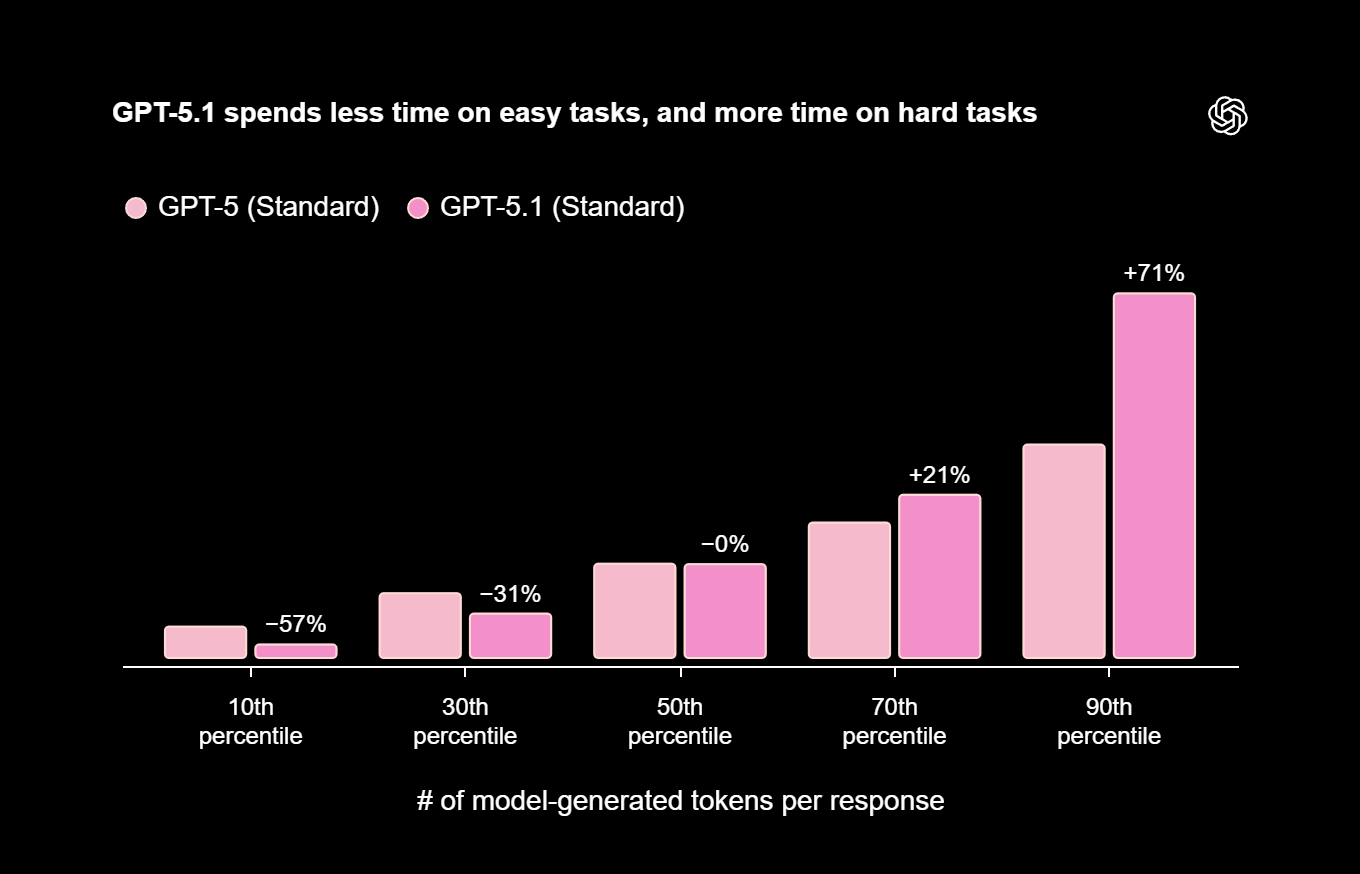
GPT-5.1 Instant produces conversational, adaptive responses. It reasons deeply on complex tasks but handles simple ones quickly. For example, it scores higher on benchmarks like AIME 2025 and Codeforces by adjusting computation dynamically.
GPT-5.1 Thinking emphasizes advanced reasoning, processing easy tasks faster and complex ones with persistence—up to twice the efficiency of predecessors. It explains concepts clearly, such as BABIP in baseball: a metric for hit frequency on balls in play, with formulas and caveats.
Both variants use adaptive reasoning via GPT-5.1 Auto routing. They follow instructions precisely, like limiting responses to six words for travel suggestions. GPT-5.1 excels in empathetic interactions, offering practical advice post-incidents.
Technically, while parameter details remain undisclosed, metrics show superior performance in math, coding, and natural language. This makes GPT-5.1 ideal for chatbots, analysis, and generation tools.
Moving forward, prepare your setup to access the API.
Prerequisites for Accessing the GPT-5.1 API
Developers start by creating an OpenAI account on their website with a valid email. This provides dashboard access for API keys.
Upgrade to a paid plan—Pro, Plus, Go, or Business—for immediate GPT-5.1 availability. Free tiers follow later, but subscriptions offer higher limits and priority.
Set up your environment with compatible languages like Python or Node.js. Install the OpenAI SDK: pip install openai for Python.
Secure your API key by storing it in environment variables, avoiding repository exposure. Review usage policies to prevent violations, such as harmful content generation.
With these in place, activate the API seamlessly.
Step-by-Step Guide to Obtaining GPT-5.1 API Access
Log into your OpenAI developer dashboard and select models. Launched November 12, 2025, GPT-5.1 becomes available via endpoints like gpt-5.1-chat-latest for Instant and GPT-5.1 for Thinking.
Authenticate requests with your key. A Python example:
import openai

openai.api_key = 'your-api-key-here'

response = openai.ChatCompletion.create(
    model="gpt-5.1-chat-latest",
    messages=[{"role": "user", "content": "Explain quantum computing basics."}]
)

print(response['choices'][0]['message']['content'])
This initiates a query and processes the output.
Manage rate limits with exponential backoff. Test in the playground for quick iterations, then add error handling for issues like RateLimitError.
For enhanced testing, incorporate Apidog.
Integrating Apidog for GPT-5.1 API Management
Apidog supports API lifecycle management, complementing GPT-5.1 integrations. Download and install it freely from their site.
Create a project, import OpenAI specs, and set authentication with your key as a Bearer Token.
Build requests for /v1/chat/completions, specifying GPT-5.1 models. Debug in real-time, inspecting JSON responses.
Automate tests with scripts for assertions, like checking 'content' fields. Share projects for team collaboration and use mocks for early prototyping.
Apidog bridges access to deployment, optimizing workflows.
Advanced Configuration Options for GPT-5.1 API
Customize with parameters: lower temperature for deterministic outputs, max_tokens for length control.
Fine-tune by uploading JSONL datasets via API, adapting to specific needs.
Monitor token usage in the dashboard; log metrics for analysis.
Apply moderation endpoints to filter content. Use batch API for high-volume processing.
Integrate with vector databases for RAG, enhancing context-aware responses.
These options refine GPT-5.1 applications.
Use Cases and Examples with GPT-5.1 API
In support, GPT-5.1 powers empathetic chatbots resolving queries.
For content, it generates articles or code: prompt for outlines, then expand.
Education benefits from adaptive tutors explaining concepts.
E-commerce personalizes recommendations based on preferences.
Gaming uses it for immersive NPC dialogues.
Examples include coding algorithms with explanations or statistical analyses with interpretations.
These demonstrate GPT-5.1's practical versatility.
Best Practices for GPT-5.1 API Implementation
Document specs using Apidog. Craft clear prompts with system roles.
Estimate costs with token calculators. Anonymize data for privacy.
Update SDKs regularly. Test across environments.
Monitor performance and engage communities for insights.
These ensure reliable deployments.
Troubleshooting Common GPT-5.1 API Issues
Rate limits cause 429 errors—retry with backoff.
401 indicates invalid keys—regenerate them.
Fallback to older models during unavailability.
Validate JSON to avoid parse errors.
Use Apidog for debugging.
Address issues methodically.
Comparing GPT-5.1 to Previous Models
GPT-5.1 outperforms GPT-4 in reasoning and tone. It excels in math benchmarks.
Versus GPT-5, it doubles efficiency in thinking adjustments.
API structure evolves minimally, easing upgrades.
Future Prospects for GPT-5.1 API Enhancements
Expect multimodal features and finer reasoning controls.
Integrations with platforms like Azure expand options.
Stay updated via announcements.
Security and Ethical Considerations in Using GPT-5.1 API
Encrypt data and minimize storage.
Test for biases; comply with GDPR.
Use safety guidelines.
Build ethical AI.
Scaling GPT-5.1 API in Enterprise Environments
Distribute traffic with balancers. Containerize for deployment.
Monitor with analytics tools.
Automate via CI/CD.
Scale effectively.
Community Resources and Support for GPT-5.1 Developers
Participate in OpenAI forums and GitHub.
Attend webinars; join Apidog groups.
Accelerate development.
Optimizing Performance with GPT-5.1 API Parameters
Tune top_p and penalties for quality.
Iterate experiments.
Migrating from Older Models to GPT-5.1 API
Update endpoints; retest prompts.
Monitor variances.
Transition smoothly.
Cost Management Strategies for GPT-5.1 API Usage
Batch and cache requests.
Select efficient variants.
Control expenses.
Advanced Prompt Engineering for GPT-5.1
Employ chain-of-thought and few-shot.
Refine for optimal results.
Integrating GPT-5.1 API with Web Frameworks
Use hooks in React; routes in Flask.
Create interactive apps.
Data Privacy in GPT-5.1 API Interactions
Anonymize inputs; delete logs.
Adhere to standards.
Handling Edge Cases in GPT-5.1 API Requests
Test ambiguities; manage contexts.
Ensure stability.
This guide empowers developers to utilize GPT-5.1 efficiently. With Apidog, integrations become robust and scalable in the AI ecosystem. (Word count: 1247)