Google just shipped Antigravity 2.0 at I/O 2026, and it is no longer one app. It is now a desktop IDE, a CLI, an SDK, a Managed Agents tier inside the Gemini API, and an enterprise deployment path through the Gemini Enterprise Agent Platform. The original Antigravity that launched in November 2025 was a single editor. The 2.0 release is a full agent-first development stack.
If you build APIs and ship code, this matters. The new desktop app runs dynamic subagents in parallel, schedules background tasks, and takes voice commands. The CLI brings the same agent harness to your terminal. The SDK lets you host agents on your own infrastructure. Managed Agents in the Gemini API means you can call agentic workflows the way you currently call a chat completion. We’ve been tracking this space for months, and the leap from 1.0 to 2.0 is the most aggressive product expansion Google has done outside the Gemini model family.
TL;DR
Google Antigravity 2.0, announced at I/O 2026 on May 19, expands the original IDE into a five-surface platform: desktop app, CLI, SDK, Managed Agents API, and Enterprise Agent Platform. New features include dynamic subagents for parallel workflows, scheduled background tasks, native voice commands, and integrations with Google AI Studio, Android, and Firebase. Pricing introduces a $100 AI Ultra tier with 5x the Pro plan’s limits.
What’s new in Antigravity 2.0
The original Antigravity launched in November 2025 as a free public preview on macOS, Windows, and Linux. It was an AI-powered IDE with an Editor View, a Manager Surface for orchestrating agents asynchronously, Artifacts for verification, and a Knowledge Base for context. Models supported: Gemini 3 Pro with generous rate limits, Anthropic’s Claude Sonnet 4.5, and OpenAI’s GPT-OSS.
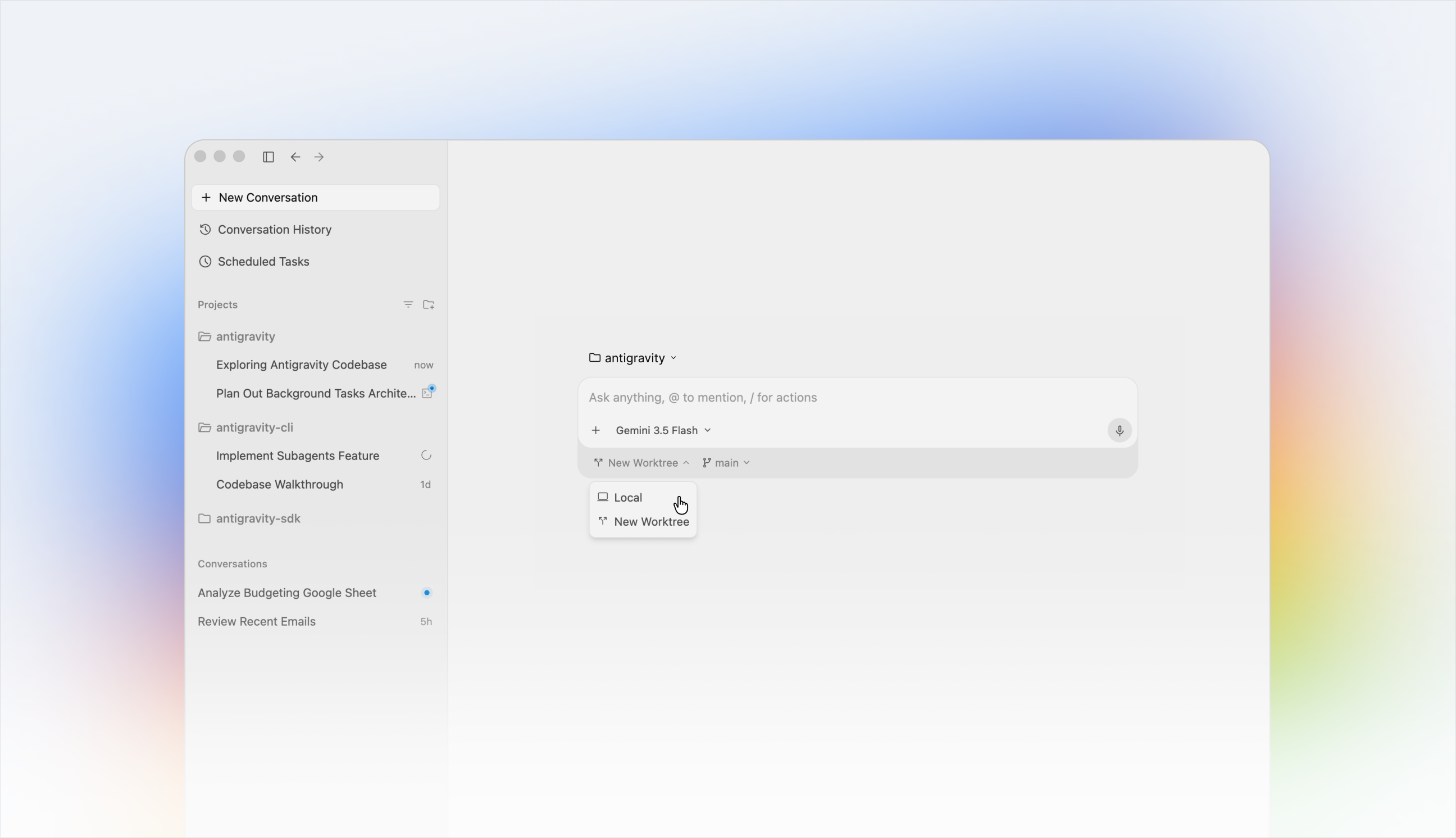
2.0 keeps all that and adds the rest of the stack.
| Surface | What it is | Who it is for |
|---|---|---|
| Desktop App 2.0 | Updated IDE with dynamic subagents, scheduled tasks, voice commands | Individual developers |
| Antigravity CLI | Terminal-based agent creation, no GUI | Power users, automation |
| Antigravity SDK | Programmatic access to Google’s agent harness | Teams hosting custom agents |
| Managed Agents (Gemini API) | API endpoints for hosted agentic workflows | Anyone calling Gemini today |
| Gemini Enterprise Agent Platform | Enterprise deployment path | Google Cloud customers |
That is more product surface in one release than most Google launches ship in a year. Let’s walk through each.
The desktop app: dynamic subagents, scheduling, voice
The flagship is still the desktop app. What changed in 2.0:
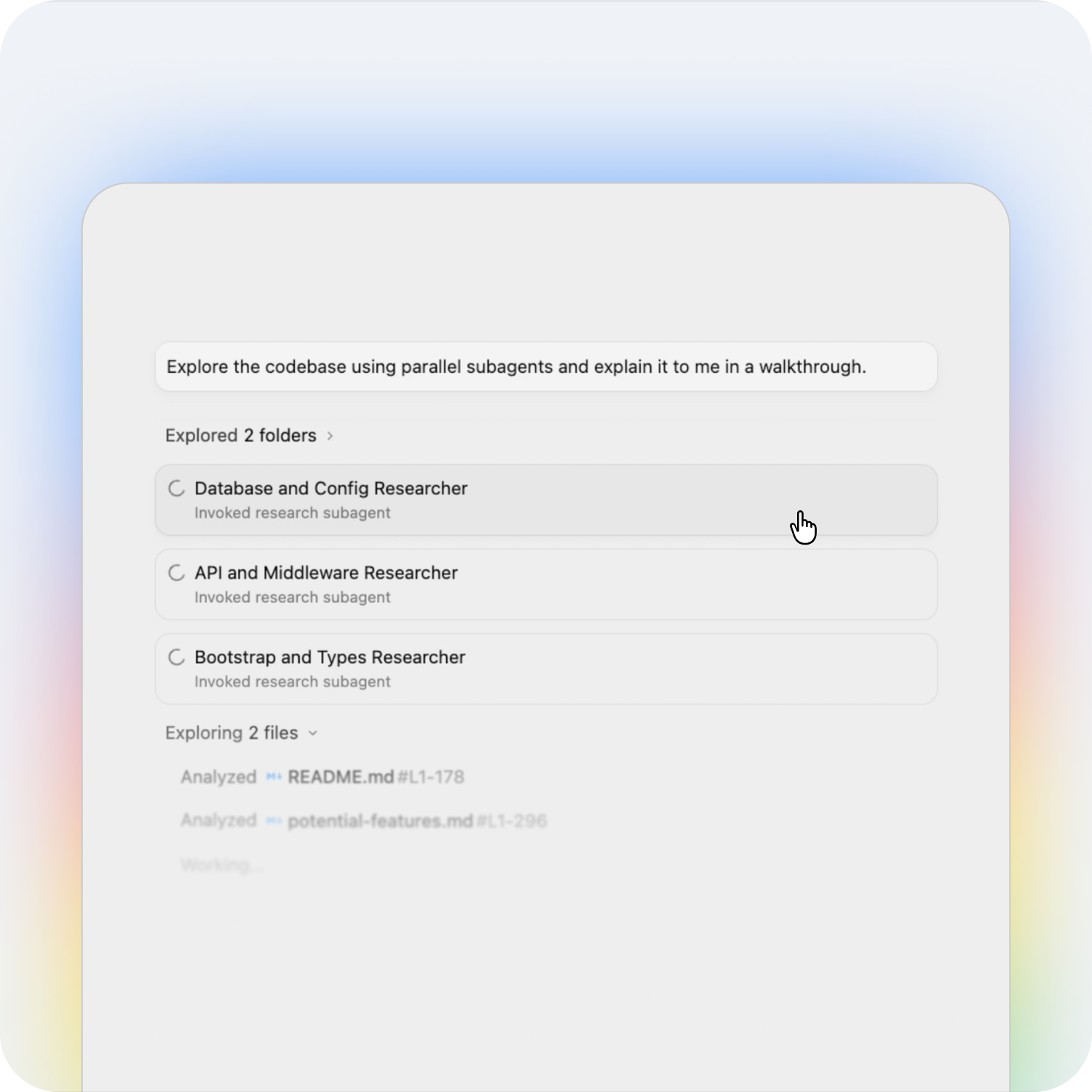
Dynamic subagents. In 1.0, the Manager Surface let you watch one agent at a time and dispatch others asynchronously. In 2.0, agents can spawn subagents to parallelize work. If you ask the main agent to “audit the auth flow across all microservices,” it splits the work into a tree of subagents, each scoped to one service, all running concurrently. Results stream back to the Manager Surface.
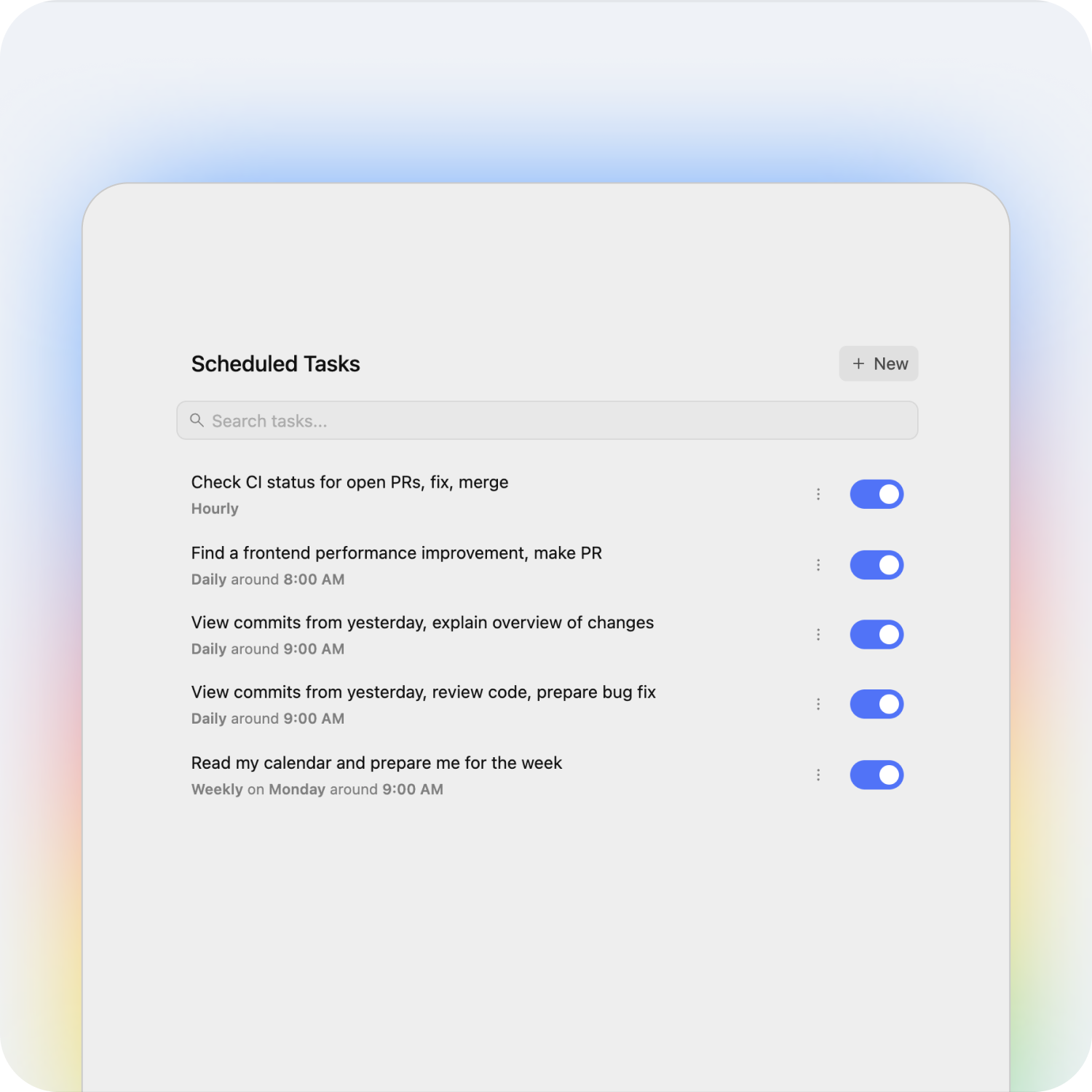
Scheduled tasks. Background automation now has a first-class place in the editor. Set a cron-like schedule, and the agent runs without you opening the app. Common patterns: nightly dependency upgrades, weekly security scans, refactoring sweeps the moment you push a release tag.
Native voice commands. Dictate code, ask the agent for a diff, run tests by saying so. Consistent with Google’s recent voice rollouts across Gmail and Docs.
New integrations. Google AI Studio (export projects in and out), Android (build mobile apps with native agent loops), and Firebase (deploy with no context switch).
The desktop app is still free for individuals on the Pro plan, with the new Ultra plan stacking 5x the limits at $100 a month and Ultra Premium at $200 a month for 20x the limits. The $200 price is a reduction from $250 in the previous tier.
The Antigravity CLI
The CLI is the most interesting addition for the Apidog crowd. It is a terminal binary that exposes the same agent harness Google uses internally, without the GUI. Workflows that previously required the desktop app now run as scripts:
antigravity agent run "refactor the rate-limit middleware" \
  --repo ./services/api \
  --model gemini-3.5-flash
This is a different shape from Claude Code and OpenAI Codex. Claude Code is a single-agent CLI; Antigravity CLI orchestrates multiple agents from the terminal, can dispatch subagents, and ships with the same scheduling primitive as the desktop.
If you live in tmux and view the IDE as overhead, this is the surface for you. You can wire it into pre-commit hooks, CI pipelines, and pre-deploy gates. Pair it with Apidog running headless and you can build an end-to-end agentic CI pipeline that writes tests, runs them against a mock server, and merges only if the contracts hold.
The Antigravity SDK
The SDK exposes the agent harness programmatically. You define your own agent behaviors (system prompts, tool catalogs, allowed actions) and host them anywhere: your own EC2, Vertex AI, or on-prem.
A typical agent definition:
from antigravity import Agent, Tool

agent = Agent(
    model="gemini-3.5-flash",
    tools=[Tool.shell, Tool.code_edit, Tool.web_search],
    system="You are a backend code reviewer. Block any PR that ships SQL without an index.",
)
result = agent.run("review PR #421")
print(result.artifacts)
The SDK is optimized for Gemini models, which means lower latency and lower cost when you stick with Google’s family. Other providers work, but Gemini gets the cache hits and the tool-call optimization. Same pattern we documented in the agentic workflow guide.
Managed Agents in the Gemini API
This is the big one for API consumers. Managed Agents adds a new endpoint family to the Gemini API where you describe a goal, list permitted tools, and Google runs the agent for you. Think of it like serverless agents: you pay for runs, Google handles the loop, scaling, retries, and tool execution.
This sits between two existing patterns:
- Direct model calls. You manage the loop, the tools, and the state. Cheapest, most flexible, most code.
- Managed Agents. You declare the goal and tools. Google manages the loop. Less code, more guardrails.
- Desktop / CLI / SDK. You run the agent locally. Full control, no managed scaling.
Most production teams will mix the three. Use direct calls for high-volume, single-step inference. Use Managed Agents for long-running tasks where reliability matters more than per-call cost. Use the SDK for sensitive workloads that can’t leave your VPC.
If you’re already calling Gemini 3 Pro through Apidog, the same auth and base URL work for Managed Agents. Add the new endpoint to your Apidog collection, mock the response shape, and start integrating before you spend real budget on long-running runs.
Enterprise: Antigravity in Gemini Enterprise Agent Platform
For organizations on Google Cloud, Antigravity now plugs directly into the Gemini Enterprise Agent Platform. That means:
- Single-sign-on through Google Workspace
- Audit logs of every agent action
- VPC-Service-Controls scopes
- BigQuery for run analytics
- Cloud KMS for tool credential storage
The interesting part is that the same agent definitions move between the SDK (developer-hosted) and the Enterprise Platform (Google-hosted). Build locally, ship to the platform, and your security team gets the controls they need without you rewriting the agent.
This was the missing piece in our original Antigravity vs Cursor comparison. Cursor has no enterprise platform of this depth. Windsurf is closer but lacks the Google Cloud surface. For Google Cloud shops, this changes the math.
Pricing tiers explained
Three plans, two of them updated at I/O 2026:
| Plan | Monthly | Limits |
|---|---|---|
| Pro | Included in AI Pro | Baseline |
| AI Ultra | $100 | 5x Pro limits |
| AI Ultra Premium | $200 (down from $250) | 20x Pro limits |
For most solo developers, Pro is enough for an exploratory week. Heavy users (multi-repo refactors, scheduled background sweeps, voice-driven sessions) will hit Pro’s limits fast. $100 buys you headroom; $200 is the team plan in disguise.
A free tier still exists for the original public preview features. See our Antigravity 1.0 coverage for the baseline.
Antigravity vs Cursor, Windsurf, and Claude Code
A direct comparison of the leading agentic dev surfaces:
| Feature | Antigravity 2.0 | Cursor | Windsurf | Claude Code |
|---|---|---|---|---|
| Desktop IDE | Yes (standalone) | Yes (VS Code fork) | Yes (VS Code fork) | No |
| CLI tool | Yes (new in 2.0) | No | No | Yes |
| SDK / programmatic API | Yes (new in 2.0) | No | Limited | Yes (Agent SDK) |
| Multi-agent orchestration | Yes (Manager + dynamic subagents) | Composer (single agent) | Cascade (single agent) | Subagents |
| Scheduled background tasks | Yes (new in 2.0) | No | No | Continuously-running mode |
| Voice commands | Yes (new in 2.0) | No | No | No |
| Managed-agents API | Yes (Gemini API) | No | No | Claude Managed Agents |
| Enterprise platform | Yes (Gemini Enterprise) | Cursor for Business | Windsurf Enterprise | Anthropic Enterprise |
| Default model | Gemini 3.5 Flash | Claude Sonnet 4.5 | Various | Claude Sonnet 4.5 |
| Other models supported | Claude, GPT-OSS | Claude, GPT, Gemini | Claude, GPT | Mostly Claude |
For agent-orchestration depth, Antigravity 2.0 now leads. For pure code-completion experience, Cursor Composer 2.5 still has the edge. For headless CLI agents, Claude Code has the maturity. The decision usually comes down to which model family you’re already paying for and whether you need scheduled background work.
Wiring Antigravity 2.0 into Apidog
You will hit Antigravity from Apidog for three workflows:
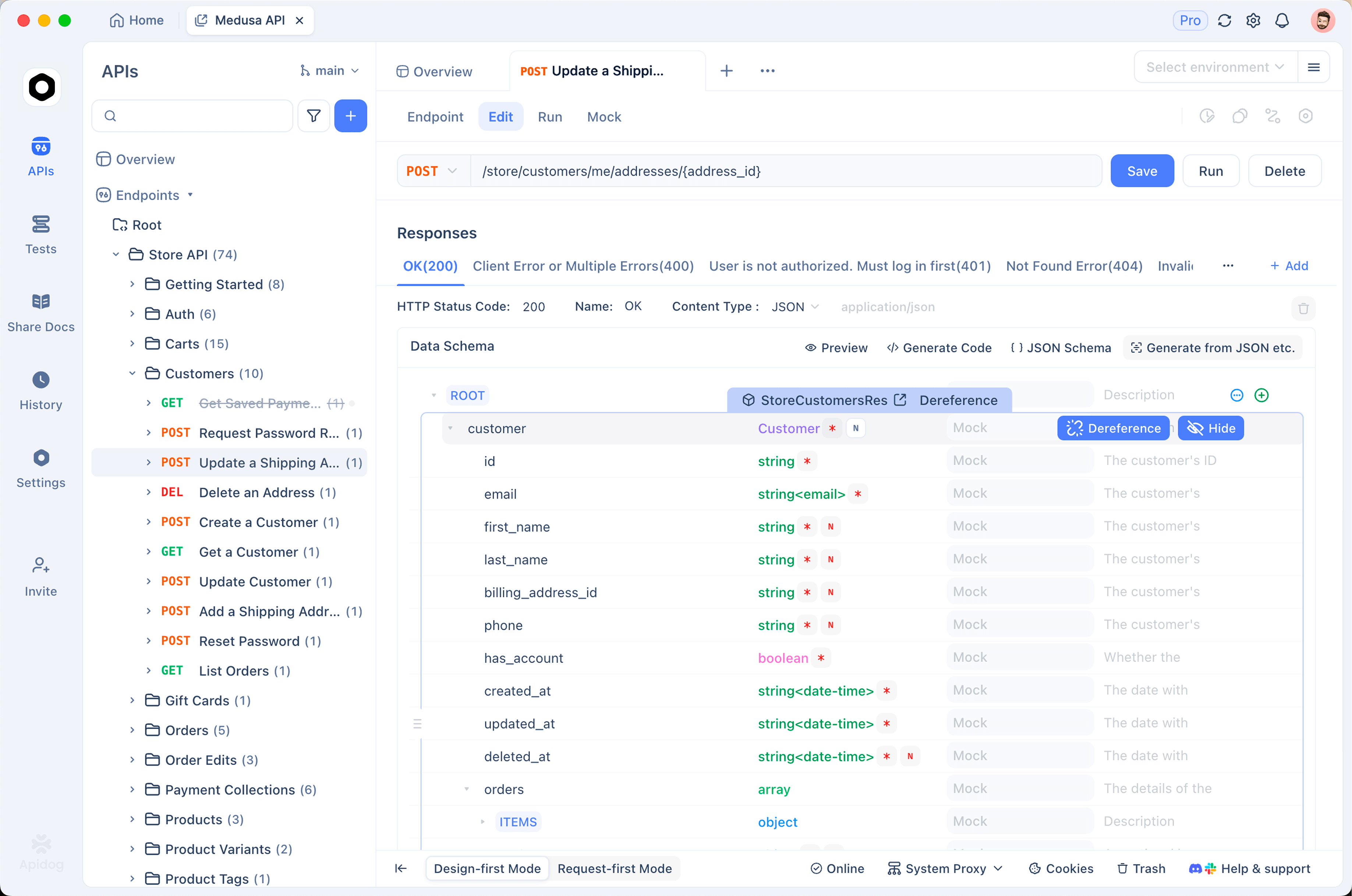
1. Calling Managed Agents. Add https://generativelanguage.googleapis.com/v1beta/agents:run (projected name) to your Gemini collection. Set auth to x-goog-api-key. Body shape mirrors the existing generateContent schema, with tools and goal fields added.
2. Testing agent-generated APIs. Antigravity’s desktop and CLI agents write code. That code ships endpoints. Use Apidog to validate those endpoints meet your OpenAPI spec before you trust the agent. Run contract tests, schema diffs, and visual assertions on every agent-generated PR.
3. Mocking long-running agent responses. Managed Agents can take minutes. Use Apidog’s smart mock to return a canned “completed” payload during frontend development. Swap in the live endpoint once your UI handles async correctly.
Download Apidog, import your Gemini API collection, and add Antigravity Managed Agents as a new request group. The pattern is the same as wiring up Gemini 3 or Gemini Omni earlier this month.
Best practices and gotchas
Practical lessons from the first week of 2.0:
- Cap subagent depth. Dynamic subagents can spawn subagents. Without a depth cap, you’ll blow through your Ultra budget on recursive plans. Set a max in the agent config.
- Use scheduled tasks for idempotent work only. Anything that depends on prior state needs locking. Cron-like schedules will misfire and run twice; design for that.
- Voice is faster than typing for short prompts. It is worse for long, multi-line specs. Mix it.
- Don’t migrate from Cursor in a panic. The Editor View in Antigravity is good but different. Give your team a week of parallel use before flipping the switch.
- Managed Agents bills per run, not per token. Long agents are expensive. Cache aggressively. Apidog can help by mocking expensive runs during development.
- The CLI is preview-quality on Linux. macOS and Windows are smoother. Watch the release notes.
Frequently asked questions
What is Google Antigravity 2.0?
Antigravity 2.0 is the May 2026 release of Google’s agent-first development platform. It expands the original IDE into a full stack: desktop app, CLI, SDK, Managed Agents in the Gemini API, and enterprise deployment through the Gemini Enterprise Agent Platform.
Is Antigravity 2.0 free?
The base Pro tier is included with existing Google AI Pro subscriptions. The new Ultra plan is $100 a month and gives 5x the Pro limits. Ultra Premium is $200 a month (reduced from $250) with 20x limits.
Which models does Antigravity 2.0 support?
Gemini 3 Pro and Gemini 3.5 Flash (default), plus Anthropic’s Claude Sonnet 4.5 and OpenAI’s GPT-OSS. The platform is optimized for Gemini, which means lower cost and lower latency on Google’s family.
How is Antigravity 2.0 different from Cursor?
Antigravity is a standalone IDE built specifically for multi-agent orchestration, with dynamic subagents, scheduled tasks, and a Manager Surface. Cursor is a VS Code fork focused on inline AI completions and a single Composer agent. See our Antigravity vs Cursor comparison for the full breakdown.
What is the Antigravity CLI?
A terminal binary that runs the same agent harness as the desktop app, without the GUI. Designed for power users, automation, and CI pipelines. Different from Claude Code in that it supports dynamic subagents natively.
What are Managed Agents in the Gemini API?
A new API tier where Google hosts the agent loop for you. You declare the goal and the permitted tools; Google handles the iteration, retries, and tool execution. Pay-per-run rather than per-token.
Can I use Antigravity 2.0 with Apidog?
Yes. Apidog handles the API surface for Managed Agents, mocks long-running agent responses, and validates the OpenAPI contracts that Antigravity agents generate. The Apidog setup mirrors the Gemini 3 integration.
When did Antigravity 2.0 launch?
May 19, 2026 at Google I/O 2026.
Wrapping up
Antigravity 2.0 is Google’s bet that the developer surface of the future is not a single editor but a constellation of agent-orchestration tools. Desktop for craft. CLI for automation. SDK for customization. Managed API for production. Enterprise platform for scale.
If you build APIs, the most important addition is Managed Agents in the Gemini API. It is the cleanest agentic surface Google has shipped, and it slots into existing Gemini integrations with minimal code. Pair it with Apidog to mock, validate, and ship.