
TL;DR
You can use GLM-5.1 with Claude Code by routing Claude Code through the BigModel OpenAI-compatible API. Set the base URL to https://open.bigmodel.cn/api/paas/v4/, use model name glm-5.1, and authenticate with your BigModel API key. Once configured, Claude Code can use GLM-5.1 for coding tasks, repo exploration, refactoring, and longer agent-style workflows.
Introduction
Claude Code is one of the best interfaces for AI-assisted coding, but the interface and the model are two separate things. If your Claude Code setup supports OpenAI-compatible providers, you can swap the backend model and test a different coding engine without changing your workflow too much.
That makes GLM-5.1 interesting. Z.AI released GLM-5.1 as its flagship model for agentic engineering, and the published results are strong: #1 on SWE-Bench Pro, a big jump over GLM-5 on Terminal-Bench 2.0, and much better long-horizon behavior on coding tasks that run for many iterations. If you like how Claude Code handles tools, files, and iterative coding, GLM-5.1 is worth trying behind that same interface.
This guide shows the full setup, how the request path works, what to expect from GLM-5.1 in Claude Code, common problems, and how to decide whether this swap is worth it for your workflow.
Why use GLM-5.1 with Claude Code?
There are really three reasons.
1. You want Claude Code's workflow, but a different model
Claude Code is useful because of how it works: it can inspect files, propose edits, iterate on bugs, and stay inside a coding loop. If your setup allows custom OpenAI-compatible providers, you can keep that workflow while changing the underlying model.
2. GLM-5.1 is built for long coding sessions
GLM-5.1's strongest published results are not about short answers. They're about staying useful over longer runs. Z.AI showed it improving through hundreds of iterations and thousands of tool calls on optimization tasks. That maps well to Claude Code style usage where you're not asking one question, you're running a coding session.
3. You want another cost/performance option
Depending on your workload, GLM-5.1 may be worth testing as an alternative backend for coding-heavy sessions. The BigModel API uses quota rather than the usual per-token pricing pattern, so for some teams it can be a practical alternative to running every session through Anthropic or OpenAI directly.
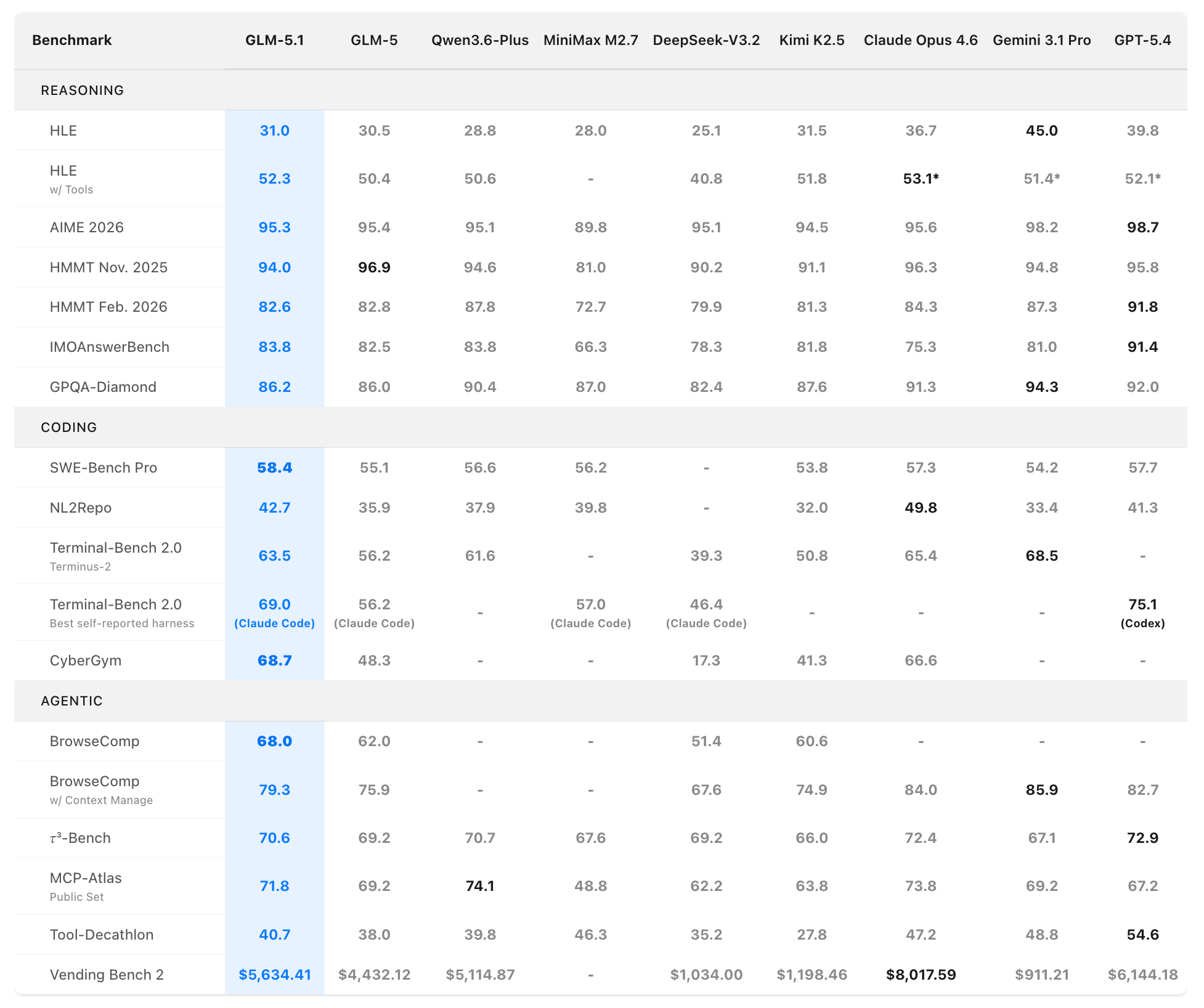
For the full model overview and benchmark context, see what is GLM-5.1.
What you need before setup
Make sure you have these four things ready:
- A BigModel account at
https://bigmodel.cn - A BigModel API key
- Claude Code installed locally
- A Claude Code build or config path that supports OpenAI-compatible custom providers
The key point is the last one. GLM-5.1 does not plug into Claude Code through a special GLM SDK. It works because the BigModel API is OpenAI-compatible.
The exact values you need
You only need three values to make the routing work.
Base URL
https://open.bigmodel.cn/api/paas/v4/
Model name
glm-5.1
Authorization header
Authorization: Bearer YOUR_BIGMODEL_API_KEY
That is the entire core setup. Everything else is just where you place those values inside Claude Code.
Step 1: create and store your BigModel API key
Open the BigModel developer console and generate an API key.
Then save it as an environment variable:
export BIGMODEL_API_KEY="your_api_key_here"
If you use zsh, put that line in ~/.zshrc. If you use bash, put it in ~/.bashrc or ~/.bash_profile.
Then reload your shell:
source ~/.zshrc
Verify it loaded:
echo $BIGMODEL_API_KEY
You should see the key printed. If nothing shows up, Claude Code will not be able to authenticate.
Hardcoding the key in a settings file can work, but environment variables are safer and easier to rotate later.
Step 2: update Claude Code settings
In many setups, Claude Code stores settings in:
~/.claude/settings.json
A minimal OpenAI-compatible configuration looks like this:
{
  "model": "glm-5.1",
  "baseURL": "https://open.bigmodel.cn/api/paas/v4/",
  "apiKey": "your_bigmodel_api_key"
}
If your Claude Code build supports environment variable expansion, use that instead of pasting the raw key.
For example, your local setup may support something like this:
{
  "model": "glm-5.1",
  "baseURL": "https://open.bigmodel.cn/api/paas/v4/",
  "apiKeyEnv": "BIGMODEL_API_KEY"
}
The exact field names can vary by build, but the pattern stays the same: - provider mode: OpenAI-compatible - base URL: BigModel - model: glm-5.1- auth: your BigModel key
If you already configured Claude Code for another OpenAI-compatible provider, this change usually takes less than a minute.
Step 3: understand what Claude Code is doing behind the scenes
When Claude Code talks to GLM-5.1, it's effectively sending OpenAI-style chat completion requests to BigModel.
A raw request looks like this:
curl https://open.bigmodel.cn/api/paas/v4/chat/completions \
  -H "Authorization: Bearer $BIGMODEL_API_KEY" \
  -H "Content-Type: application/json" \
  -d '{
    "model": "glm-5.1",
    "messages": [
      {
        "role": "user",
        "content": "Write a Python function that removes duplicate lines from a file."
      }
    ],
    "max_tokens": 2048,
    "temperature": 0.7
  }'
This matters because it explains why the integration works. Claude Code does not need a special GLM integration layer. It only needs a backend that speaks the OpenAI-compatible API format.
For the full API walkthrough with Python and Node examples, see how to use the GLM-5.1 API.
Step 4: run a small validation task first
Before pointing Claude Code at a large repo, start with a simple coding task.
Try one of these:
Write a Python script that scans a folder for JSON files and prints invalid ones.
Refactor this function for readability and add tests.
Read this file, explain what it does, and suggest two safe improvements.
You are checking four things:
- Claude Code accepts the configuration
- BigModel authentication works
- GLM-5.1 returns responses in the expected format
- Tool-use behavior inside Claude Code still works cleanly
If those pass, move to a real repository task.
Best tasks for GLM-5.1 inside Claude Code
GLM-5.1 looks strongest on coding sessions that benefit from iteration.
Good fits
- bug fixing across multiple files
- repo exploration and codebase summarization
- test generation and test repair
- iterative refactoring
- performance tuning
- long-running agent loops
- benchmark-driven code improvement
Less ideal fits
- pure writing tasks
- short factual questions
- very small one-shot edits where model switching is not worth it
- workflows where Claude's native style is more valuable than the backend swap
The strongest use case is when you want the model to stay productive over a longer coding session instead of giving one answer and stalling.
GLM-5.1 vs Claude inside Claude Code
This is the question most people really care about.
The answer is not "GLM-5.1 is better than Claude everywhere." It isn't.
Claude still has real strengths in reasoning-heavy edits, instruction following, and some repo navigation workflows. But GLM-5.1 is strong enough that it is worth benchmarking on your actual tasks, especially if your work looks like SWE-Bench style coding or long tool-driven sessions.
Test both on the same repo task and compare:
- code quality
- number of turns needed
- test pass rate
- tool use behavior
- latency
- cost or quota usage
If GLM-5.1 solves the same task with similar quality and lower effective cost, it may be a good backend option. If Claude still produces cleaner changes in your workflow, stick with Claude.
This is one of those cases where side-by-side testing beats opinions.
Common problems and fixes
Authentication failed
This usually means the API key is wrong or Claude Code is not reading it.
Check: - the key works in a raw curl request - the environment variable is loaded in your current shell - the config file points to the correct key field - there are no trailing spaces or quote mistakes
Model not found
Make sure the model name is exactly:
glm-5.1
Do not invent a longer version name.
Claude Code ignores the custom provider
Some setups cache settings or require a restart after config changes.
Fix: - save the config - restart Claude Code - run a very small test prompt first
Requests are sent, but output quality feels off
That may not be a setup problem. It may be a task fit problem. GLM-5.1 is strongest on longer coding sessions, not every single kind of developer prompt.
Try: - lowering temperature if your config allows it - giving clearer repo-specific instructions - using it on iterative coding tasks rather than general reasoning prompts
Quota drains too fast
GLM-5.1 uses quota multipliers on BigModel. Peak hours cost more than off-peak. If you're running long coding sessions, schedule heavy usage off-peak when possible.
Testing the integration with Apidog
If you want to validate this setup more systematically, Apidog is useful for testing the BigModel endpoint directly before or alongside Claude Code.
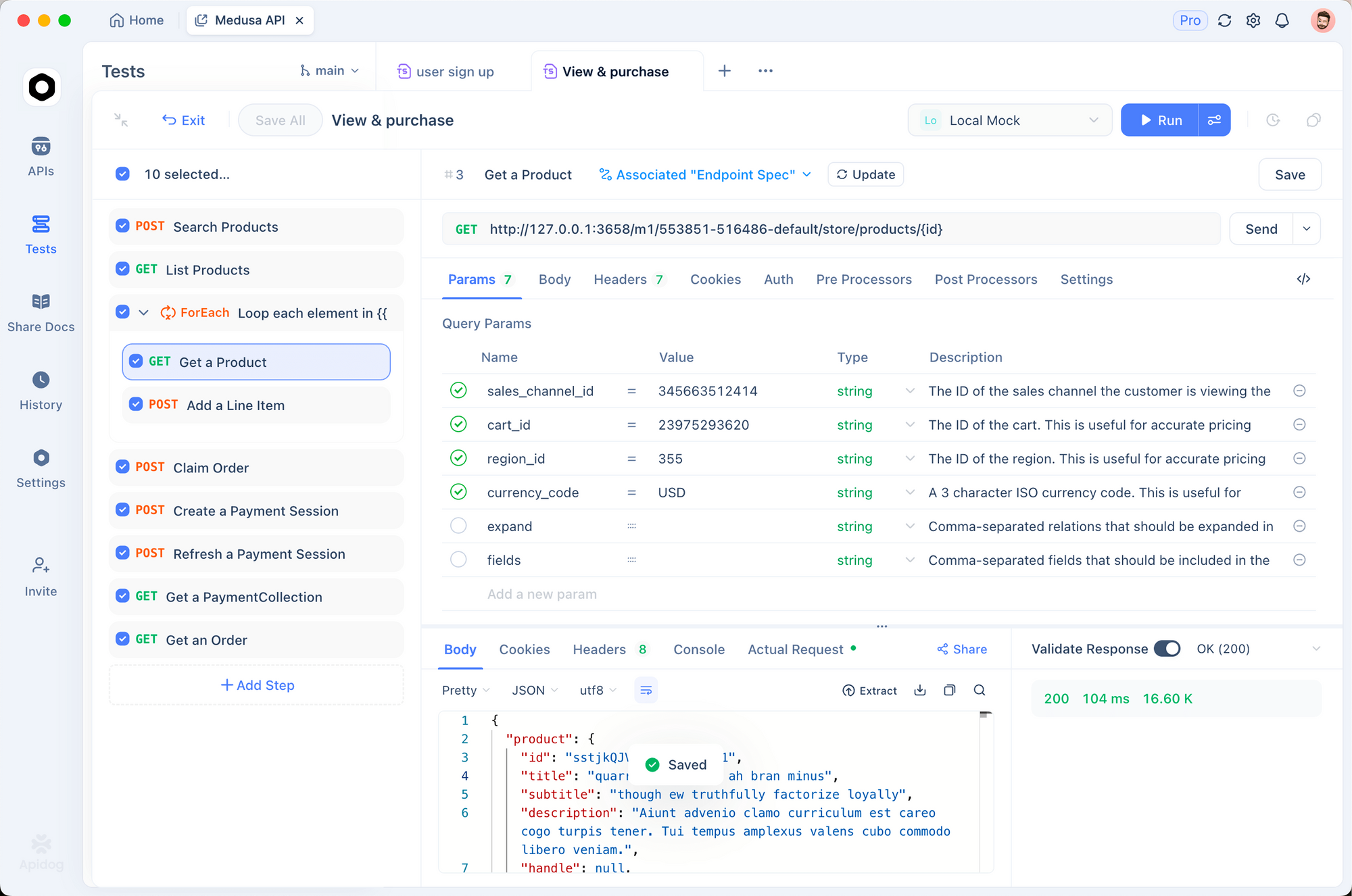
A practical workflow looks like this:
- Define the BigModel chat completions endpoint in Apidog
- Save a request using model
glm-5.1 - Test a normal completion response
- Test error cases like invalid auth or rate limits
- Mock the endpoint so internal tools can be tested without consuming quota
This is especially useful if your team is building wrappers around AI coding tools or routing traffic between different model providers. With Apidog's Smart Mock and Test Scenarios, you can verify the API behavior independently from the editor integration.
Should you use GLM-5.1 with Claude Code?
Yes, if your goal is to test a strong agentic coding model without giving up the Claude Code workflow.
It's especially worth trying if: - you already use Claude Code daily - your tasks involve multi-step coding sessions - you want another backend option - you are cost sensitive - you want to benchmark multiple models against the same coding loop
If your workflow is mostly short editing help and careful reasoning, Claude may still be the cleaner fit. But if you're doing sustained code work and want another serious model in the mix, GLM-5.1 is one of the strongest candidates right now.
Conclusion
Using GLM-5.1 with Claude Code is simpler than it sounds. You need the BigModel API key, the BigModel base URL, and the model name glm-5.1. Because the API is OpenAI-compatible, the routing model is familiar and easy to test.
The real reason to do this is not novelty. It's to see whether GLM-5.1 performs well enough in your actual Claude Code workflow to justify using it as a backend option. If your work involves long coding sessions, iterative fixes, and tool-heavy agent loops, it is absolutely worth testing.
FAQ
Can Claude Code use GLM-5.1 directly?Yes, if your Claude Code setup supports OpenAI-compatible custom providers.
What base URL should I use?Use https://open.bigmodel.cn/api/paas/v4/.
What model name should I enter?Use glm-5.1.
Do I need a special GLM SDK?No. GLM-5.1 works through the BigModel OpenAI-compatible API.
Can I use GLM-5.1 with other coding tools too?Yes. The same setup pattern works for tools like Cline, Roo Code, and OpenCode.
Is GLM-5.1 better than Claude for all coding tasks?No. It depends on your workflow. The best way to decide is to run the same repo tasks through both and compare the results.