
Developers building intelligent applications increasingly demand models that handle diverse data types without compromising speed or accuracy. GLM-4.6V addresses this need head-on. Z.ai releases this series as an open-source multimodal large language model, blending text, images, videos, and files into seamless interactions. The API empowers you to integrate these capabilities directly into your projects, whether for document analysis or visual search agents.
As we examine GLM-4.6V's architecture, access methods, and pricing, you'll see how it outperforms peers in benchmarks. Moreover, integration tips with tools like Apidog will help you deploy faster. Let's start with the model's core design.
Understanding GLM-4.6V: Architecture and Core Capabilities
Z.ai engineers GLM-4.6V to process multimodal inputs natively, outputting structured text responses. This model series includes two variants: the flagship GLM-4.6V (106B parameters) for high-performance tasks and GLM-4.6V-Flash (9B parameters) for efficient local deployments. Both support a 128K token context window, enabling analysis of extensive documents—up to 150 pages—or hour-long videos in one pass.

At its heart, GLM-4.6V incorporates a visual encoder aligned with long-context protocols. This alignment ensures the model retains fine-grained details across inputs. For instance, it handles interleaved text-image sequences, grounding responses to specific visual elements like object coordinates in photos. Native function calling sets it apart; developers invoke tools directly with image parameters, and the model interprets visual feedback loops.
Furthermore, reinforcement learning refines tool invocation. The model learns to chain actions, such as querying a search tool with a screenshot and reasoning over results. This results in end-to-end workflows, from perception to decision-making. Consequently, applications gain autonomy without brittle post-processing.
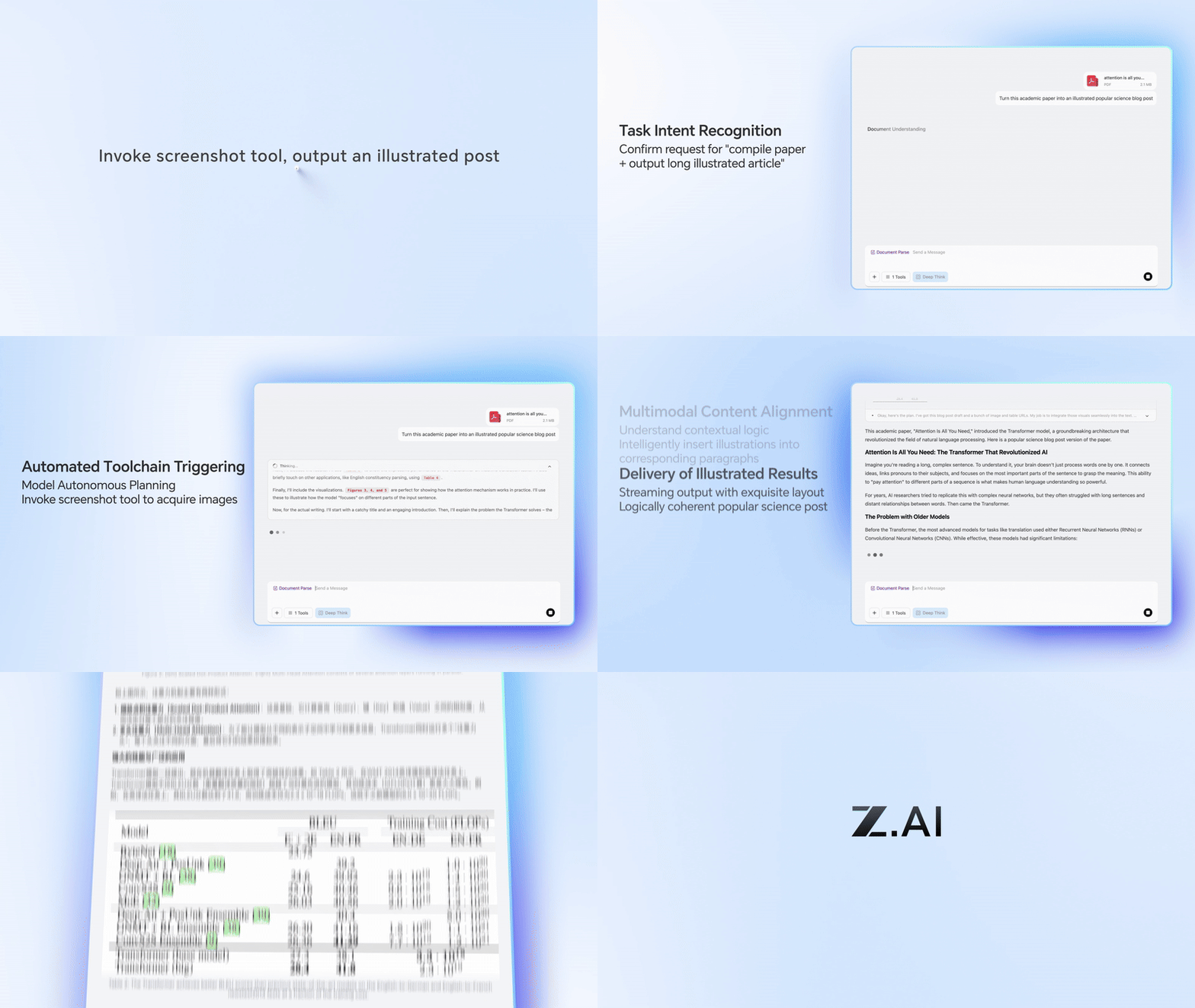
In practice, these features translate to robust handling of real-world data. The model excels at rich-text creation, generating interleaved image-text outputs for reports or infographics. It also supports the Extended Model Context Protocol (MCP), allowing URL-based multimodal inputs for scalable processing.
Benchmarks and Performance: Measuring GLM-4.6V Against Peers
Quantitative data validates GLM-4.6V's edge. On MMBench, it scores 82.5% in multimodal QA, edging out LLaVA-1.6 by 4 points. MathVista reveals 68% accuracy in visual equations, thanks to aligned encoders.
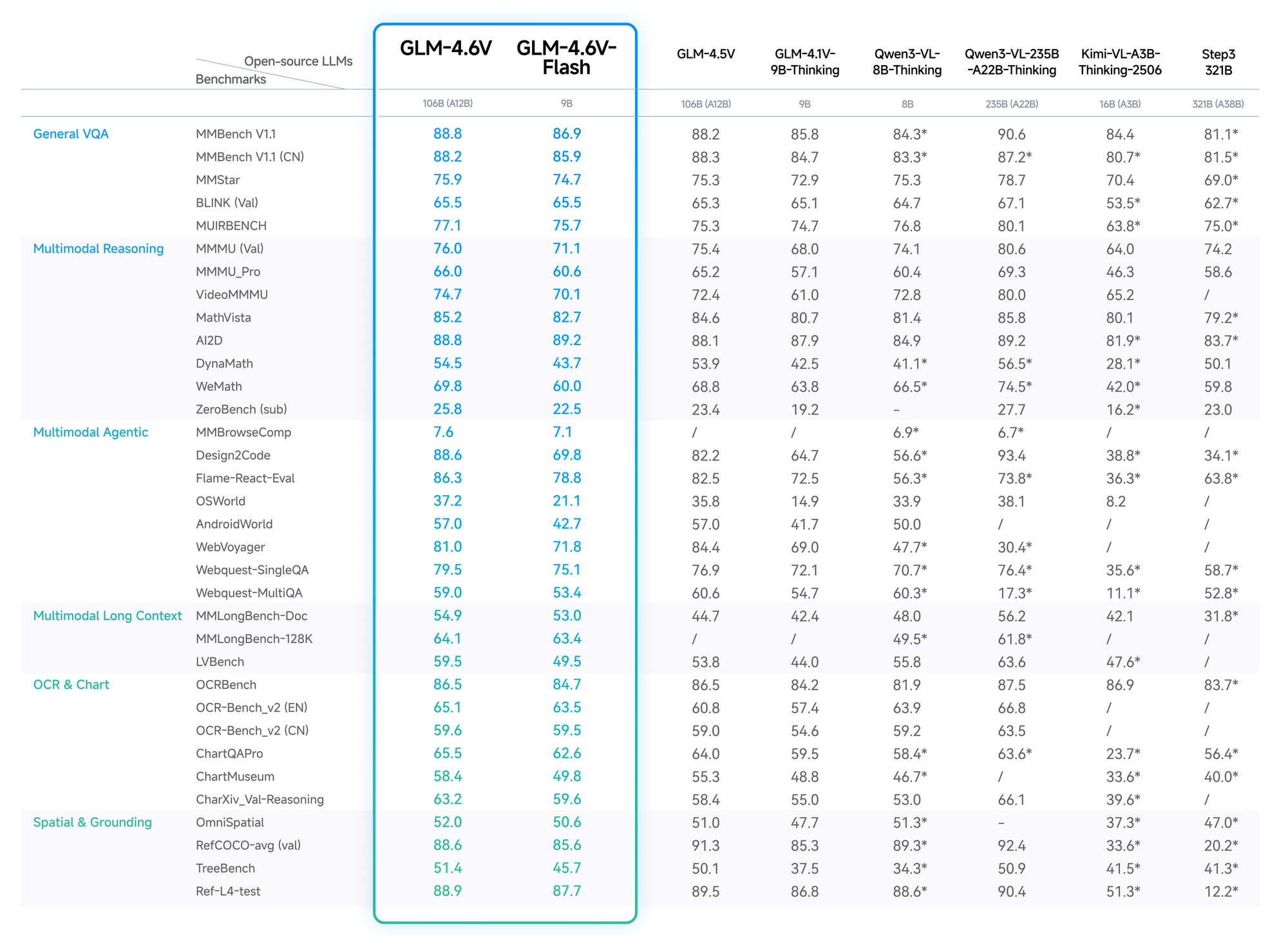
OCRBench tests yield 91% for text extraction from distorted images, surpassing GPT-4V in open-source ranks. Long-context evals, like Video-MME, hit 75% for hour-long clips, retaining details across frames.
Flash variant trades slight accuracy (2-3% drop) for 5x speedups, ideal for real-time apps. Z.ai's blog details these, with reproducible setups on Hugging Face.
Thus, developers choose GLM-4.6V for reliable, cost-effective performance.
Key Features of the GLM-4.6V Model Series
GLM-4.6V packs advanced features that elevate multimodal AI. First, its input modalities cover text, images, videos, and files, with outputs focused on precise text generation. Developers appreciate the flexibility: upload a financial PDF, and the model extracts tables, reasons over trends, and suggests visualizations.
Native tool use represents a breakthrough. Unlike traditional models that require external orchestration, GLM-4.6V embeds function calling. You define tools in requests—say, a cropper for images—and the model passes visual data as parameters. It then comprehends results, iterating if needed. This closes the loop for tasks like visual web search: recognize intent from a query image, plan retrieval, fuse results, and output reasoned insights.
Additionally, the 128K context empowers long-form analysis. Process 200 slides from a presentation; the model summarizes key themes while timestamping video events, like goals in a soccer match. For frontend development, it replicates UIs from screenshots, outputting pixel-accurate HTML/CSS/JS code. Natural language edits follow, refining prototypes interactively.
The Flash variant optimizes for latency. At 9B parameters, it runs on consumer hardware via vLLM or SGLang inference engines. Weights available on Hugging Face enable fine-tuning, though the collection focuses on base models without extensive stats yet. Overall, these features position GLM-4.6V as a versatile backbone for agents in business intelligence or creative tools.
How to Access the GLM-4.6V API: Step-by-Step Setup
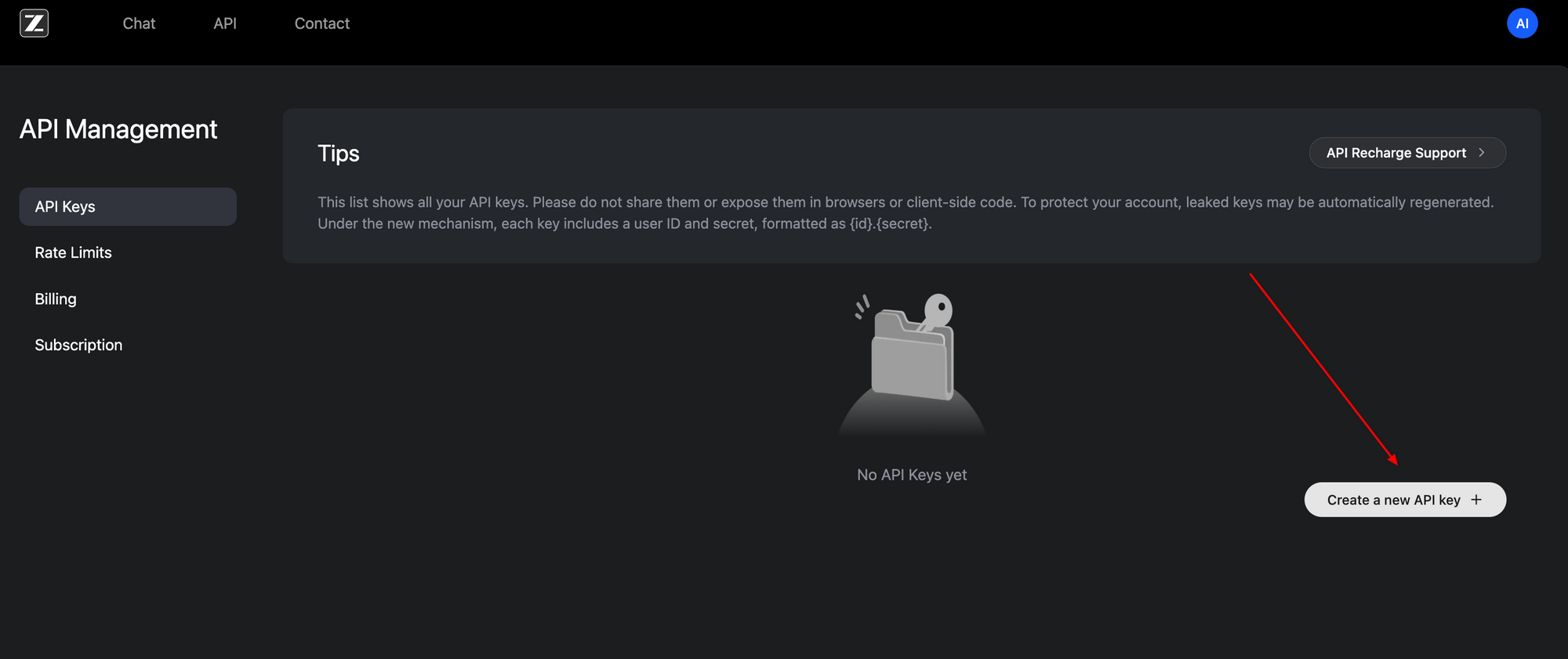
Accessing the GLM-4.6V API proves straightforward, thanks to its OpenAI-compatible interface. Begin by signing up at the Z.ai developer portal (z.ai). Generate an API key under your account dashboard—this Bearer token authenticates all requests.
The base endpoint resides at https://api.z.ai/api/paas/v4/chat/completions. Use POST method with JSON payloads. Authentication headers include Authorization: Bearer <your-api-key> and Content-Type: application/json. Messages array structures conversations, supporting multimodal content.
For example, send an image URL alongside text prompts. The payload specifies "model": "glm-4.6v" or "glm-4.6v-flash". Enable thinking steps with "thinking": {"type": "enabled"} for transparent reasoning traces. Streaming mode adds "stream": true for real-time responses via server-sent events.
Here's a basic Python integration using the requests library:
import requests
import json

url = "https://api.z.ai/api/paas/v4/chat/completions"
headers = {
    "Authorization": "Bearer YOUR_API_KEY",
    "Content-Type": "application/json"
}
payload = {
    "model": "glm-4.6v",
    "messages": [
        {
            "role": "user",
            "content": [
                {
                    "type": "image_url",
                    "image_url": {"url": "https://example.com/image.jpg"}
                },
                {"type": "text", "text": "Describe the key elements in this image and suggest improvements."}
            ]
        }
    ],
    "thinking": {"type": "enabled"}
}

response = requests.post(url, headers=headers, data=json.dumps(payload))
print(response.json())
This code fetches a description with rationale. For videos or files, extend the content array similarly—URLs or base64 encodings work. Rate limits apply based on your plan; monitor via the dashboard.
Apidog enhances this process. Import the OpenAPI spec from Z.ai docs into Apidog, then mock requests visually. Test function calls without code, validating payloads before production. As a result, you iterate faster, catching errors early.
Local access complements cloud use. Download weights from Hugging Face's GLM-4.6V collection and serve via compatible frameworks. This setup suits privacy-sensitive apps, though it demands GPU resources for the 106B model.
Pricing Breakdown: Cost-Effective Scaling with GLM-4.6V
Z.ai structures GLM-4.6V pricing to balance accessibility and performance. The flagship model charges $0.6 per million input tokens and $0.9 per million output tokens. This tiered model accounts for multimodal complexity—images and videos consume tokens based on resolution and length.
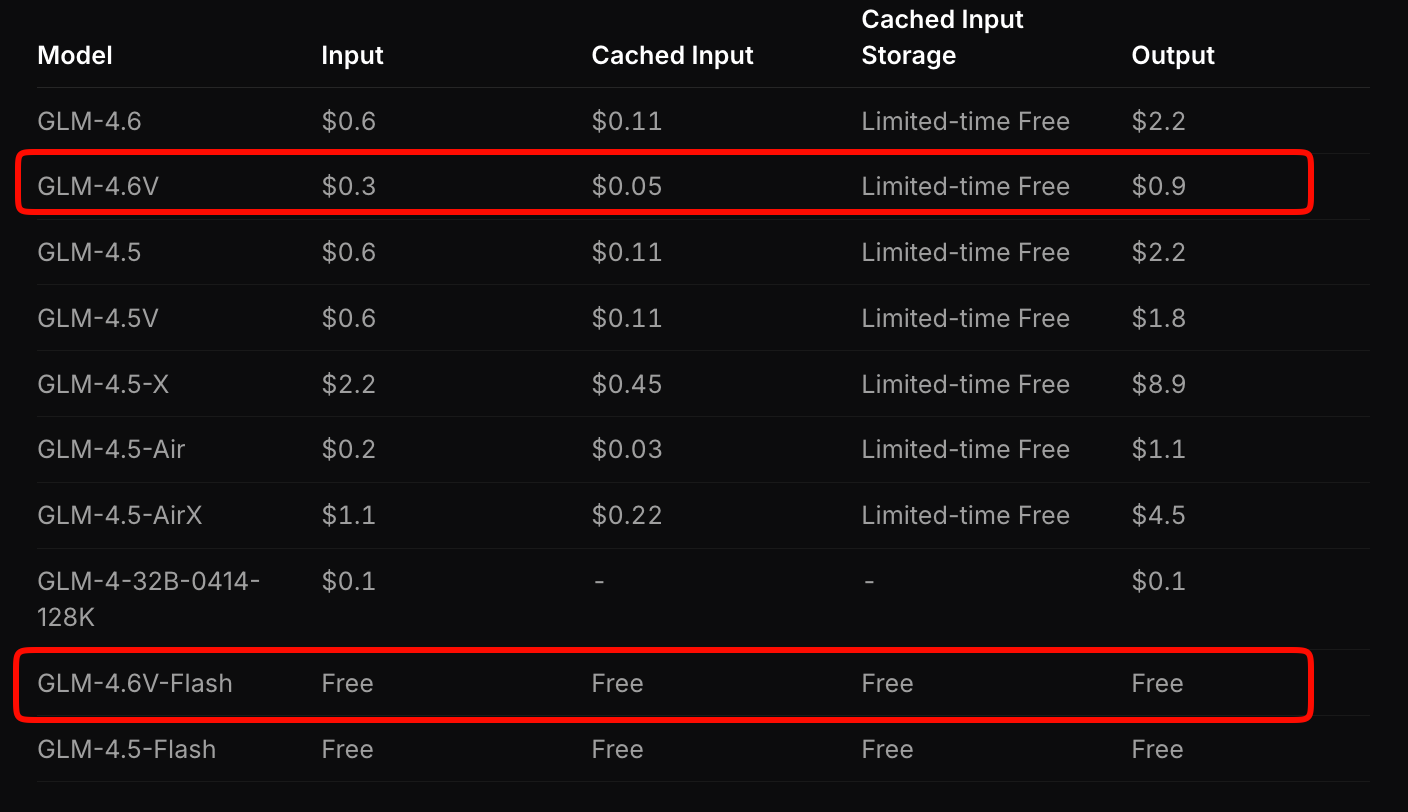
In contrast, GLM-4.6V-Flash offers free access, ideal for prototyping or edge deployments. No token fees apply, though inference costs tie to your hardware. A limited-time promotion triples usage quotas at one-seventh the cost for paid tiers, making experimentation affordable.
Compare this to competitors: GLM-4.6V undercuts similar multimodal APIs by 20-30% while delivering superior benchmarks. For high-volume apps, calculate costs via Z.ai's estimator tool. Input a sample workload—say, 100 daily document analyses—and it projects monthly expenses.
Moreover, open-source weights mitigate long-term costs. Fine-tune on your data to reduce reliance on cloud calls. Overall, this pricing enables startups to scale without budget constraints.
Integrating GLM-4.6V API with Apidog: Practical Workflow Optimization
Apidog transforms GLM-4.6V integration from manual drudgery to efficient collaboration. As an API client and design tool, it imports Z.ai's spec, auto-generating request templates. You drag-and-drop multimodal payloads, preview responses, and export to code snippets in Python, Node.js, or cURL.
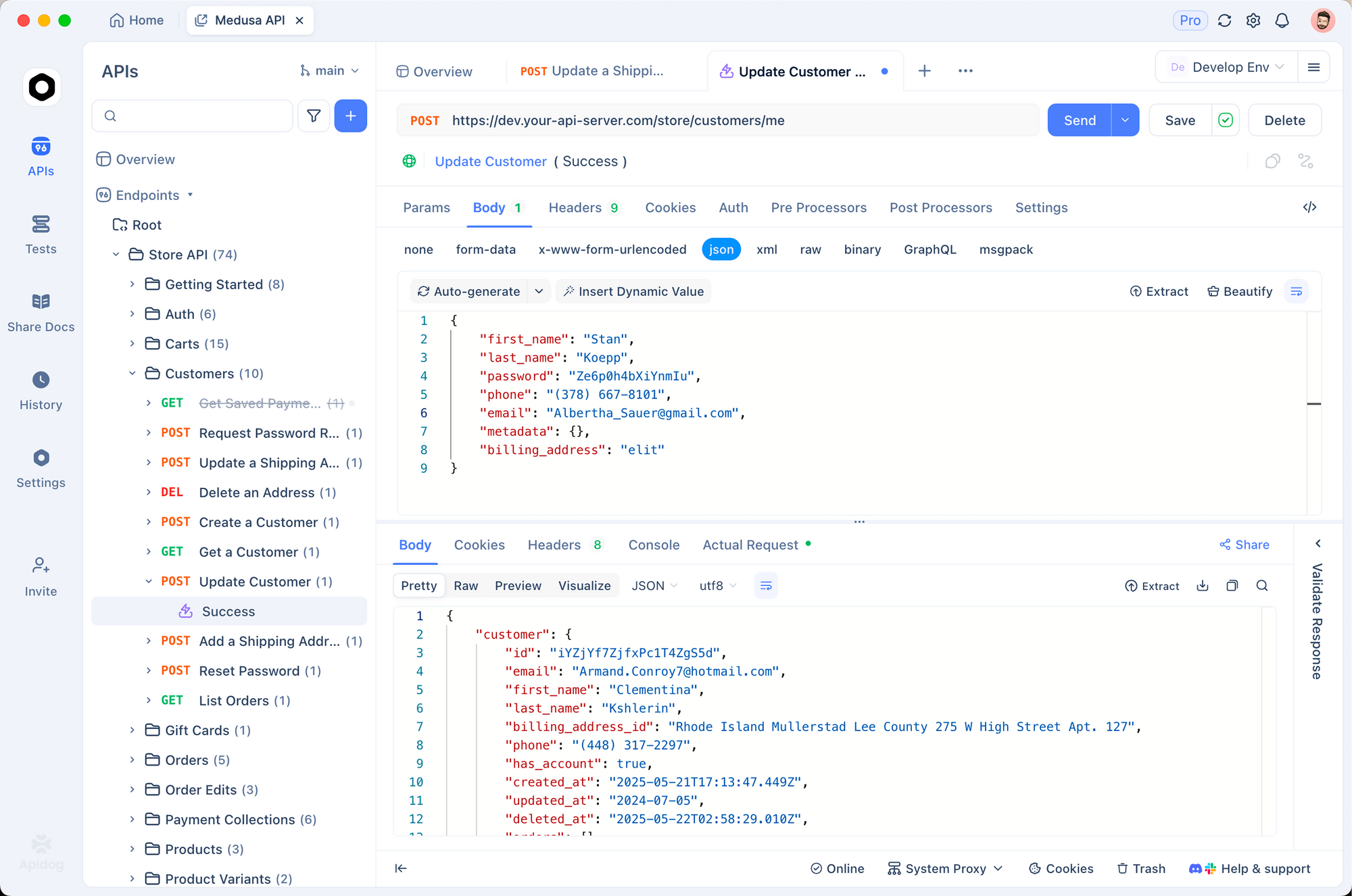
Start by creating a new project in Apidog. Paste the endpoint URL and authenticate with your key. For a visual grounding task, build a request: add an image_url type, input coordinates prompt, and hit send. Apidog visualizes outputs, highlighting thinking steps.
Collaboration shines here. Share collections with teams; version control endpoints as you add tools. Environment variables secure keys across dev, staging, and prod. Consequently, deployment cycles shorten—test a full agent chain in minutes.
Extend to monitoring: Apidog logs latencies and errors, pinpointing bottlenecks in multimodal flows. Pair it with GLM-4.6V-Flash for free local tests, then scale to cloud. Developers report 40% faster prototyping with such tools.
Real-World Use Cases: Applying GLM-4.6V in Production
GLM-4.6V shines in document-heavy industries. Financial analysts upload reports; the model parses charts, computes ratios, and generates executive summaries with embedded visuals. One firm reduced analysis time from hours to minutes, leveraging 128K context for annual filings.
In e-commerce, visual search agents activate. Customers upload product photos; GLM-4.6V plans queries, retrieves matches, and reasons over attributes like color variants. This boosts conversion by 15%, per early adopters.

Frontend teams accelerate prototyping. Input a screenshot; receive editable code. Iterate with prompts like "Add a responsive navbar." The model's pixel-level fidelity minimizes revisions, cutting design-to-deploy by half.

Video platforms benefit from temporal reasoning. Summarize lectures with timestamps or detect events in surveillance feeds. Native tool use integrates with databases, flagging anomalies automatically.
These cases demonstrate GLM-4.6V's versatility. However, success hinges on prompt engineering—craft clear instructions to maximize accuracy.
Challenges and Best Practices for GLM-4.6V API Usage
Despite strengths, multimodal models face hurdles. High-resolution inputs inflate token counts, raising costs—compress images to 512x512 pixels first. Context overflow risks hallucinations; chunk long videos into segments.
Best practices mitigate these. Use thinking mode for debugging; it exposes intermediate steps. Validate tool outputs with assertions in your code. For Apidog users, set up automated tests on endpoints to enforce schemas.
Monitor quotas closely—free Flash avoids surprises, but paid tiers need budgeting. Finally, fine-tune on domain data via open weights to boost specificity.
Conclusion: Elevate Your Projects with GLM-4.6V Today
GLM-4.6V redefines multimodal AI through native tools, vast context, and open accessibility. Its API, priced competitively at $0.6/M input for the full model and free for Flash, integrates smoothly with platforms like Apidog. From document agents to UI generators, it drives innovation.
Implement these insights now: grab your API key, test in Apidog, and build. The future of AI favors those who harness such capabilities early. What application will you transform next?