
Running large language models (LLMs) directly on mobile devices is rapidly transforming how developers build and deploy AI-powered apps. Google's efficient Gemma 3n model, paired with the innovative AI Edge Gallery, now enables fast, private, and fully on-device inference on Android. This hands-on guide walks API developers and backend engineers through setting up, optimizing, and validating Gemma 3n on Android—unlocking powerful new AI capabilities without the cloud.
💡 Ready to validate your Gemma 3n endpoints fast? Download Apidog for free—streamline API testing, monitor performance, and ensure robust integration with your Android AI workflows.
What Is Google Gemma 3n and the AI Edge Gallery?
Gemma 3n is Google’s latest lightweight language model, purpose-built for edge computing. Unlike typical LLMs that require cloud resources, Gemma 3n runs natively on your device, minimizing latency and safeguarding user privacy.
The Google AI Edge Gallery is a centralized hub for tools, sample projects, and documentation to help developers deploy AI models (including Gemma 3n) on edge devices. It offers:
- Pre-built LLM and vision model solutions
- Optimization guides for mobile hardware
- Best practices for low-resource environments
Why Use the AI Edge Gallery for On-Device LLMs?
The Edge Gallery is more than a showcase app—it’s a full-featured development environment letting you test and iterate AI models directly on Android. Key features include:
- Optimized inference engines for fast, local execution
- Easy model management and switching
- Developer UI for text, image, and multimodal interactions

The architecture combines efficient runtime engines, robust memory management, and a flexible interface for rapid prototyping and deployment.
System Requirements: Can Your Device Run Gemma 3n?
Before you start, confirm your Android device meets these minimum specs:
- Android version: 8.0 (API level 26) or newer
- RAM: At least 4GB
- Storage: ~2GB free for model files
- CPU: ARM64 preferred (older ARM supported with fallback)
- Hardware acceleration: Devices with NPUs/GPUs will see faster inference
Step 1: Install Google AI Edge Gallery (APK)
Note: The AI Edge Gallery isn’t on Google Play yet; you’ll need to sideload it from GitHub.

How to Install:
- Enable third-party app installs:
- Go to
Settings > Security > Unknown Sources - On newer Android, this is set per-app during the install prompt.
- Go to
- Download the APK:
- Visit the AI Edge Gallery GitHub releases and grab the latest APK (50–100MB).
- Transfer APK to device:
- Use USB, cloud storage, or direct browser download.
- Install the APK:
- Open a file manager, tap the APK, and follow system prompts.
- Grant permissions as needed (storage and network).


- First launch:
- The app may take a few minutes to configure and download initial assets.
Step 2: Configure and Download Gemma 3n Models
With the Edge Gallery installed, you’re ready to deploy Gemma 3n.
- Open Edge Gallery and navigate to model management.
- Download a .task file from Hugging Face or another trusted source. These are pre-configured Gemma 3n models, optimized for mobile.
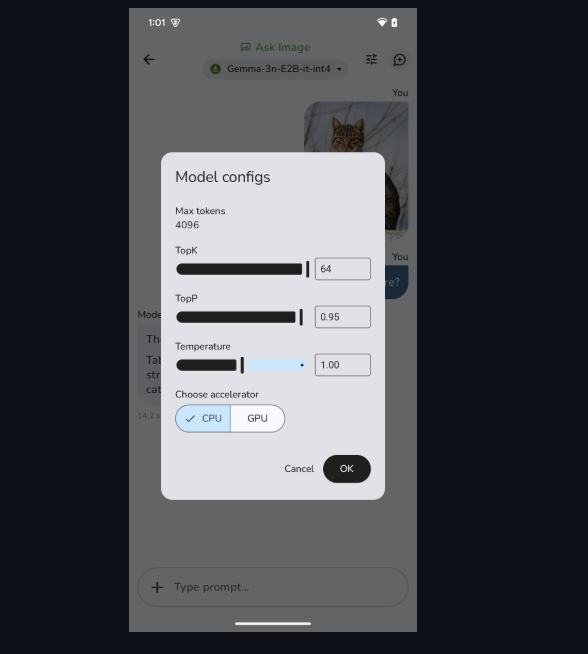
Choosing the Right Model Variant
- Smaller variants:
- Lower RAM/CPU usage, quicker inference
- Trade-off: Slightly less capability
- Larger variants:
- More accurate, but require more resources
During download, you’ll see progress indicators and estimated times.

Step 3: Test and Validate Your Gemma 3n Deployment
Effective testing is critical for reliable LLM integration. The Edge Gallery provides built-in tools:
- Text chat:
- Enter queries and verify LLM responses (expect 1–5s latency).
- Check for logical, context-aware answers.
- Resource monitoring:
- Track memory and CPU usage for stability.
- Image and multimodal testing:
- Upload images for AI-powered description (“Ask Image”)
- Run single-turn (“Prompt Lab”) and multi-turn (“AI Chat”) tasks

Tip: For production, also test edge cases and monitor latency under different loads.
Step 4: Optimize Gemma 3n for Production
To deliver robust mobile AI, optimize across these areas:
- Memory management:
- Dynamically load/unload models based on resource availability
- Model quantization:
- Use reduced-precision (e.g., INT8) models to save memory with minimal accuracy loss
- Inference scheduling:
- Prioritize user-facing tasks to avoid UI lag
- Thermal management:
- Monitor device temperature; throttle if needed to prevent overheating
Step 5: Integrate and Test with Apidog
For teams building production apps, seamless API integration is crucial. Apidog helps you:
- Test AI model endpoints and simulate real API calls
- Validate response formats, error handling, and edge cases
- Monitor API latency and performance under real-world conditions

Use Apidog’s mock server features to simulate hybrid local/cloud workflows—ideal for apps combining on-device and remote AI.
What’s Next for Gemma 3n and Edge Gallery?
The Gemma 3n and AI Edge Gallery ecosystem is evolving quickly. Upcoming enhancements include:
- iOS support: Google has announced future availability for iOS.
- Better model compression: Smaller, faster models without sacrificing quality.
- Richer multimodal features: Enhanced handling of text, image, audio, and video.
- Custom fine-tuning: Streamlined workflows for domain-specific AI.
These improvements will further empower developers to create privacy-first, high-performance AI applications.
Conclusion: Unlock On-Device AI with Gemma 3n
Deploying Google Gemma 3n on Android using the AI Edge Gallery brings advanced LLM capabilities to mobile, with the benefits of speed, privacy, and offline operation. By following this guide, API engineers and developers can efficiently set up, optimize, and test Gemma 3n for real-world production use.

Ready to ensure your AI endpoints are robust and reliable? Download Apidog and integrate advanced API testing into your workflow.