Developers constantly seek tools that streamline complex workflows, and Mistral AI's Devstral 2 emerges as a game-changer in this space. This open-source coding model family, comprising Devstral 2 and Devstral Small 2, excels in tasks like codebase exploration, bug fixing, and multi-file edits. What sets it apart? Its integration with the Mistral API allows seamless access to high-performance code generation directly in your applications. Moreover, pairing it with the Vibe CLI tool enables terminal-based automation that feels intuitive yet powerful.
Understanding Devstral 2: A Technical Breakdown of the Model Family
Mistral AI engineers designed Devstral 2 to address real-world software engineering challenges head-on. At its core, Devstral 2—a 123B parameter dense transformer—processes code with precision, achieving 72.2% on the SWE-bench Verified benchmark. This score reflects its ability to resolve GitHub issues autonomously, outperforming models like DeepSeek V3.2 by a 42.8% win rate in human evaluations. Consequently, teams adopt it for production-grade tasks without the overhead of larger competitors.
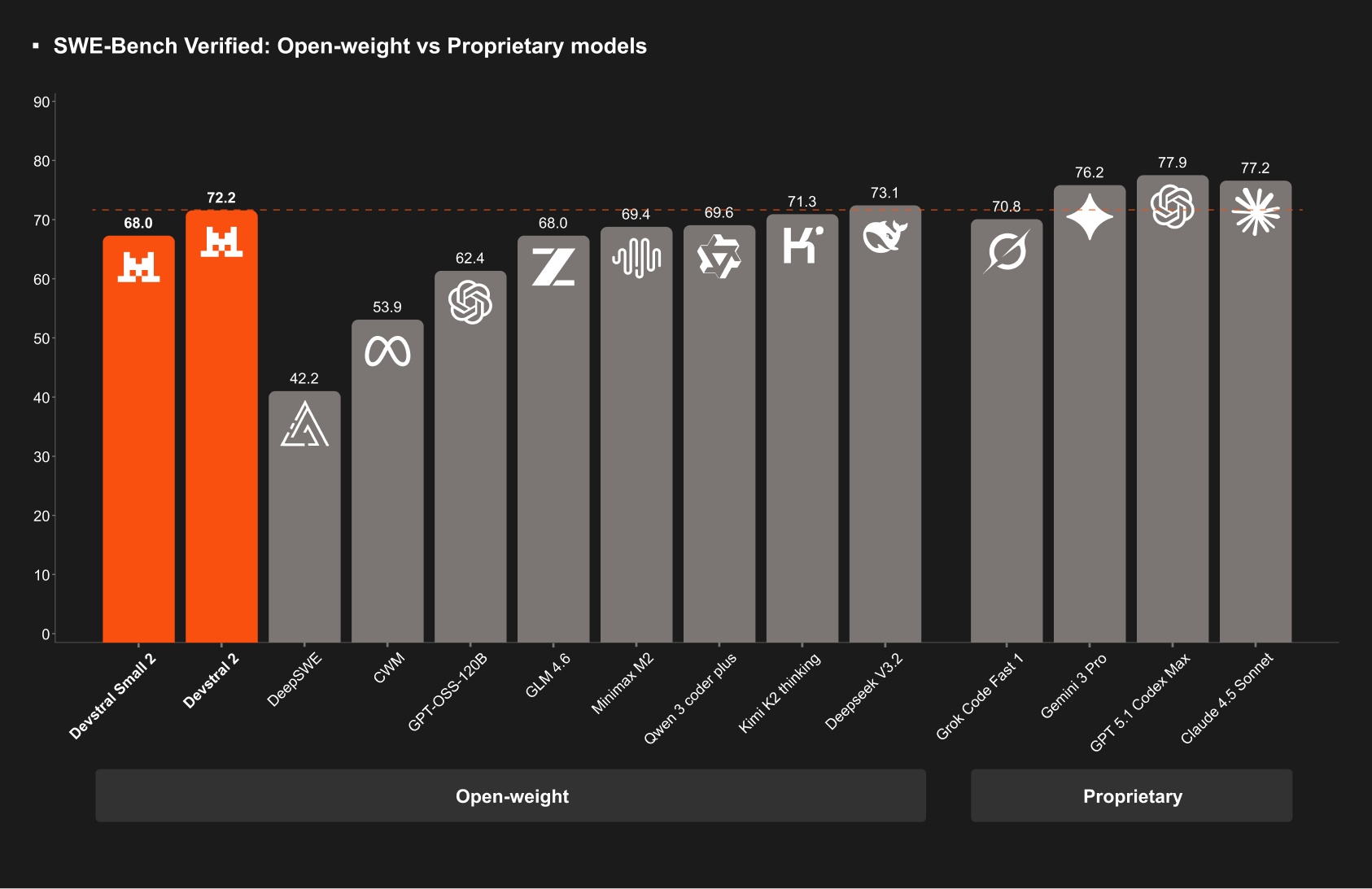
Meanwhile, Devstral Small 2, with 24B parameters, targets resource-constrained environments. It scores 68.0% on SWE-bench and introduces multimodal support, accepting image inputs for tasks like screenshot-based code generation. Both models operate under permissive licenses: Devstral 2 via a modified MIT, and Devstral Small 2 under Apache 2.0. This openness encourages community contributions and custom fine-tuning.
Technically, these models leverage a 256K token context window, enabling them to ingest entire repositories for holistic analysis. For instance, Devstral 2 tracks framework dependencies across files, detects failures, and suggests retries—features that reduce manual debugging by up to 50% in benchmarks. Furthermore, its architecture optimizes for cost-efficiency; developers report 7x savings over Claude Sonnet for equivalent outputs.
Consider the implications for enterprise use. Devstral 2 handles architecture-level reasoning, modernizing legacy systems by refactoring monolithic code into microservices. In contrast, Devstral Small 2 runs on single-GPU setups, making it ideal for edge deployments. As a result, organizations scale AI-assisted coding without infrastructure overhauls.
To quantify performance, examine key metrics:
| Model | Parameters | SWE-bench Score | Context Window | Multimodal Support | License |
|---|---|---|---|---|---|
| Devstral 2 | 123B | 72.2% | 256K | No | Modified MIT |
| Devstral Small 2 | 24B | 68.0% | 256K | Yes | Apache 2.0 |
These specifications position Devstral 2 as a versatile backbone for code agents. Next, we turn to the Vibe CLI, which brings this power to your command line.
Exploring Vibe CLI: Command-Line Interface for Devstral 2 Automation
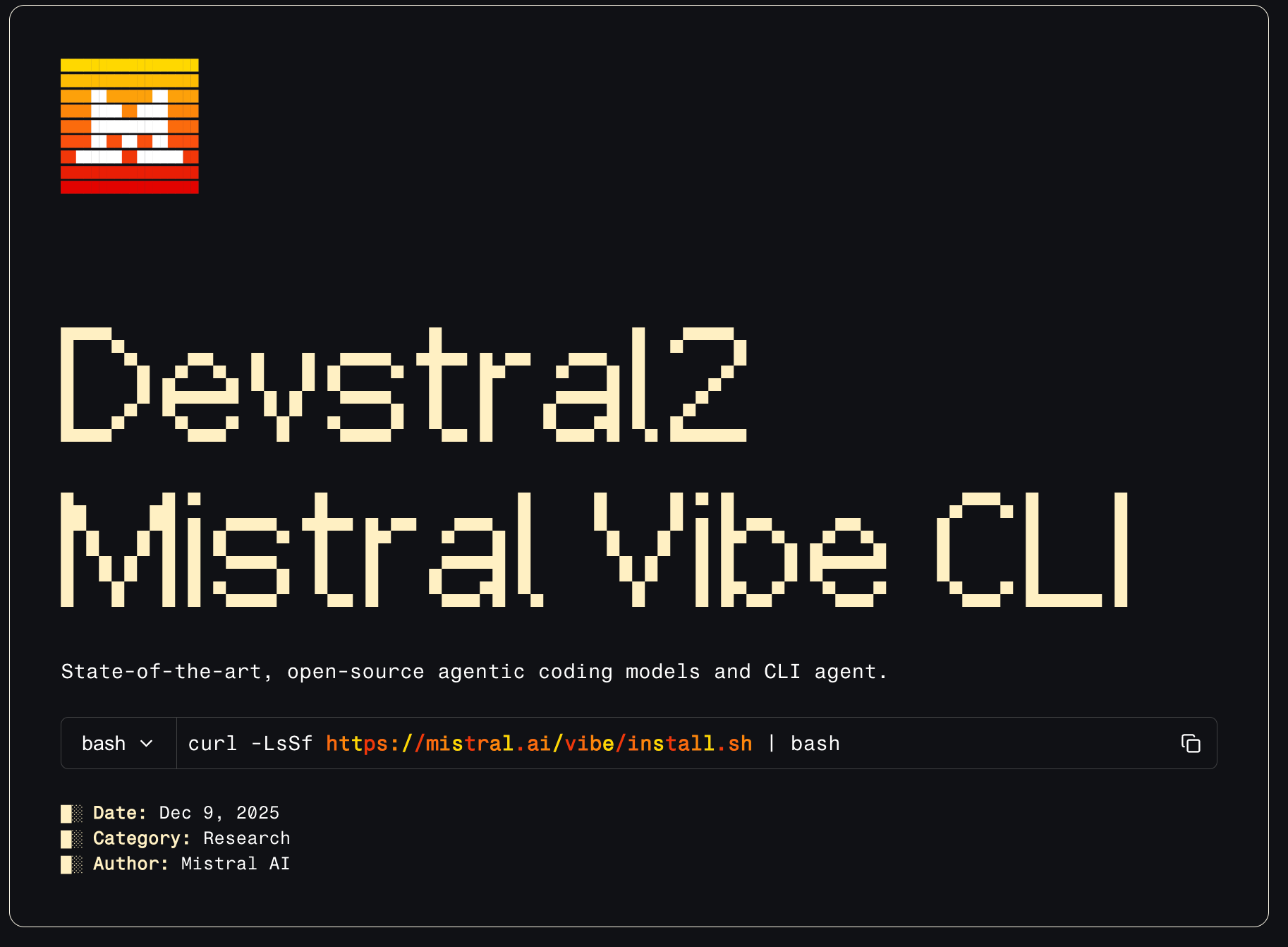
Vibe CLI stands as Mistral AI's open-source companion to Devstral 2, transforming natural language prompts into executable code changes. Developers install it via a simple curl command: curl -LsSf https://mistral.ai/vibe/install.sh | bash. Once set up, it launches an interactive chat interface in the terminal, complete with autocomplete and persistent history.
What makes Vibe CLI effective? It incorporates project-aware context, scanning directories to reference files with @ notation. For example, type @main.py to pull in a script for analysis. Additionally, execute shell commands using !, such as !git status, to integrate version control seamlessly. Slash commands further enhance usability: /config adjusts settings, while /theme customizes the interface.
Under the hood, Vibe CLI adheres to the Agent Communication Protocol, allowing IDE extensions like Zed's plugin. Configure it through a config.toml file, where you specify model providers (e.g., local Devstral instances or Mistral API keys), tool permissions, and auto-approval rules for executions. This flexibility prevents overreach; for sensitive projects, disable file writes by default.
In practice, Vibe CLI shines in iterative workflows. Suppose you maintain a Python web app. Prompt it: "Refactor the authentication module in @auth.py to use JWT instead of sessions." Vibe CLI explores dependencies, generates diffs, and applies changes via !git apply. If conflicts arise, it detects them and proposes alternatives—mirroring Devstral 2's retry mechanisms.
Benchmarks show Vibe CLI completing end-to-end tasks 3x faster than manual editing in multi-file scenarios. Moreover, its scripting mode supports automation scripts, like batch-processing PR reviews. For local runs, pair it with Devstral Small 2 on consumer hardware; inference times drop to seconds per response.
However, Vibe CLI's true strength lies in its API synergy. It proxies requests to the Mistral API, caching responses for efficiency. As we proceed, this bridge becomes crucial for custom integrations.
Accessing the Devstral 2 API: Step-by-Step Implementation Guide
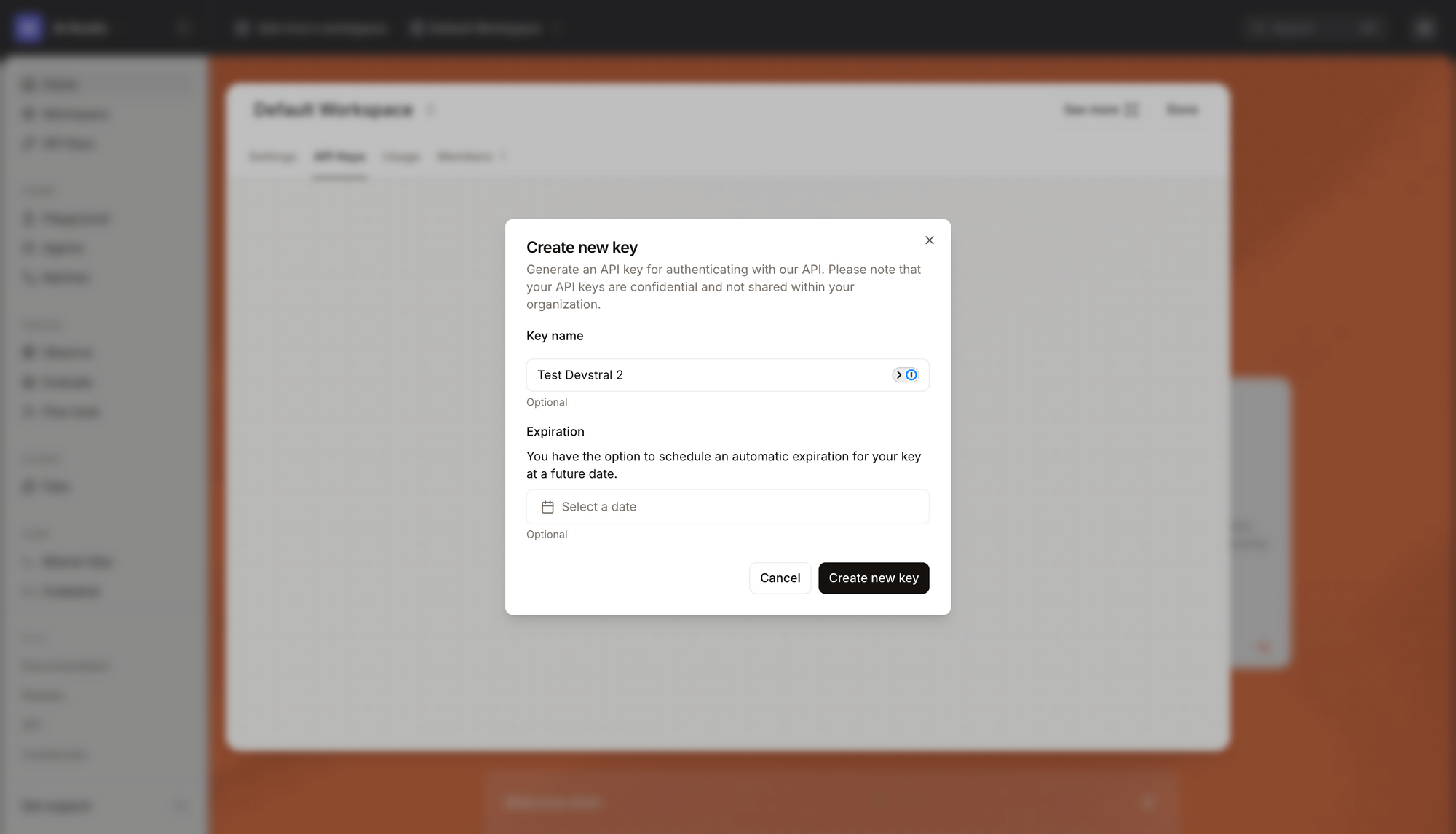
Accessing Devstral 2 API requires a Mistral AI account, available at the console. Sign up grants immediate free access during the introductory period, transitioning to pay-as-you-go pricing: $0.40 input / $2.00 output per million tokens for Devstral 2, and $0.10 / $0.30 for Devstral Small 2. Authentication uses API keys, generated in the console dashboard.
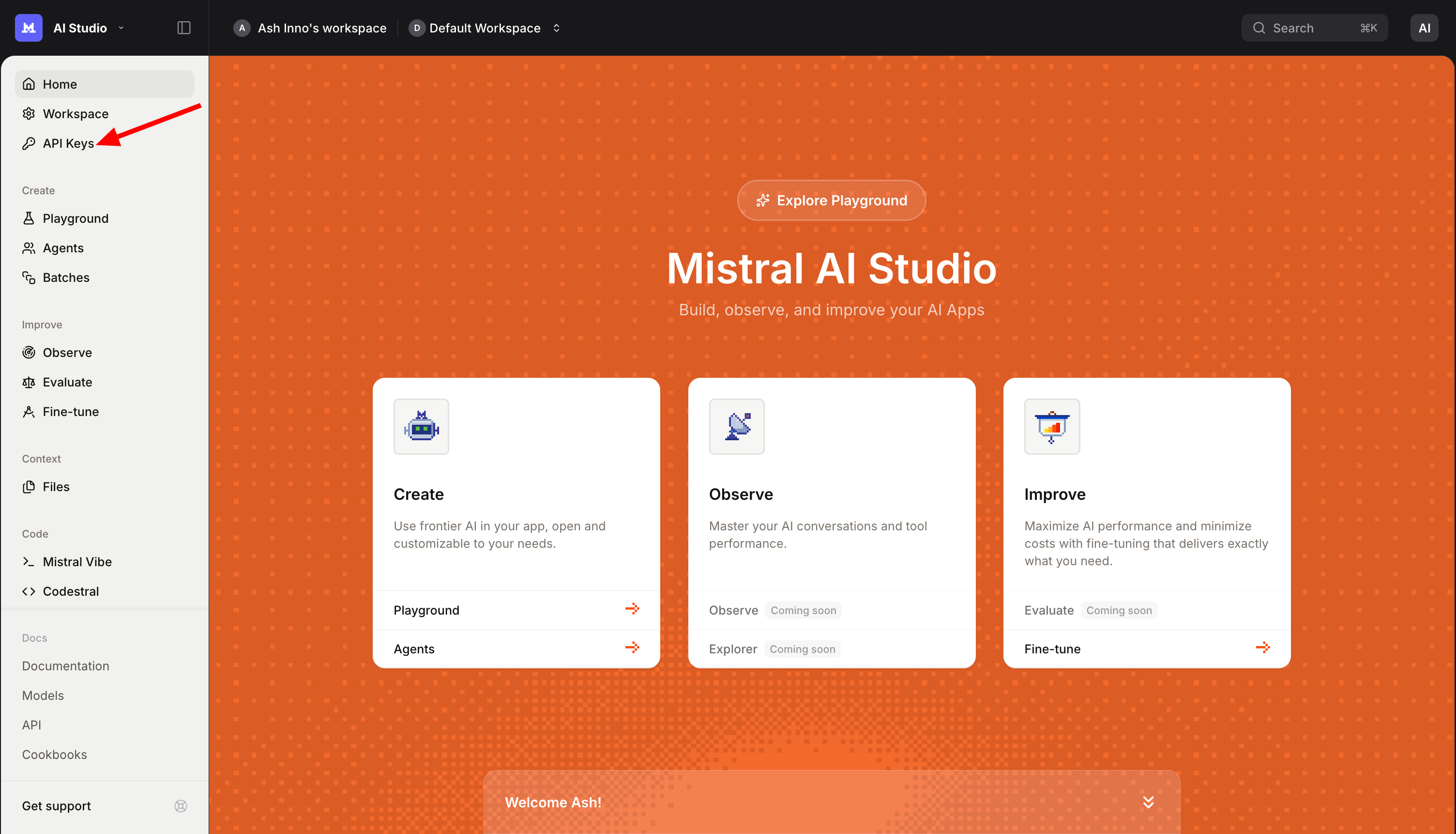
Begin by obtaining your key. Navigate to the API section, create a new key, and store it securely.
The API follows RESTful conventions over HTTPS, with endpoints hosted at https://api.mistral.ai/v1. Core operations include chat completions, fine-tuning, and embeddings, but for coding, focus on /v1/chat/completions.
Craft requests in JSON format. A basic curl example for Devstral 2:
curl https://api.mistral.ai/v1/chat/completions   -H "Content-Type: application/json"   -H "Authorization: Bearer $MISTRAL_API_KEY"   -d '{
    "model": "devstral-2",
    "messages": [{"role": "user", "content": "Write a Python function to parse JSON configs."}],
    "max_tokens": 512,
    "temperature": 0.1
  }'
This call returns generated code in the choices[0].message.content field. Adjust temperature for creativity (0.0 for deterministic outputs) and max_tokens for response length. For codebase tasks, include context in the prompt: prepend file contents or use system messages for instructions.
Advanced usage involves streaming responses with "stream": true, ideal for real-time IDE plugins. The API supports up to 256K tokens, so batch large inputs. Error handling matters; common codes include 401 (unauthorized) and 429 (rate limits). Implement retries with exponential backoff:
import requests
import time
import os

def call_devstral(prompt, model="devstral-2"):
    url = "https://api.mistral.ai/v1/chat/completions"
    headers = {
        "Authorization": f"Bearer {os.getenv('MISTRAL_API_KEY')}",
        "Content-Type": "application/json"
    }
    data = {
        "model": model,
        "messages": [{"role": "user", "content": prompt}],
        "max_tokens": 1024,
        "temperature": 0.2
    }
    while True:
        response = requests.post(url, json=data, headers=headers)
        if response.status_code == 429:
            time.sleep(2 ** attempt)  # Exponential backoff
            attempt += 1
        elif response.status_code == 200:
            return response.json()["choices"][0]["message"]["content"]
        else:
            raise Exception(f"API error: {response.status_code}")

# Example usage
code = call_devstral("Optimize this SQL query: SELECT * FROM users WHERE age > 30;")
print(code)
This Python snippet demonstrates resilient calls. For multimodal with Devstral Small 2, upload images via base64 encoding in the content array.
Rate limits vary by tier; monitor usage via the console. Fine-tuning endpoints (/v1/fine_tuning/jobs) allow customization on proprietary datasets, requiring JSONL files with prompt-completion pairs.
Transitioning to testing, Apidog simplifies validation. Import the Mistral OpenAPI spec into Apidog, mock environments, and run collections to simulate workflows. This approach catches edge cases early.
Integrating Devstral 2 API with Apidog: Best Practices for API-Driven Development
Apidog elevates Devstral 2 API usage by providing a unified platform for design, testing, and documentation. Start by downloading Apidog—free for individuals—and creating a new project. Paste the Mistral API schema (available in the console) to auto-generate endpoints.
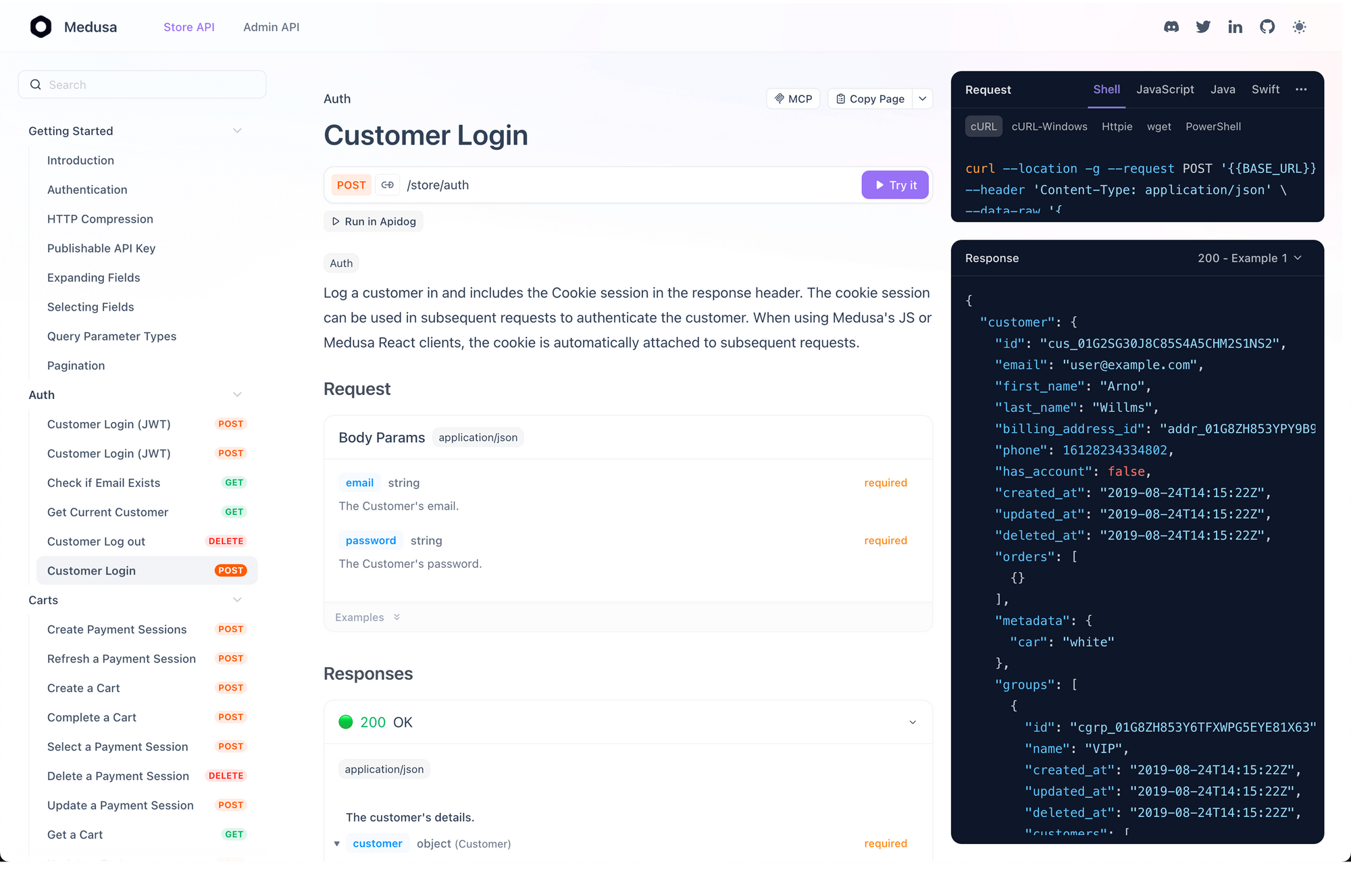
Why Apidog? It supports OpenAPI 3.0, aligning with Mistral's spec, and offers visual request builders. Test a chat completion: Set the method to POST, add your Bearer token, and input JSON payloads. Apidog's response viewer parses JSON, highlighting code outputs for quick review.
For automation, leverage Apidog's scripting. Pre-request scripts fetch dynamic contexts, like recent Git diffs, before hitting the API. Post-response scripts parse generations and trigger Vibe CLI commands. Example script in JavaScript:
// Pre-request: Fetch repo context
pm.sendRequest({
    url: 'https://api.github.com/repos/user/repo/contents/',
    method: 'GET',
    header: {
        'Authorization': 'token {{github_token}}'
    }
}, (err, res) => {
    if (!err) {
        pm.variables.set('context', res.json().map(f => f.name).join('\n'));
    }
});

// Main request uses {{context}} in prompt
This integration ensures prompts stay relevant. Moreover, Apidog's collaboration features let teams share collections, standardizing Devstral 2 usage.
Advanced Use Cases: Leveraging Devstral 2 and Vibe CLI in Production
Beyond basics, Devstral 2 API powers sophisticated agents. Combine it with Vibe CLI for hybrid workflows: Use CLI for local prototyping, then deploy API endpoints in CI/CD pipelines. For instance, integrate with GitHub Actions:
name: Code Review
on: [pull_request]
jobs:
  review:
    runs-on: ubuntu-latest
    steps:
      - uses: actions/checkout@v3
      - name: Run Devstral Review
        run: |
          curl -X POST https://api.mistral.ai/v1/chat/completions \
            -H "Authorization: Bearer ${{ secrets.MISTRAL_API_KEY }}" \
            -d '{
              "model": "devstral-2",
              "messages": [{"role": "user", "content": "Review changes in ${{ github.event.pull_request.diff_url }}"}]
            }' | jq '.choices[0].message.content' > review.md
      - name: Comment PR
        uses: actions/github-script@v6
        with:
          script: |
            github.rest.pulls.createReview({
              owner: context.repo.owner,
              repo: context.repo.repo,
              pull_number: context.payload.pull_request.number,
              body: fs.readFileSync('review.md', 'utf8')
            })
This YAML automates reviews, pulling diffs and generating feedback. Vibe CLI complements by handling local merges: vibe "Apply suggested changes from review.md".
In multimodal scenarios, Devstral Small 2 API processes UI screenshots. Feed base64 images: {"type": "image_url", "image_url": {"url": "data:image/png;base64,iVBOR..."}}. Applications include accessibility audits, where the model suggests alt-text improvements.
For enterprise scale, fine-tune on domain-specific data. Upload datasets to /v1/fine_tuning/jobs, specifying epochs and learning rates. Post-training, the API serves custom models at dedicated endpoints, reducing latency by 30%.
Edge computing benefits from Devstral Small 2's on-device runtime. Deploy via ONNX, integrating API fallbacks for overflow traffic. Tools like Kilo Code or Cline extend this, embedding Vibe CLI logic into VS Code.
Metrics from adopters show 5x productivity gains: One startup refactored a 100K-line monolith in weeks, crediting Devstral 2's dependency tracking.
Conclusion: Transform Your Coding with Devstral 2 API Today
Devstral 2 redefines AI-assisted development through its robust model family, intuitive Vibe CLI, and accessible API. Developers harness these for everything from quick fixes to full refactorings, backed by impressive benchmarks and cost savings.
Implement the strategies outlined—start with Vibe CLI installs, secure API keys, and test via Apidog. Small optimizations, like precise prompts or cached contexts, yield substantial efficiency boosts. As AI evolves, Devstral 2 positions you at the forefront.
Ready to experiment? Head to the Mistral console, spin up Vibe CLI, and download Apidog for free. Your next breakthrough awaits.