Your API tests pass when you click Run on your laptop. That proves nothing. The test that matters is the one that fires on every pull request, every merge, and every nightly build, with no human present to click anything. The job of getting your tests into that loop belongs to a command-line runner. It takes the tests you already wrote, runs them headlessly inside your pipeline, exits with a status code your CI can read, and writes a report that shows up on the build dashboard.
Two runners come up again and again when teams wire this up: the Postman CLI and the Apidog CLI. They aim at the same target from different starting points. The Postman CLI runs the collections you build in Postman. The Apidog CLI runs the visual test scenarios you build in Apidog. Both install in one step, both plug into GitHub Actions, GitLab CI, and Jenkins, and both turn the build red when a test fails. The real differences sit upstream of the run command: how you author tests, how you authenticate in CI, and where the test definition actually lives.
TL;DR
- Postman CLI (binary
postman) runs the collections stored in your Postman workspace. It’s based on Newman, signed and supported by Postman, and authenticates with a Postman API key. When you’re signed in, it sends run results back to the Postman cloud automatically. - Apidog CLI (
apidog-cli, binaryapidog) runs the test scenarios you design visually in Apidog. You point it at a scenario by ID with an access token, and it executes that scenario headlessly with no GUI. - Both emit JUnit, JSON, HTML, and terminal reports. Both fail the build on a failed test. JUnit XML is what plugs into a CI dashboard in either case.
- Pick the Postman CLI when your tests already live in Postman collections and your team is committed to the Postman cloud for reporting and history.
- Pick the Apidog CLI when you want visual scenario authoring, request chaining, environment management, and data-driven runs from a single source of truth, with full control over whether reports stay local or go to the cloud.
The real problem: tests that exist but never run
A test you run by hand is a test that rots. Someone wrote it, it passed once, and then it sat untouched while the API drifted out from under it. Three months later the test is wrong and nobody noticed, because nobody ran it. The fix is not writing more tests. It’s making the tests you have run automatically on every change, with a pass or fail signal the pipeline can act on.
A CLI runner is the tool that closes that gap. To earn a place in CI it has to do three things. It has to run without a GUI, because your CI runner has no screen. It has to exit non-zero when something fails, so the build goes red and a broken merge gets blocked. And it has to write a machine-readable report, so the reviewer sees what broke without rerunning anything locally. The Postman CLI and the Apidog CLI both clear that bar cleanly. Where they part ways is in everything that happens before run: how the test got written, and where it lives when CI goes looking for it.
If you’re setting up automated testing from scratch, the broader patterns in automating API tests in CI/CD are worth reading alongside this piece. Here, the focus stays on the two runners.
What the Postman CLI does well
First, a point of clarity that trips a lot of people up: the Postman CLI is not Newman. Newman is the older, open-source, npm-based runner that the community has used for years. The Postman CLI is a newer tool, built on Newman’s foundation, but signed and officially supported by Postman the company. If you’ve been running Newman, the two are not interchangeable, and the difference matters in CI. We’ve written up that exact distinction in Postman CLI vs Newman if you’re deciding between the two Postman-side options.
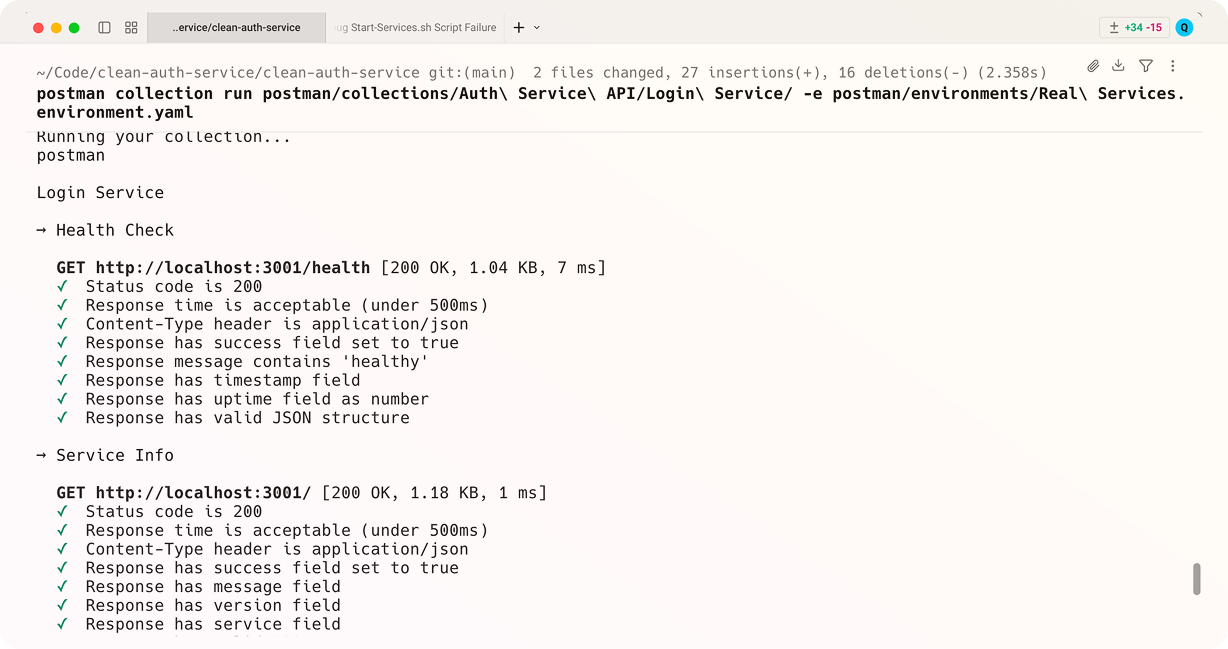
The Postman CLI’s biggest strength is that it stays inside the world your team already knows. If your collections, environments, and shared variables already live in a Postman workspace, the CLI runs them with almost no translation. You don’t rebuild anything. You authenticate, name the collection, and it runs the requests and tests exactly as the app would.
Installing it is a single command. On macOS and Linux you run the official install script:
curl -o- "https://dl-cli.pstmn.io/install/unix.sh" | sh
On Windows you use the signed PowerShell installer, and there’s also an npm package if you’d rather pin it as a dev dependency:
npm install -g postman-cli
The binary is postman. In CI you authenticate with a Postman API key, which is the method Postman recommends for pipelines:
postman login --with-api-key $POSTMAN_API_KEY
Then you run a collection by its ID, or by a local file path if you’ve exported it:
postman collection run $POSTMAN_COLLECTION_ID -e $POSTMAN_ENV_ID
The part that earns the Postman CLI a lot of loyalty is what happens after the run. When you’re signed in, it sends the run results straight to the Postman cloud, where they show up in your workspace alongside the collection. Test history, run comparisons, and the team-visible dashboard are all there without any extra plumbing. For a team that already lives in Postman, that round trip is genuinely useful, and it’s a fair reason to stay.
What the Apidog CLI does well
Apidog takes a different route to the same pipeline. You build tests visually inside the Apidog app: chain several requests into a single test scenario, add assertions on each response, pull a value out of one response and feed it into the next request, and loop the whole scenario over a data file. The CLI is the headless executor for those scenarios. It has no test format of its own. It reaches into your Apidog project, finds the scenario you name by ID, and runs it exactly as the app would, then reports back.
The payoff is that nobody maintains two copies of the same test. The scenario you built in the visual editor is the test that runs in CI. There’s no step where you re-express a working test as a script and then debug the script. The fast authoring loop and the automation loop share one source of truth. For multi-step flows, login then create then read then delete, that visual chaining saves a lot of the glue code you’d otherwise hand-write. The mechanics of building those flows are covered in the guide to test scenarios for API test automation.
Install is one npm command:
npm install -g apidog-cli
The binary is apidog. A typical run names a scenario by ID, picks an environment, sets an iteration count, and authenticates with an access token:
apidog run --access-token $APIDOG_ACCESS_TOKEN -t 605067 -e 1629989 -n 1 -r html,junit
You don’t type those IDs by hand. Open the test scenario in Apidog, switch to its CI/CD tab, click to generate an access token, and Apidog builds the full command for you with the scenario ID and environment ID already filled in. You copy it once, move the token into a CI secret, and reference it as $APIDOG_ACCESS_TOKEN in your workflow.
The token-and-ID model is the clearest split from the Postman CLI. Apidog runs tests stored in a project that the CLI fetches over the network, authenticated by the token. There’s no separate cloud opt-in for reporting either: you choose --out-dir for local artifacts and add --upload-report only when you want an overview pushed to the Apidog cloud. The reports stay where you put them.
Side by side
| Dimension | Postman CLI (postman) |
Apidog CLI (apidog) |
|---|---|---|
| Package / install | Install script, signed installer, or npm i -g postman-cli |
npm i -g apidog-cli |
| Run command | postman collection run <id|file> |
apidog run -t <scenarioId> |
| Test source | Collections in your Postman workspace (or exported file) | Test scenarios in your Apidog project, fetched by ID |
| Authoring | Collection editor and the Postman app | Visual scenario builder in the Apidog app |
| Auth in CI | Postman API key (postman login --with-api-key) |
Access token (--access-token) |
| Select what runs | Collection ID or file path | -t scenario, -f folder, --test-suite |
| Environment | -e, --environment |
-e, --environment <environmentId> |
| Data-driven | -d, --iteration-data (JSON or CSV) |
-d, --iteration-data (JSON or CSV) |
| Iterations | -n, --iteration-count |
-n, --iteration-count |
| Reporters | cli, json, junit, html |
cli, html, json, junit |
| Fail-fast | --bail |
--on-error end (default stops on first failure) |
| Cloud reporting | Auto-sends results when signed in | Opt-in via --upload-report |
| Built on | Newman | Apidog’s own engine |
Two things jump out of that table. First, both runners cover the CI essentials in nearly the same shape: environment selection, data-driven iteration, the four report formats that matter, and a non-zero exit on failure. If all you need is a runner that goes red on a bad merge, either one does the job. Second, the real divide is about where the test lives and how you wrote it. The Postman CLI runs a collection that lives in your Postman workspace. The Apidog CLI runs a visual scenario that lives in your Apidog project.
Reporters and exit codes: the parts CI actually reads
A runner proves its worth in a pipeline through two behaviors: the report it writes, and the exit code it returns. Get those two right and everything else is wiring.
The Postman CLI takes a comma-separated reporter list, and when you’re signed in it also ships the results to the Postman cloud:
postman collection run $POSTMAN_COLLECTION_ID \
  -e $POSTMAN_ENV_ID \
  --reporters cli,junit \
  --bail
The junit reporter is the one your CI dashboard parses into a pass or fail tree. The --bail flag stops the run at the first failed request, test, or assertion, which keeps feedback fast on a smoke test. Drop --bail and it runs everything, then reports all failures together. The CLI exits non-zero on any failure, so the build goes red on its own.
The Apidog CLI uses the same -r reporter idea and writes everything under one output directory:
apidog run --access-token $APIDOG_ACCESS_TOKEN -t 605067 \
  -r html,junit --out-dir ./apidog-reports
Its --on-error flag shapes mid-scenario behavior: end stops at the first failure and is the default, continue runs every step so you collect all failures in one report, and ignore steps past a known-flaky step without derailing the run. Either way the process ends non-zero if anything failed, and the JUnit XML lands in ./apidog-reports ready for your dashboard to pick up.
The practical upshot: both write JUnit XML, both fail the build correctly, and both archive an HTML report you can open later. The difference in reporting is the cloud round trip. Postman pushes results to its cloud by default when you’re authenticated. Apidog keeps reports local unless you ask it to upload. Neither is better in the abstract; one suits teams who want a hosted history without thinking about it, the other suits teams who want to decide exactly what leaves the runner.
Wiring each one into GitHub Actions
The shape of a GitHub Actions job is the same for both: check out the repo, set up Node, install the CLI, run the tests, and the failed exit code blocks the merge. Store the secret in your repository settings, never in the workflow file.
Here’s the Postman CLI version:
- name: Run API tests (Postman CLI)
  run: |
    curl -o- "https://dl-cli.pstmn.io/install/unix.sh" | sh
    postman login --with-api-key ${{ secrets.POSTMAN_API_KEY }}
    postman collection run $POSTMAN_COLLECTION_ID -e $POSTMAN_ENV_ID --reporters cli,junit --bail
And the Apidog CLI version:
- name: Run API tests (Apidog CLI)
  run: |
    npm install -g apidog-cli
    apidog run --access-token ${{ secrets.APIDOG_ACCESS_TOKEN }} -t 605067 -e 1629989 -r cli,junit
Both are short, both are readable, and both behave the same way at the level your pipeline cares about: a passing run exits zero and the merge proceeds, a failing run exits non-zero and the merge is blocked. If you want a deeper walkthrough of running API tests in a GitHub workflow, API test automation with GitHub Actions goes step by step. For Jenkins users, the same idea is laid out in integrating Apidog automated tests with Jenkins.
So which one wins in CI?
There’s no single winner, because the right answer depends on where your tests already live and how your team wants to author and store them.
The Apidog CLI wins when you value visual authoring and a single source of truth more than a hosted cloud history. You build a scenario once in the visual editor, with request chaining and assertions handled for you, and the same scenario runs in CI by reference. You decide whether reports stay local or get uploaded. And because Apidog covers design, mocking, and documentation in the same workspace, the test scenario sits next to the API contract it checks, which keeps tests and spec from drifting apart. Teams weighing the platforms more broadly can read the full Apidog vs Postman comparison.
The Postman CLI wins when your team is already inside Postman. Your collections are there, your environments are there, and you want run history in the Postman cloud without setting anything up. The cloud round trip on every run is a real convenience for that setup, and the tool is officially signed and supported. If that describes your team, switching runners buys you little.
If you’re already feeling boxed in by the Postman cloud model, or you just want to author tests once and run them everywhere, the move is clear. Download Apidog, build a scenario, open its CI/CD tab, and copy the generated apidog run command into your pipeline. That’s the whole setup.
FAQ
Is the Postman CLI the same as Newman? No. Newman is the older open-source npm runner. The Postman CLI is a newer tool built on Newman’s foundation, signed and supported by Postman, with built-in reporting to the Postman cloud. If you’re choosing between the two on the Postman side, Postman CLI vs Newman breaks down the differences.
Do I need an account or token for either CLI in CI? Yes for both, but the form differs. The Postman CLI authenticates with a Postman API key via postman login --with-api-key. The Apidog CLI authenticates with an access token passed as --access-token. Store either one as a CI secret, never in the workflow file.
Do both runners fail the build when a test fails? Yes. Both exit with a non-zero status code on any failed test or assertion, which is what tells your CI system to mark the build red and block the merge. The Postman CLI uses --bail to stop on the first failure; the Apidog CLI uses --on-error end, which is its default.
Can I keep my reports local instead of sending them to a cloud? The Apidog CLI keeps reports local by default and writes them to --out-dir; you only upload with --upload-report. The Postman CLI writes local reporters too, but when you’re signed in it also sends run results to the Postman cloud automatically.
How do I get the exact Apidog run command for my scenario? Open the test scenario in Apidog, switch to its CI/CD tab, generate an access token, and Apidog builds the full apidog run command with the scenario ID and environment ID already filled in. Copy it, move the token into a CI secret, and you’re done. For every available flag, run apidog run --help.
Which one should a team migrating off Postman cloud pick? If the reason you’re leaving is the cloud-centric model or pricing, the Apidog CLI fits, because it runs a single visual scenario from your project and lets you decide what leaves the runner. Start with the Apidog vs Postman comparison to see how the platforms line up beyond the runner.