As AI becomes increasingly integrated into API development and testing, the barrier to entry for automated testing is steadily decreasing. Tasks that once required repetitive manual operations and data preparation can now be handled by AI. Apidog reflects this change in API testing as well.
In Apidog, automated testing primarily revolves around two approaches: Endpoint Tests and Test Scenarios.
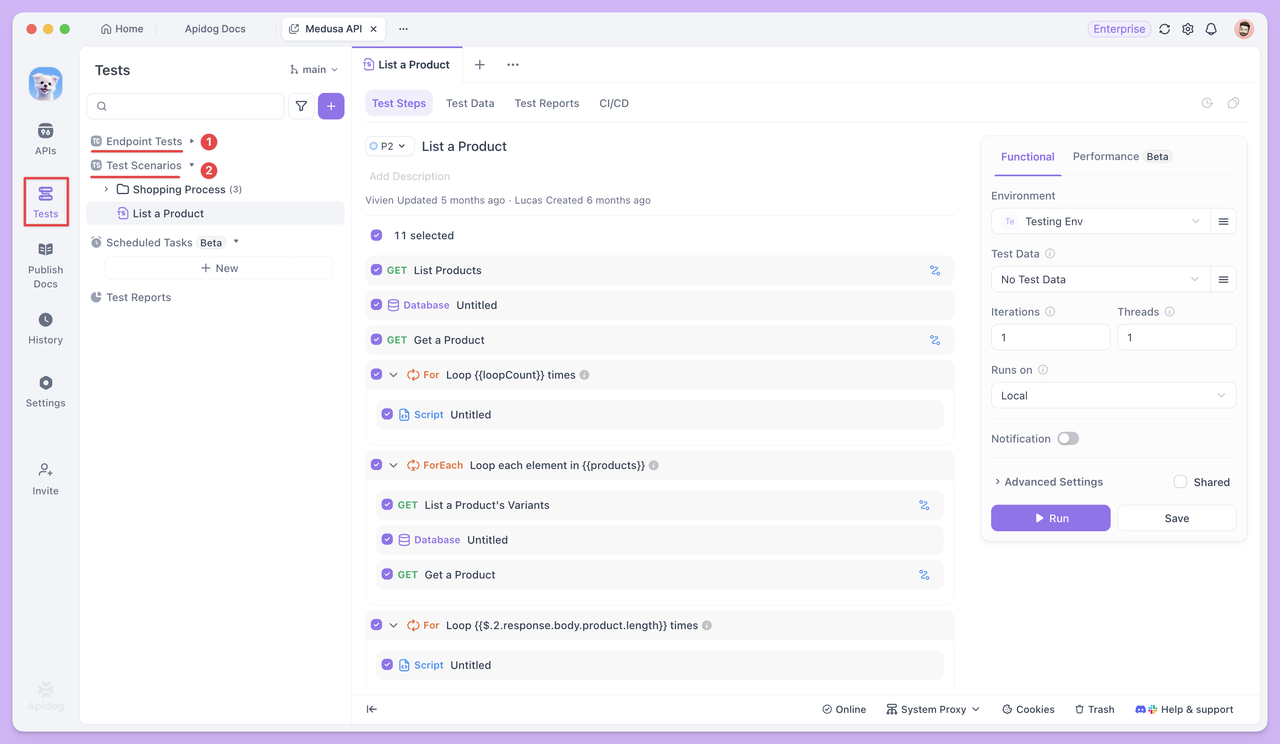
If you don't see the Endpoint Test module, it means your Apidog version is outdated. Simply update to the latest version.
The Endpoint Tests module displays all HTTP endpoints of your APIs, making QA developers more focused. It includes only test cases, test reports, and documentation—without allowing endpoint editing. This design ensures testers can concentrate on creating and executing test cases efficiently.
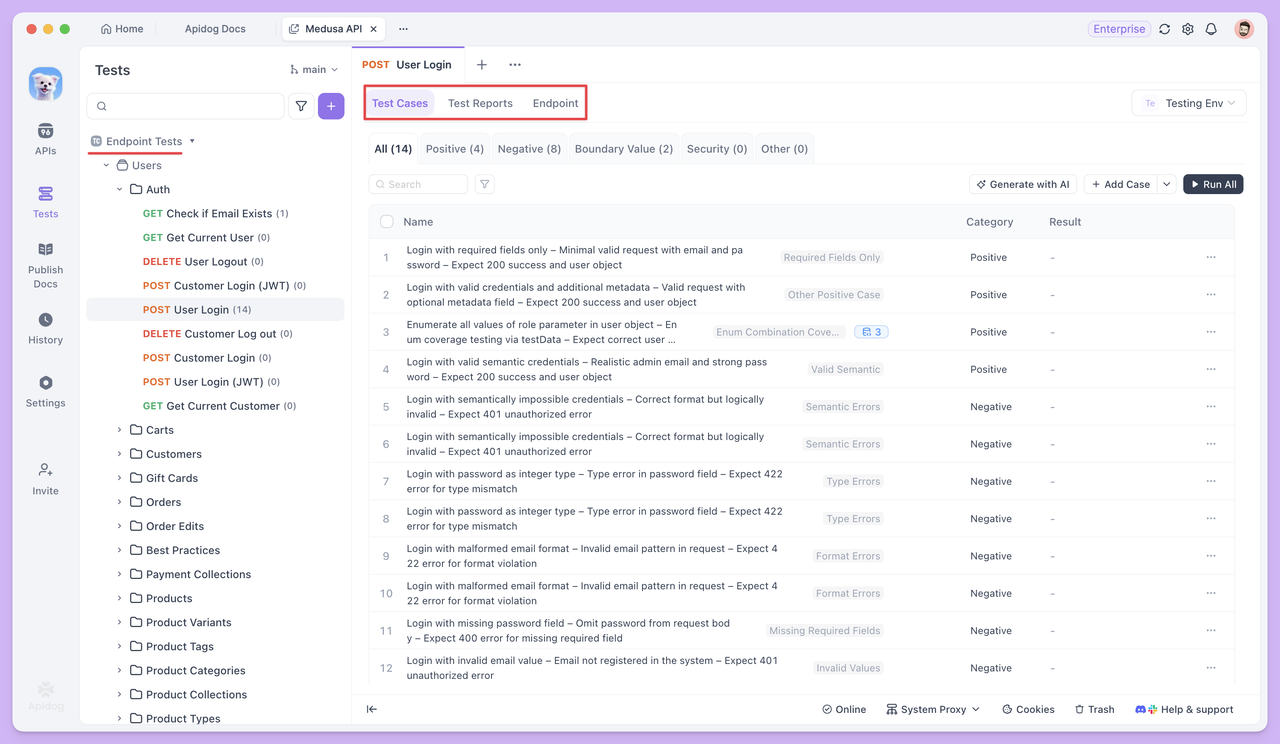
Test Scenarios, in contrast, link multiple endpoints or test cases together. They allow you to define the execution order and data passing relationships between endpoints, effectively simulating a complete business process.
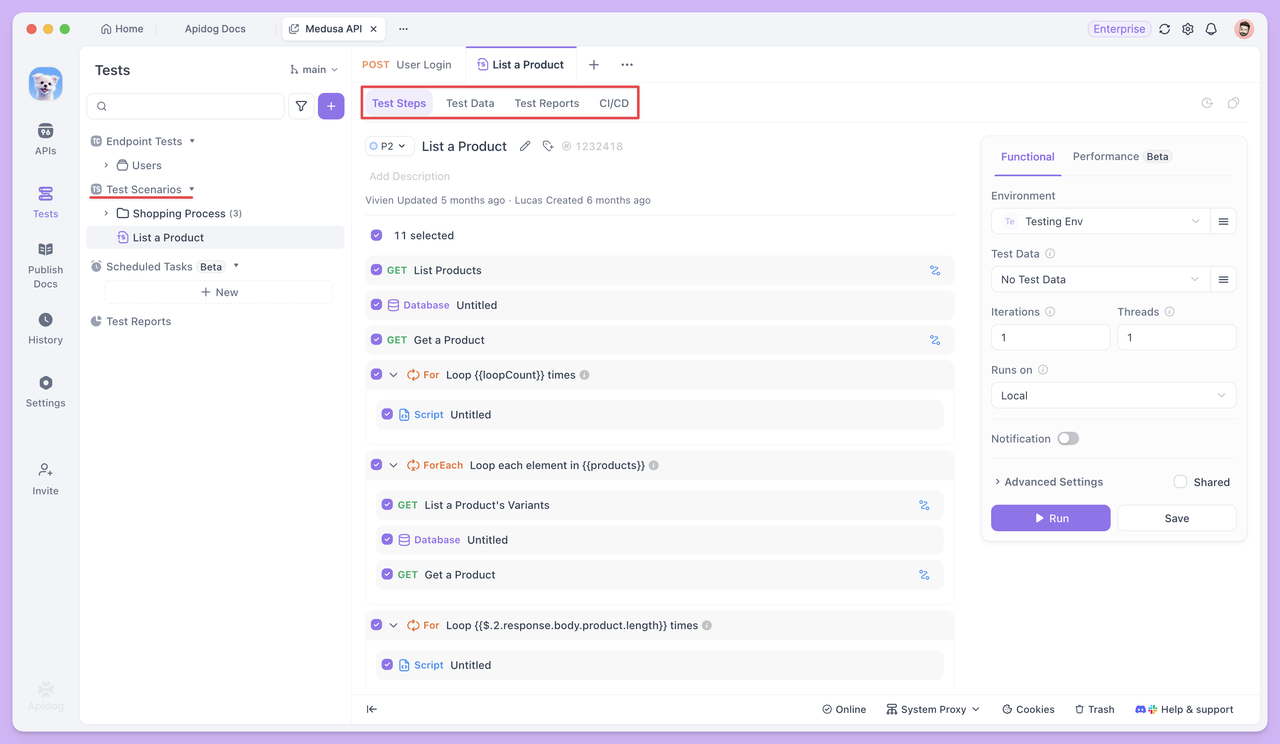
With AI integrated into both Endpoint Tests and Test Scenarios, API testing can gradually shift toward more automated, reusable, and efficient execution. Next, we'll explore how these two testing methods help solve real-world challenges.
Endpoint Tests with Automation
Endpoint Test focuses on whether the endpoint itself is stable and if the input/output meets expectations. Each test case is executed independently, with the emphasis on thoroughly verifying a single endpoint with different data.
AI-Generated Test Cases
Open any endpoint in the Endpoint Test module and click Generate with Al. AI will automatically generate a set of test cases based on the endpoint parameters and response structure.
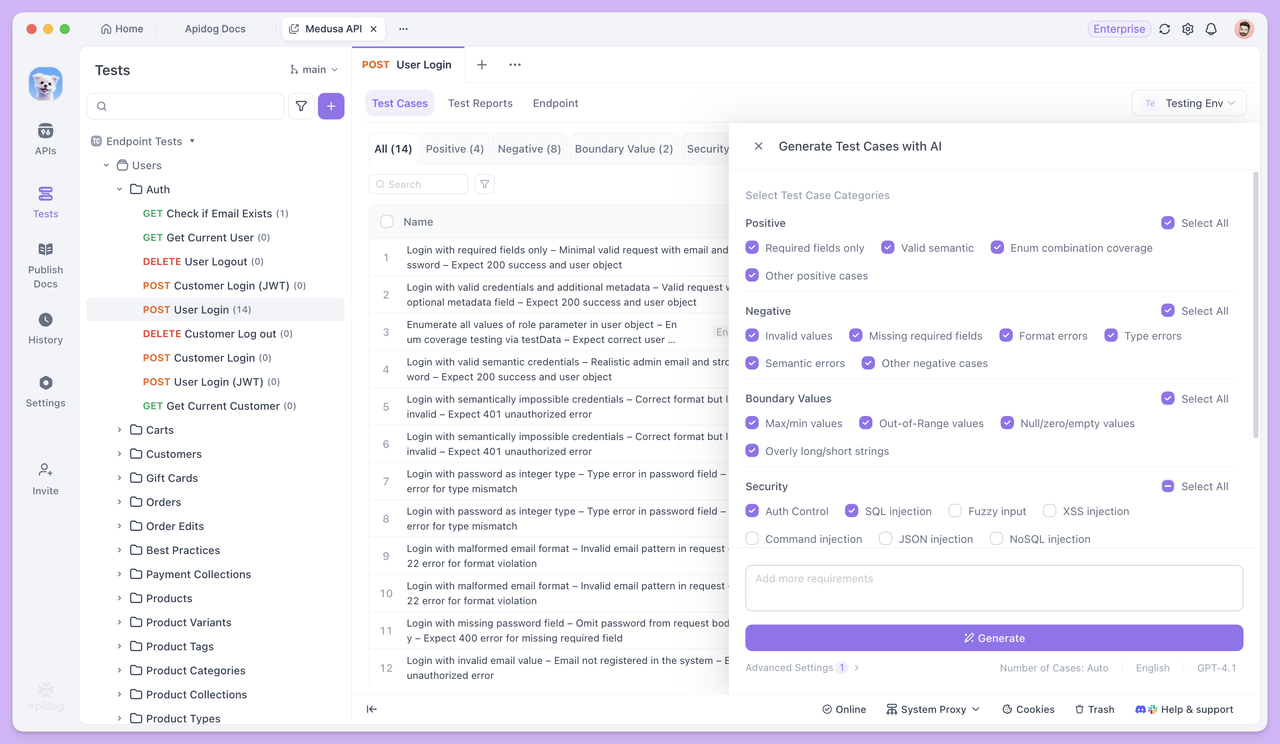
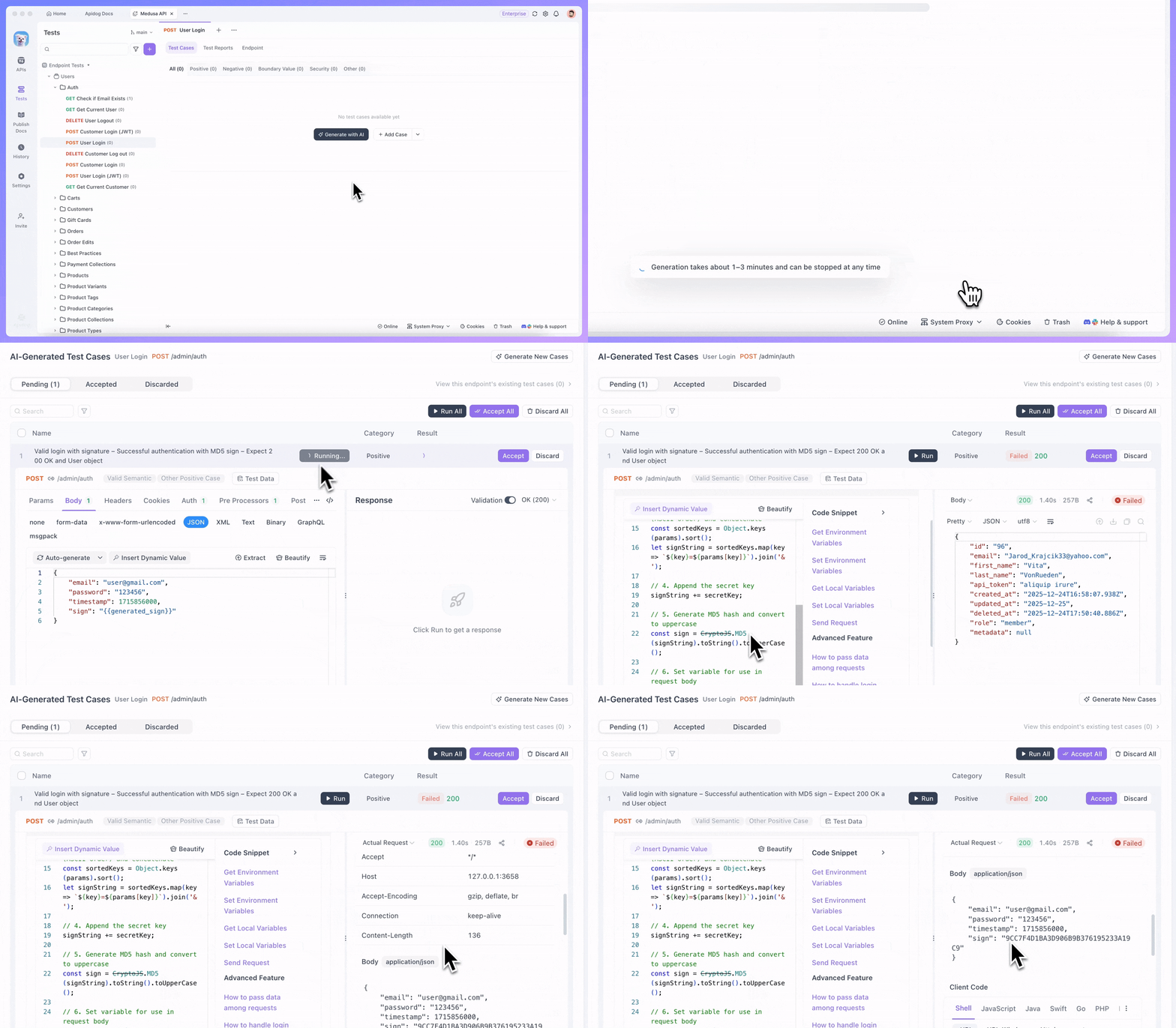
If you only need specific test cases, there's no need to select the default types. Simply describe your requirements directly to AI, and it will generate the corresponding test case. For example, you can ask AI to:
- Generate a test case for "login successfully and extract the token".
- Generate a test case to "create the signature field
signbased on existing parameters and send it".
For more precise results, you can provide detailed conditions and rules, such as:
Generate a positive test case for this endpoint.

The endpoint requires a signature parameter sign, with the following signing rules:
1. Collect all non-empty request parameters (excluding sign), sort them by parameter name in ASCII order, concatenate them in the format key=value joined by &, and append the secret key SECRET_KEY at the end.
2. Apply MD5 hashing to the resulting string and convert the hash to uppercase. The final result is used as the value of sign.

Test case requirements:
1. Before sending the request, use a pre-request script to generate the sign, with clear comments included.
2. Add the generated sign to the request parameters and send the request.
This way, AI will generate cases strictly according to your rules, without omissions or misunderstandings.
Test Data Generation
While generating test cases, AI also prepares corresponding test datasets for different types of cases to cover various real-world input situations.
In standard business scenario cases, test data usually consists of multiple sets of semantically valid parameter values. For instance, in a login endpoint test, although all emails and passwords are valid, the dataset will include various common email formats—such as those with dots, plus signs, numeric emails, or corporate emails—to verify the compatibility and stability of the endpoint under normal usage scenarios.
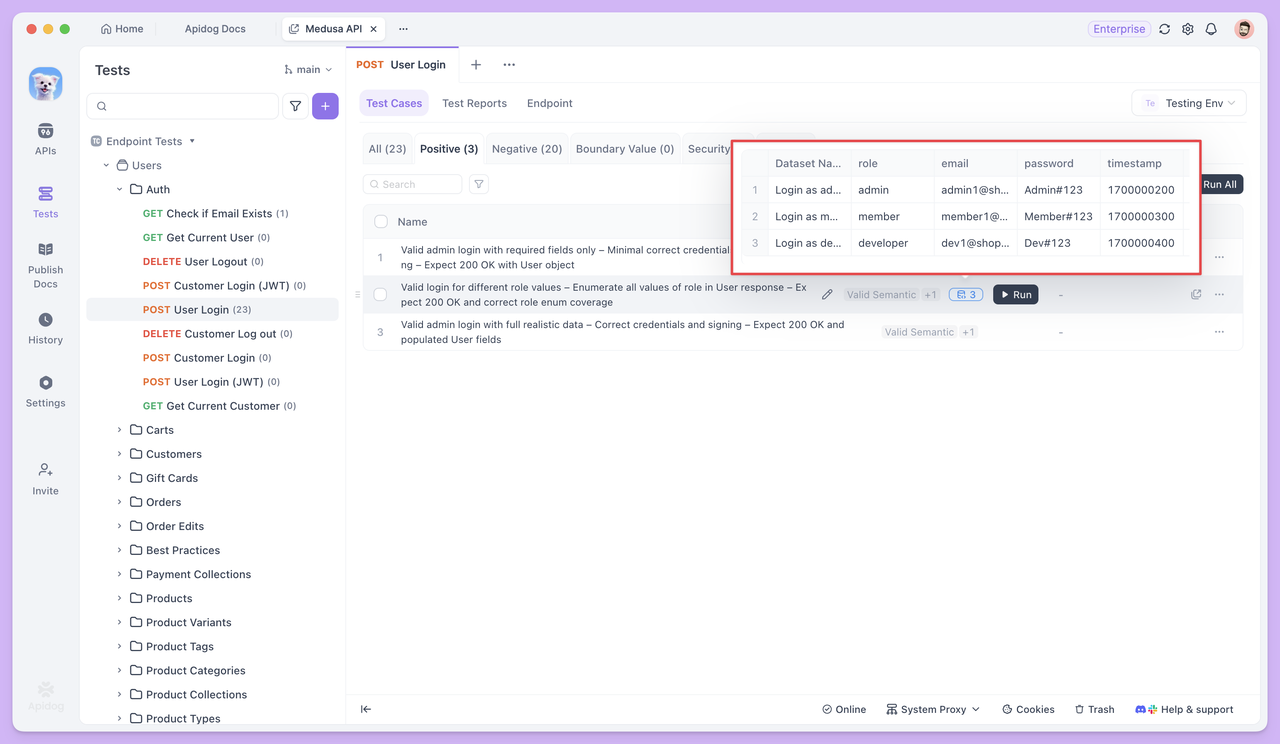
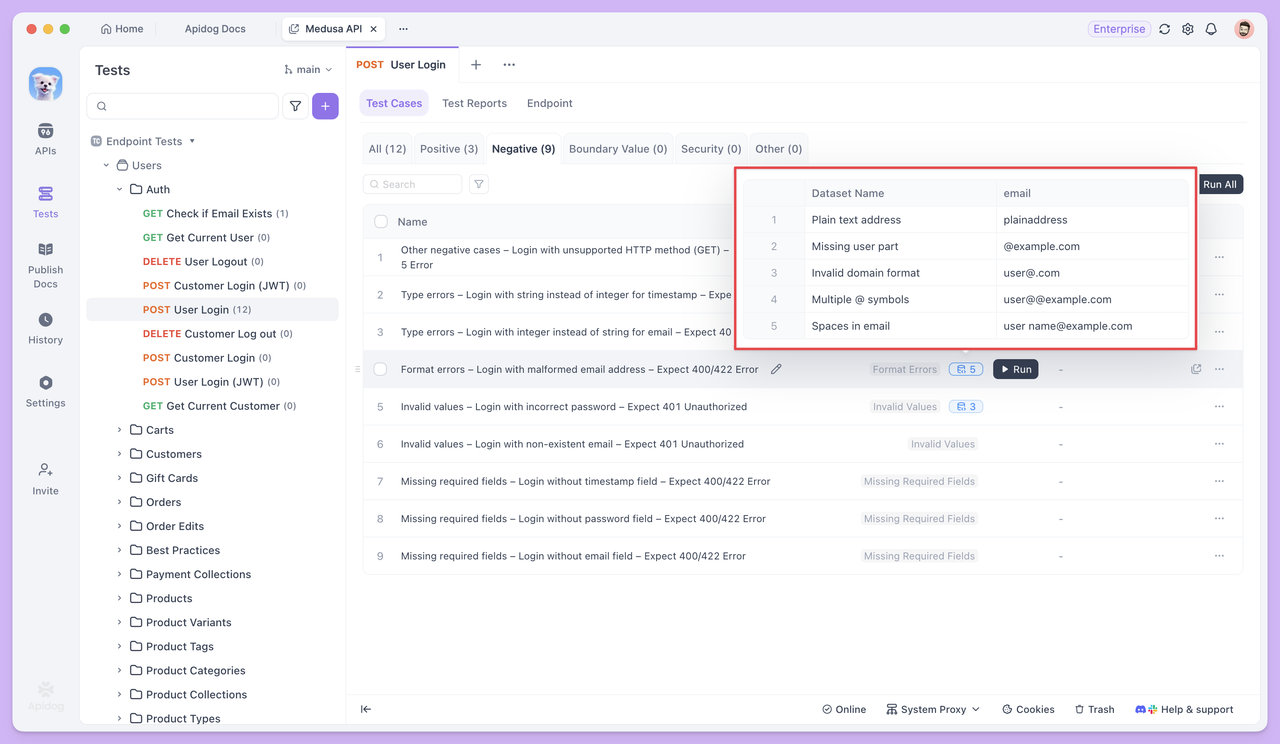
In abnormal or boundary test cases, the test data is intentionally designed to include inputs that violate validation rules.
For example, in a test case like "Log in with an invalid email format and expect a 400 error", the data set would contain different types of invalid email addresses—such as emails missing the @ symbol, missing a domain name, or containing spaces. The goal is to check whether the API endpoint can correctly detect these invalid inputs and properly reject the request.
Referencing Test Data
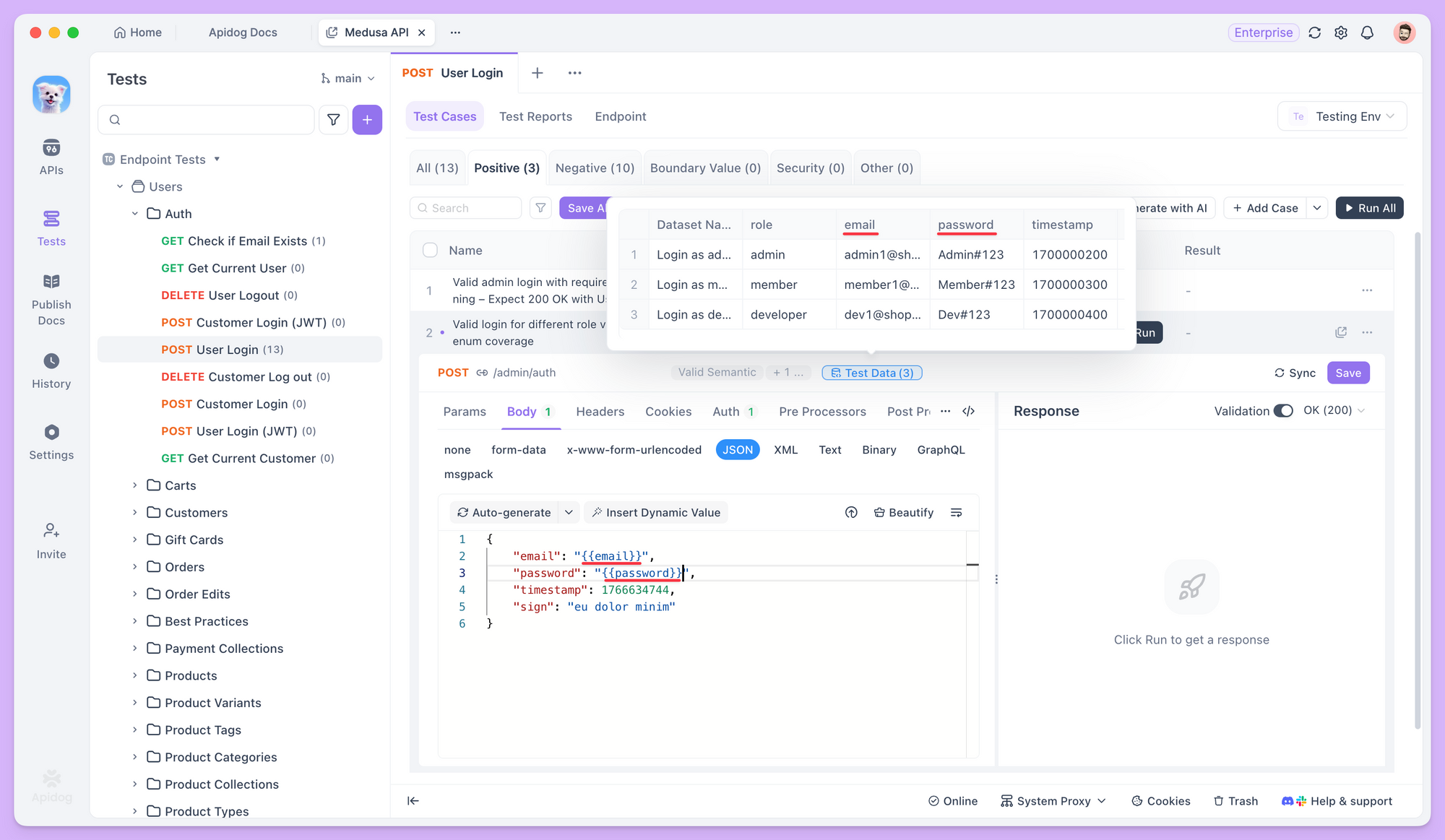
In test cases, you can use the {{variable_name}} syntax to reference test data and insert variables into request parameters, request bodies, and other fields.
When the test runs, Apidog automatically pulls values from the dataset one by one and sends requests using each value. This lets you test the same endpoint multiple times with different data—without having to rewrite the test case.
Batch Execution and Test Reports
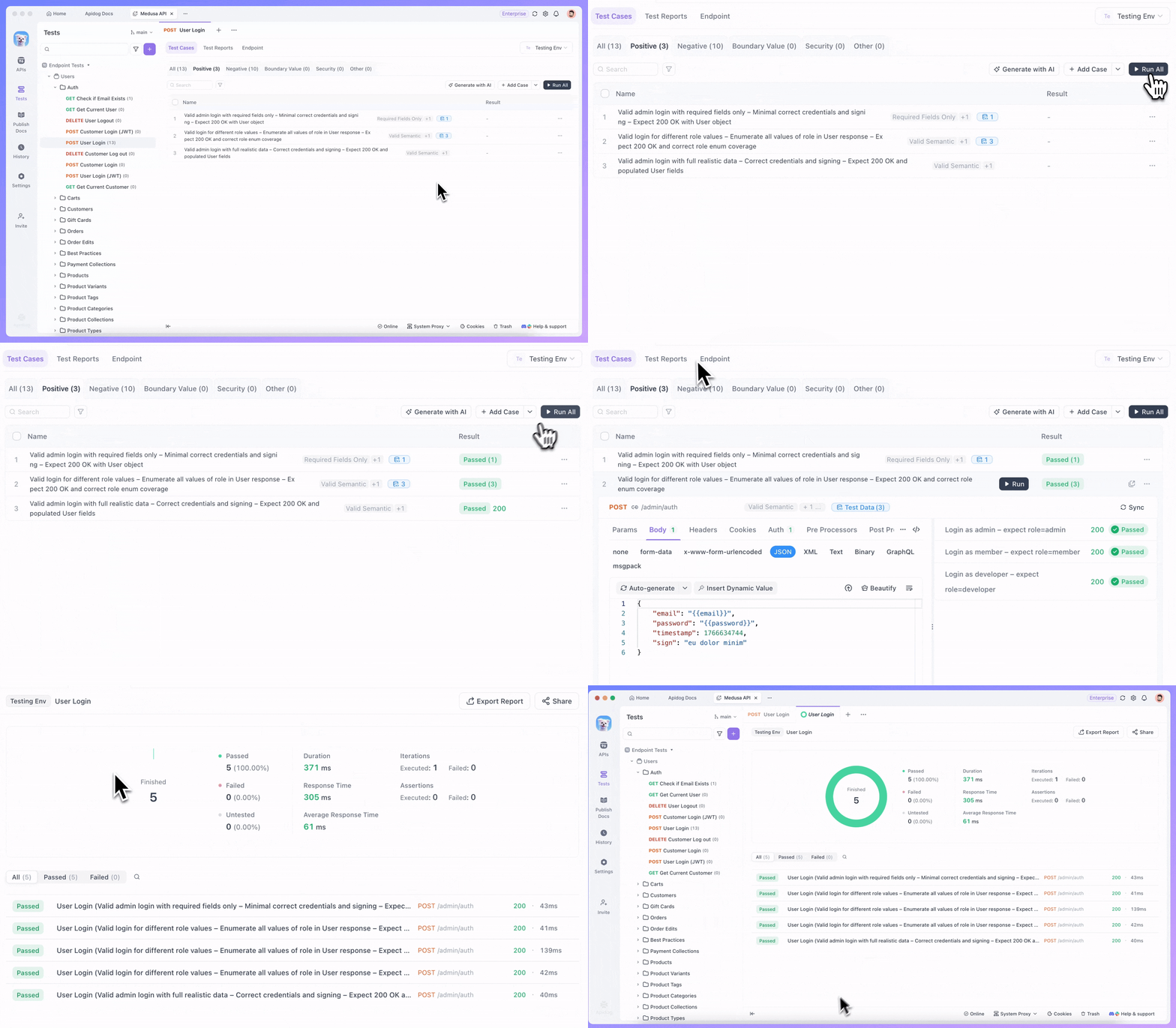
Once the test cases and their corresponding data are ready, you can select multiple test cases and run them together. Each test case runs independently based on its own configuration, and all results are collected into a single test report for easy review.
In real-world applications, endpoints rarely operate in isolation. When the response from one request is used as the input for the next, testing is no longer about a single endpoint but about the entire call chain.
This is where Test Scenarios come into play.
Test Scenarios
A single endpoint is usually not enough to complete a business task. For example, a user must log in before placing an order, and only after the order is created successfully can the order details be queried. The response from one endpoint often becomes the input for the next.
These dependencies are hard to fully validate with single endpoint test.
Test Scenarios shift the focus from checking whether one endpoint works correctly to verifying whether an entire call chain runs smoothly and as expected.
Orchestrating Endpoints into a Workflow
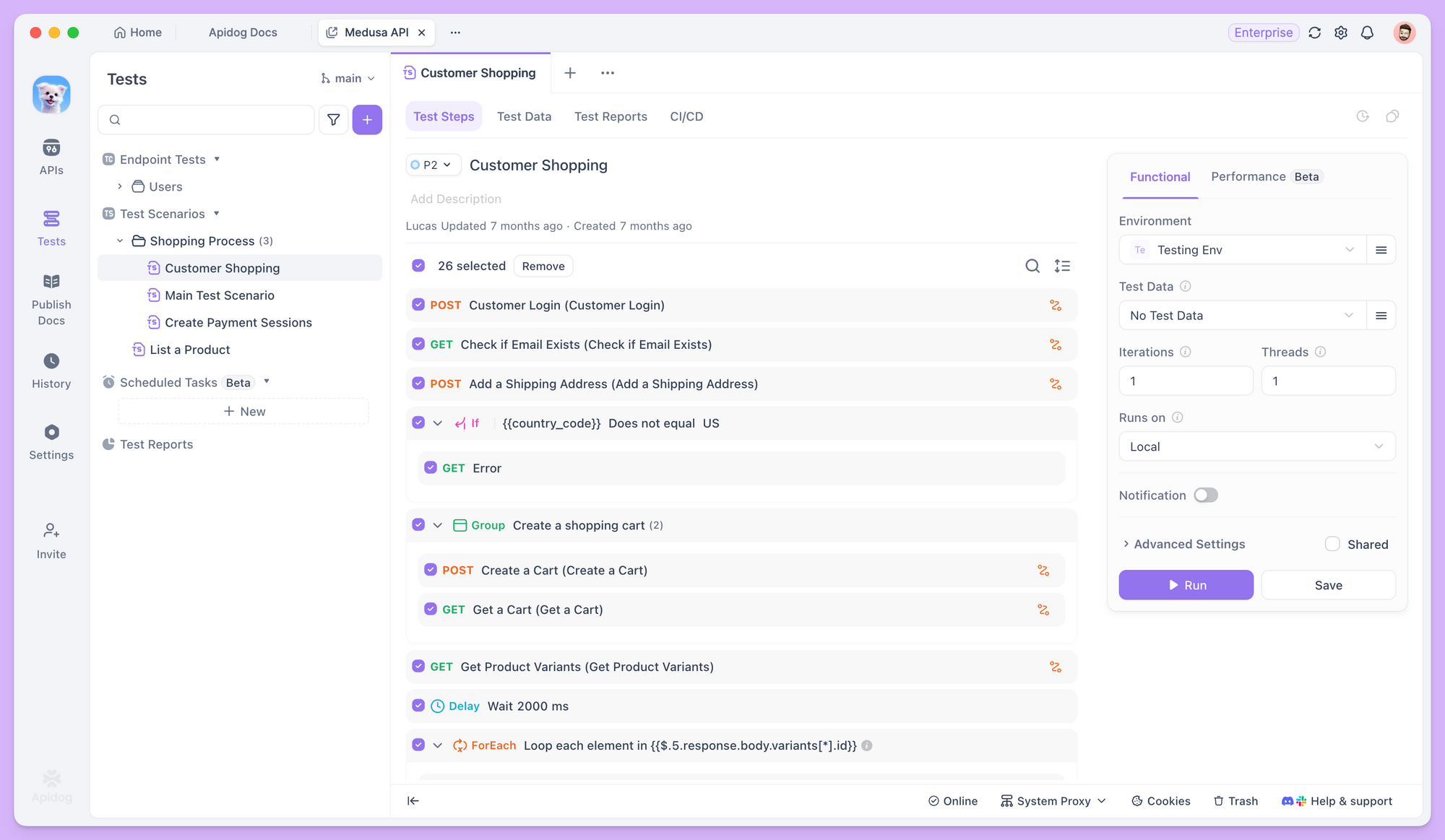
In Apidog, after creating a new test scenario, you can add multiple endpoints or existing test cases in a specific order, clearly defining the execution sequence for each step.
Passing Data between the Test Steps
When endpoints depend on each other, test scenarios let you pass data from one step to the next as variables. For example, the id returned by the Create Order endpoint can be reused directly in later steps, such as querying or updating the order.
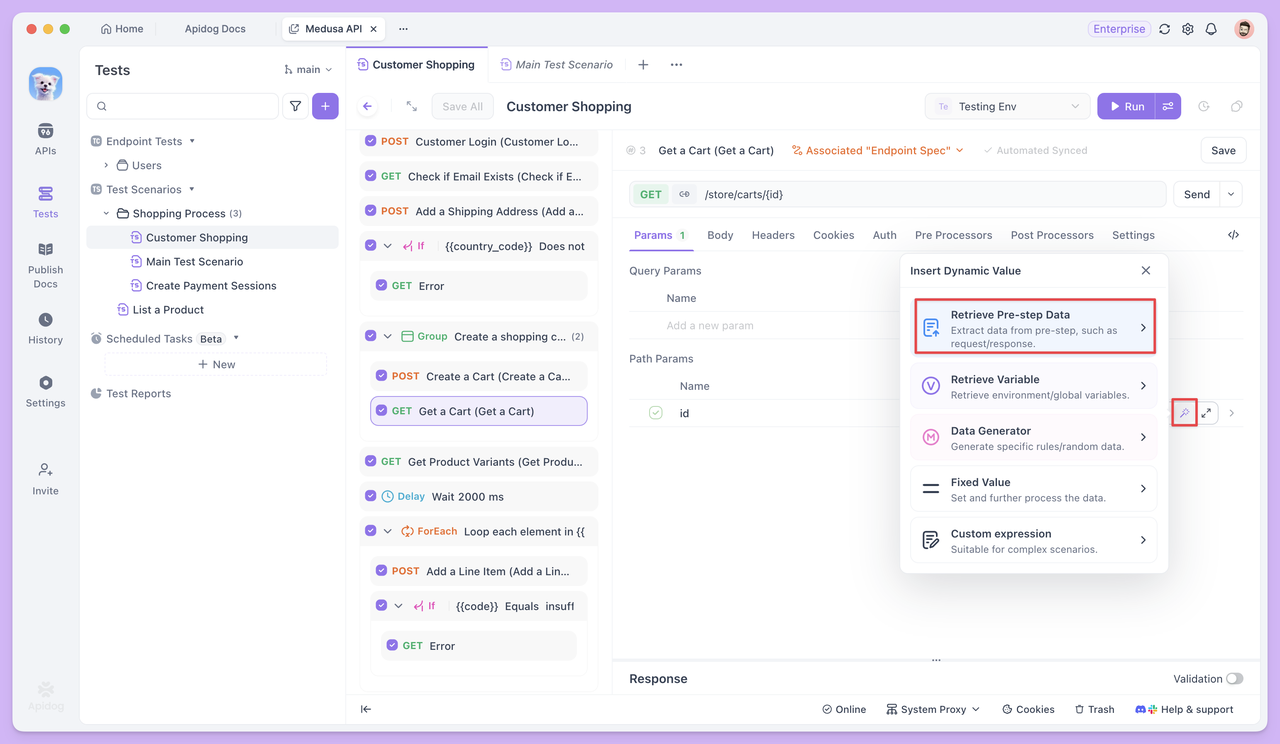
This data passing requires no additional code. Instead, it relies on variable referencing to clearly define the upstream and downstream relationships between endpoints.
What if Test Cases are Missing?
When orchestrating test scenarios, the first goal is often to ensure the main workflow runs smoothly—for example, Login → Create Order → Query Order, where each step corresponds to an existing test case.
However, in practice, you may run into a common challenge: some steps in the workflow may not have ready-made test cases, or existing cases may not fully meet the workflow requirements.
For instance, in the login step, you might need not only to verify a successful login but also to extract the returned token as an environment variable for subsequent requests. An existing single endpoint test case might only perform basic login validation without handling token extraction.
If you’re unsure how to extract returned fields as variables or are not familiar with scripting, you can pause the scenario orchestration. Then, go to the Endpoint Test page for that endpoint and leverage AI to handle the requirement. For example, you could specify:
"Generate a test case that extracts the token and saves it as an environment variable after successful login, including necessary assertions."
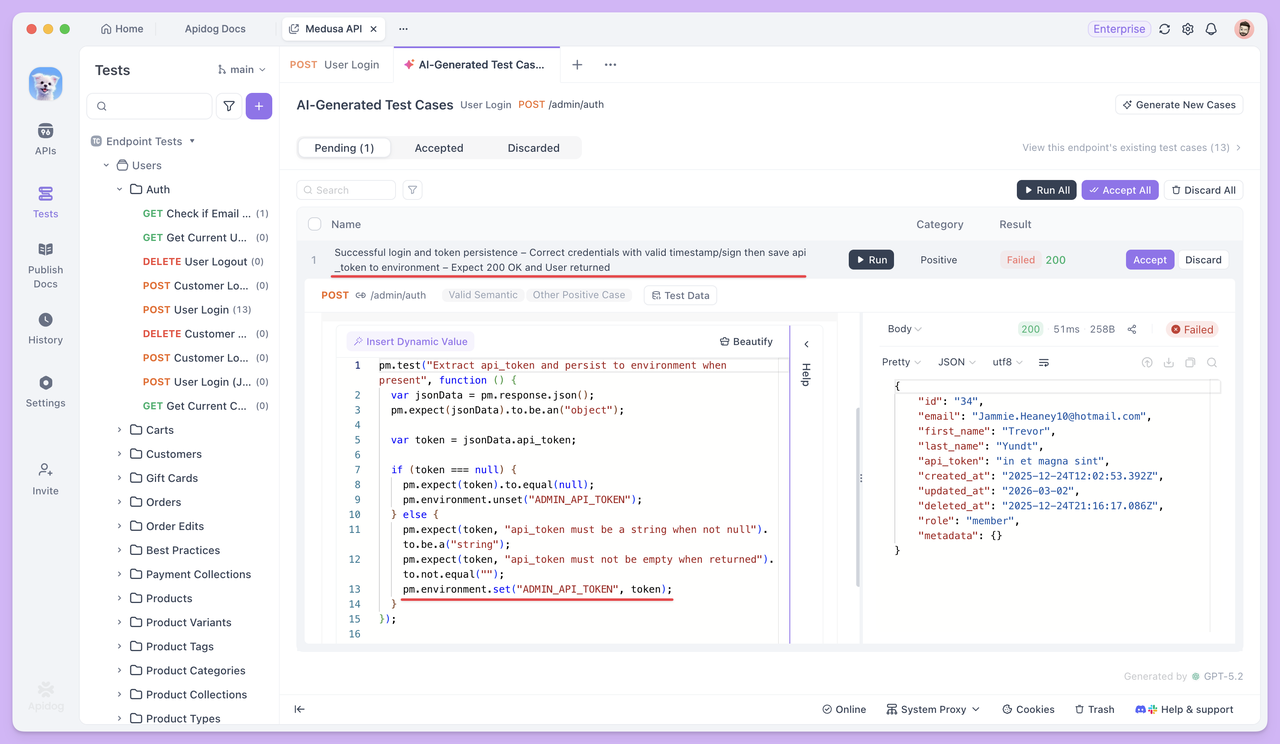
If you want more precise control over your test cases, you can enable Step-by-Step generation in the Advanced Settings.
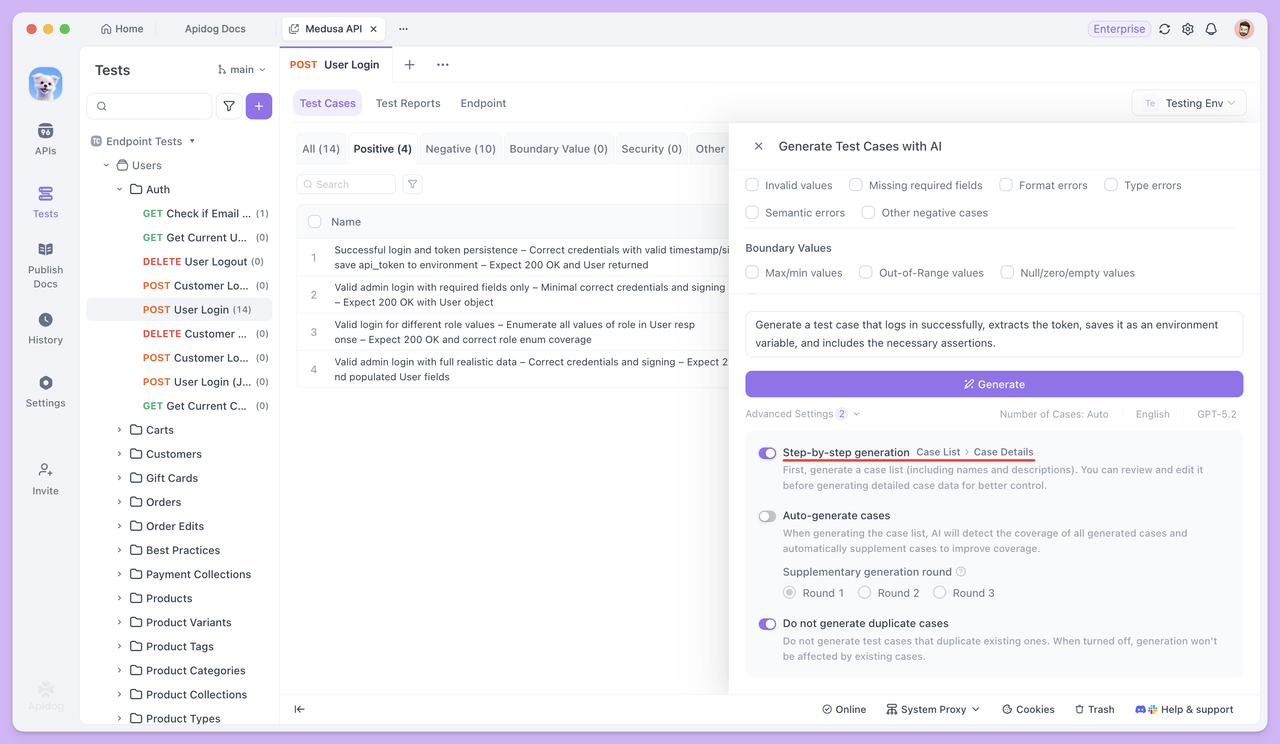
Once enabled, Apidog will first generate a list of test cases, including their names and descriptions. You can then manually review, modify, and confirm them before generating the full detailed test case data.
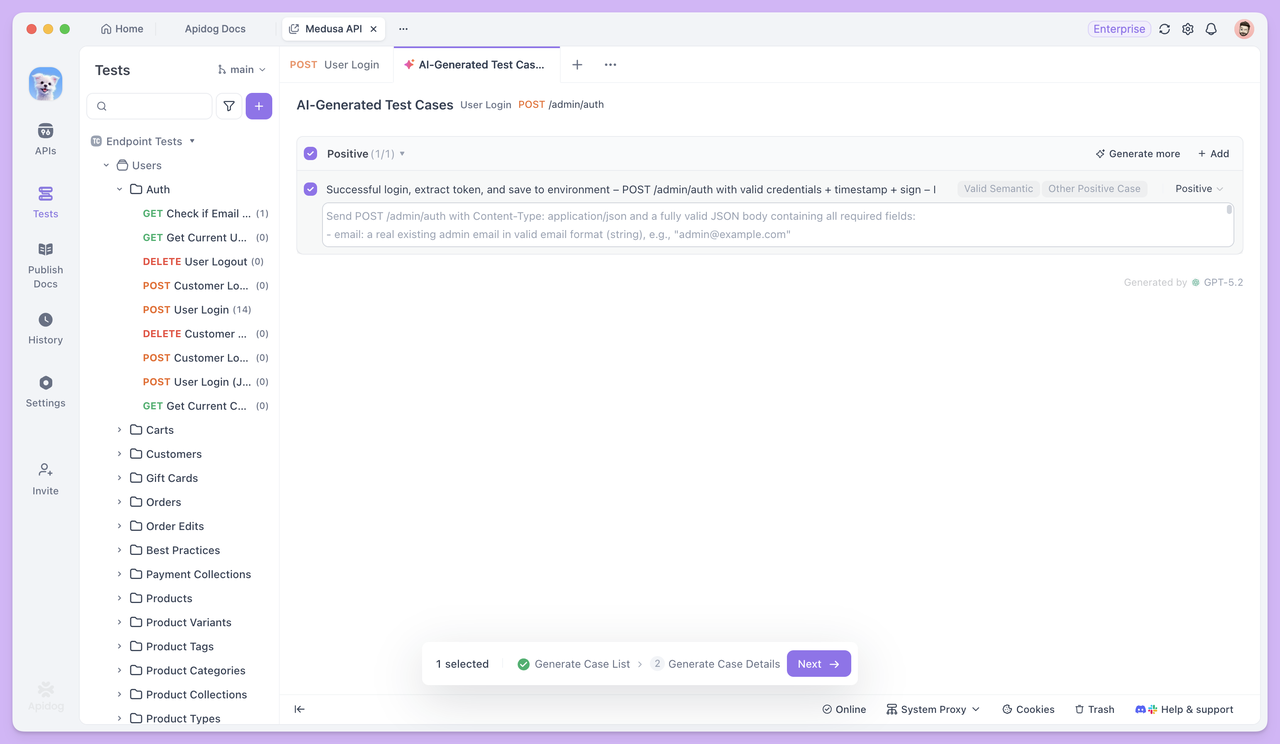
After the test case is generated, return to the test scenario. You can use this case directly as the login step, and subsequent endpoints can reference the token through Dynamic Values, allowing the workflow to continue seamlessly.
If you need test data in your Test Scenarios, you can first have AI generate cases with Test Data in Endpoint Test. Then, copy the CSV-formatted dataset into the test scenario using Bulk Edit, making data setup much faster and more convenient.
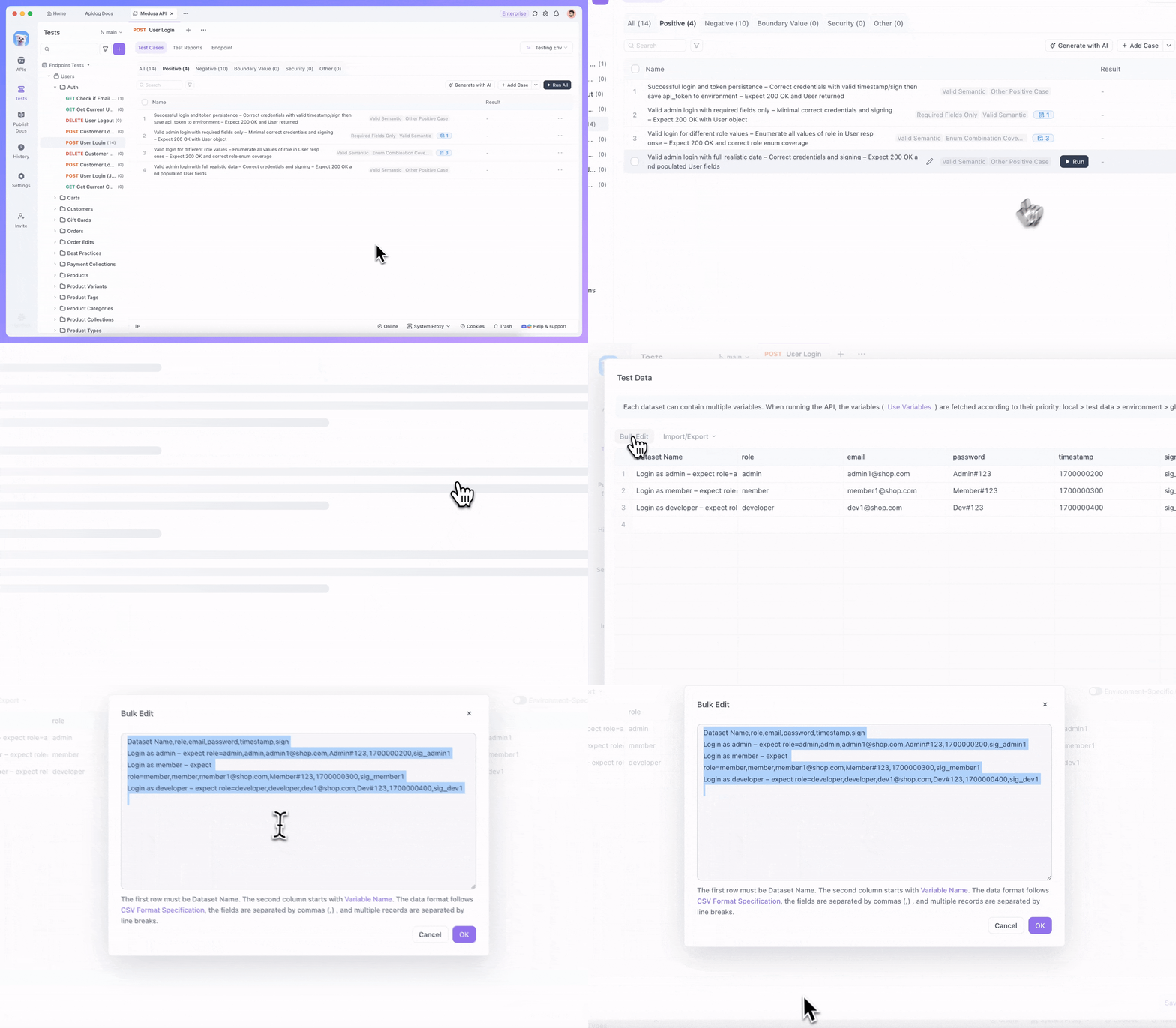
This approach ensures that the test scenario is always centered on the main workflow, while AI acts as a fill-as-you-go assistant. Whenever a step is missing, simply use AI to generate the corresponding test case for that endpoint, and then link it back into the workflow immediately.
Summary
AI hasn’t changed what API testing needs to verify, but it has significantly lowered the effort required to start and complete testing.
During Endpoint Tests, AI primarily addresses slow test case creation and incomplete coverage. This allows testing to move faster into the validation phase, instead of getting stuck preparing data and writing cases manually.
When testing progresses to Test Scenarios, the focus shifts from verifying a single endpoint to ensuring that endpoints can work together correctly within real call sequences.
In this workflow, you don’t need to prepare all test cases in advance. As the scenario is gradually built, you can return to Single Endpoint Testing at any time to have AI generate the specific cases needed for the current workflow, then continue orchestrating the steps. This reduces unnecessary upfront effort and saves on credit usage.
Overall, Apidog integrates Endpoint Test, Test Scenarios, and AI capabilities within a single workflow, turning the usual bottlenecks of API testing—writing cases, preparing data, and chaining processes—into manageable tasks.
If you still think automated testing means "complex configuration and a steep learning curve", start small: pick a single endpoint in Apidog, generate a few cases, and run a test scenario. You'll quickly experience how much smoother and faster the process can be in practice.