TL;DR
AI agents are autonomous programs that can plan, execute, and adapt API test cases without step-by-step instructions. They generate tests from requirements, self-heal when applications change, and analyze failures intelligently. Organizations using AI agents for API testing report 6-10x faster analysis, 85% fewer flaky tests, and 84% more coverage compared to traditional automation.
Introduction
API testing is broken. Teams spend weeks writing test scripts that break with every UI change. Flaky tests waste hours of debugging time. Coverage gaps let bugs slip into production.
Traditional automation depends on predefined scripts. When your API changes, your tests fail. When your team grows, test maintenance becomes a bottleneck. When you ship fast, quality suffers.
AI agents change this. They don’t follow scripts, they reason, adapt, and learn. They generate tests from requirements, fix themselves when things change, and find bugs you didn’t know existed.
This guide shows you how to use AI agents for API testing securely and effectively. You’ll learn what makes AI agents different, how to sandbox them safely, and how to implement them in your workflow. By the end, you’ll know how to build test automation that doesn’t just run, it thinks.
What Are AI Agents in API Testing?
AI agents aren’t just smarter test scripts. They’re autonomous systems that operate with reasoning and adaptability.
Traditional automation follows instructions: “Click this button, check that response, assert this value.” If the button moves, the test breaks. If the API changes, you rewrite the test.
AI agents work differently. You give them a goal: “Test the user registration flow.” They figure out how. They explore endpoints, generate test data, execute requests, and analyze responses. When something changes, they adapt.
Key Differences from Traditional Automation
| Traditional Automation | AI Agents |
|---|---|
| Follows predefined scripts | Plans and adapts dynamically |
| Breaks when UI/API changes | Self-heals and updates tests |
| Requires manual test writing | Generates tests from requirements |
| Fixed test data | Creates contextual test data |
| Reports failures | Analyzes root causes |
Core Capabilities of AI Testing Agents
1. Autonomous Test Generation
AI agents create test cases from requirements, code, or user journeys. You describe what to test in natural language. The agent writes the tests.
Example: “Test that users can’t register with duplicate emails” becomes a full test scenario with edge cases, boundary conditions, and negative tests.
2. Self-Healing Tests
When your API changes, agents update tests automatically. They detect when endpoints move, parameters change, or response structures evolve. Instead of failing, they adapt.
3. Intelligent Failure Analysis
Agents don’t just report “Test failed.” They examine execution traces, compare against historical patterns, classify issue types, and provide root cause analysis with recommendations.
4. Context-Aware Test Data
Agents generate realistic test data based on your API schema, business rules, and data relationships. They understand that email fields need valid emails, dates need proper formats, and foreign keys need existing records.
5. Continuous Learning
Agents learn from past test runs. They identify patterns in failures, optimize test execution order, and improve coverage over time.
The Security Challenge: Sandboxing AI Agents
AI agents are powerful. That’s also the problem.
An agent that can read your API specs, execute requests, and modify test data has significant access. If compromised or misconfigured, it could leak sensitive data, corrupt databases, or overwhelm production systems.
Recent discussions on HackerNews highlighted the need for secure AI agent execution. The Agent Safehouse project demonstrates macOS-native sandboxing for local agents, showing that the developer community recognizes this risk.
Security Risks of Unsandboxed AI Agents
1. Data Exposure
Agents access API responses containing user data, authentication tokens, and business logic. Without proper isolation, this data could leak to logs, training data, or external services.
2. Unintended Actions
An agent testing a DELETE endpoint might accidentally remove production data. An agent generating test data might create thousands of records that overwhelm your database.
3. Credential Leakage
Agents need API keys, database credentials, and authentication tokens to run tests. If these leak, your entire system is compromised.
4. Resource Exhaustion
Agents can generate and execute tests rapidly. Without rate limiting, they might trigger DDoS protection, exhaust API quotas, or crash test environments.
Sandboxing Best Practices
Isolate Test Environments
Run agents against dedicated test environments, never production. Use separate databases, API keys, and infrastructure.
# Example: Environment isolation config
environments:
  production:
    accessible_by_agents: false
    url: https://api.production.com

  testing:
    accessible_by_agents: true
    url: https://api.test.com
    rate_limit: 100/minute
    data_retention: 7_days
Implement Permission Boundaries
Agents should have minimal permissions. They need to read API specs and execute tests, but they don’t need to modify schemas, delete projects, or access billing.
Use Temporary Credentials
Generate short-lived API keys for agent sessions. Rotate credentials frequently. Revoke access when tests complete.
Monitor Agent Behavior
Log all agent actions. Track API calls, data access, and test execution. Alert on anomalies like excessive requests, unauthorized endpoints, or data exfiltration attempts.
Network Isolation
Run agents in isolated networks. Block access to internal services, production databases, and external APIs unless explicitly required.
Apidog’s Sprint Branches feature provides isolated testing environments where teams can test changes without affecting production APIs. Combined with role-based access control, you can limit what agents can access and modify.
How AI Agents Transform API Testing
Let’s look at how AI agents solve real API testing problems.
Problem 1: Test Creation Takes Too Long
Writing comprehensive API tests is slow. You need to understand the API, write test code, handle authentication, manage test data, and add assertions.
Traditional Approach:
// Manual test writing
describe('User Registration', () => {
  it('should create a new user', async () => {
    const response = await fetch('https://api.example.com/users', {
      method: 'POST',
      headers: { 'Content-Type': 'application/json' },
      body: JSON.stringify({
        email: 'test@example.com',
        password: 'SecurePass123!',
        name: 'Test User'
      })
    });

    expect(response.status).toBe(201);
    const data = await response.json();
    expect(data.email).toBe('test@example.com');
  });
});
You write this for every endpoint. Every edge case. Every validation rule.
AI Agent Approach:
Agent: Generate tests for user registration endpoint
Requirements:
- Users must provide email, password, and name
- Email must be unique
- Password must be 8+ characters
- Name is optional
The agent generates:
- Happy path test (valid registration)
- Duplicate email test (409 conflict)
- Weak password test (400 validation error)
- Missing fields test (400 validation error)
- SQL injection test (security)
- XSS attempt test (security)
All tests include proper assertions, error handling, and cleanup.
Problem 2: Tests Break When APIs Change
APIs evolve. Endpoints move. Parameters change. Response structures grow. Your tests break.
Traditional Approach:
API changes from /api/v1/users to /api/v2/users. You manually update 47 test files. You miss 3. Those tests fail in CI. Your deployment is blocked.
AI Agent Approach:
The agent detects the endpoint change. It updates all affected tests automatically. It validates that the new endpoint behaves correctly. Your tests pass.
Problem 3: Flaky Tests Waste Time
Flaky tests fail randomly. They pass locally but fail in CI. They fail on retry. They waste hours of debugging time.
Common causes:
- Race conditions
- Timing issues
- Test data conflicts
- Environment differences
AI Agent Solution:
Agents analyze flaky test patterns. They identify root causes:
“Test fails when run after UserDeletion test because it expects user ID 123 to exist. UserDeletion test removes all test users. Solution: Generate unique user IDs per test or add proper test isolation.”
The agent fixes the test automatically.
Problem 4: Coverage Gaps Let Bugs Through
You test happy paths. You miss edge cases. Bugs slip into production.
AI Agent Solution:
Agents explore your API systematically. They test:
- Boundary values (0, -1, MAX_INT)
- Invalid inputs (null, undefined, wrong types)
- Authentication edge cases (expired tokens, wrong permissions)
- Rate limiting behavior
- Error handling
- Concurrent requests
They find bugs you didn’t think to test.
Implementing AI Agents with Apidog
Apidog provides AI-powered features that bring agent-like capabilities to your API testing workflow.
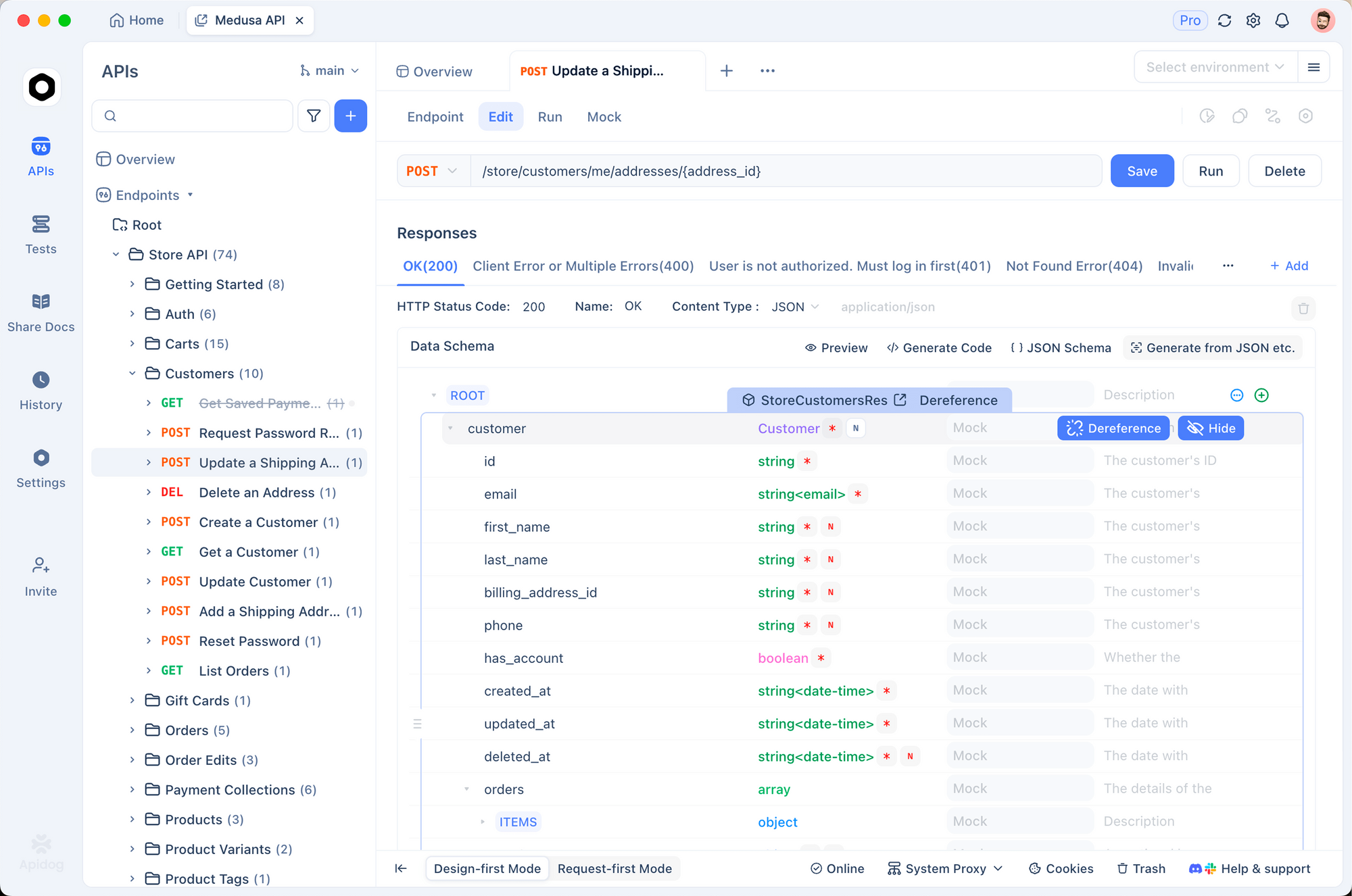
Step 1: Generate Test Scenarios with AI
Instead of writing tests manually, describe what you want to test. Apidog’s AI generates complete test scenarios.
How to use it:
- Open your API endpoint in Apidog
- Click “Generate Test Scenario” in the AI Features menu
- Describe your test requirements in natural language
- Review and customize the generated tests
Apidog’s AI creates test scenarios with:
- Proper request structure
- Realistic test data
- Comprehensive assertions
- Error handling
- Pre-request scripts for setup
- Post-request scripts for cleanup
Step 2: Optimize API Schemas
AI agents need accurate API schemas to generate effective tests. Apidog’s schema optimization feature analyzes your API responses and suggests improvements.
Benefits:
- Identifies missing required fields
- Detects inconsistent data types
- Suggests better validation rules
- Improves documentation quality
Better schemas lead to better AI-generated tests.
Step 3: Automate with CI/CD Integration
AI-generated tests are only useful if they run automatically. Apidog integrates with GitHub Actions, GitLab CI, and Jenkins.
Example GitHub Actions workflow:
name: API Tests
on: [push, pull_request]

jobs:
  test:
    runs-on: ubuntu-latest
    steps:
      - uses: actions/checkout@v2

      - name: Run Apidog Tests
        uses: apidog/apidog-cli-action@v1
        with:
          api-key: ${{ secrets.APIDOG_API_KEY }}
          test-suite: regression-tests
          environment: staging
Your AI-generated tests run on every commit. Failures block deployment. Quality is enforced automatically.
Step 4: Use Smart Mock for Development
While AI agents test your APIs, your frontend team needs mock data. Apidog’s Smart Mock uses AI to generate realistic responses based on your API schema.
How it works:
- Define your API schema in Apidog
- Enable Smart Mock
- Frontend calls the mock endpoint
- AI generates realistic responses matching your schema
No manual mock data creation. No outdated fixtures. Just intelligent, schema-aware mocking.
Step 5: Collaborate with Sprint Branches
AI agents work best when they test in isolation. Apidog’s Sprint Branches provide Git-like workflow for API development.
Workflow:
- Create a branch for your feature
- Modify APIs in the branch
- AI agents generate and run tests in the branch
- Merge when tests pass
Your main branch stays stable. Agents test changes safely. Teams work in parallel without conflicts.
Best Practices for AI Agent Testing
1. Start with Clear Requirements
AI agents are smart, but they’re not mind readers. Give them clear, specific requirements.
Bad: “Test the user API”
Good: “Test the user registration API. Verify that users can register with email and password, duplicate emails are rejected with 409 status, passwords under 8 characters are rejected, and successful registration returns a user ID and auth token.”
2. Review Generated Tests
AI agents generate tests quickly. Review them before running in production.
Check for:
- Correct assertions
- Appropriate test data
- Proper cleanup
- Security considerations
- Performance impact
3. Combine AI and Manual Testing
AI agents excel at repetitive tasks, edge case exploration, and regression testing. Humans excel at exploratory testing, usability evaluation, and business logic validation.
Use both.
4. Monitor Agent Performance
Track metrics:
- Test generation time
- Test execution time
- Flaky test rate
- Coverage percentage
- Bug detection rate
Optimize based on data.
5. Iterate on Prompts
AI agents improve with better prompts. If generated tests miss edge cases, refine your requirements. If tests are too broad, add constraints.
Treat prompts like code. Version them. Review them. Improve them.
6. Implement Gradual Rollout
Don’t replace all tests with AI agents overnight.
Rollout plan:
- Week 1-2: Generate tests for new endpoints only
- Week 3-4: Add AI tests for critical paths
- Week 5-6: Expand to regression suite
- Week 7-8: Replace flaky manual tests
- Week 9+: Full AI-powered test suite
Monitor quality at each stage. Adjust based on results.
7. Maintain Test Data Quality
AI agents need good test data. Maintain a test data repository with:
- Valid examples for each data type
- Edge cases and boundary values
- Invalid inputs for negative testing
- Realistic user scenarios
Apidog’s data-driven testing feature lets you define test data sets that AI agents can use across multiple test scenarios.
Real-World Use Cases
Use Case 1: E-Commerce Platform
Challenge: 500+ API endpoints, frequent changes, manual testing took 3 days per release.
Solution: Implemented AI agents with Apidog for test generation and execution.
Results:
- Test generation time: 3 days → 2 hours
- Test coverage: 60% → 92%
- Flaky tests: 23% → 3%
- Bugs found in testing: 2x increase
- Release cycle: 2 weeks → 1 week
Use Case 2: Fintech API
Challenge: Complex business logic, strict compliance requirements, high security standards.
Solution: Used AI agents for comprehensive edge case testing with sandboxed environments.
Results:
- Edge cases tested: 150 → 1,200+
- Security vulnerabilities found: 7 critical issues before production
- Compliance audit time: 40% reduction
- Test maintenance time: 70% reduction
Use Case 3: SaaS Platform
Challenge: Multi-tenant architecture, customer-specific configurations, integration testing complexity.
Solution: AI agents generate tenant-specific test scenarios and validate integrations.
Results:
- Integration test coverage: 45% → 88%
- Customer-reported bugs: 60% reduction
- Test execution time: 4 hours → 45 minutes
- Developer productivity: 30% increase
Conclusion
AI agents are changing API testing. They generate tests faster, adapt to changes automatically, and find bugs humans miss.
But they’re not magic. They need clear requirements, proper sandboxing, and human oversight. They work best when combined with solid testing practices and the right tools.
Key takeaways:
- AI agents plan, execute, and adapt tests autonomously
- Sandboxing is critical for security and stability
- Start small, iterate, and scale gradually
- Combine AI agents with manual testing for best results
- Use tools like Apidog to implement AI-powered testing effectively
Next steps:
- Try Apidog’s AI test generation for your APIs
- Start with one endpoint and expand coverage
- Integrate AI-generated tests into your CI/CD pipeline
- Monitor results and refine your approach
- Join the Apidog community to share experiences
AI agents will make testers more effective. They’ll handle the repetitive work so you can focus on what matters: building great APIs.
FAQ
What’s the difference between AI agents and traditional test automation?
Traditional automation follows predefined scripts. If your API changes, tests break. AI agents reason and adapt. They generate tests from requirements, self-heal when things change, and analyze failures intelligently. Think of traditional automation as a recipe you follow exactly, and AI agents as a chef who understands cooking principles and adapts to available ingredients.
Are AI agents secure for API testing?
AI agents can be secure if properly sandboxed. Run them in isolated test environments, use temporary credentials, implement permission boundaries, and monitor their behavior. Never give agents access to production systems or sensitive data without proper controls. Tools like Apidog provide environment isolation and role-based access control to help secure AI-powered testing.
How much does it cost to implement AI agents for API testing?
Costs vary based on your approach. Using platforms like Apidog with built-in AI features costs $0-$50/user/month depending on your plan. Building custom AI agents requires LLM API costs ($0.01-$0.10 per 1K tokens) plus development time. Most teams see ROI within 2-3 months through reduced test maintenance time and faster release cycles.
Can AI agents replace manual testers?
No. AI agents excel at repetitive tasks, edge case exploration, and regression testing. Humans excel at exploratory testing, usability evaluation, and business logic validation. The best approach combines both: AI agents handle the grunt work while humans focus on strategic testing that requires judgment and creativity.
How do I get started with AI agents for API testing?
Start small. Pick one API endpoint and use AI to generate tests for it. Review the generated tests, run them, and measure results. If successful, expand to more endpoints. Use tools like Apidog that provide AI test generation out of the box, so you don’t need to build infrastructure from scratch. Iterate based on what works for your team.
What happens when AI agents generate incorrect tests?
Review generated tests before running them in production. AI agents are probabilistic, they make mistakes. Treat generated tests like code reviews: check assertions, validate test data, ensure proper cleanup. Over time, as you refine prompts and provide feedback, agents generate better tests. Most teams report 85-90% accuracy after initial tuning.
How do AI agents handle authentication in API testing?
AI agents can manage authentication flows if properly configured. You provide authentication credentials (API keys, OAuth tokens, etc.) through secure configuration. Agents use these credentials to authenticate requests during testing. Best practice: use temporary, test-specific credentials with limited permissions. Apidog’s environment variables and authentication schemes make this straightforward.
Can AI agents test GraphQL and gRPC APIs?
Yes. Modern AI agents support multiple protocols including REST, GraphQL, gRPC, WebSocket, and SOAP. Apidog supports all these protocols natively, and its AI features work across all of them. The agent understands protocol-specific concepts like GraphQL queries, mutations, and subscriptions, or gRPC service definitions and streaming.