You built an A2A agent. It connects, it runs, and sometimes it returns the wrong thing. Now what? You open the console and see a stream of JSON-RPC envelopes with the fields you actually care about buried three levels deep. You can’t tell if the bug is in the transport or in the agent. This is the exact gap an Agent2Agent (A2A) Debugger fills.
This article explains what an A2A debugger is, why debugging agent-to-agent traffic is hard without one, what a good debugger does, and what to look for when you pick one. If you need the protocol background first, start with what Agent2Agent (A2A) is.
What is an A2A debugger?
An A2A debugger is a tool that lets you connect to an Agent2Agent agent, send it test messages, and inspect the full request and response without writing client code. It sits between you and the agent the way a REST client sits between you and an API: you drive the agent manually, see exactly what crosses the wire, and find the broken field fast.
A2A is the open protocol for communication between AI agents. It defines the Agent Card an agent uses to advertise itself, the task lifecycle, and the message-and-artifact format agents exchange. An A2A debugger is the workbench for exercising all of that by hand before you trust it in a production workflow.
The job is narrow and useful. The debugger does not build your agent or run your workflow. It answers one question reliably: given this Agent Card, what does the agent actually do when I send it this message?
Why debugging A2A is hard without one
Agent-to-agent traffic hides in places normal debugging tools don’t reach.
Console logs lie by omission. An agent SDK logs what its authors decided to log. The structured task ID, the artifact parts, the metadata you attached; those often never make it to stdout. You see “task completed” and nothing about the payload.
The network tab flattens structure. A browser network panel shows the raw HTTP body, but A2A payloads are nested JSON-RPC. Finding whether the agent returned a text part or a file part means scrolling a wall of escaped JSON.
Bespoke test scripts rot. The usual fallback is a curl command or a throwaway Python client. It works for a day. Then the Agent Card changes, the auth scheme moves, and the script breaks silently. Nobody updates it.
Transport bugs and logic bugs look identical. When an agent returns the wrong answer, the cause is either a malformed request, a broken connection, an auth failure, or genuinely wrong agent reasoning. Without seeing the wire, all four look the same: “the agent is broken.”
An A2A debugger removes that ambiguity. You see the request you sent, the response you got, and the exact field that is wrong. That alone tells you which side to fix.
What an A2A debugger does
A capable A2A debugger covers four areas.
Connection and discovery
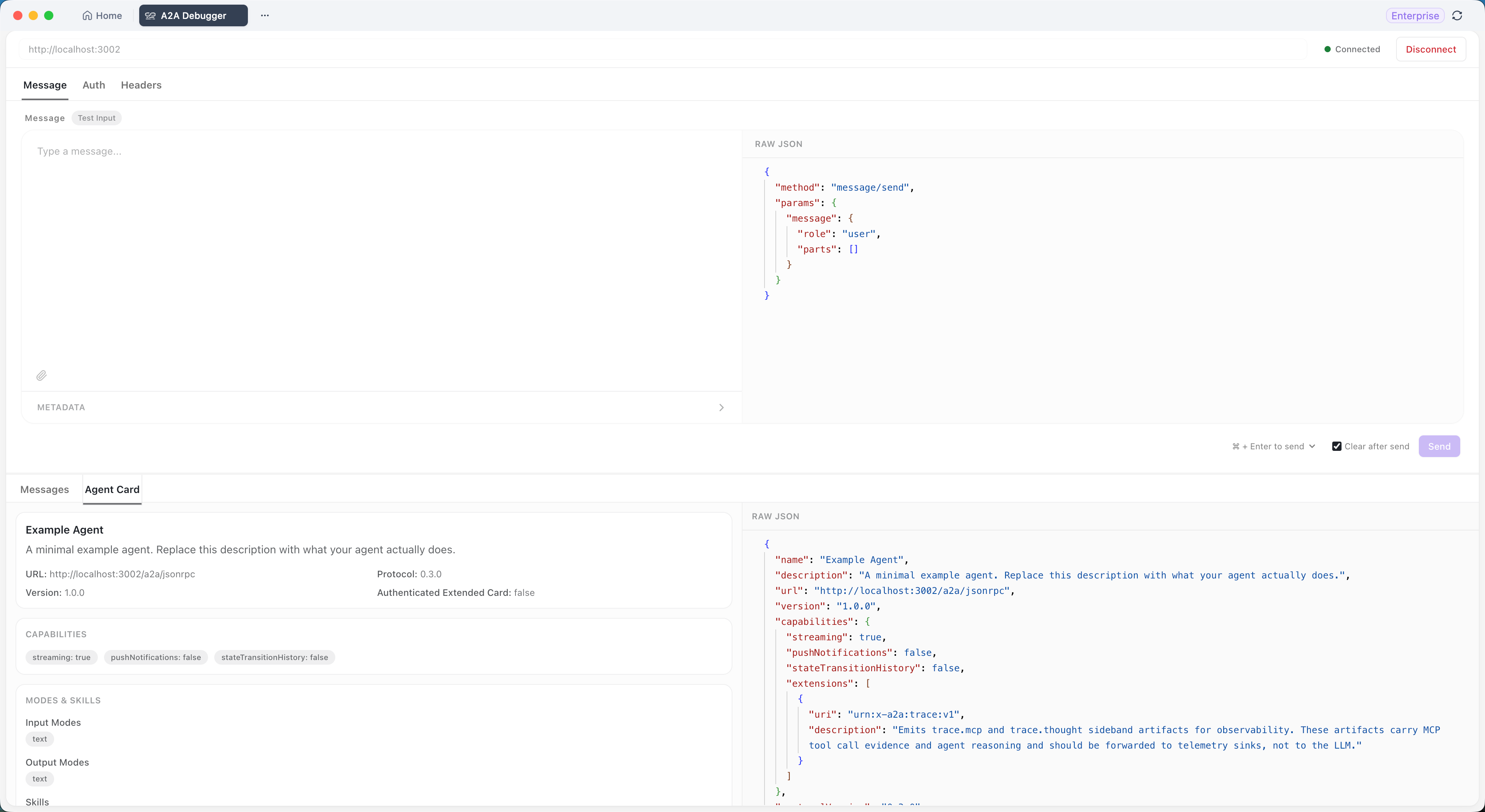
You paste the Agent Card URL and the debugger fetches it, validates it, and shows what the agent advertises: name, description, capabilities, declared skills, supported input types, and protocol version. If the card is malformed, a good debugger fails loudly and points at the missing field, so you fix the manifest instead of chasing a ghost.
Message testing
You compose a message the way you would in any chat box; plain text, file attachments, custom metadata key-value pairs; and send it. The debugger wraps your input in the correct A2A message structure and JSON-RPC envelope. You write no client code and hand-roll no payloads.
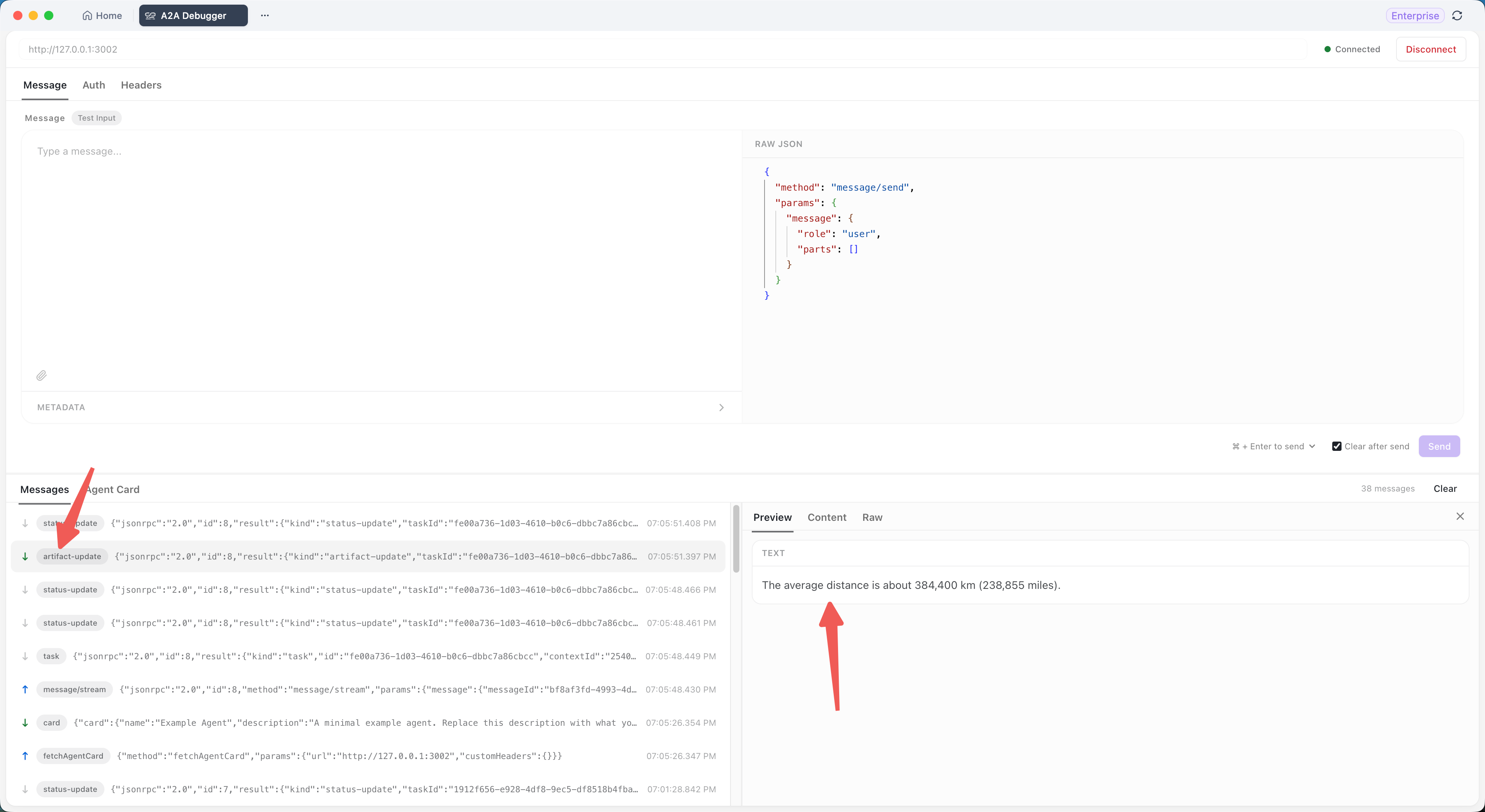
Response inspection
This is the core value. A2A responses can be plain strings, structured artifacts, file references, or a mix. A good debugger shows the same payload through more than one lens. Apidog’s A2A Debugger, for example, offers three views:
- Preview renders structured fields as a readable tree.
- Content shows the human-readable body the way a user would see it.
- Raw Data dumps the full JSON-RPC payload for field-level verification.
When Preview looks fine but Content is empty, you instantly know the agent returned a typed artifact the renderer can’t flatten. That diagnosis takes seconds with three views and an afternoon without them.
Authentication and headers
Production agents sit behind auth. A debugger worth using handles the common patterns in the UI: Bearer Token, Basic Auth, and API key via a custom header. It also lets you add arbitrary headers for gateways, tenant IDs, or request signatures. No manual base64 encoding, no header typos.
The Apidog A2A Debugger
Apidog ships an A2A Debugger inside its standard client, so you can see a concrete example of the category.
The flow is short. Open the A2A Debugger page, paste an Agent Card URL (for local development, often http://localhost:3000/.well-known/agent.json), and click Connect. The status switches to Connected and the panel fills with the agent’s metadata. Open the Messages tab, type a prompt, optionally attach a file or add metadata, and click Send. The reply lands in the three views above.
Apidog handles the JSON-RPC envelope, server-sent-event streaming where the agent supports it, and response parsing. Session history keeps every message you send so you can scroll back through a test run. The debugger runs as a local client; traffic goes straight between your machine and the agent, not through Apidog’s servers.
It also covers a useful distinction many teams trip on: HTTP headers versus A2A metadata. Headers reach your gateway and reverse proxy. Metadata reaches the agent’s task handler. Putting a per-message hint in a header (where the agent never reads it) is the number-one “why did the agent ignore me” bug, and seeing both channels side by side makes it obvious.
For a full step-by-step walkthrough, the Apidog A2A Debugger guide covers connecting, sending, and reading responses in detail. Apidog also has an AI agent debugger for the broader agent-testing workflow.
What to look for in an A2A debugger
When you compare tools, check for these:
- Agent Card validation. It should tell you why a card failed, not just that it failed.
- Multiple response views. Raw JSON alone is not enough; you want a readable view and the raw payload together.
- Full auth coverage. Bearer, Basic, API key, and custom headers, all without scripting.
- File and metadata support. Real A2A traffic includes attachments and per-message context. A text-only debugger misses half the surface.
- Streaming support. If the agent uses server-sent events, the debugger should render chunks as they arrive.
- Session history. You will send the same message many times while debugging; replay and history save real effort.
- Local-first traffic. The debugger should talk directly to your agent, not route your payloads through a third party.
A debugger that handles all of these turns A2A debugging from guesswork into a confirm-the-wire-first routine; the same discipline the how to test AI agents that call your APIs post applies to the API layer. If you also run MCP servers, the MCP server vs A2A guide explains why you often need a debugger for each protocol.
A practical debugging loop
When an A2A agent misbehaves, run this loop in the debugger:
- Connect to the agent and confirm the Agent Card shows the skill you expect.
- Send the smallest message that should trigger that skill. Plain text first; add files and metadata only once text works.
- Read Raw Data first, not Preview. You want exactly what the agent emitted.
- If a field you expect is missing, the bug is in the agent code, not the transport.
- If the response is well-formed but wrong, the bug is in the prompt or model; you have already cleared the transport.
That sequence isolates transport from logic every time, which is the whole reason an A2A debugger exists.
Common questions
What is an A2A debugger in one sentence?
It is a tool that connects to an Agent2Agent agent, sends it test messages, and shows the full request and response so you can debug agent integrations without writing client code.
How is an A2A debugger different from an API client?
An API client tests plain HTTP endpoints. An A2A debugger understands the A2A layer on top: Agent Cards, the task lifecycle, message parts, and artifacts. It parses and renders those structures instead of leaving you a raw body.
Do I need an A2A debugger if I have logs?
Logs show what the agent author chose to log, which usually skips the structured payload fields. A debugger shows the exact wire traffic, so you can tell a transport bug from an agent-logic bug. See what Agent2Agent (A2A) is for the protocol context.
Is the Apidog A2A Debugger free?
Yes. It is bundled with the standard Apidog client. Download Apidog and the A2A Debugger appears in the side panel on a recent version.
Can an A2A debugger test agents on any framework?
Yes, as long as the agent exposes a valid A2A Agent Card. The protocol is framework-agnostic, so LangGraph, CrewAI, AutoGen, and custom agents all work.
Does an A2A debugger handle streaming responses?
A good one does. When the agent supports server-sent events, the debugger reads chunks as they arrive and updates its views in real time, then shows the assembled payload once the stream closes.