TL;DR
Qwen 3.5 Small Model Series from Alibaba Cloud offers four compact large language models (0.8B, 2B, 4B, and 9B parameters) designed for efficient local deployment, edge computing, and cost-effective AI applications. These models provide capable Qwen 3.5 features in smaller footprints, making them ideal for developers who need AI capabilities without the computational overhead of larger models. You can access them via ModelScope, HuggingFace, or Alibaba Cloud's API services.
Introduction
Small language models (SLMs) are becoming increasingly important for developers and businesses seeking efficient, cost-effective AI solutions. Alibaba's Qwen 3.5 Small Model Series represents a significant advancement in compact AI technology, offering four distinct model sizes that balance performance with computational efficiency.
Whether you're building applications for edge devices, need local AI capabilities for privacy-sensitive operations, or want to reduce cloud API costs, the Qwen 3.5 small models provide compelling options. These models are available through multiple platforms including ModelScope and HuggingFace, making them accessible for various development scenarios.
Understanding Small Language Models
Small language models are compact versions of larger LLM architectures, designed to run efficiently on limited computational resources while retaining core capabilities.
The key advantages include:
Lower Resource Requirements
- Run on consumer-grade hardware
- No need for expensive GPU clusters
- Works on edge devices and IoT
Cost Efficiency
- Much lower inference costs
- No per-token API fees when running locally
- Uses less electricity and cooling
Privacy and Security
- Data stays local
- No external API calls for sensitive operations
- You control your data
Latency Benefits
- Faster response times without network lag
- Real-time processing
- Better user experience for interactive apps
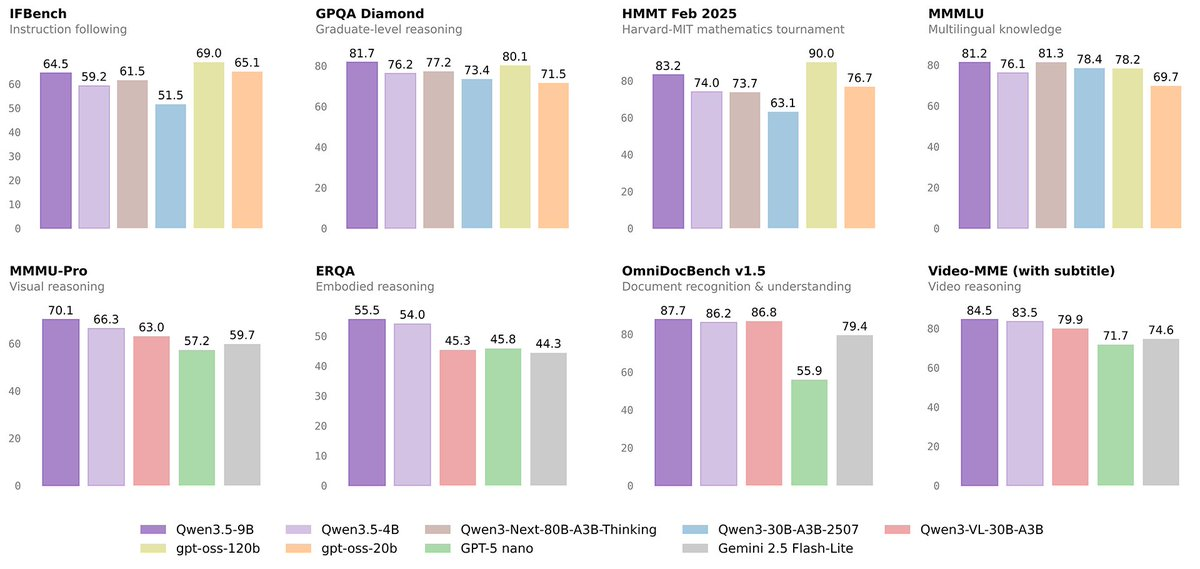
The Qwen 3.5 small models keep the core capabilities of the full Qwen 3.5 architecture but work in these constrained environments.
Qwen 3.5 Small Model Series Overview
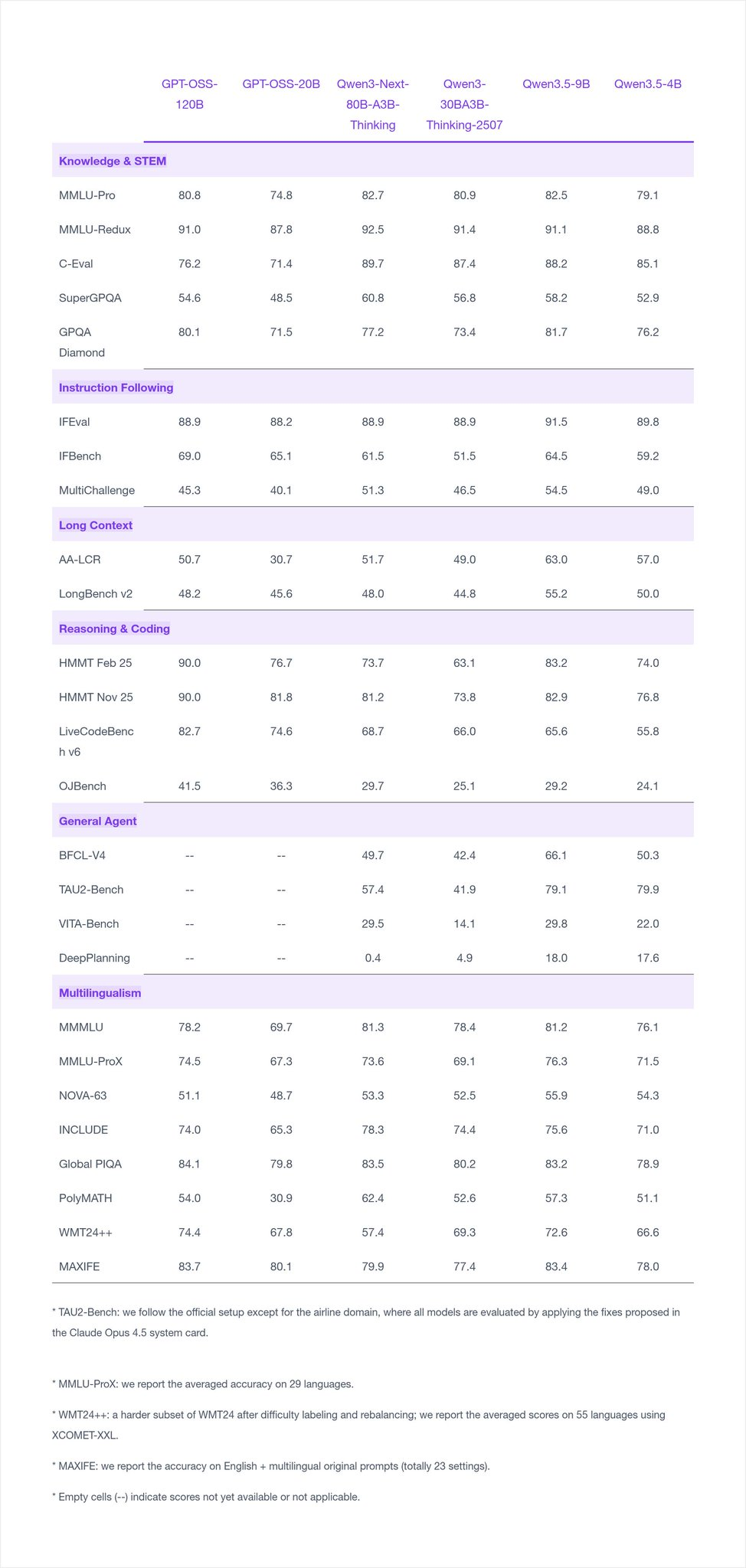
The Qwen 3.5 Small Model Series comprises four models, each designed for different use cases and deployment scenarios:
Qwen3.5-0.8B
The most compact model in the series with 800 million parameters. This model is specifically designed for:
- Extremely resource-constrained environments
- Embedded systems
- Mobile applications
- Quick prototyping
Despite its small size, Qwen3.5-0.8B maintains reasonable language understanding capabilities suitable for basic tasks like text classification, simple conversations, and lightweight automation.
Qwen3.5-2B
A balanced option with 2 billion parameters, offering a significant capability jump over the 0.8B model. Ideal for:
- Standard desktop applications
- Small business use cases
- Development and testing environments
- Applications requiring moderate complexity
This model gives you a good balance of capability and resource usage, which makes it the most versatile choice in the series.
Qwen3.5-4B
With 4 billion parameters, this model provides substantial capabilities while remaining deployable on consumer hardware. Suitable for:
- More complex natural language tasks
- Enhanced conversational AI
- Content generation requirements
- Reasoning and analysis tasks
The 4B model gets close to what much larger models can do while still being practical to run.
Qwen3.5-9B
The flagship small model with 9 billion parameters. This model offers:
- Near-full Qwen 3.5 capabilities
- Complex reasoning and analysis
- High-quality content generation
- Advanced task completion
Best for when you need the highest quality outputs but still want to run things locally.
Model Specifications and Capabilities
Understanding the technical specifications helps in selecting the right model for your needs:
| Model | Parameters | Context Length | Recommended Use | Hardware Requirements |
|---|---|---|---|---|
| Qwen3.5-0.8B | 800M | 8K-32K | Basic tasks, prototyping | 2GB+ RAM, CPU |
| Qwen3.5-2B | 2B | 8K-32K | Standard applications | 4GB+ RAM, CPU/iGPU |
| Qwen3.5-4B | 4B | 8K-32K | Complex tasks | 8GB+ RAM, dedicated GPU |
| Qwen3.5-9B | 9B | 8K-32K | Advanced applications | 16GB+ RAM, GPU recommended |
All models include:
- Multi-language support (English, Chinese, and 20+ other languages)
- Code generation and understanding
- Math reasoning
- Instruction following
- Tool use (newer versions)
- Function calling
How to Access Qwen 3.5 Small Models
ModelScope
ModelScope provides the easiest access for Chinese developers and offers comprehensive documentation in Chinese.
from openai import OpenAI
# Configured by environment variables
client = OpenAI()

messages = [
    {"role": "user", "content": "Give me a short introduction to large language models."},
]

chat_response = client.chat.completions.create(
    model="Qwen/Qwen3.5-2B",
    messages=messages,
    max_tokens=32768,
    temperature=1.0,
    top_p=1.0,
    presence_penalty=2.0,
    extra_body={
        "top_k": 20,
    },
)
print("Chat response:", chat_response)
HuggingFace
HuggingFace provides global access with extensive community resources.
from openai import OpenAI
# Configured by environment variables
client = OpenAI()

messages = [
    {"role": "user", "content": "Type \"I love Qwen3.5\" backwards"},
]

chat_response = client.chat.completions.create(
    model="Qwen/Qwen3.5-9B",
    messages=messages,
    max_tokens=81920,
    temperature=1.0,
    top_p=0.95,
    presence_penalty=1.5,
    extra_body={
        "top_k": 20,
    },
)
print("Chat response:", chat_response)
Alibaba Cloud API
For cloud-based access without local deployment:
# Using DashScope API (Alibaba Cloud)
from dashscope import Generation

# Set API key
import os
os.environ["DASHSCOPE_API_KEY"] = "your-api-key"

response = Generation.call(
    model="qwen-turbo",
    prompt="Write a Python function to calculate factorial",
    max_tokens=500
)

print(response.output.text)
Deployment Options
Local Deployment
CPU-Only (for 0.8B and 2B models):
# Using Ollama for easy local deployment
ollama pull qwen3.5:9b
ollama run qwen3.5:9b
GPU-Accelerated:
# With CUDA support
pip install torch torchvision torchaudio
pip install transformers accelerate

# Run with GPU acceleration
python qwen_inference.py --model qwen3.5:9b --device cuda
Docker Deployment
FROM python:3.11-slim

WORKDIR /app
RUN pip install transformers torch accelerate

COPY inference.py .
CMD ["python", "inference.py"]
Edge Deployment
For edge devices, consider using:
- llama.cpp with GGUF format for quantized inference
- MLC-LLM for mobile deployment
- TensorFlow Lite for embedded systems
API Integration Guide
REST API Server
Create a simple API server for your deployed model:
from flask import Flask, request, jsonify
from transformers import AutoModelForCausalLM, AutoTokenizer
import torch

app = Flask(__name__)

# Load model (adjust based on your hardware)
MODEL_NAME = "Qwen/qwen3.5:9b"
tokenizer = AutoTokenizer.from_pretrained(MODEL_NAME)
model = AutoModelForCausalLM.from_pretrained(
    MODEL_NAME,
    device_map="auto",
    torch_dtype=torch.float16
)

@app.route('/generate', methods=['POST'])
def generate():
    data = request.json
    prompt = data.get('prompt', '')
    max_tokens = data.get('max_tokens', 512)
    temperature = data.get('temperature', 0.7)

    messages = [{"role": "user", "content": prompt}]
    text = tokenizer.apply_chat_template(
        messages, tokenize=False, add_generation_prompt=True
    )
    inputs = tokenizer([text], return_tensors="pt").to(model.device)

    outputs = model.generate(
        **inputs,
        max_new_tokens=max_tokens,
        temperature=temperature,
        do_sample=True
    )

    response = tokenizer.decode(outputs[0], skip_special_tokens=True)
    return jsonify({"response": response})

if __name__ == '__main__':
    app.run(host='0.0.0.0', port=5000)
Testing Your Integration with Apidog
When building AI-powered applications, thorough testing is essential. Use Apidog to validate your API integrations:
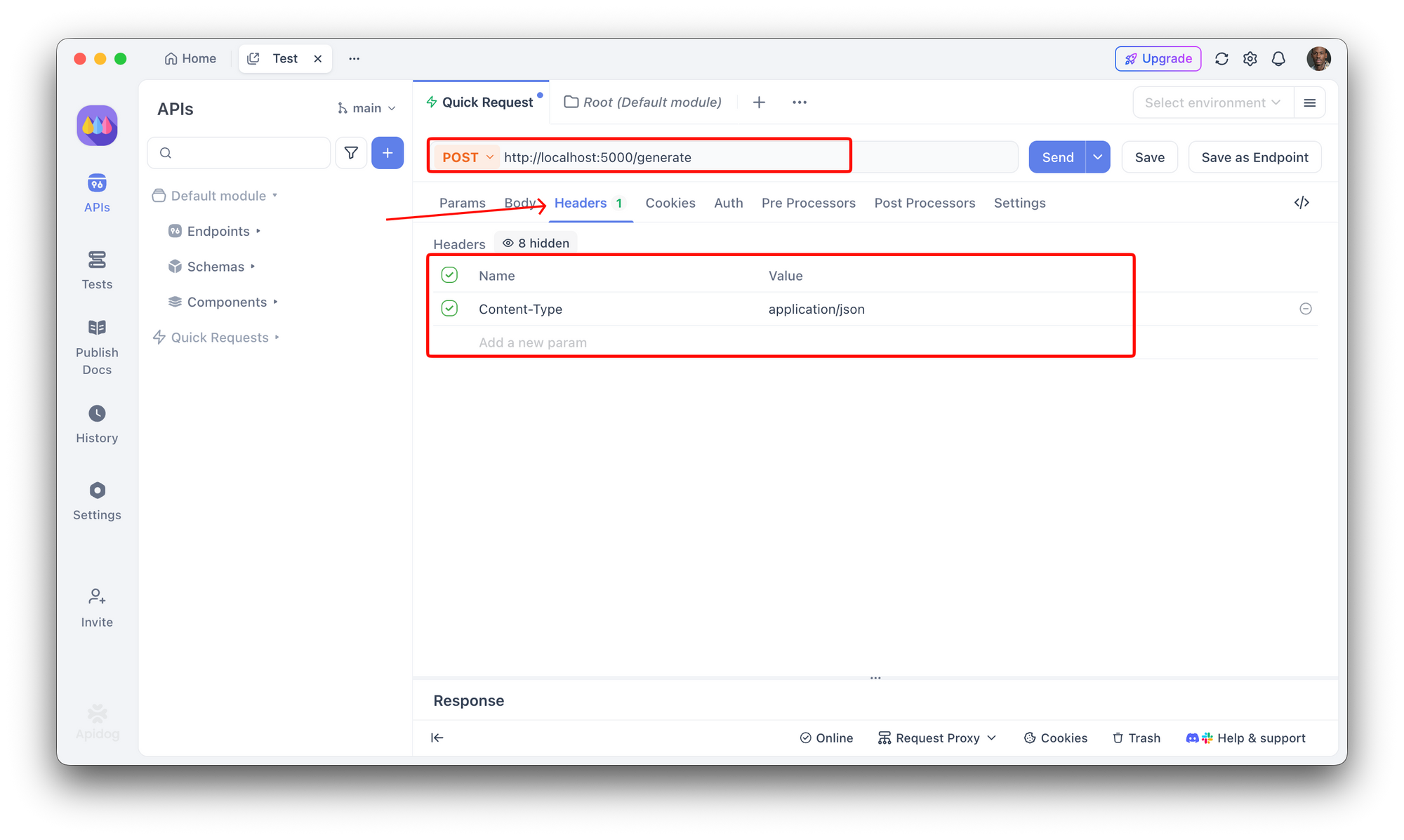
- Create a POST request to your local server (e.g.,
http://localhost:5000/generate) - Set Content-Type to
application/json
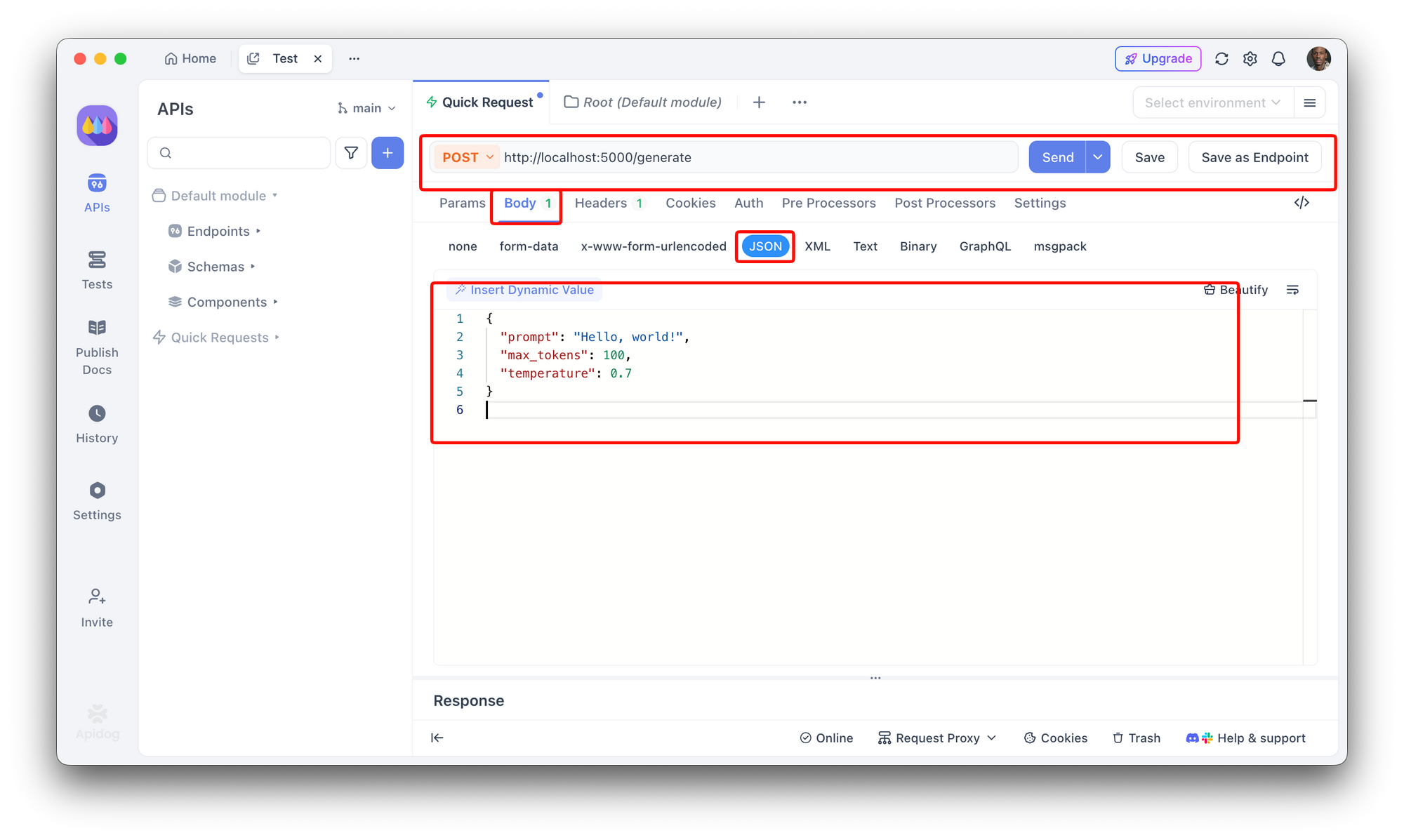
3. Add request body:
{
  "prompt": "Hello, world!",
  "max_tokens": 100,
  "temperature": 0.7
}
4. Add test assertions in Apidog:
- Verify response contains "response" field
- Assert response time is under acceptable threshold
- Validate JSON structure
- Check response is not empty
Apidog lets you create automated test cases, set up scheduled monitoring, and catch issues before they affect your users. This is especially important when integrating with local LLMs where response quality can vary based on hardware and model configuration.
Use Cases and Selection Guide
When to Use Qwen3.5-0.8B
- IoT and embedded systems with minimal resources
- Educational projects and learning
- Rapid prototyping before scaling up
- Simple automation scripts
- Mobile apps with offline capabilities
When to Use Qwen3.5-2B
- General-purpose chatbots
- Content assistance tools
- Small business applications
- Development and staging environments
- Customer support automation
When to Use Qwen3.5-4B
- Complex question answering
- Code generation and review
- Technical documentation assistance
- Advanced analytics support
- Multi-step reasoning tasks
When to Use Qwen3.5-9B
- High-quality content creation
- Complex problem solving
- Research assistance
- Advanced AI assistants
- Production-grade applications
Best Practices and Optimization
Quantization
Reduce model size and improve inference speed:
from transformers import BitsAndBytesConfig

quantization_config = BitsAndBytesConfig(
    load_in_4bit=True,
    bnb_4bit_compute_dtype=torch.float16
)

model = AutoModelForCausalLM.from_pretrained(
    "Qwen/Qwen2.5-4B",
    quantization_config=quantization_config,
    device_map="auto"
)
Batch Processing
For higher throughput:
# Process multiple prompts efficiently
prompts = [
    "What is machine learning?",
    "Explain neural networks",
    "Define deep learning"
]

inputs = tokenizer(prompts, return_tensors="pt", padding=True).to(model.device)
outputs = model.generate(**inputs, max_new_tokens=256)
responses = tokenizer.batch_decode(outputs, skip_special_tokens=True)
Memory Management
# Clear GPU cache when needed
import torch

# Only keep necessary tensors in memory
model.eval()

# Use gradient checkpointing for long sequences
from transformers import GradientCheckpointingAuto

# Monitor memory usage
print(f"GPU Memory: {torch.cuda.memory_allocated() / 1e9:.2f} GB")
Conclusion
The Qwen 3.5 Small Model Series offers compelling options for developers and businesses seeking efficient AI capabilities. Whether you need the ultra-compact 0.8B model for edge devices or the larger 9B model for complex tasks, these models provide flexibility without sacrificing core functionality.
Key takeaways:
- Pick the right model size based on your hardware and what you need to do
- Use ModelScope or HuggingFace for easy access and community help
- Try quantization if you need better performance on limited hardware
- Test your API thoroughly before deploying
- Start small and scale up as your needs grow
Having these models available on multiple platforms means you can add capable AI to your apps while keeping costs and data under your control.
Next steps: When integrating Qwen 3.5 models into your workflows, use Apidog to set up comprehensive API tests that validate responses, measure latency, and catch issues early. Try Apidog free to streamline your AI API testing.
FAQ
What is the difference between Qwen 3.5 and Qwen 2.5 small models?
Qwen 3.5 is the latest version with improved reasoning, better multilingual support, and enhanced tool use capabilities. The 3.5 series also includes improvements in instruction following and safety measures.
Can Qwen 3.5 small models run on CPU only?
Yes, the smaller models (0.8B and 2B) can run efficiently on CPU-only systems. The 4B and 9B models will be slower but can still run on CPU with sufficient RAM.
How do I choose between the different model sizes?
Consider your hardware constraints, task complexity, and latency requirements. Start with the smallest model that meets your performance needs and scale up if necessary.
Are these models suitable for commercial use?
Yes, Alibaba's Qwen models are available under open-source licenses that permit commercial use. Check the specific license terms on ModelScope or HuggingFace.
Can I fine-tune Qwen 3.5 small models?
Yes, all models support fine-tuning. Use techniques like LoRA or QLoRA for efficient fine-tuning on consumer hardware.
How do the Qwen 3.5 small models compare to other SLMs like Phi or Gemma?
Qwen 3.5 models offer competitive performance with strong multilingual support. Benchmark against your specific use case to determine the best fit.
What is the context window for these models?
The base context length is typically 8K-32K tokens depending on the specific model variant and configuration.
Where can I find more resources and community support?
Check the official ModelScope and HuggingFace pages for documentation, examples, and community discussions. The Qwen GitHub repository also contains extensive resources.