Developers constantly seek combinations that deliver frontier-level agentic performance without prohibitive costs or vendor lock-in. MiniMax M2.5 paired with OpenClaw achieves exactly that. MiniMax M2.5 delivers state-of-the-art results in coding, multi-turn tool calling, search, and office workflows while operating at a fraction of the price of comparable models. OpenClaw supplies the robust execution layer that turns LLM intelligence into concrete actions across messaging channels, filesystems, browsers, and shells.
Together, they create autonomous agents that handle complex, persistent tasks directly from your preferred chat apps. Small configuration choices—such as model selection, context caching, or tool definitions—produce outsized improvements in reliability, speed, and cost. These details matter because they determine whether your agent completes a full-stack feature implementation in minutes or stalls midway.
What Makes MiniMax M2.5 the Ideal Brain for OpenClaw
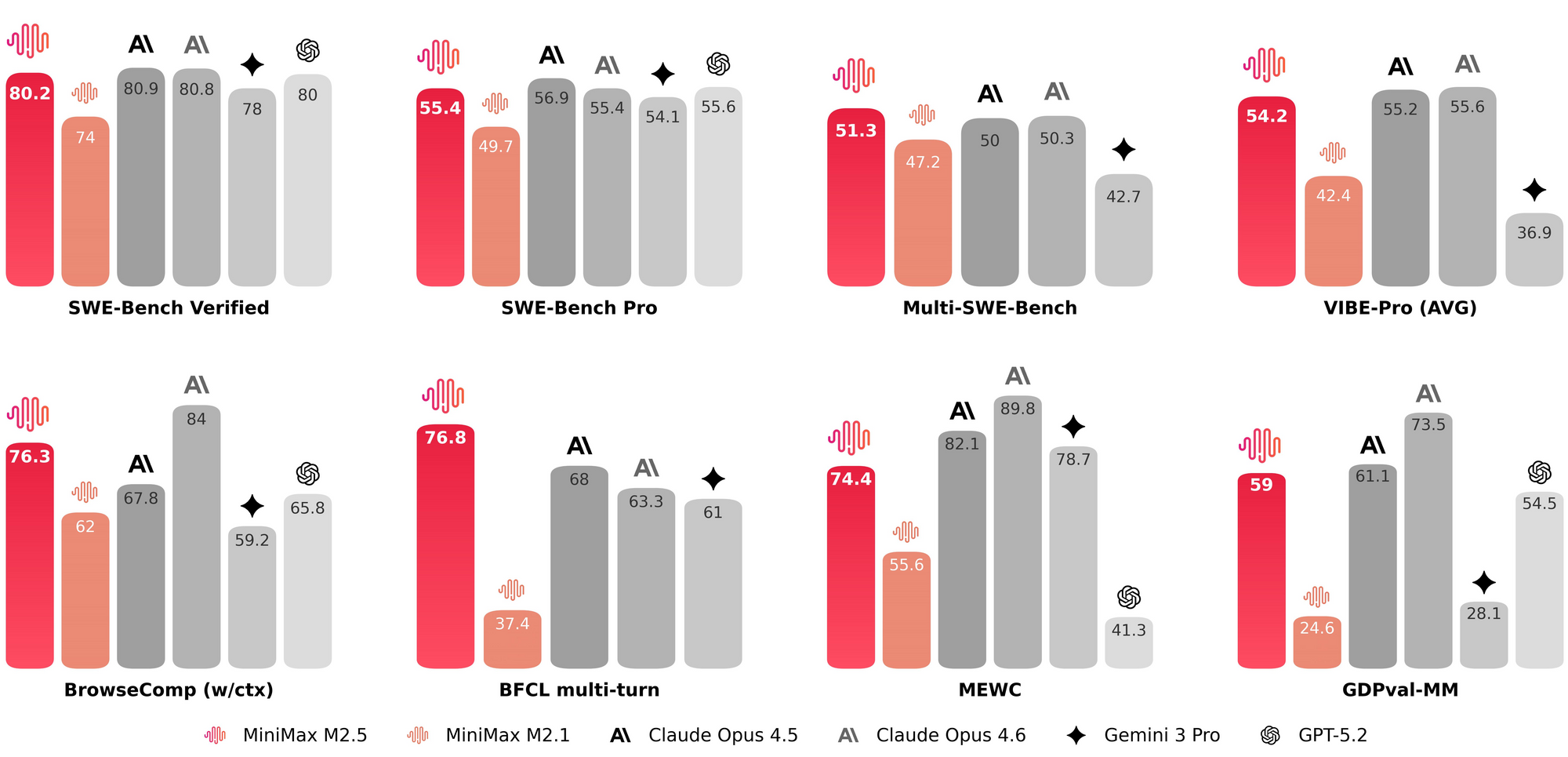
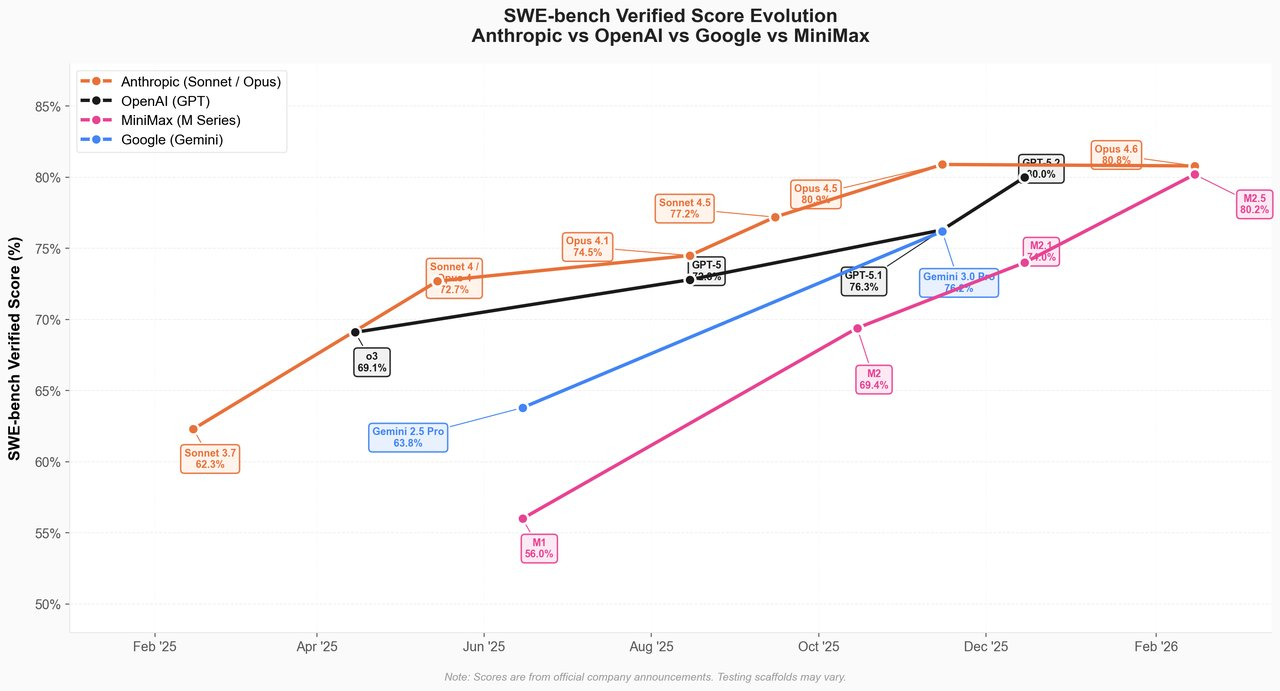
MiniMax engineers trained M2.5 extensively with reinforcement learning across hundreds of thousands of real-world digital environments. The model therefore decomposes tasks efficiently, plans ahead, and executes tool calls with architect-level precision. It scores 80.2% on SWE-Bench Verified—matching or exceeding Claude Opus 4.6—while completing evaluations 37% faster than its predecessor. On BrowseComp it reaches 76.3%, and BFCL multi-turn tool calling hits 76.8%. These metrics translate directly to OpenClaw because the agent runtime relies on accurate, low-latency planning and tool orchestration.
The architecture features 230 billion total parameters with only 10 billion active per token thanks to a mixture-of-experts design. Consequently, inference stays efficient even at 196k context lengths. You choose between M2.5 (50 tokens per second) or M2.5-Lightning (100 tokens per second). Output pricing lands between $1.10–$2.40 per million tokens—roughly one-tenth to one-twentieth the cost of Opus, GPT-5.2, or Gemini 3 Pro. Developers therefore run agents continuously for pennies per hour instead of dollars.
MiniMax M2.5 natively supports caching, which OpenClaw leverages for persistent memory across long sessions. The model also handles office deliverables natively: it generates, edits, and operates Word, Excel, and PowerPoint files while switching contexts between applications. When you pair this capability with OpenClaw’s browser control and shell access, you obtain a true digital coworker that reads your screen, fills forms, scrapes data, and commits code—all while you chat via Telegram or WhatsApp.
OpenClaw Architecture: The Execution Layer That Brings Intelligence to Life
OpenClaw functions as a local-first gateway that exposes a unified WebSocket control plane on port 18789. It routes messages from any supported channel—Telegram, WhatsApp, Slack, Discord, Signal, iMessage, Teams, Matrix, and more—into a persistent agent session. The runtime maintains full access to the host machine: filesystem reads/writes, shell execution (optionally sandboxed via Docker), browser automation, cron jobs, webhooks, and device nodes for camera, screen, and location.
Skills live in ~/.openclaw/workspace/skills/<name>/SKILL.md files that define triggers, tools, and prompt templates. The framework automatically discovers, installs, and hot-reloads community skills from ClawHub. You therefore extend functionality without redeploying the entire system. OpenClaw also supports multi-agent orchestration, voice mode via ElevenLabs, and a live canvas for visual workspaces.
Because OpenClaw runs on your hardware or isolated cloud instances, data never leaves your control by default. However, you must still apply isolation practices—especially when granting root-level tool access. The combination with MiniMax M2.5 amplifies these strengths: the model’s superior tool-calling accuracy reduces erroneous shell commands, while OpenClaw’s sandboxing contains any mistakes.
Why This Combination Outperforms Traditional Setups
Traditional agent frameworks often force you to choose between cost and capability. You either pay premium prices for Claude or GPT agents that still hallucinate tool sequences, or you accept slower local models that lack planning depth. MiniMax M2.5 eliminates that trade-off. Its RL training on actual productivity environments produces coherent multi-step plans that respect token budgets and context switches.
OpenClaw’s channel-agnostic design means you interact with the same agent from mobile, desktop, or even embedded devices. You send a message like “Implement a REST API for user analytics using Next.js and Prisma, then deploy to Vercel” and watch the agent decompose the task, write code, run tests, handle errors, and push the PR—entirely autonomously.
Developers report 95% cost reductions after switching from Opus-based OpenClaw setups to MiniMax M2.5 while maintaining or improving success rates on complex workflows. The speed advantage also compounds: 100 TPS Lightning mode lets the agent respond in near real-time during interactive sessions.
Prerequisites and Environment Preparation
You prepare your system before installation to avoid common friction points.
- Hardware — A machine with at least 16 GB RAM for comfortable local operation; 32 GB+ recommended for 196k context.
- Software — Node.js ≥22, npm or pnpm, Git, and a modern terminal. On Windows, enable WSL2. For full local inference, install Ollama.
- Security baseline — Generate SSH keys, enable firewall rules, and prepare an isolated user or VM. You will grant OpenClaw broad access; isolation therefore becomes non-negotiable.
Additionally, install Apidog early. You use it later to prototype every external API your custom skills will invoke, generating ready-to-paste tool definitions and test suites.
Step-by-Step Installation of OpenClaw with Ollama for Free
OpenClaw supports multiple backends; you select based on latency, privacy, and cost requirements.
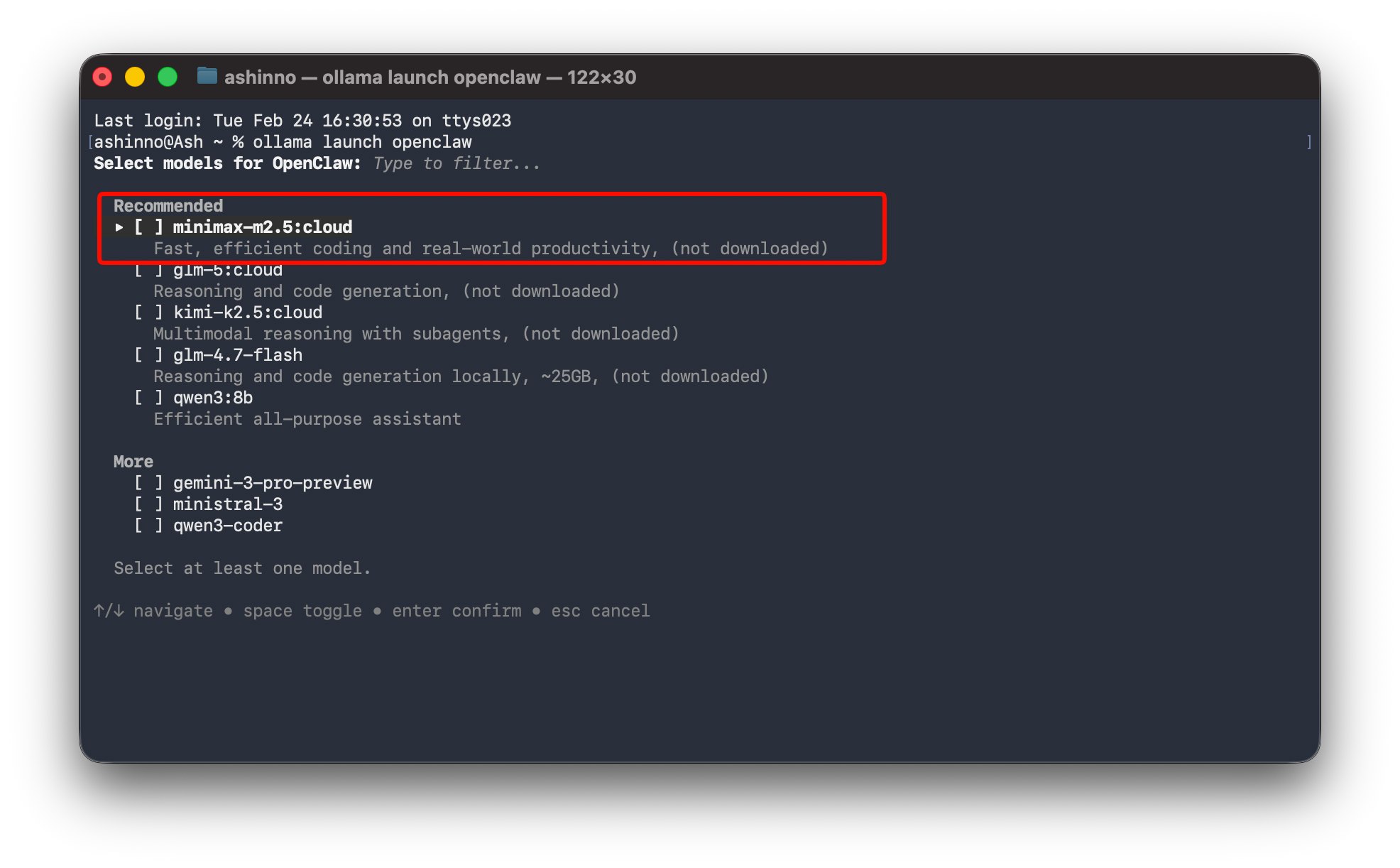
Option 1: Fully Local via Ollama (Recommended for Privacy)
Install Ollama, then pull the model:
ollama pull minimax-m2.5:cloud
Launch OpenClaw directly with the model:
ollama launch openclaw --model minimax-m2.5:cloud
Ollama handles the selection dialog and injects the correct provider configuration. Consequently, your entire stack stays offline after initial download.
Option 2: Cloud API for Maximum Speed
Edit ~/.openclaw/openclaw.json:
{
  "agent": {
    "model": "minimax/MiniMax-M2.5",
    "provider": "minimax",
    "apiKey": "YOUR_MINIMAX_API_KEY"
  },
  "cache": {
    "enabled": true,
    "ttl": 3600
  }
}
Restart the gateway. OpenClaw automatically routes requests and rotates keys if you configure failover.
Option 3: Hybrid with OpenRouter or Custom Endpoints
Add multiple models and let OpenClaw failover based on cost or capability tags. For example, route simple queries to a smaller local model and agentic coding tasks to MiniMax M2.5.
You test connectivity with:
openclaw agent --message "What is your model?" --thinking high
The agent replies with its current configuration, confirming successful integration.
Advanced Configuration and Optimization Techniques
Edit the config file to unlock full potential:
- Set
context.windowto 196608 for maximum history retention. - Enable
tool.parsing.strictto leverage M2.5’s superior structured output. - Configure
planning.depthto 5+ steps for complex tasks. - Add
temperature: 0.2andtop_p: 0.95for deterministic coding behavior.
Furthermore, implement model failover:
"failover": [
  {"model": "minimax/MiniMax-M2.5", "priority": 1},
  {"model": "ollama/gemini-flash-local", "priority": 2}
]
Cache frequently used tool schemas and conversation prefixes. Consequently, token usage drops dramatically on repeated workflows.
Monitor performance through the built-in metrics endpoint or the TUI. You adjust parameters iteratively until latency under interactive load stays below 800 ms and success rate on multi-tool tasks exceeds 95%.
Building Custom Skills with Apidog Integration
Custom skills drive OpenClaw’s extensibility. You create a new skill folder and define SKILL.md with YAML frontmatter that declares required tools.
When your skill needs to call external services—payment gateways, CRMs, or internal microservices—Apidog accelerates development. You import or design the API in Apidog, generate TypeScript client code, mock responses for offline testing, and export OpenAPI specs. Then you paste the validated schema directly into your skill’s tool definition.
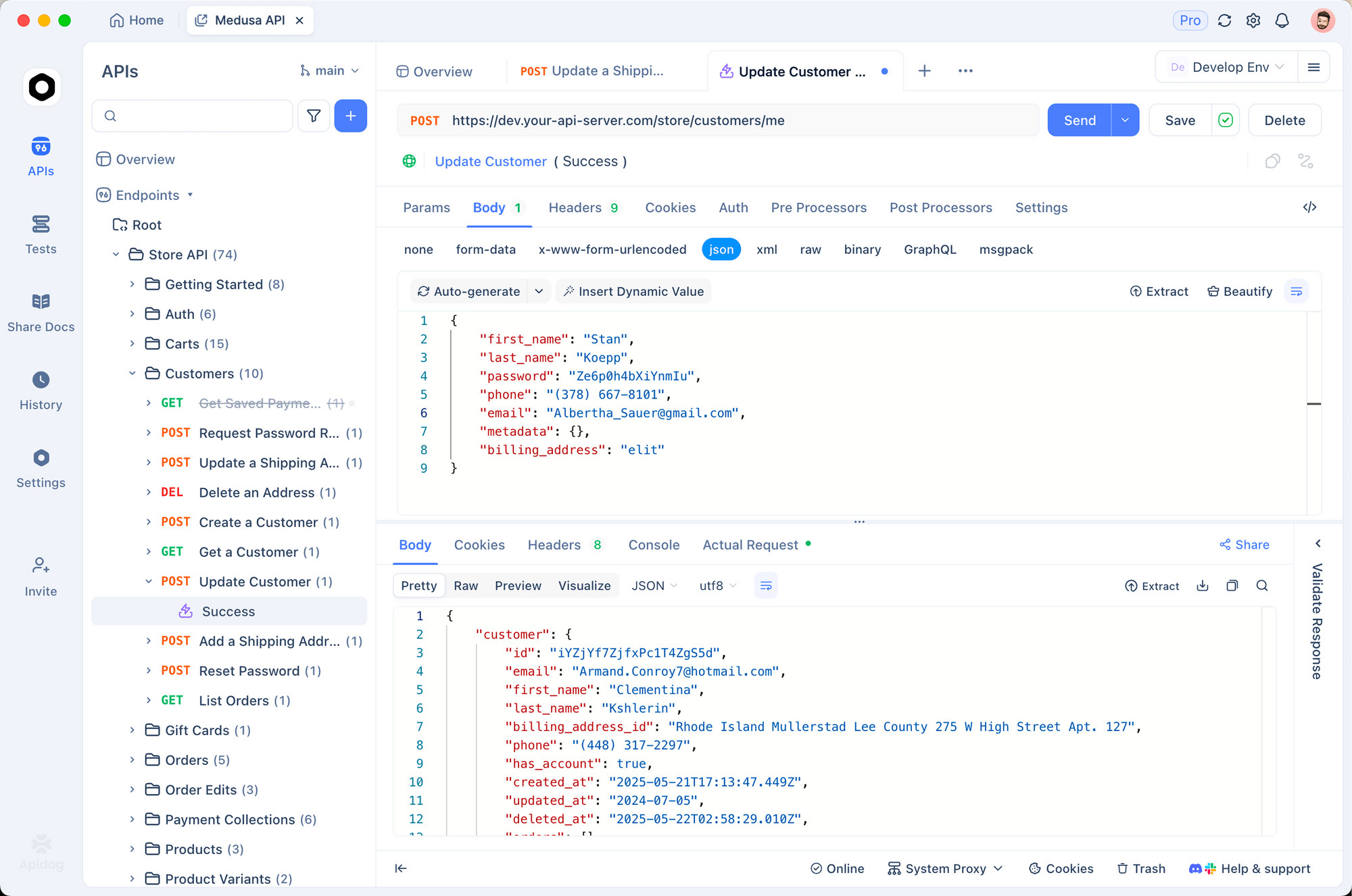
https://apidog.com/blog/use-llms-for-free/apFor example, you build a “GitHub PR Reviewer” skill. Apidog lets you test the GitHub REST endpoints, generate authentication flows, and produce sample payloads. The resulting tool definition in OpenClaw becomes:
tools:
  - name: github_create_review_comment
    description: Post review comment on PR
    parameters:
      type: object
      properties:
        pr_number: {type: integer}
        body: {type: string}
MiniMax M2.5 parses and calls this tool with near-perfect accuracy thanks to its 76.8% BFCL score. You therefore ship production-ready skills in hours instead of days.
Real-World Use Cases and Implementation Walkthroughs
Use Case 1: Autonomous Full-Stack Development
You message OpenClaw: “Build a SaaS analytics dashboard with Next.js 15, Tailwind, Supabase, and deploy to Vercel.” M2.5 generates the project structure, writes all files, runs npm install, fixes lint errors, seeds the database, and pushes to GitHub. OpenClaw’s browser tool then logs into Vercel and triggers deployment. The entire process completes in under 12 minutes on Lightning mode.
Use Case 2: Daily Office Automation
Configure a morning routine skill. At 8:00 AM the agent checks your calendar, scans Gmail for action items, updates a Notion workspace, and prepares a prioritized task list. It even generates PowerPoint slides from the latest sales data pulled via API. You review everything in a single WhatsApp thread.
Use Case 3: Multi-Agent Research Team
Spawn sub-agents for literature review, code prototyping, and presentation drafting. MiniMax M2.5 coordinates them through OpenClaw’s session tools, maintaining shared memory and conflict resolution.
Each scenario benefits from the model’s efficient decomposition and OpenClaw’s persistent execution environment.
Performance Benchmarks and Direct Comparisons
Real deployments show MiniMax M2.5 inside OpenClaw achieves 80%+ success on SWE-Bench style tasks while costing $0.30–$1.00 per hour of continuous operation. In contrast, an Opus 4.6 setup often exceeds $10 per hour for similar throughput. Latency for tool-heavy sessions averages 1.2 seconds versus 3.8 seconds on slower frontier models.
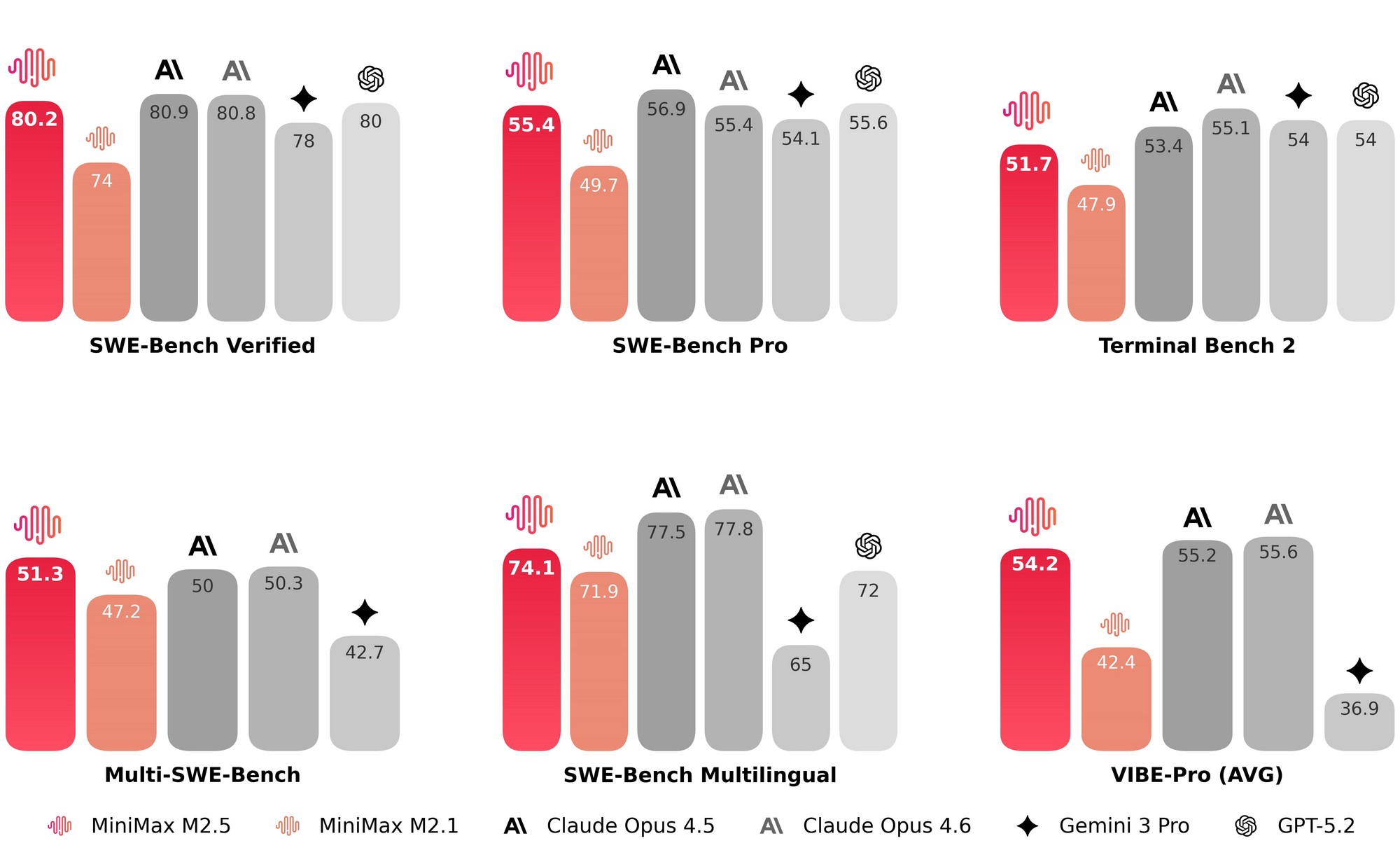
You reproduce these results by running the official evaluation harness adapted for OpenClaw’s tool interface. Furthermore, community benchmarks on Multi-SWE-Bench and BrowseComp confirm the combination leads the open-source agent space. When you run MiniMax M2.5 via Ollama, you should also monitor usage through the Ollama platform to understand real-world token consumption and capacity limits during these workloads.
Troubleshooting Common Challenges
- API Key Errors → Verify the key in credentials and test with
curlagainst the MiniMax endpoint. - High Latency → Switch to Lightning, reduce context, or enable caching.
- Usage or Rate Limit Issues → When running MiniMax M2.5 through Ollama, the user should monitor usage through the Ollama platform to track token consumption, detect throttling, and adjust workloads before hitting limits.
- Tool Parsing Failures → Lower temperature and add explicit JSON schema enforcement in skill definitions.
- Daemon Crashes → Check system logs with
journalctl -u openclawand increase memory allocation. - Channel Connection Drops → Regenerate tokens and re-pair devices.
You resolve 90% of issues by consulting the verbose gateway logs and the active Discord community.
Security and Privacy Best Practices
Run OpenClaw in a dedicated VM or container with minimal privileges. Use Docker sandbox for all shell and browser tools. Rotate API keys weekly and never embed secrets in skills. Monitor filesystem changes with tools like auditd. For enterprise deployments, integrate with existing identity providers via OAuth and enforce allow-lists on outbound network calls.
Consequently, you gain the power of a full agent without compromising your infrastructure.
Conclusion
You now possess a complete technical blueprint to harness MiniMax M2.5 inside OpenClaw. Start with the one-liner install, configure your preferred backend, prototype your first skill with Apidog, and scale to production-grade automation. The combination delivers frontier agentic intelligence at commodity prices while preserving full data sovereignty and extensibility.
Implement these steps today. Test a simple automation workflow this evening. You will quickly discover how small configuration refinements create massive productivity gains. The future of personal and team AI assistants has arrived—and it runs on your terms with MiniMax M2.5 and OpenClaw.