TL;DR
nanochat is Andrej Karpathy’s open-source LLM training framework that lets you train a GPT-2 level chatbot for under $50 in about 2 hours. The project uses a single 8xH100 GPU node, minimal code (~500 lines for the core model), and one configuration dial (--depth) to automatically optimize all hyperparameters. Current records show training completion in 1.65 hours with a CORE score of 0.2626, beating OpenAI’s 2019 GPT-2 that cost $43,000 and took 168 hours.
Introduction
Training a large language model used to require millions of dollars and a team of PhD researchers. Those days are over.
Andrej Karpathy just released nanochat, an open-source project that trains a capable conversational AI for less than the cost of a nice dinner. The entire pipeline runs on a single 8xH100 GPU node and completes in under 2 hours.
Why This Matters Now
The AI landscape shifted dramatically in early 2026. What took OpenAI 168 hours and $43,000 in 2019 now takes 1.65 hours and $48. That’s a 100x speedup driven by algorithmic improvements, better hardware, and community optimization.
For API developers and teams building AI-powered applications, this changes everything. You can now experiment with custom model training, test architectural changes, and understand LLM internals without massive infrastructure budgets.
What You’ll Learn
By the end of this article, you’ll understand:
- How nanochat achieves 100x cost reduction vs traditional LLM training
- The complete architecture (GPT model, Muon optimizer, data loading)
- Step-by-step instructions to train your own model
- How to use nanochat for rapid LLM research and experimentation
- Real limitations and what GPT-2 capability actually means
What Is nanochat?
nanochat is a minimal LLM training harness that covers the entire development pipeline: tokenization, pretraining, finetuning, evaluation, inference, and a ChatGPT-like web UI.
The codebase fits in a single repository with no configuration monsters or framework complexity. Karpathy designed it as a “strong baseline” that’s readable, hackable, and forkable.
The Core Claim
Train a GPT-2 capability model (1.6B parameters) for:
- $48 on demand (2 hours at ~$24/hour for 8xH100)
- ~$15 on spot instances
For context, OpenAI’s original GPT-2 training in 2019 cost approximately $43,000 and took 7 days on 32 TPU v3 chips.
What nanochat Covers
| Stage | Script | Description |
|---|---|---|
| Tokenization | scripts.tok_train |
Train BPE tokenizer (vocab 32,768) |
| Pretraining | scripts.base_train |
Train base GPT model |
| Finetuning | scripts.chat_sft |
Supervised finetuning for chat |
| Evaluation | scripts.base_eval |
CORE metric, bits-per-byte |
| Inference | scripts.chat_cli |
CLI chat interface |
| Web UI | scripts.chat_web |
ChatGPT-like web interface |
The Philosophy: One Dial to Control Everything
Most LLM frameworks drown you in configuration files. nanochat takes the opposite approach.
The entire system revolves around one parameter: --depth (the number of transformer layers).
# GPT-1 size model
torchrun --standalone --nproc_per_node=8 -m scripts.base_train -- --depth=12

# GPT-2 capability model
torchrun --standalone --nproc_per_node=8 -m scripts.base_train -- --depth=24

# Pushing the boundaries
torchrun --standalone --nproc_per_node=8 -m scripts.base_train -- --depth=26
Set the depth, and nanochat calculates everything else automatically:
- Transformer width (embedding dimension)
- Number of attention heads
- Learning rates for each parameter group
- Training horizon (total steps)
- Weight decay schedules
- Batch sizes
This “one dial” philosophy enables what Karpathy calls the nanochat miniseries: a family of compute-optimal models at different sizes, all trained with the same principled approach.
Why This Works
The team measured scaling laws across dozens of training runs. They found predictable relationships between depth, width, batch size, and training duration. Instead of exposing all these knobs, nanochat encodes these relationships directly into the training script.
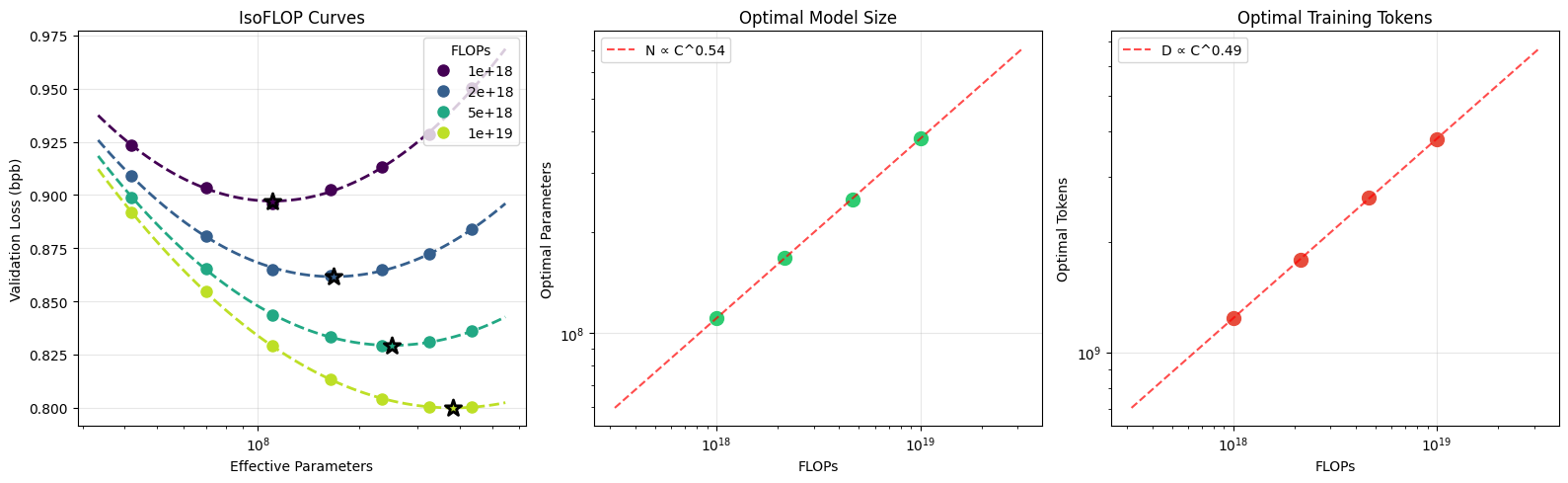
You get compute-optimal training without needing a PhD in deep learning.
The Leaderboard: Racing to Beat GPT-2
nanochat maintains a public leaderboard tracking “time to GPT-2” capability. The target is beating OpenAI’s original CORE score of 0.256525 on 22 evaluation tasks (ARC, MMLU, and others from the DCLM benchmark suite).
Current Records
| Run | Model | Time | CORE Score | Key Innovation |
|---|---|---|---|---|
| Original GPT-2 | 1.6B | 168 hours | 0.2565 | OpenAI 2019 baseline |
| Run 1 | d24 | 3.04 hrs | 0.2585 | Initial baseline |
| Run 2 | d26 | 2.91 hrs | 0.2578 | FP8 training |
| Run 3 | d26 | 2.76 hrs | 0.2602 | 1M token batch size |
| Run 4 | d24 | 2.02 hrs | 0.2571 | ClimbMix dataset |
| Run 5 | d24 | 1.80 hrs | 0.2690 | AI-discovered optimizations |
| Run 6 | d24 | 1.65 hrs | 0.2626 | Improved smear/backout |
How AI Discovered Optimizations
Runs 5 and 6 incorporated changes from Karpathy’s “autoresearch” system. An AI agent explored architectural modifications on small d12 models (5-minute training runs), then translated winning changes to the full d24 setup.
The system found improvements to:
- Backout mechanism: Better mid-layer residual subtraction
- Smear implementation: More efficient bigram mixing from previous tokens
These changes reduced training time from 2.02 hours to 1.65 hours, a 19% improvement discovered through autonomous experimentation.
How nanochat Works
The codebase contains roughly 3,000 lines across core modules. Let’s examine each component.
1. The GPT Model (nanochat/gpt.py)
The transformer follows modern best practices with several optimizations:
Architecture Features:
- Rotary embeddings (RoPE): Relative positional encoding without learned position embeddings
- QK normalization: Stabilizes training at scale
- Untied weights: Separate token embedding and output projection layers
- ReLU² activation: Squared ReLU in MLP instead of GeLU
- Grouped Query Attention (GQA): Fewer KV heads than query heads for faster inference
- Sliding window attention: Configurable pattern (e.g., “SSSL” alternates short/long context)
- Flash Attention 3: Hopper GPU optimization with SDPA fallback
Value Embeddings (ResFormer):Alternating layers include learnable value embeddings mixed via input-dependent gating:
# Value residual: mix in value embedding with per-head gate
if ve is not None:
    ve = ve.view(B, T, self.n_kv_head, self.head_dim)
    gate = 3 * torch.sigmoid(self.ve_gate(x[..., :self.ve_gate_channels]))
    v = v + gate.unsqueeze(-1) * ve
This adds capacity without significant compute overhead.
Efficiency Tricks:
The model includes three learned mechanisms that improve training dynamics:
# 1. Per-layer residual scaling
x = self.resid_lambdas[i] * x + self.x0_lambdas[i] * x0

# 2. Smear: mix previous token embedding for bigram info
gate = self.smear_lambda * torch.sigmoid(self.smear_gate(x[:, :, :24]))
x = x + gate * x_pre_smear

# 3. Backout: subtract mid-layer residual
x = x - self.backout_lambda * x_backout
2. The Muon Optimizer (nanochat/optim.py)
nanochat uses a mixed optimizer strategy:
| Parameter Type | Optimizer | Purpose |
|---|---|---|
| Embeddings, lm_head | AdamW | Standard adaptive optimization |
| Scalar parameters | AdamW | Learned scaling factors |
| 2D matrices | Muon | Orthogonalized updates |
Muon (MomentUm Orthogonalized by Newton-Schulz):
The Muon optimizer orthogonalizes weight updates using a quintic Newton-Schulz iteration called “Polar Express”:
# Polar Express coefficients (5 iterations)
polar_express_coeffs = [
    (8.156, -22.483, 15.879),
    (4.043, -2.809, 0.500),
    # ... more coefficients
]

# Orthogonalization loop
for a, b, c in polar_express_coeffs[:ns_steps]:
    A = X.mT @ X
    B = b * A + c * (A @ A)
    X = a * X + X @ B
NorMuon Variance Reduction:
After orthogonalization, updates get normalized per-neuron to prevent scale collapse:
v_mean = g.float().square().mean(dim=red_dim, keepdim=True)
v_norm = v_mean.sum(dim=(-2, -1), keepdim=True).sqrt()
final_scale = step_size * (v_norm / v_norm_new.clamp_min(1e-10))
g = g * final_scale.to(g.dtype)
Distributed Training:
For multi-GPU setups, the optimizer implements ZeRO-2 style sharding with three-phase async communication:
Phase 1: Launch all async reduce_scatter operations
Phase 2: Wait for reduces, compute updates, launch all_gathers
Phase 3: Wait for gathers, copy back updated params
This overlaps communication with computation, maximizing GPU utilization.
3. Precision Management (nanochat/common.py)
nanochat manages precision explicitly instead of using torch.amp.autocast:
| Hardware | Default dtype | Reason |
|---|---|---|
| CUDA SM 80+ (A100, H100) | bfloat16 | Native BF16 tensor cores |
| CUDA SM < 80 (V100, T4) | float32 | No BF16 support |
| CPU / MPS | float32 | No reduced-precision cores |
The custom Linear layer casts weights to match compute dtype during forward pass:
class Linear(nn.Linear):
    def forward(self, x):
        return F.linear(x, self.weight.to(dtype=x.dtype))
Master weights stay in FP32 for optimizer precision. For H100 and Blackwell GPUs, FP8 training is available via --fp8, converting most layers to Float8Linear with tensorwise scaling.
4. Data Loading (nanochat/dataloader.py)
The dataloader uses BOS-aligned best-fit packing:
- Every row starts with BOS (Beginning of Sequence) token
- Documents packed using best-fit algorithm to minimize waste
- When no document fits, one gets cropped to fill exactly
- 100% utilization with ~35% token cropping at 2048 sequence length
This ensures every token can attend back to BOS and see full document context.
# Find largest document that fits entirely
best_idx = -1
best_len = 0
for i, doc in enumerate(doc_buffer):
    doc_len = len(doc)
    if doc_len <= remaining and doc_len > best_len:
        best_idx = i
        best_len = doc_len

if best_idx >= 0:
    doc = doc_buffer.pop(best_idx)
    # Add full document
else:
    # Crop shortest doc to fill remaining space
5. Flash Attention Unification (nanochat/flash_attention.py)
The project provides a unified interface that auto-switches between FA3 and PyTorch SDPA:
from nanochat.flash_attention import flash_attn

# Works on any hardware - auto-selects best backend
y = flash_attn.flash_attn_func(q, k, v, causal=True, window_size=window_size)
On Hopper GPUs with bfloat16, it uses Flash Attention 3. Everywhere else falls back to PyTorch’s scaled dot-product attention.
6. Inference Engine (nanochat/engine.py)
The Engine class handles efficient generation with:
- KV Cache: Pre-filled prompt cache with FA3’s
flash_attn_with_kvcache - Tool Use: Special tokens trigger Python calculator via
eval() - Batch Generation: Clone KV cache for parallel sampling
The engine coordinates conversation flow, including forcing tool output tokens when the model invokes the calculator.
Step-by-Step: Train Your Own Model
The entire pipeline lives in runs/speedrun.sh. Here’s how to run it.
Prerequisites
- 8xH100 GPU node (or similar)
- ~20 GB disk space for dataset
- Python 3.10+
- uv package manager
Step 1: Environment Setup
# Install uv
curl -LsSf https://astral.sh/uv/install.sh | sh

# Create and activate virtual environment
uv venv
source .venv/bin/activate

# Install dependencies
uv sync --extra gpu
Step 2: Download Training Data
# Download ~2B characters from ClimbMix dataset
python -m nanochat.dataset -n 170

# This downloads ~170 shards at ~100MB each
# Total: ~17 GB compressed
The script downloads pretraining data shards with file locking to handle multi-rank coordination.
Step 3: Train the Tokenizer
# Train BPE tokenizer with 32,768 vocab
python -m scripts.tok_train

# Evaluate compression ratio
python -m scripts.tok_eval
The tokenizer uses a GPT-4 style split pattern with byte-fallback BPE. Training completes in ~10 minutes on 2B characters.
Step 4: Pretrain the Base Model
# Train d24 model (GPT-2 capability)
torchrun --standalone --nproc_per_node=8 -m scripts.base_train -- \
    --depth=24 \
    --target-param-data-ratio=8 \
    --device-batch-size=16 \
    --fp8 \
    --run=my-first-model
Key parameters:
--depth=24: GPT-2 size model--target-param-data-ratio=8: Slightly undertrained for speed--device-batch-size=16: Per-GPU batch size--fp8: Enable FP8 training (H100+ only)
Expected runtime: ~2 hours.
Step 5: Supervised Finetuning
# Download identity conversations
curl -L -o ~/.cache/nanochat/identity_conversations.jsonl \
    https://karpathy-public.s3.us-west-2.amazonaws.com/identity_conversations.jsonl

# Run SFT for chat capability
torchrun --standalone --nproc_per_node=8 -m scripts.chat_sft -- \
    --device-batch-size=16 \
    --run=my-sft
This teaches the model conversation format, special tokens, and tool use.
Step 6: Chat With Your Model
# CLI chat
python -m scripts.chat_cli -p "Why is the sky blue?"

# Or launch web UI
python -m scripts.chat_web
The web UI runs on port 8000 and provides a ChatGPT-like interface.
Research Workflow: Rapid Experimentation
For testing new ideas, use smaller models for faster iteration.
Quick Experiments (~5 minutes)
OMP_NUM_THREADS=1 torchrun --standalone --nproc_per_node=8 -m scripts.base_train -- \
    --depth=12 \
    --run="d12-test" \
    --core-metric-every=999999 \
    --sample-every=-1 \
    --save-every=-1
This trains a d12 (GPT-1 size) model with minimal logging. Perfect for testing architectural changes.
Metrics to Monitor
Track these in Weights & Biases:
- val_bpb: Validation bits-per-byte (vocab-size-independent loss)
- core_metric: DCLM CORE evaluation score
- train/mfu: Model FLOPS utilization (hardware efficiency)
- train/tok_per_sec: Training throughput
Testing Requirements
Any improvement must work across all depths (d12 through d26). This prevents overfitting to a single model size and ensures principled advances.
Why nanochat Matters
Cost Accessibility
| Approach | Cost | Time | Hardware |
|---|---|---|---|
| OpenAI GPT-2 (2019) | $43,000 | 168 hours | 32 TPU v3 |
| nanochat (2026) | $48 | 2 hours | 8xH100 |
| nanochat spot | ~$15 | 2 hours | 8xH100 spot |
This brings LLM training within reach of:
- Individual researchers
- Small startups
- University courses
- Hobbyists
Educational Value
The codebase serves as a learning resource:
- ~500 lines for GPT model
- ~530 lines for optimizer
- Clear comments on every design decision
- No hidden configuration
Students can read, modify, and experiment with a complete LLM pipeline.
Research Velocity
Reducing training from days to hours enables:
- Faster hypothesis testing
- More experiments per week
- Lower cost of failure
- Community collaboration via leaderboard
Transparency
Every design choice is documented:
- Scaling laws in
dev/LOG.md - Ablation studies in GitHub Discussions
- Full reproduction details for leaderboard entries
- Clear AI contribution disclosure
Limitations and Reality Check
nanochat is impressive but has clear boundaries.
Hardware Requirements
The $48 figure assumes access to an 8xH100 node. Cloud rental costs vary:
- Lambda Labs: ~$25/hour for 8xH100
- RunPod: ~$15/hour spot pricing
- Total runtime: ~2 hours pretraining + SFT
You’ll need ~$50-100 for a full run depending on provider.
Capability Ceiling
nanochat achieves GPT-2 level performance (2019 technology). This means:
What it can do:
- Basic conversation
- Simple reasoning
- Elementary math
- Factual recall (limited)
What it cannot do:
- Complex multi-step reasoning
- Code generation beyond simple functions
- Nuanced instruction following
- Competitive with GPT-4, Claude, or Gemini
Think of it as a kindergartener: capable of basic conversation but not expert-level work.
Data Requirements
The full speedrun downloads:
- ~170 data shards
- ~17 GB compressed
- ~2B characters total
You’ll need adequate storage and bandwidth.
Metric Limitations
The CORE score measures 22 tasks but doesn’t capture:
- Real-world conversation quality
- Domain-specific knowledge
- Instruction following nuance
- Safety and alignment
Different random seeds produce ~0.016 CORE variance. Your results may vary.
FAQ
How much does it cost to train a model with nanochat?
Approximately $48 on demand ($24/hour × 2 hours) or ~$15 on spot instances. This covers pretraining only. Add ~30 minutes for SFT.
What GPU do I need?
Minimum: Single GPU (any modern datacenter GPU). Optimal: 8xH100 or 8xA100 for fastest training. The code scales from 1 GPU to 8 GPUs with automatic gradient accumulation.
How long does training take?
1.65 to 3 hours depending on configuration and hardware. The current leaderboard record is 1.65 hours for a d24 model.
What is the CORE metric?
The DCLM CORE score evaluates models on 22 tasks including ARC (science questions), MMLU (multi-task language understanding), and other benchmarks. GPT-2 scored 0.256525. nanochat regularly exceeds 0.26.
Can I train on a single GPU?
Yes. Omit torchrun and the code automatically uses gradient accumulation. Training will take 8× longer but produces nearly identical results.
What dataset does nanochat use?
The current best uses ClimbMix (NVIDIA’s curated web dataset). Previous versions used FineWeb-EDU. The tokenizer trains on ~2B characters from the first ~8 shards.
Does nanochat work on Apple Silicon?
Yes. The code runs on MPS (Metal Performance Shaders) with float32 precision. Training is slower than CUDA but functional for experimentation.
Can I resume training from a checkpoint?
Yes. Use --resume-from-step=<step> to continue from a saved checkpoint. The dataloader state is also saved for exact resumption.
What’s the difference between nanochat and nanoGPT?
nanoGPT covered pretraining only. nanochat extends to the full pipeline: tokenization, pretraining, SFT, RLHF, evaluation, inference, and web UI.
Conclusion
nanochat proves that LLM training no longer requires massive budgets or specialized infrastructure. What cost $43,000 in 2019 now costs under $50.
The project’s impact extends beyond raw cost reduction. By providing a minimal, readable codebase with a “one dial” interface, Karpathy has created both a research tool and an educational resource.
Key Takeaways
- 100x cost reduction: From $43,000 to $48 for GPT-2 capability
- 100x speedup: From 168 hours to 1.65 hours
- Single configuration dial:
--depthcontrols everything - Full pipeline: Tokenization through web UI
- Community driven: Public leaderboard with continuous improvements
Next Steps
Ready to train your own model? Start with the nanochat repository and the runs/speedrun.sh script.
For API developers building AI-powered applications, understanding LLM training internals has never been more accessible. The barrier to entry has dropped from “venture-funded startup” to “weekend project.”