
TL;DR
Promptfoo is an open-source LLM evaluation and red-teaming framework that helps developers test AI applications systematically. It supports 90+ model providers, offers 67+ security attack plugins, and runs 100% locally for privacy. With 1.6 million npm downloads and production use at companies serving 10M+ users, it has become the standard for LLM testing. Get started with npm install -g promptfoo and promptfoo init --example getting-started.
Introduction
You spent weeks building your AI-powered customer support chatbot. It answered questions perfectly during development. Then users started finding ways to make it leak sensitive data, bypass safety guardrails, and give inconsistent responses.
This scenario plays out every day. Teams ship LLM applications based on gut feel and manual testing, only to discover vulnerabilities and quality issues in production. The cost of fixing these problems after launch is 100x higher than catching them during development.
Promptfoo solves this by bringing systematic, automated testing to LLM applications. It lets you evaluate prompts across multiple models, run security red-team assessments, and catch regressions before they reach users.
I have analyzed the promptfoo codebase (version 0.121.2) and tested its core features to bring you this comprehensive guide. You will learn how to set up evaluations, run security scans, integrate with CI/CD, and avoid common pitfalls.
By the end, you will have a working test suite for your LLM application and know how to ship with confidence.
What Is Promptfoo and Why You Need It
Promptfoo is a command-line tool and Node.js library for evaluating and red-teaming LLM applications. Think of it as a testing framework built specifically for the quirks of AI development.
Traditional testing tools fail with LLMs because outputs are non-deterministic. You cannot assert exact string matches when the same prompt produces different responses each time. Promptfoo solves this with:
- Semantic assertions that check meaning instead of exact text
- LLM-graded evals where one model evaluates another’s output
- Multi-model comparison to test the same prompt across GPT-4, Claude, and others
- Security plugins that automatically probe for vulnerabilities
The tool runs locally on your machine. Your prompts and test data never leave your environment unless you opt into cloud features. This privacy-first design makes it suitable for testing with sensitive data.
The Problem Promptfoo Solves
Most teams test LLM applications manually. They send a few prompts, read the outputs, and decide if things look good. This approach has three fatal flaws:
- No regression detection - You cannot tell if a model update broke existing functionality
- Coverage gaps - Manual testing misses edge cases and adversarial inputs
- No metrics - You cannot track improvement or compare models objectively
Promptfoo replaces this with automated evals that run on every change. You define test cases once and execute them against any model. Results include pass/fail rates, cost comparisons, and latency metrics.
Who Uses Promptfoo
The project has 1.6 million npm downloads and powers LLM applications serving over 10 million end users. Companies use it for:
- Customer support chatbots that need consistent, accurate responses
- Content generation pipelines that must maintain brand voice
- Healthcare and fintech applications with strict compliance requirements
- Security-sensitive systems that cannot leak data or accept harmful inputs
In March 2026, Promptfoo joined OpenAI. The project remains open source and MIT licensed, with continued development under the new ownership.
Getting Started: Install and Run Your First Eval
You can install promptfoo globally or run it without installation using npx.
Installation
# Global install (recommended)
npm install -g promptfoo

# Or run without installing
npx promptfoo@latest

# macOS users can also use Homebrew
brew install promptfoo

# Python users can also use pip
pip install promptfoo
Set your API keys as environment variables:
export OPENAI_API_KEY=sk-abc123
export ANTHROPIC_API_KEY=sk-ant-xxx
Create Your First Eval
Initialize an example project:
promptfoo init --example getting-started
cd getting-started
This creates a promptfooconfig.yaml file with sample prompts, providers, and test cases.
Run the evaluation:
promptfoo eval
View results in the web UI:
promptfoo view
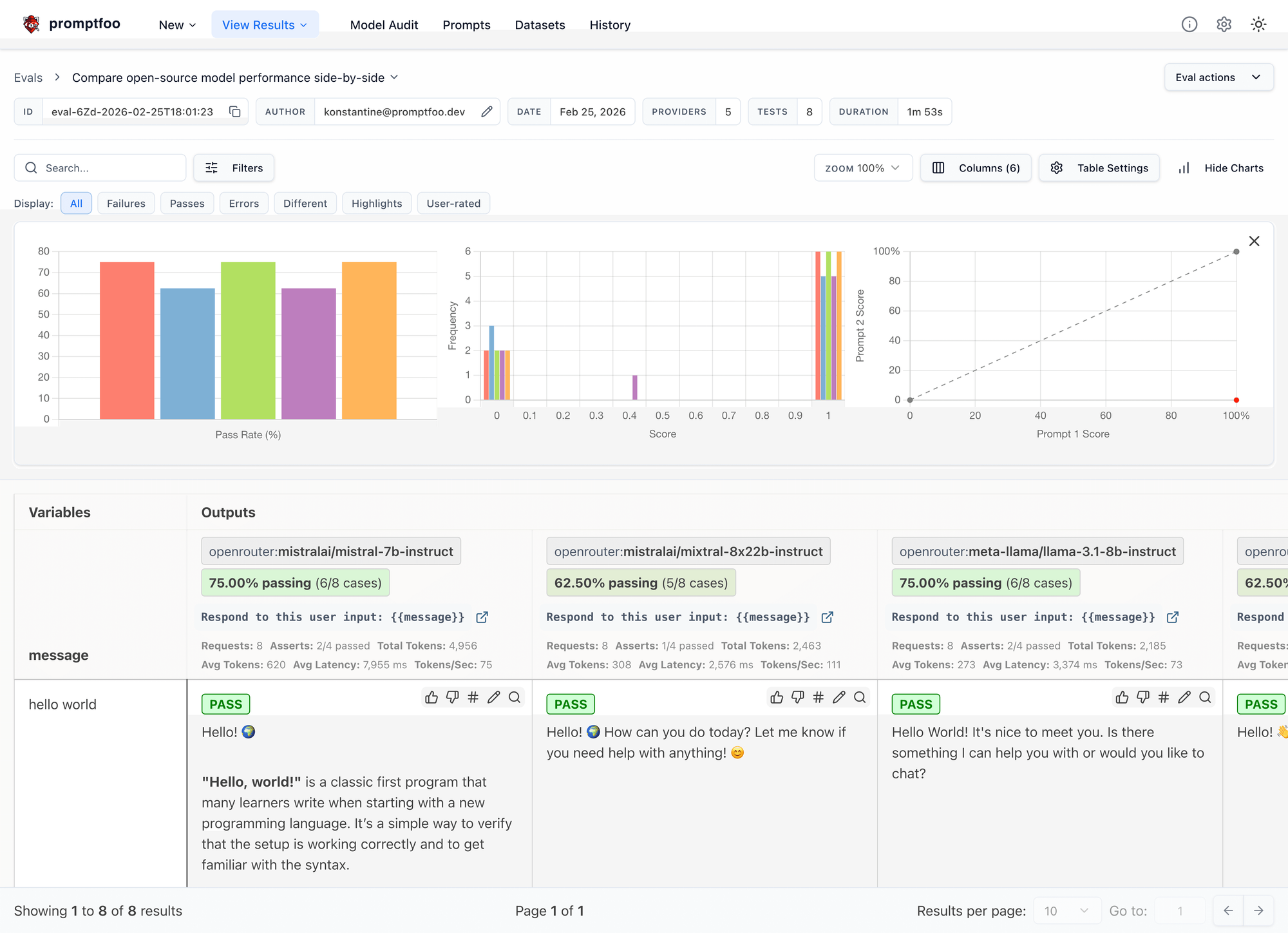
The UI opens at localhost:3000 and shows a side-by-side comparison of outputs from each model, with pass/fail status for each assertion.
Understanding the Config File
The promptfooconfig.yaml file defines your eval suite:
description: "My First Eval Suite"

prompts:
  - prompts/greeting.txt
  - prompts/farewell.txt

providers:
  - openai:gpt-4o
  - anthropic:claude-sonnet-4-5

tests:
  - vars:
      input: "Hello"
    assert:
      - type: contains
        value: "Hi"
      - type: latency
        threshold: 3000
- prompts: Files or inline text to test
- providers: Models to evaluate (supports 90+ providers)
- tests: Test cases with variables and assertions
You can scale this to hundreds of test cases. Many teams keep eval configs in version control and run them in CI on every pull request.
Core Features: What Promptfoo Can Do
1. Automated Evaluations
Automated evals are the foundation of promptfoo. You define test cases with expected outcomes, and the tool runs them against your chosen models.
Assertion Types
Promptfoo includes 30+ built-in assertion types:
| Assertion | Purpose |
|---|---|
contains |
Output includes a substring |
equals |
Exact string match |
regex |
Match against a regex pattern |
json-schema |
Validate JSON structure |
javascript |
Custom JS function returns pass/fail |
python |
Custom Python function |
llm-rubric |
Use an LLM to grade output |
similar |
Semantic similarity score |
latency |
Response time under threshold |
cost |
Cost per request under threshold |
Example with multiple assertions:
tests:
  - vars:
      question: "What is the capital of France?"
    assert:
      - type: contains
        value: "Paris"
      - type: javascript
        value: output.length < 100
      - type: latency
        threshold: 2000
      - type: cost
        threshold: 0.001
This test checks that the answer mentions Paris, stays under 100 characters, responds in under 2 seconds, and costs less than $0.001.
LLM-Graded Evals
The llm-rubric assertion uses one LLM to grade another’s output. This is powerful for subjective criteria like tone or helpfulness:
assert:
  - type: llm-rubric
    value: "Response should be helpful, harmless, and honest"
The grader LLM reads the output and scores it against your rubric. You can use a cheaper model for grading to reduce costs.
2. Red Teaming and Security Testing
Promptfoo includes comprehensive security testing through its red team module. It automatically generates adversarial inputs to probe for vulnerabilities.
Supported Attack Vectors
The red team system includes 67+ plugins organized by category:
| Category | What It Tests |
|---|---|
| Prompt Injection | Direct, indirect, and context injection attacks |
| Jailbreaks | DAN, persona switching, role-play bypasses |
| Data Exfiltration | SSRF, system prompt extraction, prompt leakage |
| Harmful Content | Hate speech, dangerous activities, self-harm requests |
| Compliance | PII leakage, HIPAA violations, financial data exposure |
| Audio/Visual | Audio injection and image-based attacks |
Running a Red Team Scan
Initialize a red team config:
promptfoo redteam init
Run the security scan:
promptfoo redteam run
View the report:
promptfoo redteam report [directory]
The redteam run command performs two steps:
- Generates dynamic attack probes tailored to your application
- Evaluates probes against your target and scores vulnerabilities
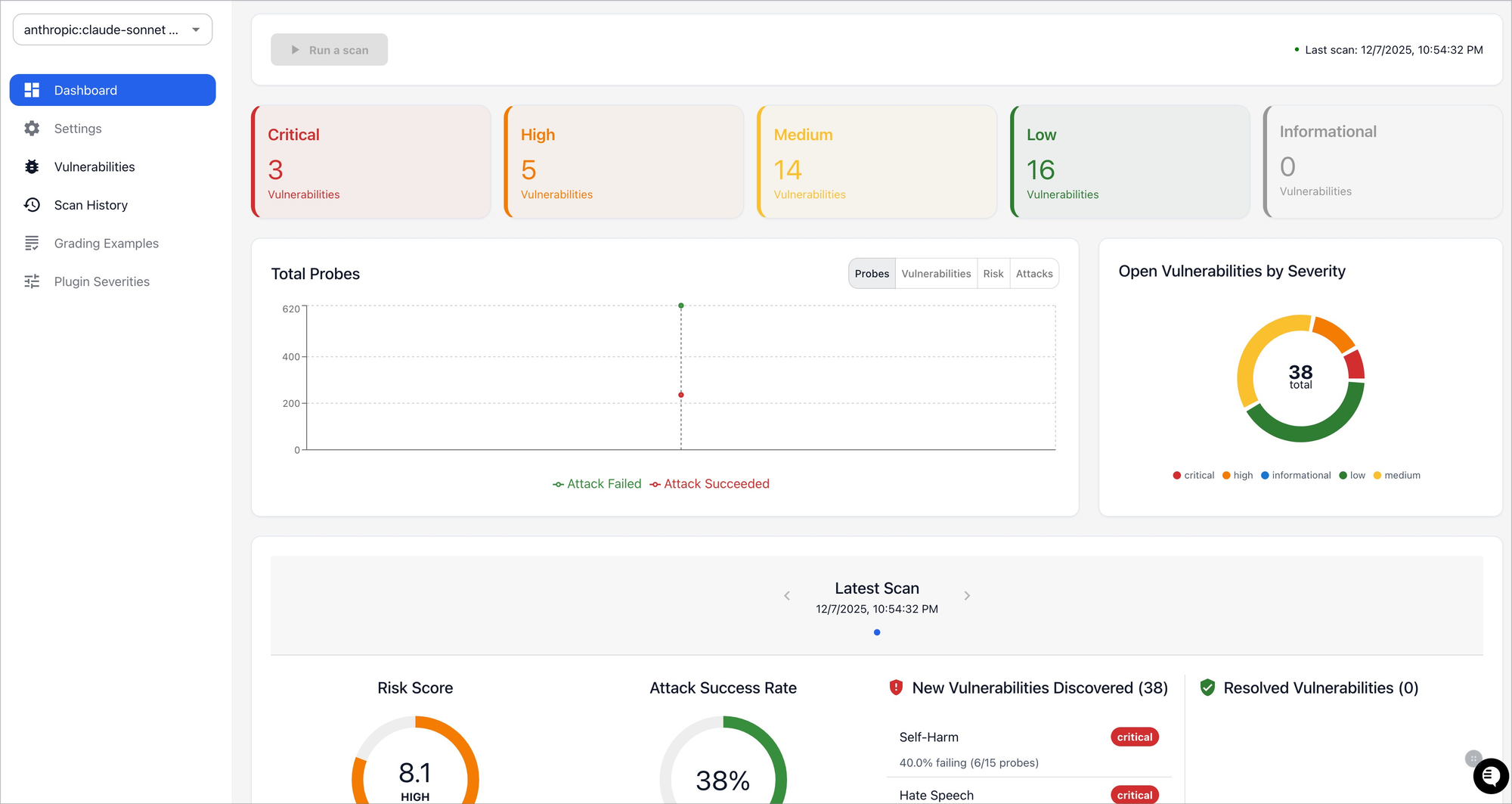
Results include severity ratings (Critical, High, Medium, Low), exploitable test cases, and remediation recommendations.
Example Red Team Output
Vulnerability Summary:
- Critical: 2 (PII leakage, prompt extraction)
- High: 5 (jailbreaks, injection attacks)
- Medium: 12 (bias, inconsistent responses)
- Low: 23 (minor policy violations)
Fix critical issues before deployment. Re-run scans after changes to verify fixes.
3. Code Scanning for Pull Requests
Promptfoo integrates with GitHub Actions to scan pull requests for LLM-related security issues.
# .github/workflows/promptfoo-scan.yml
name: Promptfoo Code Scan
on: [pull_request]
jobs:
  scan:
    runs-on: ubuntu-latest
    steps:
      - uses: actions/checkout@v4
      - uses: promptfoo/promptfoo/code-scan-action@main
        with:
          github-token: ${{ secrets.GITHUB_TOKEN }}
This catches:
- Hardcoded API keys in config files
- Insecure prompt patterns
- Missing input validation
- Potential prompt injection vectors
4. Model Comparison
Compare outputs from multiple models side by side to choose the best one for your use case.
# Run eval with multiple providers
promptfoo eval

# View comparison in web UI
promptfoo view
The web UI displays:
- Pass/fail rates per model
- Cost per 1000 requests
- Average latency
- Qualitative output differences
This data-driven approach prevents bias toward familiar models. You might find that a cheaper model outperforms GPT-4 on your specific evals.
Supported Providers: 90+ LLM Integrations
Promptfoo supports over 90 LLM providers out of the box. You can test the same prompt across OpenAI, Anthropic, Google, Amazon, and local models without changing your code.
Major Providers
| Provider | Models |
|---|---|
| OpenAI | GPT-4, GPT-4o, GPT-4o-mini, o1, o3 |
| Anthropic | Claude 3.5/3.7/4.5/4.6, Thinking models |
| Gemini 1.5/2.0, Vertex AI | |
| Microsoft | Azure OpenAI, Phi |
| Amazon | Bedrock (Claude, Llama, Titan) |
| Meta | Llama 3, 3.1, 3.2 (via multiple providers) |
| Ollama | Local models (Llama, Mistral, Phi) |
Custom Providers
You can write custom providers in Python or JavaScript if your model is not supported.
Python example:
# custom_provider.py
from typing import Any

class CustomProvider:
    async def call_api(self, prompt: str, options: dict, context: dict) -> dict:
        response = await my_async_api.generate(prompt)
        return {
            "output": response.text,
            "tokenUsage": {
                "total": response.usage.total_tokens,
                "prompt": response.usage.prompt_tokens,
                "completion": response.usage.completion_tokens
            }
        }
JavaScript example:
// customProvider.js
export default class CustomProvider {
  async callApi(prompt) {
    return {
      output: await myApi.generate(prompt),
      tokenUsage: { total: 50, prompt: 20, completion: 30 }
    };
  }
}
Register custom providers in your config:
providers:
  - id: file://custom_provider.py
    config:
      api_key: ${MY_API_KEY}
Command-Line Interface: Essential Commands
Promptfoo’s CLI provides all the functionality you need for daily workflows.
Core Commands
# Run evaluations
promptfoo eval -c promptfooconfig.yaml

# Open web UI
promptfoo view

# Share results online
promptfoo share

# Red team testing
promptfoo redteam init
promptfoo redteam run

# Configuration
promptfoo init
promptfoo validate [config]

# Results management
promptfoo list
promptfoo show <id>
promptfoo delete <id>
promptfoo export <id>

# Utilities
promptfoo cache clear
promptfoo retry <id>
Useful Flags
--no-cache              # Disable caching for fresh results
--max-concurrency <n>   # Limit parallel API calls
--output <file>         # Write results to JSON file
--verbose               # Enable debug logging
--env-file <path>       # Load environment variables from file
--filter <pattern>      # Run specific test cases
Example: Run Eval with Custom Settings
promptfoo eval \
  -c promptfooconfig.yaml \
  --no-cache \
  --max-concurrency 3 \
  --output results.json \
  --env-file .env
This runs evals fresh (no cache), limits concurrency to 3 parallel calls, saves results to JSON, and loads API keys from .env.
CI/CD Integration: Automate LLM Testing
Integrate promptfoo into your CI/CD pipeline to catch regressions before deployment.
GitHub Actions Example
name: LLM Tests
on: [push, pull_request]
jobs:
  eval:
    runs-on: ubuntu-latest
    steps:
      - uses: actions/checkout@v4
      - uses: actions/setup-node@v4
        with:
          node-version: '22'
      - run: npm install -g promptfoo
      - run: promptfoo eval -c promptfooconfig.yaml
        env:
          OPENAI_API_KEY: ${{ secrets.OPENAI_API_KEY }}
          ANTHROPIC_API_KEY: ${{ secrets.ANTHROPIC_API_KEY }}
Quality Gates
Set pass/fail thresholds in your config:
commandLineOptions:
  threshold: 0.8  # Require 80% pass rate
This fails CI if evals do not meet the threshold, preventing regressions from merging.
Caching in CI
Enable caching to speed up CI runs:
- uses: actions/cache@v4
  with:
    path: ~/.cache/promptfoo
    key: ${{ runner.os }}-promptfoo-${{ hashFiles('promptfooconfig.yaml') }}
Cached results skip API calls for unchanged tests, reducing CI time and costs.
Web UI: Visualize and Share Results
The built-in web UI (promptfoo view) provides an interactive interface for reviewing evals.
Features
- Eval matrix - Compare outputs side by side
- Filtering - Find specific test cases by status or provider
- Diff view - See exactly what changed between runs
- Sharing - Generate shareable links for team review
- Real-time updates - Watch evals run live
Access and Security
The UI runs on localhost:3000 by default. It includes CSRF protection using Sec-Fetch-Site and Origin headers to block cross-site requests from untrusted origins.
Do not expose the local web server to untrusted networks. For team access, use the promptfoo share command to upload results to the cloud, or self-host with authentication.
Database and Caching
Cache Location
- macOS/Linux:
~/.cache/promptfoo - Windows:
%LOCALAPPDATA%\promptfoo
The cache stores evaluation results to speed up repeated runs. Use --no-cache during development to ensure fresh results.
Database Location
- All platforms:
~/.promptfoo/promptfoo.db(SQLite)
The database stores historical eval runs for comparison and trend analysis. Do not delete this file unless you want to lose historical data.
Security Model: What You Can Trust
Promptfoo operates on a trust-by-configuration model. Understanding this prevents security surprises.
Trusted Inputs (Treated as Code)
These inputs execute as code and should only come from trusted sources:
- Config files (
promptfooconfig.yaml) - Custom JavaScript/Python/Ruby assertions
- Provider configurations
- Transform functions
Untrusted Inputs (Data-Only)
These inputs are treated as data and should not trigger code execution:
- Prompt text
- Test case variables
- Model outputs
- Remote content fetched during evals
Hardening Recommendations
For high-security environments:
- Run inside a container or VM with minimal privileges
- Use dedicated, least-privileged API keys
- Avoid placing secrets in prompts or config files
- Restrict network egress for third-party code
- Do not expose the local web server to untrusted networks
Performance: Optimize Your Evals
Optimization Tips
- Use caching - Default behavior speeds up repeated runs
- Tune concurrency -
--max-concurrencybalances speed vs. rate limits - Filter tests - Use
--filterto run specific test cases during development - Sample datasets - Use
--repeatwith subsets for iteration before full runs
Scaling for Large Evals
For large-scale evaluations with thousands of test cases:
- Use the scheduler (
src/scheduler/) for distributed runs - Leverage remote generation for offloading compute
- Export results to Google Sheets for team visibility
Extensibility: Build Custom Features
Custom Assertions
Write custom assertions for domain-specific checks:
// assertions/customCheck.js
export default function customCheck(output, context) {
  const pass = output.includes('expected');
  return {
    pass,
    score: pass ? 1 : 0,
    reason: pass ? 'Output matched' : 'Missing expected content'
  };
}
Use in your config:
assert:
  - type: file://assertions/customCheck.js
MCP Server
Promptfoo includes a Model Context Protocol (MCP) server for integration with AI assistants like Claude Code:
promptfoo mcp
This enables AI agents to:
- Run evaluations directly from chat
- Access red team capabilities
- Query stored results
- Generate new test cases
Real-World Use Cases
Customer Support Chatbot
A SaaS company uses promptfoo to test their support chatbot before each deployment:
- 500 test cases covering common questions
- Eval across GPT-4 and Claude to compare quality
- Red team scans for PII leakage and jailbreaks
- CI integration blocks deploys with failing evals
Result: 90% reduction in customer-reported issues after implementing automated evals.
Content Generation Pipeline
A marketing team validates AI-generated content for brand voice:
- LLM-graded evals check tone and style
- Latency thresholds ensure fast generation
- Cost monitoring keeps expenses under control
- Model comparison finds the best value provider
Result: Consistent brand voice across all content with 40% lower API costs.
Healthcare Application
A healthtech startup ensures compliance with strict testing:
- Red team scans for HIPAA violations
- Custom assertions validate medical accuracy
- All evals run locally for data privacy
- Audit trails for regulatory requirements
Result: Passed SOC 2 audit with promptfoo evals as evidence.
Conclusion
Promptfoo brings systematic testing to LLM applications. It replaces manual, error-prone processes with automated evals that catch regressions, security issues, and quality problems before deployment.
Key takeaways:
- Install with
npm install -g promptfooand start withpromptfoo init - Use assertions to validate outputs beyond exact string matching
- Run red team scans to find security vulnerabilities
- Integrate with CI/CD to block regressions
- Compare models objectively with side-by-side evals
- Custom providers and assertions extend functionality
The future of AI development is data-driven. With promptfoo, you have the tools to build, test, and secure LLM applications at scale.
If you also work with APIs, consider using Apidog alongside promptfoo. Apidog handles API design, testing, and documentation, while promptfoo focuses on LLM evaluation. Together they cover the full stack of modern application testing.
FAQ
What is promptfoo used for?
Promptfoo is used for testing and evaluating LLM applications. It runs automated tests against prompts, compares outputs across models, and performs security red-team assessments to find vulnerabilities.
Is promptfoo free?
Yes, promptfoo is open source and MIT licensed. You can use it for free for personal and commercial projects. Cloud features and enterprise support may require paid plans.
How do I install promptfoo?
Run npm install -g promptfoo for global installation. You can also use npx promptfoo@latest without installing, or install via brew install promptfoo on macOS or pip install promptfoo for Python.
What models does promptfoo support?
Promptfoo supports 90+ LLM providers including OpenAI (GPT-4, GPT-4o, o1), Anthropic (Claude 3.5/4/4.5), Google (Gemini), Microsoft (Azure OpenAI), Amazon Bedrock, and local models via Ollama.
How do I run a red team scan?
Run promptfoo redteam init to create a config, then promptfoo redteam run to execute the security scan. View results with promptfoo redteam report.
Can I use promptfoo in CI/CD?
Yes. Install promptfoo in your CI pipeline and run promptfoo eval with your config file. Set quality gates with the threshold option to fail CI if evals do not meet pass rates.
Does promptfoo send my data to external servers?
No. Promptfoo runs 100% locally by default. Your prompts and test data never leave your machine unless you explicitly opt into cloud features. Cache and database files are stored locally.
How do I compare models with promptfoo?
List multiple providers in your config file, then run promptfoo eval. View the comparison in the web UI with promptfoo view, which shows pass/fail rates, costs, and latency for each model.