
You've crafted the perfect AI video prompt. The scene is cinematic, the camera work is deliberate, and the visual details are precise. You submit it to Seedance 2's API—and it gets rejected. No clear explanation. No specific policy violation. Just a generic "content policy" error.
This happens to 37% of Seedance 2 API requests, according to usage data from major platforms hosting the service. The frustrating part? Most of these rejected prompts don't actually violate ByteDance's content policies. They trigger a false positive in the LLM-based content filter that evaluates every request before video generation begins.
Unlike traditional keyword-based filters, Seedance 2 uses a language model to interpret the intent and context of your entire prompt. This creates new challenges for developers building applications on top of the API: you can't simply maintain a blocklist of forbidden words. You need to understand how the filter reads your prompts as scenes.
This guide breaks down the patterns behind that 37% rejection rate—and shows you how to engineer prompts that pass content moderation on the first try. We'll cover the technical architecture of the filter system, proven strategies for building safe context, and how to systematically test your prompts using API development tools.
Understanding Seedance 2's Content Filter System
How the Filter Actually Works
Seedance 2's content moderation doesn't scan for keywords. It uses a large language model to read your prompt and evaluate the context of the scene you're describing.
バイトダンスの最新モデル「Seeddance 2.0」が、海外で「狂ってる」と話題に。
— チャエン | デジライズ CEO《重要AIニュースを毎日最速で発信⚡️》 (@masahirochaen) February 10, 2026
何でもできてしまう…いろいろカオス
プロンプト例:
「図1のキャラが世界武術大会で図2のキャラと対戦する」
※著作権違反になるため、解放されても以下のような動画は作ってはいけませんpic.twitter.com/zkdsNUdSgv
This changes everything about prompt engineering.
The filter interprets:
- Intent: What is the scene trying to depict?
- Context: What creative or narrative framework surrounds the action?
- Ambiguity: Are there multiple ways to interpret this prompt?
A word like "rifle" won't automatically flag your prompt. But "a person fires a rifle" with no surrounding context will—because the filter has nothing to work with except an isolated violent action.
The goal isn't to remove words. The goal is to build a context that reads as clearly non-harmful.
The LLM Evaluation Process
When you submit a prompt via the Seedance 2 API, here's what happens:
- Image Analysis (if image input provided): Face detection runs first; photographic faces are rejected immediately
- Prompt Parsing: The LLM reads your entire text prompt as a single scene
- Intent Classification: The model evaluates whether the scene depicts prohibited content
- Context Assessment: The model checks if cinematic/creative framing is present
- Final Decision: Pass → video generation begins; Fail → API returns 400 error
This multi-stage process means you can fail at different checkpoints. Understanding where your prompt fails helps you fix it.
Current Prohibited Content Categories
Based on ByteDance's updated policies (February 2026):
| Category | Examples | Status |
|---|---|---|
| Real human faces | Photos of identifiable people | Strictly blocked |
| Celebrity likenesses | Named actors, public figures | Blocked |
| Copyrighted characters | Disney, Marvel, etc. | Blocked |
| Violence without context | Isolated violent actions | High scrutiny |
| Minors in any context | Age descriptors + any action | Maximum sensitivity |
| Political content | Named politicians, flags | Blocked |
| Explicit content | Sexual or graphic depictions | Blocked |
The key insight: context matters more than content. A historically accurate war film scene can pass; an isolated gun with no context cannot.
Testing Seedance 2 API with Apidog
Before diving into prompt strategies, let's set up systematic testing. When you're working with content filters, you need to test prompt variations at scale and track what passes versus what fails.
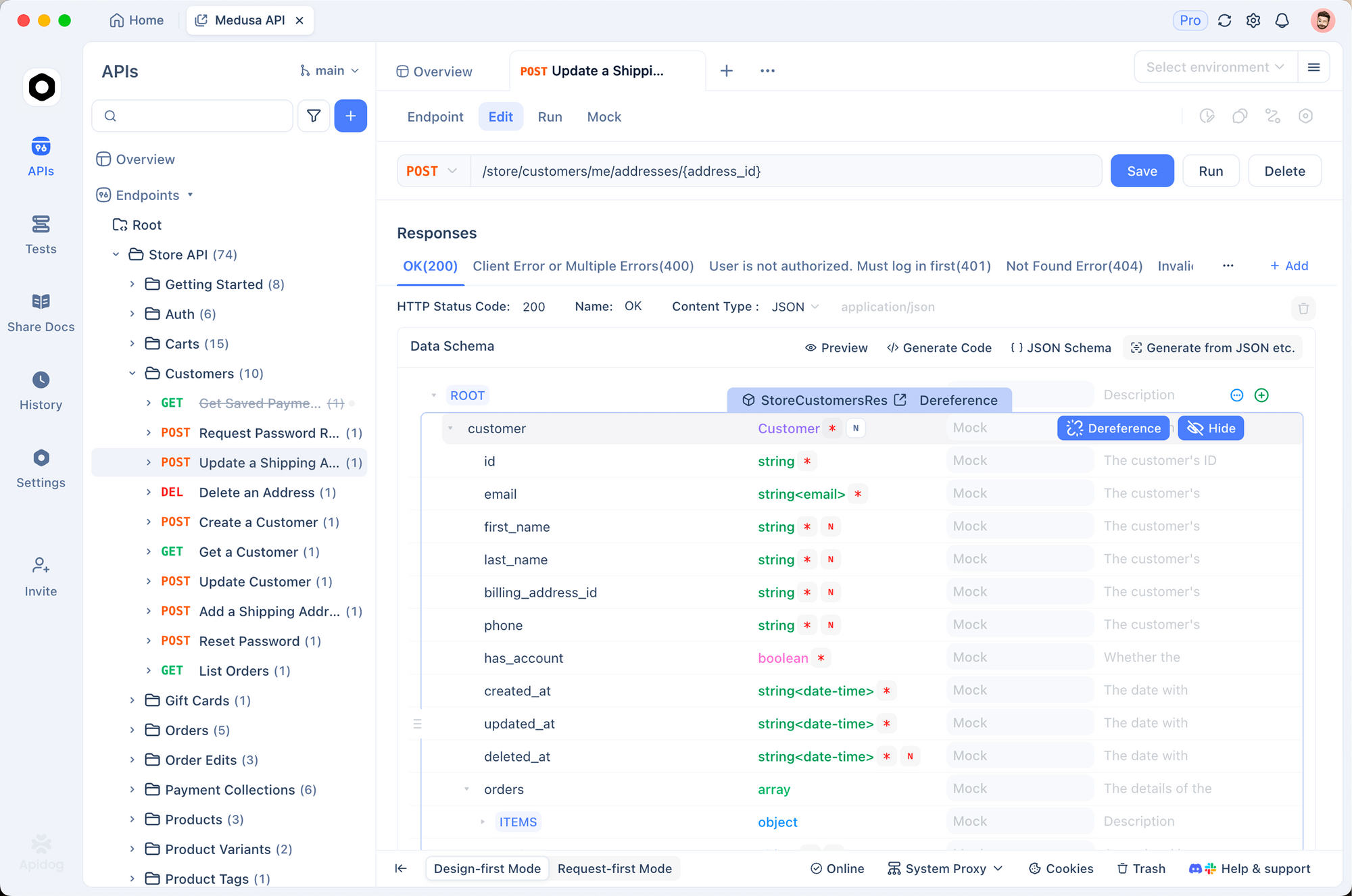
Setting Up Seedance 2 API in Apidog
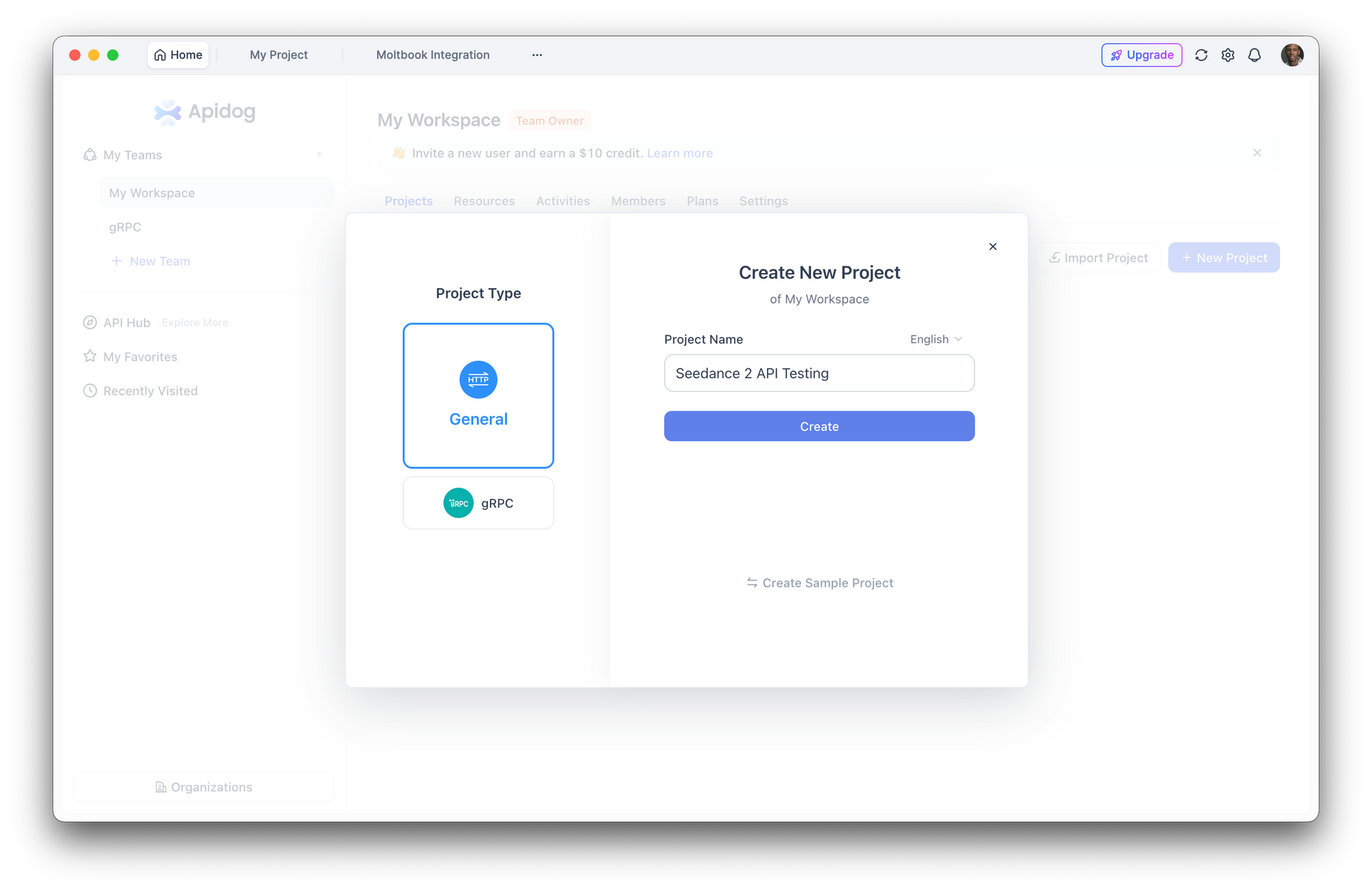
Step 1: Create a New Project
- Open Apidog and create a project named "Seedance 2 API Testing"
- This keeps all your video generation endpoints organized
Step 2: Configure Authentication
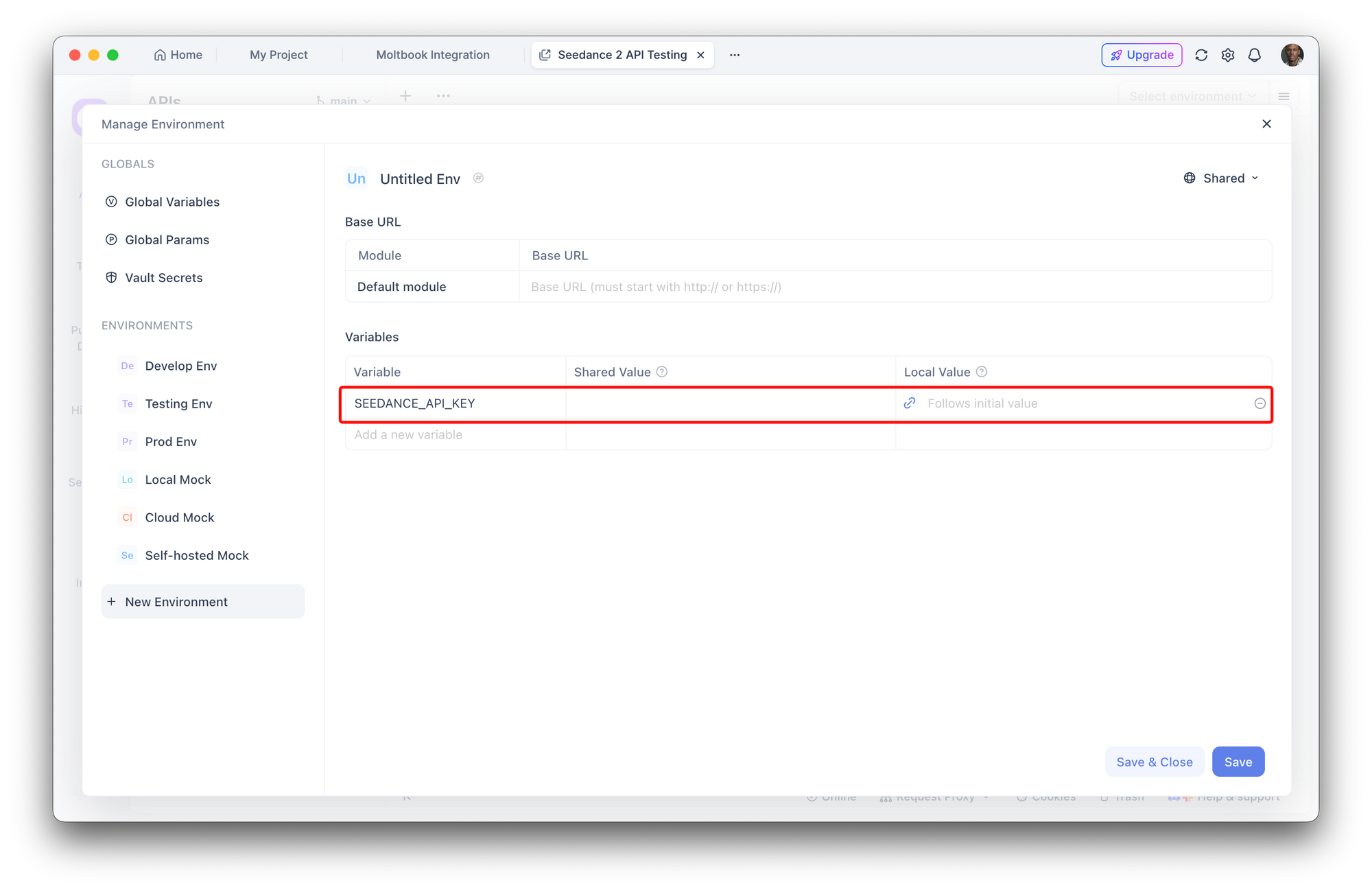
Seedance 2 API (accessed via platforms like WaveSpeed, fal.ai, or Replicate) typically uses Bearer token authentication:
- Navigate to Environment Settings in Apidog
- Add environment variable:
- Name:
SEEDANCE_API_KEY - Value: Your API token
- Mark as "Sensitive"
Step 3: Create Video Generation Endpoint
Add a new POST request with these settings:
- URL:
https://api.fal.ai/v1/seedance/video(or your provider's endpoint) - Headers:
Authorization:Bearer {{SEEDANCE_API_KEY}}Content-Type:application/json
Step 4: Build a Test Prompt Collection
Create multiple saved requests to test prompt variations:
{
  "prompt": "cinematic wide shot, 35mm film grain, 2.39:1 anamorphic, a rider on horseback in a vast snowy landscape, overcast diffused light, muted desaturated tones",
  "duration": 10,
  "aspect_ratio": "16:9",
  "quality": "high"
}
With Apidog, you can:
- Test variations side-by-side: Clone requests and modify one variable at a time
- Track rejection patterns: Save failed requests with error codes
- Automate regression tests: Verify that previously passing prompts still work after API updates
- Generate client code: Export working prompts as Python, JavaScript, or cURL
Try Apidog free to build your Seedance 2 prompt testing workflow.
Strategy 1: Build Safe Context Around Sensitive Elements
Don't remove sensitive elements from your scene. Don't water down dramatic moments. Instead, surround them with context that makes the intent unmistakable.
The Problem: Isolated Actions
The LLM reads your entire prompt as a unified scene. If the overall scene reads as a peaceful journey, a cultural moment, or a cinematic narrative—one action within it won't break it.
❌ Failed Prompt:
a person fires a rifle into the sky
Why it fails:
- No scene context
- No creative framing
- No purpose for the action
- Ambiguous intent
The filter defaults to caution because it has nothing else to evaluate.
✅ Passing Prompt:
a rider on a horse galloping through a vast snowy mountain landscape, poncho whipping in the wind, the rider raises an old rifle overhead and fires once into the gray sky as a signal, the sound echoing across the empty valley, cinematic, 35mm film grain, 2.39:1 anamorphic
Why it passes:
- Cinematic journey context
- Clear purpose (signaling)
- Cultural setting (poncho, old rifle)
- Film aesthetic anchors creative intent
- Wide establishing shot framing
Same action. Different context. The LLM reads the full scene and understands you're describing a film shot, not depicting real-world violence.
The Principle: Don't strip your prompt down—build it up. Give the filter enough context to understand what you're making.
Strategy 2: Describe Characters by Role, Not Age
This strategy applies when using image inputs as reference frames. When Seedance 2 already has a visual of your character, you don't need to describe who they are—the image does that. Your prompt describes what they do.
The Minor Protection Filter
Seedance 2 has extremely strict minor protection filters. The moment the LLM interprets a character as a child, the entire prompt gets scrutinized at maximum sensitivity—even if the image would have passed on its own.
Words that trigger high sensitivity:
- "boy", "girl", "child", "kid", "young"
- "teen", "youth", "juvenile"
- Age numbers under 18
- "small child", "little one"
The Fix: Role-Based Descriptions
Refer to the character by their role in the scene. The image already carries the visual identity.
❌ Failed Prompt (with image input):
a young boy riding a horse through snowy mountains
Why it fails:
- "young boy" triggers maximum scrutiny
- Everything else (horse, mountains, snow) gets evaluated through the minor safety lens
- Even innocent activities become suspicious
✅ Passing Prompt (with same image):
a rider on a gray horse moving through snowy mountains, wearing a colorful striped poncho and leather boots, a worn saddlebag on the horse
Why it passes:
- Image shows who the character is
- Prompt describes the action and environment
- Filter reads "rider" and evaluates normally
- No age-based scrutiny
More Examples
❌ Fails:
a child standing alone in the wilderness
✅ Passes:
a small figure wrapped in a wool cloak, standing in a vast mountain landscape, overcast sky, wide establishing shot
The Principle: When using image inputs, let the image carry identity. Your prompt describes action and scene—never the character's age.
Strategy 3: Every Sentence Should Build Context
Strategy 1 says build context. This strategy says don't waste it.
The LLM evaluates your entire prompt as one scene. Every sentence either strengthens the safe context you're building—or introduces noise the filter might misread.
What to Cut
These elements don't help pass moderation:
- Backstory: "After years of searching..."
- Character motivation: "driven by revenge..."
- Emotional narration: "feeling lost and alone..."
- Political references: "fighting for freedom..."
- Internal thoughts: "wondering if they'll survive..."
The filter doesn't care why your character is in the mountains. It cares what the camera sees.
The Principle: Be dense, not long. Every sentence should either describe what the camera sees or anchor the scene as creative/cinematic. If a sentence does neither, cut it.
Structured JSON Prompts
One way to enforce this discipline is to structure your prompt as JSON. Seedance 2 API accepts JSON-formatted prompts, and separating your visual world from your shot description keeps everything organized:
{
  "visual_world": {
    "light": "overcast flat snow light, no direct sun, soft diffused shadows",
    "color": "muted desaturated naturals, cold whites and grays, warm tones only on skin and fabric",
    "film": "35mm grain, vintage Cooke lenses, soft halation on highlights, 2.39:1 anamorphic",
    "atmosphere": "quiet, vast, isolated"
  },
  "sequence": {
    "duration": "10 seconds",
    "pacing": "starts still, builds to rapid cuts, ends in sudden stillness",
    "shots": {
      "shot_1": {
        "duration": "3 seconds",
        "camera": "static, locked off, no movement",
        "action": "Rider in colorful striped poncho sitting on gray horse beside an icy stream, horse drinking, snowy peaks in background, overcast sky, completely still",
        "transition": "SMASH CUT"
      },
      "shot_2": {
        "duration": "3 seconds",
        "camera": "wide shot from behind, low angle",
        "action": "Rider on gray horse galloping fast through deep snow, snow kicking up, dark pine trees flanking both sides",
        "transition": "SMASH CUT"
      },
      "shot_3": {
        "duration": "4 seconds",
        "camera": "wide still composition, locked off",
        "action": "Flat open snow field, a gray wolf standing still on the left facing right, the rider on the stopped horse on the right facing left, both motionless, breath vapor rising, total stillness"
      }
    }
  }
}
Every field serves a purpose. Nothing is wasted. The visual world sets cinematic context once, and each shot is a clean, focused description of what the camera sees.
Strategy 4: Image Inputs and Face Detection
Seedance 2 actively detects faces in uploaded images and rejects them before the LLM even evaluates your prompt. This is the #1 rejection reason for requests with image inputs.
The Face Detection System
ByteDance implemented strict face detection in response to deepfake concerns and legal pressure from Hollywood studios. The system:
- Analyzes uploaded images for facial features
- Detects faces even in profile or partially obscured
- Rejects photographic faces immediately
- Allows illustrated/stylized faces with varying tolerance
What Gets Blocked
❌ Guaranteed rejection:
- Front-facing photographic faces
- Profile photos showing facial features
- Partially obscured faces (sunglasses, masks)
- Group photos with identifiable people
- Celebrity photos or screenshots
✅ May pass:
- Back of head, shoulders visible
- Wide shots where figure is <5% of frame
- Illustrated faces (art style, not photos)
- 3D-rendered characters (stylized, not photorealistic)
- Silhouettes with no facial detail
Fix Strategies
Option 1: Crop to Remove Faces
Show character from behind:
- Back of head
- Shoulders
- Clothing details
- Environment around them
Option 2: Use Wide Shots
Pull the camera back so facial features
aren't detectable by the algorithm:
- Landscape with small figure
- Environmental emphasis
- Scale and atmosphere
Option 3: Replace with Illustration
Convert photo reference to illustrated style first:
- Use an AI image-to-image tool
- Apply heavy artistic filters
- Remove photorealistic biometric features
If your image keeps getting rejected, the face detector is triggering before the LLM reads your prompt. Fix the image first, then resubmit.
Strategy 5: Use Cinematic Language as Context Anchor
When your prompt reads like a film direction—with camera angles, lens specs, lighting descriptions, and aspect ratios—the LLM interprets the entire prompt as a creative/cinematic production context.
This context is inherently safer. Films depict all kinds of dramatic scenes. The filter is more permissive when it reads a prompt as a shot description rather than a real-world scenario.
Cinematic Vocabulary That Works
Camera angles and movement:
- "wide establishing shot"
- "locked off camera, no movement"
- "slow dolly push"
- "aerial drone shot descending"
- "tracking shot following from behind"
Lens and format:
- "35mm film grain"
- "2.39:1 anamorphic"
- "vintage Cooke lenses"
- "shallow depth of field, f/2.8"
- "long lens compression, 85mm"
Lighting descriptors:
- "overcast diffused light"
- "golden hour backlight"
- "soft window light, no harsh shadows"
- "tungsten practical lights"
- "motivated lighting from fire source"
Film aesthetic:
- "muted desaturated naturals"
- "soft halation on highlights"
- "subtle film grain texture"
- "vintage color grading"
Before and After
❌ No cinematic framing:
a person on a horse fires a gun in the mountains
✅ With cinematic framing:
cinematic wide shot, 35mm film grain, 2.39:1 anamorphic, a rider on horseback in a vast snowy landscape, overcast diffused light, the rider raises a rifle and fires once into the sky as a signal, smoke rising, sound echoing, muted desaturated tones
Same content. But the cinematic framing tells the LLM: this is a movie, not a threat.
The Principle: Film language = creative context = higher filter tolerance.
API Implementation Examples
Here's how to implement these strategies when calling Seedance 2 API programmatically.
Python Example: Testing Prompt Variations
import requests
import os

API_KEY = os.environ.get("SEEDANCE_API_KEY")
BASE_URL = "https://api.fal.ai/v1/seedance/video"

def generate_video(prompt, test_name):
    """
    Submit a video generation request and return the response.
    """
    headers = {
        "Authorization": f"Bearer {API_KEY}",
        "Content-Type": "application/json"
    }

    payload = {
        "prompt": prompt,
        "duration": 10,
        "aspect_ratio": "16:9",
        "quality": "high"
    }

    try:
        response = requests.post(BASE_URL, json=payload, headers=headers)

        if response.status_code == 200:
            print(f"✅ {test_name} PASSED")
            return response.json()
        else:
            print(f"❌ {test_name} FAILED: {response.status_code}")
            print(f"Error: {response.json().get('error', 'Unknown error')}")
            return None

    except Exception as e:
        print(f"❌ {test_name} ERROR: {str(e)}")
        return None

# Test different prompt strategies
prompts = {
    "minimal_context": "person fires rifle",

    "basic_context": "hunter fires rifle in forest",

    "cinematic_context": """cinematic wide shot, 35mm film grain,
    weathered hunter in autumn forest clearing, raises vintage rifle
    and fires at distant target, golden hour light filtering through trees,
    2.39:1 anamorphic, muted earth tones"""
}

# Run tests
results = {}
for test_name, prompt in prompts.items():
    results[test_name] = generate_video(prompt, test_name)

# Analyze results
passing_rate = sum(1 for r in results.values() if r is not None) / len(results)
print(f"\nPassing rate: {passing_rate * 100:.1f}%")
JavaScript Example: Structured JSON Prompts
const SEEDANCE_API_KEY = process.env.SEEDANCE_API_KEY;
const BASE_URL = 'https://api.fal.ai/v1/seedance/video';

async function generateVideoWithStructure(promptStructure) {
  const response = await fetch(BASE_URL, {
    method: 'POST',
    headers: {
      'Authorization': `Bearer ${SEEDANCE_API_KEY}`,
      'Content-Type': 'application/json',
    },
    body: JSON.stringify({
      prompt: promptStructure,
      duration: 10,
      aspect_ratio: '16:9',
    }),
  });

  if (!response.ok) {
    const error = await response.json();
    console.error('Generation failed:', error);
    return null;
  }

  return await response.json();
}

// Structured prompt example
const structuredPrompt = {
  visual_world: {
    light: 'overcast flat snow light, soft diffused shadows',
    color: 'muted desaturated naturals, cold whites and grays',
    film: '35mm grain, vintage Cooke lenses, 2.39:1 anamorphic',
    atmosphere: 'quiet, vast, isolated',
  },
  sequence: {
    duration: '10 seconds',
    shots: {
      shot_1: {
        duration: '5 seconds',
        camera: 'static wide shot, locked off',
        action: 'Rider in striped poncho on gray horse beside icy stream, horse drinking, snowy peaks in background, completely still',
      },
      shot_2: {
        duration: '5 seconds',
        camera: 'wide shot from behind, low angle',
        action: 'Rider on horse galloping through deep snow, snow kicking up, dark pines flanking both sides',
      },
    },
  },
};

// Generate video
const result = await generateVideoWithStructure(structuredPrompt);
console.log('Video generation result:', result);
Current Content Restrictions (February 2026)
Based on ByteDance's updated policies and industry reporting, here are the current restrictions:
Strictly Prohibited
- Real human faces in images: Photographic faces rejected immediately
- Celebrity likenesses: Named actors, musicians, public figures
- Copyrighted characters: Disney, Marvel, DC, Nintendo, etc.
- Political content: Named politicians, flags, political symbols
- Explicit sexual content: Nudity, sexual acts, suggestive imagery
- Graphic violence: Gore, torture, extreme violence without context
- Minors in any context: Any age descriptor + any action
High Scrutiny (Context Required)
- Weapons: Require clear cinematic framing and purpose
- Conflict scenes: Need film aesthetic and creative anchoring
- Isolated figures: Better in environmental context
- Ambiguous actions: Clarify with scene description
Recent Changes (2026)
- Voice reconstruction suspended: The feature that recreated voices from photos has been removed due to privacy concerns
- Mandatory verification: Some platforms require user verification before accessing advanced features
- Enhanced IP detection: Stronger checks for copyrighted material
- Real-time monitoring: Generated videos screened for misuse
Legal Context
ByteDance faces ongoing legal pressure from Hollywood studios regarding unauthorized use of copyrighted material. The Motion Picture Association stated that Seedance 2.0 engaged in "large-scale unauthorized use" of copyrighted works for training data.
These restrictions will likely tighten further in response to legal developments.
Best Practices Summary
Do This
✅ Build cinematic context: Use film terminology, camera angles, lighting descriptions
✅ Describe what the camera sees: Focus on visual elements only
✅ Use role-based character descriptions: "rider", "figure", "traveler" instead of ages
✅ Structure prompts as JSON: Separate visual world from shot descriptions
✅ Test systematically: Use Apidog to track what passes vs. fails
✅ Crop faces from images: Show characters from behind or in wide shots
✅ Give actions clear purpose: "fires rifle as a signal" not just "fires rifle"
✅ Use illustrated references: Stylized images pass more often than photos
Don't Do This
❌ Don't use age descriptors: "boy", "girl", "child", "young" trigger maximum scrutiny
❌ Don't include backstory: The filter doesn't care about character motivation
❌ Don't upload photographic faces: Instant rejection
❌ Don't leave actions ambiguous: Give context for every dramatic element
❌ Don't skip film framing: Cinematic language creates safe context
❌ Don't use bare keywords: "person fires gun" will fail; build a scene
❌ Don't reference celebrities: Named people or copyrighted characters get blocked
Ready to build reliable AI video generation workflows? Download Apidog to test Seedance 2 API prompts systematically, debug content moderation errors, and create production-ready integrations with visual testing and automated validation.