TL;DR
Qwen3.5 is Alibaba's groundbreaking 397-billion parameter vision-language model with Mixture of Experts (MoE) architecture. You can access it for free through NVIDIA's GPU-accelerated endpoints by registering for the NVIDIA Developer Program. This guide walks you through obtaining your API key, making your first calls, and integrating Qwen3.5's multimodal capabilities into your applications.
Introduction
Alibaba's Qwen3.5 represents a significant leap in multimodal AI. This 397-billion parameter model combines Mixture of Experts (MoE) architecture with Gated Delta Networks, delivering powerful reasoning capabilities while keeping active parameters at just 17 billion. The result is a model that can understand images, navigate user interfaces, and handle complex multimodal tasks, all accessible through a free API.
The best part? You can start using Qwen3.5 for free right now through NVIDIA's developer platform. Whether you're building AI agents, developing visual reasoning applications, or exploring multimodal AI, this guide will walk you through every step.
What is Qwen3.5 VLM?
Qwen3.5 is Alibaba's first native vision-language model in the Qwen3.5 series, designed specifically for building autonomous agents. Unlike previous VLMs that were adapted from text-only models, Qwen3.5 was built from the ground up for multimodal reasoning and UI navigation.
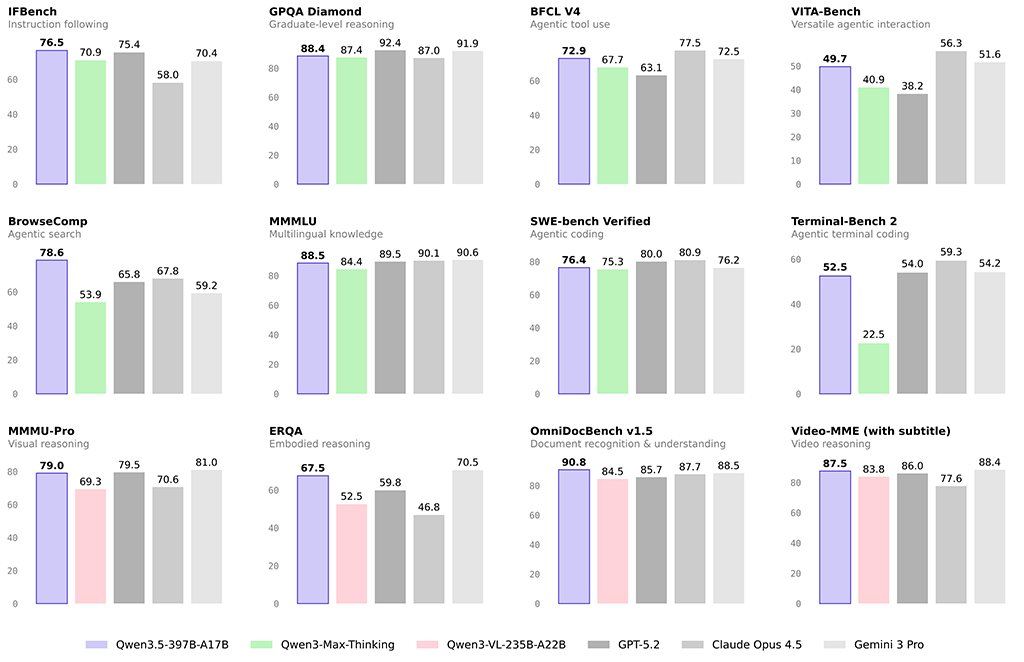
Key Specifications
| Specification | Value |
|---|---|
| Total Parameters | 397 billion |
| Active Parameters | 17 billion |
| Activation Rate | 4.28% |
| Expert Count | 512 experts |
| Experts per Token | 11 (10 routed + 1 shared) |
| Input Context | 256K (extensible to 1M) |
| Languages Supported | 200+ |
| Architecture | MoE + Gated Delta Networks |
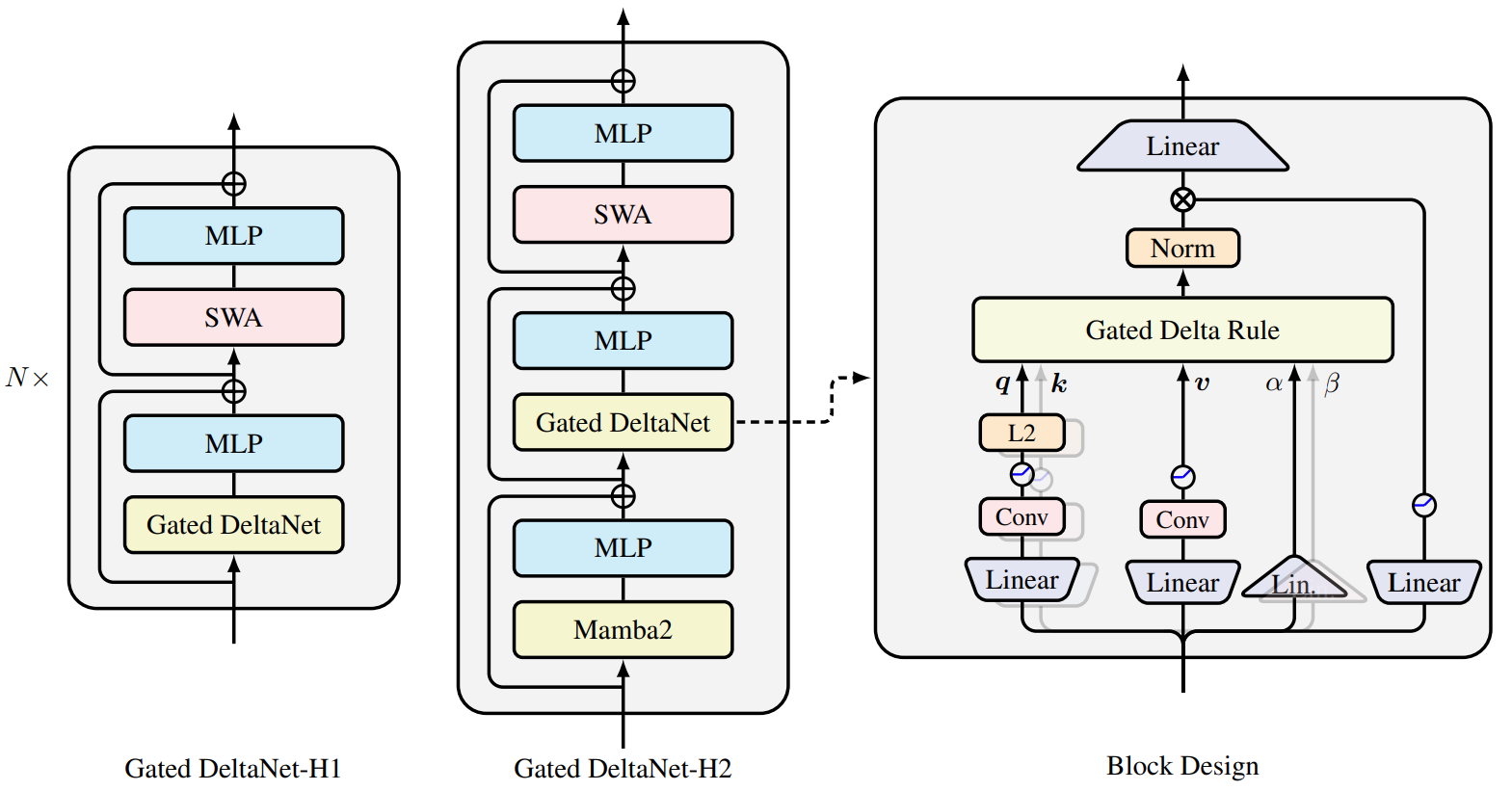
What Makes Qwen3.5 Special
Mixture of Experts (MoE) architecture means only a subset of the model's parameters are active for any given input. This makes the model computationally efficient while maintaining the capacity for complex reasoning across all 397B parameters.
Native Multimodal Agent Capabilities set Qwen3.5 apart from other VLMs:
- Understands and navigates user interfaces
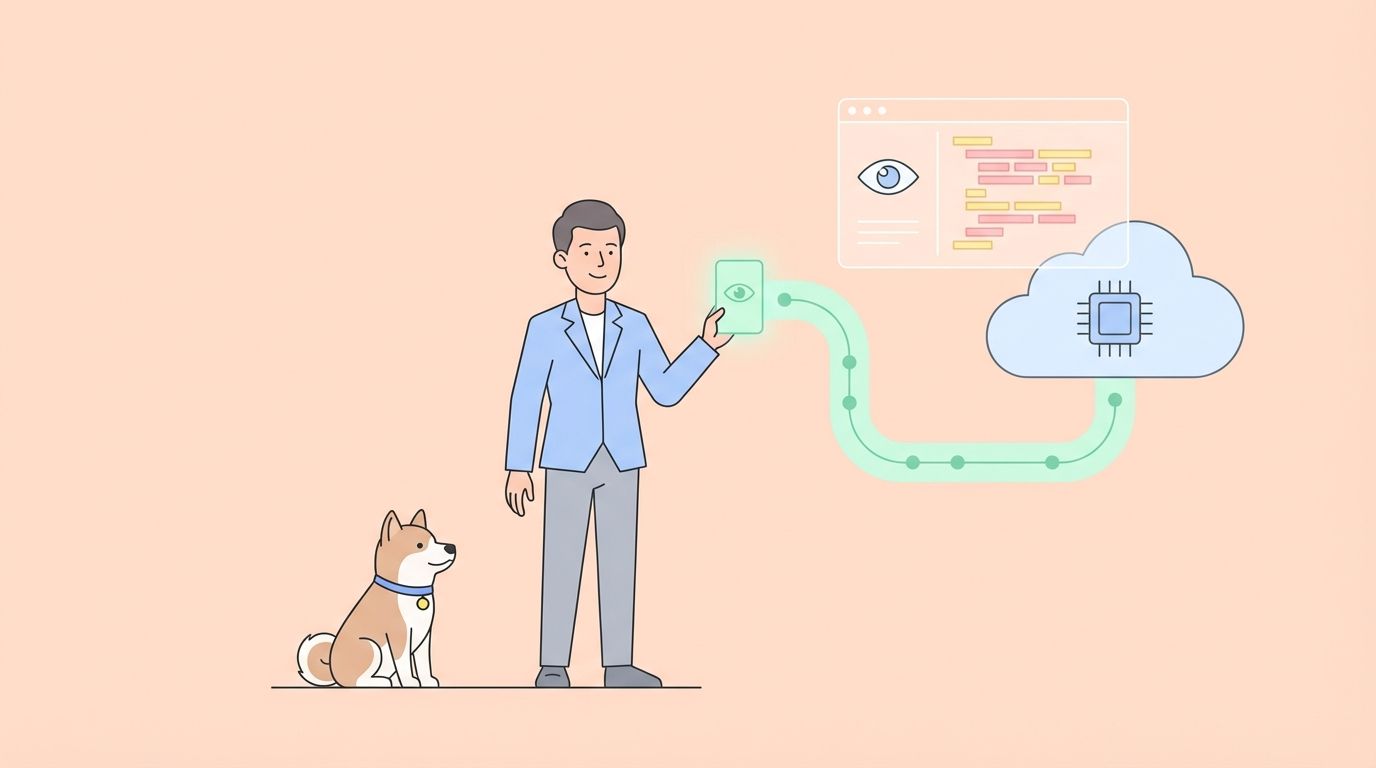
- Performs visual reasoning on mobile and web interfaces
- Handles complex coding tasks
- Powers chat applications with multimodal understanding
Ideal Use Cases
- Coding and Web Development: Write and debug code with visual context
- Visual Reasoning: Analyze screenshots, photos, and UI elements
- Chat Applications: Build conversational AI with multimodal understanding
- Complex Search: Search across images and text simultaneously
- UI Automation: Navigate and interact with interfaces autonomously
NVIDIA Developer Program: Get Your Free API Key
NVIDIA provides free access to Qwen3.5 through their GPU-accelerated endpoints. Here's how to get started:
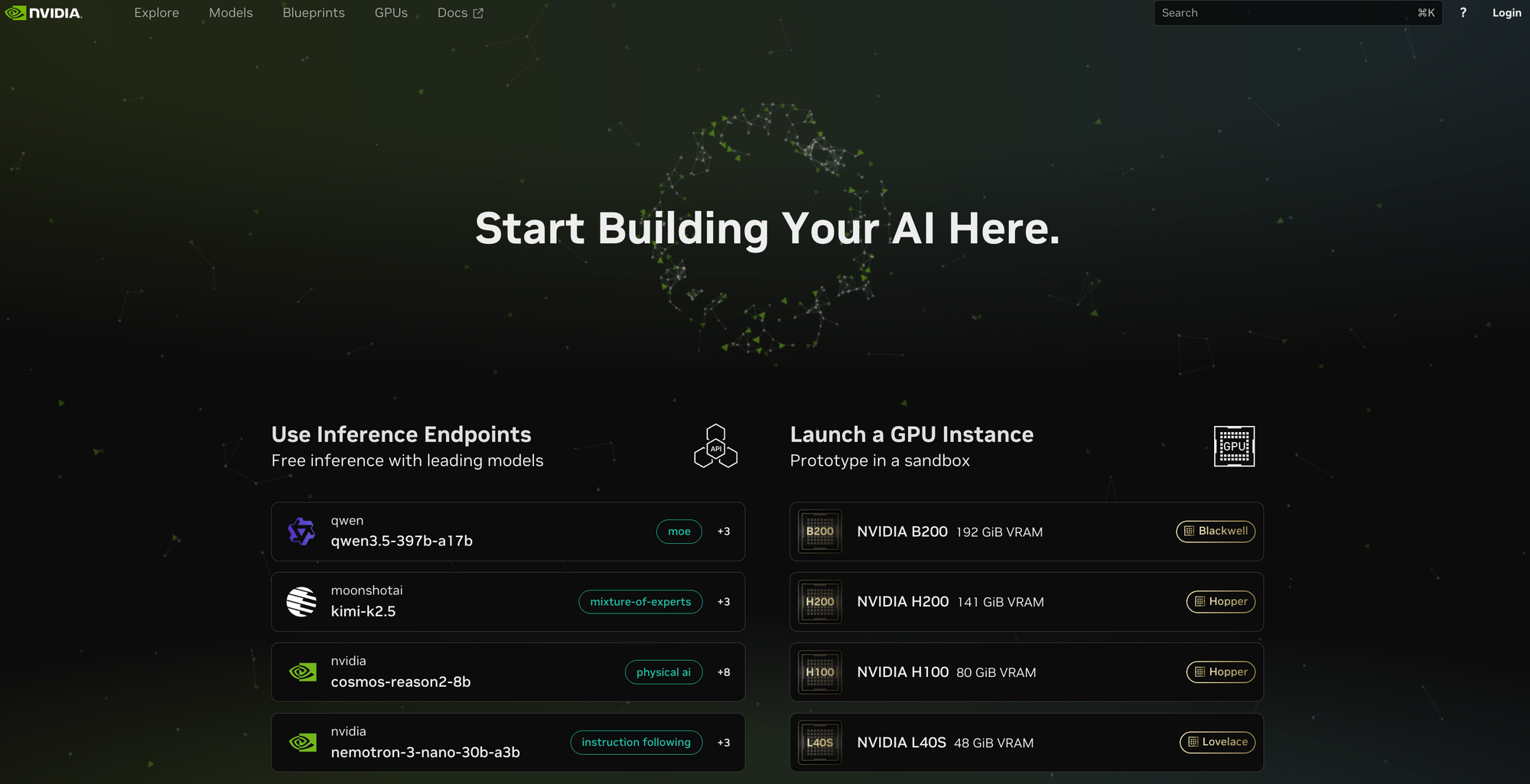
Step 1: Join NVIDIA Developer Program
- Visit build.nvidia.com
- Click Sign In or Create Account
- Register for the NVIDIA Developer Program (free)
- Verify your email address
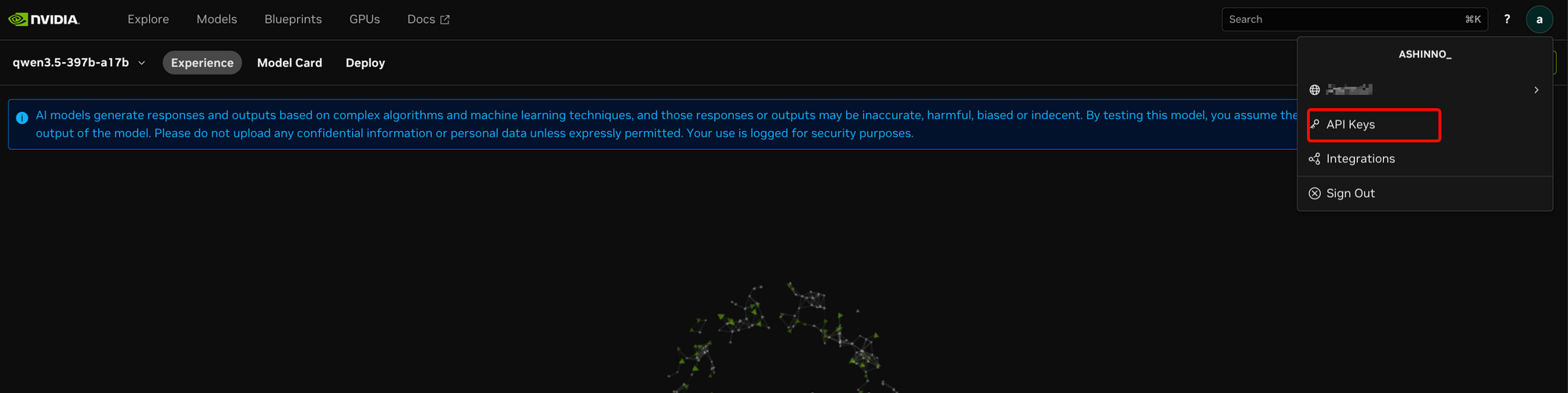
Step 2: Get Your API Key
- After logging in, navigate to your account settings
- Find API Keys or NVIDIA API Key
- Copy your API key (starts with
nvapi-) - Store it securely (you'll need it for authentication)
Important: Never expose your API key in client-side code. Use environment variables or a backend server to store it securely.
Step 3: Test Your Access
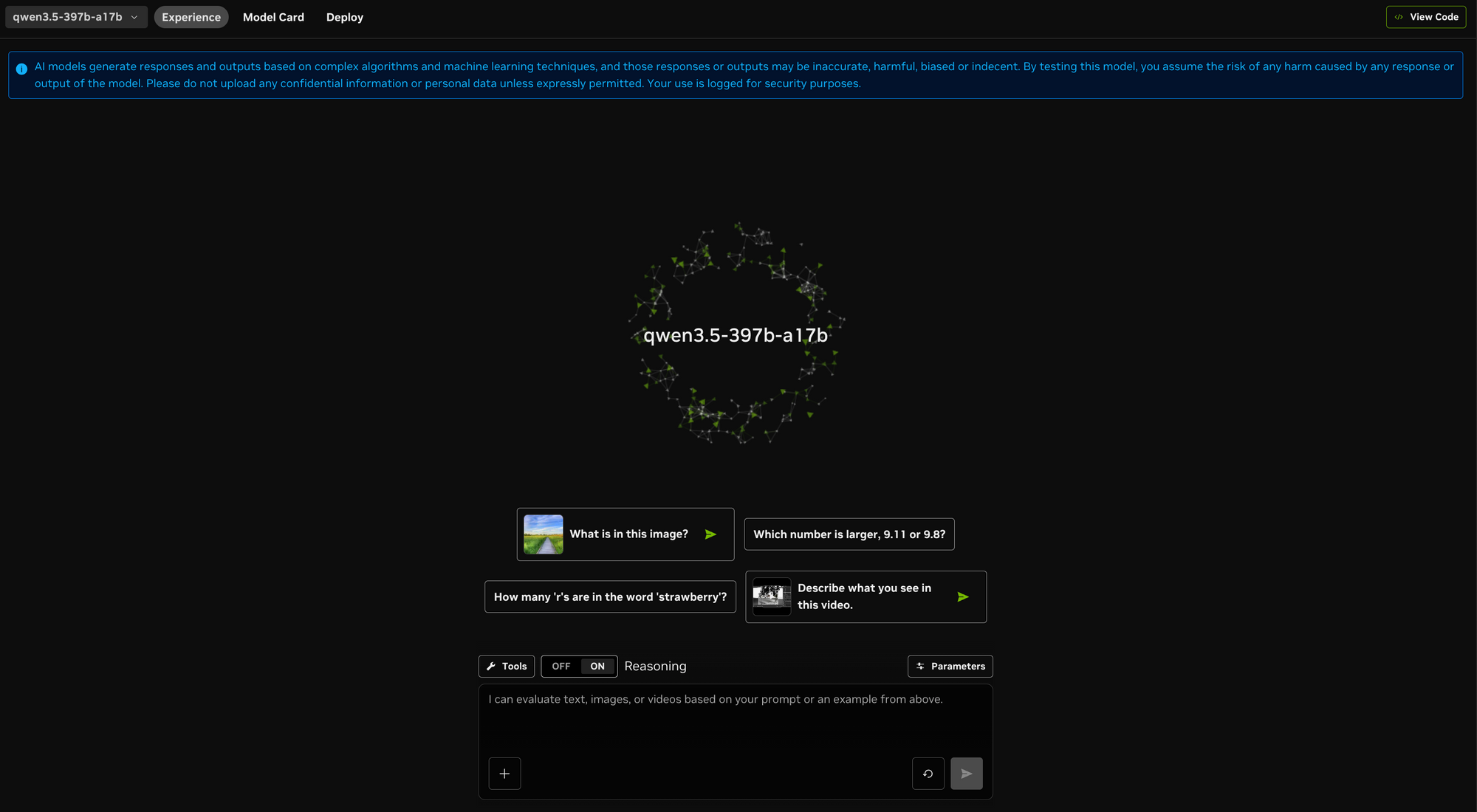
You can test Qwen3.5 directly in your browser at build.nvidia.com/qwen/qwen3.5-397b-a17b. This lets you experiment with prompts and evaluate the model with your own data before writing any code.
Your First Qwen3.5 API Call
Now let's make your first API call to Qwen3.5. The API is compatible with OpenAI's format, making it easy to integrate into existing applications.
Basic API Call
import requests

# Configuration
invoke_url = "https://integrate.api.nvidia.com/v1/chat/completions"
api_key = "YOUR_NVIDIA_API_KEY"  # Replace with your API key

headers = {
    "Authorization": f"Bearer {api_key}",
    "Accept": "application/json",
}

# Payload - simple text-only request
payload = {
    "messages": [
        {
            "role": "user",
            "content": "What are the key features of Qwen3.5 VLM?"
        }
    ],
    "model": "qwen/qwen3.5-397b-a17b",
    "max_tokens": 1024,
    "temperature": 0.7,
}

# Make the request
session = requests.Session()
response = session.post(invoke_url, headers=headers, json=payload)
response.raise_for_status()

# Print the response
result = response.json()
print(result['choices'][0]['message']['content'])
Making Multimodal Requests (With Images)
To use Qwen3.5's vision capabilities, include image data in your request:
import requests
import base64

# Function to encode image to base64
def encode_image(image_path):
    with open(image_path, "rb") as image_file:
        return base64.b64encode(image_file.read()).decode('utf-8')

# Encode your image
image_base64 = encode_image("screenshot.png")

invoke_url = "https://integrate.api.nvidia.com/v1/chat/completions"
api_key = "YOUR_NVIDIA_API_KEY"

headers = {
    "Authorization": f"Bearer {api_key}",
    "Accept": "application/json",
}

# Multimodal request with image
payload = {
    "messages": [
        {
            "role": "user",
            "content": [
                {
                    "type": "image_url",
                    "image_url": {"url": f"data:image/png;base64,{image_base64}"}
                },
                {
                    "type": "text",
                    "text": "What do you see in this image? Describe the UI elements."
                }
            ]
        }
    ],
    "model": "qwen/qwen3.5-397b-a17b",
    "max_tokens": 1024,
}

response = requests.post(invoke_url, headers=headers, json=payload)
result = response.json()
print(result['choices'][0]['message']['content'])
Code Examples in Python and JavaScript
Python: Complete Integration Example
import os
import requests
from requests.exceptions import RequestException

class QwenClient:
    """Python client for Qwen3.5 API"""

    def __init__(self, api_key=None):
        self.api_key = api_key or os.getenv("NVIDIA_API_KEY")
        self.endpoint = "https://integrate.api.nvidia.com/v1/chat/completions"
        self.model = "qwen/qwen3.5-397b-a17b"

    def chat(self, message, system_prompt=None, **kwargs):
        """Send a chat message to Qwen3.5"""
        headers = {
            "Authorization": f"Bearer {self.api_key}",
            "Content-Type": "application/json"
        }

        messages = []
        if system_prompt:
            messages.append({"role": "system", "content": system_prompt})
        messages.append({"role": "user", "content": message})

        payload = {
            "messages": messages,
            "model": self.model,
            "max_tokens": kwargs.get("max_tokens", 2048),
            "temperature": kwargs.get("temperature", 0.7),
            "top_p": kwargs.get("top_p", 0.9),
        }

        # Enable thinking mode if requested
        if kwargs.get("thinking", False):
            payload["chat_template_kwargs"] = {"thinking": True}

        try:
            response = requests.post(
                self.endpoint,
                headers=headers,
                json=payload,
                timeout=kwargs.get("timeout", 60)
            )
            response.raise_for_status()
            return response.json()
        except RequestException as e:
            return {"error": str(e)}

    def chat_with_image(self, message, image_path, **kwargs):
        """Send a chat message with image to Qwen3.5"""
        import base64

        with open(image_path, "rb") as f:
            image_base64 = base64.b64encode(f.read()).decode("utf-8")

        headers = {
            "Authorization": f"Bearer {self.api_key}",
            "Content-Type": "application/json"
        }

        payload = {
            "messages": [{
                "role": "user",
                "content": [
                    {"type": "image_url", "image_url": {"url": f"data:image/png;base64,{image_base64}"}},
                    {"type": "text", "text": message}
                ]
            }],
            "model": self.model,
            "max_tokens": kwargs.get("max_tokens", 2048),
            "temperature": kwargs.get("temperature", 0.7),
        }

        response = requests.post(self.endpoint, headers=headers, json=payload)
        response.raise_for_status()
        return response.json()


# Usage example
client = QwenClient(api_key="YOUR_NVIDIA_API_KEY")

# Text-only chat
result = client.chat("Explain Mixture of Experts architecture in simple terms")
print(result['choices'][0]['message']['content'])

# Multimodal chat
result = client.chat_with_image(
    "What UI elements are in this screenshot?",
    "screenshot.png"
)
print(result['choices'][0]['message']['content'])
JavaScript/Node.js: Complete Integration Example
const axios = require('axios');

class QwenClient {
  constructor(apiKey) {
    this.apiKey = apiKey;
    this.endpoint = 'https://integrate.api.nvidia.com/v1/chat/completions';
    this.model = 'qwen/qwen3.5-397b-a17b';
  }

  async chat(message, options = {}) {
    const { systemPrompt, temperature = 0.7, maxTokens = 2048, thinking = false } = options;

    const messages = [];
    if (systemPrompt) {
      messages.push({ role: 'system', content: systemPrompt });
    }
    messages.push({ role: 'user', content: message });

    const payload = {
      messages,
      model: this.model,
      temperature,
      max_tokens: maxTokens,
      ...(thinking && { chat_template_kwargs: { thinking: true } })
    };

    try {
      const response = await axios.post(this.endpoint, payload, {
        headers: {
          'Authorization': `Bearer ${this.apiKey}`,
          'Content-Type': 'application/json'
        },
        timeout: 60000
      });

      return response.data;
    } catch (error) {
      console.error('API Error:', error.response?.data || error.message);
      throw error;
    }
  }

  async chatWithImage(message, imageBase64, options = {}) {
    const { temperature = 0.7, maxTokens = 2048 } = options;

    const payload = {
      messages: [{
        role: 'user',
        content: [
          { type: 'image_url', image_url: { url: `data:image/png;base64,${imageBase64}` } },
          { type: 'text', text: message }
        ]
      }],
      model: this.model,
      temperature,
      max_tokens: maxTokens
    };

    const response = await axios.post(this.endpoint, payload, {
      headers: {
        'Authorization': `Bearer ${this.apiKey}`,
        'Content-Type': 'application/json'
      }
    });

    return response.data;
  }
}

// Usage
const client = new QwenClient(process.env.NVIDIA_API_KEY);

// Text chat
const result = await client.chat('What is the advantage of MoE architecture?');
console.log(result.choices[0].message.content);

// With thinking enabled
const deepResult = await client.chat('Explain how reasoning works in LLMs', {
  thinking: true
});
console.log(deepResult.choices[0].message.content);
Advanced Features: Thinking Mode and Tool Calling
Thinking Mode
Qwen3.5 supports an advanced "thinking" mode that enables the model to show its reasoning process. This is particularly useful for complex problem-solving tasks.
payload = {
    "messages": [{"role": "user", "content": "Solve this step by step: If a train travels 120km in 2 hours, what is its speed?"}],
    "model": "qwen/qwen3.5-397b-a17b",
    "chat_template_kwargs": {"thinking": True},
    "max_tokens": 4096,
}

response = session.post(invoke_url, headers=headers, json=payload)
result = response.json()
print(result['choices'][0]['message']['content'])
Tool Calling
Qwen3.5 supports function calling through OpenAI-compatible tools. This enables you to build agentic applications that can execute real actions.
import json

# Define tools for the model to use
tools = [
    {
        "type": "function",
        "function": {
            "name": "get_weather",
            "description": "Get current weather for a location",
            "parameters": {
                "type": "object",
                "properties": {
                    "location": {"type": "string", "description": "City name"}
                },
                "required": ["location"]
            }
        }
    }
]

payload = {
    "messages": [
        {"role": "user", "content": "What's the weather like in Tokyo?"}
    ],
    "model": "qwen/qwen3.5-397b-a17b",
    "tools": tools,
    "tool_choice": "auto"
}

response = session.post(invoke_url, headers=headers, json=payload)
result = response.json()

# Check if model wants to call a tool
if 'tool_calls' in result['choices'][0]['message']:
    tool_call = result['choices'][0]['message']['tool_calls'][0]
    print(f"Model wants to call: {tool_call['function']['name']}")
    print(f"Arguments: {tool_call['function']['arguments']}")
Understanding Rate Limits and Pricing
Current Free Tier (NVIDIA Developer Program)
| Feature | Limit |
|---|---|
| API Access | Free with registration |
| GPU-Accelerated Endpoints | Included |
| Browser Testing | Unlimited |
| Rate Limits | Check developer dashboard |
What This Means for You
- No credit card required: Just register for the free NVIDIA Developer Program
- GPU-accelerated: Requests run on NVIDIA Blackwell GPUs
- Production-ready: Same endpoints used for production workloads
Scaling to Production
When you're ready to move beyond free tier:
- NVIDIA NIM: Deploy containerized models anywhere (cloud, on-premises, hybrid)
- NeMo: Customize the model for your specific domain
- Enterprise support: Contact NVIDIA for dedicated infrastructure
Production Deployment with NVIDIA NIM
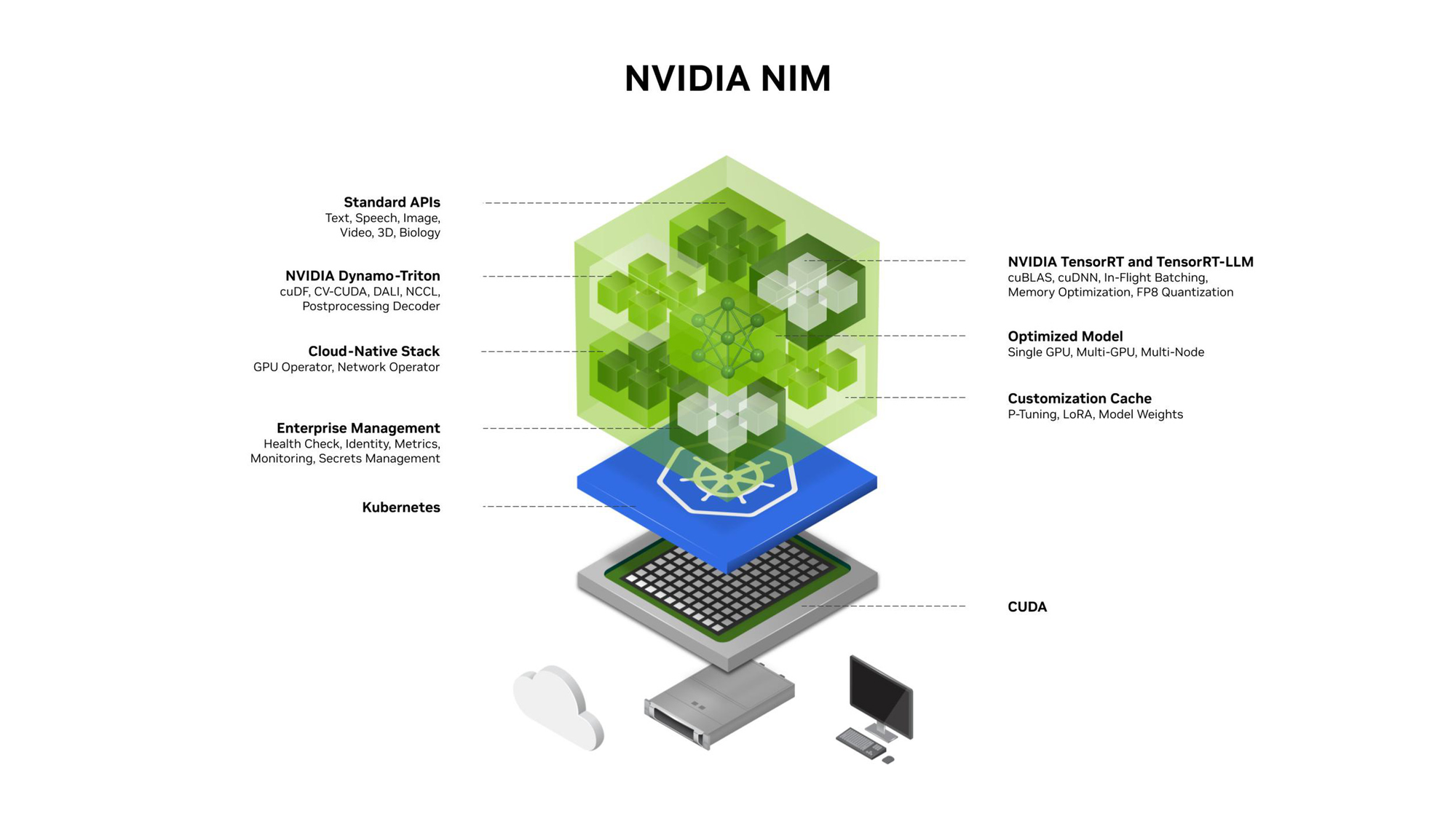
NVIDIA NIM (NVIDIA Inference Microservices) makes it easy to take Qwen3.5 from development to production.
What is NIM?
NIM provides pre-built, optimized containers for AI inference. Each NIM microservice packages:
- The model with performance optimizations
- Standardized APIs (OpenAI-compatible)
- Deployment flexibility (cloud, on-premises, edge)
Deploying Qwen3.5 with NIM
# Pull the Qwen3.5 NIM container
docker pull nvcr.io/nim/qwen/qwen3.5-397b-a17b:latest

# Run the container
docker run --gpus all --rm -p 8000:8000 \
  -e NVIDIA_API_KEY=$NVIDIA_API_KEY \
  nvcr.io/nim/qwen/qwen3.5-397b-a17b:latest
Now your model is running locally at http://localhost:8000/v1/chat/completions.
Benefits of NIM
- Anywhere deployment: Run on-premises, in cloud, or hybrid
- Optimized performance: Tuned for NVIDIA GPU inference
- Consistent APIs: OpenAI-compatible interface
- Scalable: Scale from dev to production seamlessly
Customization with NVIDIA NeMo
For domain-specific applications, you can fine-tune Qwen3.5 using NVIDIA NeMo.
NeMo Framework Capabilities
- High-throughput fine-tuning: PyTorch-native training
- LoRA support: Memory-efficient customization
- Multinode training: Slurm and Kubernetes support
- Hugging Face integration: Direct training on existing checkpoints
Example: Fine-tuning for Medical VQA
NVIDIA provides a technical tutorial for fine-tuning Qwen3.5 on radiological datasets for medical Visual Question Answering. This demonstrates how to adapt the model for specialized domains like healthcare.
Conclusion
Qwen3.5 represents an exciting opportunity to use a cutting-edge multimodal AI model at no cost through NVIDIA's developer platform. With its 397B parameter MoE architecture, native vision capabilities, and free API access, it's an excellent choice for:
- Building multimodal AI agents
- Developing visual reasoning applications
- Creating coding assistants with visual context
- Automating UI navigation tasks
Getting started is simple: register for the NVIDIA Developer Program, get your API key, and start building.
If you're building applications that integrate with Qwen3.5 or other AI APIs, Apidog provides the testing infrastructure you need. Test your API integrations, validate responses, manage environment variables, and automate your testing workflows with Apidog's comprehensive platform.
FAQ
Is Qwen3.5 really free to use?
Yes, NVIDIA provides free access to Qwen3.5 GPU-accelerated endpoints through their Developer Program. No credit card is required. Simply register at build.nvidia.com to get your API key.
What makes Qwen3.5 different from other VLMs?
Qwen3.5 was built specifically for autonomous agents, not adapted from a text-only model. Its Mixture of Experts architecture (397B total, 17B active) provides powerful reasoning while remaining computationally efficient. It's particularly good at UI navigation and visual reasoning tasks.
Can I use Qwen3.5 for commercial projects?
Check the current licensing terms on NVIDIA's platform. For production use, consider NVIDIA NIM for deployment or contact NVIDIA about enterprise options.
What's the difference between the free tier and NIM?
The free tier (Developer Program) uses NVIDIA-hosted endpoints. NIM lets you deploy the model yourself using containers, whether on-premises, in your cloud, or hybrid environments. NIM is designed for production-scale deployments.
How do I handle rate limiting?
The free tier has certain rate limits. For higher limits, consider upgrading to production access through NVIDIA NIM or contacting NVIDIA about enterprise options.
Can I fine-tune Qwen3.5?
Yes! NVIDIA NeMo framework provides tools for fine-tuning Qwen3.5 on your domain-specific data. This includes LoRA for memory-efficient customization and multinode support for large-scale training.