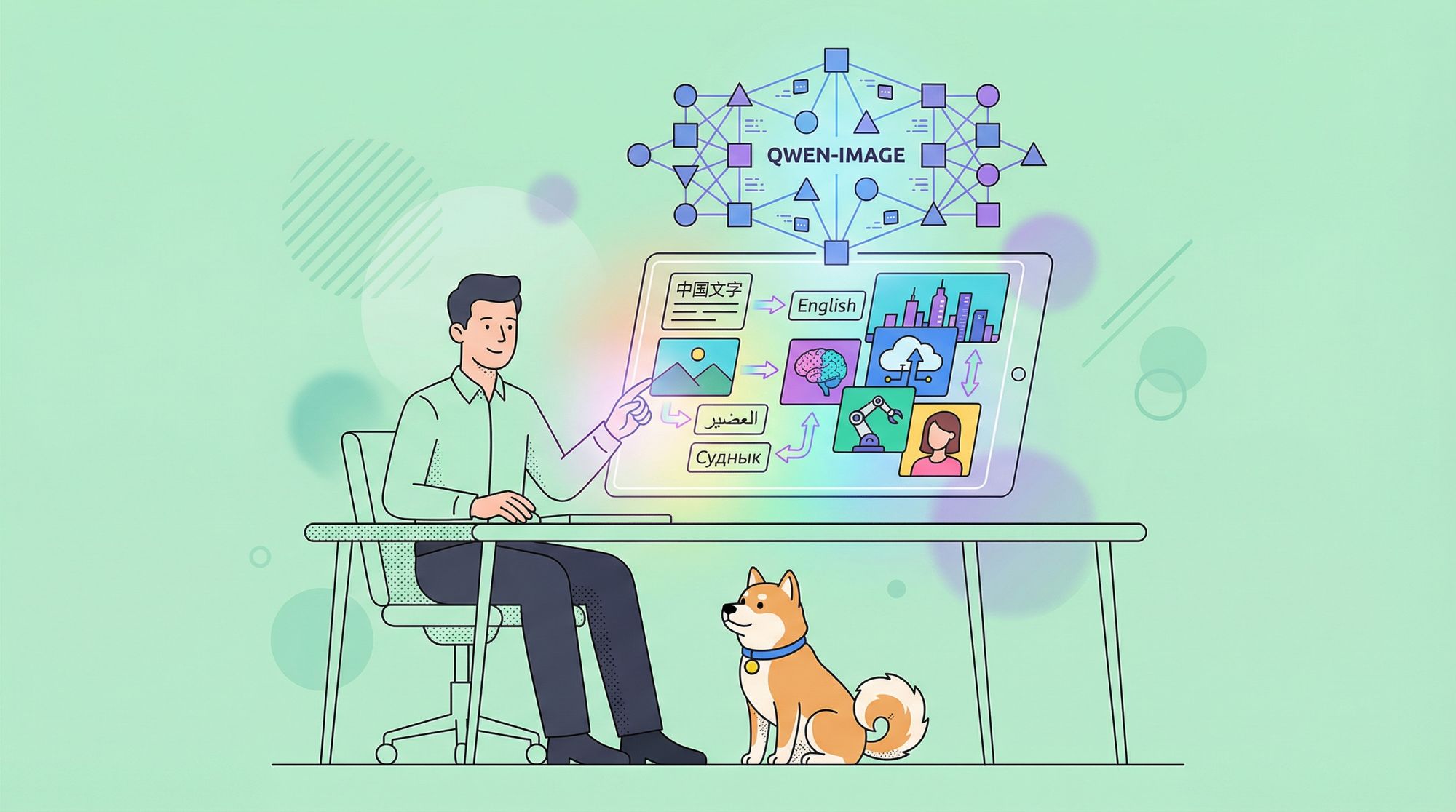
Qwen-Image, Alibaba Cloud’s flagship multimodal image foundation model, is transforming how developers create, edit, and analyze visual content. With 20 billion parameters and unmatched support for multilingual text rendering and image understanding, Qwen-Image stands out as a powerful, open-source solution for API developers and technical teams. Whether you’re building marketing visuals, automating analytics, or prototyping creative tools, Qwen-Image delivers reliable performance and flexible integration.
For teams looking to streamline API testing and integration, Apidog offers a free platform to easily connect Qwen-Image’s API with your applications. Download Apidog to accelerate your development workflow.
What Is Qwen-Image? Overview for Developers
Qwen-Image is a multimodal diffusion transformer (MMDiT) model from Alibaba Cloud’s Qwen series, purpose-built for both image generation and advanced editing. Unlike traditional image models, it seamlessly combines high-quality visual generation with precise text rendering and deep image understanding.
- Open-source: Apache 2.0 license
- Available on: GitHub, Hugging Face, ModelScope
- Multilingual: Handles 119 languages, excelling in both Chinese and English
- Developer-focused: Designed for easy integration into diverse workflows
Qwen-Image’s massive training dataset—over 30 trillion tokens—empowers it to outperform competitors on benchmarks like GenEval, DPG, and LongText-Bench. Its reinforcement learning-based training ensures robust handling of complex tasks such as multilingual text layout and object manipulation.
Core Features of Qwen-Image
1. Multilingual Text Rendering in Images
One of Qwen-Image’s standout capabilities is its ability to accurately render complex, multi-line text in images—including both alphabetic (e.g., English) and logographic (e.g., Chinese) scripts.
- Example: Generate a movie poster titled “Imagination Unleashed” with multi-row subtitles, maintaining typographic precision.
- Datasets: Trained on LongText-Bench, ChineseWord, and more, achieving state-of-the-art results.
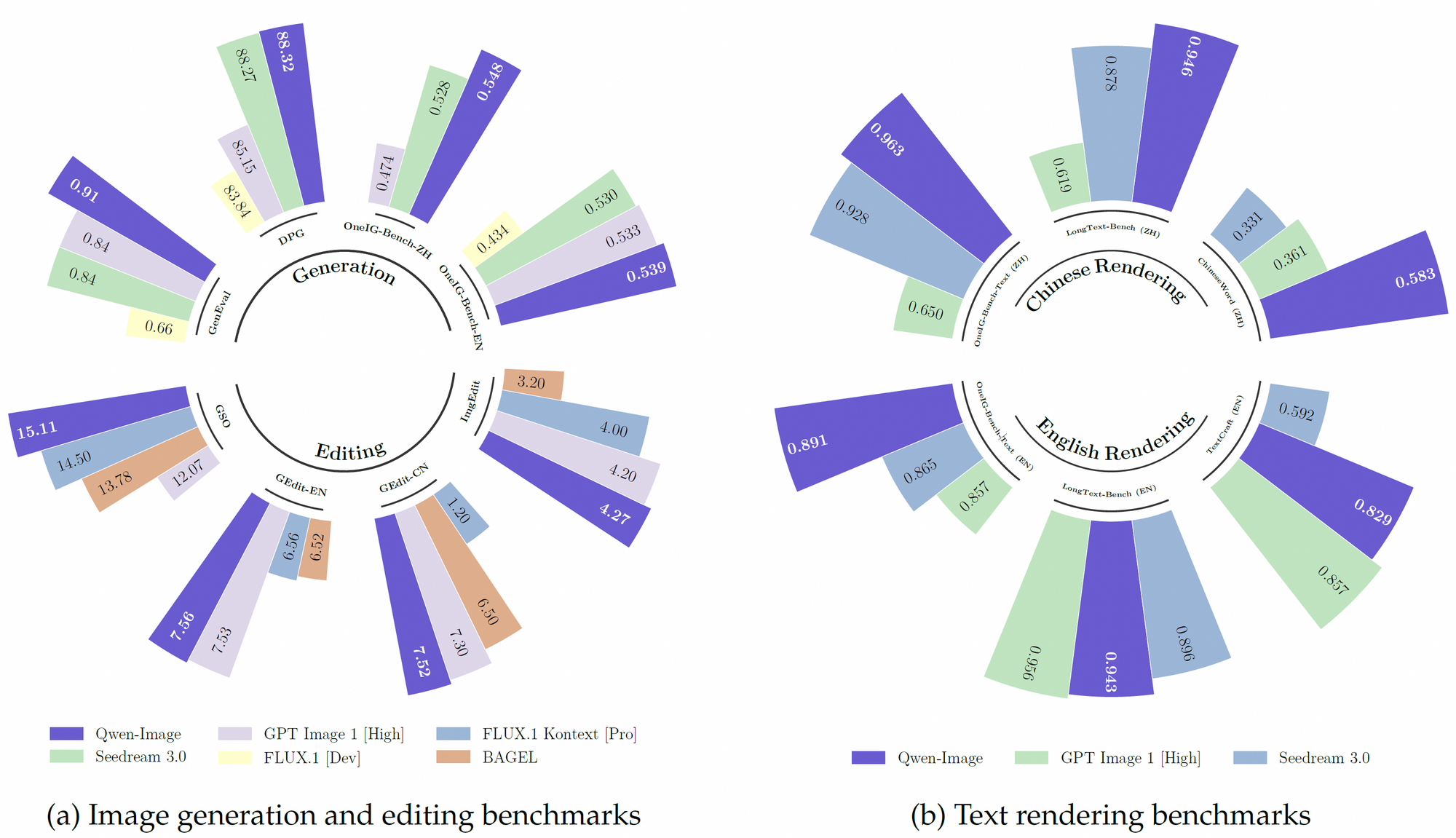
Qwen-Image excels at detailed layouts, such as handwritten poems on textured backgrounds or signage with precise font placement. This makes it ideal for posters, digital signage, and document visualization.
2. Advanced Image Editing Tools
Qwen-Image isn’t limited to generation—it offers advanced editing features:
- Style transfer: Change visual styles (e.g., realism to Van Gogh)
- Object insertion: Add or move objects with semantic accuracy
- Text editing in images: Update poster text or signage without altering the background
Its multi-task training ensures that edits maintain visual and contextual consistency, making it highly useful for advertising, social media, and content management.
3. Deep Visual Understanding
Beyond creation and editing, Qwen-Image supports a range of analysis tasks:
- Object detection & bounding boxes: Find “the Husky dog in the subway scene”
- Semantic segmentation & depth estimation
- Edge detection (Canny), super-resolution, and novel view synthesis
These capabilities open up applications in automation, e-commerce tagging, and visual analytics.
4. Benchmark Performance
Qwen-Image consistently leads on public benchmarks, including:
- GenEval, DPG, OneIG-Bench, GEdit, ImgEdit, GSO
- TextCraft: Especially strong in complex text rendering (Chinese and English)
Its versatility supports a range of visual styles—from photorealism to anime—making it a preferred tool for both technical and creative teams.
How Qwen-Image Works: Technical Architecture
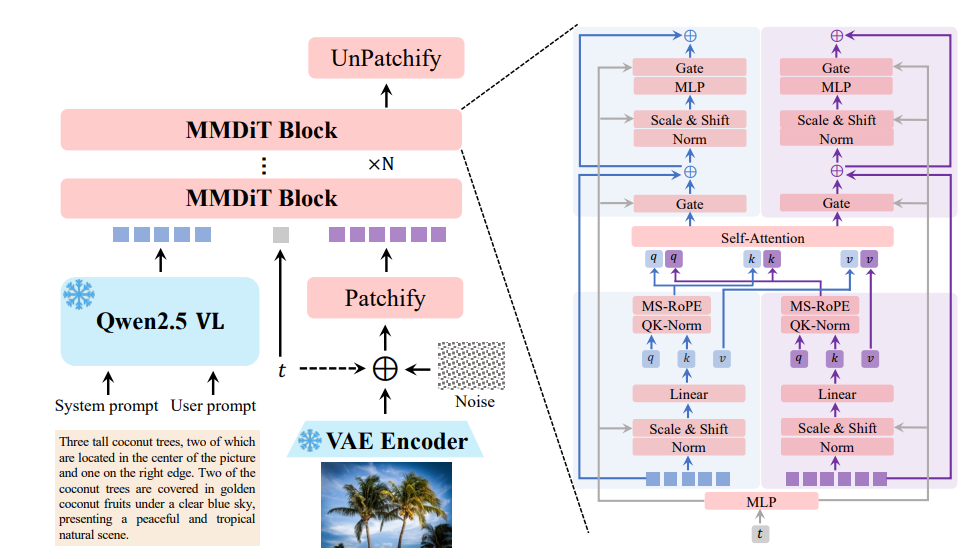
Multimodal Diffusion Transformer (MMDiT)
At its core, Qwen-Image fuses diffusion modeling with transformer architecture, enabling:
- Efficient processing of both text and image inputs
- Progressive refinement: Diffusion denoises images step-by-step
- Transformer logic: Handles complex relationships between elements
Optimized for real-world usage, Qwen-Image runs on consumer hardware with as little as 4GB VRAM (using FP8 quantization and offloading).
Pretraining and Fine-Tuning Pipeline
Qwen-Image’s training is structured into three key stages:
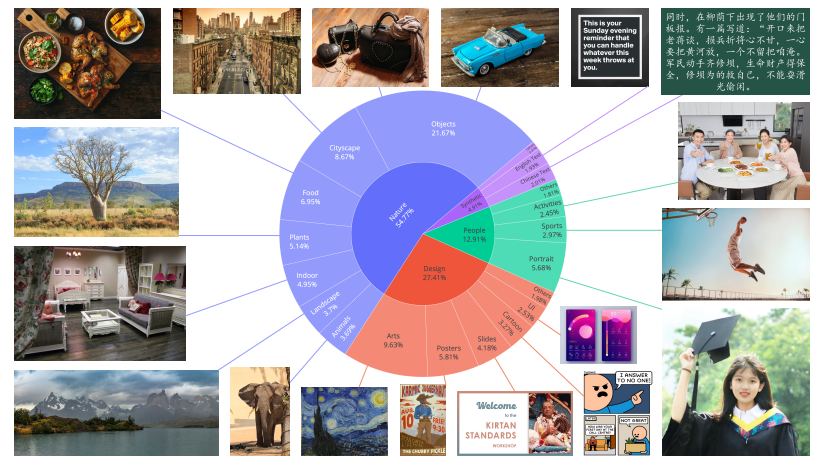
- Stage 1: Pretraining on 30T tokens (web, PDF, synthetic data) for foundational skills
- Stage 2: Reinforcement learning for reasoning and task adaptation
- Stage 3: Fine-tuning on curated datasets, boosting alignment and task-specific accuracy
This approach ensures both general robustness and domain-specific performance.
Developer-Friendly Integration
Qwen-Image integrates seamlessly with common ML frameworks. Here’s how you can generate an image with Python:
from diffusers import DiffusionPipeline
import torch

model_name = "Qwen/Qwen-Image"
torch_dtype = torch.bfloat16 if torch.cuda.is_available() else torch.float32
device = "cuda" if torch.cuda.is_available() else "cpu"

pipe = DiffusionPipeline.from_pretrained(model_name, torch_dtype=torch_dtype)
pipe = pipe.to(device)

prompt = "A coffee shop entrance with a chalkboard sign reading 'Qwen Coffee 😊 $2 per cup.'"
image = pipe(prompt).images[0]
image.save("qwen_coffee.png")
For teams seeking to validate and iterate on API integrations rapidly, Apidog provides a user-friendly interface to test Qwen-Image endpoints and streamline deployment.
Real-World Applications for API-Focused Teams
Creative Content & Media Generation
Qwen-Image empowers designers and developers to generate:
- Photorealistic scenes
- Artistic illustrations (impressionist, anime, etc.)
- Marketing visuals with custom multilingual text

Advertising and Branding
Marketers and product teams use Qwen-Image for campaign assets:
- Dynamic poster creation with precise text placement
- Editing and updating existing assets for new promotions

Automation and Visual Analytics
E-commerce, robotics, and analytics platforms benefit from:
- Automated product tagging
- Object detection and segmentation for workflow automation
- Depth estimation for navigation systems
Educational Visuals
E-learning platforms leverage Qwen-Image for:
- Detailed scientific diagrams with accurate labels
- Custom illustrations to enhance student engagement

Qwen-Image vs. Other Image Generation Models
Qwen-Image vs. DALL-E 3:
- DALL-E 3 is strong in creative generation but struggles with complex text layouts and logographic scripts.
Qwen-Image vs. Stable Diffusion:
- Stable Diffusion offers versatility but lacks Qwen-Image’s deep text rendering and built-in image understanding tasks.
Qwen-Image’s open-source model and hardware efficiency make it especially attractive for development teams with resource constraints.
Limitations and Considerations
While Qwen-Image is powerful, developers should note:
- Data privacy: Training on large datasets requires careful handling; Alibaba Cloud enforces strict compliance.
- Language coverage: Performance may vary for less-represented dialects.
- Resource needs: 20B parameters require optimizations (e.g., FP8, offloading) for efficient deployment.
What’s Next for Qwen-Image?
Future plans for Qwen-Image include:
- Editing-specific versions for professional workflows
- Support for emerging frameworks (e.g., vLLM, LoRA fine-tuning)
- Deeper reasoning capabilities inspired by the latest reinforcement learning techniques
Ongoing community contributions and research will continue to push the boundaries of what’s possible in visual AI.
How to Get Started with Qwen-Image
- Access model weights: On GitHub or Hugging Face
- Official resources: Visit the Qwen official blog
- Try online: Use Qwen Chat’s “Image Generation” demo
- Streamline API testing: Download Apidog for rapid integration and testing
Conclusion: Qwen-Image for Modern API Development
Qwen-Image sets a new standard in multimodal image generation, editing, and understanding. Its open-source accessibility, deep multilingual support, and robust technical architecture make it the top choice for development teams building advanced visual applications. By leveraging tools like Apidog, technical leads and backend engineers can accelerate prototyping, integration, and deployment.