Alibaba Cloud released Qwen 3.5 on February 15, 2026, and the developer community immediately took notice. The model delivers native multimodal understanding, 1-million-token context windows, and agentic capabilities that consistently outperform GPT-4.5, Claude 4, and Gemini 2.5 across reasoning, coding, and tool-use benchmarks.
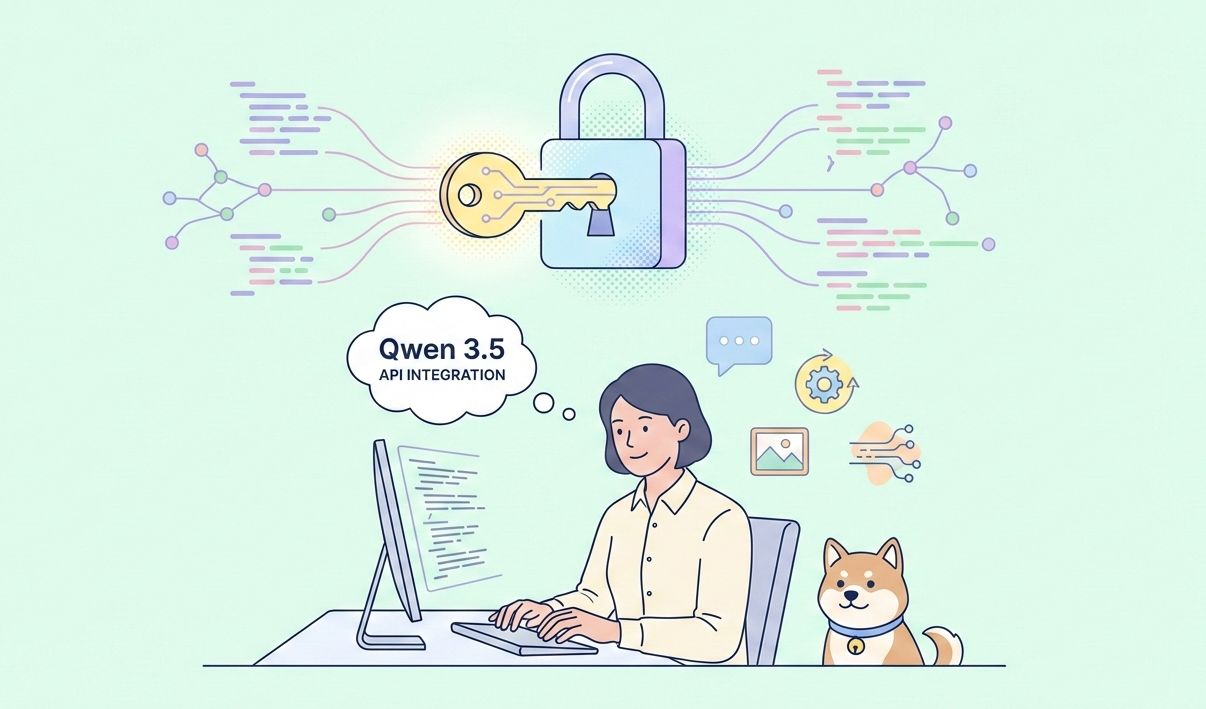
The Qwen 3.5 API puts all of this power behind a clean, OpenAI-compatible endpoint. You authenticate once, send standard chat completion requests, and unlock features that previously required complex orchestration layers.
This guide walks you through every technical detail—from generating your first token to building production-grade multimodal agents. You will learn exact payloads, advanced parameters, error-handling patterns, and cost-optimization strategies that actually work in real workloads.
Ready? Let’s get your environment set up and send your first production-ready request to Qwen 3.5.
What Makes Qwen 3.5 Stand Out?
Qwen 3.5 represents a significant leap in the Qwen series. Alibaba released the open-weight Qwen3.5-397B-A17B, a hybrid MoE model with 397 billion total parameters but only 17 billion active per inference. This architecture combines Gated Delta Networks for linear attention with sparse experts, delivering exceptional efficiency.
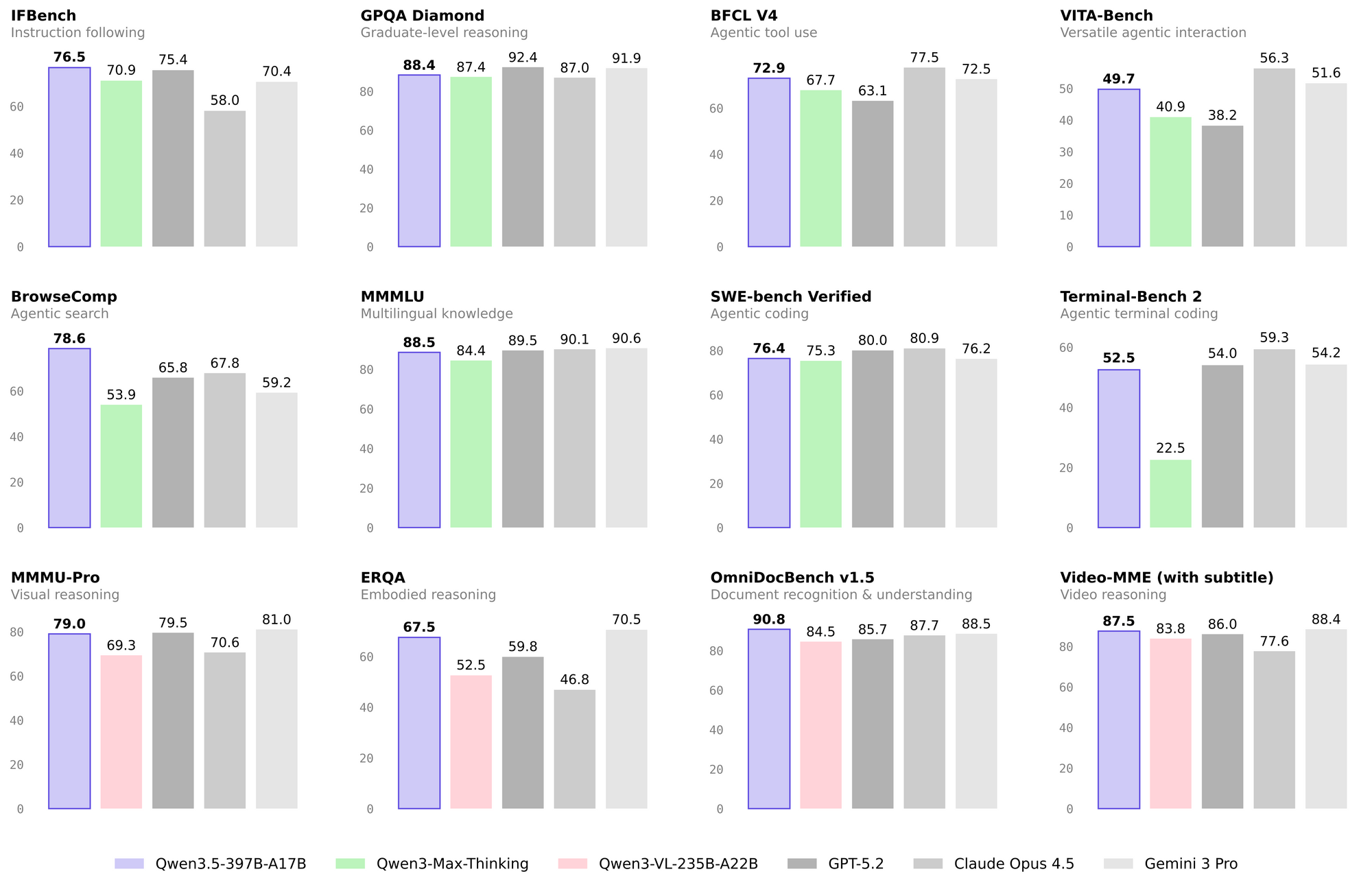
The hosted Qwen 3.5-Plus model on the API provides a 1M token context window by default. It supports 201 languages and dialects, processes images and videos natively, and excels in benchmarks:
- Reasoning: 87.8 on MMLU-Pro
- Coding: 76.4 on SWE-bench Verified
- Agent capabilities: 86.7 on TAU2-Bench
- Vision: 85.0 on MMMU
These results position Qwen 3.5 as a strong choice for developers building agents, code assistants, or multimodal applications. The API makes these features immediately accessible without managing massive hardware.
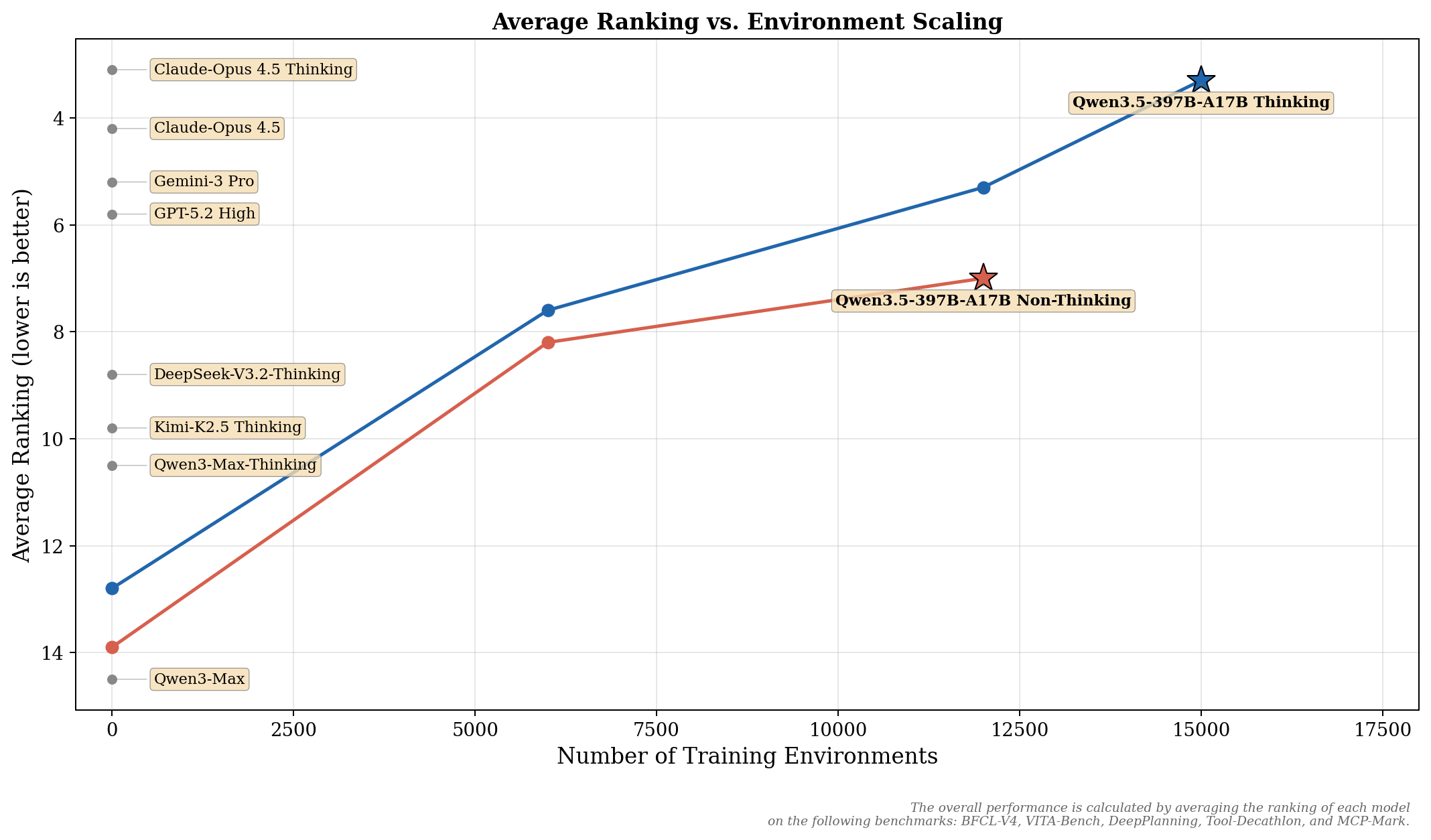
Furthermore, Qwen 3.5 introduces built-in tools like web search and code interpretation. You activate them with simple parameters, so you avoid building custom orchestration layers. As a result, teams ship intelligent workflows faster.
Prerequisites for Qwen 3.5 API Integration
You prepare your environment before you send the first request. Qwen 3.5 API runs on Alibaba Cloud’s Model Studio (formerly DashScope), so you create an account there.
- Visit the Alibaba Cloud Model Studio console.
- Sign up or log in with your Alibaba Cloud credentials.
- Navigate to the API key section and generate a new DASHSCOPE_API_KEY. Store this securely—treat it like any production secret.
Additionally, install the OpenAI Python SDK. Qwen 3.5 maintains full compatibility, so you reuse familiar patterns from other providers.
pip install openai
You also benefit from Apidog at this stage. After downloading it for free from the official site, you import your OpenAPI spec or manually add the Qwen 3.5 endpoint. Apidog auto-generates request schemas and validates responses, which proves invaluable when you explore custom parameters later.
Authenticating and Configuring the Client
You set the base URL and API key to connect. International users typically choose the Singapore or US endpoint for lower latency.
import os
from openai import OpenAI

client = OpenAI(
    api_key=os.getenv("DASHSCOPE_API_KEY"),
    base_url="https://dashscope-intl.aliyuncs.com/compatible-mode/v1"
)
This client object handles all subsequent calls. You switch regions by changing the base URL—Beijing for China-based workloads or Virginia for US traffic. The SDK abstracts authentication, so you focus on payload design.
However, production applications often use environment variables and secret managers. You rotate keys regularly and implement retry logic with exponential backoff to handle transient network issues.
Sending Your First Chat Completion Request
You now execute a basic request. Qwen 3.5 accepts standard OpenAI message formats and returns structured responses.
messages = [
    {"role": "system", "content": "You are a helpful technical assistant."},
    {"role": "user", "content": "Explain the architecture of Qwen 3.5 in simple terms."}
]

completion = client.chat.completions.create(
    model="qwen3.5-plus",
    messages=messages,
    temperature=0.7,
    max_tokens=1024
)

print(completion.choices[0].message.content)
This code sends a query and prints the response. You adjust temperature and top_p to control creativity, just as with other models.
To test this quickly, open Apidog, create a new request, paste the endpoint https://dashscope-intl.aliyuncs.com/compatible-mode/v1/chat/completions, add your headers and body, then hit Send. Apidog displays the full response timeline, headers, and even generates cURL or Python code snippets for you.
Unlocking Advanced Features with Extra Parameters
Qwen 3.5-Plus shines when you enable its native capabilities. You pass these through the extra_body field.
completion = client.chat.completions.create(
    model="qwen3.5-plus",
    messages=messages,
    extra_body={
        "enable_thinking": True,      # Activates chain-of-thought reasoning
        "enable_search": True,        # Enables web search + code interpreter
    },
    stream=True
)

for chunk in completion:
    if chunk.choices[0].delta.content:
        print(chunk.choices[0].delta.content, end="", flush=True)
    if hasattr(chunk.choices[0].delta, "reasoning_content") and chunk.choices[0].delta.reasoning_content:
        print("\n[Thinking]:", chunk.choices[0].delta.reasoning_content)
Therefore, the model thinks step-by-step before answering and fetches real-time information when needed. Streaming responses arrive token-by-token, which improves perceived latency in chat interfaces.
Moreover, Qwen 3.5 supports multimodal inputs. You include images or videos directly in messages:
messages = [
    {
        "role": "user",
        "content": [
            {"type": "text", "text": "What is happening in this image?"},
            {"type": "image_url", "image_url": {"url": "https://example.com/chart.png"}}
        ]
    }
]
The API processes visual data natively and returns reasoned descriptions or answers. Developers building document analysis tools or visual agents find this feature transformative.
Implementing Tool Calling and Agentic Workflows
Qwen 3.5 excels at function calling. You define tools in the request, and the model decides when to invoke them.
tools = [
    {
        "type": "function",
        "function": {
            "name": "get_weather",
            "description": "Get current weather for a location",
            "parameters": {
                "type": "object",
                "properties": {
                    "location": {"type": "string"}
                },
                "required": ["location"]
            }
        }
    }
]

completion = client.chat.completions.create(
    model="qwen3.5-plus",
    messages=messages,
    tools=tools,
    tool_choice="auto"
)
When the model returns a tool call, you execute the function on your side and append the result back to the conversation. This loop creates robust agents that interact with external systems.
Apidog simplifies testing these flows. You create test scenarios that chain multiple requests, assert on tool call formats, and even mock external APIs. As a result, you validate complex agent behavior before you deploy to production.
Real-World Application Examples
Developers integrate Qwen 3.5 API across many domains. Here are practical patterns you replicate today.
Intelligent Coding Assistant
You build a VS Code extension that sends code snippets to Qwen 3.5 with context from the workspace. The model returns refactored code, unit tests, and explanations. Because of its strong SWE-bench performance, it handles real repository-scale tasks effectively.
Multimodal Research Agent
You create an agent that accepts PDF uploads or screenshots, extracts data, searches the web for verification, and generates reports. The 1M context window holds entire research papers in a single conversation.
Customer Support Chatbot
You combine Qwen 3.5 with your knowledge base and CRM. The model reasons over conversation history, pulls real-time order data via tools, and responds in the user’s preferred language from its 201-language support.
In each case, you monitor token usage and costs through the Alibaba Cloud console. Qwen 3.5-Plus delivers competitive pricing for its capabilities, especially at scale.
Best Practices for Production Deployments
You follow these guidelines to ensure reliability and performance:
- Rate limiting: Implement client-side throttling and respect Alibaba’s documented limits.
- Error handling: Catch
RateLimitError,InvalidRequestError, and retry with backoff. - Cost control: Track token counts in responses and set
max_tokensconservatively. - Security: Never expose your API key in frontend code. Use backend proxies for all calls.
- Observability: Log full request/response payloads (without sensitive data) and monitor latency.
Additionally, you version your prompts and test changes in Apidog before you promote them. The platform’s environment variables let you switch between dev, staging, and production keys seamlessly.
Troubleshooting Common Qwen 3.5 API Issues
You encounter these problems occasionally:
- Authentication errors: Double-check the
DASHSCOPE_API_KEYand region-specific base URL. - Context length exceeded: The model supports 1M tokens, but you still monitor usage. Truncate history intelligently.
- Tool call failures: Ensure your function schemas match the expected JSON schema exactly.
- Slow responses: Enable streaming and consider
enable_thinking: falsefor simple queries.
Apidog helps here too. Its detailed logs, response validation, and mock servers let you isolate issues quickly.
Local Deployment of the Open-Weight Model
While the API suits most use cases, you run the Qwen3.5-397B-A17B model locally for sensitive data or offline needs. The model is available on Hugging Face:
pip install transformers
You serve it with vLLM or SGLang for high throughput:
python -m vllm.entrypoints.openai.api_server \
  --model Qwen/Qwen3.5-397B-A17B \
  --tensor-parallel-size 8
The local server exposes the same /v1/chat/completions endpoint. You point your Apidog workspace at http://localhost:8000/v1 and test identically to the cloud API.
Note that the 397B model requires substantial GPU resources—typically 8×H100 or equivalent. Smaller quantized versions may appear in the community soon.
Comparing Qwen 3.5 API with Other Providers
Qwen 3.5 competes directly with GPT-4.5, Claude 4, and Gemini 2.5. It leads in coding and agent benchmarks while offering native multimodality at a lower price point. The OpenAI-compatible interface means you migrate with minimal code changes.
However, Alibaba Cloud’s global regions provide advantages for Asia-Pacific workloads. You achieve lower latency and better compliance for certain markets.
Conclusion: Start Building with Qwen 3.5 Today
You now possess a complete technical roadmap for the Qwen 3.5 API. From basic chat completions to sophisticated multimodal agents, the platform delivers frontier performance with developer-friendly tools.
Download Apidog for free right now and import the Qwen 3.5 endpoint. You prototype, test, and document your integrations in minutes instead of hours. The small decisions you make in your API workflow—choosing the right testing platform, structuring your prompts, handling tool calls—create big differences in development speed and application quality.
The Qwen 3.5 team continues to push boundaries. Check the official Qwen blog, GitHub repository, and Hugging Face collection for updates.
What will you build first? Whether it is an autonomous research agent, a vision-powered analytics tool, or a multilingual customer experience platform, Qwen 3.5 API gives you the foundation. Start coding, iterate rapidly with Apidog, and bring your ideas to life.