TL;DR
Pretext.js is a zero-dependency TypeScript library that measures and positions multiline text through pure arithmetic instead of DOM operations. It eliminates forced synchronous reflows, delivers ~500x faster text measurement than getBoundingClientRect(), and supports every major writing system on the planet. If you build virtual scrollers, chat UIs, or data grids, this library solves a problem browsers have ignored for 30 years.
Introduction
Every time your JavaScript calls getBoundingClientRect() or reads offsetHeight, the browser stops everything. It flushes pending style changes, recalculates layout, and forces a full rendering pass. This is called forced synchronous reflow, and it is the single most expensive operation a browser can perform.
Now multiply that by 1,000 chat bubbles in a virtual list. Or 10,000 rows in a data grid. The result? Dropped frames, jank, and users who think your app is broken.
Cheng Lou, the developer behind react-motion (21,700+ GitHub stars) and a core contributor to React and ReasonML at Meta, built Pretext.js to fix this. The library shipped in March 2026, hit 14,000+ GitHub stars in days, and sparked one of the biggest Hacker News threads of the year.
This article breaks down what Pretext.js does, how it works under the hood, when you should use it, and where it falls short. You’ll walk away knowing whether this library belongs in your stack.
What is Pretext.js?
Pretext.js is a pure JavaScript/TypeScript text layout engine. It measures and positions multiline text entirely through arithmetic; no getBoundingClientRect(), no offsetHeight, no reflow, no thrashing.
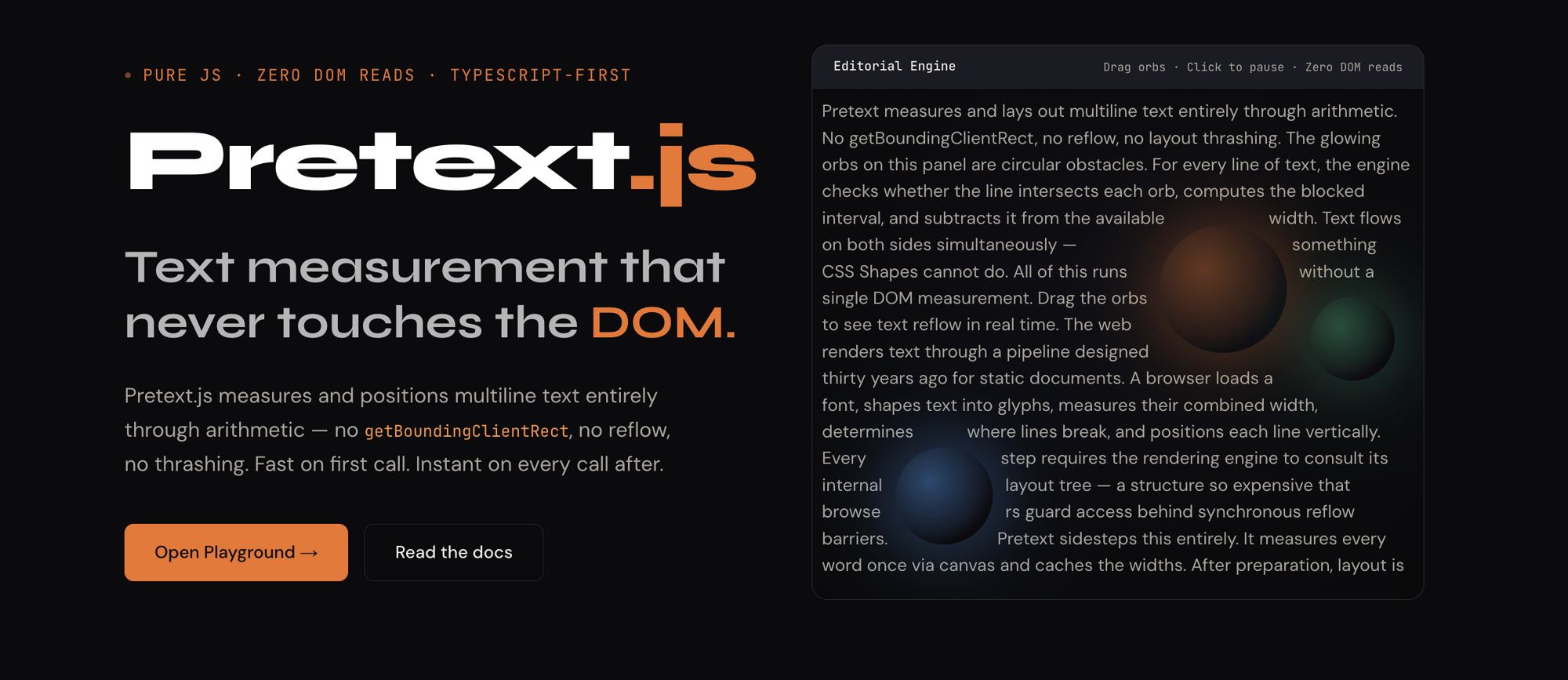
The core idea is simple. Instead of asking the browser “how tall is this text?” (which forces the browser to render it first), Pretext.js calculates the answer mathematically using font metrics from the Canvas API.
Here’s the entire API surface:
import { prepare, layout } from '@chenglou/pretext';

// Step 1: Prepare text (one-time, cacheable)
const handle = prepare('Hello, pretext.js', '16px "Inter"');

// Step 2: Layout at any width (pure arithmetic, microseconds)
const { height, lineCount } = layout(handle, 400, 24);
That’s it. Two functions. One measures text segments and caches them. The other does arithmetic to compute layout. The prepare() call is the only operation that touches the browser (via Canvas measureText()). After that, layout() is pure math.
Why this matters for API-heavy applications
If you’re building apps that consume streaming API responses; think AI assistants, real-time dashboards, or collaborative editors; you need to know the height of incoming text before you render it. Without that, your virtual scroller stutters, your chat UI jumps, and your users notice.
Pretext.js gives you that height in microseconds instead of milliseconds. The difference compounds fast.
The problem Pretext.js solves
To understand why this library exists, you need to understand what happens when JavaScript reads layout properties.
Forced synchronous reflow explained
When you write this code:
const elements = document.querySelectorAll('.text-block');
elements.forEach(el => {
  const height = el.getBoundingClientRect().height; // REFLOW!
  // use height for positioning...
});
Each getBoundingClientRect() call forces the browser to:
- Pause JavaScript execution
- Flush all pending style changes
- Recalculate layout for the entire document (or subtree)
- Return the computed value
This is called “layout thrashing.” In a loop measuring 1,000 elements, the browser performs 1,000 full layout recalculations. The cost? Roughly 94 milliseconds, which means 6 dropped frames at 60fps.
The virtual scrolling problem
Virtual scrolling libraries (like react-window or tanstack-virtual) need to know the height of every item to compute scroll positions. For fixed-height items, this is trivial. For variable-height text content, it’s a nightmare.
The standard workaround is to render items off-screen, measure them, then position them. This works but defeats the purpose of virtual scrolling; you’re rendering DOM nodes you’re trying to avoid rendering.
Some libraries estimate heights and correct them after render, causing visible jumps. Others force developers to specify fixed heights, limiting what you can display.
Pretext.js eliminates this entire category of workarounds. You compute the exact text height before any DOM node exists.
Real numbers
Pretext.js published benchmark results on their site:
| Approach | 1,000 text blocks | 500 text blocks |
|---|---|---|
DOM (getBoundingClientRect) |
~94ms (6 dropped frames) | ~47ms |
Pretext.js (layout()) |
~2ms | ~0.09ms |
| Speed difference | ~47x faster | ~500x faster |
The speed improvement is more dramatic with smaller batches because the per-call overhead of DOM measurement stays constant while Pretext’s arithmetic cost scales linearly.
How Pretext.js works under the hood
The library operates in three distinct phases. Understanding these helps you optimize how you use it.
Phase 1: Text segmentation
When you call prepare(), Pretext.js first normalizes your input text. It handles whitespace, applies Unicode line-break rules (UAX #14), and segments the text into breakable units.
This is where the multilingual support comes in. The segmentation engine correctly handles:
- CJK characters (Chinese, Japanese, Korean): Each character is a valid break point
- Arabic and Hebrew: Right-to-left text with bidirectional markers
- Thai: No spaces between words, requires dictionary-based segmentation
- Hindi/Devanagari: Complex conjunct consonants and ligatures
- Emoji: Properly handles multi-codepoint emoji sequences (flags, skin tones, ZWJ sequences)
- Soft hyphens: Respects
­break opportunities
Phase 2: Canvas measurement
After segmentation, Pretext.js feeds each segment through the Canvas measureText() API. This is the one browser call the library makes, and it’s fast because Canvas text measurement doesn’t trigger layout reflow.
// Internal: how Pretext measures text
const ctx = offscreenCanvas.getContext('2d');
ctx.font = '16px "Inter"';
const metrics = ctx.measureText('Hello'); // No reflow!
const width = metrics.width; // Glyph advance width
The measurements are cached by segment and font combination. If you call prepare() with the same text and font twice, the second call reuses cached data.
Phase 3: Pure arithmetic layout
The layout() function takes cached segment widths and a container width, then computes line breaks using a greedy algorithm:
- Sum segment widths until the total exceeds container width
- Break to a new line
- Repeat until all segments are placed
- Multiply line count by line-height to get total height
No DOM. No Canvas. Pure addition and comparison.
This is why layout() is so fast; it’s doing the same math you’d write on paper with a ruler and a calculator.
The reusable handle pattern
One of the best design decisions in Pretext.js is that prepare() returns a reusable handle. A single prepare() call works across all container widths:
const handle = prepare(longArticleText, '16px "Inter"');

// Compute height for mobile, tablet, and desktop in microseconds
const mobile = layout(handle, 375, 24);   // { height: 2400, lineCount: 100 }
const tablet = layout(handle, 768, 24);   // { height: 1200, lineCount: 50 }
const desktop = layout(handle, 1200, 24); // { height: 720, lineCount: 30 }
This pattern is perfect for responsive design calculations. You measure once and lay out at any width instantly.
Practical use cases
1. Virtual scrolling with variable-height text
This is the primary use case. Here’s how you’d integrate Pretext.js with a virtual scroller:
import { prepare, layout } from '@chenglou/pretext';

interface TextItem {
  id: string;
  content: string;
}

function computeHeights(items: TextItem[], containerWidth: number) {
  return items.map(item => {
    const handle = prepare(item.content, '14px "Inter"');
    const { height } = layout(handle, containerWidth, 20);
    return { id: item.id, height: height + 32 }; // +32 for padding
  });
}

// 10,000 items measured in ~4ms
const heights = computeHeights(chatMessages, 600);
No off-screen rendering. No height estimation. No visible jumps when items scroll into view.
2. AI chat interfaces
AI assistants stream responses token by token. Each new token can change the line count, shifting everything below it. With traditional DOM measurement, every token update triggers a reflow.
With Pretext.js, you recompute the height after each chunk arrives without touching the DOM:
let streamedText = '';
const font = '15px "SF Pro"';

socket.on('token', (token: string) => {
  streamedText += token;
  const handle = prepare(streamedText, font);
  const { height } = layout(handle, bubbleWidth, 22);

  // Update virtual scroller position without DOM measurement
  scroller.updateItemHeight(messageId, height + padding);
});
3. Data grids with text columns
Spreadsheet-style apps need column auto-sizing. Measuring thousands of cell values through the DOM is expensive. Pretext.js makes it fast:
function computeColumnWidth(values: string[], font: string, padding: number) {
  let maxWidth = 0;
  for (const value of values) {
    const handle = prepare(value, font);
    // Layout with infinite width = single line = natural text width
    const { height } = layout(handle, Infinity, 20);
    // Use handle's internal width tracking for column sizing
    maxWidth = Math.max(maxWidth, /* computed width */);
  }
  return maxWidth + padding;
}
4. Multilingual content feeds
Social media feeds with mixed-script content (Chinese posts followed by Arabic replies followed by Korean comments) are notoriously hard to virtualize because each script has different line-breaking rules.
Pretext.js handles all of them with the same API:
const posts = [
  { text: 'This library changed everything', lang: 'en' },
  { text: 'RTL text with correct bidirectional layout', lang: 'ar' },
  { text: 'CJK text gets proper character-level breaks', lang: 'zh' },
];

// Same API, correct results for every script
posts.forEach(post => {
  const handle = prepare(post.text, '16px system-ui');
  const { height } = layout(handle, 400, 24);
});
Testing your text layout with Apidog
When you’re building text-heavy UIs backed by APIs, getting the layout right is only half the battle. You also need to verify the API responses that feed your text components deliver the right data, in the right format, at the right speed.
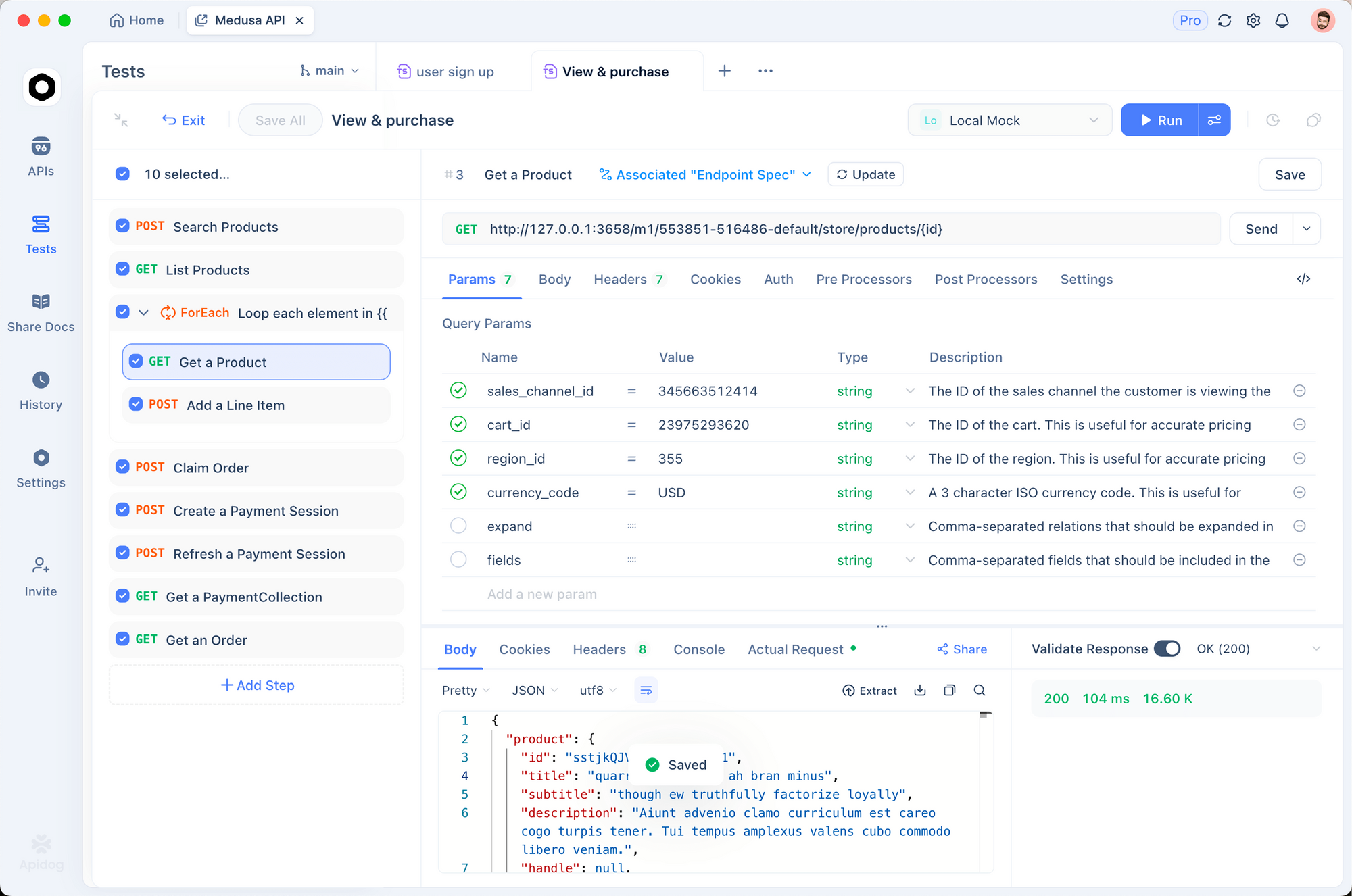
Apidog makes this straightforward. You can mock streaming API responses to test how your Pretext.js integration handles progressive text loading. Set up test scenarios with different text lengths, languages, and Unicode edge cases, then verify your virtual scroller behaves correctly before deploying.
For teams building AI chat products, Apidog’s API testing environment lets you:
- Mock streaming responses with chunked text to simulate real LLM output
- Test with multilingual payloads to catch layout bugs before users do
- Validate response schemas to confirm text fields contain the expected format
- Run automated test suites that cover your text rendering edge cases
This matters because a text layout library is only as good as the data flowing into it. Garbage API responses produce garbage layouts, regardless of how fast your measurement engine runs.
Known limitations and criticisms
Pretext.js isn’t perfect. The Hacker News thread surfaced several valid concerns worth knowing before you adopt it.
Rendering accuracy edge cases
Multiple users reported text extending beyond bounding boxes in Safari and Chrome demos. The library’s arithmetic can diverge from the browser’s native layout in specific scenarios:
- Fonts with unusual kerning pairs
- Text with mixed font sizes within a single block
- Subpixel rendering differences between Canvas and DOM
- Browser-specific text shaping quirks
These edge cases matter less for virtual scrolling (where a few pixels of error is invisible) and more for pixel-perfect typesetting.
Canvas measurement isn’t free
The prepare() call still hits the browser’s Canvas text engine. For applications that create thousands of unique prepare() handles per frame, this can become a bottleneck. The solution is caching and batching, but the library doesn’t enforce either.
No CSS property support
Pretext.js measures raw text with a font specification. It doesn’t account for CSS properties that affect layout:
letter-spacingword-spacingtext-indenttext-transformfont-feature-settingsfont-variant
If your text styling relies on these CSS properties, the computed height won’t match what the browser renders. You’d need to account for these manually or accept the discrepancy.
It doesn’t replace DOM rendering
Pretext.js tells you how tall text will be. It doesn’t render text for you. You still need DOM nodes (or Canvas/SVG rendering) to display the text. The library’s value is in the measurement phase, not the rendering phase.
Pretext.js vs. traditional approaches
| Feature | Pretext.js | DOM measurement | Estimated heights |
|---|---|---|---|
| Speed (1K items) | ~2ms | ~94ms | ~0ms (no measurement) |
| Accuracy | High (Canvas-based) | Perfect (ground truth) | Low (heuristic) |
| DOM dependency | None after prepare() |
Full | None |
| Reflow triggers | Zero | One per measurement | Zero |
| Multilingual | Full Unicode support | Full (browser-native) | Poor (hardcoded ratios) |
| CSS property support | Limited (font only) | Full | None |
| Memory overhead | Cached segments | DOM nodes | Minimal |
| Responsive layouts | One prepare(), many layout() |
Re-measure per width | Re-estimate per width |
The right choice depends on your constraints. If you need pixel-perfect accuracy and CSS property support, DOM measurement is still the ground truth. If you need speed across thousands of items and can tolerate minor sub-pixel differences, Pretext.js wins by a wide margin.
Getting started
Installation
npm install @chenglou/pretext
# or
pnpm add @chenglou/pretext
# or
bun add @chenglou/pretext
Basic usage
import { prepare, layout } from '@chenglou/pretext';

// Measure a paragraph
const handle = prepare(
  'Pretext.js computes text layout without touching the DOM.',
  '16px "Inter"'
);

// Get height at a specific container width
const result = layout(handle, 600, 24);
console.log(result.height);    // e.g., 48 (2 lines x 24px)
console.log(result.lineCount); // e.g., 2
Integration with React
import { prepare, layout } from '@chenglou/pretext';
import { useVirtualizer } from '@tanstack/react-virtual';
import { useMemo, useRef } from 'react';

function VirtualChat({ messages }: { messages: string[] }) {
  const parentRef = useRef<HTMLDivElement>(null);
  const containerWidth = 600;
  const font = '14px "Inter"';
  const lineHeight = 20;

  const heights = useMemo(() => {
    return messages.map(msg => {
      const handle = prepare(msg, font);
      const { height } = layout(handle, containerWidth, lineHeight);
      return height + 24; // padding
    });
  }, [messages]);

  const virtualizer = useVirtualizer({
    count: messages.length,
    getScrollElement: () => parentRef.current,
    estimateSize: (index) => heights[index],
  });

  return (
    <div ref={parentRef} style={{ height: '100vh', overflow: 'auto' }}>
      <div style={{ height: virtualizer.getTotalSize(), position: 'relative' }}>
        {virtualizer.getVirtualItems().map(virtualRow => (
          <div
            key={virtualRow.key}
            style={{
              position: 'absolute',
              top: virtualRow.start,
              width: containerWidth,
            }}
          >
            {messages[virtualRow.index]}
          </div>
        ))}
      </div>
    </div>
  );
}
This gives you a virtual chat with accurate item heights computed before any message renders to the DOM. No estimation, no correction jumps, no reflow.
Interactive playground
The Pretext.js website includes an interactive playground at pretextjs.dev/playground where you can paste text, choose fonts, adjust container width, and see the layout computation in real time. It’s the fastest way to verify behavior before integrating.
When you should NOT use Pretext.js
Pretext.js isn’t the right tool for every text measurement problem:
- Static pages with known content: If your text doesn’t change and you’re not virtualizing, CSS handles layout fine. No library needed.
- Pixel-perfect print layouts: The sub-pixel differences between Canvas measurement and DOM rendering matter at print resolution. Use the DOM as ground truth.
- Heavy CSS text styling: If you rely on
letter-spacing,text-indent, orfont-feature-settings, the height calculations will diverge from rendered output. - Server-side rendering: Pretext.js depends on the Canvas API, which isn’t available in Node.js without polyfills like
node-canvas. Server-side support is on the roadmap but not shipped yet. - Small, static lists: If you have 50 items in a list, DOM measurement takes under 5ms. The optimization isn’t worth the dependency.
FAQ
Is Pretext.js production-ready?
The library shipped in March 2026 and gained 14,000+ GitHub stars within days. Cheng Lou, the creator, runs Midjourney’s frontend; a production system serving millions of users. The library’s test suite covers dozens of languages and edge cases. That said, it’s a new release. Pin your version and test against your specific fonts and content.
Does Pretext.js work with React, Vue, and Svelte?
Yes. Pretext.js is framework-agnostic. It’s a pure TypeScript library with two functions. You call prepare() and layout() wherever you need text measurements; inside React hooks, Vue composables, Svelte stores, or plain JavaScript.
How does Pretext.js handle web fonts?
The prepare() function measures text using whatever font the browser has loaded at call time. If your web font hasn’t loaded yet, the measurement will use the fallback font and produce incorrect results. Make sure your fonts are loaded before calling prepare(). Use the Font Loading API (document.fonts.ready) to verify.
Can I use Pretext.js for Canvas or SVG rendering?
Yes. The library computes text layout that’s rendering-target agnostic. You can use the computed heights and line breaks to position text in Canvas 2D, WebGL, SVG, or DOM. The Pretext.js website shows examples of all these rendering targets.
Does it support RTL (right-to-left) languages?
Yes. Pretext.js handles Arabic, Hebrew, and other RTL scripts with proper bidirectional text support. It also handles mixed-direction text (e.g., Arabic text with embedded English words) correctly.
What’s the bundle size?
15KB minified with zero dependencies. No polyfills required. The library uses only standard browser APIs (Canvas measureText() and Intl.Segmenter where available).
How accurate is it compared to DOM measurement?
For most text content, Pretext.js matches DOM layout within 1-2 pixels. The accuracy depends on the font and CSS properties you use. Properties like letter-spacing and word-spacing aren’t accounted for, so if you use those, expect larger differences. For virtual scrolling, where a few pixels of error is invisible, the accuracy is more than sufficient.
Can Pretext.js measure styled text (bold, italic, mixed sizes)?
Each prepare() call takes a single font specification. For text with mixed styles (bold words within regular text), you’d need to segment the text yourself and create separate handles for each style run. This is a known limitation that may be addressed in future versions.
Conclusion
Pretext.js solves a problem that browsers have ignored for three decades: fast, accurate text measurement without DOM reflow. For developers building virtual scrollers, chat UIs, data grids, or any interface that needs to measure thousands of text blocks, this library replaces an entire category of workarounds with two function calls.
The library isn’t a silver bullet. It doesn’t support CSS text properties beyond font specification, has minor sub-pixel accuracy differences, and doesn’t work server-side yet. But for its target use case; pre-computing text heights for virtualized lists; nothing else comes close.
Ready to build faster text-heavy UIs? Start by testing your API endpoints with Apidog to make sure your data layer is solid, then drop Pretext.js into your rendering pipeline.