
TL;DR
Postman's 2026 pricing update brings significant changes that affect every team using the platform. The Free plan now targets solo users with 50 AI credits, the Solo plan costs $9 per user monthly, and the Team plan starts at $19 per user monthly. For teams that previously relied on Postman's Free tier with team collaboration, the entry price jumped from zero to $19 per user per year. Apidog offers a compelling alternative with up to 4 users on its free tier, unlimited collection runs, and no metered AI features.
Introduction
If you built your API workflow around Postman over the past decade, you probably remember when it started as a free Chrome extension in 2012. The tool went open-source and gradually became the default for millions of developers working with APIs. Somewhere along the way, Postman transformed from a free developer tool into an enterprise SaaS company with a pricing model that increasingly resembles traditional software vendors.
That shift accelerated in 2026.
The latest pricing changes, effective 2026, represent the most significant restructuring since Postman introduced tiered plans. The Free plan now targets solo developers only. The Solo plan at $9 per month adds AI credits. The Team plan at $19 per user monthly is the new entry point for any team that needs collaboration features. If you're part of a startup or a team that needs to work together on APIs, you're looking at a cost that might make you reconsider whether Postman still makes sense for your workflow.
This guide breaks down exactly what changed, what it means for different team sizes, and what alternatives exist for teams that need powerful API tools without the enterprise price tag.
What Changed in Postman's 2026 Pricing
Postman's 2026 pricing update restructures how the platform charges for access. Let's look at what actually changed.
The Free Plan Now Targets Solo Developers
The most significant change affects the Free tier. Previously, this plan allowed small teams to collaborate on collections, share environments, and work together on API projects. Now, the Free plan is explicitly designed for solo developers building and testing APIs.
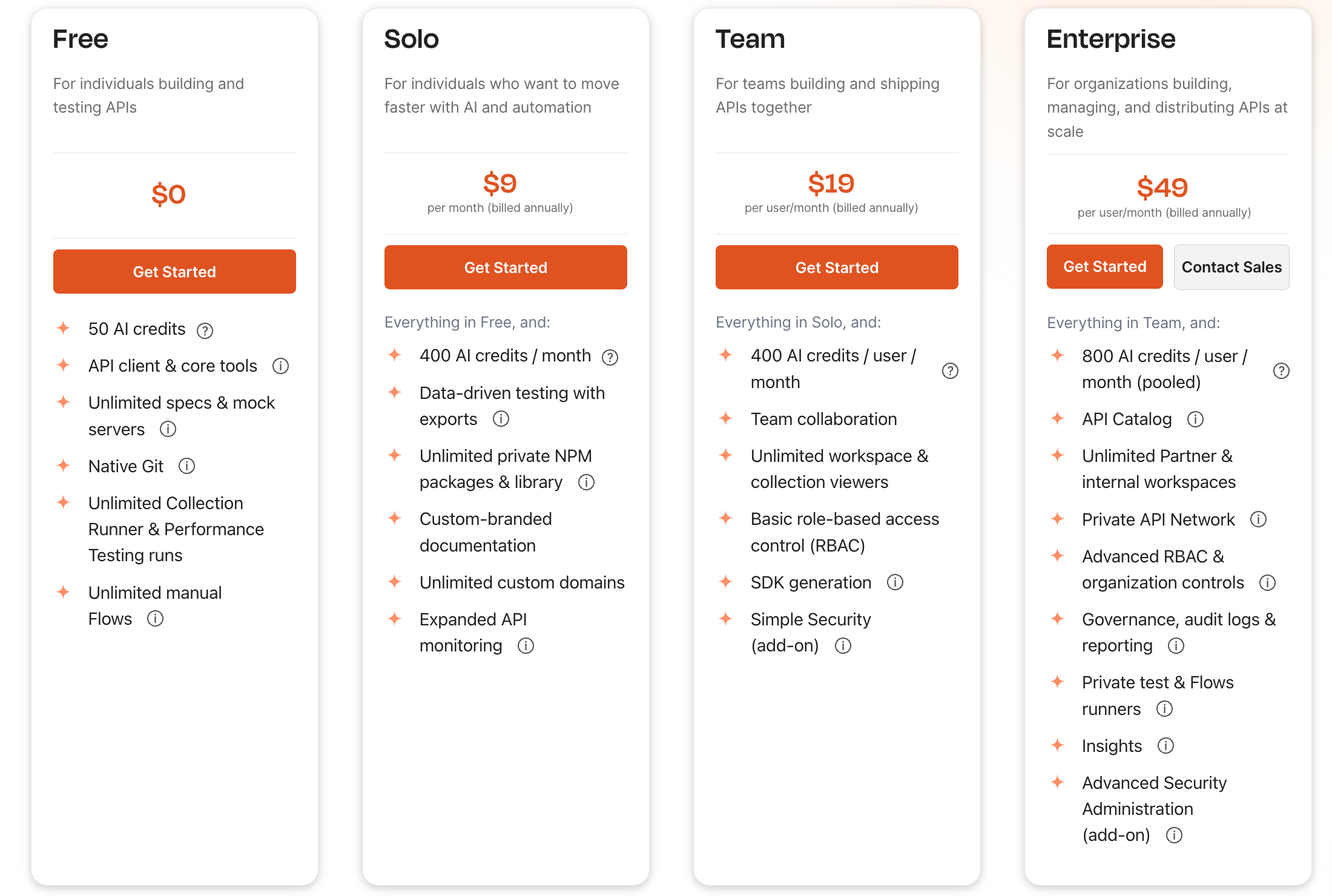
For teams that previously used the Free plan with 2-3 developers, this change forces a decision: either pay for a team plan or find a different tool that supports collaboration on its free tier.
Solo Plan Adds AI Credits
The new Solo plan at $9 per month (billed annually) includes everything in Free plus 400 AI credits per month, data-driven testing with exports, unlimited private NPM packages and library, custom-branded documentation, unlimited custom domains, and expanded API monitoring.
This plan targets individual developers who want AI assistance without team features. The 400 AI credits sounds generous until you realize that generating comprehensive API documentation or running AI-powered test generation can consume hundreds of credits in a single session.
Team Plan Becomes the Collaboration Entry Point
The Team plan at $19 per user monthly (billed annually) includes everything in Solo plus 400 AI credits per user per month, team collaboration, unlimited workspace and collection viewers, basic role-based access control, SDK generation, and Simple Security as an add-on.
This is where most teams will land. If you need to work with teammates on APIs, this is the cheapest option. A three-person team now pays $57 per month ($684 annually) for the privilege of collaborating on API projects.
Enterprise Gets More Expensive
The Enterprise plan at $49 per user monthly (billed annually) adds 800 AI credits per user (pooled), API Catalog, unlimited Partner and internal workspaces, Private API Network, Advanced RBAC and organization controls, Governance, audit logs and reporting, Private test and Flows runners, Insights, and Advanced Security Administration as an add-on.
This pricing puts Postman firmly in the enterprise category. Most teams don't need these features, but the pricing structure pushes smaller teams toward more expensive tiers to access features that should probably be included.
Breaking Down Each Plan
Postman Free
The Free plan now includes:
- Solo developer use case (no team collaboration)
- 50 AI credits
- Unlimited specs and mock servers
- Native Git integration
- Unlimited Collection Runner and Performance Testing runs
- Unlimited manual Flows
- Community support
What this means in practice: Individual developers get genuine value here. You can design APIs, test them extensively, generate documentation, and use mock servers without paying anything. The catch is that you're meant to work alone.
Postman Solo ($9/month)
The Solo plan adds:
- 400 AI credits per month (up from 50)
- Data-driven testing with exports
- Unlimited private NPM packages and library
- Custom-branded documentation
- Unlimited custom domains
- Expanded API monitoring
This plan makes sense for individual developers who want AI assistance and better documentation features. The AI credits are the main draw, but they run out quickly if you use AI features regularly.
Postman Team ($19/month per user)
The Team plan adds:
- 400 AI credits per user per month
- Team collaboration
- Unlimited workspace and collection viewers
- Basic role-based access control
- SDK generation
- Simple Security add-on available
This is the minimum cost for any team that needs to collaborate. A two-person team pays $228 annually. A five-person team pays $1,140 annually. These costs add up quickly.
Postman Enterprise ($49/month per user)
Enterprise adds:
- 800 AI credits per user (pooled across organization)
- API Catalog
- Unlimited Partner and internal workspaces
- Private API Network
- Advanced RBAC and organization controls
- Governance, audit logs, and reporting
- Private test and Flows runners
- Insights
- Advanced Security Administration add-on
Most teams don't need Enterprise. But the pricing structure pushes smaller teams toward more expensive tiers to access features that should probably be included at lower price points.
Hidden Costs and Considerations
The list prices don't tell the whole story. Several factors can increase your actual costs.
AI Credits Run Out Fast
The AI features Postman promotes require credits. Writing API documentation, generating test cases, and suggesting optimizations all consume credits from your monthly allocation. Once you hit the limit, you either stop using those features or pay extra.
The Solo plan gives 400 AI credits per month. The Team plan gives 400 per user per month. Sounds generous until you realize that generating comprehensive API documentation for a complex API can consume thousands of credits in a single session.
Add-Ons Add Up
Simple Security appears as an add-on for the Team plan. Advanced Security Administration is an add-on for Enterprise. These aren't optional extras for teams that need compliance features. The base price doesn't include everything you might need.
Annual Billing Required
The Team and Enterprise plans require annual billing. You can't pay monthly. This commitment makes it harder to evaluate whether the upgrade was worth it before committing to a full year.
Who Gets Hit Hardest These Changes
These pricing changes don't affect all teams equally. Some groups feel the impact more than others.
Small Startups and Indie Developers
Teams of 2-3 developers who previously used the Free plan now face a $19-per-user minimum per month. For a three-person startup, that's $684 per year minimum. This sudden cost increase hits hardest for teams with limited budgets who chose Postman specifically because it offered free team collaboration.
Startups often choose tools based on cost when they're pre-revenue. A $500-700 annual cost for an API client is nontrivial when you're burning through runway. Many startups will either absorb the cost begrudgingly or search for alternatives.
Agencies and Consultancies
Development agencies that manage multiple client projects often have many small Postman workspaces. The per-user pricing means each developer costs more, and the limits on collaboration features hurt teams that run many projects across different clients.
An agency with 10 developers paying $19 per user monthly (annual) spends $2,280 per year just for the base plan. That doesn't include any add-ons that teams might need.
Growing Teams
Teams that started as solo developers and gradually added members are particularly affected. They built their workflows around Postman's collaboration features, then hit the pricing wall exactly when they started needing those features most.
The timing creates a bad user experience. You discover a tool works well for your needs, recommend it to your team, grow your team, and then discover the pricing changed mid-growth. This pattern leaves a sour taste even if the tool itself remains decent.
What You Actually Get for Your Money
Let's be fair: Postman offers real value. Understanding what you get helps determine whether the price makes sense for your situation.
Collaboration Features
Postman's strength has always been team collaboration. Shared collections, synchronized environments, and team workspaces work well. If your team genuinely collaborates on APIs daily, these features have value.
The workflow where one developer designs an API, another tests it, and a third documents it works smoothly in Postman. This collaboration capability is why teams adopt Postman in the first place.
The Ecosystem
Postman has an enormous ecosystem. Thousands of public APIs have ready-made collections. The community shares workflows and templates. Finding help is easy because millions of developers use the tool.
When you encounter a problem, chances are someone else solved it and posted the solution. This network effect has real value that alternatives struggle to match.
Enterprise Features
For large organizations, the governance, compliance, and security features in Enterprise tier matter. These teams typically have budget for tools and need the audit trails and access controls.
If you're a bank, healthcare company, or enterprise that needs SOC2 compliance and detailed access logs, Postman's enterprise features justify the cost. These teams aren't price-sensitive on API tools because the alternatives cost more in compliance overhead.
Where the Value Breaks Down
The value calculation changes when you look at what you're actually using. Many teams pay for Team but only use collaboration features. Others hit limits they didn't expect. The gap between "useful" and "overpriced" depends heavily on your actual usage patterns.
A team of 5 developers who only use collections and basic testing might reasonably use the Free tier if they coordinate carefully. But that defeats the purpose of collaboration tools. You're paying for the concept of team features even when you don't fully use them.
The Smarter Alternative: Apidog
For teams that need powerful API tools without the enterprise price tag, Apidog offers a compelling alternative that covers what most teams actually need.
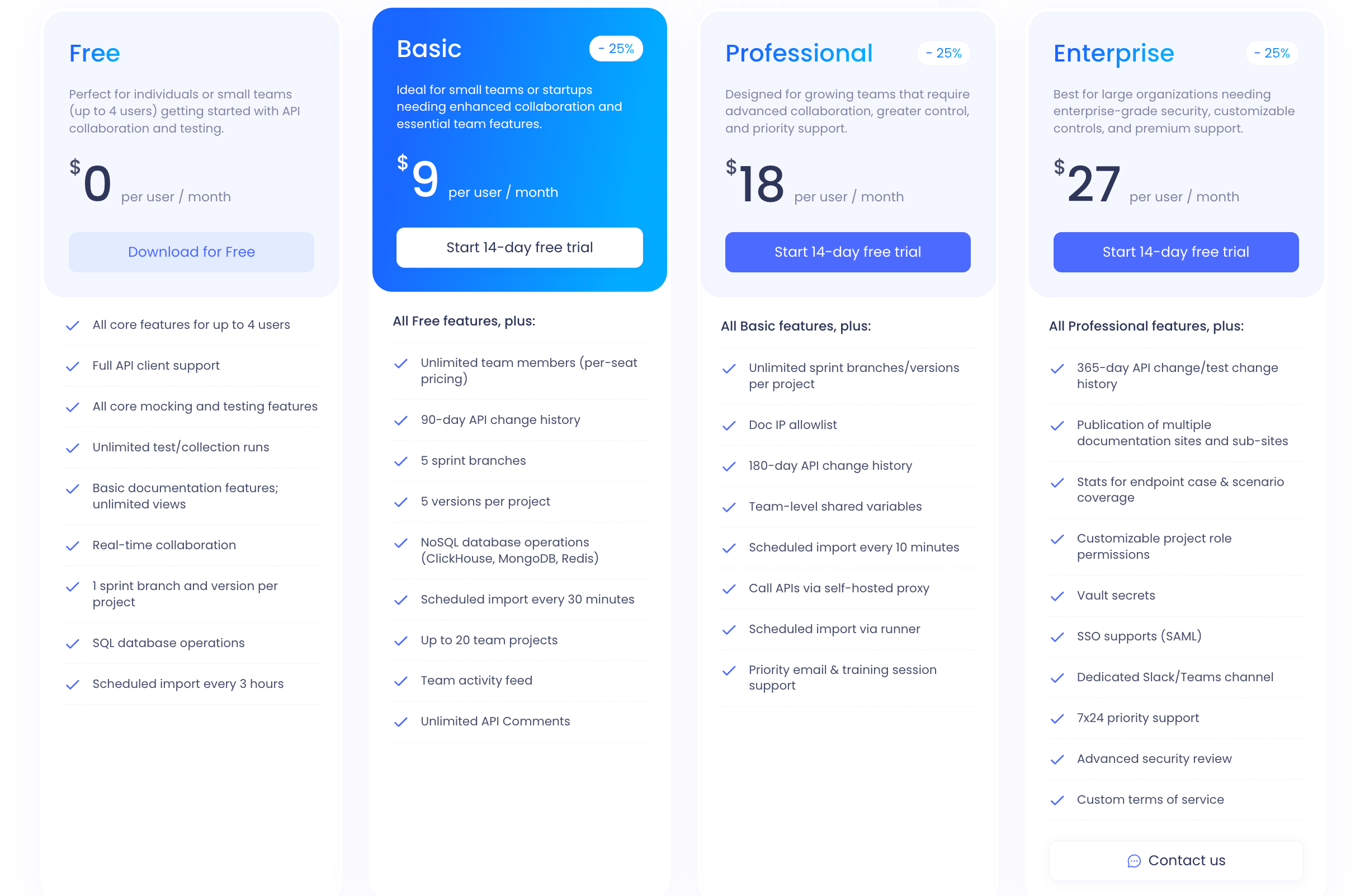
The key difference: Apidog's Free plan supports up to 4 users with collaboration features. Postman's Free plan is solo-only. To get team collaboration in Postman, you need the Team plan at $19 per user.
API Design-First Approach
Apidog takes an API design-first approach that many developers prefer. You design your API specification first, then generate documentation, mock servers, and tests from that single source of truth. This workflow reduces errors and keeps everyone on the same page.
The design-first methodology aligns with how modern API development should work. You define what your API should look like before you build it. This prevents the drift that happens when documentation gets outdated or tests don't match implementation.
No Hidden Costs
Apidog doesn't meter AI features or surprise you with overage fees. What you see is what you get. Teams know their costs upfront and don't face budget surprises.
This predictability matters for team budgeting. When you calculate what Apidog costs, that number is accurate. With Postman, the actual cost depends on AI credit usage patterns that are hard to predict.
Migration from Postman
Moving from Postman to Apidog takes minutes. You can import your existing Postman collections directly. Your team doesn't need to rebuild everything from scratch.
1.Open Postman and go to the "Environments" tab.

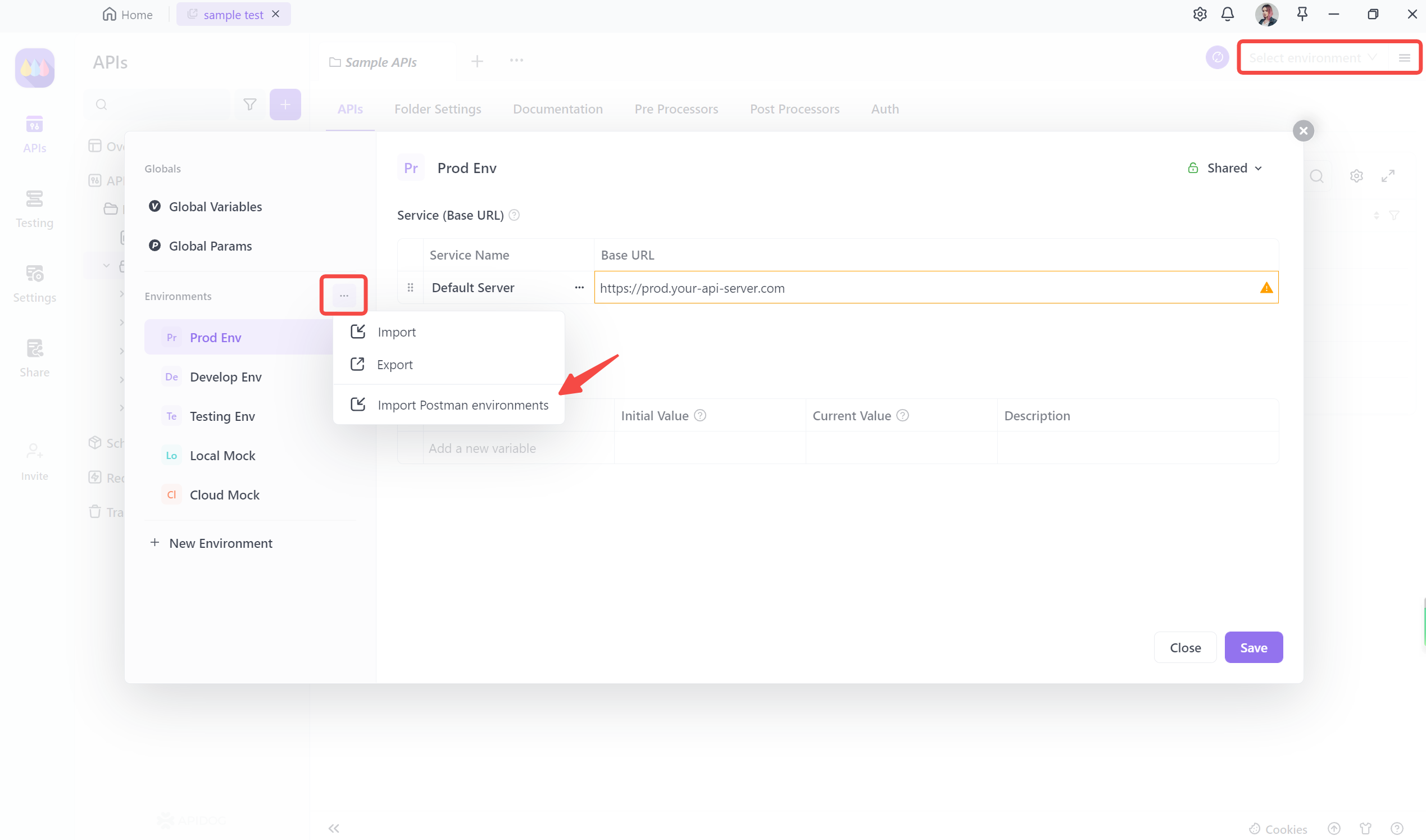
2.Select the environment you want to export from the list. Click on the "..." button next to the environment name, and choosing the "Export" option.

This will generate a JSON file containing the environment variables and their values. Select the location where you want to save the exported file.3.Go to the "Environment Management" section in the top right corner of the Apidog interface and select "Import Postman Environment.
4.Simply select the downloaded Postman Environment file and upload it to Apidog. This will allow you to seamlessly import your Postman environment into Apidog.
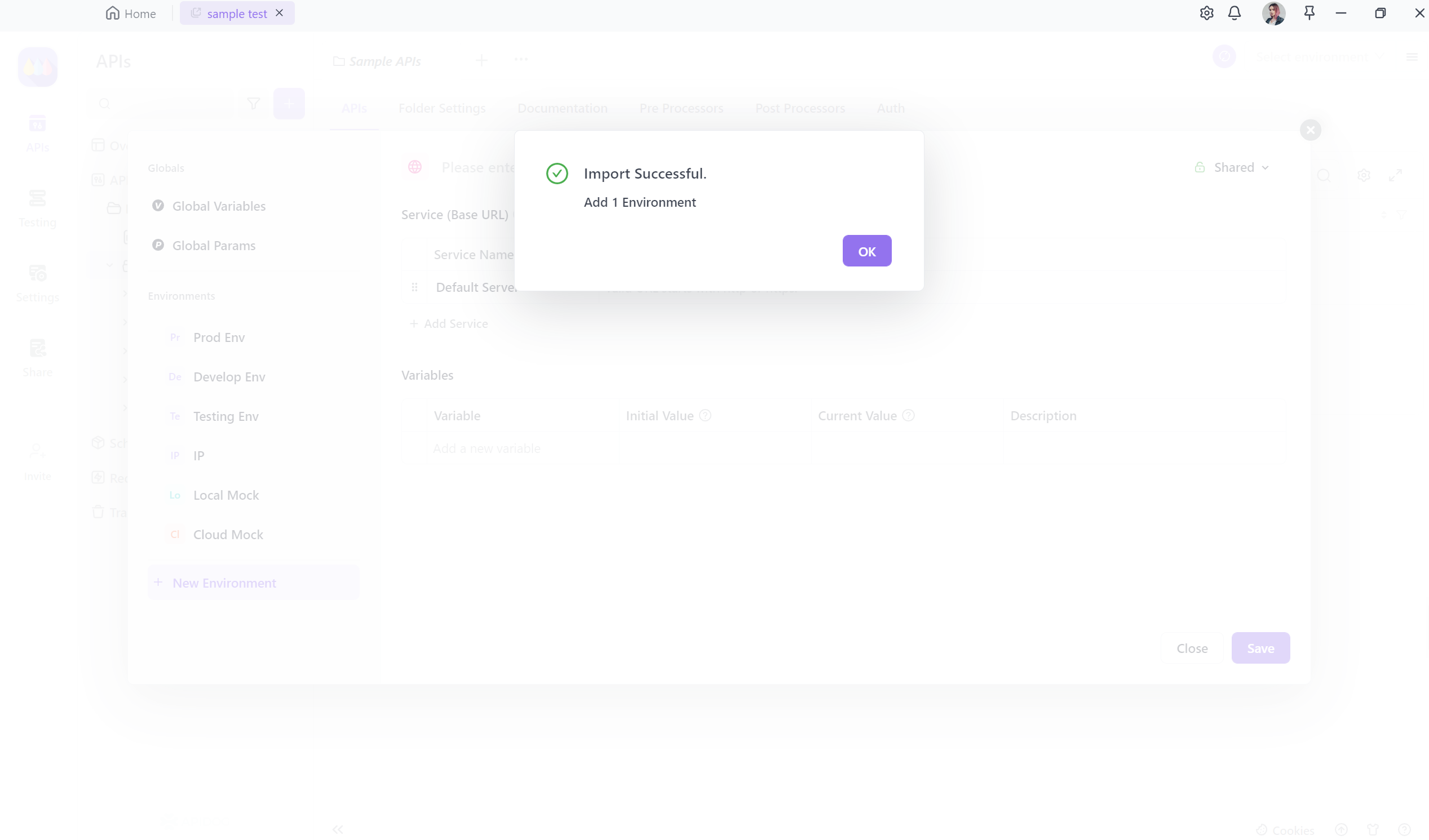
The import process handles collections, environments, and configurations. You lose very little by switching, which means the decision becomes purely about which tool serves you better.
Conclusion
Postman's 2026 pricing changes represent a fundamental shift in who the tool is for. What started as a free tool for developers became a paid platform that requires significant budget commitment from any team that needs collaboration.
The changes hit hardest for the teams that built their workflows around Postman's collaboration features exactly when those teams started growing. The $19-per-user entry point for teams, combined with the solo-only Free tier, creates a real budget line item where none existed before.
For teams that need powerful API tools without enterprise pricing, alternatives like Apidog offer more generous free tiers and simpler pricing. The free tier supports up to 4 users with full collaboration capabilities. The migration takes minutes, and most teams find they get equal or better functionality for less money.
The best time to evaluate your options was before these changes. The second best time is now. Your team's API workflow shouldn't cost more than necessary.
FAQ
Did Postman really change pricing in 2026?
Yes. The 2026 pricing update restructured all tiers: Free now targets solo developers, Solo costs $9 per month for individuals wanting AI features, Team starts at $19 per user monthly for collaboration, and Enterprise sits at $49 per user monthly.
Is Postman still worth it for small teams?
For solo developers, Postman's Free plan still works well. For teams of 2 or more, the cost increase makes alternatives like Apidog worth evaluating. What you pay for Postman Team often exceeds what you get in return, especially when you compare against free alternatives.
What is the cheapest Postman plan for teams?
The Team plan at $19 per user monthly (billed annually) is the cheapest team plan. Annual billing is required. Note that this doesn't include unlimited AI credits, which are metered based on usage.
Are there really hidden costs with Postman?
Yes. AI features consume metered credits that charge overages when exhausted. Add-ons like Simple Security and Advanced Security Administration cost extra. These costs often exceed the list price significantly depending on your usage.
How do I switch from Postman to Apidog?
Import your Postman collections directly into Apidog. The process takes minutes. Your team can continue working with the same collections in a new tool without rebuilding anything. Apidog supports importing collections, environments, and configurations.
Does Apidog have a free team plan?
Yes. Apidog's Free plan supports up to 4 users with collaboration features, unlimited collection runs, unlimited mock servers, and unlimited monitors. Most teams can use Apidog Free indefinitely without upgrading.