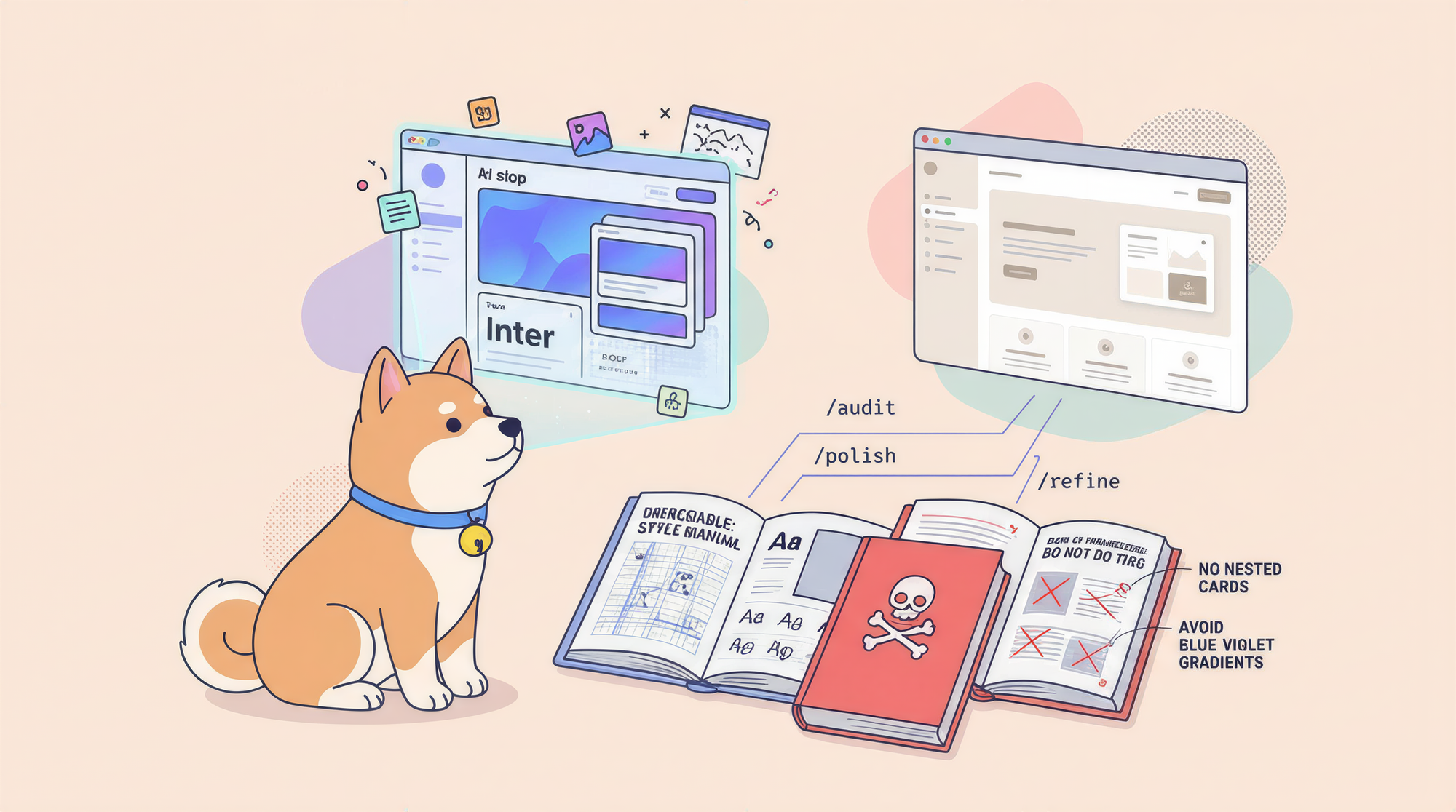
Impeccable is an open-source Claude Code skill built by Paul Bakaus that fights the "AI slop" problem in AI-generated frontend output. It ships with 20 steering commands (/audit, /polish, /critique, and more), 7 domain-specific design reference files, and curated anti-patterns that tell the model exactly what NOT to generate. The result: UIs that look designed, not auto-generated.
Why Every AI-Generated Frontend Looks the Same
Ask any AI coding assistant to build you a dashboard, a landing page, or a settings panel. Give it free rein. What do you get?
Inter font. Purple-to-blue gradient. Cards nested inside cards. Gray text on a colored background. A hero section with a big number, a small label, and a glowing accent. Maybe some glassmorphism for "depth."
You've seen it a thousand times because every large language model trained on the same generic templates produces the same generic output. That's the AI-generated frontend trap: technically functional, visually forgettable.
Impeccable was created specifically to break that cycle. Where Anthropic's official frontend-design skill laid the foundation, Impeccable builds on it with deeper expertise, more domain coverage, and hard constraints that steer the AI away from the predictable patterns burned into its weights.
What Impeccable Actually Is
Impeccable is a Claude Code skill an installable set of instructions, reference files, and slash commands that augment how Claude Code approaches any frontend task.
At its core, the skill ships with three components:
Impeccable's Expanded frontend-design Skill
The frontend-design skill inside Impeccable is a comprehensive design guide split into seven domain-specific reference files:
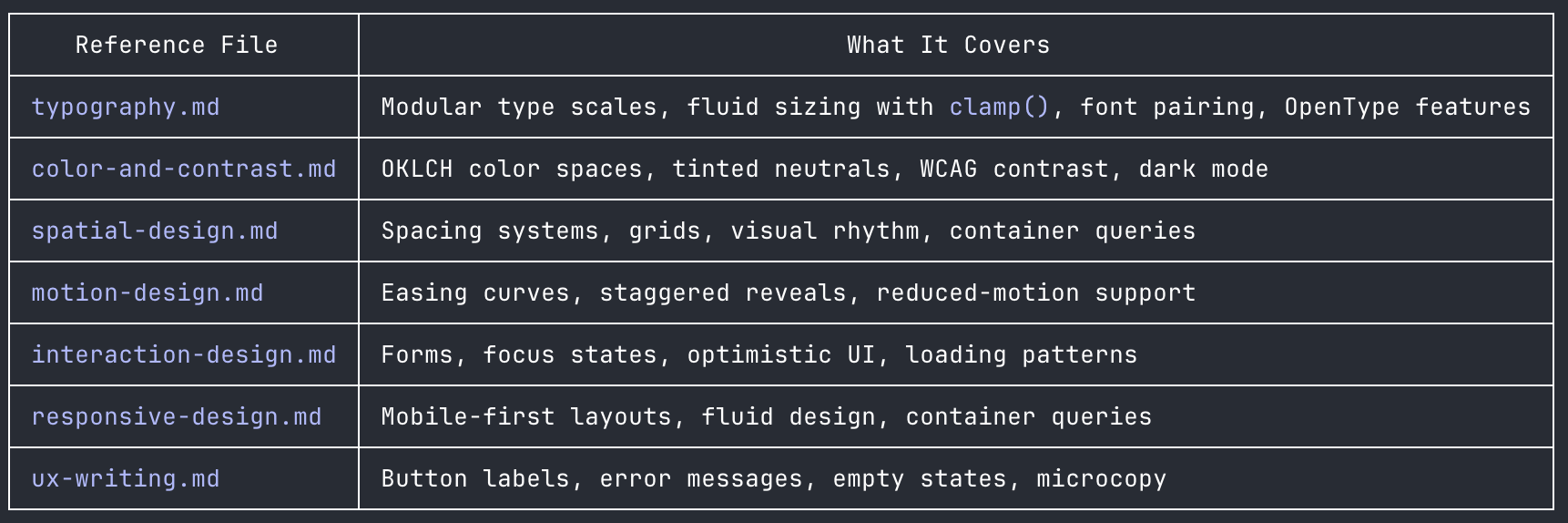
Each reference file is technically precise. The typography guide, for example, goes beyond "use good fonts" and explains how vertical rhythm works, why FOUT (Flash of Unstyled Text) happens and how to prevent it with size-adjust overrides, and when fluid type with clamp() is actually the wrong choice. This depth is what separates Impeccable from a generic style guide.
Impeccable's Context-Gathering Protocol
One of the most underrated aspects of Impeccable's design is the /teach-impeccable command. Before any design work begins, the skill requires confirmed design context: target audience, use cases, and brand personality. This context gets saved to .impeccable.md in the project root and is automatically loaded in future sessions.
It's a small thing that makes a big difference. AI-generated frontend output is generic partly because the model has no project context it defaults to safe, average choices. Impeccable forces that context to be established first.
The 20 Commands That Fix AI-Generated Frontends
Impeccable ships with 20 user-invokable commands, each addressing a specific failure mode in AI-generated frontend work. You call them as slash commands inside Claude Code:
/audit          → Accessibility, performance, and responsive quality check
/critique       → UX review: hierarchy, clarity, emotional resonance
/polish         → Final pass before shipping (alignment, spacing, details)
/distill        → Strip to essence—remove complexity that doesn't earn its place
/normalize      → Align with design system standards
/animate        → Add purposeful motion (not decorative jitter)
/colorize       → Introduce strategic color to monochromatic interfaces
/bolder         → Amplify safe, boring designs
/quieter        → Tone down overly aggressive designs
/delight        → Add memorable moments of joy
/typeset        → Fix font choices, hierarchy, and sizing
/arrange        → Fix layout, spacing, and visual rhythm
/harden         → Error handling, i18n, edge cases
/optimize       → Performance improvements
/extract        → Pull reusable components and design tokens
/adapt          → Adapt for different devices/contexts
/onboard        → Design onboarding flows and empty states
/clarify        → Improve unclear UX copy
/overdrive      → Technically ambitious effects (shaders, spring physics, scroll-driven reveals)
/teach-impeccable → One-time setup: gather and save design context
Most commands accept an optional scope argument. /audit header runs the audit only on the navigation bar. /polish checkout-form focuses the polish pass on the payment flow. This surgical targeting keeps Claude focused and prevents it from touching parts of the AI-generated frontend that are already working.
The real power comes from chaining commands. A typical workflow might run /audit to surface issues, /arrange to fix layout problems, /typeset to clean up the type hierarchy, and /polish as the final pass before shipping each step building on the last.
The Anti-Pattern Library: Teaching AI What Not to Do
The most original contribution Impeccable makes to the AI-generated frontend problem isn't the commands it's the anti-patterns.
The skill bakes explicit "DO NOT" constraints directly into the model's context. These aren't vague style preferences; they're specific, recurring failure signatures that appear in AI-generated frontend output again and again:
Typography anti-patterns:
- Don't use Inter, Roboto, Arial, or system defaults (they make designs invisible)
- Don't use monospace fonts as lazy shorthand for "developer vibes"
- Don't put large rounded icons above every heading it looks templated
Color anti-patterns:
- Don't use gray text on colored backgrounds it looks washed out; use a darker shade of the background color instead
- Don't use the "AI palette": cyan-on-dark, purple-to-blue gradients, neon accents on dark backgrounds
- Don't use pure black (
#000) or pure white (#fff) tint your neutrals
Layout anti-patterns:
- Don't wrap everything in cards not every element needs a container
- Don't nest cards inside cards
- Don't use identical card grids (icon + heading + text, repeated forever)
- Don't center everything left-aligned text with asymmetric layouts reads as designed
Motion anti-patterns:
- Don't use bounce or elastic easing they feel dated; real objects decelerate smoothly
- Don't animate layout properties like
width,height,paddingusetransformandopacityonly
These rules are pattern-matched to exactly the habits that make AI-generated frontend code recognizable at a glance. By naming them explicitly, Impeccable gives the model a corrective lens it wouldn't have without external guidance.
Under the Hood: Build System, Unit Tests, and Multi-Tool Support
Impeccable isn't just a prompt file it's a proper software project with a build system, a unit test suite, and multi-provider support.
The Build System
Skill source files live in source/skills/ and use rich YAML frontmatter (following the Agent Skills specification). A single build step compiles them to provider-specific formats for Cursor, Claude Code, OpenCode, Gemini CLI, Codex CLI, VS Code Copilot, Kiro, and Pi:
bun run build      # Compile all 8 provider formats
bun run rebuild    # Clean and rebuild from scratch
Each provider gets the right dialect. Claude Code and OpenCode get full metadata including args and allowed-tools. Codex CLI gets argument-hint format with $ARGNAME placeholders. Gemini gets minimal frontmatter. The build handles all of this automatically through a modular transformer architecture in scripts/lib/transformers/.
The Unit Test Suite
Impeccable ships with a Bun-based unit test suite in tests/build.test.js. The tests cover the entire build pipeline:
- Orchestration tests verify that each transformer function is called with the correct arguments
- Integration tests create real source files in a temp directory and assert that the expected output files exist for every provider
- Transformation correctness tests check specific transformations—that Gemini output contains
{{args}}, that Codex output contains$TARGET, that Claude Code output containsuser-invokable: true - Edge case tests handle empty skill lists and verify the pipeline doesn't break
Running the unit test suite is a single command:
bun test
These unit tests are what make it safe to contribute to Impeccable. You can modify a transformer, run the unit tests, and know immediately whether your change broke the output for any of the eight supported tools. That's the kind of engineering confidence that separates maintained open-source projects from abandoned prompt collections.
Impeccable + Apidog: Pairing Design Quality with API Quality
Impeccable solves the AI-generated frontend quality problem at the UI layer. Apidog solves it at the API layer.
When you're building a real product with AI assistance, both layers matter. An AI-generated frontend that looks polished will still disappoint users if the API calls it makes are poorly documented, untested, or unreliable. Apidog gives you the same level of precision for your API that Impeccable gives you for your UI.
With Apidog, you can:
- Design APIs visually before writing a single line of backend code
- Generate mock servers automatically from your API schema, so your AI-generated frontend has realistic data to render during development
- Run automated API tests against each endpoint, catching regressions before they reach production
- Share interactive API documentation with your team, keeping frontend and backend developers aligned
The combination is natural: use Impeccable to ensure your AI-generated frontend is visually distinctive and production-ready, and use Apidog to ensure the APIs powering that frontend are reliable and well-documented. Together, they close the quality gap that AI-assisted development alone leaves open.
Try Apidog free to generate mock servers and API docs for your next AI-generated frontend project.
Getting Started with Impeccable
The fastest path is to download the ready-to-use bundle from impeccable.style, pick your tool, and extract.
For Claude Code specifically:
# Project-level install
cp -r dist/claude-code/.claude your-project/

# Or install globally for all projects
cp -r dist/claude-code/.claude/* ~/.claude/
Then run /teach-impeccable once to save your project's design context, and you're ready to use all 20 commands.
FAQ
What makes Impeccable different from Anthropic's official frontend-design skill? Impeccable builds on Anthropic's skill with 7 domain-specific reference files, 20 steering commands, and an explicit anti-pattern library. The official skill is a starting point; Impeccable is a comprehensive design system layered on top of it.
Does Impeccable work with tools other than Claude Code? Yes. Impeccable supports Cursor, Claude Code, OpenCode, Gemini CLI, Codex CLI, VS Code Copilot, Kiro, and Pi. The build system compiles a single source format into provider-specific dialects for each tool.
What is the /overdrive command for? /overdrive is for technically ambitious effects that go beyond conventional limits WebGL shaders, 60fps virtual tables, spring physics on dialogs, scroll-driven reveals. Use it when you want something that makes users ask "how did they do that?"
How does Impeccable handle unit tests? The project ships with a Bun-based unit test suite that covers the entire build pipeline, including transformer correctness and integration tests that create real source files and verify output. Run bun test to execute the full unit test suite.
Can Impeccable help with API-driven frontends? Impeccable handles UI quality. For the API layer, pair it with Apidog, which provides visual API design, automated testing, and mock server generation—everything you need to build reliable backends for your AI-generated frontend.
Is Impeccable free to use? Yes. Impeccable is Apache 2.0 licensed and open source. The source code is available on GitHub and the compiled bundles are available at impeccable.style.