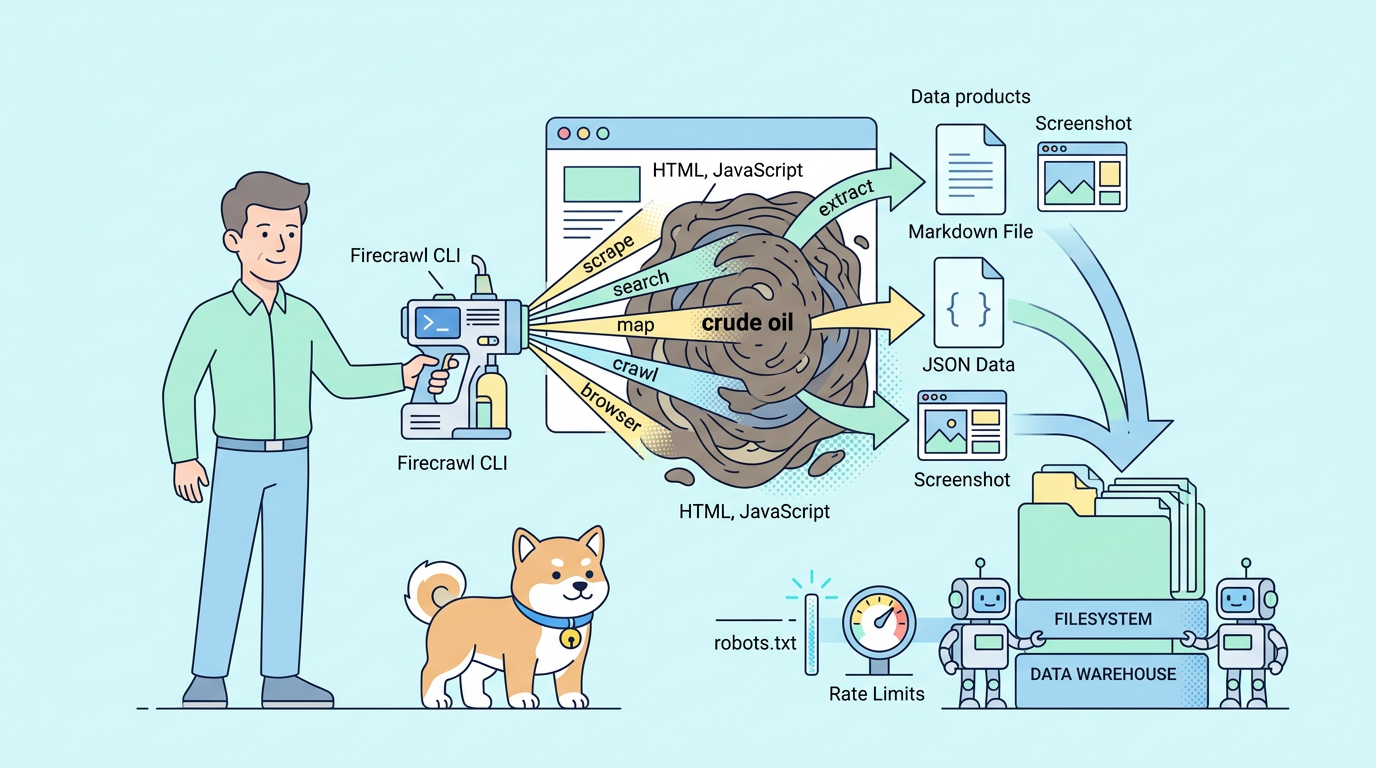
Firecrawl CLI is a unified terminal tool that lets AI agents and developers scrape, search, map, crawl, and automate browsers on any website with clean markdown, JSON, screenshots, and more written directly to your filesystem. Run Firecrawl CLI via npx firecrawl (no install needed) or install globally, then connect to Claude Code, Cursor, or OpenCode with a single firecrawl init command that adds the skill automatically.
You install Firecrawl CLI because AI agents and developers need reliable, real-time web data without brittle custom scripts or blocked requests. Firecrawl CLI unifies scraping, web search, site mapping, recursive crawling, and cloud browser sessions into one terminal-native tool. It outputs clean markdown, structured JSON, screenshots, or HTML directly to your filesystem, keeping token counts low and context precise for LLMs. Agents like Claude Code, Cursor, and OpenCode leverage Firecrawl CLI daily to fetch fresh content from JavaScript-rendered pages, dynamic sites, or protected flows that traditional tools cannot handle.
You prepare your system, install Firecrawl CLI, authenticate, explore core commands, integrate with agents, and apply best practices. Firecrawl CLI manages concurrency, rate limits, and local caching automatically so you concentrate on extracting valuable data. Precise flag choices in Firecrawl CLI such as format selectors or wait timers create substantial improvements in output quality and efficiency.
What Firecrawl CLI Delivers and Why It Outperforms Traditional Web Tools
Firecrawl CLI renders JavaScript natively through cloud browsers, respects anti-bot protections, and delivers >80% content recall on complex sites where cheerio-based or basic Puppeteer scripts fail. You receive LLM-optimized markdown by default, stripped of boilerplate, which reduces context window pressure when feeding results to agents.
Firecrawl CLI writes files locally instead of streaming large payloads, enabling bash-powered search over scraped content without repeated API calls. You combine Firecrawl CLI scrape, search, map, crawl, and browser commands in scripts or agent loops seamlessly. These capabilities eliminate the need for separate libraries, headless instances, or proxy rotations. Small decisions like using --only-main-content in Firecrawl CLI yield cleaner, cheaper outputs that compound into major productivity gains.
Preparing Your Environment Before Installing Firecrawl CLI
You verify Node.js ≥18 because Firecrawl CLI depends on modern npm features. Run node --version in your terminal. Update via your package manager or nvm if needed.
You create a workspace directory to organize Firecrawl CLI outputs:
mkdir firecrawl-cli-projects && cd firecrawl-cli-projectsThis prevents clutter and makes it easy to git-track datasets. You optionally disable telemetry:
export FIRECRAWL_NO_TELEMETRY=1Installing Firecrawl CLI Using the Recommended Init Method for Agents
The fastest path installs Firecrawl CLI, authenticates, and adds agent skills in one step. Execute:
npx -y firecrawl-cli@latest init --all --browserFirecrawl CLI opens your browser for Firecrawl account login (or signup), generates/stores your API key securely, and configures skills for Claude Code, Cursor, and other compatible agents. Restart your agent afterward so it detects the new Firecrawl CLI capabilities. This method equips Firecrawl CLI globally and enables MCP/serverless browser access.
Installing Firecrawl CLI Globally via npm for Frequent Use
For permanent, low-latency access across projects, install Firecrawl CLI globally:
npm install -g firecrawl-cliVerify with:
firecrawl --versionFirecrawl CLI now responds instantly from any directory without npx overhead.
Authenticating Firecrawl CLI and Checking Your Configuration
Authentication unlocks full Firecrawl CLI features. Run:
firecrawl loginFirecrawl CLI prompts browser-based OAuth. Alternatively, set your key manually:
export FIRECRAWL_API_KEY=fc-your-key-hereCheck status anytime:
firecrawl --statusThis displays credits, concurrency limits, and auth state. View full config:
firecrawl view-configSwitch accounts with firecrawl logout then re-login. For local/self-hosted Firecrawl instances, use --api-url http://localhost:3002 to bypass cloud auth and credits.
Mastering the Scrape Command in Firecrawl CLI
You extract content from any URL with:
firecrawl scrape https://example.com --only-main-contentFirecrawl CLI returns clean markdown and saves to ./output.md when you add -o output.md. Always prefer --only-main-content to remove nav, ads, and sidebars, slashing token usage.
Request multiple formats:
firecrawl scrape https://example.com --format markdown,json,html,links,images --prettyFirecrawl CLI outputs structured JSON containing all requested data. Capture screenshots: --screenshot or --full-page-screenshot. Handle slow loaders with --wait-for 5000.
Filter precisely:
firecrawl scrape https://docs.example.com --include-tags main,article --exclude-tags nav,footer,scriptAdd --timing to benchmark performance. Firecrawl CLI stores results locally, ready for piping or agent ingestion.
Performing Web Search with Firecrawl CLI
You search the internet and scrape top results together:
firecrawl search "latest AI agent benchmarks" --scrape --limit 8 --scrape-formats markdownFirecrawl CLI fetches results, extracts content, and saves files. Filter by recency --tbs qdr:w, location, or source type. Combine search with browser sessions for deeper verification. Firecrawl CLI therefore supports full research loops in one tool.
Mapping Websites Using Firecrawl CLI
Discover all URLs before deep extraction:
firecrawl map https://example.com -o sitemap.jsonFirecrawl CLI returns a structured list with metadata. Feed filtered URLs into scrape or crawl commands. Firecrawl CLI honors robots.txt and polite crawling automatically.
Crawling Entire Sites Recursively with Firecrawl CLI
Crawl comprehensively:
firecrawl crawl https://example.com --wait --progress -o crawl-output.jsonFirecrawl CLI follows internal links, scrapes pages, and stores everything locally. Control depth, max pages, and concurrency to manage costs. Real-time progress reporting lets you monitor or cancel large jobs.
Automating Browser Sessions in Firecrawl CLI
Handle interactive flows with cloud browsers:
firecrawl browser launch-sessionFirecrawl CLI returns a session ID. Execute actions:
firecrawl browser execute "open https://news.ycombinator.com" --session <id>
firecrawl browser execute "click .titleline > a" --session <id>
firecrawl browser execute "scrape" --session <id>
Firecrawl CLI supports clicks, typing, navigation, and extraction after dynamic interactions. Close sessions to free resources. Firecrawl CLI replaces complex Puppeteer code with simple, agent-readable commands.
Advanced Firecrawl CLI Configuration and Global Flags
Customize persistently:
firecrawl config --api-url https://your-custom-endpoint --concurrency 5Firecrawl CLI applies these on every run. Force JSON output globally or adjust headers. Monitor credits before big operations with --status. Export FIRECRAWL_API_KEY in your shell profile for seamless sessions.
Integrating Firecrawl CLI with AI Coding Agents
Install the Firecrawl CLI skill once (npx -y firecrawl-cli@latest init --all), and agents discover it automatically. In CLI + Skills mode, agents run Firecrawl CLI commands explicitly when needed. In MCP mode, agents call native tools invisibly.
Firecrawl CLI returns local file paths instead of raw content, preserving lean context windows. Agents therefore perform reliable web research without extra prompting.
Troubleshooting Firecrawl CLI Issues Efficiently
Authentication fails? Re-run firecrawl login. Rate limits hit? Lower concurrency or check dashboard for plan upgrades. Empty results on JS-heavy sites? Increase --wait-for or enable --only-main-content. Use --timing for diagnostics. Clear credentials with firecrawl logout when switching keys.
Best Practices to Get the Most from Firecrawl CLI
Always include --only-main-content for noise-free markdown. Use descriptive output filenames and dedicated folders. Test small scopes before full crawls. Combine search → map → crawl pipelines. Version-control output dirs for reproducible datasets. Review weekly credit usage to stay efficient. These habits keep Firecrawl CLI fast, cost-effective, and dependable.
Complementing Firecrawl CLI Workflows with Apidog
Download Apidog for free and import Firecrawl endpoints (scrape, search, crawl, etc.) into collections. Apidog visualizes requests, stores your Firecrawl CLI API key as a variable, mocks responses, and runs automated tests. You debug complex Firecrawl CLI options or custom payloads before terminal execution. Firecrawl CLI + Apidog delivers end-to-end confidence: current web data plus verified API behavior.
Conclusion
You now command every aspect of Firecrawl CLI from installation and authentication to advanced scraping, searching, mapping, crawling, and browser automation in Firecrawl CLI. Firecrawl CLI turns chaotic web access into a clean, terminal-first pipeline that powers agents and developers alike.
Run the init command today, test a scrape, and build from there. Firecrawl CLI rewards careful flag usage and experimentation with dramatically better results.
Download Apidog for free now to supercharge your Firecrawl CLI testing and API validation. Install Firecrawl CLI, use Firecrawl CLI, and unlock real-time web mastery.
Additional resources
- Firecrawl CLI documentation → https://docs.firecrawl.dev/sdks/cli
- Firecrawl main site → https://www.firecrawl.dev
- GitHub repository → https://github.com/firecrawl/cli
- API reference → https://docs.firecrawl.dev/api-reference
- Dashboard / API key → https://app.firecrawl.dev
- Apidog free API client → https://apidog.com