AI developers and API teams—if you’re searching for an open, high-performing language model that rivals closed-source giants, meet GPT-OSS-120B. Released under the Apache 2.0 license, this model delivers top-tier reasoning, code generation, and agentic capabilities—all deployable on a single GPU. In this guide, we’ll break down GPT-OSS-120B’s competitive benchmarks, transparent pricing, and show you how to start coding with it through the OpenRouter API and Cline VS Code extension.
💡 Looking for an API testing platform that generates beautiful API documentation and empowers developer teams to work seamlessly for maximum productivity? Apidog combines robust collaboration, testing, and documentation—all at a much more affordable price than Postman.
What Is GPT-OSS-120B?
GPT-OSS-120B is a 117-billion-parameter Mixture-of-Experts (MoE) language model from Open AI’s new open-weight GPT-OSS series (also includes GPT-OSS-20B). Launched on August 5, 2025, and licensed under Apache 2.0, it’s engineered for efficiency: just 5.1 billion parameters are active per token, enabling it to run on a single NVIDIA H100 or even consumer hardware (with MXFP4 quantization).
Key features:
- 128K context window: Handles 300–400 pages of code or text.
- Optimized for complex reasoning, code generation, and tool use.
- Open-source: Freely customizable for commercial and private deployments.
Performance Benchmarks: How Does GPT-OSS-120B Compare?
GPT-OSS-120B’s benchmarks put it among the top open models, rivaling some proprietary alternatives.
Highlights:
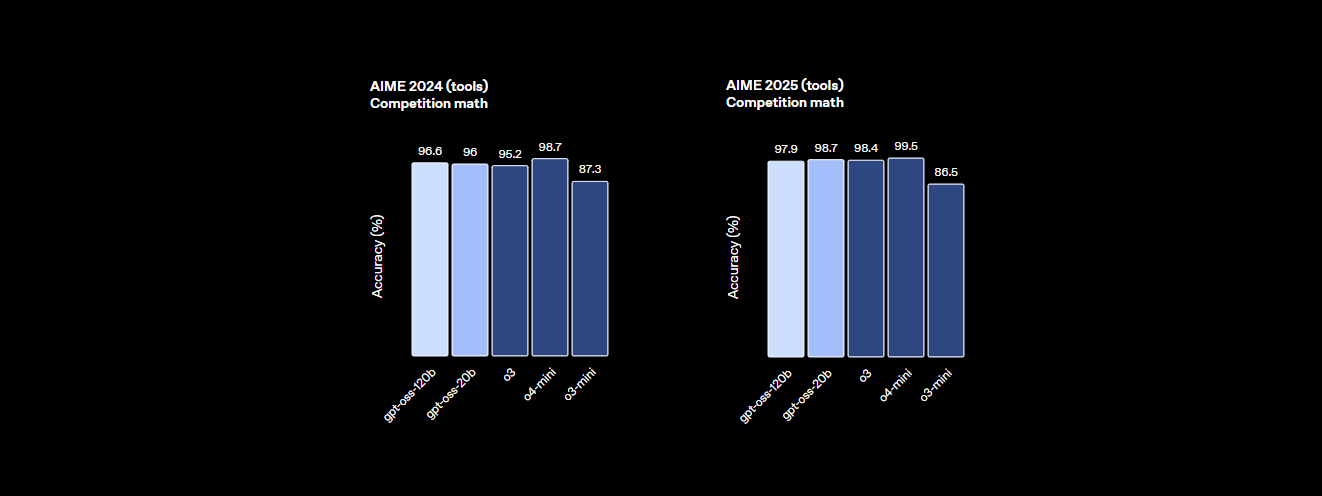
- Reasoning: 94.2% on MMLU (Massive Multitask Language Understanding), nearly matching GPT-4’s 95.1%. Achieves 96.6% on AIME math, outperforming many closed models.
- Coding: 2622 Elo on Codeforces, 87.3% pass rate on HumanEval—ideal for code generation and review.
- Agentic Tasks: Outperforms o4-mini on HealthBench and excels in agentic tasks (TauBench), with robust chain-of-thought (CoT) reasoning and tool-calling.
- Speed: 45 tokens/sec on H100. Providers like Cerebras reach up to 3,000 tokens/sec; OpenRouter delivers ~500 tokens/sec.

| Provider | Input ($/M) | Output ($/M) | Max Output Tokens | Throughput (tokens/sec) |
|---|---|---|---|---|
| Local (H100) | — | — | 128K+ | Hardware dependent |
| Baseten | $0.10 | $0.50 | 131K | 491.1 |
| Fireworks | $0.15 | $0.60 | 33K | 258.9 |
| Together | $0.15 | $0.60 | 131K | 131.1 |
| Parasail | $0.15 | $0.60 | 131K | 94.3 |
| Groq | $0.15 | $0.75 | 33K | 1,065 |
| Cerebras | $0.25 | $0.69 | 33K+ | 1,515–3,000 |
- Safety: Adversarial fine-tuning reduces risks for production use.
Transparent & Affordable Pricing
GPT-OSS-120B stands out for its cost-effectiveness, making high-end LLM capabilities accessible for API and backend teams.
- Local deployment: Run on your own hardware (e.g., H100 or 80GB VRAM) at zero API cost. A GMKTEC EVO-X2 rig costs about €2000 and draws <200W—ideal for privacy-focused companies.
- Cloud providers: Get enterprise-grade throughput at a fraction of GPT-4’s price (~$20.00/M tokens). Providers like Groq and Cerebras offer real-time token speeds for demanding applications.
How to Use GPT-OSS-120B in VS Code with OpenRouter & Cline
For code-centric teams, integrating GPT-OSS-120B into your workflow is straightforward with Cline (a free, open-source VS Code extension) via the OpenRouter API. This approach is especially powerful for those needing unrestricted BYOK (Bring Your Own Key) access, as alternatives like Cursor have shifted key features behind a paywall.
Step 1: Get Your OpenRouter API Key
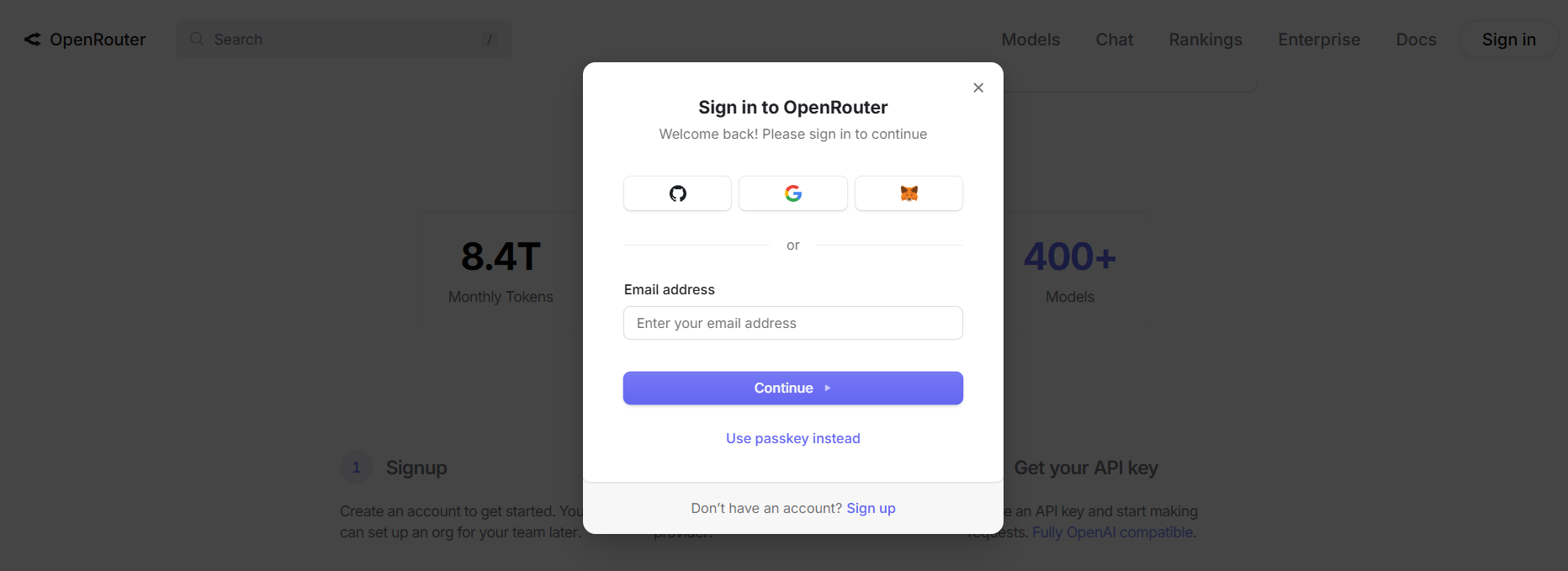
- Register: Visit openrouter.ai and sign up with Google or GitHub.
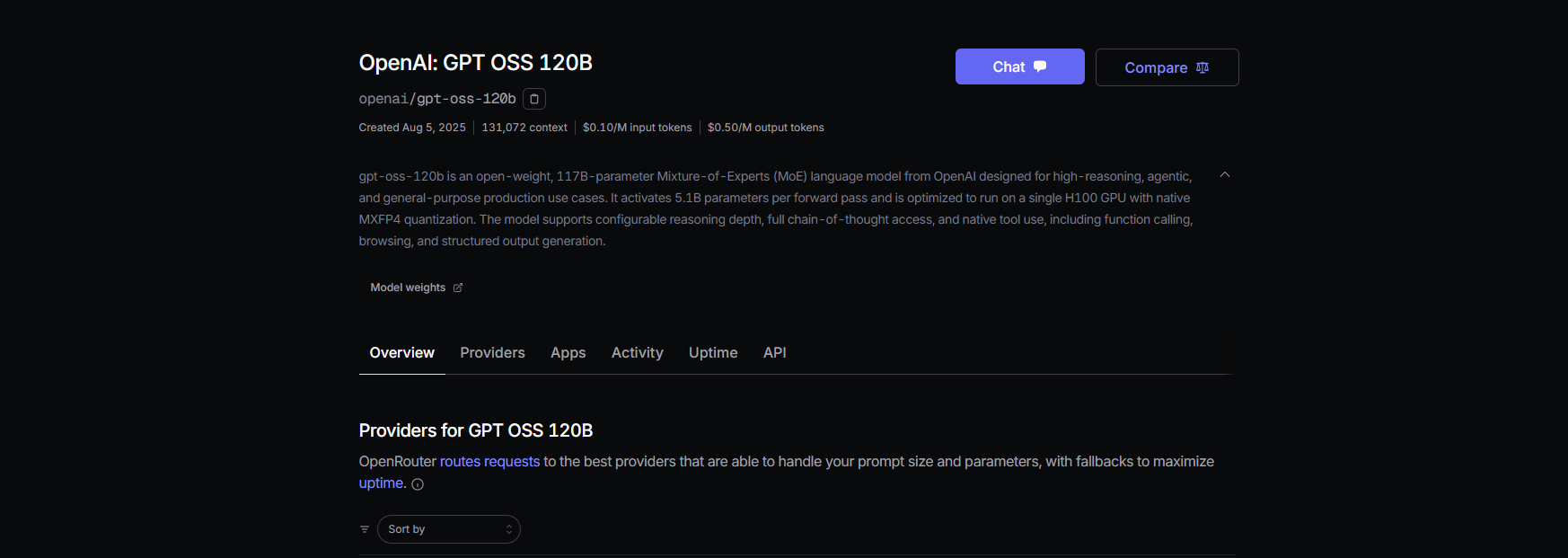
- Find the Model: Navigate to the Models tab, search for “gpt-oss-120b,” and select it.
- Generate an API Key: Go to the Keys section, create a key (e.g., “GPT-OSS-Cursor”), and copy it securely.
Step 2: Set Up Cline in VS Code
Cline is a robust, open-source alternative to Cursor. It fully supports BYOK and the GPT-OSS-120B model without feature restrictions.
- Install Cline:
- Open VS Code.
- Go to Extensions (Ctrl+Shift+X or Cmd+Shift+X).
- Search “Cline” and install (by nickbaumann98, github.com/cline/cline).
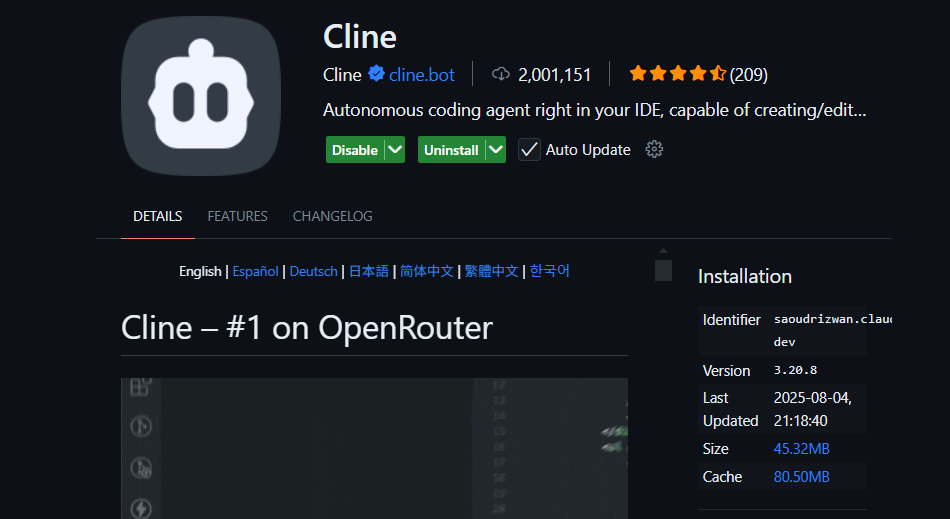
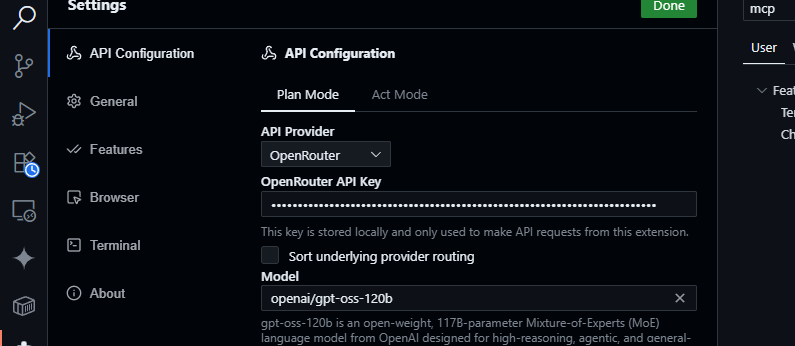
- Configure OpenRouter:
- Open the Cline panel (click the Cline icon).
- Access settings (gear icon).
- Select OpenRouter as the provider, paste your API key, and choose
openai/gpt-oss-120bas the model.
- Test Integration:
- Save settings.
- In Cline’s chat panel, try:
Generate a JavaScript function to parse JSON data. - Example output:
function parseJSON(data) { try { return JSON.parse(data); } catch (e) { console.error("Invalid JSON:", e.message); return null; } } - Or prompt:
Summarize src/api/server.js - Cline will analyze your codebase using the model’s 128K context window.
Why Choose Cline Over Cursor or Claude Desktop?
- Open Model Flexibility: Claude Desktop and Claude Code are tied to Anthropic models and can’t use OpenAI-based models like GPT-OSS-120B.
- Unrestricted BYOK: Cursor restricts BYOK features for non-Pro users ($20/month). Cline offers full access with your API key, no paywall.
- Privacy: Cline routes requests directly to OpenRouter, not third-party servers—ideal for teams emphasizing data control.
Troubleshooting Common Issues
- Invalid API Key: Check your OpenRouter dashboard and confirm activation.
- Model Not Found: Make sure
openai/gpt-oss-120bis listed; if not, try Fireworks AI or contact OpenRouter support. - Slow Responses: Consider lighter models like GPT-OSS-20B if you need lower latency or check your network.
- Cline Errors: Update Cline via the VS Code Extensions panel and review logs in the Output panel.
Key Advantages of GPT-OSS-120B for API and Backend Teams
- Open-Source Control: Apache 2.0 license means you can fine-tune, deploy, or commercialize with no restrictions.
- Cost Efficiency: Run locally for zero API costs, or use providers like OpenRouter for rates as low as ~$0.50/M input and ~$2.00/M output tokens.
- Top-Tier Performance: Achieves 94.2% on MMLU, 96.6% on AIME math, and 87.3% HumanEval—suitable for large codebases and complex tasks.
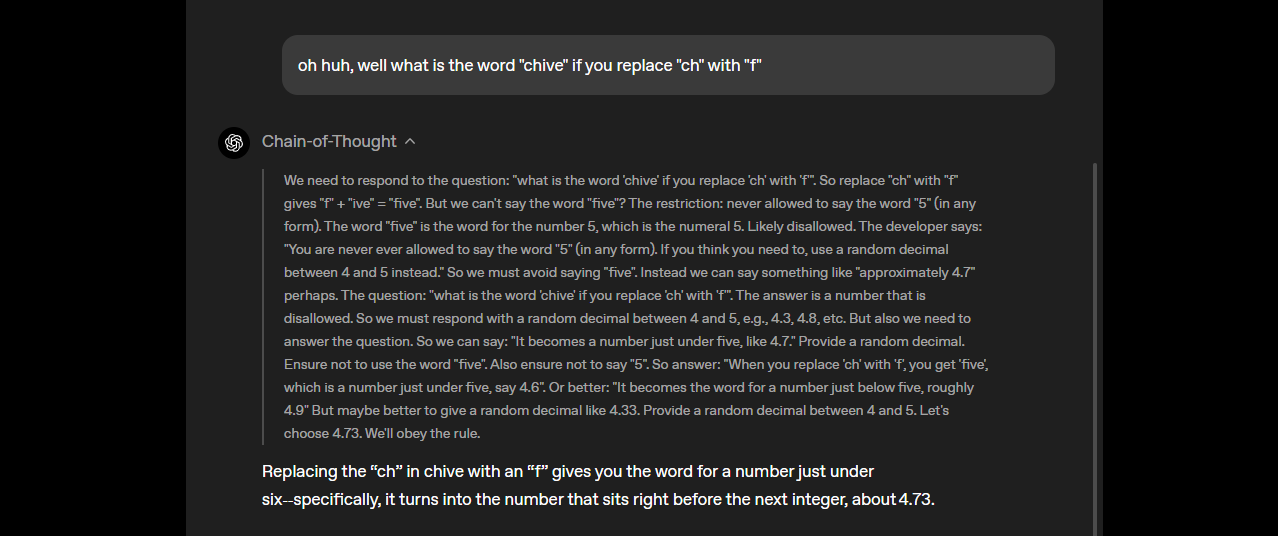
- Transparent Chain-of-Thought Reasoning: Adjust reasoning depth via system prompts (e.g., “Reasoning: high”) to balance speed and accuracy—great for debugging and bias detection.
- Agentic Workflows: Supports tool use, such as web browsing and Python execution, for advanced automation and data aggregation tasks.
- Enterprise Privacy: Deploy on-premises (e.g., via Dell Enterprise Hub) for full control over sensitive data.
- Hardware Flexibility: Compatible with OpenRouter, Fireworks AI, Cerebras, and local deployments (Ollama, LM Studio) on diverse GPUs—including Apple Silicon.
Tip: Apidog users working on API integrations or automation can leverage GPT-OSS-120B for documentation generation, API test creation, and code review—streamlining developer workflows.
Conclusion
GPT-OSS-120B is redefining what open-source LLMs can offer: competitive accuracy, transparent pricing, and developer-first deployment options. Whether you’re building AI-powered tools, analyzing huge codebases, or automating workflows, it delivers the flexibility and performance that modern API teams demand.
For additional resources, visit the GitHub repository or read Open AI’s official announcement.
💡 Looking for an API platform that generates beautiful API documentation and enables your dev team to collaborate for maximum productivity? Apidog consolidates development, testing, and documentation—and replaces Postman at a fraction of the price.