Developers building intelligent applications often face the challenge of integrating cutting-edge models like GPT-5.2 into their workflows. Released by OpenAI as the latest frontier in AI capabilities, GPT-5.2 pushes boundaries in code generation, image perception, and multi-step reasoning. You integrate it not just to experiment, but to deploy robust, scalable solutions that handle complex professional tasks. However, the API's depth—from variant selection to parameter tuning—demands a structured approach. That's where tools like Apidog come in, simplifying API design, testing, and documentation so you focus on innovation rather than boilerplate.
Understanding GPT-5.2: Core Capabilities and Why It Matters for Developers
You select GPT-5.2 because it outperforms predecessors in precision and efficiency. OpenAI positions it as a suite optimized for knowledge work, where it achieves state-of-the-art results across benchmarks. For instance, it scores 80.0% on SWE-Bench Verified for coding tasks, meaning you generate more accurate software solutions with fewer iterations. Moreover, its vision capabilities halve error rates in chart reasoning, enabling applications like automated data visualization tools.
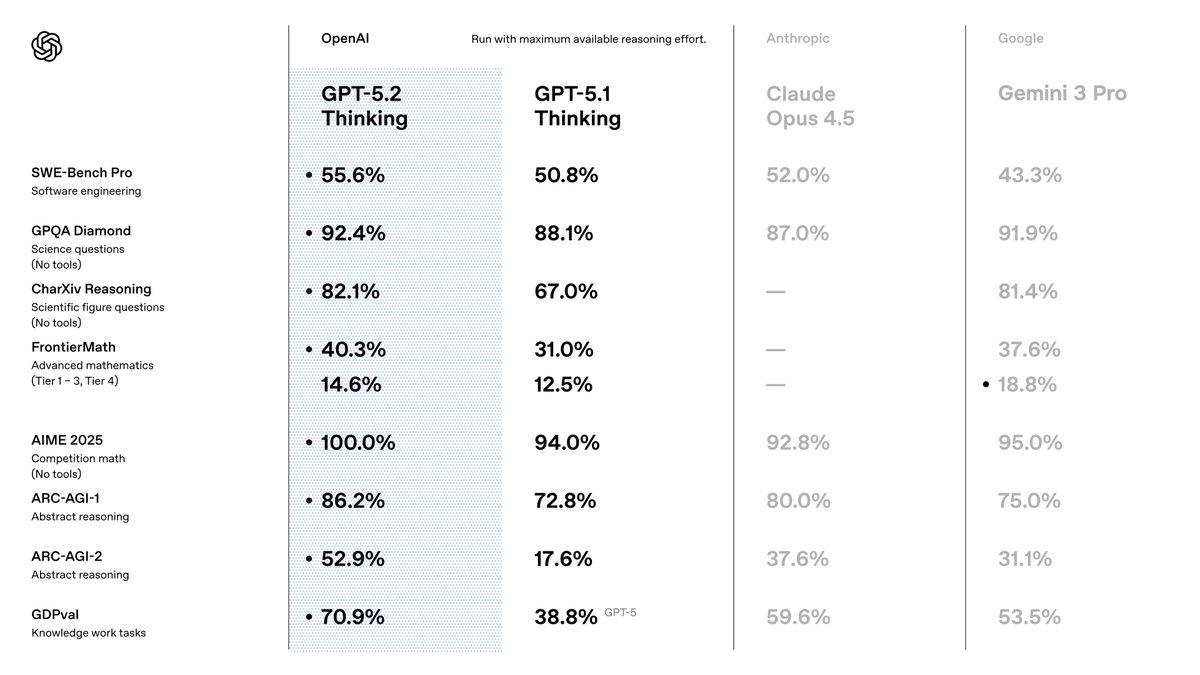
Transitioning from GPT-5.1, you notice enhancements in factuality—30% fewer hallucinations on search-enabled queries—and long-context handling, with near-perfect accuracy up to 256k tokens. These features matter because they reduce post-processing needs in your pipelines. You also benefit from improved tool calling, scoring 98.7% on multi-turn benchmarks, which streamlines agentic systems.
For API users, GPT-5.2 integrates seamlessly into existing OpenAI ecosystems. You access it via the Chat Completions or Responses API, supporting parameters like temperature for creativity control. However, success hinges on choosing the right variant. We explore those next.
Exploring GPT-5.2 Variants: Tailor Performance to Your Needs
GPT-5.2 offers variants that balance speed, depth, and cost, allowing you to match model behavior to task demands. Unlike monolithic models, these options—Instant, Thinking, and Pro—provide flexibility. You activate them through specific model identifiers in your API requests.
Start with GPT-5.2 Instant (gpt-5.2-chat-latest). This variant prioritizes low latency for everyday interactions, such as quick info-seeking or technical writing. Developers favor it for chatbots or real-time assistants, where response times under 200ms prove essential. It handles translations and how-tos with refined accuracy, making it ideal for consumer-facing apps.
Next, consider GPT-5.2 Thinking (gpt-5.2). You deploy this for deeper analysis, like long document summarization or logical planning. Its reasoning engine excels in math and decision-making, solving 40.3% of FrontierMath problems. Use the reasoning parameter here—set to 'high' or 'xhigh'—to amplify output quality on complex queries. For example, in project management tools, it orchestrates multi-step workflows with minimal errors.
Finally, GPT-5.2 Pro (gpt-5.2-pro) targets elite performance on challenging domains. It boasts 93.2% on GPQA Diamond for science questions and shines in programming with fewer edge-case failures. You reserve this for R&D prototypes or high-stakes environments, like financial modeling, where precision outweighs speed.
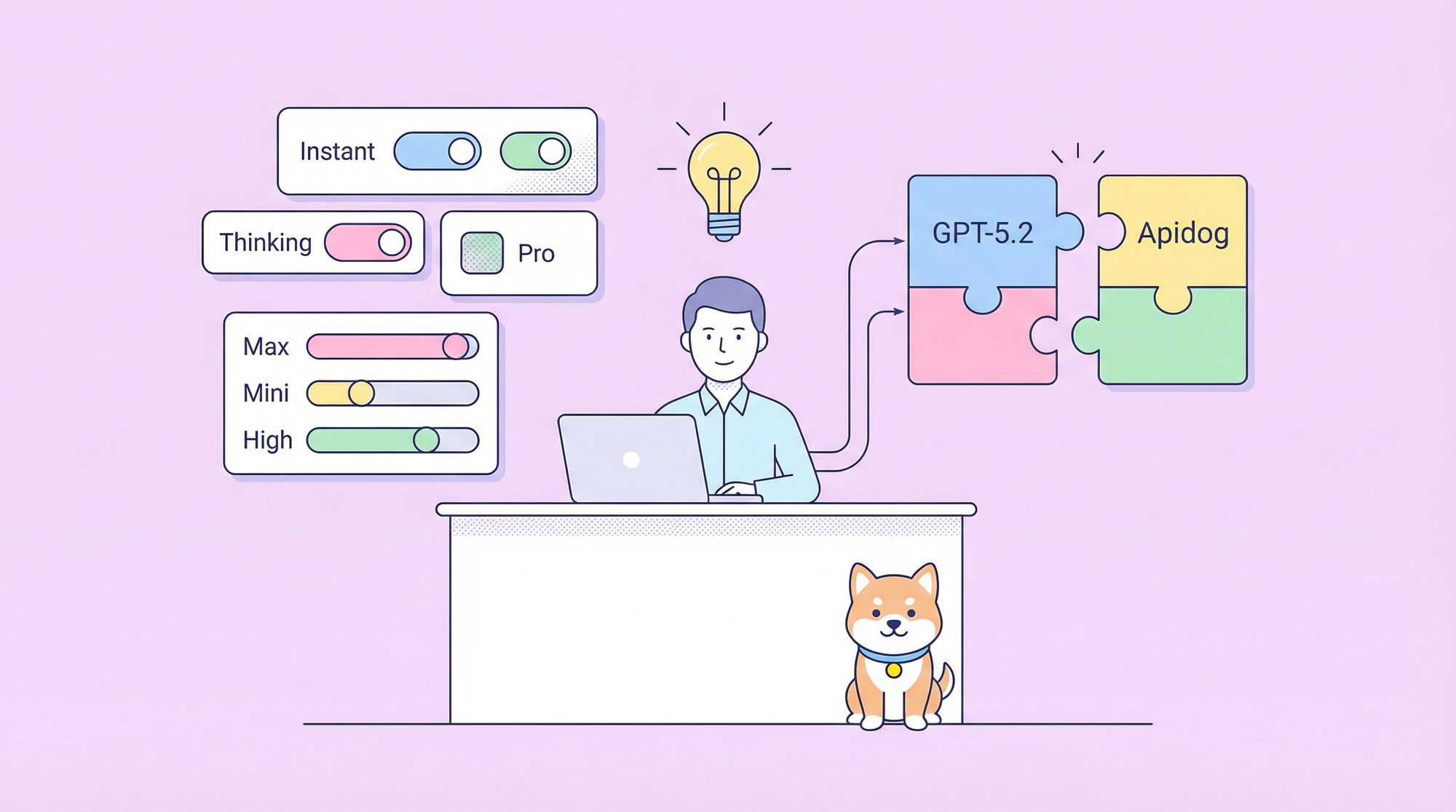
The image you shared highlights toggles for these, including "Max," "Mini," "High," "Low," and "Fast" modes. These align with reasoning efforts: 'none' for instant responses, 'low' for basic tasks, up to 'xhigh' for exhaustive analysis. You toggle them via API params, ensuring the model adapts dynamically. For instance, switch to "Max High Fast" for balanced coding sessions that prioritize velocity without sacrificing depth.
By selecting variants thoughtfully, you optimize resource use. Now, you set up access to make these calls.
Setting Up Your GPT-5.2 API Access: Authentication and Environment Prep
You begin integration by securing API credentials. OpenAI requires an API key, which you generate from the platform dashboard. Navigate to platform.openai.com, create an account if needed, and issue a key under "API Keys."
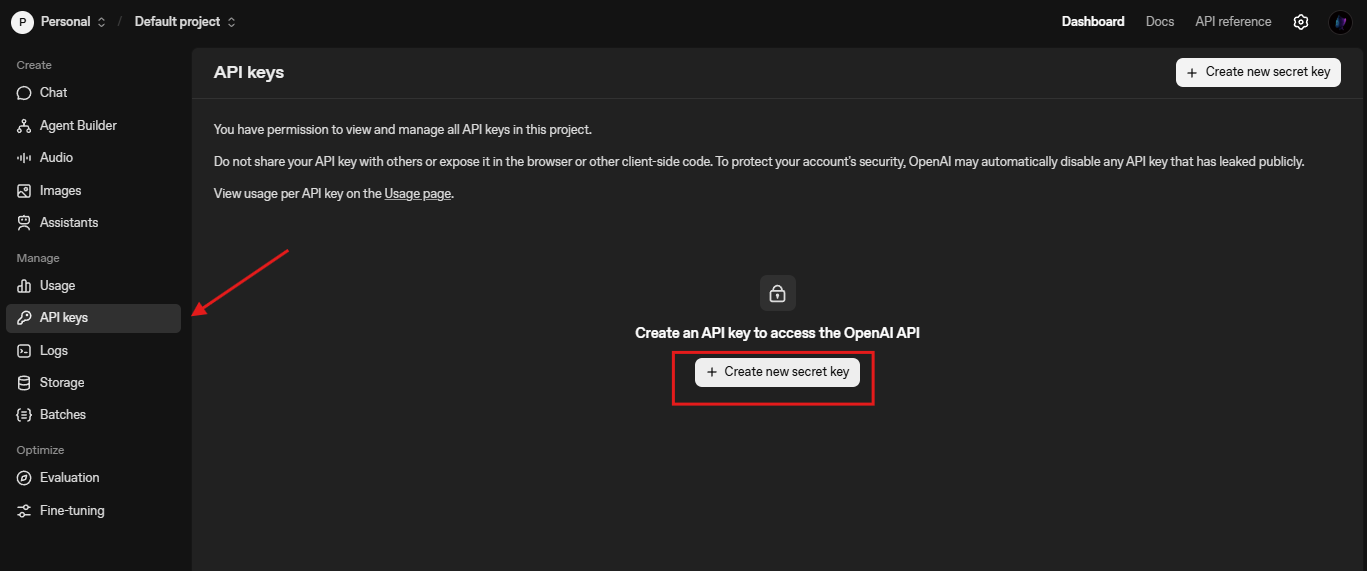
Next, install the OpenAI Python SDK. Run pip install openai in your terminal. This library handles HTTP requests, retries, and streaming out of the box. For Node.js users, npm install openai provides similar functionality. You import it as follows:
from openai import OpenAI
client = OpenAI(api_key=os.getenv("OPENAI_API_KEY"))
Test connectivity with a simple completion:
response = client.chat.completions.create(
    model="gpt-5.2-chat-latest",
    messages=[{"role": "user", "content": "Explain quantum entanglement briefly."}]
)
print(response.choices[0].message.content)
This call verifies setup. If errors arise, check rate limits (default 3,500 RPM for Tier 1) or key validity. You also configure base URL for custom endpoints, like /compact for extended contexts: client = OpenAI(base_url="https://api.openai.com/v1", api_key=...).
With basics in place, you explore request crafting.
Crafting Effective GPT-5.2 API Requests: Parameters and Best Practices
You construct requests using the Chat Completions endpoint (/v1/chat/completions). The payload includes model, messages, and optional params like temperature (0-2 for determinism) and max_tokens (up to 4096 output).
For GPT-5.2 specifics, incorporate reasoning_effort to control depth:
response = client.chat.completions.create(
    model="gpt-5.2",
    messages=[{"role": "user", "content": "Write a Python function for Fibonacci sequence."}],
    reasoning_effort="high",  # Aligns with "Max High" toggle
    temperature=0.7,
    max_tokens=500
)
This generates code with step-by-step reasoning, reducing bugs. You chain messages for conversations, preserving context across turns. For vision tasks, upload images via content with type "image_url":
messages = [
    {"role": "user", "content": [
        {"type": "text", "text": "Describe this chart's trends."},
        {"type": "image_url", "image_url": {"url": "https://example.com/chart.png"}}
    ]}
]
Best practices include batching requests for cost savings and using streaming (stream=True) for real-time UIs. Monitor token usage with usage in responses to refine prompts. Additionally, enable tools for function calling—define schemas for external APIs, and GPT-5.2 executes them autonomously.
To test these efficiently, integrate Apidog. It mocks OpenAI endpoints, letting you simulate variants without hitting live quotas.
Integrating GPT-5.2 with Apidog: Simplify Testing and Documentation
Apidog transforms how you manage GPT-5.2 API workflows. As an all-in-one platform, it supports OpenAPI spec imports, request building, and automated testing. You import the OpenAI schema into Apidog, then design collections for GPT-5.2 calls.
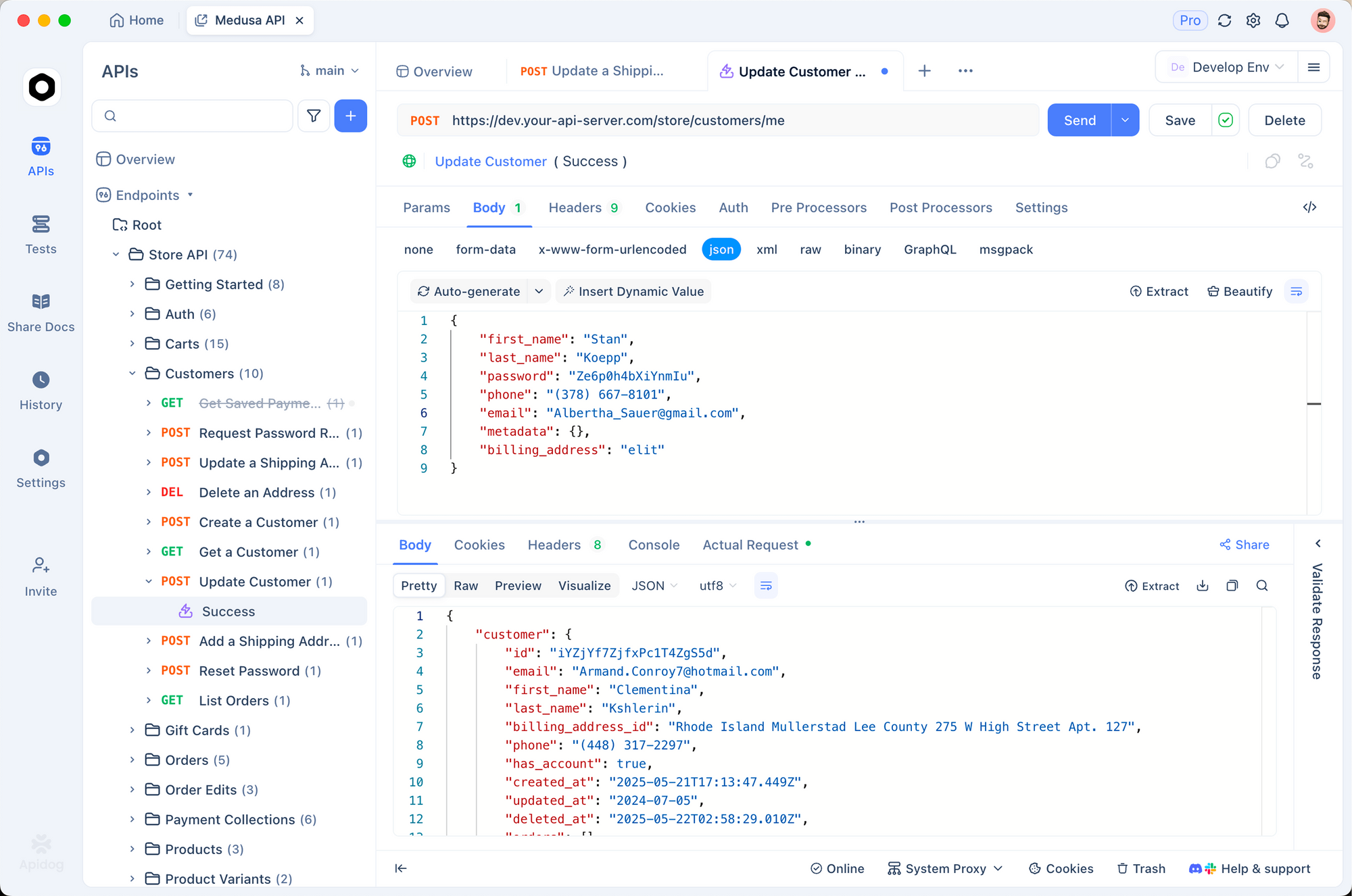
Start by creating a new project in Apidog. Add an HTTP request to https://api.openai.com/v1/chat/completions, set headers (Authorization: Bearer YOUR_KEY, Content-Type: application/json), and paste a sample body. Toggle variables for models like "gpt-5.2-pro" to compare outputs side-by-side.
Apidog's strength lies in its mocking server. You generate fake responses mimicking GPT-5.2's JSON structure, ideal for offline development. For instance, simulate a "Max Extra High" response with detailed reasoning traces. Run tests with assertions on token counts or hallucination rates.
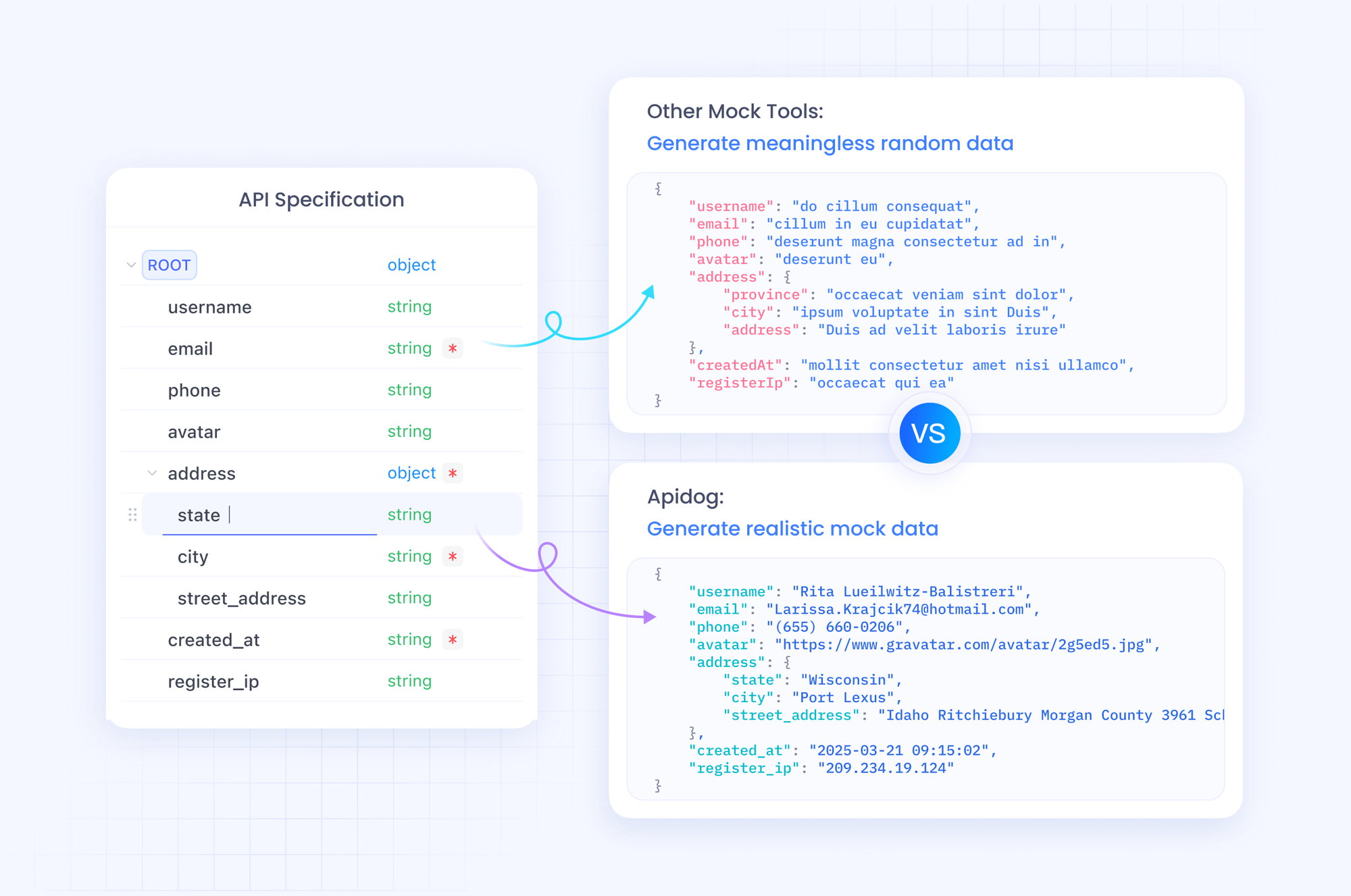
Furthermore, document your API with Apidog's built-in editor. Generate interactive docs that colleagues use to explore endpoints. Export to Postman or HAR for portability. In production, Apidog monitors calls, alerting on anomalies like high latency in "Low Fast" modes.
By weaving Apidog into your process, you accelerate iteration. Download it free and import your first GPT-5.2 request—experience the difference in minutes.
GPT-5.2 API Pricing: Balance Cost and Capability Strategically
You cannot ignore pricing when scaling GPT-5.2 applications. OpenAI structures costs per million tokens, with tiers reflecting usage volume. For GPT-5.2 Instant (gpt-5.2-chat-latest), expect $1.75 per 1M input tokens and $14 per 1M output tokens. Cached inputs drop to $0.175—a 90% savings—encouraging repeated contexts.
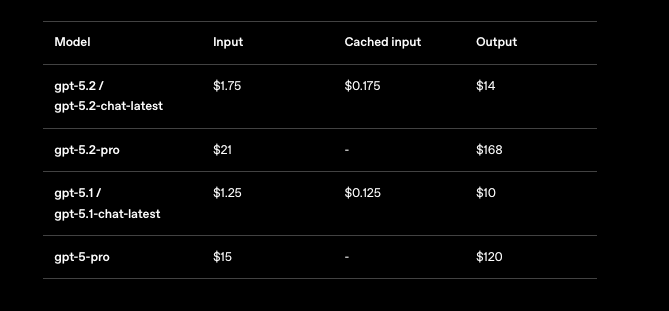
GPT-5.2 Thinking (gpt-5.2) mirrors these rates, making it cost-effective for balanced tasks. However, GPT-5.2 Pro (gpt-5.2-pro) demands more: $21 per 1M input and $168 per 1M output. This premium reflects its superior accuracy on pro-level queries, but you evaluate ROI carefully.
Overall, GPT-5.2 proves token-efficient, often lowering total spend versus GPT-5.1 for quality outputs. You track via the dashboard's usage analyzer. For enterprises, negotiate custom tiers. Tools like Apidog help forecast costs by logging simulated token flows.
Understanding these figures, you proceed to hands-on examples.
Practical Examples: Code Generation and Vision Tasks with GPT-5.2
You apply GPT-5.2 in tangible scenarios. Consider code generation: Prompt for a React component with state management.
response = client.chat.completions.create(
    model="gpt-5.2",
    messages=[{"role": "user", "content": "Build a React todo list with useReducer."}],
    reasoning_effort="medium"
)
The output yields clean, commented code—80% benchmark-aligned. You refine by iterating: Follow up with "Optimize for performance."
For vision, analyze screenshots. Upload a UI mockup and query: "Suggest accessibility improvements." GPT-5.2 identifies issues like color contrast, leveraging its halved error rate.
In multi-tool agents, define functions for database queries. GPT-5.2 orchestrates calls, reducing latency in mega-agents with 20+ tools.
These examples demonstrate versatility. Yet, errors occur—handle them with retries and fallbacks.
Handling Errors and Edge Cases in GPT-5.2 API Calls
You encounter rate limits or invalid params. Wrap calls in try-except:
try:
    response = client.chat.completions.create(...)
except openai.RateLimitError:
    time.sleep(60)  # Backoff
    response = client.chat.completions.create(...)
For hallucinations, cross-verify with search tools. In long contexts, use /compact to compress histories. Monitor for bias in sensitive apps, applying filters.
Apidog aids here: Script tests for error scenarios, ensuring resilience.
Advanced Optimizations: Scaling GPT-5.2 for Production
You scale by fine-tuning prompts and using Assistants API for persistent threads. Implement caching for repeated inputs. For global apps, route via edge servers.
Integrate with frameworks like LangChain: Chain GPT-5.2 with vector stores for RAG systems.
Finally, stay updated—OpenAI iterates rapidly.
Conclusion: Master GPT-5.2 API and Build the Future
You now possess the tools to wield GPT-5.2 effectively. From variant selection to Apidog-enhanced testing, apply these steps to elevate your projects. Pricing remains accessible for thoughtful use, unlocking capabilities once reserved for labs.
Experiment today: Prototype a GPT-5.2 agent and measure gains. Share your builds in comments—what challenges do you face? For deeper dives, explore OpenAI docs. Build boldly.