TL;DR
GLM-5V-Turbo is ZhipuAI’s multimodal vision coding model with a 200K context window, 128K max output, and native support for images, video, text, and file inputs. It scored 94.8 on the Design2Code benchmark (vs Claude Opus 4.6’s 77.3) and costs $1.20/M input tokens, $4/M output tokens. This guide covers setup, API integration, and practical examples for vision-based coding tasks.
Introduction
ZhipuAI (operating as Z.ai) released GLM-5V-Turbo on April 1, 2026. It’s their first model built specifically for vision-based coding tasks, where the input is an image, a screenshot, or a video, and the output is working code.
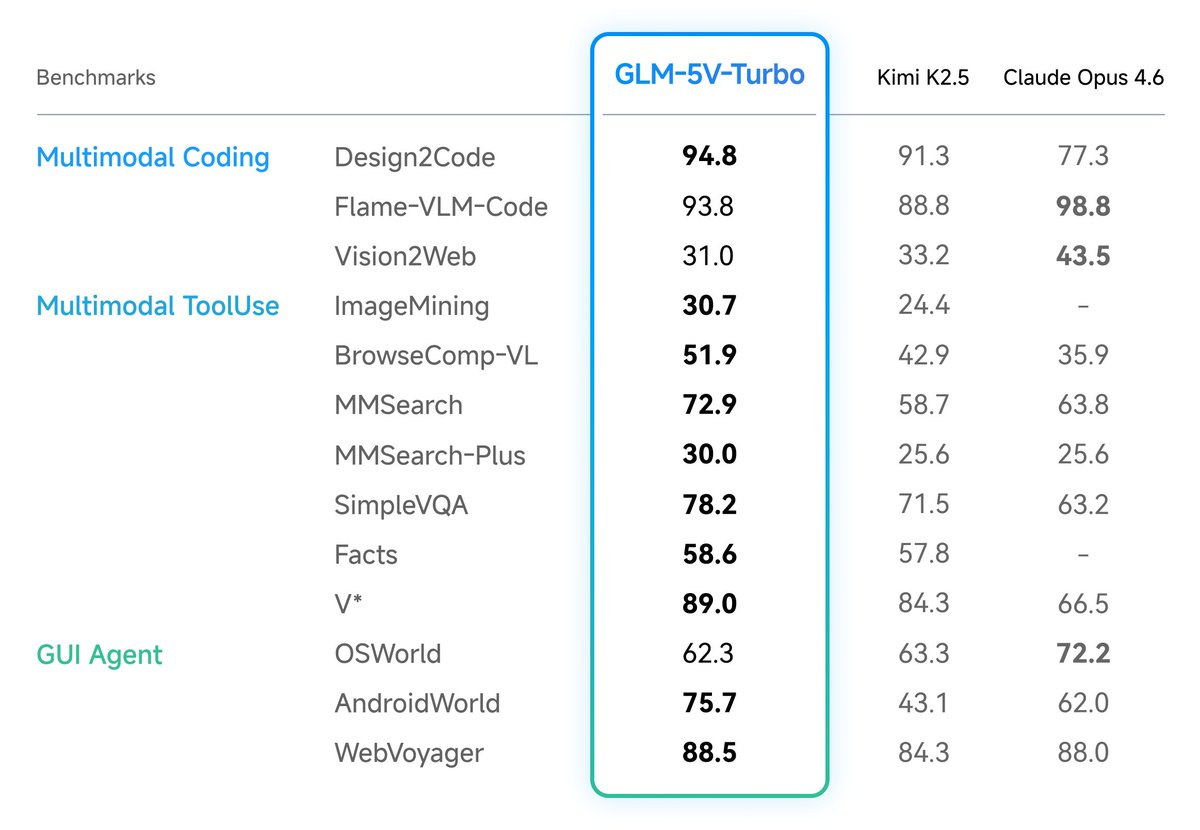
The model sits in a family that includes GLM-5 (text-only, 744B parameters) and GLM-5-Turbo (optimized text coding). GLM-5V-Turbo adds native multimodal understanding on top of the Turbo variant, using a CogViT vision encoder and Multi-Token Prediction (MTP) architecture.
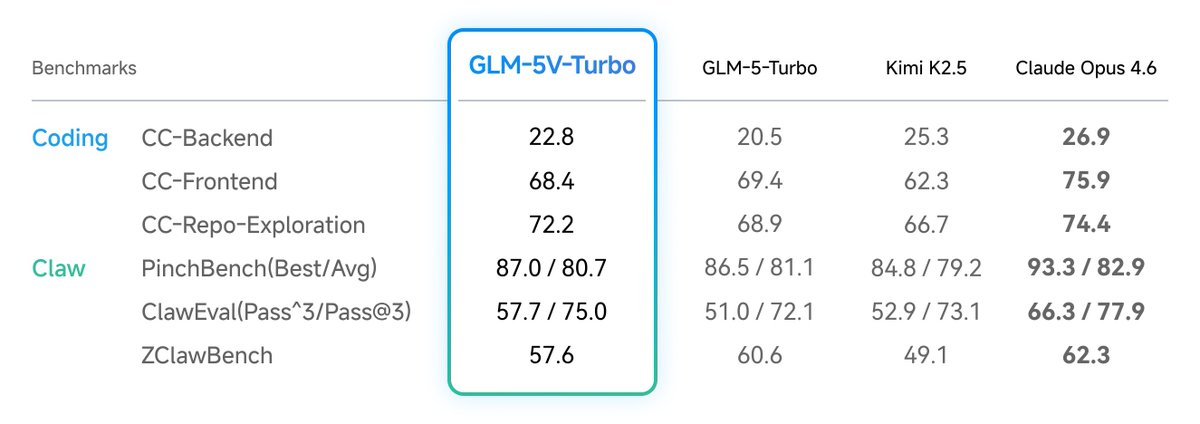
The standout number: 94.8 on Design2Code, where models reproduce UI mockups as HTML/CSS. Claude Opus 4.6 scored 77.3 on the same test. That’s a 22% gap on the specific task of turning visual designs into code.
This guide shows you how to call the GLM-5V-Turbo API, send images and video, enable thinking mode, stream responses, use function calling, and test your integration with Apidog.
What GLM-5V-Turbo can do
Core specifications
| Specification | Value |
|---|---|
| Context window | 200K tokens (202,752) |
| Max output | 128K tokens (131,072) |
| Input modalities | Image, video, text, file (PDF, Word) |
| Output modality | Text |
| Input pricing | $1.20 per million tokens |
| Output pricing | $4.00 per million tokens |
| Cache read pricing | $0.24 per million tokens |
| Release date | April 1, 2026 |
| API endpoint | https://api.z.ai/api/paas/v4/chat/completions |
Supported capabilities
- Thinking mode with configurable reasoning tokens (
<think>tags) - Streaming output for real-time responses
- Function calling for tool integration
- Context caching for long conversation optimization
- Structured output via response format configuration
Where it excels
GLM-5V-Turbo is purpose-built for a narrow but high-value category: looking at visual content and writing code from it. The key use cases:
Frontend recreation from design mockups. Hand it a Figma screenshot or design comp and it generates pixel-accurate HTML/CSS. The 94.8 Design2Code score backs this up with hard numbers.
GUI autonomous exploration. The model integrates with OpenClaw (ZhipuAI’s agent framework) for autonomous website browsing, form filling, and interaction testing. It scored well on AndroidWorld and WebVoyager benchmarks for GUI operation.
Code debugging from screenshots. Send a screenshot of a broken UI and the model identifies rendering issues, layout bugs, and CSS conflicts.
Document extraction. Process PDFs, Word documents, and scanned images to extract structured data, tables, and text.
Where it doesn’t
On pure text coding (no visual input), Claude and GPT-5 still lead across backend tasks, repository exploration, and systems architecture. GLM-5V-Turbo’s strength is specifically when visual input drives the coding task.
Getting started: API setup
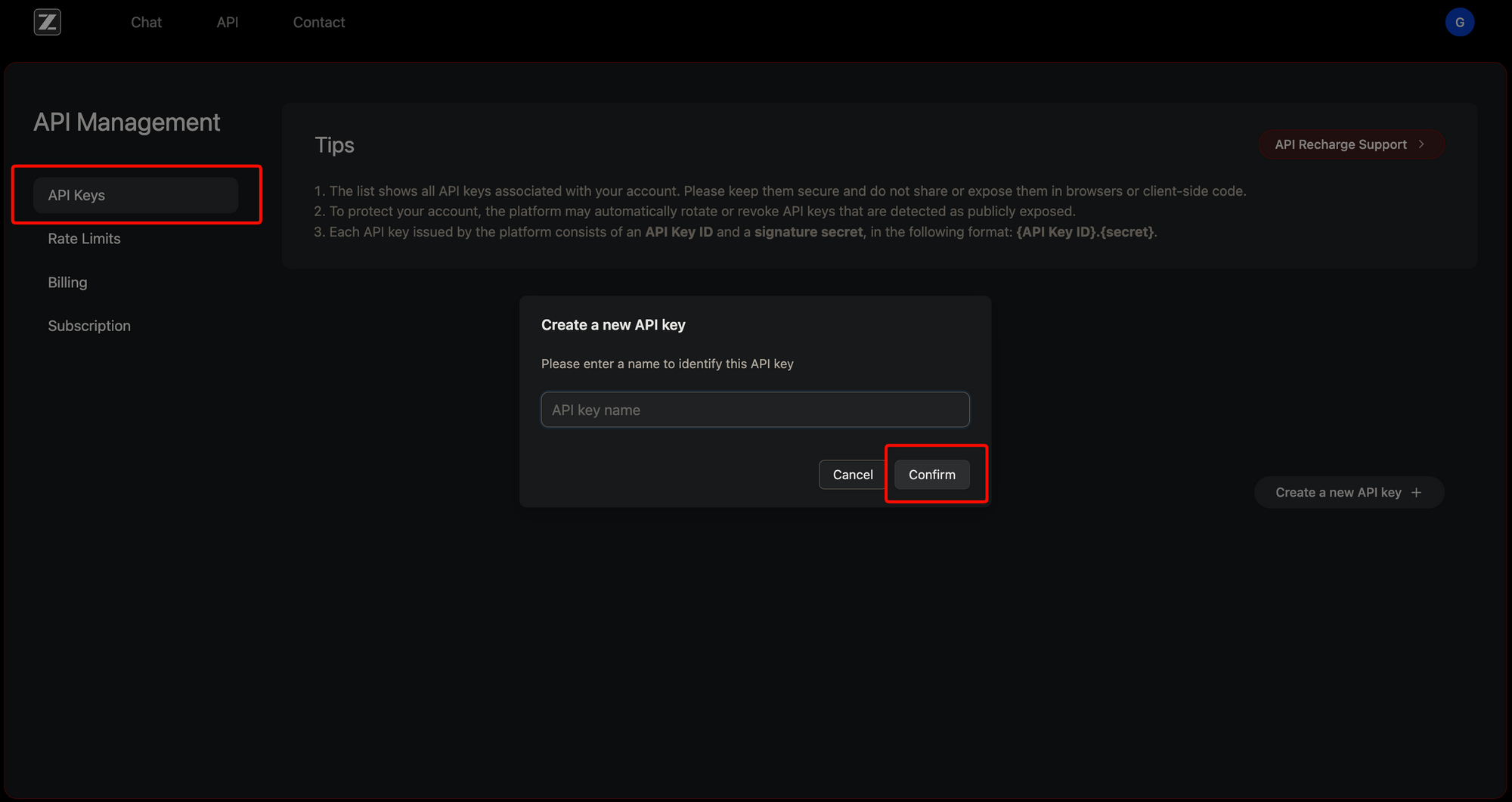
Get your API key
- Sign up at z.ai
- Navigate to the API keys section in your dashboard
- Generate a new key
- Store it securely; you’ll pass it as a Bearer token
Base configuration
All requests go to:
POST https://api.z.ai/api/paas/v4/chat/completions
Required headers:
Authorization: Bearer YOUR_API_KEY
Content-Type: application/json
The API follows OpenAI-compatible conventions, so if you’ve worked with the OpenAI or Anthropic APIs, the request format will feel familiar.
Sending your first request with cURL
Basic image analysis
curl -X POST https://api.z.ai/api/paas/v4/chat/completions \
  -H "Authorization: Bearer $ZAI_API_KEY" \
  -H "Content-Type: application/json" \
  -d '{
    "model": "glm-5v-turbo",
    "messages": [
      {
        "role": "user",
        "content": [
          {
            "type": "image_url",
            "image_url": {
              "url": "https://example.com/dashboard-mockup.png"
            }
          },
          {
            "type": "text",
            "text": "Recreate this dashboard UI as responsive HTML and CSS. Use Tailwind CSS classes."
          }
        ]
      }
    ]
  }'
With thinking mode enabled
Thinking mode adds a reasoning step before the model generates its response. This improves accuracy on complex coding tasks at the cost of additional output tokens.
curl -X POST https://api.z.ai/api/paas/v4/chat/completions \
  -H "Authorization: Bearer $ZAI_API_KEY" \
  -H "Content-Type: application/json" \
  -d '{
    "model": "glm-5v-turbo",
    "messages": [
      {
        "role": "user",
        "content": [
          {
            "type": "image_url",
            "image_url": {
              "url": "https://example.com/login-form-screenshot.png"
            }
          },
          {
            "type": "text",
            "text": "This login form has a layout bug on mobile. Identify the issue and provide fixed CSS."
          }
        ]
      }
    ],
    "thinking": {
      "type": "enabled"
    }
  }'
When thinking mode is enabled, the response includes reasoning_content alongside the standard content field. The reasoning tokens show the model’s step-by-step analysis before producing the final answer.
Python SDK integration
Installation
pip install zai-sdk
Or pin a specific version:
pip install zai-sdk==0.0.4
Basic image-to-code
from zai import ZaiClient

client = ZaiClient(api_key="your-api-key")

response = client.chat.completions.create(
    model="glm-5v-turbo",
    messages=[
        {
            "role": "user",
            "content": [
                {
                    "type": "image_url",
                    "image_url": {
                        "url": "https://example.com/pricing-page.png"
                    }
                },
                {
                    "type": "text",
                    "text": "Convert this pricing page design into a React component using Tailwind CSS. Include responsive breakpoints for mobile, tablet, and desktop."
                }
            ]
        }
    ],
    thinking={"type": "enabled"}
)

print(response.choices[0].message.content)
Streaming responses
For long code generation tasks (entire page layouts, multi-component UIs), streaming gives you output in real time instead of waiting for the full response:
from zai import ZaiClient

client = ZaiClient(api_key="your-api-key")

response = client.chat.completions.create(
    model="glm-5v-turbo",
    messages=[
        {
            "role": "user",
            "content": [
                {
                    "type": "image_url",
                    "image_url": {
                        "url": "https://example.com/full-page-design.png"
                    }
                },
                {
                    "type": "text",
                    "text": "Build this entire landing page as a single HTML file with embedded CSS and JavaScript. Include smooth scroll, a sticky navbar, and a working contact form."
                }
            ]
        }
    ],
    stream=True
)

for chunk in response:
    delta = chunk.choices[0].delta
    # Print reasoning tokens (thinking mode)
    if delta.reasoning_content:
        print(f"[thinking] {delta.reasoning_content}", end="", flush=True)
    # Print the generated code
    if delta.content:
        print(delta.content, end="", flush=True)
Multi-image input
Send multiple images in a single request. This is useful for comparing designs, providing style references alongside mockups, or sending before/after screenshots for debugging:
response = client.chat.completions.create(
    model="glm-5v-turbo",
    messages=[
        {
            "role": "user",
            "content": [
                {
                    "type": "image_url",
                    "image_url": {"url": "https://example.com/design-mockup.png"}
                },
                {
                    "type": "image_url",
                    "image_url": {"url": "https://example.com/current-implementation.png"}
                },
                {
                    "type": "text",
                    "text": "The first image is the design mockup. The second is the current implementation. Identify all visual differences and provide CSS fixes to match the mockup."
                }
            ]
        }
    ]
)
Function calling
GLM-5V-Turbo supports function calling, letting you integrate it into agentic workflows where the model can request external actions:
tools = [
    {
        "type": "function",
        "function": {
            "name": "save_component",
            "description": "Save a generated React component to a file",
            "parameters": {
                "type": "object",
                "properties": {
                    "filename": {
                        "type": "string",
                        "description": "Component filename, e.g. 'PricingCard.tsx'"
                    },
                    "code": {
                        "type": "string",
                        "description": "The full component source code"
                    },
                    "dependencies": {
                        "type": "array",
                        "items": {"type": "string"},
                        "description": "npm packages this component requires"
                    }
                },
                "required": ["filename", "code"]
            }
        }
    },
    {
        "type": "function",
        "function": {
            "name": "take_screenshot",
            "description": "Take a screenshot of a URL to verify the rendered output",
            "parameters": {
                "type": "object",
                "properties": {
                    "url": {
                        "type": "string",
                        "description": "URL to screenshot"
                    },
                    "viewport": {
                        "type": "string",
                        "description": "Viewport size: 'mobile', 'tablet', or 'desktop'"
                    }
                },
                "required": ["url"]
            }
        }
    }
]

response = client.chat.completions.create(
    model="glm-5v-turbo",
    messages=[
        {
            "role": "user",
            "content": [
                {
                    "type": "image_url",
                    "image_url": {"url": "https://example.com/card-design.png"}
                },
                {
                    "type": "text",
                    "text": "Generate a React component from this card design and save it. Then take a screenshot to verify."
                }
            ]
        }
    ],
    tools=tools,
    tool_choice="auto"
)
Java SDK integration
Maven dependency
<dependency>
    <groupId>ai.z.openapi</groupId>
    <artifactId>zai-sdk</artifactId>
    <version>0.3.0</version>
</dependency>
Gradle
implementation 'ai.z.openapi:zai-sdk:0.3.0'
Basic request
import ai.z.openapi.ZaiClient;
import ai.z.openapi.model.*;
import java.util.Arrays;

public class GLM5VTurboExample {
    public static void main(String[] args) {
        String apiKey = System.getenv("ZAI_API_KEY");

        ZaiClient client = ZaiClient.builder().ofZAI()
            .apiKey(apiKey)
            .build();

        ChatCompletionCreateParams request =
            ChatCompletionCreateParams.builder()
                .model("glm-5v-turbo")
                .messages(Arrays.asList(
                    ChatMessage.builder()
                        .role(ChatMessageRole.USER.value())
                        .content(Arrays.asList(
                            MessageContent.builder()
                                .type("image_url")
                                .imageUrl(ImageUrl.builder()
                                    .url("https://example.com/mockup.png")
                                    .build())
                                .build(),
                            MessageContent.builder()
                                .type("text")
                                .text("Convert this design to HTML with Tailwind CSS.")
                                .build()
                        ))
                        .build()
                ))
                .build();

        ChatCompletionResponse response =
            client.chat().createChatCompletion(request);

        System.out.println(response.getChoices()
            .get(0).getMessage().getContent());
    }
}
Streaming in Java
ChatCompletionCreateParams streamRequest =
    ChatCompletionCreateParams.builder()
        .model("glm-5v-turbo")
        .stream(true)
        .messages(Arrays.asList(
            ChatMessage.builder()
                .role(ChatMessageRole.USER.value())
                .content(Arrays.asList(
                    MessageContent.builder()
                        .type("image_url")
                        .imageUrl(ImageUrl.builder()
                            .url("https://example.com/dashboard.png")
                            .build())
                        .build(),
                    MessageContent.builder()
                        .type("text")
                        .text("Build this dashboard as a React component.")
                        .build()
                ))
                .build()
        ))
        .build();

ChatCompletionResponse streamResponse =
    client.chat().createChatCompletionStream(streamRequest);

streamResponse.getFlowable().subscribe(
    data -> System.out.print(data),
    error -> System.err.println("Error: " + error.getMessage()),
    () -> System.out.println("\n[Complete]")
);
Using the OpenAI-compatible endpoint
The Z.ai API follows OpenAI conventions, so you can use the OpenAI Python client with a custom base URL:
from openai import OpenAI

client = OpenAI(
    api_key="your-zai-api-key",
    base_url="https://api.z.ai/api/paas/v4"
)

response = client.chat.completions.create(
    model="glm-5v-turbo",
    messages=[
        {
            "role": "user",
            "content": [
                {
                    "type": "image_url",
                    "image_url": {
                        "url": "https://example.com/wireframe.png"
                    }
                },
                {
                    "type": "text",
                    "text": "Turn this wireframe into a working Vue 3 component with Composition API."
                }
            ]
        }
    ]
)

print(response.choices[0].message.content)
This means any tool that supports OpenAI-compatible APIs, including Apidog, can connect to GLM-5V-Turbo by pointing to the Z.ai base URL.
Testing GLM-5V-Turbo API calls with Apidog
Before integrating GLM-5V-Turbo into your application, test your API calls interactively with Apidog. This saves you from debugging raw JSON payloads in code.
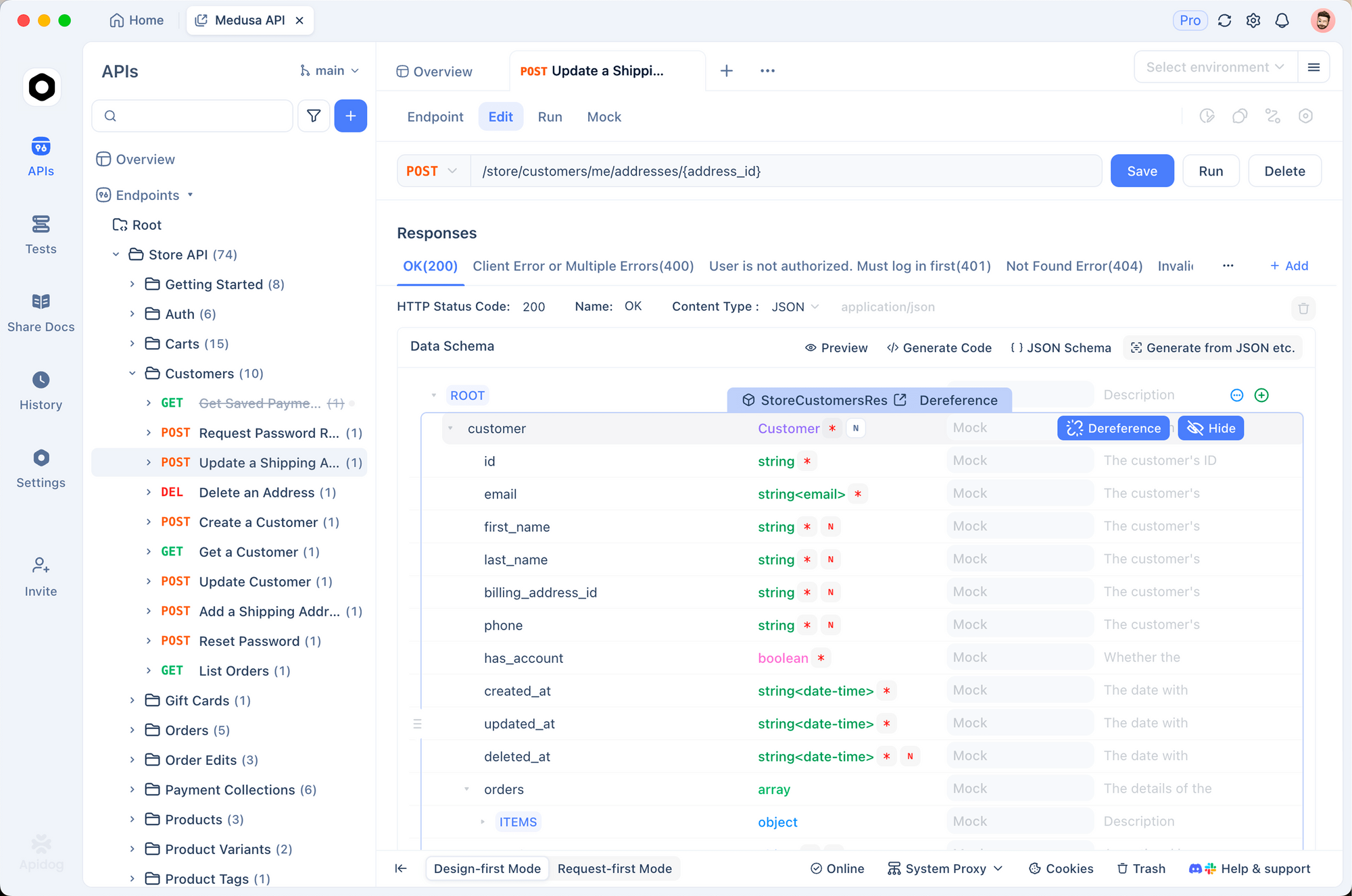
Set up the endpoint
- Open Apidog and create a new request
- Set the method to POST and the URL to
https://api.z.ai/api/paas/v4/chat/completions - Add the
Authorization: Bearer YOUR_KEYheader - Set
Content-Type: application/json
Build multimodal request bodies visually
Apidog’s JSON editor lets you construct the nested messages array with image_url and text content blocks without hand-writing JSON. You can:
- Switch between raw JSON and form-based input
- Save request templates for common patterns (single image, multi-image, video input)
- Use environment variables for the API key so you don’t paste it into every request
Compare model responses
When evaluating GLM-5V-Turbo against other vision models (Claude, GPT-4o, Gemini), use Apidog’s collection runner to send the same image to multiple endpoints and compare outputs side by side. This is particularly useful for Design2Code tasks where you want to verify which model produces the most accurate HTML/CSS.
Validate response schemas
GLM-5V-Turbo’s streaming responses include both reasoning_content and content fields. Apidog’s response validator can check that your application correctly handles both fields, including edge cases where one field is null.
Download Apidog to start testing your GLM-5V-Turbo integration.
Pricing comparison with other vision models
| Model | Input (per 1M tokens) | Output (per 1M tokens) | Context window | Design2Code score |
|---|---|---|---|---|
| GLM-5V-Turbo | $1.20 | $4.00 | 200K | 94.8 |
| Claude Opus 4.6 | $15.00 | $75.00 | 200K | 77.3 |
| Claude Sonnet 4.6 | $3.00 | $15.00 | 200K | N/A |
| GPT-4o | $2.50 | $10.00 | 128K | N/A |
| Gemini 3 Pro | $1.25 | $5.00 | 1M | N/A |
GLM-5V-Turbo is the cheapest option for vision-based coding tasks. It costs 92% less than Claude Opus 4.6 on input tokens and 94.7% less on output tokens, while scoring 22% higher on Design2Code.
The tradeoff: Claude and GPT-5 handle broader coding tasks better. If your workflow is specifically “image in, code out,” GLM-5V-Turbo offers the strongest price-to-performance ratio.
Architecture: how it works under the hood
CogViT vision encoder
GLM-5V-Turbo uses CogViT, a vision transformer designed to preserve spatial hierarchies and fine-grained visual details. Standard vision encoders compress images into flat feature vectors, losing spatial relationships. CogViT maintains the positional information that matters for layout-sensitive tasks like CSS grid placement, flexbox alignment, and pixel-accurate spacing.
Multi-Token Prediction (MTP)
The MTP architecture predicts multiple tokens per forward pass instead of one at a time. For code generation, this means faster inference when outputting long sequences of HTML, CSS, or JavaScript. The model doesn’t generate token-by-token; it predicts chunks, reducing latency on the 128K max output window.
30+ task joint reinforcement learning
ZhipuAI trained GLM-5V-Turbo with reinforcement learning across 30+ tasks simultaneously: STEM reasoning, visual grounding, video analysis, GUI operation, and coding. This joint optimization prevents the model from overfitting to one task type while maintaining strong performance across the full range of vision-coding workflows.
Agentic data system
The training pipeline includes what ZhipuAI calls a “multi-level, verifiable data construction” system with action prediction pretraining. In practice, this means the model was trained on sequences of “see screenshot, predict next action, execute, verify result,” making it effective for autonomous GUI tasks beyond static image-to-code conversion.
Practical examples
Design mockup to React component
from zai import ZaiClient

client = ZaiClient(api_key="your-api-key")

response = client.chat.completions.create(
    model="glm-5v-turbo",
    messages=[
        {
            "role": "system",
            "content": "You are a senior frontend developer. Generate production-ready React components with TypeScript and Tailwind CSS. Include proper types, accessibility attributes, and responsive design."
        },
        {
            "role": "user",
            "content": [
                {
                    "type": "image_url",
                    "image_url": {"url": "https://example.com/hero-section.png"}
                },
                {
                    "type": "text",
                    "text": "Build this hero section as a React TypeScript component. It should be fully responsive with a mobile-first approach. Include the gradient background, CTA button with hover state, and the illustration positioning."
                }
            ]
        }
    ],
    thinking={"type": "enabled"}
)

# The model first reasons about layout structure (reasoning_content)
# then outputs the complete React component (content)
print(response.choices[0].message.content)
Screenshot debugging workflow
def debug_ui_from_screenshot(screenshot_url: str, description: str) -> str:
    """Send a screenshot of a broken UI and get CSS fixes."""
    response = client.chat.completions.create(
        model="glm-5v-turbo",
        messages=[
            {
                "role": "system",
                "content": "You are a CSS debugging specialist. Analyze screenshots of broken UIs and provide specific CSS fixes. Always explain what's wrong before providing the fix."
            },
            {
                "role": "user",
                "content": [
                    {
                        "type": "image_url",
                        "image_url": {"url": screenshot_url}
                    },
                    {
                        "type": "text",
                        "text": f"Bug report: {description}. Identify the CSS issues and provide fixes."
                    }
                ]
            }
        ],
        thinking={"type": "enabled"}
    )

    return response.choices[0].message.content


# Usage
fix = debug_ui_from_screenshot(
    "https://example.com/broken-modal.png",
    "Modal dialog is overflowing on mobile screens and the close button is unreachable"
)
print(fix)
Document extraction to structured data
response = client.chat.completions.create(
    model="glm-5v-turbo",
    messages=[
        {
            "role": "user",
            "content": [
                {
                    "type": "image_url",
                    "image_url": {"url": "https://example.com/api-spec-page.png"}
                },
                {
                    "type": "text",
                    "text": "Extract the API endpoint definitions from this documentation screenshot. Return them as an OpenAPI 3.1 YAML specification."
                }
            ]
        }
    ]
)
This is a strong use case for API development teams: photograph whiteboard API designs or scan legacy documentation, then generate OpenAPI specs directly. You can then import the generated spec into Apidog to get interactive documentation, mock servers, and test cases from a single screenshot.
Tips for getting the most out of GLM-5V-Turbo
Image quality matters
The CogViT encoder preserves spatial detail, but it can’t recover information that isn’t in the source image. For Design2Code tasks:
- Use screenshots at 2x resolution (Retina) for crisp text and icon detail
- Crop to the specific component you want recreated, not the full page
- Remove browser chrome and OS window decorations from screenshots
- For color accuracy, use PNG over JPEG to avoid compression artifacts
Use thinking mode for complex layouts
Enable thinking mode ("thinking": {"type": "enabled"}) for:
- Multi-component page layouts
- Responsive designs with breakpoint logic
- Designs with complex CSS (grid, flexbox nesting, animations)
- Debugging tasks where root cause analysis matters
Skip thinking mode for simple tasks (single component extraction, basic image captioning) to save on token costs and latency.
Manage your context window
At 200K tokens, the context window is large but not unlimited. A single high-resolution image can consume 1,000-5,000 tokens. For multi-image workflows:
- Resize images to the minimum resolution the task requires
- Use context caching for iterative conversations where the base design stays the same
- Break full-page designs into component-level screenshots for individual generation
Cost optimization with caching
Context caching costs $0.24/M tokens (80% discount from standard input pricing). For iterative design-to-code workflows where you’re refining the same component:
- Send the design image in the first request
- Follow-up requests reference the cached context
- Each iteration costs a fraction of re-sending the full image
Handling errors and edge cases
Rate limits and retries
The Z.ai API returns standard HTTP status codes. Handle these in your integration:
import time
from zai import ZaiClient

client = ZaiClient(api_key="your-api-key")

def call_with_retry(messages, max_retries=3):
    """Call GLM-5V-Turbo with exponential backoff on rate limits."""
    for attempt in range(max_retries):
        try:
            response = client.chat.completions.create(
                model="glm-5v-turbo",
                messages=messages,
                thinking={"type": "enabled"}
            )
            return response
        except Exception as e:
            error_str = str(e)
            if "429" in error_str:
                # Rate limited - wait and retry
                wait_time = 2 ** attempt
                print(f"Rate limited. Retrying in {wait_time}s...")
                time.sleep(wait_time)
                continue
            elif "400" in error_str:
                # Bad request - don't retry, fix the input
                print(f"Bad request: {error_str}")
                raise
            else:
                # Server error - retry
                if attempt < max_retries - 1:
                    time.sleep(1)
                    continue
                raise

    raise Exception("Max retries exceeded")
Handling large outputs
With a 128K max output window, GLM-5V-Turbo can generate entire multi-file applications in a single response. Your application needs to handle this:
response = client.chat.completions.create(
    model="glm-5v-turbo",
    messages=messages,
    max_tokens=131072  # Full 128K output
)

content = response.choices[0].message.content

# Parse multiple files from the output
# The model typically separates files with markdown code fences
import re

file_blocks = re.findall(
    r'```(\w+)?\s*\n// file: (.+?)\n(.*?)```',
    content,
    re.DOTALL
)

for lang, filename, code in file_blocks:
    print(f"Writing {filename} ({lang})")
    with open(filename, "w") as f:
        f.write(code.strip())
Image URL accessibility
The model fetches images from the URLs you provide. Common failures:
- Expired signed URLs from cloud storage (S3, GCS). Generate URLs with at least 1 hour expiry.
- CORS-restricted images that block server-side fetching. Host images on a CDN without CORS restrictions.
- Large images that time out during download. Resize to under 5MB before sending.
If you control the image hosting, a public CDN with no auth is the most reliable option for API calls.
GLM-5V-Turbo vs using it through OpenRouter
You can access GLM-5V-Turbo through OpenRouter as an alternative to the direct Z.ai API. OpenRouter processed over 44,000 requests with 769M+ prompt tokens in the model’s first two days of availability.
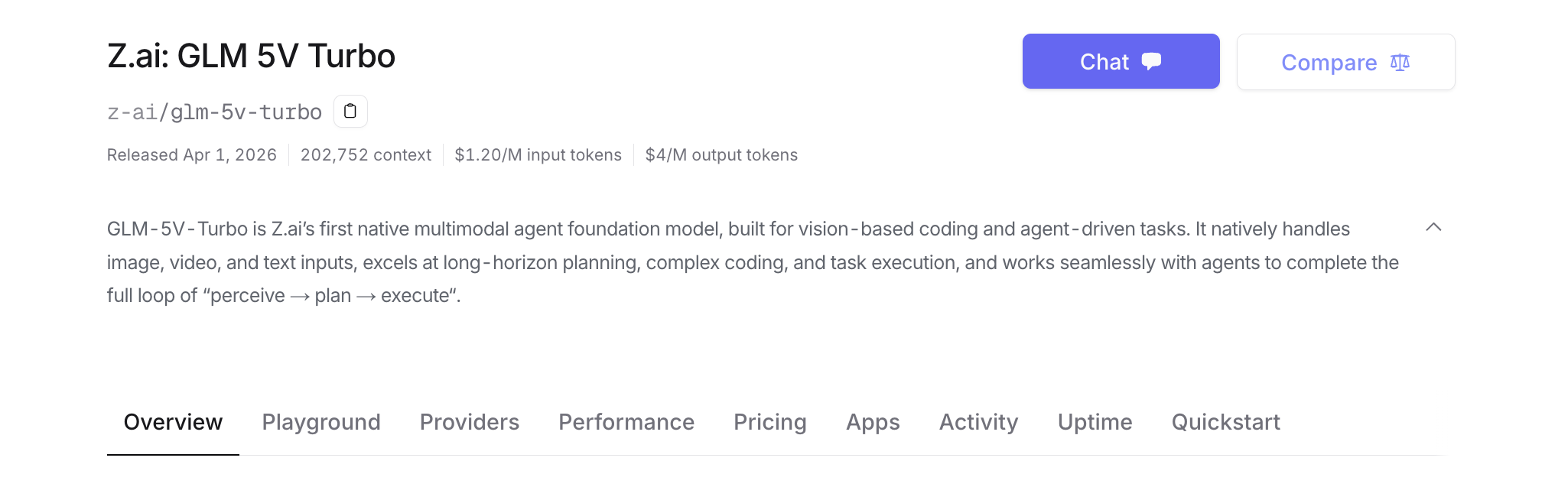
Benefits of OpenRouter:
- Single API key for multiple model providers
- Automatic fallback if Z.ai has downtime
- Usage analytics across all your models
- Same OpenAI-compatible format
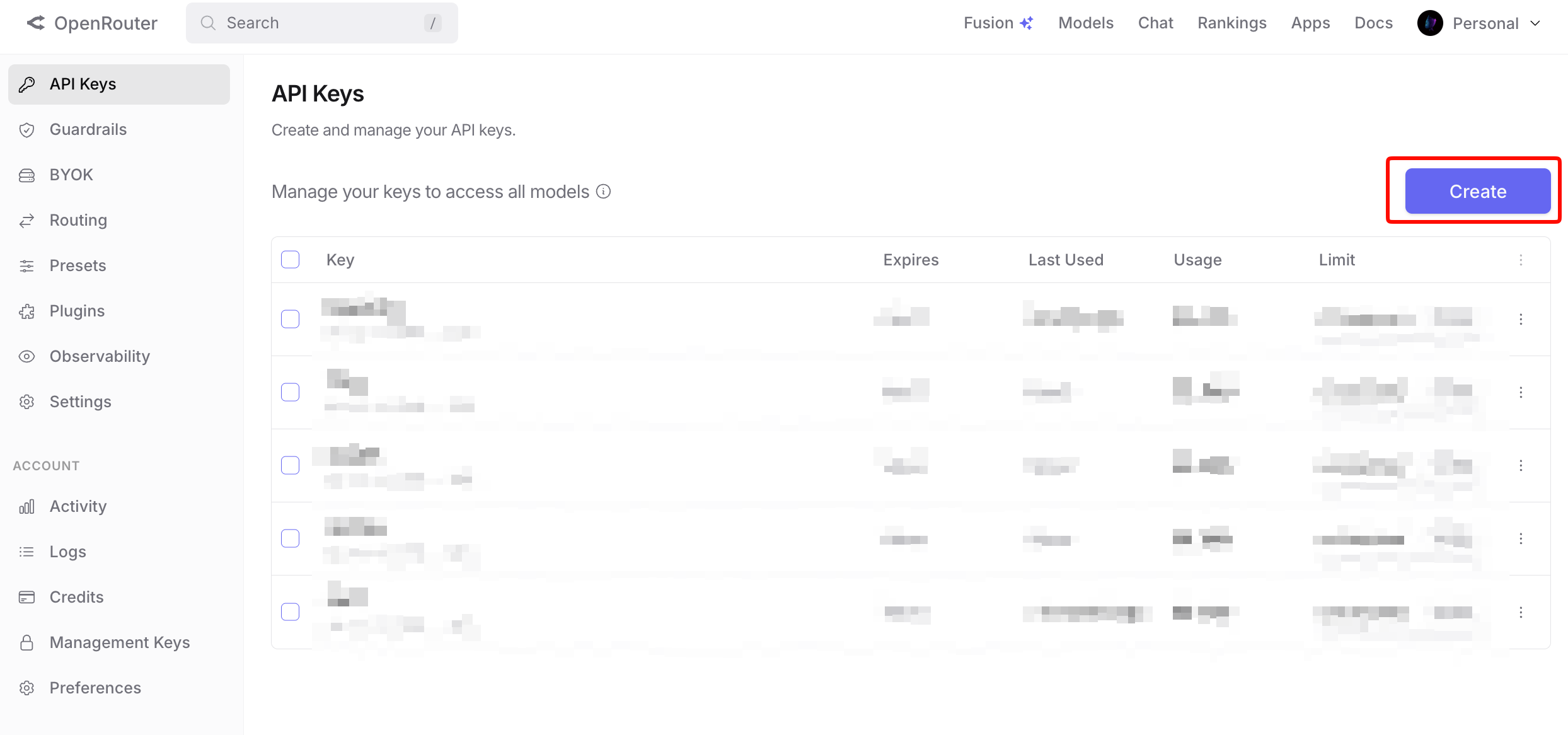
Trade-off: OpenRouter adds a small markup to token pricing. For high-volume production use, the direct Z.ai API is cheaper.
Building a design-to-code pipeline with GLM-5V-Turbo
Here’s a complete workflow that takes a design mockup, generates code, and validates the output:
from zai import ZaiClient
import os
import subprocess

client = ZaiClient(api_key=os.environ["ZAI_API_KEY"])


def design_to_code_pipeline(image_url: str, output_dir: str, framework: str = "react"):
    """Complete pipeline: design screenshot -> working code -> validation."""

    os.makedirs(output_dir, exist_ok=True)

    # Step 1: Analyze the design
    analysis = client.chat.completions.create(
        model="glm-5v-turbo",
        messages=[
            {
                "role": "user",
                "content": [
                    {"type": "image_url", "image_url": {"url": image_url}},
                    {
                        "type": "text",
                        "text": "Analyze this design. List: 1) All UI components visible, 2) The color palette (hex values), 3) Typography (font sizes, weights), 4) Layout structure (grid/flexbox), 5) Interactive elements (buttons, inputs, dropdowns)."
                    }
                ]
            }
        ],
        thinking={"type": "enabled"}
    )

    design_analysis = analysis.choices[0].message.content
    print(f"Design analysis complete: {len(design_analysis)} chars")

    # Step 2: Generate the component
    generation = client.chat.completions.create(
        model="glm-5v-turbo",
        messages=[
            {
                "role": "system",
                "content": f"You are a {framework} developer. Generate production-ready, accessible, responsive components. Use TypeScript and Tailwind CSS."
            },
            {
                "role": "user",
                "content": [
                    {"type": "image_url", "image_url": {"url": image_url}},
                    {
                        "type": "text",
                        "text": f"Based on this design, generate the complete {framework} component. Include all styling, hover states, and responsive breakpoints. The component must match the design pixel-for-pixel."
                    }
                ]
            }
        ],
        thinking={"type": "enabled"},
        max_tokens=16384
    )

    code = generation.choices[0].message.content

    # Step 3: Save the output
    output_file = os.path.join(output_dir, "Component.tsx")
    with open(output_file, "w") as f:
        # Extract code from markdown fences if present
        if "```" in code:
            import re
            match = re.search(r'```(?:tsx?|jsx?)\n(.*?)```', code, re.DOTALL)
            if match:
                f.write(match.group(1).strip())
            else:
                f.write(code)
        else:
            f.write(code)

    print(f"Component saved to {output_file}")
    return output_file


# Usage
design_to_code_pipeline(
    image_url="https://example.com/dashboard-card.png",
    output_dir="./generated-components",
    framework="react"
)
This pipeline separates analysis from generation. The first call maps the design’s structure, colors, and typography. The second call generates code with that understanding as context. Splitting the work into two calls produces more accurate output than a single “convert this to code” request, because the model has already reasoned about the layout before writing code.
You can test each step independently in Apidog by saving the analysis request and generation request as separate endpoints in a collection, then running them in sequence with the collection runner.
FAQ
Is GLM-5V-Turbo free to use?
No. API pricing is $1.20/M input tokens and $4.00/M output tokens. ZhipuAI offers a free web interface at chat.z.ai for testing, but API usage requires payment.
Can I send base64-encoded images?
The documentation shows URL-based image input (image_url with a url field). For base64 support, encode your image as a data URI: data:image/png;base64,{encoded_data} and pass it as the URL value. This follows the same convention as the OpenAI Vision API.
How does GLM-5V-Turbo handle video input?
Video is listed as a supported input modality. The model can process video frames for tasks like analyzing UI interaction recordings, identifying animation bugs, or understanding user flows. Specific codec and format requirements aren’t documented yet.
What’s the difference between GLM-5-Turbo and GLM-5V-Turbo?
GLM-5-Turbo is a text-only coding model. GLM-5V-Turbo adds the CogViT vision encoder for multimodal input (images, video, files). Choose GLM-5-Turbo for pure text coding tasks and GLM-5V-Turbo when your workflow involves visual input.
Can I use GLM-5V-Turbo with the OpenAI Python client?
Yes. Set the base_url to https://api.z.ai/api/paas/v4 and use your Z.ai API key. The endpoint follows OpenAI-compatible conventions for chat completions, including multimodal message formats.
How does it compare to Claude for coding?
GLM-5V-Turbo dominates on vision-to-code tasks (94.8 vs 77.3 on Design2Code). Claude leads on pure text coding, backend architecture, and repository-level understanding. They serve different use cases. For teams doing both, the cost difference is significant: GLM-5V-Turbo is 92% cheaper on input tokens than Claude Opus 4.6.
What’s the maximum image size?
The documentation doesn’t specify a pixel limit. The 200K context window is the practical constraint; larger images consume more tokens. For Design2Code tasks, 1920x1080 screenshots at 2x resolution work well without hitting limits.
Does ZhipuAI retain my API data?
No. Z.ai’s data policy states no training usage and no prompt retention for API calls. Your images and code outputs are not used to train future models.