Developers who build intelligent applications constantly evaluate frontier models for superior reasoning, coding, and long-horizon agentic performance. GLM-5, Zhipu AI’s latest flagship, delivers state-of-the-art results among open-weight models while remaining accessible through a robust API. Engineers integrate GLM-5 to power complex systems, autonomous agents, and production-grade AI workflows.
This guide walks you through every stage: understanding the model, reviewing its benchmarks, obtaining access, authenticating requests, and implementing advanced features. Consequently, you will deploy GLM-5 confidently in your projects.
What Is GLM-5?
Zhipu AI developed GLM-5 as a 744-billion-parameter Mixture-of-Experts (MoE) model with approximately 40 billion active parameters. The architecture builds on previous GLM iterations but introduces significant enhancements. Engineers increased pre-training data from 23 trillion to 28.5 trillion tokens. They also incorporated DeepSeek Sparse Attention (DSA) to maintain long-context performance while reducing inference costs. Furthermore, the team created a novel asynchronous reinforcement learning framework called Slime, which dramatically improves post-training efficiency.
GLM-5 shifts focus from casual chat interactions toward “agentic engineering.” It excels at long-horizon planning, multi-step tool use, document generation (including .docx, .pdf, and .xlsx files), and complex software engineering tasks. The model supports a 200K token context window and generates up to 128K output tokens. These specifications enable developers to process massive codebases or long documents in a single prompt.
Moreover, Zhipu AI released GLM-5 weights under the permissive MIT license on Hugging Face and ModelScope. Teams therefore run the model locally with vLLM or SGLang, even on non-NVIDIA hardware such as Huawei Ascend chips. The official API, however, provides the fastest and most scalable path for production use.
GLM-5 Benchmarks: Leading Open-Weight Performance
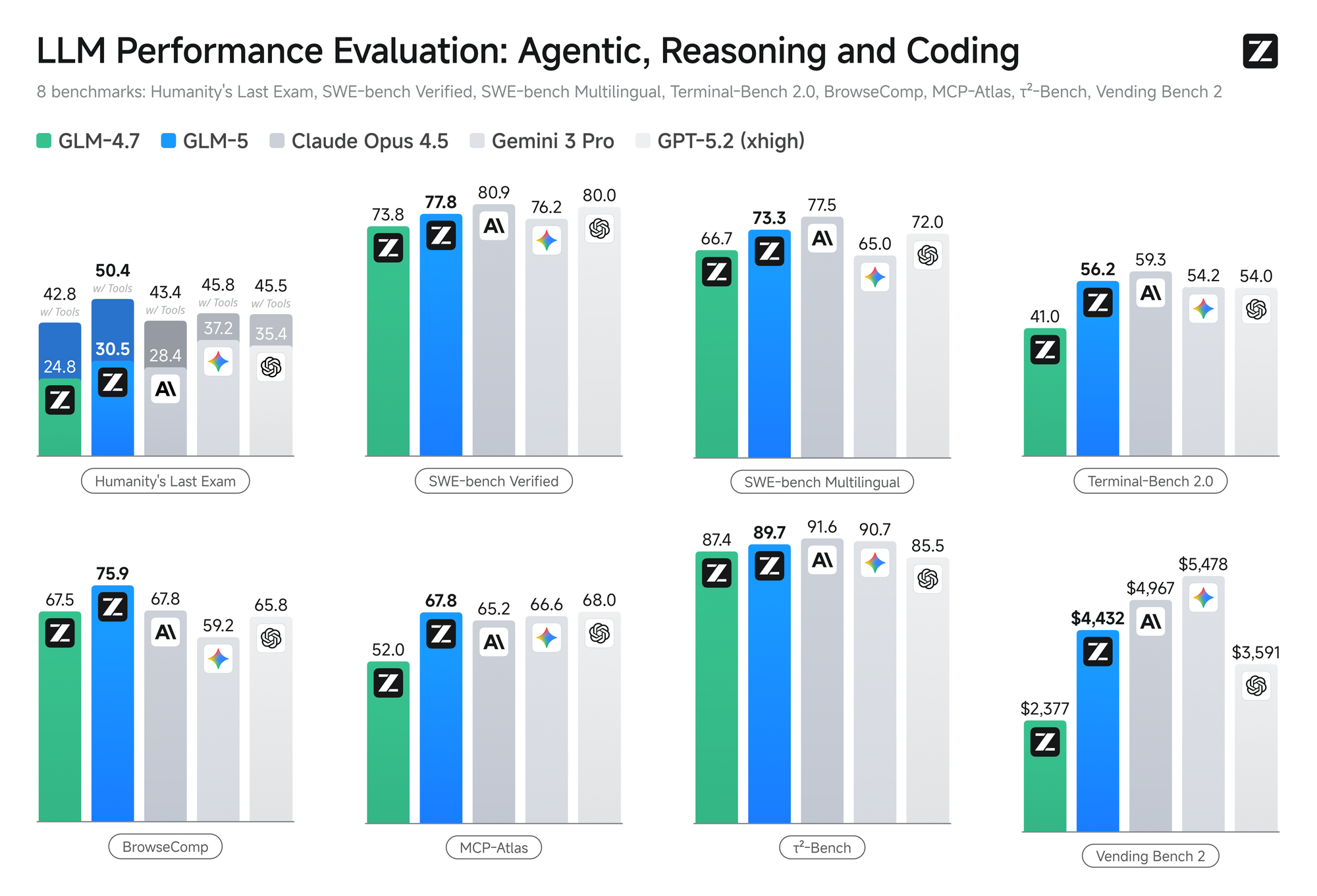
GLM-5 establishes new records among open-source models across reasoning, coding, and agentic benchmarks. It narrows the gap with proprietary frontier models and, in several categories, surpasses them.
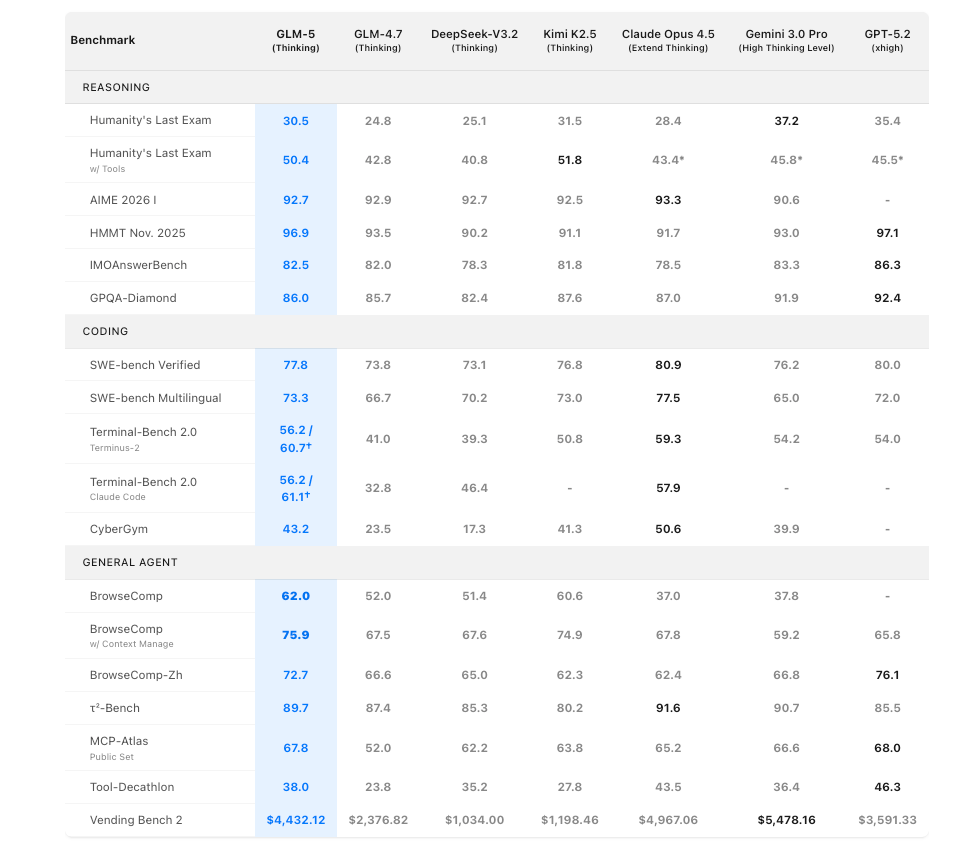
Key reasoning benchmarks include:
- Humanity’s Last Exam (HLE): 30.5 (base) → 50.4 (with tools)
- AIME 2026 I: 92.7
- HMMT Nov. 2025: 96.9
- IMOAnswerBench: 82.5
- GPQA-Diamond: 86.0
Coding performance stands out:
- SWE-bench Verified: 77.8
- SWE-bench Multilingual: 73.3
- Terminal-Bench 2.0 (verified): 56.2
Agentic capabilities shine brightest:
- BrowseComp: 62.0 (75.9 with context management)
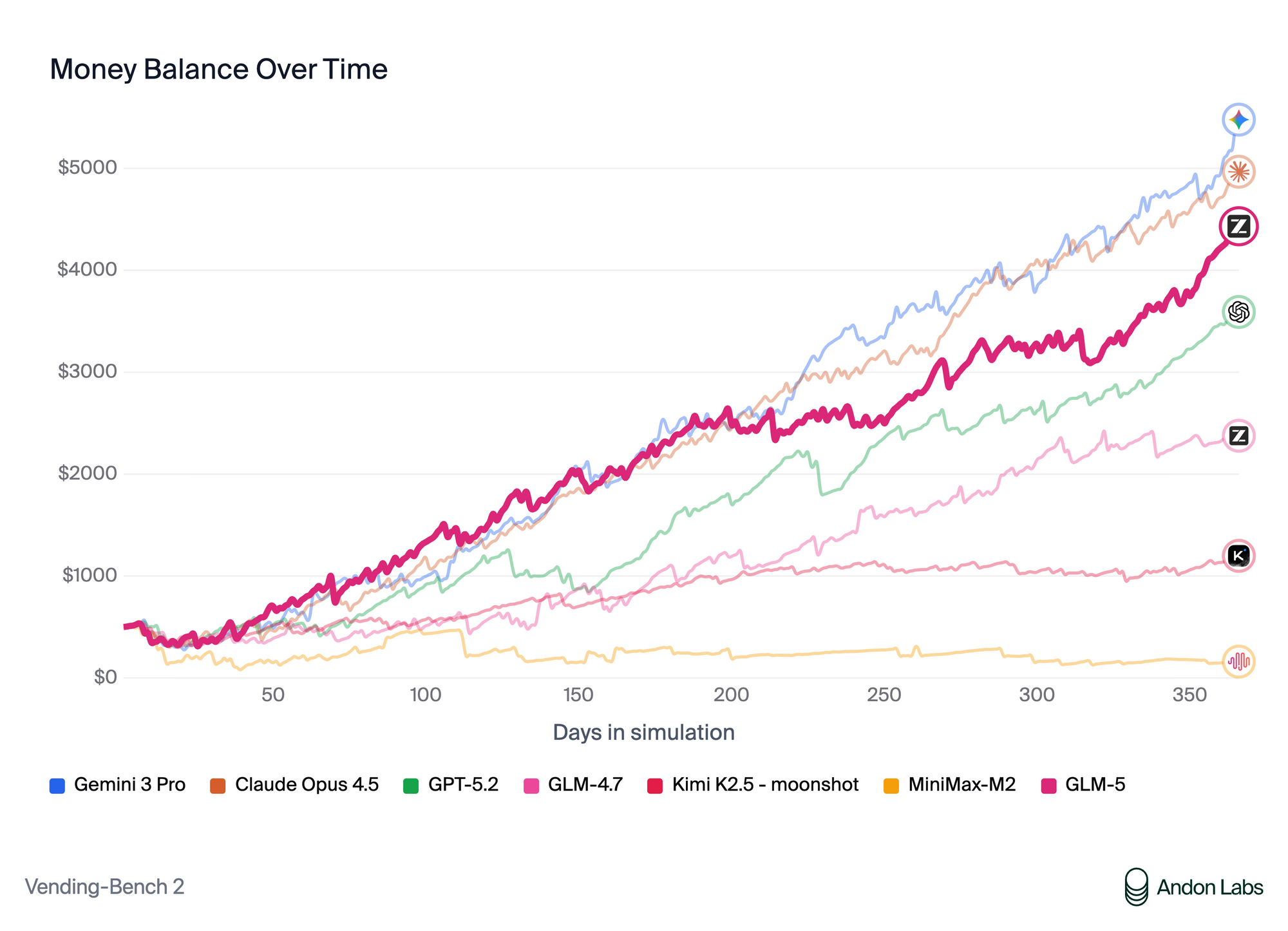
- Vending Bench 2: $4,432.12 final balance — first among open models
These numbers demonstrate that GLM-5 handles real-world software engineering, long-term planning, and multi-tool orchestration at levels competitive with Claude Opus 4.5 and GPT-5.2.
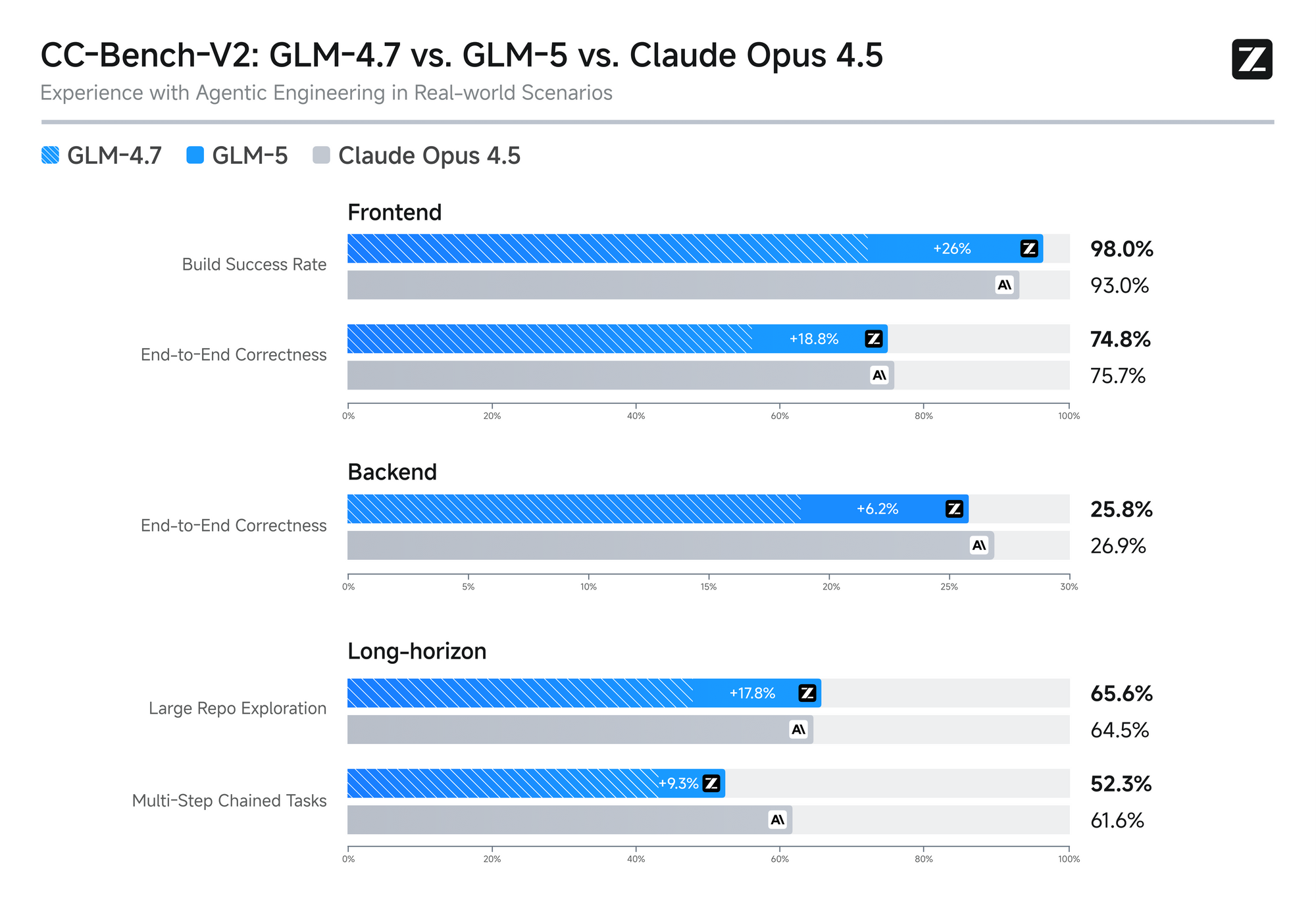
The model also achieves strong multilingual results and maintains low hallucination rates thanks to targeted RL training. Consequently, enterprises adopt GLM-5 for mission-critical applications where reliability matters.
How to Access the GLM-5 API
Accessing the GLM-5 API requires only a few straightforward steps.
Create an account — Visit z.ai (international) or open.bigmodel.cn (China mainland) and register or log in.
Top up your balance (if needed) — Navigate to the billing page and add credits. Free trial credits are often available for new users.
Generate an API key — Go to the API Keys management section, click “Create new key,” and copy the token immediately. Store it securely—never commit it to version control.
Choose your endpoint — Use the general base URL https://api.z.ai/api/paas/v4/ for most applications. Coding-specific workloads can use the dedicated coding endpoint when applicable.
Engineers who complete these steps gain immediate access to the glm-5 model identifier.
Authenticating and Making Your First Request
Authentication follows the standard Bearer token pattern. Developers include the header Authorization: Bearer YOUR_API_KEY with every request.
The primary endpoint is /chat/completions. The API maintains broad compatibility with the OpenAI client library, so migration from other providers requires minimal code changes.
Basic curl example:
curl -X POST "https://api.z.ai/api/paas/v4/chat/completions" \
  -H "Content-Type: application/json" \
  -H "Authorization: Bearer YOUR_API_KEY" \
  -d '{
    "model": "glm-5",
    "messages": [
      {"role": "system", "content": "You are a world-class software architect."},
      {"role": "user", "content": "Design a scalable microservices architecture for an e-commerce platform."}
    ],
    "temperature": 0.7,
    "max_tokens": 2048
  }'
Python implementation using the official OpenAI SDK (recommended for simplicity):
from openai import OpenAI

client = OpenAI(
    api_key="YOUR_API_KEY",
    base_url="https://api.z.ai/api/paas/v4/"
)

response = client.chat.completions.create(
    model="glm-5",
    messages=[
        {"role": "system", "content": "You are a helpful assistant."},
        {"role": "user", "content": "Explain how to implement sparse attention in transformers."}
    ],
    temperature=0.6,
    max_tokens=1024
)

print(response.choices[0].message.content)
Alternative: Official Zai Python SDK
from zai import ZaiClient

client = ZaiClient(api_key="YOUR_API_KEY")
response = client.chat.completions.create(
    model="glm-5",
    messages=[...]
)
Both approaches work reliably. The OpenAI compatibility layer therefore accelerates adoption for teams already familiar with that ecosystem.
Advanced API Features and Parameters
GLM-5 exposes several parameters that experienced developers leverage for production systems.
- thinking: Set to
{"type": "enabled"}or"disabled"to control explicit chain-of-thought reasoning. Enabling thinking often improves complex problem solving. - stream: Boolean flag that returns Server-Sent Events for real-time token generation.
- temperature / top_p / top_k: Standard sampling controls.
- tools / function calling: Define JSON schemas for tool use. The model calls external functions autonomously.
- response_format: Request structured JSON output for reliable parsing.
Streaming example in Python:
stream = client.chat.completions.create(
    model="glm-5",
    messages=[...],
    stream=True
)

for chunk in stream:
    if chunk.choices[0].delta.content:
        print(chunk.choices[0].delta.content, end="")
Streaming reduces perceived latency and improves user experience in chat interfaces.
Tool calling setup requires developers to define tools in the request and handle the model’s tool_calls responses. Consequently, building autonomous agents becomes straightforward.
Using Apidog to Test and Manage GLM-5 API Calls
Apidog transforms how teams interact with any REST API, including GLM-5. After downloading Apidog for free, developers create a new project and add the Z.ai base URL. They then define the /chat/completions endpoint manually or import an OpenAPI specification if available.
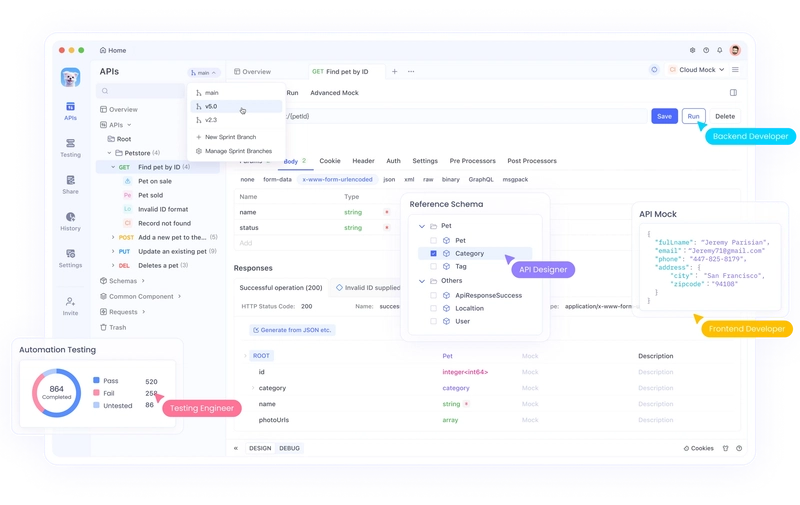
Within Apidog, engineers:
- Visually construct messages and parameters
- Save reusable environments for different API keys or regions
- Generate client code in Python, JavaScript, Java, Go, and more
- Run automated tests and monitor response times
- Mock responses during frontend development
The platform’s built-in schema validation and history tracking therefore eliminate common integration headaches. Teams that combine the GLM-5 API with Apidog ship features faster and with fewer errors.
Best Practices for Production Deployments
Engineers who move GLM-5 into production follow several key practices.
First, implement proper error handling for rate limits and quota exhaustion. Second, cache frequent prompts or use context caching when the platform supports it. Third, monitor token usage to control costs. Fourth, rotate API keys regularly and store them in secret managers such as AWS Secrets Manager or HashiCorp Vault.
For high-throughput applications, batch requests where possible and use asynchronous clients. Additionally, test thoroughly with representative workloads—GLM-5’s strong reasoning shines on complex tasks but still benefits from prompt engineering.
Security remains paramount: never expose API keys in client-side code and validate all outputs before passing them downstream.
Real-World Use Cases and Integration Examples
Developers apply GLM-5 across diverse scenarios:
- Autonomous coding agents: Connect the model to tools like file system access, git, and terminal execution. The high SWE-bench score translates into reliable code generation and debugging.
- Document intelligence: Feed long reports or codebases and request structured summaries, tables, or generated slide decks in Office formats.
- Multi-agent systems: Orchestrate several GLM-5 instances with specialized roles using tool calling.
- Enterprise search and RAG: Leverage the 200K context window to process entire knowledge bases without chunking.
One team, for instance, built a long-horizon business simulation agent that managed inventory, pricing, and marketing decisions over simulated months—directly inspired by Vending Bench 2 results.
Troubleshooting Common Issues
When requests fail, developers first check the HTTP status code and error message. Common problems include invalid API keys (401), quota exceeded (429), or malformed JSON. The model identifier must be exactly "glm-5"—typos cause 404 errors.
Context length violations produce clear messages; simply reduce input size or split conversations. For streaming issues, verify that the client properly handles SSE format.
Zhipu AI maintains comprehensive documentation at docs.z.ai. Engineers who consult it alongside community forums resolve most issues quickly.
Conclusion: Start Building with GLM-5 Today
GLM-5 represents a significant leap in accessible, high-performance AI. Its combination of open weights, powerful API, and leading benchmarks makes it an excellent choice for developers who demand both capability and flexibility.
By following the steps outlined—creating an account, generating a key, crafting requests, and leveraging tools like Apidog—you position yourself to harness GLM-5 effectively. The model’s strengths in reasoning, coding, and agentic workflows will accelerate your projects and open new possibilities.
Download Apidog for free right now to begin testing GLM-5 endpoints immediately. Experiment with the examples above, explore tool calling, and push the model on your hardest problems. The future of agentic engineering starts with a single API call.