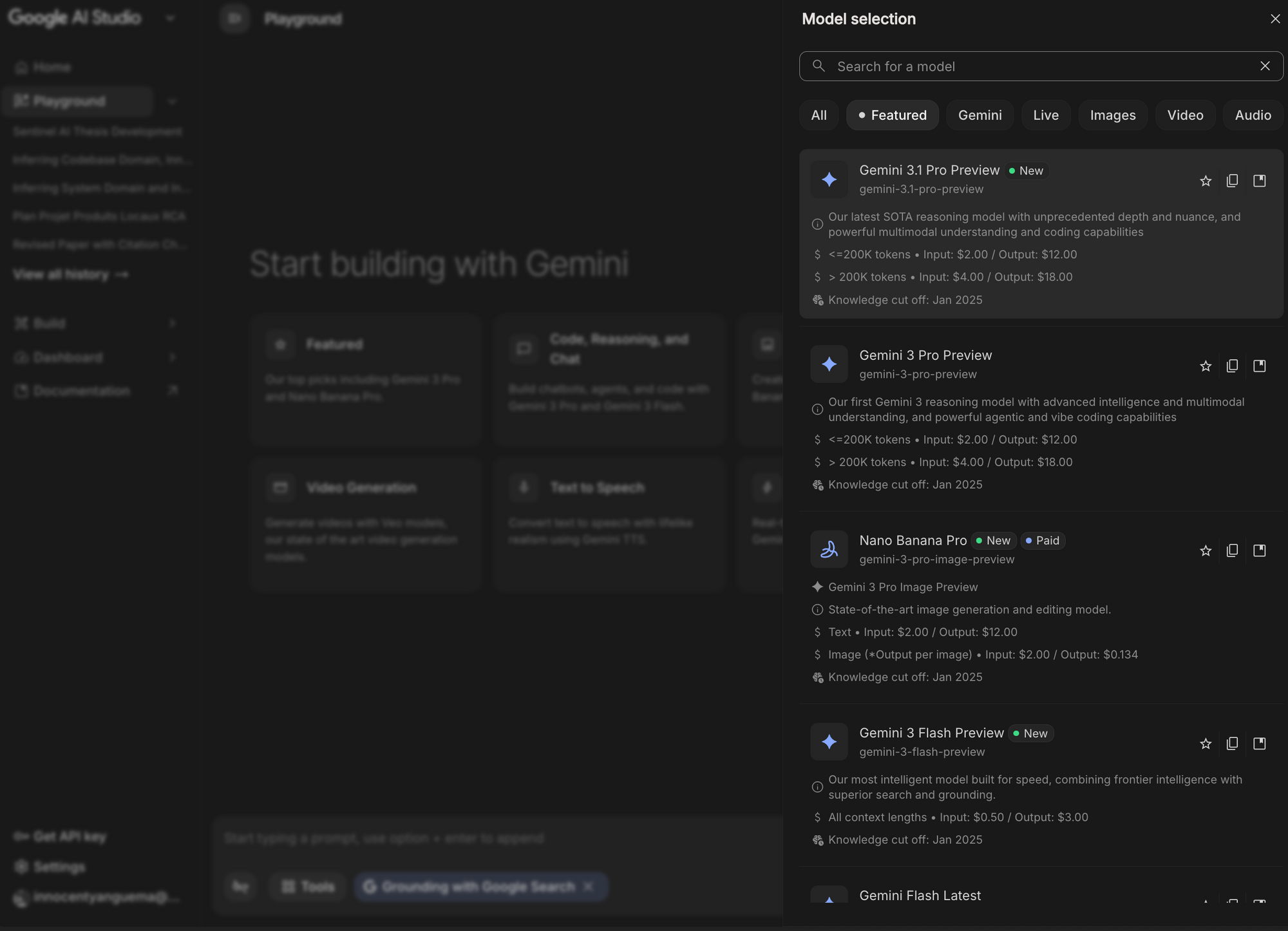
Google released Gemini 3.1 Pro as its most capable model yet. Engineers access this preview model through the Gemini API to tackle complex reasoning, multimodal understanding, and agentic workflows that previous generations handled less effectively. Developers who integrate the Gemini 3.1 Pro API gain state-of-the-art performance across 1 million input tokens and 64k output tokens while maintaining low latency for production systems.
You begin your journey with the official model identifier gemini-3.1-pro-preview. Google hosts this endpoint at https://generativelanguage.googleapis.com/v1beta/models/gemini-3.1-pro-preview:generateContent. The API supports both REST calls and official SDKs that abstract complexity while preserving full control.
Understanding Gemini 3.1 Pro: Capabilities That Redefine AI Integration
Gemini 3.1 Pro advances beyond earlier models through native dynamic thinking, improved tool use, and superior multimodal fusion. The model processes text, high-resolution images, video frames, PDFs up to 1000 pages, and code simultaneously within the same context window. Engineers therefore achieve more coherent multi-step reasoning without extensive prompt engineering.
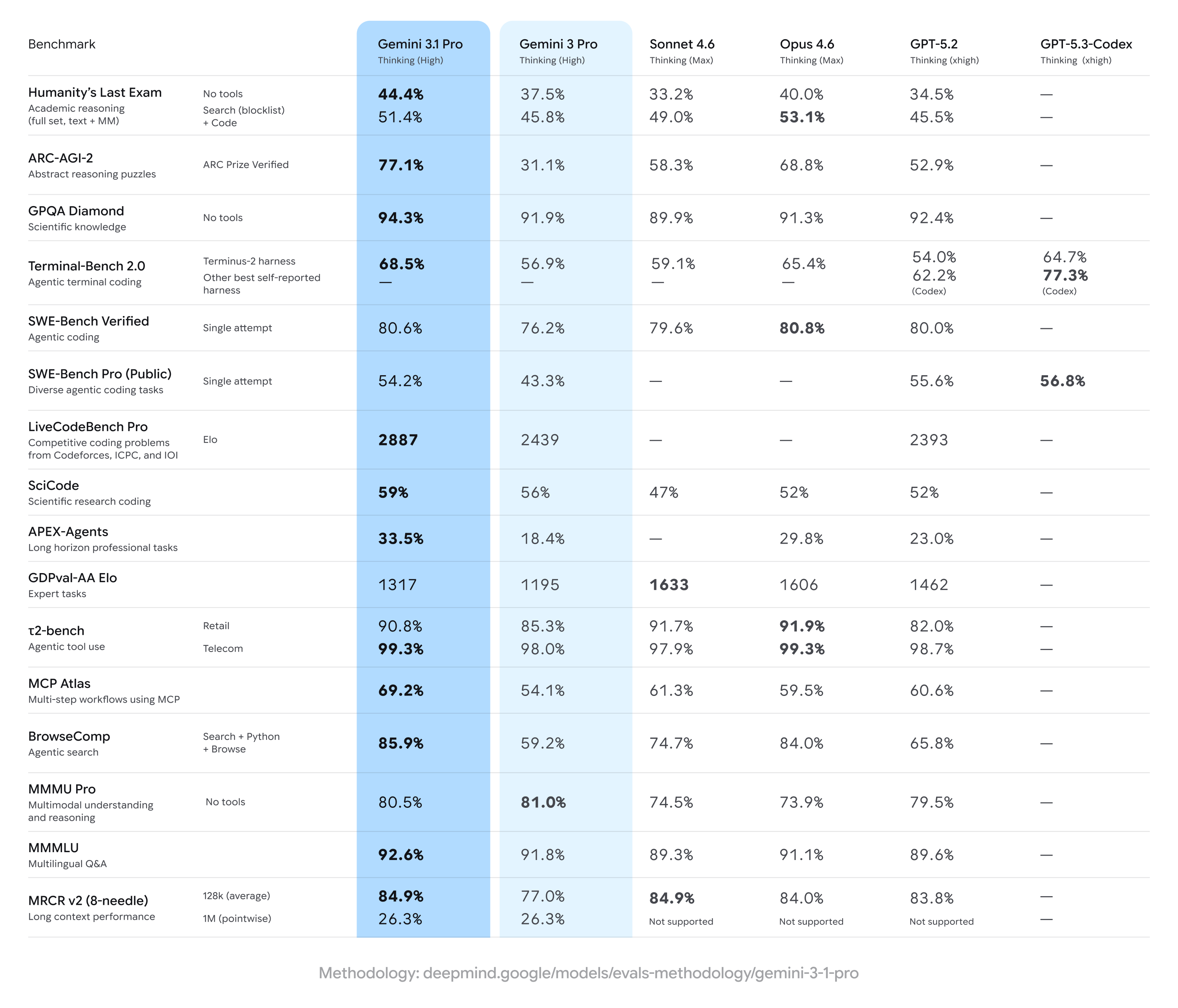
Moreover, the model introduces thinking_level configuration. You set this parameter to high for deep analysis tasks or low for high-throughput scenarios. The default high level activates internal chain-of-thought mechanisms automatically, so you spend less time crafting explicit reasoning instructions.
Additionally, Gemini 3.1 Pro supports thought signatures. These encrypted strings maintain conversation state across turns when you combine function calling with image generation or editing. You include the exact thoughtSignature value in subsequent requests; otherwise, the API returns a 400 error. This mechanism guarantees deterministic behavior in long-running agent loops.
The knowledge cutoff sits at January 2025. Consequently, you pair the model with the built-in Google Search tool to retrieve fresh information. The combination yields grounded, up-to-date responses without manual retrieval-augmented generation pipelines.
Prerequisites for Working with the Gemini 3.1 Pro API
You prepare your environment before writing any code. First, you need a Google account with access to Google AI Studio. Second, you verify that billing is enabled on the associated Google Cloud project because preview models enforce strict rate limits on free tiers. Third, you install Python 3.9+ or Node.js 18+ depending on your preferred stack.
Furthermore, you allocate storage for large multimodal payloads. Video files and high-resolution images consume tokens quickly, so you monitor usage through the AI Studio dashboard. Professionals who plan ahead avoid unexpected quota errors during development.
Obtaining and Securing Your Gemini API Key
You navigate to Google AI Studio and click “Get API key.” The console creates a new key tied to your project. You copy the key immediately because the UI displays it only once.
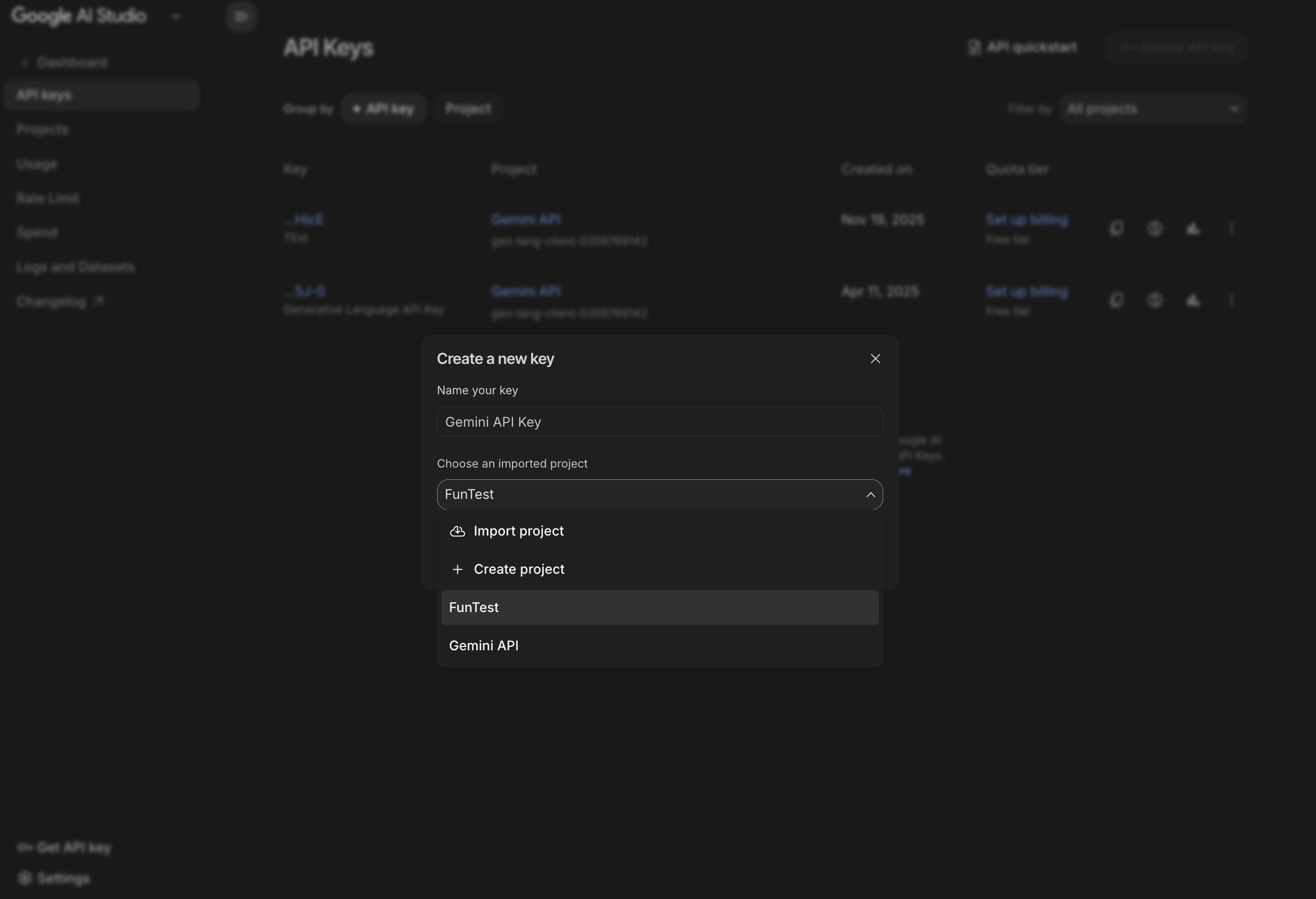
You store the key as the environment variable GEMINI_API_KEY. This practice keeps credentials out of source code and enables seamless SDK initialization across operating systems. On Linux or macOS you run:
export GEMINI_API_KEY=your_actual_key_here
On Windows you use:
set GEMINI_API_KEY=your_actual_key_here
For production deployments you rotate keys regularly and restrict them through Google Cloud IAM policies. You never expose the key in client-side JavaScript because attackers can abuse it for unauthorized token consumption.
Installing the Official Google GenAI SDK
The SDK abstracts HTTP details and provides type-safe interfaces. You install the latest version with these commands:
Python
pip install -U google-genai
Node.js
npm install @google/genai
The package automatically reads GEMINI_API_KEY from the environment. If you prefer explicit configuration, you pass the key during client instantiation. This flexibility supports both local development and containerized environments where environment variables remain immutable.
Making Your First Call to the Gemini 3.1 Pro API
You initialize the client and send a simple text prompt to verify connectivity.
Python Example
from google import genai
from google.genai import types

client = genai.Client()

response = client.models.generate_content(
    model="gemini-3.1-pro-preview",
    contents="Explain the differences between Gemini 3.1 Pro and previous models in technical terms.",
    config=types.GenerateContentConfig(
        thinking_level="high"
    )
)

print(response.text)
The response object contains the generated text plus usage metadata. You inspect response.usage_metadata to track token consumption for cost optimization.
cURL Equivalent (Useful for Apidog Testing)
curl "https://generativelanguage.googleapis.com/v1beta/models/gemini-3.1-pro-preview:generateContent" \
  -H "x-goog-api-key: $GEMINI_API_KEY" \
  -H "Content-Type: application/json" \
  -X POST \
  -d '{
    "contents": [{
      "parts": [{"text": "Explain the differences between Gemini 3.1 Pro and previous models in technical terms."}]
    }],
    "generationConfig": {
      "thinking_level": "high"
    }
  }'
You paste this request directly into Apidog. The platform parses the JSON, highlights syntax, and lets you switch between environments with different keys. Consequently, you validate headers and payloads before committing code changes.
JavaScript Example
import { GoogleGenAI } from "@google/genai";

const ai = new GoogleGenAI({});

async function main() {
  const response = await ai.models.generateContent({
    model: "gemini-3.1-pro-preview",
    contents: "Explain the differences between Gemini 3.1 Pro and previous models in technical terms.",
    config: { thinking_level: "high" }
  });
  console.log(response.text);
}

main();
You run these snippets and observe coherent, technically precise answers. The model references architectural improvements such as enhanced media resolution control and native tool orchestration.
Exploring Core Endpoints and Request Anatomy
The Gemini API centers on three primary methods: generateContent, streamGenerateContent, and countTokens. You use generateContent for synchronous responses and streamGenerateContent when you display partial output to users immediately.
The request body follows a consistent structure:
contents: Array of role-based messages (user/model/function)tools: Array of Google Search, code_execution, or custom function declarationsgenerationConfig: Controls thinking_level, temperature (keep at default 1.0), maxOutputTokens, etc.safetySettings: Optional overrides for content filters
You define custom functions with JSON schemas. The model then emits functionCall parts that you execute locally and return as functionResponse parts. This closed loop powers autonomous agents that interact with external APIs or databases.
Apidog excels here because you import OpenAPI specifications or manually build the schema. The tool validates your function declarations against the model’s expected format and even simulates responses during design time.
Configuring Generation Parameters for Production Reliability
You fine-tune behavior through the generationConfig object. Google recommends leaving temperature at 1.0 because lower values degrade reasoning quality in Gemini 3 series models. Instead, you adjust thinking_level to balance latency and depth.
Key parameters include:
thinking_level: "low" | "high" (default high)maxOutputTokens: 64k maximumstopSequences: Array of strings that halt generationresponseMimeType: "application/json" for structured outputresponseJsonSchema: Pydantic or Zod schema for type-safe parsing
You combine structured outputs with tools to extract clean JSON from web searches or code execution. For example, you request a list of flight options, receive parsed objects, and feed them directly into your backend logic without regex or manual parsing.
Harnessing Multimodal Capabilities
Gemini 3.1 Pro processes images, videos, and documents natively. You include file data either as base64 inline or via the File API for larger uploads.
Python Multimodal Example
import base64
from google import genai
from google.genai import types

client = genai.Client()

# Read image
with open("diagram.png", "rb") as f:
    image_bytes = f.read()

response = client.models.generate_content(
    model="gemini-3.1-pro-preview",
    contents=[
        types.Content(
            role="user",
            parts=[
                types.Part(text="Analyze this system architecture diagram and suggest optimizations."),
                types.Part(
                    inline_data=types.Blob(
                        mime_type="image/png",
                        data=image_bytes
                    )
                )
            ]
        )
    ],
    config=types.GenerateContentConfig(
        media_resolution="media_resolution_high"  # v1alpha endpoint if needed
    )
)

print(response.text)
You upload videos by extracting frames or sending short clips directly. The model understands temporal sequences and answers questions about actions across frames. Professionals therefore build video analysis tools without separate computer-vision pipelines.
Apidog simplifies these tests. You drag-and-drop image or PDF files into the request body, select the correct MIME type, and send the request instantly. The platform displays rendered previews and lets you iterate on prompts without rewriting code.
Implementing Function Calling and Tool Use
You declare tools in the config to enable agentic behavior. Supported built-in tools include google_search, code_execution, url_context, and custom functions.
Structured Tool Example
from pydantic import BaseModel, Field
from typing import List

class WeatherData(BaseModel):
    city: str = Field(description="City name")
    temperature: float
    condition: str

response = client.models.generate_content(
    model="gemini-3.1-pro-preview",
    contents="Fetch current weather for Tokyo and return structured data.",
    config={
        "tools": [{"google_search": {}}],
        "response_mime_type": "application/json",
        "response_json_schema": WeatherData.model_json_schema()
    }
)

data = WeatherData.model_validate_json(response.text)
print(data)
The model calls the search tool internally, processes results, and returns validated JSON. You chain multiple tools across turns to create sophisticated agents that book travel, analyze reports, or control external systems.
Thought signatures ensure continuity. You copy the signature from each model response and include it in the next user message when function calls occur. This requirement prevents context drift in long conversations.
Testing and Debugging Efficiently with Apidog
You open Apidog and create a new project named “Gemini 3.1 Pro Integration.” You add a global variable for your API key and set the base URL to the generative language endpoint.
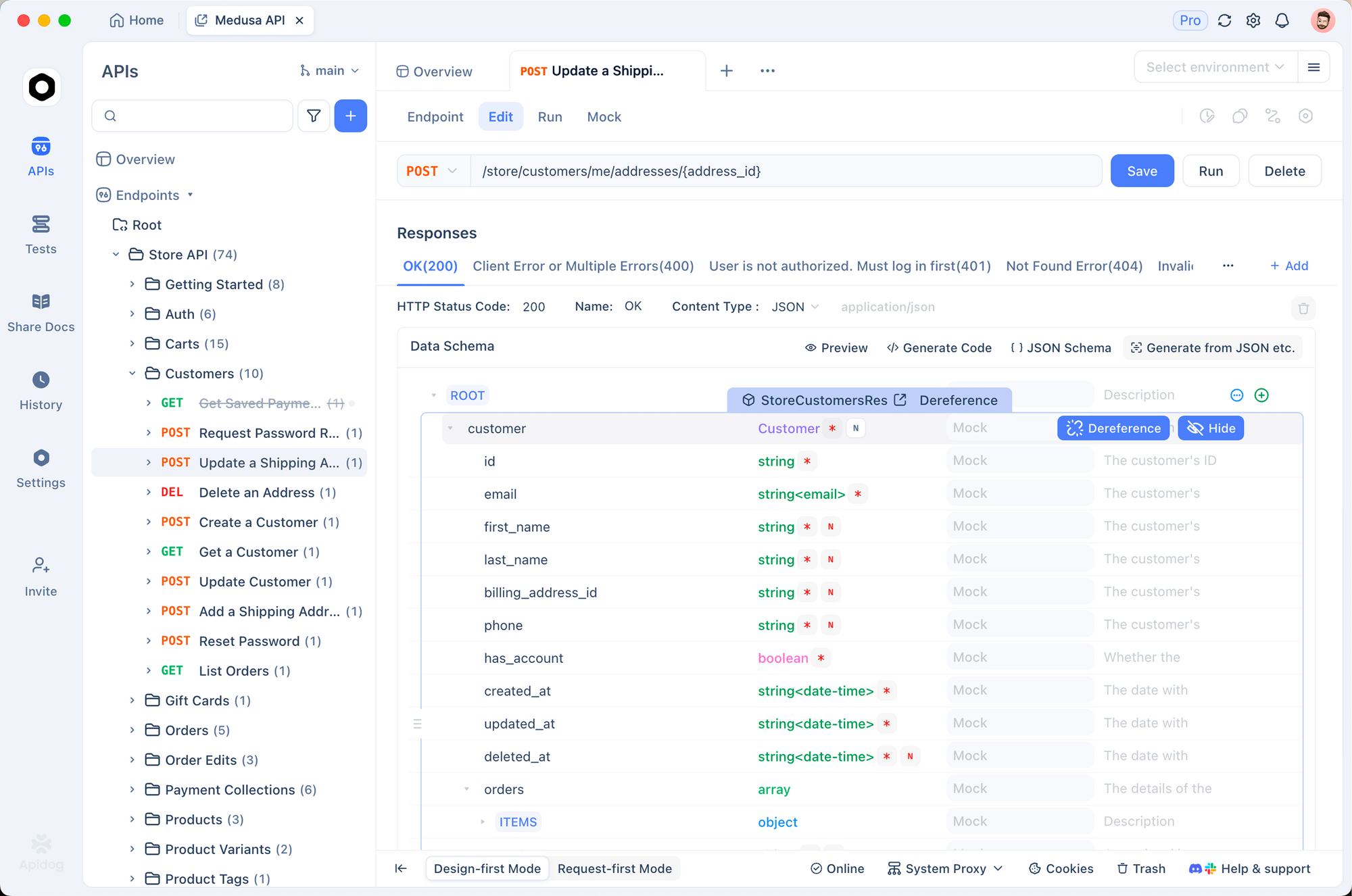
Next, you create a collection for different scenarios: text-only, multimodal, function-calling, and streaming. Apidog auto-generates cURL, Python, and JavaScript snippets from each saved request. You therefore maintain a living documentation set that the entire team can reference.
When you receive errors, Apidog highlights the exact header or payload field that caused the issue. You compare responses side-by-side across model versions or thinking levels. The platform also records request history with timestamps and token usage, which helps you build accurate cost models before production deployment.
Professionals who integrate Apidog report 40-60% faster iteration cycles because they eliminate context switching between code editors and terminal windows. The free tier supports unlimited local projects and sufficient request volume for most development workflows.
Advanced Techniques: Streaming, Context Caching, and Batch Processing
You enable streaming for responsive user interfaces.
Python Streaming
response = client.models.generate_content(
    model="gemini-3.1-pro-preview",
    contents="Write a detailed technical specification for a new microservice.",
    stream=True
)

for chunk in response:
    print(chunk.text, end="", flush=True)
The SDK yields partial responses so you display text as it arrives.
You also use context caching for repeated long documents. You upload a 500-page PDF once, cache the processed context, and reference the cache ID in subsequent calls. This technique reduces token costs and latency dramatically for enterprise RAG applications.
Batch API support lets you process multiple prompts in a single request. You therefore analyze thousands of support tickets overnight while staying within rate limits.
Real-World Use Cases and Production-Ready Code Samples
Use Case 1: Intelligent Document Analyzer
You build a system that ingests contracts, extracts clauses, and flags risks. The multimodal capabilities identify tables and signatures within scanned PDFs.
Use Case 2: Autonomous Coding Assistant
You combine code_execution tool with Gemini 3.1 Pro to debug, refactor, and test code in a single loop. The model writes Python, executes it, inspects output images or logs, and iterates until the task completes.
Use Case 3: Multimodal Customer Support Agent
Users upload screenshots of errors. The agent analyzes the image, searches knowledge base, and returns step-by-step fixes with annotated screenshots generated via the image model.
Each use case benefits from Apidog prototypes. You design the exact payload structure, test edge cases with sample files, and export ready-to-use code.
Best Practices for Cost Control and Performance
You monitor token usage after every call. You set maxOutputTokens conservatively and use countTokens endpoint before expensive operations. You prefer gemini-3.1-pro-preview only for complex tasks and route simpler queries to lighter variants when available.
You implement exponential backoff for rate-limit errors. You cache frequent responses locally or through Redis. You always validate structured outputs with Pydantic or equivalent libraries to catch schema drift early.
Security remains paramount. You sanitize user inputs before sending them to the model. You apply content safety settings appropriate for your domain. You log only anonymized usage metrics.
Troubleshooting Common Issues
Error 429 (Resource Exhausted) appears when you exceed quota. You check the AI Studio usage dashboard and request higher limits through Google Cloud support.
Error 400 (Invalid Argument) often stems from missing thought signatures in multi-turn function calls. You verify that every model response signature travels back in the next request.
Multimodal requests fail when file sizes exceed limits. You compress images or use the File API for persistent storage.
Apidog helps isolate these problems because you replay failed requests with modified parameters instantly. The built-in validator flags schema issues before you even run code.
Comparing Gemini API with Vertex AI
The Gemini Developer API (ai.google.dev) offers the fastest onboarding and free tier access. Vertex AI provides enterprise features such as VPC Service Controls, private endpoints, and tighter IAM integration. You migrate from one to the other by changing only the client initialization and model endpoint. The request formats remain identical.
Most teams begin with the Developer API during prototyping and move to Vertex AI before production. The transition requires minimal code changes.
Conclusion
You now possess a complete technical roadmap for the Gemini 3.1 Pro API. You understand model capabilities, authentication flows, SDK integration, advanced configuration, multimodal inputs, tool orchestration, and production best practices.
The combination of Gemini 3.1 Pro’s reasoning power and Apidog’s visual testing environment lets you ship sophisticated AI features faster than ever before. You start small with text prompts, expand to multimodal agents, and scale confidently with monitoring and caching strategies.
The field evolves rapidly. You bookmark the official documentation at ai.google.dev and revisit the Apidog project regularly to incorporate new features.
You possess everything required to build the next generation of intelligent applications. Begin coding today, test thoroughly with Apidog, and push the boundaries of what AI can achieve.
Start building with the Gemini 3.1 Pro API now. Download Apidog for free and transform how you develop and test AI integrations.