TL;DR
What if you could ask your CI/CD logs natural language questions like "Where are test failures happening most frequently?" and get instant answers? Companies are now feeding terabytes of CI logs to LLMs and discovering that AI can identify bugs, spot flaky tests, and predict deployment failures with surprising accuracy. This approach turns your entire CI/CD history into a searchable, queryable database using text-to-SQL technology.
Introduction
Modern development teams generate massive amounts of CI/CD data. Every build, test, and deployment creates logs that could contain valuable insights if only we could extract them efficiently.
Traditional log analysis requires writing complex SQL queries or learning specialized tools. But what if you could simply ask "Which tests are most likely to fail on the main branch?" and get an instant answer?
This is exactly what forward-thinking companies are doing now. By feeding terabytes of CI logs to LLMs and combining them with text-to-SQL technology, teams can query their entire CI/CD history using natural language. The results show surprising accuracy in finding bugs, identifying patterns, and predicting failures.
In this guide, we'll explore how LLM-powered CI/CD debugging works, what it can do, and how you can implement it in your workflow.
What is LLM-Powered CI/CD Debugging?
LLM-powered CI/CD debugging is a technique where large language models analyze your continuous integration and deployment logs to:
- Find bugs - Identify patterns that indicate underlying issues
- Spot flaky tests - Detect tests that pass or fail randomly
- Predict failures - Warn about pipelines likely to fail based on historical patterns
- Answer questions - Allow natural language queries over your entire CI/CD history
Instead of writing SQL queries to analyze logs, you type questions in plain English. The LLM generates the appropriate query, executes it against your log database, and returns actionable results.
The Scale Problem
Consider what a typical engineering team deals with:
- 100+ pipelines running daily
- Thousands of test executions
- Millions of log lines per day
- Months or years of historical data
Traditional tools force you to:
- Know which database stores the data
- Write SQL queries (or hire someone who can)
- Parse the results manually
LLM-powered debugging eliminates all of this.
How It Works
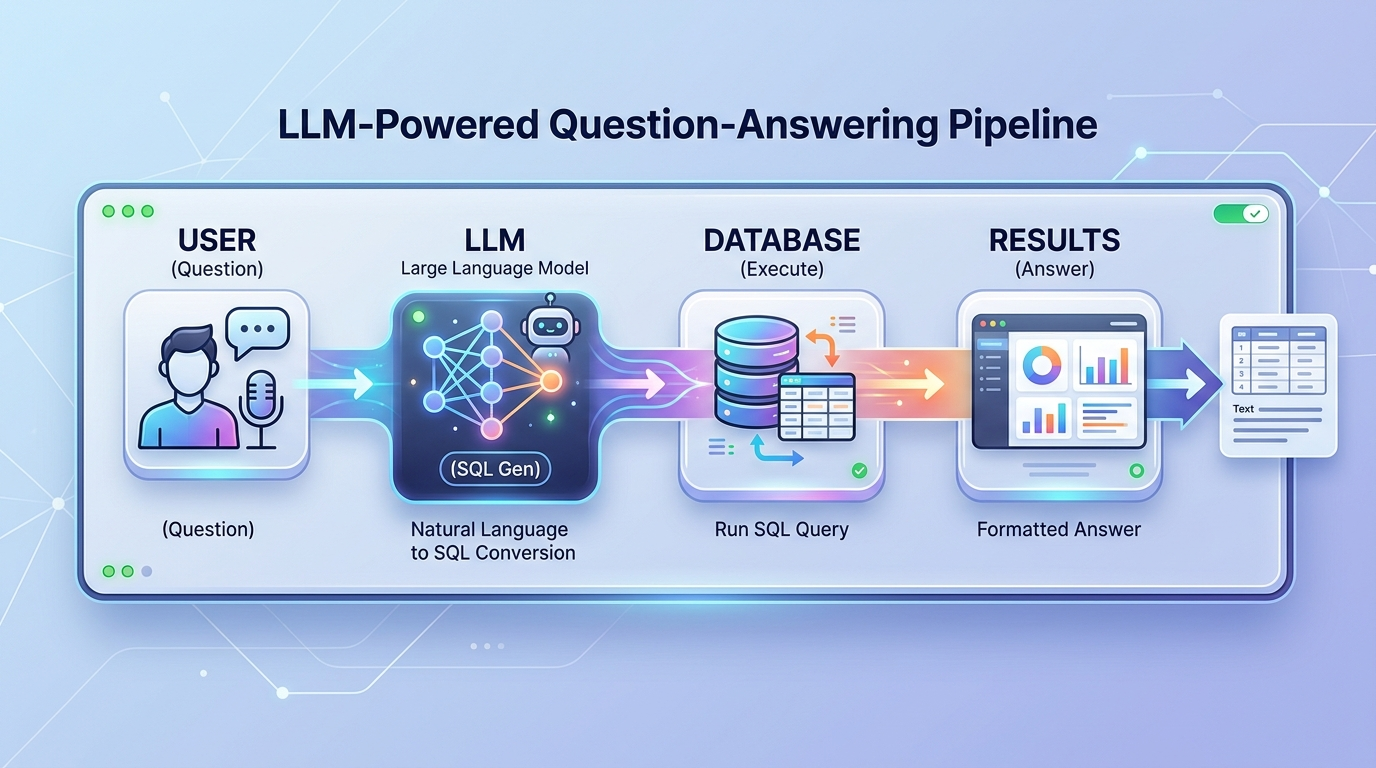
The system architecture is surprisingly straightforward:
Step-by-Step Process
- You ask a question in natural language:
- "Where are test failures happening most frequently?"
- "Which teams have the most flaky tests?"
- "What's the CI pipeline with the highest failure rate?"
2. The LLM generates SQL based on your question:
SELECT test_name, COUNT(*) as failure_count
FROM ci_logs
WHERE status = 'failed'
GROUP BY test_name
ORDER BY failure_count DESC
LIMIT 10;
3. The database executes the query against your CI/CD logs
4. You get results - actionable insights without writing a single line of SQL
Technologies Used
| Component | Purpose |
|---|---|
| LLM (Claude, GPT, Gemini) | Natural language understanding + SQL generation |
| ClickHouse / PostgreSQL | Storing and querying massive log datasets |
| Vector DB (optional) | Semantic search over log entries |
| API Layer | Interface between user and system |
Key Findings from Real-World Testing
Companies that have implemented this approach report surprising results:
1. LLMs Write Better SQL Than Most Developers
The LLM doesn't just understand your logs, it understands database schemas and can write optimized queries. In testing:
- Claude Sonnet 4.6 wrote 90%+ accurate SQL on first try
- GPT-5.2 showed strong performance on complex joins
- Gemini excelled at aggregating large datasets
2. Pattern Recognition Beyond SQL
LLMs don't just execute queries, they recognize patterns across results:
❌ Before: "Show me all failed builds yesterday"
✅ After:  "What's unusual about today's failure rate compared to last week?"
The AI notices anomalies that traditional query-based systems would miss.
3. Natural Language is the Interface
The biggest win isn't technical, it's accessibility. Now anyone can ask:
- "Which API endpoint has the slowest response time?"
- "Are there any tests that fail only on Fridays?"
- "What was the most common error last month?"
4. Cost-Effective at Scale
| Approach | Cost per Query | Time to Answer |
|---|---|---|
| Manual SQL | $50-200 (developer time) | Hours to days |
| Traditional BI | $10-50 (tool license) | Minutes to hours |
| LLM-powered | $0.01-0.10 (API cost) | Seconds |
Implementing LLM CI/CD Analysis
Ready to implement this in your organization? Here's how:
Step 1: Collect Your Logs
First, aggregate all CI/CD data into a queryable database:
# Example: Export GitHub Actions logs to ClickHouse
gh run list --json logs > actions_logs.json
# Process and load into ClickHouse
Step 2: Set Up the LLM Interface
import anthropic
import clickhouse_connect

client = anthropic.Anthropic(api_key="your-key")
db = clickhouse_connect.Client(host="localhost")

def ask_ci_logs(question: str) -> str:
    # Get schema info
    schema = db.query("DESCRIBE TABLE ci_logs")

    # Build prompt with schema
    prompt = f"""Given this database schema:
    {schema}

    Write a ClickHouse SQL query to answer this question:
    {question}

    Only return the SQL query, nothing else."""

    # Get SQL from LLM
    response = client.messages.create(
        model="claude-4-sonnet-20250227",
        max_tokens=500,
        messages=[{"role": "user", "content": prompt}]
    )

    sql = response.content[0].text.strip()

    # Execute and return results
    result = db.query(sql)
    return result.result_rows
Step 3: Add Security and Access Control
# Only allow read queries
def is_safe_query(sql: str) -> bool:
    dangerous = ['DROP', 'DELETE', 'UPDATE', 'INSERT', 'ALTER']
    return not any(word in sql.upper() for word in dangerous)

def ask_ci_logs_safe(question: str) -> str:
    sql = generate_sql(question)
    if not is_safe_query(sql):
        raise ValueError("Query not allowed")
    return execute_safe_query(sql)
Integrating with Apidog
Apidog is the perfect companion for LLM-powered CI/CD analysis. Here's how to combine both:
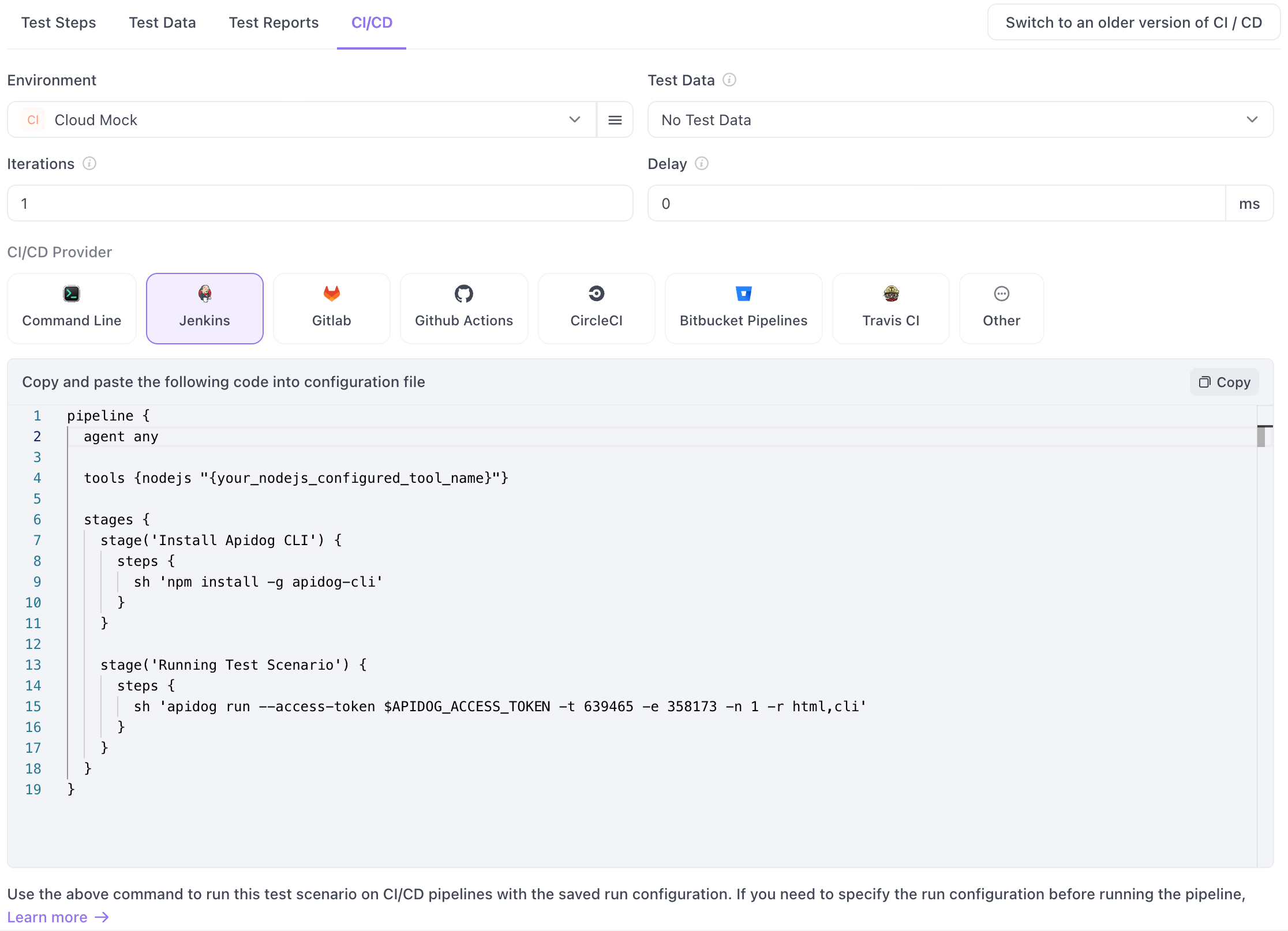
1. Import LLM Findings into Apidog
When your LLM identifies problematic tests, import them directly into Apidog for detailed analysis:
# After finding flaky tests with LLM
# Import into Apidog for deeper investigation
import requests

# Get test details from Apidog
response = requests.get(
    "https://api.apidog.com/v1/projects/{id}/tests",
    headers={"Authorization": f"Bearer {APIDOG_TOKEN}"}
)
2. Run Tests in Apidog Based on LLM Recommendations
# LLM identifies: "POST /users endpoint fails with 500 on invalid email"
# Run this specific test in Apidog
requests.post(
    "https://api.apidog.com/v1/test-runs",
    json={
        "test_ids": ["test-user-post-validation"],
        "environment": "staging"
    }
)
3. Generate Test Cases with Apidog's AI
Apidog has built-in AI test generation. Use LLM findings to trigger test creation:
- LLM finds: "Payment endpoint has no rate limiting tests"
- Use Apidog to auto-generate rate limiting tests
- Results feed back into your LLM analysis
4. Unified Dashboard
Create a dashboard combining:
- LLM insights from CI logs
- Apidog test results
- Real-time API monitoring
This gives you end-to-end visibility from code commit to production.
Best Practices
Data Quality
- Normalize your logs - Different CI systems format logs differently
- Index strategically - Add indexes on frequently queried columns
- Retain history - At least 90 days for meaningful analysis
Query Optimization
- Set time ranges - Don't query all-time by default
- Use sampling - For aggregate queries over massive datasets
- Cache common queries - Store results for frequently asked questions
LLM Configuration
- Use Sonnet for SQL generation - Best balance of cost and accuracy
- Use Opus for complex analysis - When reasoning about patterns
- Provide schema context - Always include table schemas in prompts
Security
- Never expose raw log access - Always route through the LLM
- Implement query allowlisting - Restrict to read-only operations
- Audit all queries - Log who asked what for compliance
Limitations and Challenges
LLM CI/CD analysis isn't perfect. Here are the challenges to expect:
1. Token Limits
LLMs have context windows. Analyzing years of logs in one go isn't possible.
Solution: Query in date ranges, then have LLM synthesize results.
2. Schema Understanding
LLMs sometimes misinterpret column names or relationships.
Solution: Always provide schema in your prompts. Validate generated SQL before execution.
3. Hallucinations
Rarely, LLMs generate plausible-but-wrong SQL.
Solution: Implement result validation. If results don't make sense, regenerate.
4. Cost at Scale
Millions of queries add up.
Solution: Cache results, use cheaper models for simple queries, implement query limits.
Conclusion
LLM-powered CI/CD debugging represents a paradigm shift in how we analyze pipeline data. Instead of struggling with complex queries, any team member can ask questions in plain English and get actionable insights.
The technology is proven: companies are successfully analyzing terabytes of logs, finding bugs that would have gone unnoticed, and dramatically reducing time-to-resolution for pipeline issues.
FAQ
What databases work best for this?
ClickHouse is popular for its ability to handle massive log datasets. PostgreSQL works well for medium-scale data. Both integrate well with LLM text-to-SQL.
Do I need to fine-tune the LLM?
No. Standard LLMs like Claude and GPT models are already excellent at SQL generation when given proper schema context.
How much data can I analyze?
As much as your database can store. The LLM processes queries one at a time, so there's no limit on historical data, only on what you query in a single request.
Is this secure?
Yes, with proper implementation. All queries go through the LLM, which acts as a guardrail. Implement read-only access and audit logging.
What's the accuracy rate?
Testing shows 90%+ accuracy on first-query SQL generation for common patterns. Complex queries may need 1-2 regenerations.
Can this work for API logs specifically?
Absolutely. The same approach works for API access logs, error logs, and performance data. Just structure your logs in a queryable format.