
Cursor dropped a bombshell on March 19, 2026. Their new Composer 2 model doesn’t just match Claude Opus 4.6 and GPT-5.4 on coding benchmarks—it beats them both.
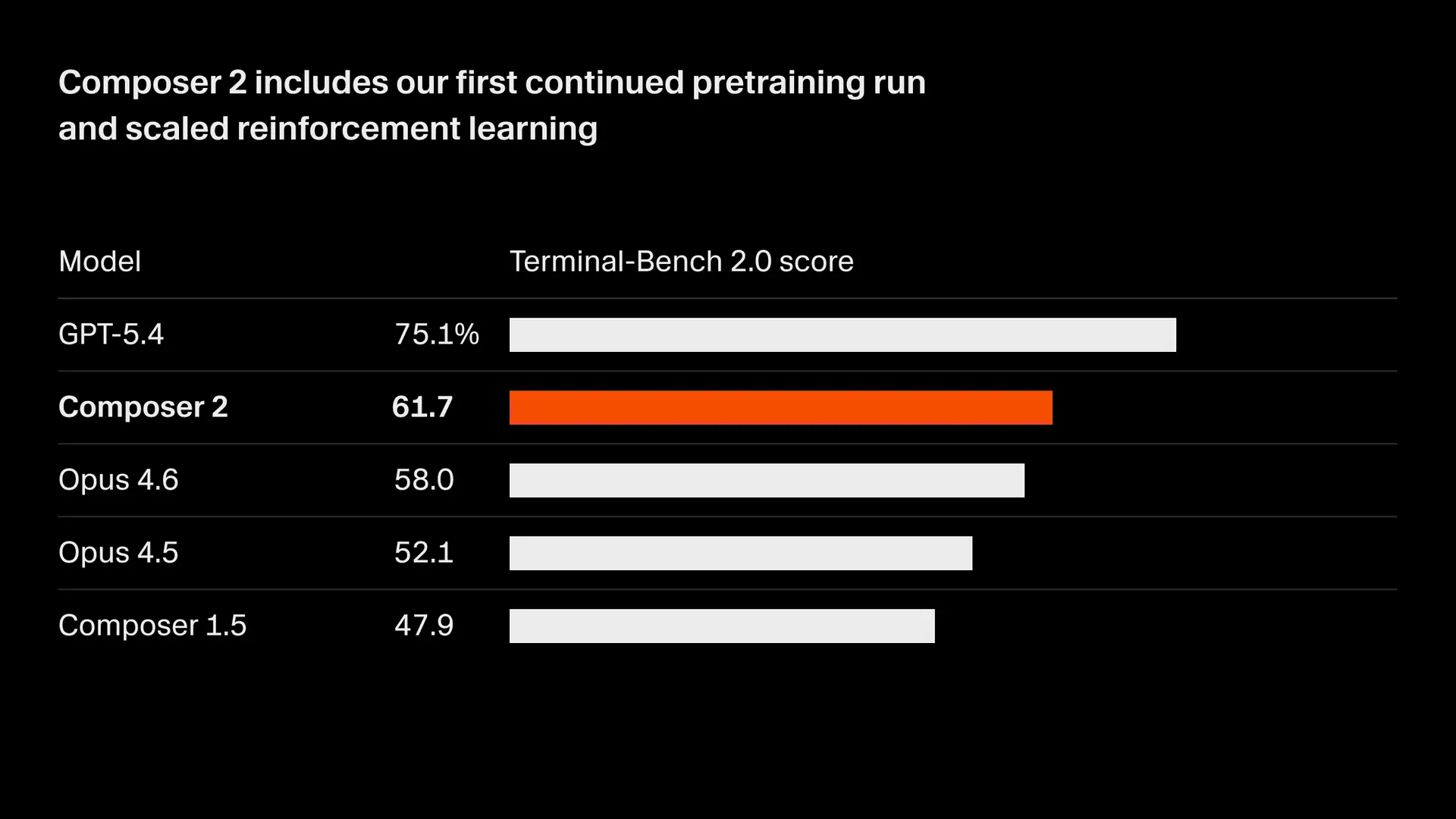
The numbers tell a striking story: 61.7 on Terminal-Bench 2.0. 73.7 on SWE-bench Multilingual. A 17-point leap from the previous version. And they’re pricing it at roughly one-third of what competitors charge.
If these claims hold up under independent scrutiny, the AI coding landscape just shifted beneath our feet.
Here’s everything you need to know about Composer 2, why the benchmarks matter, and what this means for your development stack.
The Benchmarks That Have Everyone Talking
Cursor’s announcement centers on three proprietary and industry-standard benchmarks. The results show Composer 2 pulling ahead of both the previous version and competing frontier models:
*Approximate comparative scores based on Cursor’s infrastructure testing
The jump from Composer 1.5 to Composer 2 represents the largest single-generation improvement Cursor has delivered. Seventeen points on CursorBench. Nearly 8 points on SWE-bench. These aren’t incremental gains—they’re the kind of leaps you typically see once every few years, not between minor version updates.
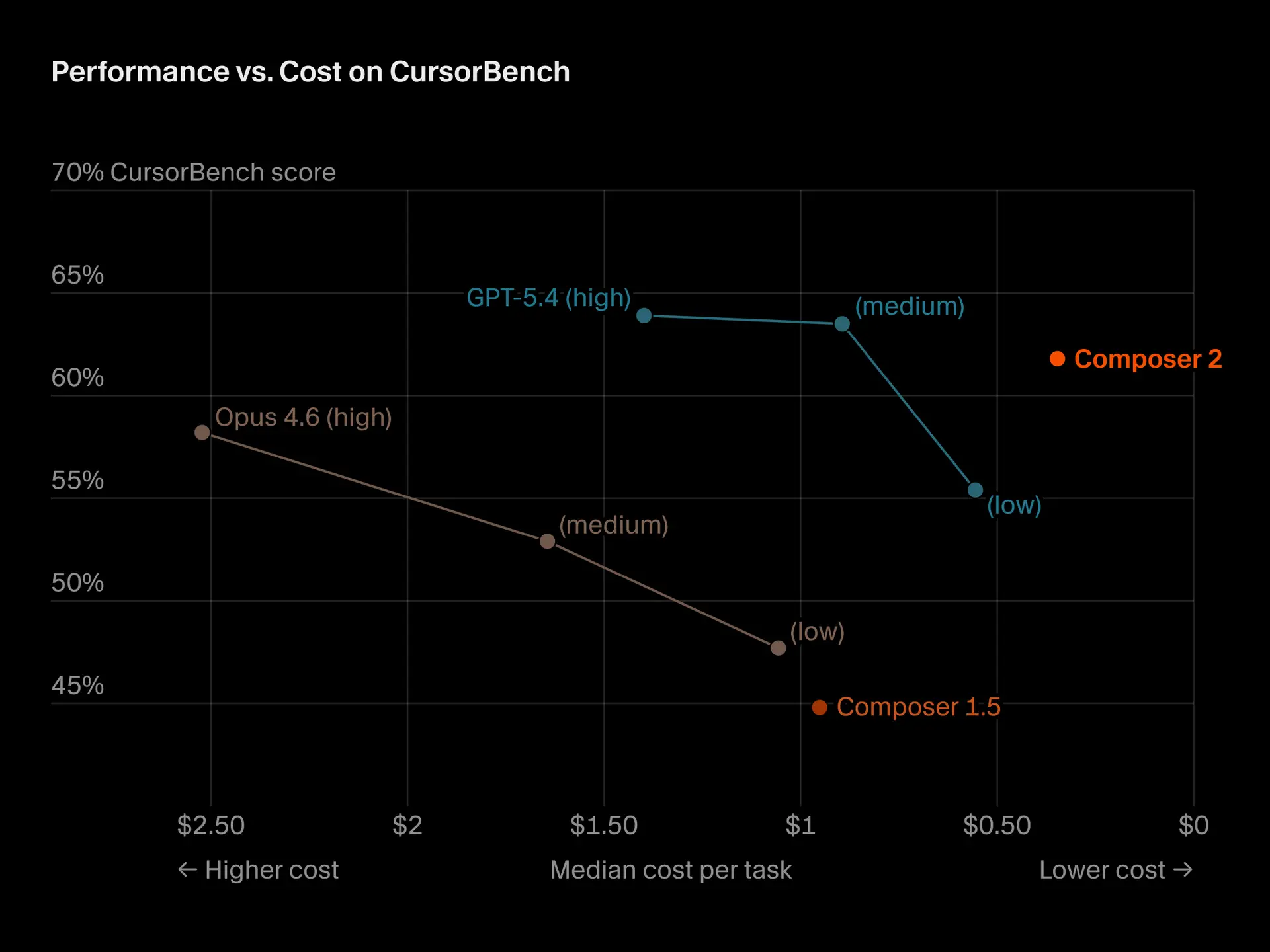
Cursor attributes the improvement to their first continued pretraining run. This creates a stronger foundation for the reinforcement learning that follows, allowing the model to handle coding tasks that require hundreds of sequential actions without losing track of context.
The Pricing Strategy That Changes Everything
Benchmark performance gets headlines. Pricing wins markets.
Composer 2’s pricing structure:
- Standard variant: $0.50 per million input tokens, $2.50 per million output tokens
- Fast variant: $1.50 per million input tokens, $7.50 per million output tokens
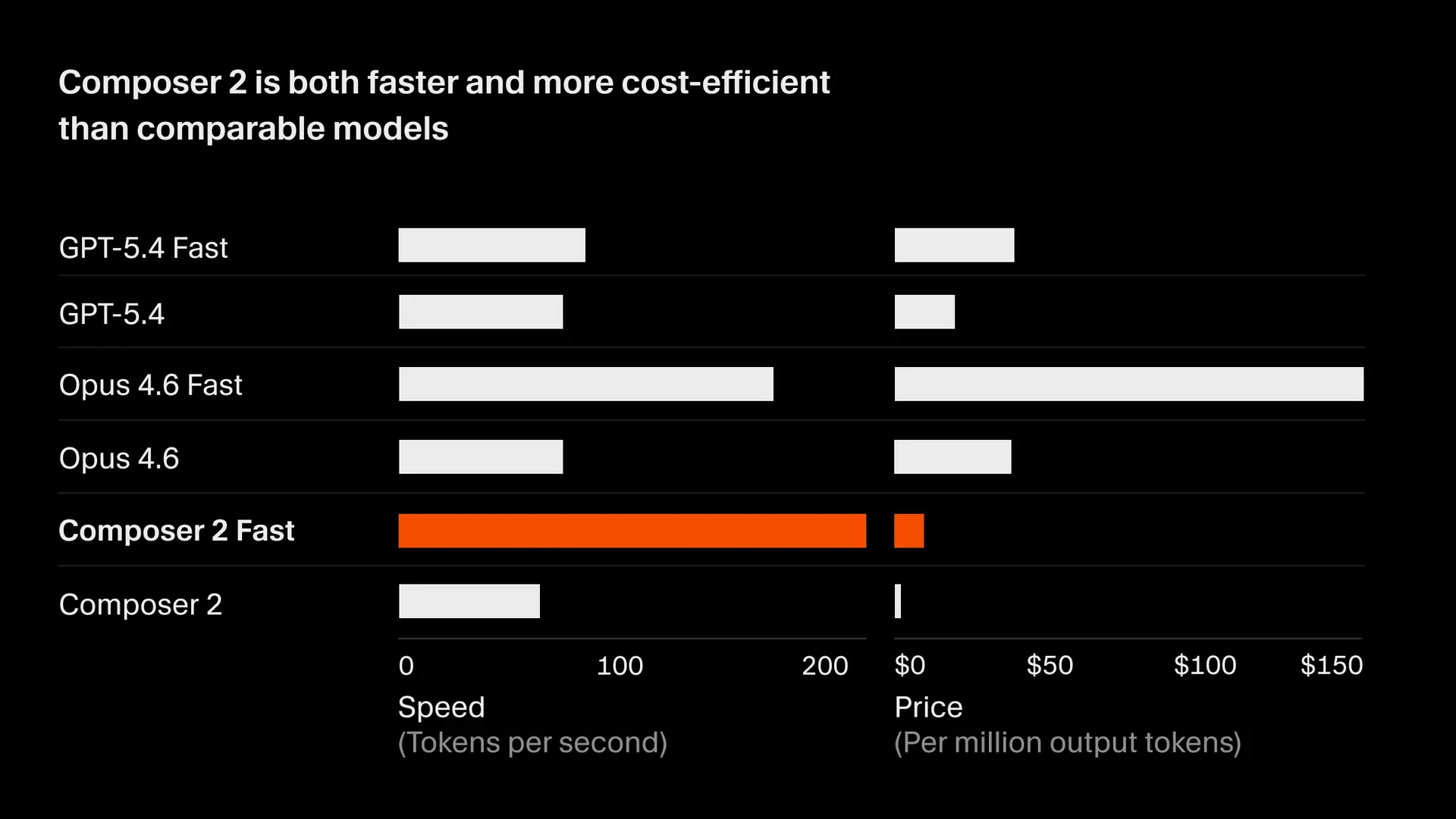
The fast variant delivers identical intelligence with lower latency. Cursor explicitly positions it as cheaper than competing “fast” models while maintaining the same performance tier.
For context, here’s how the math plays out for a team generating 10 million output tokens monthly:
| Model | Monthly Cost |
|---|---|
| Composer 2 | ~$25 |
| Claude Opus 4.6 | ~$75-150 |
| GPT-5.4 | ~$60-120 |
These are approximate comparisons based on published pricing from Anthropic and OpenAI. Actual costs vary by usage patterns and enterprise agreements. But the direction is clear: Cursor is undercutting the competition by a significant margin.
Breaking Down Terminal-Bench 2.0
Terminal-Bench 2.0 isn’t just another coding benchmark. It tests whether an AI can complete real-world terminal and coding tasks autonomously—no hand-holding, no step-by-step guidance.
The benchmark is maintained by the Laude Institute and uses different evaluation harnesses for different model families:
- Anthropic models: Evaluated using the Claude Code harness
- OpenAI models: Evaluated using the Simple Codex harness
- Cursor models: Evaluated using the Harbor evaluation framework (the official designated harness for Terminal-Bench 2.0)
Cursor ran 5 iterations per model-agent pair and reported average scores. The benchmark focuses on agent behavior: can the AI navigate an unfamiliar codebase, execute terminal commands, debug failures, and complete multi-step tasks without human intervention?
A score of 61.7 means Composer 2 successfully completed roughly 62% of the tasks it attempted. That number might not sound overwhelming until you compare it to the competition—and to the previous version of Composer itself.
SWE-bench Multilingual: The Real-World Test
SWE-bench evaluates an AI’s ability to resolve actual GitHub issues across multiple programming languages. This isn’t synthetic test data. These are real bugs, real feature requests, and real codebases.
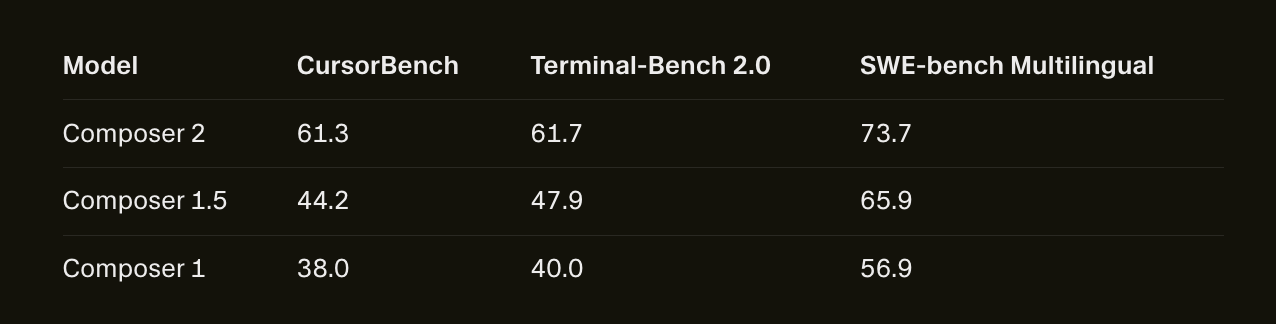
A score of 73.7 means Composer 2 successfully resolved approximately 74% of the issues it attempted. For comparison, Composer 1 scored 56.9% on the same benchmark. That’s a 17-point improvement in the model’s ability to understand, fix, and verify real-world code changes.
This benchmark matters because it tests problem-solving, not just code completion. The AI needs to:
- Parse the issue description (often vague or incomplete)
- Locate relevant files across a codebase
- Understand the existing code structure
- Make targeted fixes without breaking other functionality
- Verify the changes work as intended
Most coding assistants excel at step 4—generating code snippets. Composer 2’s score suggests it’s gotten significantly better at steps 1, 2, 3, and 5.
How Cursor Built a Benchmark-Beating Model
The technical story behind Composer 2 involves two key phases:
Phase 1: Continued Pretraining
Cursor took their base model and continued training it on additional code data. This isn’t the same as the initial pretraining that created the base model. Instead, it’s a targeted refinement process that strengthens the model’s understanding of code patterns, APIs, and development workflows.
Think of it like a medical residency. The model already has its MD (the base pretraining). Continued pretraining is the specialized fellowship that makes it an expert in one domain.
Phase 2: Reinforcement Learning on Long-Horizon Tasks
From the strengthened base, Cursor applies reinforcement learning specifically to long-horizon coding tasks. These are tasks that require hundreds of sequential actions—refactoring a large module, migrating an entire codebase to a new API, or debugging a complex integration issue.
The reinforcement learning process works like this:
- The model attempts a long-horizon task
- It receives feedback on whether the task succeeded
- Over thousands of iterations, it learns which action sequences lead to success
This approach mirrors how Anthropic and OpenAI have discussed their own model development. The differentiator: Cursor is training specifically on coding tasks with extended action sequences, not general reasoning or chat interactions.
What This Means for Development Teams
If Composer 2 delivers on these benchmark claims in day-to-day usage, several shifts become likely across the industry.
1. Consolidation of AI Coding Tools
Many teams currently use multiple AI tools—one for code completion, another for refactoring, another for debugging, another for code review. Composer 2’s benchmark performance suggests it can handle all of these tasks at a frontier level.
Expect teams to consolidate around fewer tools. The cognitive overhead of context-switching between different AI assistants adds up. A single model that performs well across all tasks reduces that friction.
2. Cost Becomes a Primary Decision Factor
At $0.50 per million input tokens, Composer 2 prices below most enterprise AI coding solutions. For high-volume teams—those generating millions of tokens daily—this pricing could swing decisions away from incumbents.
The fast variant adds another dimension. Teams that need low-latency responses (pair programming, real-time code review) can pay more for speed. Teams that prioritize cost over latency can use the standard variant. Both get the same underlying intelligence.
3. Benchmark Skepticism Remains Healthy
Cursor’s benchmark methodology includes an important detail: they took “the max score between the official leaderboard score and the score recorded running in our infrastructure” for non-Composer models.
This approach has reasonable justification—infrastructure differences can affect scores. But it also means Cursor’s comparisons haven’t been independently validated. Teams should test Composer 2 on their actual codebases before making enterprise-wide decisions.
Benchmarks guide decisions. Real-world testing confirms them.
The Competitive Response Nobody’s Talking About
When one player shifts the market, others respond. Cursor’s announcement puts pressure on three groups:
Anthropic built their developer reputation on Claude’s coding capabilities. Composer 2 beating Opus 4.6 on coding benchmarks challenges that positioning. Expect Anthropic to either release updated benchmarks or announce their own coding-focused improvements.
OpenAI has faced criticism about GPT-5.4’s coding performance relative to its predecessors. Composer 2’s gains widen the pressure. OpenAI may accelerate their own coding model development or adjust pricing to remain competitive.
GitHub Copilot and other IDE-integrated tools face a different challenge. Cursor isn’t just a model—it’s an IDE with a tightly integrated AI assistant. The combination of model performance and IDE integration creates a moat that pure API providers can’t easily cross.
Where Apidog Fits Into the AI Coding Revolution
AI coding tools like Cursor excel at generating and modifying code. Write a function, refactor a module, debug a failing test—Composer 2 handles these tasks well.
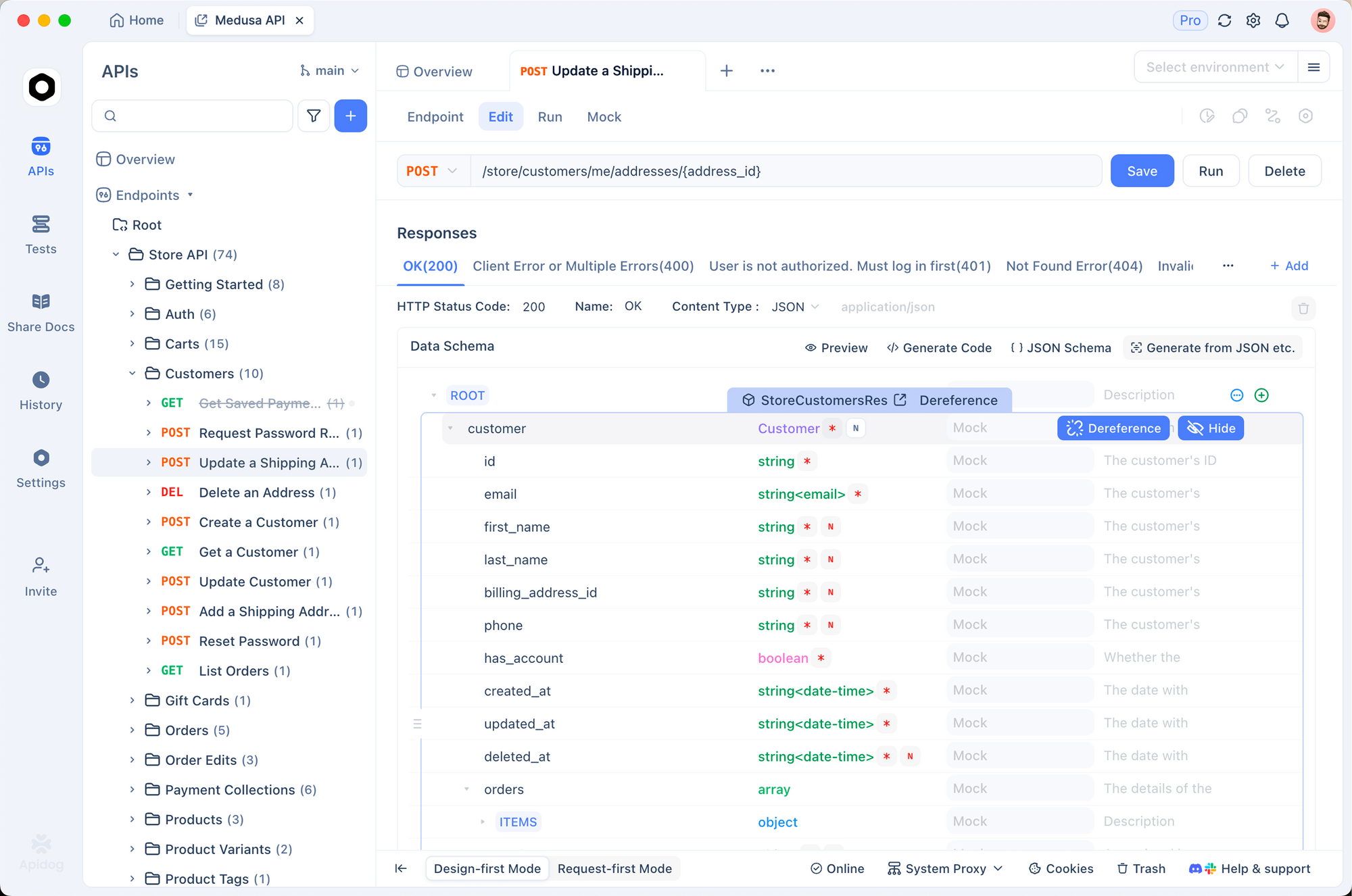
But API development requires more than code generation. It demands testing, debugging, mocking, and documentation workflows that extend beyond what an AI assistant provides.
Apidog handles the full API lifecycle:
- API Design: Visual designer with OpenAPI support and branch-based versioning. Design your API before writing implementation code.
- Testing: Automated test scenarios with visual assertions and CI/CD integration. Catch regressions before they reach production.
- Debugging: Visual debugging tools that show request and response flows in real time. See exactly what’s happening across your API calls.
- Mocking: Smart mock servers with dynamic responses, no code required. Unblock frontend development before the backend is ready.
- Documentation: Auto-generated, customizable docs with custom domain support. Keep documentation in sync with your actual API behavior.
Teams using Cursor for code generation can pair it with Apidog for API workflow management. The AI writes the code. Apidog ensures the API works as intended, stays tested, and remains documented.
The Bottom Line
Cursor Composer 2 represents a meaningful leap in AI coding capabilities. The benchmark improvements are substantial. The pricing is aggressive. The implications for development teams are real.
But benchmarks don’t ship code. Teams should test Composer 2 on their actual codebases, with their actual workflows, before making decisions. The model that wins on paper doesn’t always win in practice.
TL;DR
- Composer 2 scores 61.7 on Terminal-Bench 2.0 and 73.7 on SWE-bench Multilingual—outperforming both Claude Opus 4.6 and GPT-5.4 on Cursor’s evaluations
- Pricing starts at $0.50 per million input tokens—roughly one-third of competing frontier models
- Improvements come from continued pretraining plus reinforcement learning on long-horizon coding tasks
- Fast variant available at $1.50 per million input tokens with identical intelligence, lower latency
- Independent validation matters—test on your codebase before enterprise adoption
- Apidog complements AI coding tools by handling API testing, debugging, mocking, and documentation
FAQ
Is Composer 2 actually better than Claude Opus 4.6 for coding?
Cursor’s benchmarks show Composer 2 outperforming Opus 4.6 on Terminal-Bench 2.0 and SWE-bench Multilingual. The margin: approximately 2-3 points on each benchmark. These are meaningful differences, but not overwhelming.
Real-world performance depends on your specific use case. Code completion, refactoring, debugging, and architectural decisions all test different capabilities. A model that wins on benchmarks might not win on your codebase.
Test both tools on your actual work before making decisions.
What’s the difference between Composer 2 standard and fast variants?
Both variants have identical intelligence and benchmark scores. The fast variant trades higher cost for lower latency—more tokens per second, faster responses.
Cursor reports speed metrics from March 18, 2026 traffic snapshots, normalized to account for token size differences across providers. Anthropic tokens run about 15 percent smaller, so Cursor adjusted the comparison accordingly.
Teams that prioritize real-time interaction (pair programming, live code review) should consider the fast variant. Teams that prioritize cost should use standard Composer 2.
How does Composer 2’s pricing compare to competitors?
At $0.50 per million input tokens and $2.50 per million output tokens, Composer 2 undercuts most enterprise AI coding solutions.
For rough comparison:
- Anthropic Claude Opus 4.6: Approximately $1.50-3.00 per million input tokens, $7.50-15.00 per million output tokens (varies by tier)
- OpenAI GPT-5.4: Approximately $1.00-2.00 per million input tokens, $5.00-10.00 per million output tokens (varies by tier)
Teams with high usage should calculate total cost based on their specific token consumption patterns. Input-heavy workloads (large codebase analysis) benefit more from Composer 2’s input pricing. Output-heavy workloads (code generation) benefit from both input and output pricing.
Should I switch from my current AI coding tool?
If you’re already productive with another tool, benchmark improvements alone may not justify switching. Consider:
- Current workflow integration: How deeply is your existing tool embedded in your workflow?
- Team familiarity: How much institutional knowledge has your team built around your current tool?
- Specific performance gaps: Are there tasks where your current tool consistently falls short?
- Total cost at your usage volume: What’s the actual monthly spend difference?
Test Composer 2 on your actual codebase for a week. Compare it directly to your current tool on tasks you do every day. Let real-world performance drive the decision.
Can I use Cursor and Apidog together?
Yes. Cursor handles AI-assisted code generation and modification. Apidog manages the API development lifecycle—design, testing, debugging, mocking, and documentation.
Common workflow:
- Use Cursor to generate API endpoint code
- Import the API definition into Apidog
- Use Apidog to design test scenarios and run automated tests
- Debug any issues using Apidog’s visual debugging tools
- Generate and publish documentation from Apidog
Teams often use AI tools for code creation, then rely on Apidog to validate, test, and document the resulting APIs.
What’s the catch? Why is Composer 2 so much cheaper?
No obvious catch. Cursor appears to be pursuing a land-grab strategy: gain market share through aggressive pricing while their technical advantage holds.
This strategy makes sense for a few reasons:
- Vertical integration: Cursor controls both the IDE and the model, reducing dependency on third-party APIs
- Usage data: More users means more data to improve future models
- Lock-in potential: Teams that build workflows around Cursor are less likely to switch when competitors respond
The pricing won’t last forever. Competitors will respond. But for now, early adopters can capture significant cost savings.
How do I verify Cursor’s benchmark claims independently?
Terminal-Bench 2.0 maintains a public leaderboard at their official website. You can compare Cursor’s reported scores against other models.
For independent validation:
- Check the Terminal-Bench 2.0 leaderboard for official scores
- Review the Laude Institute’s methodology documentation
- Test Composer 2 on your own codebase with your own evaluation criteria
Benchmarks guide decisions. Real-world testing confirms them.