

Cursor Automation and OpenClaw serve different purposes. Cursor Automation runs cloud-based AI agents that trigger automatically on events (GitHub PRs, Slack messages, PagerDuty incidents) to handle code review, monitoring, and team workflows. OpenClaw is a self-hosted AI assistant you text through WhatsApp, Telegram, or Discord for personal automation and local task execution. Choose Cursor Automation for team workflows and automatic background tasks. Choose OpenClaw for personal assistance with complete data privacy. Many developers use both.
Quick Answer: Which Should You Choose?
Choose Cursor Automation if you need:
- Automated code review on every PR
- Team-wide incident response
- Scheduled workflows (daily summaries, test coverage)
- Cloud-based execution with no local setup
- Integration with Slack, GitHub, Linear, PagerDuty
Choose OpenClaw if you need:
- Personal AI assistant via WhatsApp or Telegram
- Complete data privacy (everything stays local)
- No monthly subscriptions (pay only for API usage)
- Direct file system and command execution
- Custom messaging app integrations
Use both if: You want team automations (Cursor) plus a personal assistant (OpenClaw) that handles individual tasks.
What is Cursor Automation?
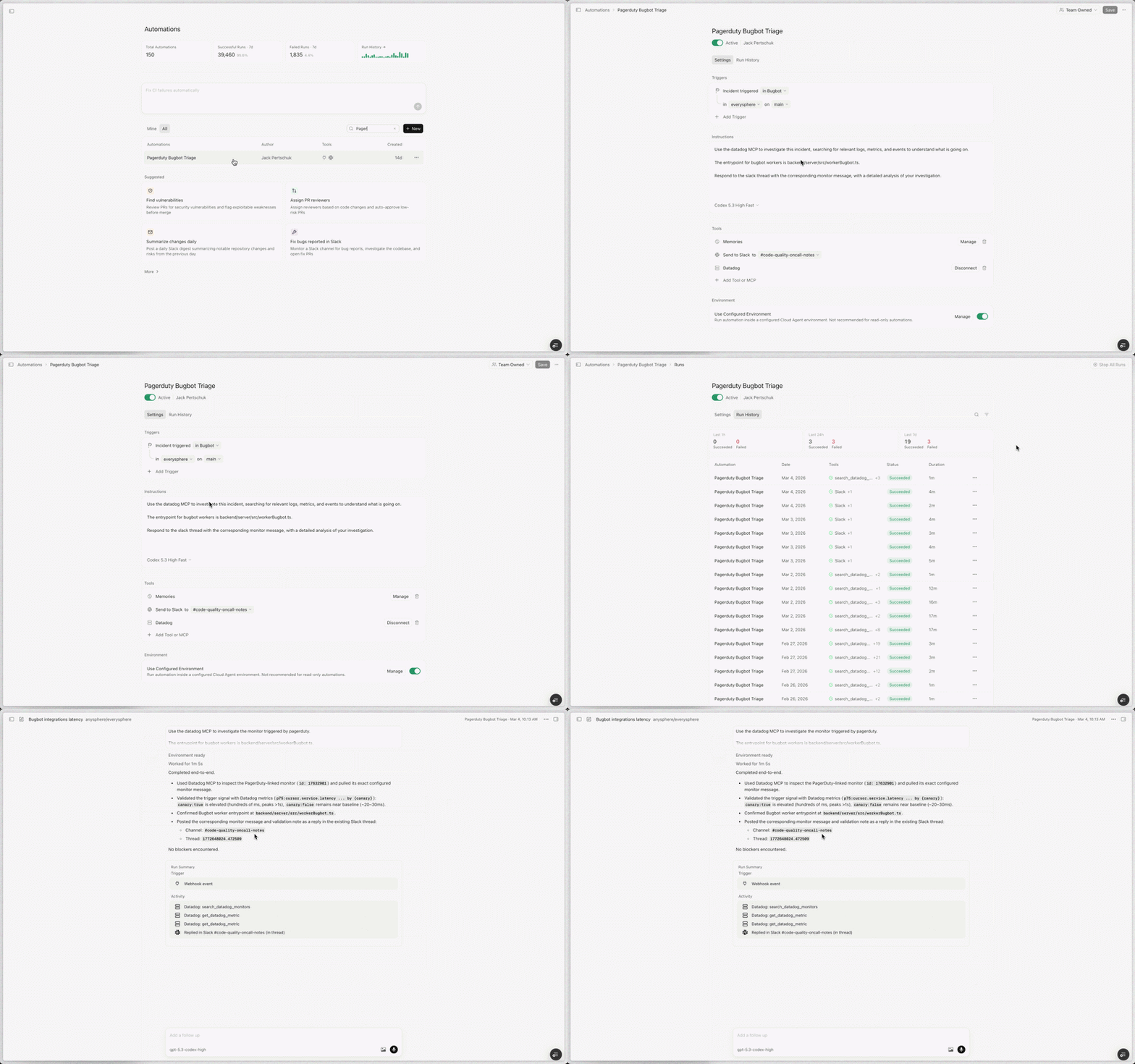
Cursor Automation is a cloud-based agent platform launched by Cursor in March 2026. It deploys always-on AI agents that run automatically when triggered by events or schedules.
How It Works
- Event triggers start automations (PR opened, Slack message, scheduled time)
- Cloud sandbox spins up with your codebase and configured tools
- AI agent executes instructions using MCPs (Model Context Protocols)
- Self-verification runs tests and validates output
- Results post to Slack, create Linear issues, or commit as PRs
Key Features
- Event-driven execution - Triggers on GitHub, Slack, Linear, PagerDuty, webhooks
- Cloud sandboxes - Isolated VMs with pre-configured tools
- MCP integrations - Connect to Datadog, Notion, Linear, and custom tools
- Memory system - Agents learn from past runs
- Team sharing - Automations visible to entire team
Typical Use Cases
| Category | Examples |
|---|---|
| Review & Monitoring | Security review, agentic codeowners, incident response |
| Team Coordination | Weekly summaries, PR routing, status reports |
| Quality Assurance | Test coverage automation, bug triage |
| DevOps | PagerDuty response, deployment verification |
Real-World Impact
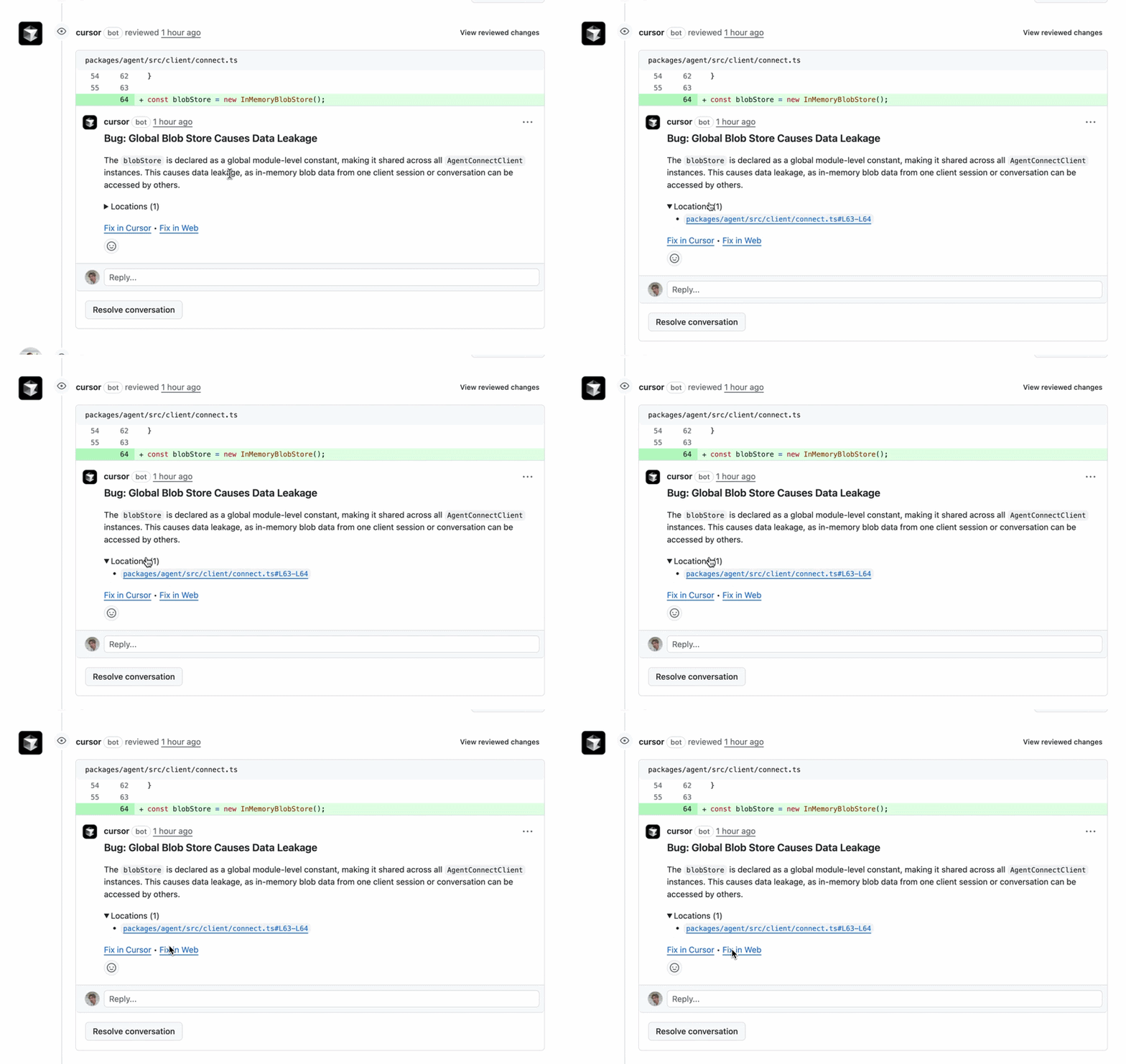
Cursor's own Bugbot automation runs thousands of times daily and has caught millions of bugs. Their security review automation catches vulnerabilities asynchronously without blocking PRs. Incident response automations have significantly reduced response times by doing investigation before humans wake up.
What is OpenClaw?
OpenClaw is a self-hosted AI agent framework created by Peter Steinberger in early 2026. It connects AI assistants to messaging apps like WhatsApp, Telegram, and Discord, running entirely on your own machine.

How It Works
- You send a message via WhatsApp, Telegram, Discord, or Slack
- Gateway receives the message and authenticates
- Agent processes your request using an LLM (Claude, GPT-4, local models)
- Tools execute actions on your system (files, commands, web)
- Results return to the messaging app
Key Features
- Self-hosted - Runs on your machine, you control everything
- Messaging apps - Works through WhatsApp, Telegram, Discord, iMessage
- Tools system - 25+ built-in tools (file access, commands, web search)
- Skills system - 53+ community-built workflows
- Memory persistence - Remembers context across sessions
- Autonomous execution - Heartbeat feature for scheduled tasks
Typical Use Cases
Category | Examples |
|---|---|
Personal Assistant | Meeting summaries, task management, daily briefings |
Development | Code review, documentation generation, debugging |
Privacy-Sensitive | Handling proprietary code, sensitive data |
Content Creation | Research, script writing, thumbnail ideas |
Community Growth
OpenClaw gained 186,000+ GitHub stars in under three months. The community has created 53+ skills for common tasks and continues to expand the ecosystem.
Head-to-Head Comparison
| Feature | Cursor Automation | OpenClaw |
|---|---|---|
| Primary Purpose | Team workflow automation | Personal AI assistant |
| Hosting | Cloud (Cursor-managed) | Self-hosted (your machine) |
| Trigger Model | Events, schedules, webhooks | Manual messages + scheduled Heartbeat |
| Execution | Automatic, background | Interactive chat + autonomous tasks |
| Data Location | Cursor cloud sandboxes | Your local machine |
| Privacy | Enterprise-grade cloud security | Complete local control |
| Setup Complexity | Low (web dashboard) | Medium (terminal required) |
| Messaging Apps | Slack (team-focused) | WhatsApp, Telegram, Discord, iMessage |
| GitHub Integration | Deep (PR triggers, code access) | Via tools/skills |
| Team Features | Built-in sharing and permissions | Single-user focused |
| Cost Model | Subscription (Cursor plan) | Free software + API costs |
| Custom Integrations | MCPs (Model Context Protocols) | Tools and Skills system |
| Best For | Engineering teams | Individual developers |
Architecture Differences
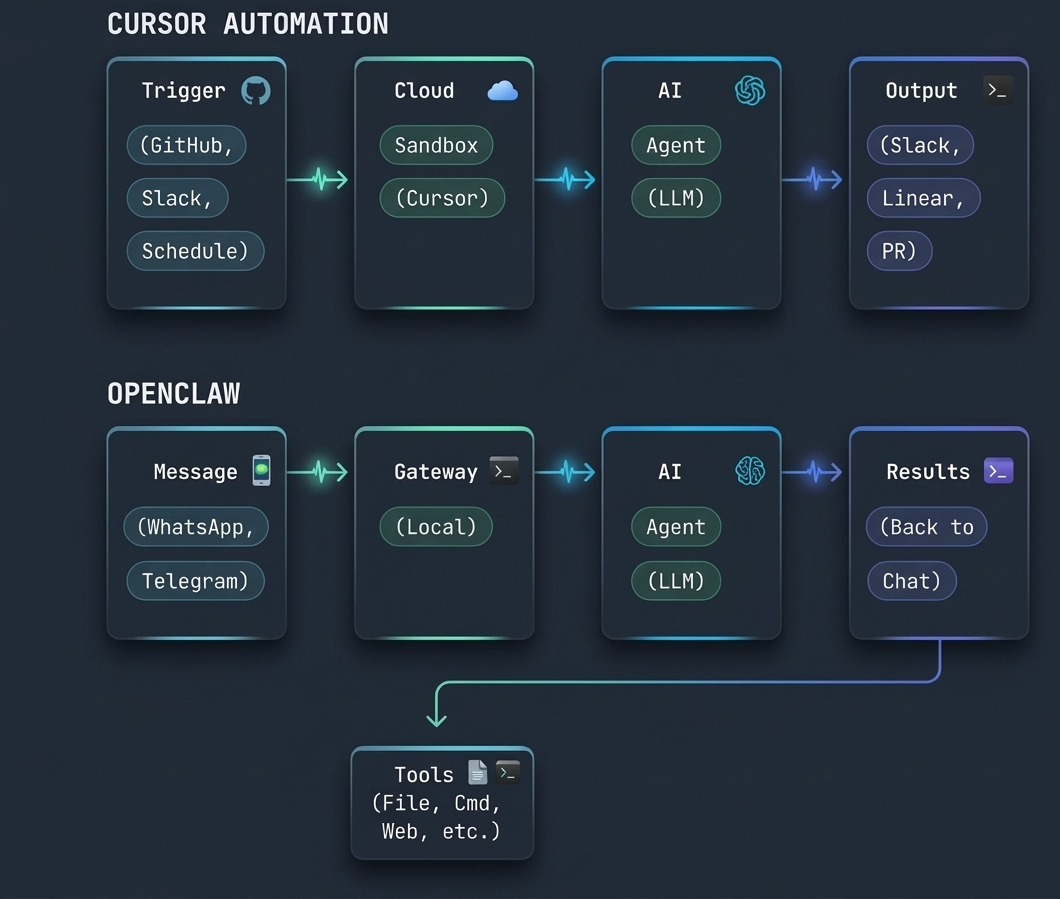
Architecture: Cloud Agents vs Local Assistant
Cursor Automation: Cloud-Based Execution
Cursor Automations run in isolated cloud sandboxes managed by Cursor. Each automation execution:
- Spins up a fresh VM with your codebase
- Loads configured MCPs and credentials
- Executes the agent's instructions
- Runs verification tests
- Delivers results and shuts down
Advantages:
- No local setup required
- Consistent environment every time
- Doesn't depend on your machine being online
- Scales automatically for multiple concurrent runs
- Team members share the same execution environment
Trade-offs:
- Code runs on Cursor's infrastructure (trust required)
- Less direct control over execution environment
- Requires internet connection
- Subscription cost for cloud resources
OpenClaw: Local Execution
OpenClaw runs entirely on your machine. The agent:
- Receives messages through your connected gateway
- Processes requests using your chosen LLM
- Executes tools directly on your file system
- Returns results to your messaging app
Advantages:
- Complete data privacy (nothing leaves your machine)
- Direct file system and command access
- No subscription fees (only API costs)
- Full control over tools and configuration
- Works with local LLMs for offline operation
Trade-offs:
- Requires terminal comfort for setup
- Your machine must be running for automations
- Maintenance is your responsibility
- Single-user focused (no team sharing built-in)
- Security risk if misconfigured (AI has file access)
Use Case Comparison
Code Review
Cursor Automation: Excels at automated code review. Runs on every PR, classifies risk, assigns reviewers, and posts findings asynchronously. Built for team workflows.
OpenClaw: Can review code when you ask it to. You'd message "Review this PR" and it analyzes the diff. More manual, less automatic.
Winner: Cursor Automation for teams, OpenClaw for individual developers.
Incident Response
Cursor Automation: Triggered by PagerDuty, investigates using Datadog MCP, creates PR with fix, alerts on-call engineer. All automatic.
OpenClaw: Can investigate incidents if you message it. Could be set up with Heartbeat to monitor, but requires more configuration.
Winner: Cursor Automation (purpose-built for this).
Personal Task Management
Cursor Automation: Not designed for personal tasks. Focused on team workflows.
OpenClaw: Excellent for personal assistance. Message via WhatsApp: "What's on my calendar today?" or "Summarize my pending tasks."
Winner: OpenClaw (purpose-built for this).
Privacy-Sensitive Development
Cursor Automation: Code runs in Cursor's cloud. Enterprise security, but still third-party.
OpenClaw: Everything stays local. Ideal for proprietary code, client work, or regulated industries.
Winner: OpenClaw (complete data control).
Scheduled Workflows
Cursor Automation: Native cron-based scheduling. Set up weekly summaries, daily test runs, or any schedule.
OpenClaw: Heartbeat feature enables scheduled tasks, but requires more manual setup.
Winner: Cursor Automation (easier, more robust).
API Testing and Monitoring
Cursor Automation: Can trigger API test suites after deployments, monitor endpoints, and alert on failures. Integrates with tools like Apidog.
OpenClaw: Can run API tests when asked and monitor with Heartbeat. More manual but more flexible for custom workflows.
Winner: Tie - Cursor for automatic team workflows, OpenClaw for personal monitoring.
Documentation Updates
Cursor Automation: Automatically updates documentation when code changes. Posts changelogs, updates API docs.
OpenClaw: Can generate documentation when requested. Can be set up to watch for changes and update automatically.
Winner: Cursor Automation (more automatic).
Meeting Summaries
Cursor Automation: Can summarize meetings if integrated with calendar and transcription tools.
OpenClaw: Forward meeting transcripts and it extracts action items, key decisions, and follow-ups.
Winner: OpenClaw (simpler for personal use).
Pricing Breakdown
Cursor Automation Pricing
Cursor Automations are included in Cursor's paid plans:
| Plan | Monthly Cost | Automation Features |
|---|---|---|
| Free | $0 | Limited or no automation access |
| Pro | ~$20/month | Basic automations, limited runs |
| Business | ~$40/user/month | Full automation features, higher limits |
| Enterprise | Custom | Unlimited automations, priority support |
Note: Check cursor.com/automations for current pricing as it may change.
Additional Costs:
- MCP usage (some third-party services charge API fees)
- Cloud compute for complex automations (if exceeding limits)
OpenClaw Pricing
OpenClaw itself is free and open-source. Costs include:
| Component | Cost |
|---|---|
| Software | Free (open source) |
| LLM API | $5-50/month (varies by usage) |
| Local Models | $0 (requires GPU hardware) |
| Messaging Apps | Free (WhatsApp, Telegram, Discord) |
| Hosting (optional) | $5-20/month (Raspberry Pi or cloud server for 24/7) |
Total Monthly Cost:
- Light usage: $5-15/month (API costs only)
- Heavy usage: $30-60/month (more API calls)
- Local models: $0 (after hardware investment)
Cost Comparison Over Time
| Timeframe | Cursor Automation | OpenClaw |
|---|---|---|
| 1 month | $20-40 | $5-15 |
| 6 months | $120-240 | $30-90 |
| 1 year | $240-480 | $60-180 |
Break-even: OpenClaw costs less over time, but requires more setup effort. Cursor Automation's premium buys convenience and team features.
When to Choose Cursor Automation
Ideal Scenarios
1. Engineering Team (5+ Developers)
Your team needs automated code review, incident response, and weekly summaries. Cursor Automation handles team coordination without manual effort.
Example: A 10-person team uses Cursor Automation for:
- Security review on every push to main
- Agentic codeowners assigning reviewers
- Weekly Slack summaries for stakeholders
- PagerDuty incident response
Result: 15 hours/week saved on coordination, faster incident resolution.
2. DevOps/Platform Team
You manage infrastructure where uptime matters. Automations provide continuous monitoring and rapid response.
Example: Platform team configures:
- Automated health checks every 5 minutes
- Instant Slack alerts with root cause analysis
- Automatic PR creation for common fixes
Result: Mean time to resolution drops from 45 minutes to 12 minutes.
3. API Development Teams
Teams building APIs benefit from automated testing and documentation workflows.
Example: API team integrates Cursor Automation with Apidog:
- Test suites run after every deployment
- Documentation updates when endpoints change
- Endpoint monitoring with smart alerts
- Weekly API usage insights
Result: Faster releases, fewer production issues, always-current documentation.
4. Security-Conscious Teams
Security teams use automations for continuous auditing without blocking development.
Example: Security automation:
- Async security reviews (don't block PRs)
- Dependency vulnerability scanning
- Secret detection in all commits
- Compliance reporting automation
Result: Better security posture without slowing development.
When to Choose OpenClaw
Ideal Scenarios
1. Solo Developer
You want an AI assistant for personal productivity without team overhead.
Example: Freelance developer uses OpenClaw for:
- Daily briefings via WhatsApp
- Code review when requested
- Documentation generation
- Meeting summary extraction
Result: Personal productivity boost without team coordination needs.
2. Privacy-First Development
You handle sensitive data (proprietary code, client work, regulated industries).
Example: Fintech developer works with financial data:
- All processing stays local
- No code sent to cloud providers
- Custom tools for compliance checks
- Local LLM for offline operation
Result: AI assistance without privacy compromises.
3. Budget-Conscious Developers
You want AI automation without monthly subscriptions.
Example: Student developer:
- Free open-source software
- Uses local LLM (Llama 3, Qwen)
- No monthly costs
- Community skills for common tasks
Result: Full AI assistant capabilities for $0/month.
4. Messaging App Power Users
You live in WhatsApp, Telegram, or Discord and want AI there.
Example: Remote worker:
- All communication via Telegram
- OpenClaw responds in same app
- No context switching
- Custom skills for workflow
Result: Streamlined workflow in preferred messaging app.
Using Both Together
Many developers find value in running both tools for different purposes.
Common Dual-Setup
Cursor Automation for Team:
- Code review automation
- Incident response
- Weekly team summaries
- Security scanning
OpenClaw for Personal:
- Personal task management
- Private code analysis
- Meeting summaries
- Custom personal workflows
How They Complement
| Need | Tool |
|---|---|
| Team code review | Cursor Automation |
| Personal code questions | OpenClaw |
| Team incident response | Cursor Automation |
| Personal monitoring | OpenClaw |
| Team summaries | Cursor Automation |
| Personal briefings | OpenClaw |
| Shared documentation | Cursor Automation |
| Private documentation | OpenClaw |
Example Workflow
A developer might use both in a single day:
9:00 AM  - OpenClaw sends morning briefing via WhatsApp
10:30 AM - Cursor Automation reviews teammate's PR
2:00 PM  - OpenClaw analyzes proprietary client code locally
3:00 PM  - Cursor Automation runs security scan on main branch
4:00 PM  - OpenClaw extracts action items from meeting transcript
5:00 PM  - Cursor Automation posts weekly summary to Slack
A third option: manage both from one board
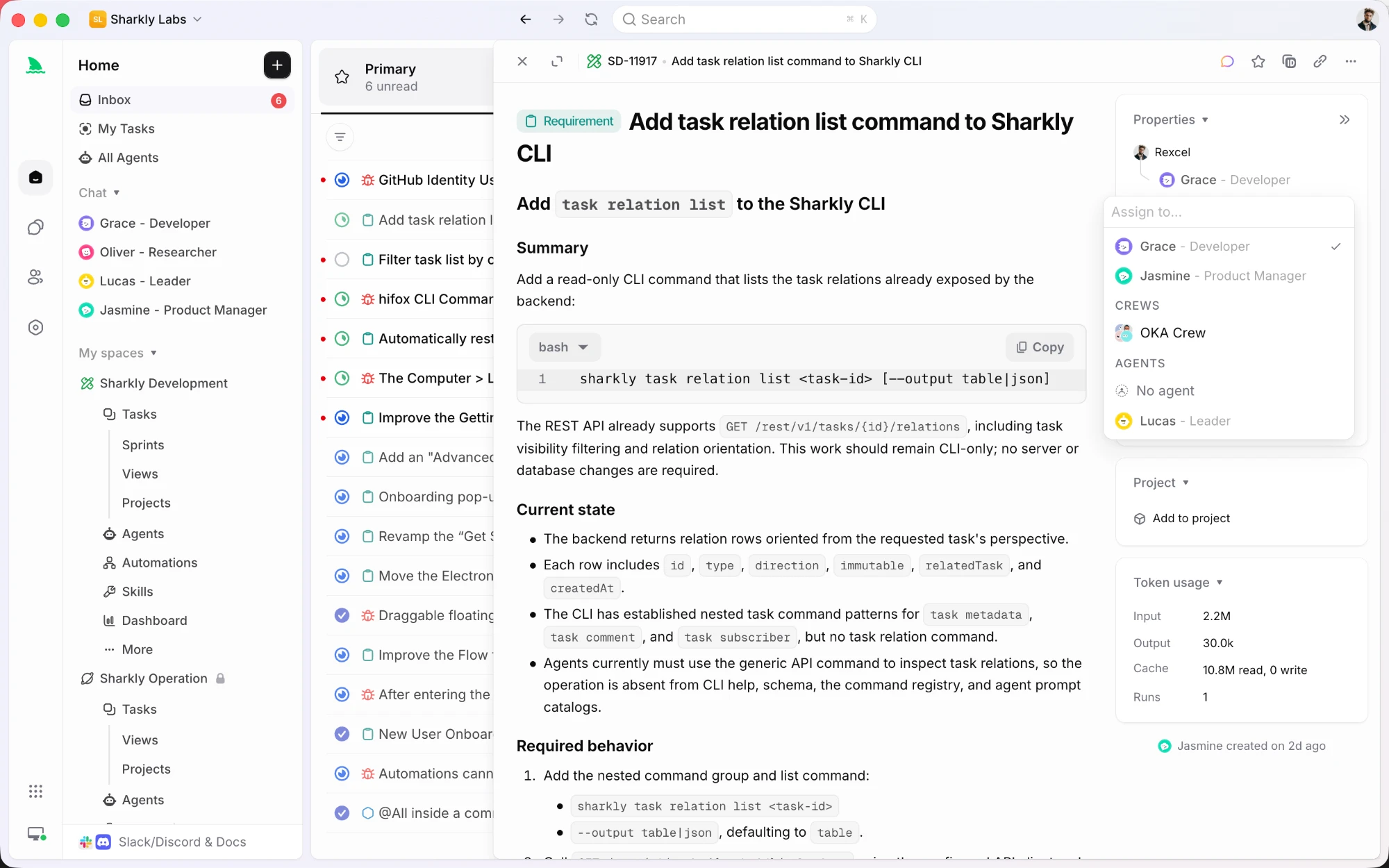
The two tools above pull in different directions. One runs in the cloud on Cursor's terms, the other runs locally on yours. There is a third setup, which is to keep both and put the coordination somewhere neutral.
Sharkly is a work management system for people and agents. A task can be assigned to a person, an Agent, or a Crew, and the run happens on a Computer you connect, using the runtime already installed on that machine. Custom ACP runtimes can be registered from Computer detail, so the list is not fixed to one vendor.
What you get for that is a shared record: run states, an execution log with tool calls, agent replies stored as task comments, and an Inbox that separates the items needing your review. Repository work can take a separate worktree per run, so parallel agents on one repo stay isolated.
If your honest answer to the comparison above is both, this is how you stop that from meaning two disconnected queues.
Integration with Apidog
Both tools can integrate with Apidog for API workflows, but in different ways.
Cursor Automation + Apidog
Use Cases:
- Trigger Apidog test suites after deployments
- Monitor API endpoint health via Apidog
- Update API documentation when code changes
- Generate changelogs from Apidog project history
Setup:
- Configure Cursor Automation with Apidog MCP or webhook
- Set triggers (deployment complete, code merged)
- Define actions (run tests, update docs, post results)
Example Workflow:
Trigger: GitHub PR merged to main
↓
Cursor Automation spins up
↓
Runs: apidog test run -e production
↓
Posts results to #api-tests Slack channel
↓
If failures: creates Linear ticket with details
OpenClaw + Apidog
Use Cases:
- Personal API monitoring via messaging app
- On-demand test execution
- API documentation queries
- Custom API workflows
Setup:
- Install Apidog CLI on your machine
- Configure OpenClaw tool to execute Apidog commands
- Message OpenClaw to trigger actions
Example Workflow:
You (via WhatsApp): "Run API tests for payment service"
↓
OpenClaw executes: apidog test run payment-flow
↓
Returns results to WhatsApp
↓
You: "Create ticket for failing tests"
↓
OpenClaw creates Linear issue with details
Which Integration to Choose?
Cursor Automation + Apidog: Best for teams wanting automatic, scheduled API workflows without manual triggering.
OpenClaw + Apidog: Best for individual developers wanting on-demand API actions via messaging app.
FAQ
Q: Can I use Cursor Automation and OpenClaw together?
A: Yes. Many developers use Cursor Automation for team workflows and OpenClaw for personal assistance. They serve different purposes and don't conflict.
Q: Which is more secure?
A: OpenClaw offers more control since everything runs locally. Cursor Automation provides enterprise-grade cloud security but requires trusting Cursor with code access. For highly sensitive work, OpenClaw is preferable.
Q: Which is easier to set up?
A: Cursor Automation. It has a web dashboard with templates. OpenClaw requires terminal commands and configuration files. Expect 15-30 minutes for Cursor vs 1-2 hours for OpenClaw.
Q: Can OpenClaw do automatic code review like Cursor?
A: Yes, with Heartbeat scheduling, but it requires more manual setup. Cursor Automation has this built-in with team features.
Q: Does Cursor Automation work with private repositories?
A: Yes. You grant repository access during setup. Automations run in isolated sandboxes with only the access you provide.
Q: Can I run OpenClaw on a server for 24/7 availability?
A: Yes. Many users run OpenClaw on Raspberry Pi, cloud VPS, or always-on workstations for continuous availability.
Q: Which has better API integration?
A: Cursor Automation has more polished integrations with team tools (GitHub, Linear, PagerDuty). OpenClaw has more flexibility for custom integrations via tools and skills.
Q: Is there a free tier for either?
A: OpenClaw is completely free (open source). Cursor Automation features require paid plans.
Q: Can teams share OpenClaw configurations?
A: Not natively. OpenClaw is single-user focused. Teams would need to share configuration files manually or use Cursor Automation for team features.
Q: Which should a startup choose?
A: Depends on team size and needs:
- 1-3 developers, budget-conscious: OpenClaw
- 5+ developers, need team features: Cursor Automation
- Mixed needs: Both (Cursor for team, OpenClaw for individuals)
Conclusion
Cursor Automation and OpenClaw represent two different approaches to AI assistance for developers.
Cursor Automation is purpose-built for engineering teams. It handles code review, incident response, and team coordination automatically. The cloud-based execution means no local setup, and team features make sharing seamless. If you need automations that run without manual triggering and integrate with Slack, GitHub, and Linear, Cursor Automation is the choice.
OpenClaw is a self-hosted personal assistant. It runs on your machine, respects your privacy, and works through messaging apps you already use. The open-source model means no subscriptions, and the flexibility allows custom workflows. If you want complete data control, budget-friendly operation, or personal assistance via WhatsApp or Telegram, OpenClaw excels.
For API development teams, both integrate with Apidog. Cursor Automation triggers tests and monitors endpoints automatically. OpenClaw provides on-demand API actions via messaging. Using both gives you automatic team workflows plus personal assistance.
The best choice depends on your specific needs:
- Team automation → Cursor Automation
- Personal assistant → OpenClaw
- Maximum flexibility → Both


