TL;DR
Cursor Automation is a cloud-based agent system that runs AI-powered workflows automatically on schedules or when triggered by events like Slack messages, GitHub PRs, Linear issues, or PagerDuty incidents. Unlike chat-based AI assistants, Cursor Automations work in the background, spinning up cloud sandboxes to review code, monitor systems, handle chores, and respond to incidents without manual intervention. Teams use Cursor Automations alongside tools like Apidog to automate API testing, security reviews, and documentation updates.
What is Cursor Automation?
Cursor Automation transforms how engineering teams handle repetitive work by deploying always-on AI agents that run automatically. Instead of opening a chat window and asking an AI assistant to do something, you configure agents that trigger on schedules or events and execute workflows without your involvement.
Think of it this way: traditional AI assistants wait for you to ask questions. Cursor Automations proactively monitor your codebase, catch issues, run tests, update documentation, and respond to incidents while you focus on building features.
For API development teams, Cursor Automations pair naturally with Apidog. While Apidog handles API design, testing, and documentation, Cursor Automations can trigger test suites after deployments, monitor endpoint health, and update API docs when code changes.
The Origin: Why Cursor Built Automations
Cursor created Automations to solve a problem they faced internally. As AI coding agents helped developers write more code faster, the bottlenecks shifted. Code review, monitoring, and maintenance couldn't keep up with the increased development velocity.
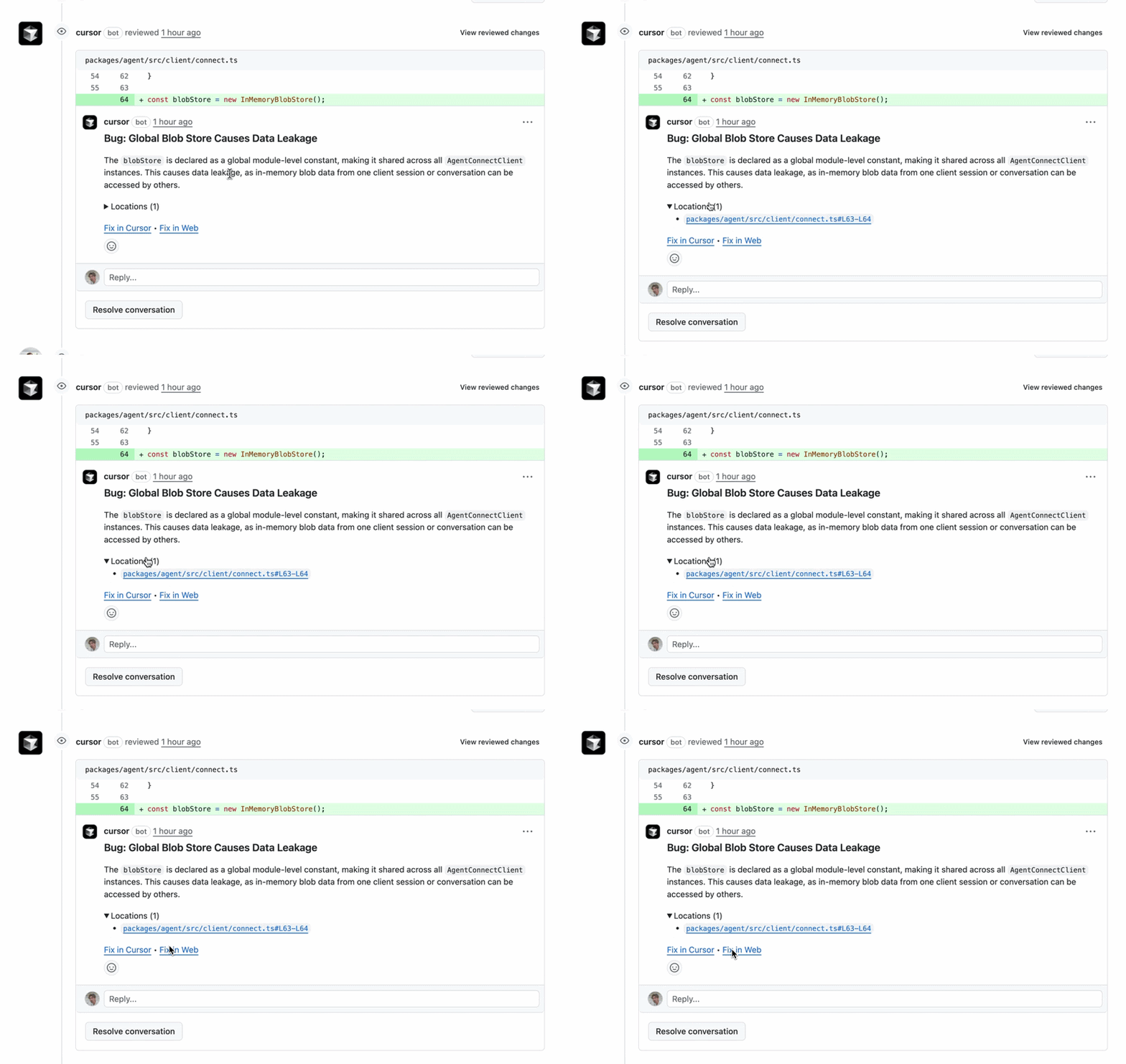
The Cursor team started building automated agents to handle these tasks. The results were significant. Their Bugbot automation runs thousands of times daily on PRs and has caught millions of bugs. Security review automations find vulnerabilities without blocking pull requests. Incident response agents reduce response times by investigating issues automatically.
Now Cursor has productized these internal tools, making them available to all teams.
How Cursor Automations Work
Cursor Automations operate through a straightforward architecture that combines event triggers, cloud execution, and intelligent verification.
The Core Architecture
Event Trigger → Cloud Sandbox → AI Agent → Verification → Output
     ↓              ↓              ↓           ↓           ↓
  GitHub PR    Isolated VM   Follows MCP    Self-checks  Slack message
  Slack msg    with tools    instructions   results      Linear issue
  Schedule     Pre-configured Uses models   Runs tests   Documentation
  Webhook      environment    Memory tool   Commits code
Event Triggers start the automation. These include:
- GitHub PR opened or updated
- Slack message in a specific channel
- Linear issue created
- PagerDuty incident triggered
- Scheduled time (cron-based)
- Custom webhooks
Cloud Sandbox spins up an isolated environment with the tools and context the agent needs. This sandbox has access to your codebase, configured MCPs (Model Context Protocols), and any credentials you've provided.
AI Agent executes your instructions. It can read files, run commands, make API calls, and use MCP integrations to interact with external services like Datadog, Linear, or your internal tools.
Verification happens automatically. The agent runs tests, validates its output, and only commits changes that pass checks. This self-verification prevents broken code from being merged.
Output gets delivered through your chosen channel. Results can be posted to Slack, created as Linear issues, committed as pull requests, or logged to databases.
Memory and Learning
Cursor Automations include a memory tool that lets agents learn from past runs. If an automation makes a mistake, it can store that lesson and avoid repeating it. Over time, automations become more accurate and efficient.
For example, if a security review automation flags a false positive, it remembers this pattern. The next time it encounters similar code, it skips the unnecessary alert.
Two Main Categories of Automations
Teams using Cursor Automations typically organize them into two buckets: review and monitoring, and chores.
Review and Monitoring
These automations examine changes, catch issues, and ensure quality. They run when code is pushed, PRs are opened, or on scheduled intervals.
Characteristics:
- Triggered by code changes or schedules
- Analyze diffs, security, performance
- Post findings to Slack or PR comments
- Often run without blocking merges
Chore Automations
These handle routine tasks that require stitching together information from multiple tools. They run on schedules or when specific events occur.
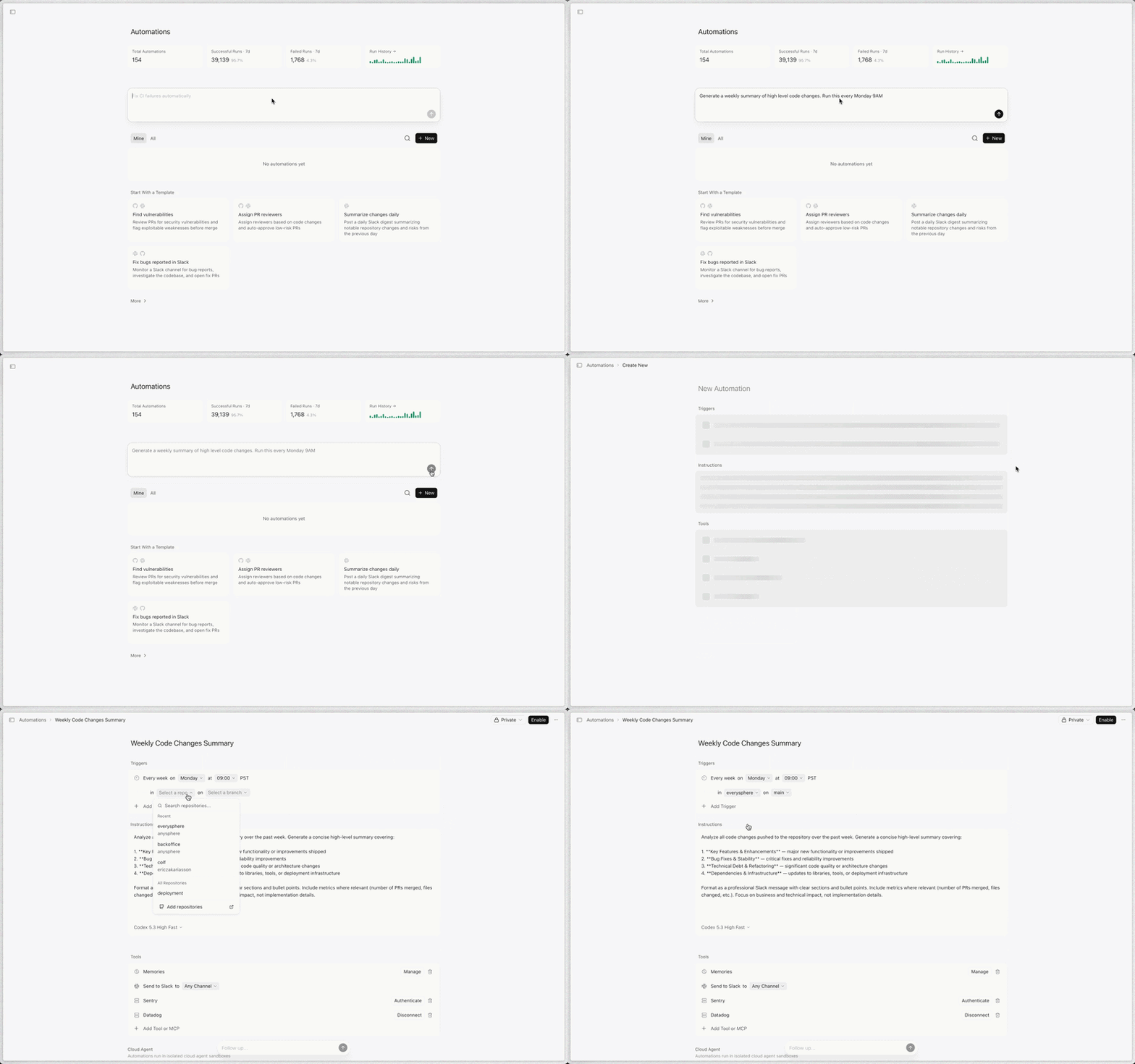
Characteristics:
- Scheduled (daily, weekly) or event-triggered
- Aggregate data from multiple sources
- Create summaries, reports, documentation
- Reduce manual coordination work
Review and Monitoring Automations
Let's dive into specific review and monitoring automations teams use daily.
Security Review Automation
What it does: Audits code changes for security vulnerabilities on every push to main. Unlike traditional security scanners that block PRs, this automation runs asynchronously and posts high-risk findings to Slack.
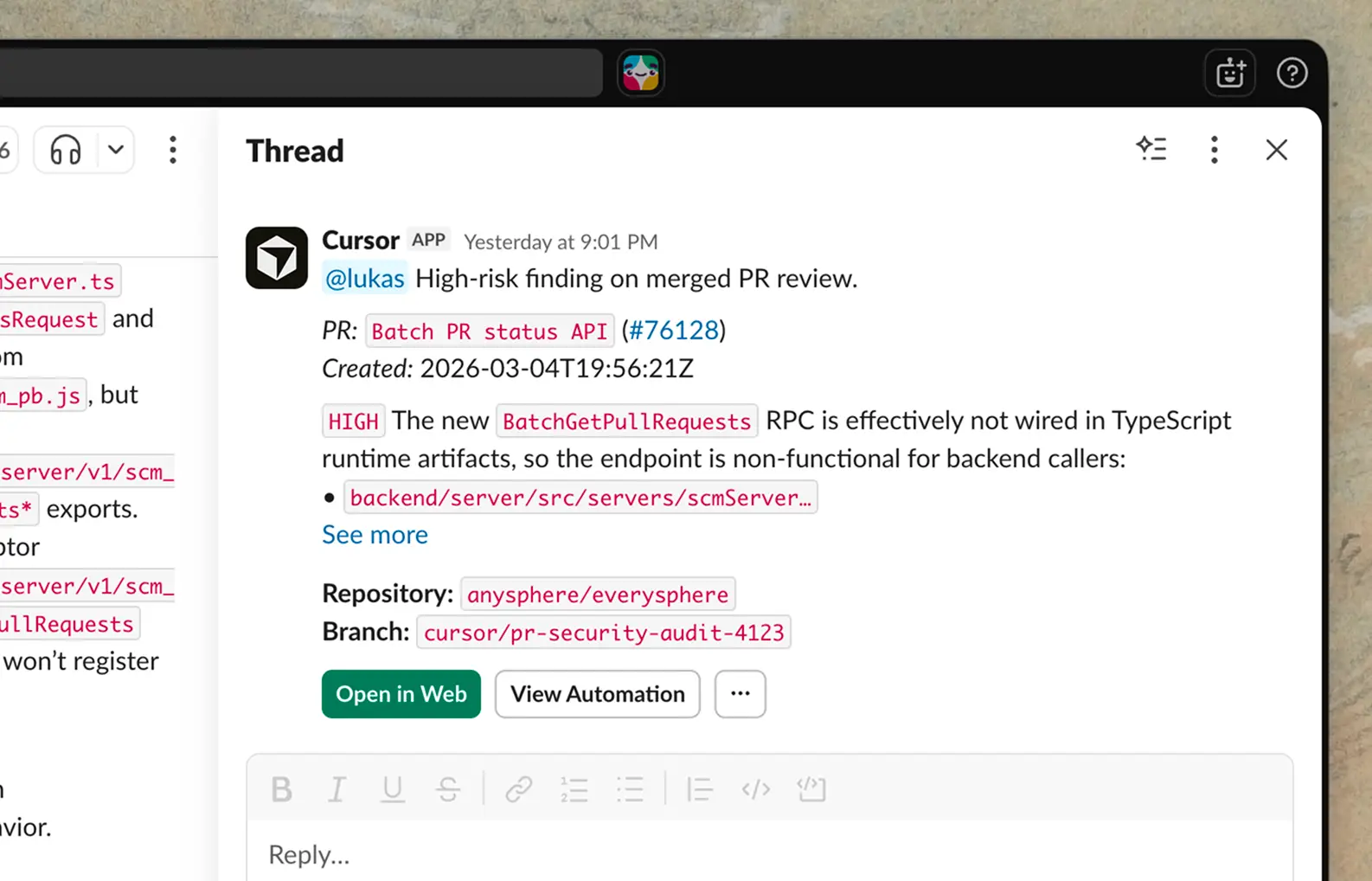
How it works:
- Triggered when code is pushed to main
- Analyzes the diff for security issues
- Skips concerns already discussed in the PR
- Posts critical findings to a security Slack channel
- Logs all findings for audit trails
Why it's effective: Security reviews take time. By running asynchronously after merge, the automation doesn't slow down development while still catching vulnerabilities early. Cursor's own security automation has caught multiple critical bugs that would have reached production.
Example output:
Security Alert: SQL Injection Risk

File: src/api/users.ts
Line: 47
Severity: HIGH

Query uses string concatenation with user input:
const query = `SELECT * FROM users WHERE id = ${userId}`;

Recommendation: Use parameterized queries
const query = 'SELECT * FROM users WHERE id = ?';

PR: github.com/company/repo/pull/142
Agentic Codeowners
What it does: Classifies PR risk based on blast radius, complexity, and infrastructure impact. Automatically assigns appropriate reviewers and approves low-risk changes.
How it works:
- Runs on every PR open or push
- Analyzes changed files and their impact
- Classifies risk level (low, medium, high)
- Auto-approves low-risk PRs
- Assigns 1-2 reviewers for higher-risk changes
- Posts decisions to Slack and logs to Notion
Why it's effective: Not all PRs need the same level of review. Documentation typos shouldn't wait for senior engineer approval. Infrastructure changes should get extra scrutiny. This automation makes those decisions consistently.
Incident Response Automation
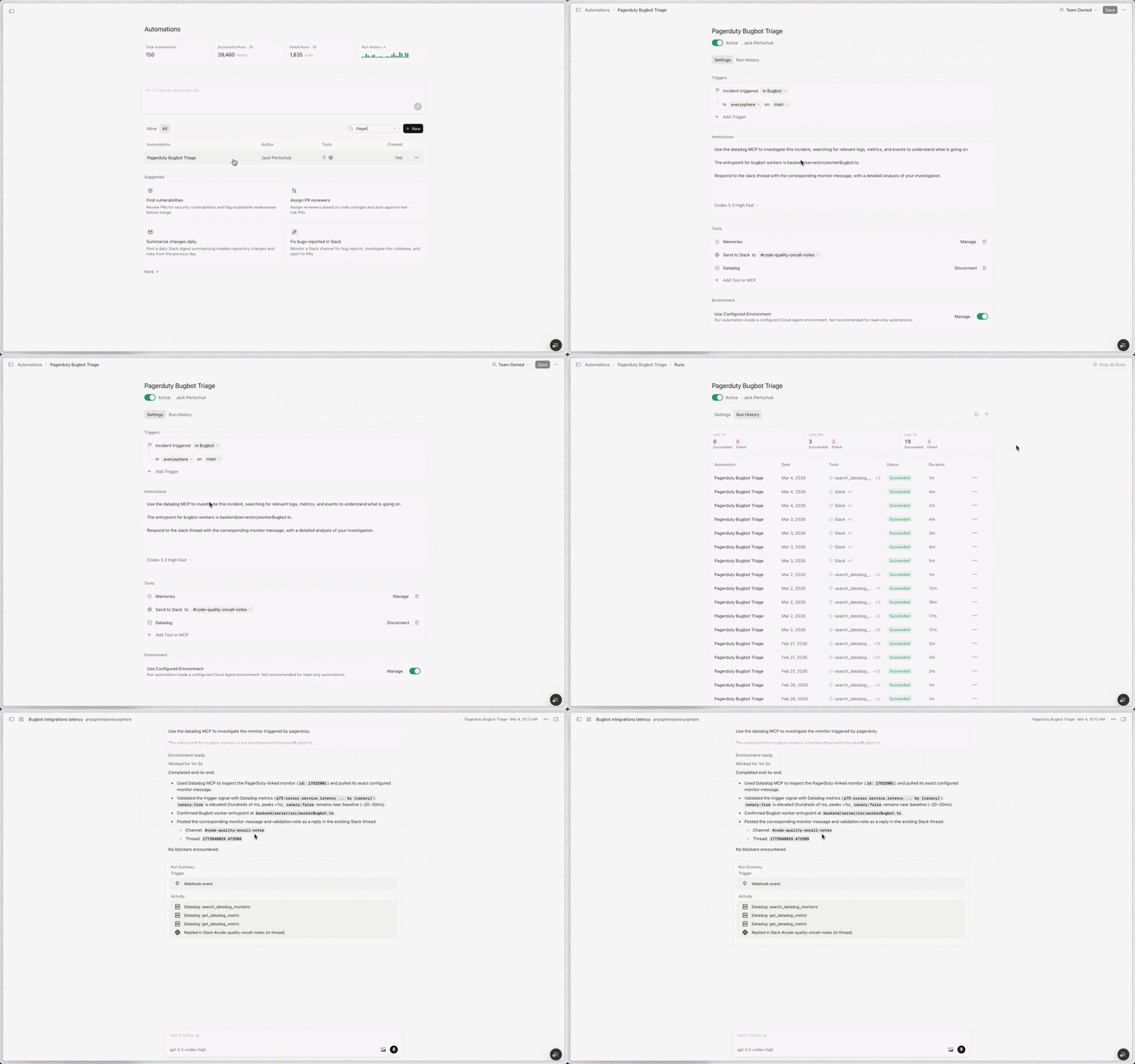
What it does: Responds to PagerDuty incidents by investigating logs, identifying root causes, and proposing fixes before humans even wake up.
How it works:
- Triggered by PagerDuty incident
- Uses Datadog MCP to pull relevant logs
- Searches codebase for recent changes
- Identifies likely root cause
- Creates a PR with proposed fix
- Alerts on-call engineer via Slack with context
Why it's effective: Incident response time drops dramatically when the investigation is already done. Instead of spending 30 minutes digging through logs, engineers receive a message with the problem and solution ready to review.
Example output:
Incident Response: API Latency Spike

Monitor: Production API p95 > 2s
Started: 2:47 AM UTC
Affected endpoints: GET /api/users, POST /api/orders

Investigation complete:
- Database connection pool exhausted
- Root cause: Missing connection release in orderService.create()
- Changed in commit abc123 (deployed 2:30 AM)

Proposed fix: github.com/company/repo/pull/156
- Adds connection release in finally block
- Tested against staging database

On-call: @engineer-name
Reply 'deploy' to merge and deploy fix.
Chore Automations
Chore automations handle the routine work that keeps teams aligned but consumes significant time.
Weekly Summary of Changes
What it does: Posts a Slack digest every Friday summarizing meaningful changes to the repository over the past seven days.
What it includes:
- Major merged PRs with links
- Bug fixes and their impact
- Technical debt addressed
- Security and dependency updates
- New features shipped
Why it's effective: Engineering managers spend hours every week compiling status reports. This automation does it automatically, ensuring stakeholders stay informed without manual effort.
Example output:
Weekly Engineering Summary (Mar 2-6)

Shipped Features:
- User preferences API (PR #134)
- Payment webhook integration (PR #141)
- Dashboard analytics v2 (PR #138)

Bug Fixes:
- Fixed race condition in order processing (PR #145)
- Resolved memory leak in WebSocket handler (PR #149)

Technical Debt:
- Migrated from Moment.js to date-fns (PR #142)
- Removed deprecated API endpoints (PR #150)

Security Updates:
- Updated lodash to 4.17.21 (CVE-2021-23337)
- Rotated database credentials

PRs Merged: 23
Lines Changed: +4,521 / -2,103
Test Coverage Automation
What it does: Reviews recently merged code every morning and identifies areas that need test coverage. Automatically adds tests following existing conventions.
How it works:
- Runs daily at 6 AM
- Scans code merged in the past 24 hours
- Identifies functions without tests
- Generates tests matching project patterns
- Runs test suite to verify
- Opens PR with new tests
Why it's effective: Test coverage drifts over time. Developers shipping features under deadline pressure sometimes skip tests. This automation ensures coverage stays high without requiring perfect discipline from every developer.
Bug Report Triage
What it does: When bug reports land in Slack, this automation checks for duplicates, creates Linear issues, investigates root causes, and proposes fixes.
How it works:
- Monitors bug-report Slack channel
- Searches existing issues for duplicates
- Creates new Linear issue if unique
- Investigates codebase for root cause
- Attempts a fix and tests it
- Replies in Slack thread with summary and PR
Why it's effective: Bug triage consumes engineering time. By automating the initial investigation, engineers can focus on fixing rather than categorizing and reproducing issues.
Real-World Examples from Teams
Teams outside Cursor have adopted Automations for diverse workflows. Here's how companies use them.
Rippling: Personal Assistant Dashboard
Abhishek Singh at Rippling built a personal assistant that aggregates tasks from multiple sources.
Setup:
- Slack channel for dumping meeting notes, action items, TODOs, and Loom links throughout the day
- Cron automation runs every two hours
- Reads Slack messages, GitHub PRs, Jira issues, and Slack mentions
- Deduplicates across sources
- Posts a clean dashboard summarizing what needs attention
Additional automations:
- Slack-triggered automation creates Jira issues from threads
- Confluence discussion summaries
- Incident triage workflows
- Weekly status reports
- On-call handoff documentation
Result: Singh reports that automations handle repetitive work, letting him focus on high-impact tasks.
Runlayer: Software Factory
Runlayer built their entire software delivery pipeline using Cursor Automations with Runlayer MCP and plugins.
Their approach:
- Cloud agents continuously monitor and improve the codebase
- Agents have appropriate tools, context, and guardrails
- Move faster than teams five times their size
Key insight: Automations work for both quick wins and complex workflows. Simple tasks get scheduled in seconds. Complex workflows integrate with custom MCPs and webhooks.
Cursor Automation vs Other AI Tools
Cursor Automations differ significantly from other AI development tools.
| Feature | Cursor Automations | GitHub Copilot | ChatGPT/Claude Web | OpenClaw |
|---|---|---|---|---|
| Execution Model | Automatic, scheduled | IDE autocomplete | Manual chat | Self-hosted chat |
| Triggers | Events, schedules, webhooks | Typing in editor | User messages | User messages |
| Cloud vs Local | Cloud sandbox | Cloud | Cloud | Local (your machine) |
| Integration | Slack, GitHub, Linear, PagerDuty | IDE only | Browser only | Messaging apps |
| Memory | Persistent across runs | Session only | Session only | Local storage |
| Verification | Self-checks before commit | None |