
Modern development is no longer just about writing lines of code, it’s about orchestrating intelligence. Claude Code Skills introduce a structured way to teach Claude repeatable, high-value workflows that feel less like prompts and more like plug-and-play developer superpowers.
This guide explains what Claude Code Skills are, how to install and use them across Claude.ai, Claude Code, and the API, and most importantly how to apply coding and development-focused skills from the Awesome Claude Skills collection to real-world engineering workflows.
If you already live in the terminal and care about productivity, consistency, and fewer context resets, this article is written for you.
What Are Claude Skills?
Claude Skills are portable, task-specific capability definitions that teach Claude how to perform repeatable workflows with structure and constraints.
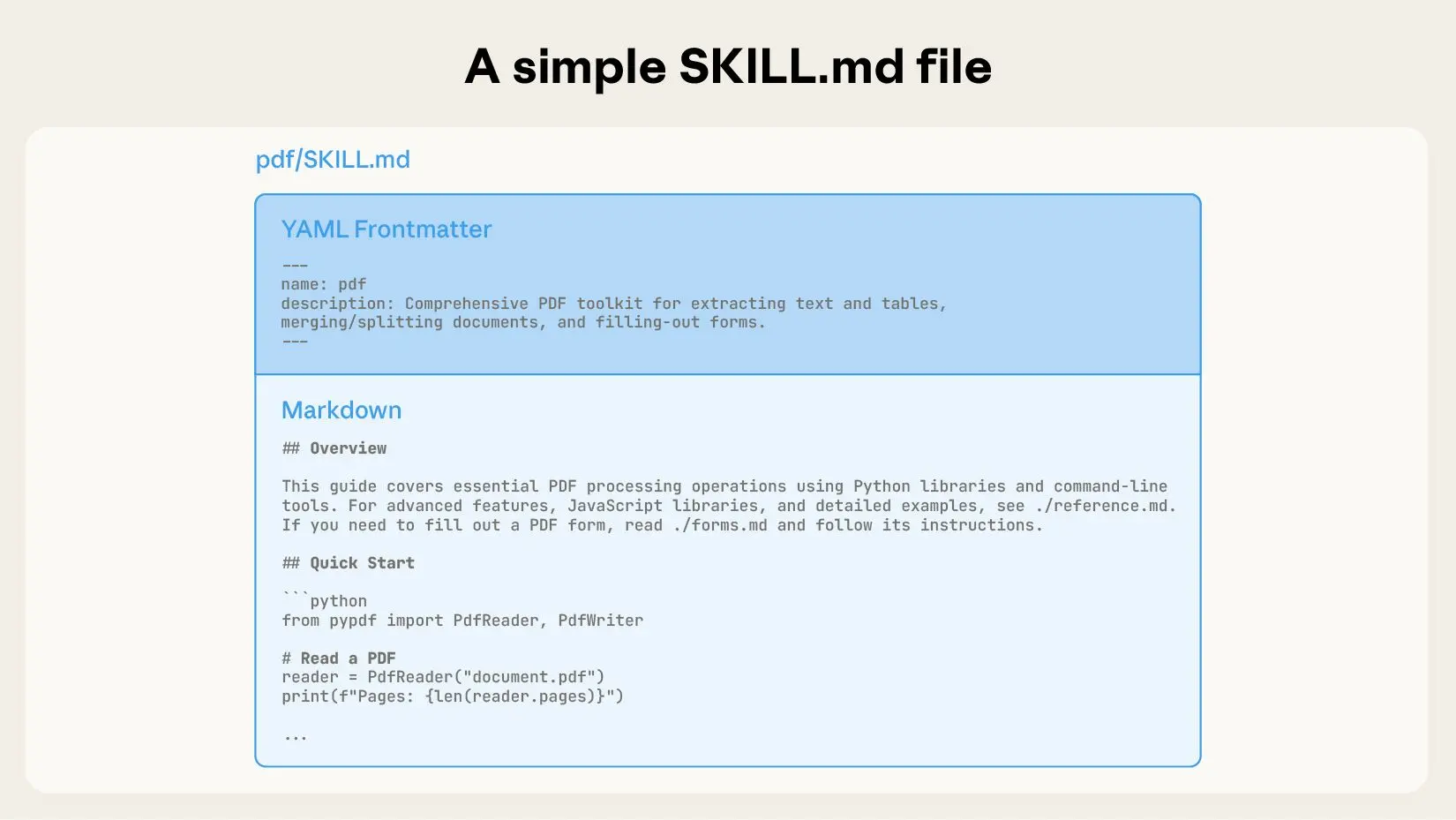
Technically, a skill is defined using a SKILL.md file that contains:
- YAML frontmatter (metadata, triggers, scope)
- Clear task definitions
- Input/output expectations
- Guardrails and best-practice instructions
Once loaded, a skill becomes contextually available. Claude automatically applies it when a prompt matches the skill’s intent—without you re-explaining the rules every time.
Key properties of Claude Skills:
- Composable – multiple skills can work together
- Portable – usable in Claude.ai, Claude Code, and via API
- Scoped – loaded only when relevant
- Repeatable – consistent outputs across sessions
Think of skills as version-controlled cognitive extensions for developers.
How Claude Code Skills Fit Into a Developer Workflow
Traditional prompting breaks down when:
- You repeat the same instructions every day
- Outputs drift across sessions
- Team members use different prompting styles
Claude Code Skills solve this by formalizing intent.
Instead of:
“Please review this PR carefully, follow best practices, look for security issues…”
You load a PR Review Skill and simply say:
“Review this PR.”
Claude already knows how to review it.
How to Add Skills to Claude (All Methods)
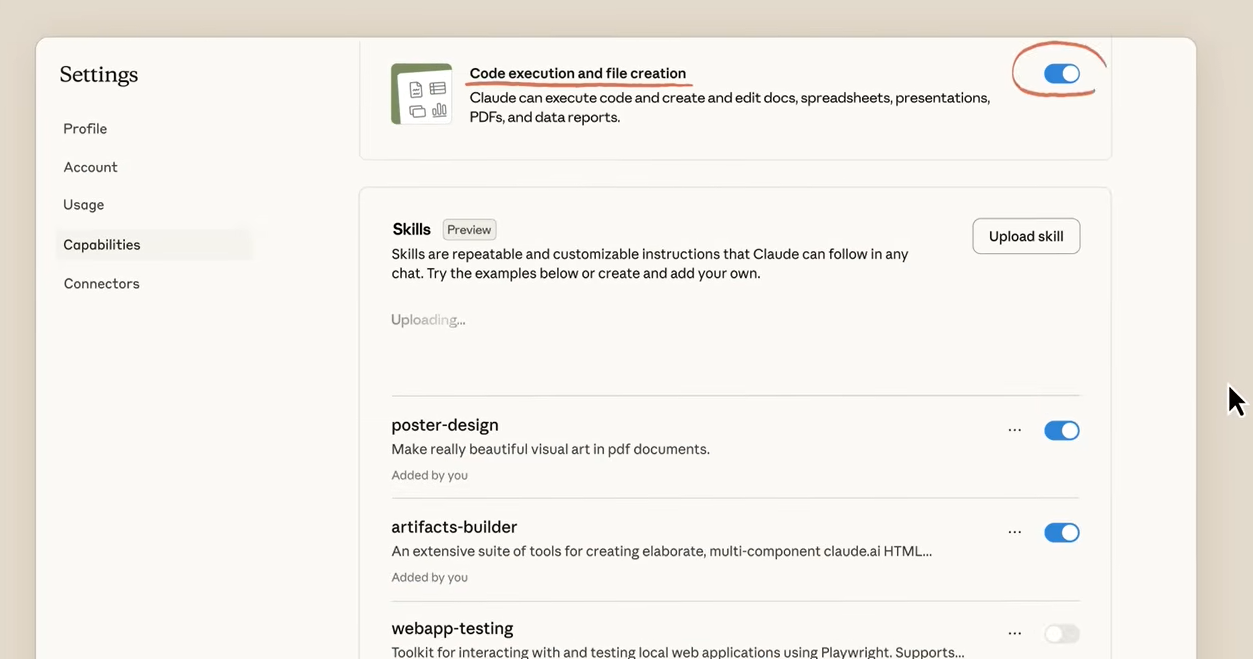
1. Using Claude.ai (No Code)
Clone or download the skills repository:
git clone https://github.com/ComposioHQ/awesome-claude-skills
Open Claude.ai
Go to Settings → Skills
Upload the folder of the skill you want (for example: code-reviewer)
The skill activates automatically when relevant
This is ideal for individual developers or quick experimentation.
2. Using Claude Code (CLI Workflow)
Claude Code loads skills from your working directory.
git clone https://github.com/ComposioHQ/awesome-claude-skills
cd awesome-claude-skills/code-reviewer
claude
Now when you interact with Claude in that directory, the skill context is applied automatically, perfect for repo-specific workflows.
3. Using Claude Skills via API
For automation and CI/CD pipelines, skills can be invoked via the API.
import anthropic

client = anthropic.Anthropic()

client.messages.create(
    model="claude-3-5-sonnet-20241022",
    skills=["code-reviewer"],
    messages=[
        {"role": "user", "content": "Review this PR for security and performance issues"}
    ]
)
This unlocks AI-driven engineering pipelines: automated reviews, test generation, and documentation checks.
Claude Code Skills for Coding & Development
The Awesome Claude Skills repository includes several skills that directly enhance engineering workflows. Below are the most impactful coding and development-focused skills, with practical usage guidance.
1. Code Reviewer Skill
What It Does
Performs structured code reviews focusing on:
- Code quality
- Maintainability
- Security issues
- Performance bottlenecks
- Style consistency
Why It Matters
Human reviews are inconsistent and time-constrained. This skill enforces a baseline standard before code ever reaches a teammate.
Practical Workflow Integration
- Run before opening a PR
- Use in CI to block low-quality submissions
- Pair with unit test generation
Example Usage
Review this PR and highlight security risks and refactoring opportunities.
Claude responds with categorized feedback instead of vague suggestions.
2. Bug Finder & Debugging Skill
What It Does
Analyzes code for:
- Logical errors
- Edge-case failures
- Race conditions
- Incorrect assumptions
Why It Matters
This skill accelerates debugging by shifting Claude into a failure-first mindset.
Practical Workflow Integration
- Run after a failing test
- Use during incident response
- Pair with logs and stack traces
Example
Analyze this function and explain why it fails under high concurrency.
Claude walks through execution paths instead of guessing.
3. Test Case Generator Skill
What It Does
Generates:
- Unit tests
- Edge-case tests
- Property-based test ideas
Why It Matters
Test coverage is often skipped due to time pressure. This skill creates a testing safety net without manual effort.
Practical Workflow Integration
- Generate tests immediately after implementation
- Use for regression test creation
- Enforce coverage standards
Example
Generate Jest unit tests for this authentication service.
4. Refactoring Assistant Skill
What It Does
Suggests structural improvements without changing behavior:
- Extracting functions
- Improving naming
- Reducing complexity
- Applying design patterns
Why It Matters
Refactoring is risky when rushed. This skill emphasizes behavioral preservation.
Practical Workflow Integration
- Use before performance optimization
- Clean up legacy code incrementally
- Prepare code for scaling
Example
Refactor this class to reduce cyclomatic complexity.
5. API Client Generator Skill
What It Does
Creates:
- Typed API clients
- Request/response models
- Error handling scaffolds
Why It Matters
Hand-written API clients drift from specs. This skill enforces contract alignment.
Practical Workflow Integration
- Generate SDKs from OpenAPI specs
- Pair with Apidog contract testing
- Speed up frontend/backend integration
Where Apidog Fits Perfectly
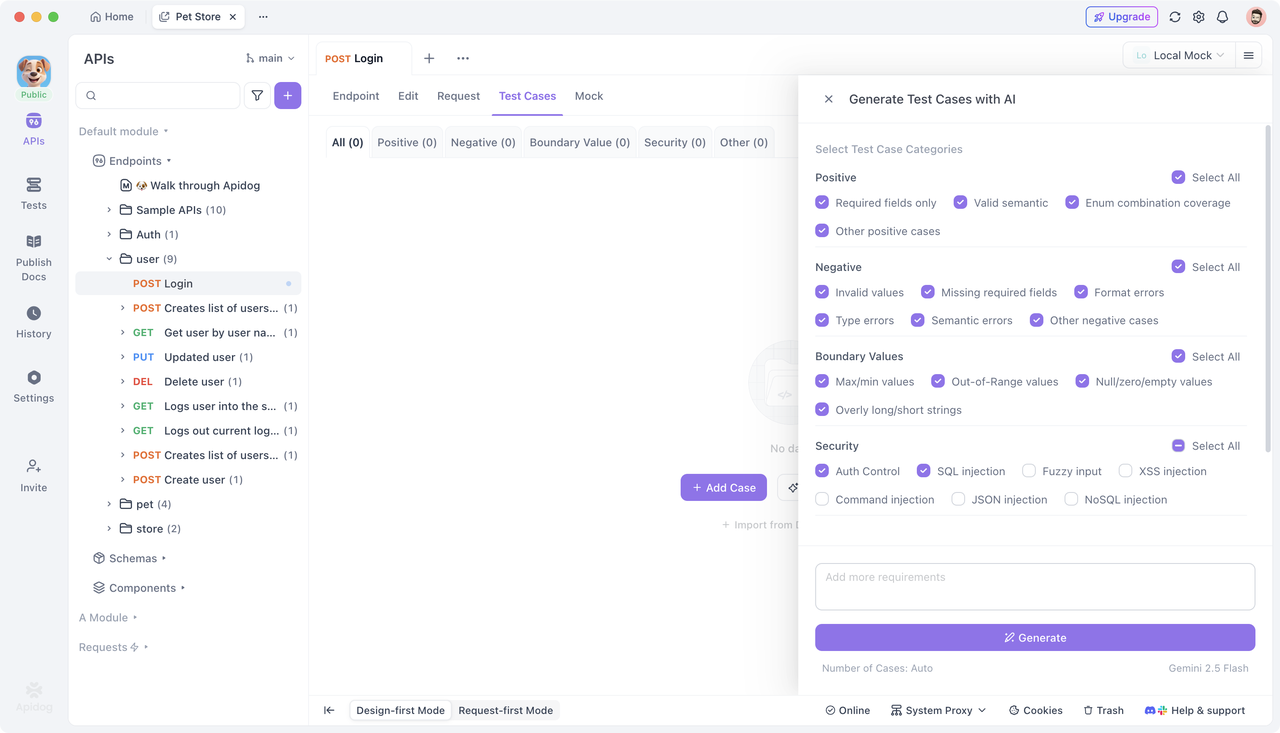
When working with APIs, Claude Skills shine brightest alongside Apidog.
Apidog helps developers:
- Design and test APIs from a single platform
- Generate API test cases automatically
- Validate API contracts before production
- Share API definitions across teams
A powerful workflow looks like this:
- Design API in Apidog
- Generate API test cases
- Use Claude skills to:
- Generate client SDKs
- Review API handlers
- Create edge-case tests
You can get started with Apidog for free, making it a natural companion to Claude-powered development.
Combining Skills for Advanced Workflows
Claude skills are composable.
Example advanced workflow:
- API Client Generator → create client
- Test Case Generator → validate endpoints
- Code Reviewer → enforce quality
- Bug Finder → analyze failures
Instead of one massive prompt, each skill activates only when needed—keeping responses focused and reliable.
Frequently Asked Questions
Q1. Are Claude Code Skills different from prompts?
Yes. Skills persist across sessions, are structured, and activate contextually—prompts do not.
Q2. Can I customize or create my own skills?
Absolutely. You can write your own SKILL.md files tailored to internal workflows.
Q3. Do skills slow Claude down?
No. Skills are lightweight and scoped, meaning they only load when relevant.
Q4. Can multiple skills run at once?
Yes. Skills are designed to be composable and non-conflicting.
Q5. Are Claude Skills suitable for teams?
Yes. Skills enforce shared standards and reduce onboarding time for new developers.
Conclusion
Claude Code Skills turn AI from a helpful assistant into a repeatable engineering system. For coding and development, they unlock faster reviews, better tests, safer refactors, and cleaner APIs—without re-prompting or context loss.
When paired with tools like Apidog for API design, testing, and contract validation, Claude skills help teams ship faster with fewer surprises.
If you work with APIs, download Apidog and start building workflows where AI follows your rules—not the other way around.