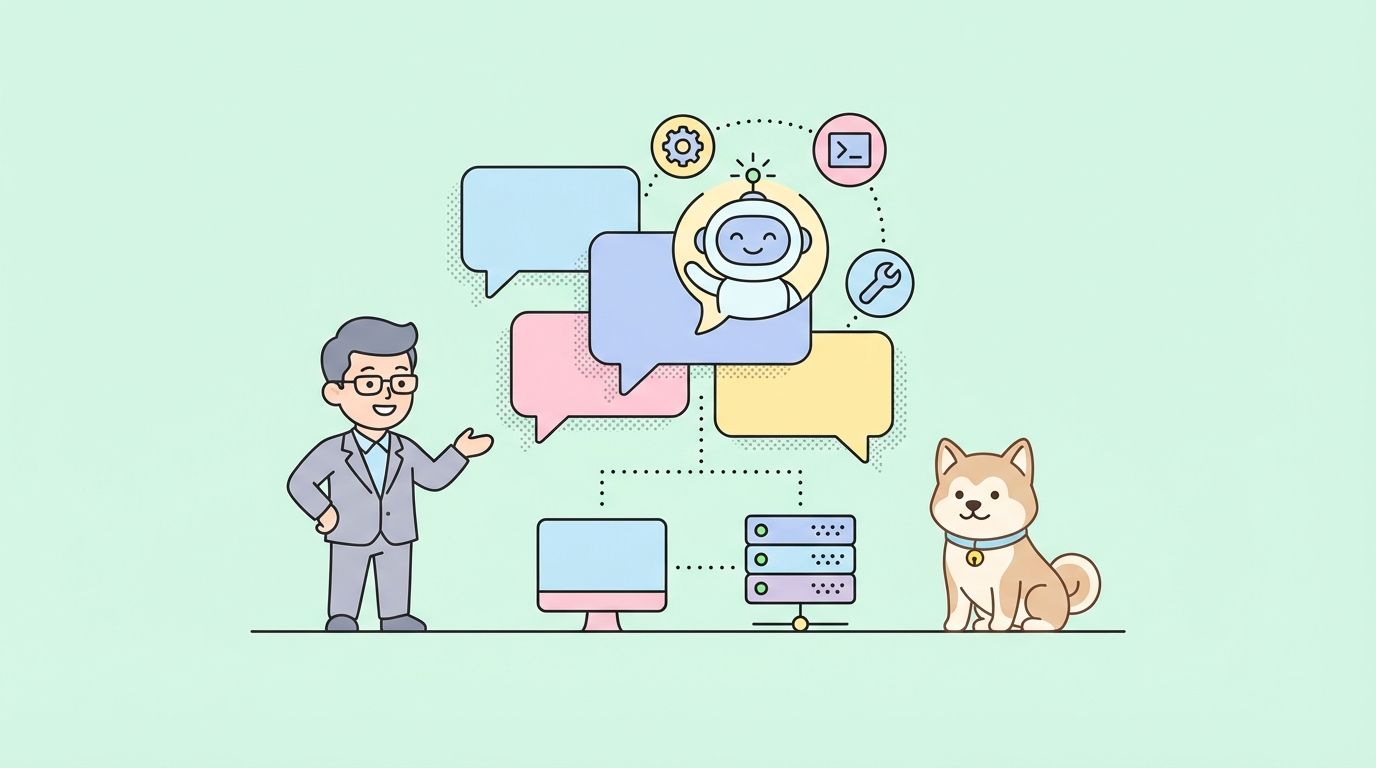
Unlike traditional AI assistants that live in web browsers or mobile apps with limited capabilities, Clawdbot is a self-hosted, open-source personal AI that runs directly on your computer or server. It connects to the messaging apps you already use daily—WhatsApp, Telegram, Discord, Slack, iMessage—and transforms powerful language models like Claude Opus 4.5 into a truly personal digital assistant with unprecedented control over your system.
You'll learn what makes Clawdbot revolutionary, how to set it up step-by-step, real-world automation use cases, and how it compares to alternatives like ChatGPT, Claude, and traditional virtual assistants.
What Makes Clawdbot Different
The Assistant That Lives Where You Live
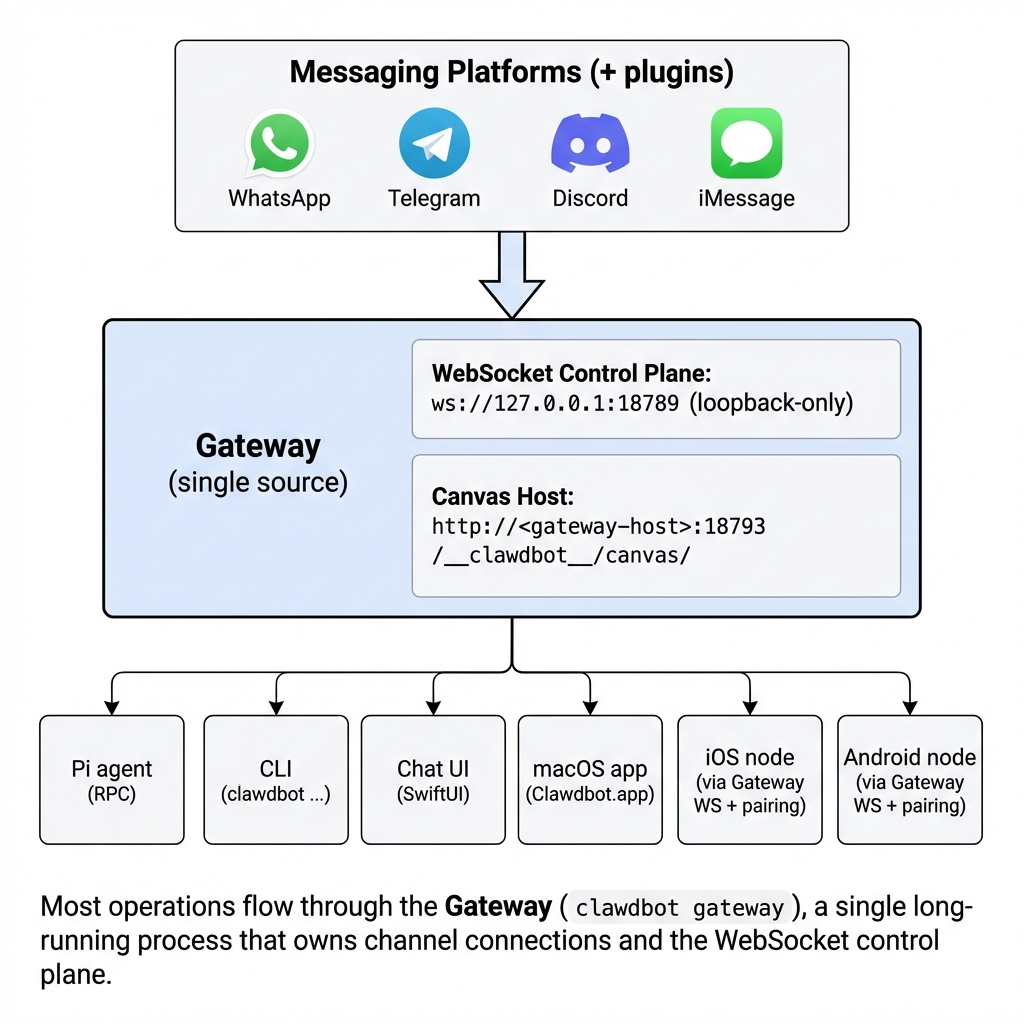
Most AI assistants force you to visit a website, open a dedicated app, or speak to a device. Clawdbot inverts this model. It lives inside the messaging platforms you already use every day—the same apps where you chat with colleagues, coordinate with friends, and manage your life.
Send a message to your Clawdbot on Telegram, and it responds just like any other contact. Ask it a question on WhatsApp while commuting. Request a file analysis through Discord. The friction of context-switching disappears entirely.
Local-First Architecture with Real Computer Access
Here's where Clawdbot fundamentally differs from cloud-based AI services: it runs on your hardware with full access to your system.
While ChatGPT and Claude operate in sandboxed cloud environments with strict limitations, Clawdbot can:
- Execute terminal commands on your computer
- Read, write, and modify files in your directories
- Run scripts and install software packages
- Access your local databases and development environments
- Control applications and system settings
- Integrate with local services via MCP (Model Context Protocol) servers
This isn't just an AI that talks—it's an AI that acts with the same permissions you have on your own machine.
Persistent Memory That Actually Works
Traditional AI chat interfaces start fresh with each conversation. Even when they claim to remember context, it's limited and unreliable. Clawdbot stores your conversations, preferences, and context as Markdown files in a local directory structure—similar to how note-taking apps like Obsidian work.
This means:
- It remembers discussions from weeks ago
- It learns your preferences and communication style over time
- It maintains context across multiple conversations and projects
- You can inspect, search, and modify its memory files directly
Self-Improving and Extensible
Perhaps the most remarkable capability: Clawdbot can improve itself based on your requests.
Need image generation? Ask Clawdbot to add that capability, and it will install the necessary tools and configure the integration. Want voice synthesis? It can add that too. Need a custom automation for your specific workflow? Describe what you want, and Clawdbot will write the code, test it, and integrate it into its own system.
This self-modifying capability represents a fundamental shift from static software that developers update to malleable software that adapts to each user's needs through natural conversation.
Core Features and Capabilities
Multi-Platform Messaging Integration
Clawdbot natively supports communication through:
- Telegram - Full bot API support with inline keyboards and rich media
- WhatsApp - Business API integration for mobile access
- Discord - Server integration with role-based permissions
- Slack - Workspace integration with channel access
- Signal - End-to-end encrypted conversations
- iMessage - Native macOS integration via BlueBubbles
- Microsoft Teams - Enterprise workspace support
- Google Chat - Google Workspace integration
- WebChat - Browser-based interface for direct access
Plus extension support for Matrix, Zalo, and other platforms through community plugins.
System-Level Control and Automation
Clawdbot provides comprehensive system access for task automation:
File System Operations:
# Example: Ask Clawdbot to organize your downloads
"Hey Clawdbot, organize my Downloads folder by file type"

# Clawdbot executes:
# - Scans Downloads directory
# - Creates categorized subdirectories (Images, Documents, Videos, etc.)
# - Moves files to appropriate folders
# - Reports results back to you
Terminal Command Execution:
# Example: Development workflow automation
"Run the test suite and let me know if anything fails"

# Clawdbot executes:
npm test
# Monitors output, captures errors, and sends you a summary
Git Repository Management:
# Example: Automated PR creation
"Create a new branch called feature/api-updates, commit my changes, and open a PR"

# Clawdbot handles:
git checkout -b feature/api-updates
git add .
git commit -m "Add API endpoint updates"
git push origin feature/api-updates
gh pr create --title "API endpoint updates" --body "..."
Browser Automation and Web Tasks
Using headless browser control, Clawdbot can:
- Navigate websites and extract information
- Fill out forms and submit data
- Monitor specific pages for changes
- Download files and screenshots
- Perform authenticated actions (after you provide credentials)
- Scrape data for research and analysis
This makes Clawdbot capable of handling tasks like:
- Booking travel accommodations
- Filling insurance claim forms
- Researching competitors
- Monitoring product availability
- Extracting data from web dashboards
AI Model Flexibility
Unlike assistants locked to a single AI provider, Clawdbot supports multiple language models:
- Anthropic Claude (Opus 4.5, Sonnet, Haiku)
- OpenAI (GPT-4, GPT-4 Turbo)
- Google Gemini
- Local models via Ollama
- Custom models through API gateways
You can switch models mid-conversation or assign different models to different tasks based on performance, cost, or capability requirements.
Lobster: Typed Workflow Engine
The "Lobster" plugin introduces a powerful workflow automation layer:
- Typed workflows - Define structured, repeatable processes
- Approval gates - Add human-in-the-loop checkpoints for sensitive operations
- Composable pipelines - Chain multiple skills and tools into complex automations
- Safe execution - Sandbox risky operations with rollback capabilities
Think of Lobster as a local-first alternative to Zapier, but with AI orchestration and natural language control.
MCP Server Integration
Clawdbot implements the Model Context Protocol (MCP), enabling connections to external services:
- Database access (PostgreSQL, MongoDB, Redis)
- Cloud services (AWS, Azure, Google Cloud)
- Developer tools (GitHub, GitLab, Jira)
- Productivity apps (Notion, Todoist, Google Calendar)
- Custom internal APIs and services
For API developers, this means Clawdbot can interact directly with your development stack, including tools like Apidog for automated API testing and documentation generation.
How Developers Use Clawdbot for Automation
Developers worldwide are discovering creative ways to leverage Clawdbot for workflow automation. Here are real-world use cases from the community:
Overnight CI/CD Pipeline Management
The Problem: Large test suites take hours to run. Failures during overnight builds require manual investigation in the morning, wasting productive time.
The Solution:
Setup: "Clawdbot, monitor my GitHub Actions workflow. If the test suite fails overnight, investigate the error logs, create an issue with details, and try to fix obvious problems."

Result: Wake up to either a successful build or a detailed issue report with potential fixes already attempted.
One developer reported: "I set up Clawdbot to run overnight code testing with error capture and PR creation. Agents fix bugs and open pull requests while I sleep. It took about five minutes of back-and-forth messaging to write shell scripts, configure schedules, and test everything."
API Development and Testing Automation
The Problem: API development involves repetitive tasks—updating documentation, running test suites, checking endpoint responses, and monitoring performance.
The Solution with Apidog + Clawdbot:
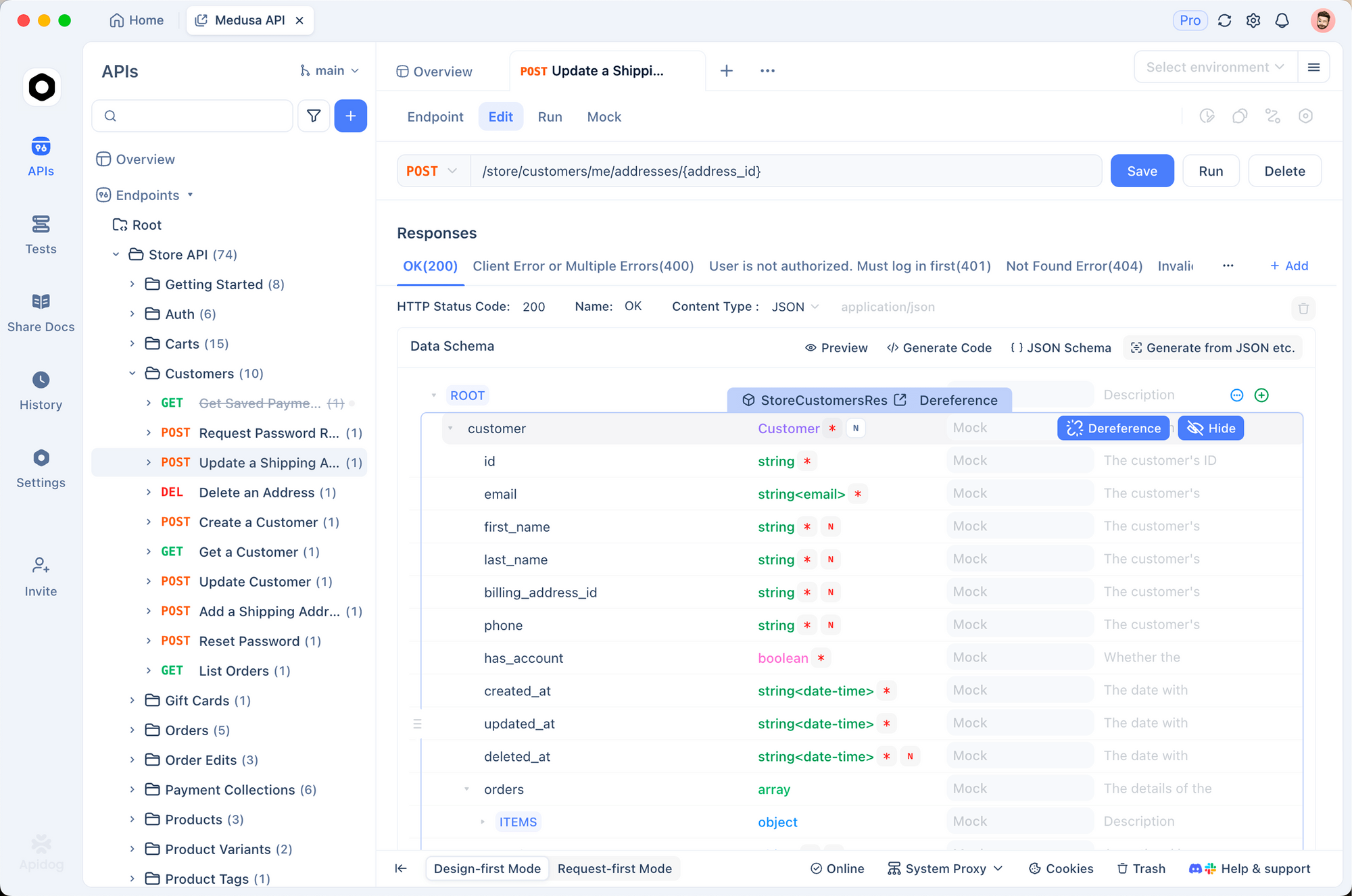
Apidog provides a comprehensive platform for API design, testing, and documentation. When combined with Clawdbot's automation capabilities, developers can create powerful workflows:
"Clawdbot, run the API test suite in Apidog every hour. If any tests fail, analyze the error response, check the API documentation for breaking changes, and send me a detailed report."

"After I commit changes to the API endpoints, automatically update the OpenAPI spec in Apidog and regenerate the documentation."

"Monitor our production API latency. If response times exceed 500ms for more than 5 requests, alert me immediately with example slow requests."
This integration enables:
- Automated regression testing on schedule
- Continuous API monitoring and alerting
- Documentation sync with code changes
- Performance tracking and anomaly detection
Code Review Assistance
Setup:
"Monitor my GitHub notifications. For any PRs assigned to me, read the code changes, run any included tests, check for common issues, and prepare a summary with specific feedback points."
Clawdbot can pre-review pull requests, flag potential bugs, check code style consistency, and prepare detailed feedback—all before you even open your IDE.
Daily Development Briefings
Example workflow:
"Every morning at 8 AM, send me a briefing that includes:
- My calendar for today
- Open GitHub issues assigned to me
- Unread notifications from Slack #engineering
- Any failed builds from overnight
- Top HackerNews stories about web development
- Weather forecast and commute time

Format it nicely and include relevant action items."
This replaces manual morning catch-up routines with an AI-generated, personalized development briefing delivered straight to your messaging app.
Documentation Generation
Common scenario:
"Read through the src/api folder, analyze the endpoint implementations, and generate comprehensive API documentation with examples for each endpoint. Save it to docs/api-reference.md and commit the changes."
Clawdbot can analyze code, understand API structures, generate documentation, and keep it synchronized with code changes—dramatically reducing documentation debt.
Deployment Monitoring and Rollback
Production safety workflow:
"After each deployment to production, monitor error rates in Sentry for 30 minutes. If error rates spike above 1%, immediately trigger a rollback to the previous version and notify the team in Slack."
Automated deployment monitoring with intelligent rollback capabilities provides peace of mind during releases.
Setting Up Clawdbot: Complete Guide
Getting Clawdbot running on your system involves several steps. Here's a comprehensive walkthrough:
System Requirements
Minimum specifications:
- Operating System: macOS, Windows (via WSL), Linux, or any Unix-like system
- RAM: 4GB minimum (8GB+ recommended)
- Storage: 2GB free space for software and models
- Network: Stable internet connection for AI API calls
- Node.js: Version 18+ required
For self-hosting:
- A VPS (Virtual Private Server) with at least 2GB RAM
- Budget options: DigitalOcean, Linode, Vultr (~$5-10/month)
- Alternatively: Run on a Raspberry Pi, old laptop, or home server
Installation Steps
Step 1: Install Dependencies
# Install Node.js (if not already installed)
# Visit https://nodejs.org or use your package manager

# Install pnpm (package manager)
npm install -g pnpm

# Install Git
# Visit https://git-scm.com or use your package manager
Step 2: Clone Clawdbot Repository
# Clone from GitHub
git clone https://github.com/clawdbot/clawdbot.git
cd clawdbot

# Install dependencies
pnpm install
Step 3: Configure API Keys
Create a .env file in the project root:
# Anthropic Claude API key (recommended)
ANTHROPIC_API_KEY=your_claude_api_key_here

# Optional: OpenAI key for GPT models
OPENAI_API_KEY=your_openai_key_here

# Optional: Google Gemini key
GOOGLE_API_KEY=your_gemini_key_here
Get API keys from:
- Anthropic Claude: https://console.anthropic.com
- OpenAI: https://platform.openai.com
- Google AI: https://ai.google.dev
Step 4: Configure Messaging Platform
Choose your preferred platform. Telegram is recommended for beginners:
For Telegram:
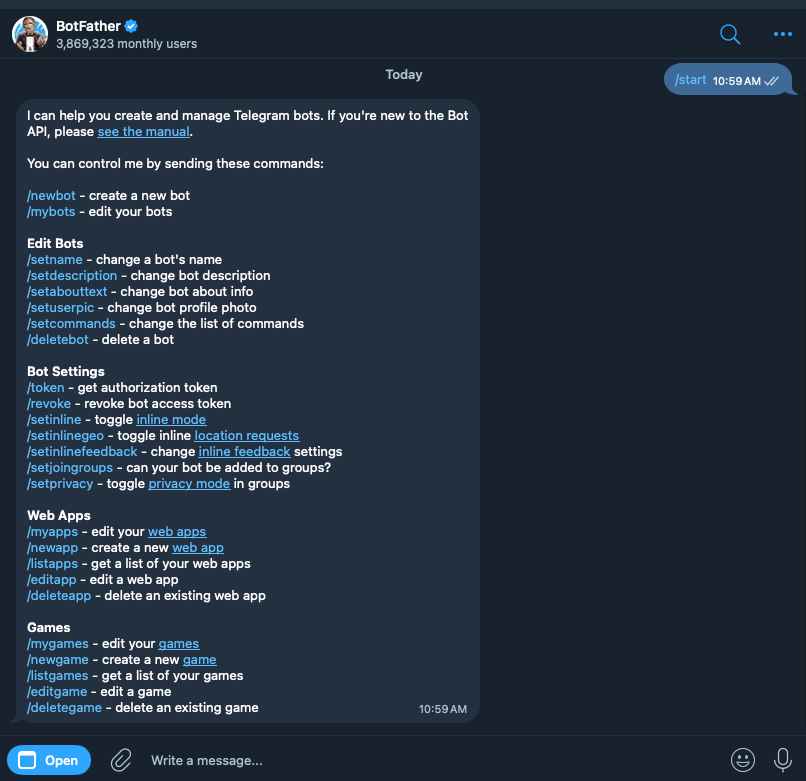
- Open Telegram and search for
@BotFather - Send
/newbotand follow prompts to create your bot - Copy the API token provided
- Add to your
.envfile:
TELEGRAM_BOT_TOKEN=your_telegram_bot_token_here
For WhatsApp:
- Requires WhatsApp Business API access
- Follow official setup guide: https://docs.clawd.bot/channels/whatsapp
For Discord:
- Create bot in Discord Developer Portal: https://discord.com/developers
- Add bot token to
.env:
DISCORD_BOT_TOKEN=your_discord_bot_token_here
Step 5: Initialize and Start Clawdbot
# Initialize configuration
pnpm run init

# Start Clawdbot
pnpm start

# For production deployment
pnpm run start:prod
Step 6: Test Your Assistant
Open your chosen messaging app and send a message to your bot:
"Hello Clawdbot!"
If configured correctly, you'll receive a response from your personal AI assistant.
Optional: Deploy to VPS for 24/7 Operation
For always-available access, deploy to a cloud server:
# SSH into your VPS
ssh user@your-server-ip

# Clone and setup (same as local installation)
git clone https://github.com/clawdbot/clawdbot.git
cd clawdbot
pnpm install

# Configure .env with your API keys

# Use PM2 for process management
npm install -g pm2
pm2 start pnpm --name clawdbot -- start
pm2 save
pm2 startup
This keeps Clawdbot running continuously, even after server reboots.
Security Best Practices
Important security considerations:
- API Key Protection: Never commit
.envfiles to version control - File System Access: Clawdbot has full system access—only run on trusted machines
- Approval Gates: Use Lobster workflows with approval requirements for sensitive operations
- Network Security: If running on VPS, use firewall rules to restrict access
- Regular Updates: Keep Clawdbot updated with
git pull && pnpm install - Audit Logs: Regularly review Clawdbot's action logs in
logs/directory
Clawdbot vs Other AI Assistants
How does Clawdbot compare to established alternatives? Here's a detailed comparison:
Clawdbot vs ChatGPT
| Feature | Clawdbot | ChatGPT |
|---|---|---|
| Hosting | Self-hosted on your device | Cloud-hosted by OpenAI |
| Privacy | All data stays local | Conversations stored on OpenAI servers |
| Computer Access | Full system control | No access to your system |
| Messaging Integration | Native support (WhatsApp, Telegram, etc.) | Requires web/app interface |
| Persistent Memory | Saves context across sessions | Limited memory, resets frequently |
| Real Actions | Can execute tasks, control apps | Conversational only |
| Customization | Fully customizable, add your own tools | Limited to OpenAI's features |
| Cost | Free software + API costs | $20/month for Plus, API costs extra |
| Open Source | Yes (MIT license) | No |
Winner for: Clawdbot wins for developers needing automation, privacy-conscious users, and anyone wanting an AI that can actually perform tasks beyond conversation.
Clawdbot vs Claude (Anthropic Web Interface)
| Feature | Clawdbot | Claude Web |
|---|---|---|
| AI Model | Claude Opus 4.5 + others | Claude Opus 4.5 |
| Context Persistence | Saves all conversations locally | Resets between sessions |
| System Integration | Full access to your computer | None |
| Proactive Outreach | Can message you with updates | Only responds when prompted |
| Multi-Platform | Works in your messaging apps | Web-only interface |
| Extensibility | Add custom tools and integrations | Fixed feature set |
| Cost | Pay-per-API-call (typically $20-30/month) | $20/month subscription |
Winner for: Clawdbot provides everything Claude Web does, plus system integration and messaging convenience. If you're already using Claude's API, Clawdbot transforms it into a personal assistant.
Clawdbot vs Siri/Alexa/Google Assistant
| Feature | Clawdbot | Traditional Assistants |
|---|---|---|
| Intelligence | State-of-the-art LLMs (Claude, GPT-4) | Limited, proprietary models |
| Developer Control | Full code access, modify anything | Closed ecosystem |
| Smart Home | Integrates via MCP servers | Native support |
| Privacy | 100% local | Requires cloud connection |
| Complex Tasks | Can handle multi-step workflows | Simple commands only |
| Learning | Improves based on your usage | Generic across all users |
| Platform Lock-in | Works anywhere | Tied to Apple/Amazon/Google |
Winner for: Clawdbot is far more capable for complex tasks, developer workflows, and privacy. Traditional assistants are more convenient for simple voice commands and smart home control out-of-the-box.
Clawdbot vs Zapier/Make
| Feature | Clawdbot | Zapier/Make |
|---|---|---|
| Interface | Natural language conversation | Visual workflow builder |
| Hosting | Local | Cloud-based |
| Flexibility | AI decides how to accomplish tasks | You define exact steps |
| Learning Curve | Describe what you want | Learn platform and connections |
| Cost | API costs only (~$20-30/month) | $20-$75+/month for useful tiers |
| Intelligence | Adapts and troubleshoots | Follows fixed logic |
| Setup Time | Minutes via conversation | Hours building workflows |
Winner for: Clawdbot for developers who want intelligent automation. Zapier/Make for non-technical users preferring visual builders and pre-made templates.
Advanced Use Cases for Developers
Beyond basic automation, developers are pushing Clawdbot's capabilities to impressive limits:
Autonomous Bug Hunting
Configure Clawdbot to:
- Monitor production error logs (Sentry, Datadog, etc.)
- When errors spike, pull the relevant code from Git
- Analyze the error pattern and code context
- Search internal docs and Stack Overflow for solutions
- Attempt fixes in a test branch
- Run test suite to verify fix
- Create PR with detailed explanation for human review
One developer reported: "Clawdbot caught and fixed a race condition bug at 3 AM that would have caused customer-facing issues the next morning. I woke up to a PR and passing tests."
API Contract Testing Automation
Workflow with Apidog integration:
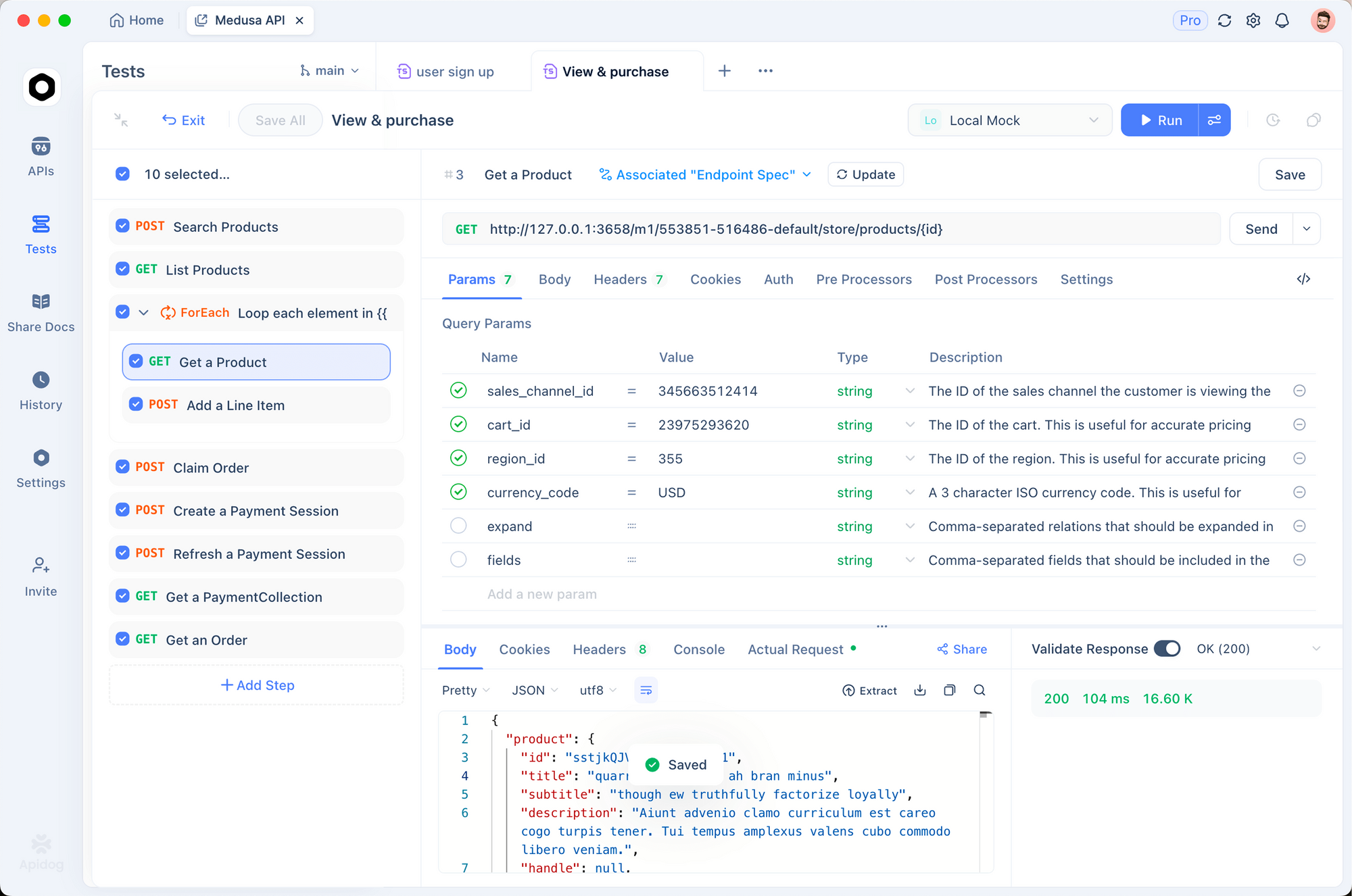
"Clawdbot, sync with our Apidog workspace and run contract tests against the staging API every time the backend team deploys. If any endpoint responses don't match the OpenAPI spec, create a GitHub issue with the specific mismatches and tag the backend lead."
This creates a continuous validation pipeline ensuring:
- Frontend and backend teams stay synchronized
- API documentation remains accurate
- Breaking changes are caught immediately
- No manual test execution required
Apidog's API testing features make it the perfect companion for Clawdbot automation—together they create a powerful quality assurance system for API-driven applications.
Competitive Intelligence Gathering
Setup:
"Monitor these competitor blogs [URLs] daily. When they publish new articles about API development or testing tools, summarize the key points, compare to our product positioning, and send me a competitive analysis report every Friday."
Clawdbot can:
- Scrape public websites (respecting robots.txt)
- Track competitor product updates
- Monitor social media mentions
- Compile weekly intelligence reports
- Alert on significant competitive moves
Personal Knowledge Base Management
Knowledge management workflow:
"Whenever I send you code snippets, interesting articles, or useful commands, categorize and save them to my knowledge base. Make them searchable so I can ask you later like 'What was that Docker command for clearing volumes?' and you'll find it instantly."
This transforms Clawdbot into a personal knowledge manager that:
- Automatically organizes information as you share it
- Makes past conversations searchable
- Surfaces relevant knowledge when needed
- Reduces reliance on external note-taking apps
Automated Content Publishing
Developer blog automation:
"Every time I push to the blog-drafts branch, read the markdown file, generate an appropriate header image using DALL-E, optimize images for web, run spell check, create an SEO-friendly slug, and publish to our Ghost CMS. Then post a link in the team Slack."
This end-to-end publishing workflow eliminates manual steps between writing and publishing.
On-Call Incident Response
Critical for DevOps teams:
"During my on-call rotation (weeknights 6 PM - 8 AM), monitor PagerDuty. For any critical alerts:
1. Acknowledge the incident
2. Check service status and recent deployments
3. Attempt standard recovery procedures (restart service, clear cache, etc.)
4. If unresolved after 5 minutes, call me with a voice summary
5. Document everything in incident log"
Clawdbot acts as a first responder, handling common issues automatically and escalating to humans when necessary.
Pricing and Cost Breakdown
Clawdbot itself is 100% free and open-source under the MIT license. However, running it incurs costs from AI API usage and optional hosting:
AI API Costs
Anthropic Claude API (Recommended):
- Claude Opus 4.5: $15 per million input tokens, $75 per million output tokens
- Claude Sonnet: $3 per million input tokens, $15 per million output tokens
- Claude Haiku: $0.25 per million input tokens, $1.25 per million output tokens
Typical monthly usage for active developer:
- 500-1000 interactions per month
- Mix of simple queries (Haiku) and complex tasks (Opus)
- Estimated cost: $20-40/month
OpenAI Alternative:
- GPT-4 Turbo: $10 per million input tokens, $30 per million output tokens
- Estimated cost: Similar range, $25-50/month
Hosting Costs
Option 1: Run on existing computer
- Cost: $0 (uses your desktop/laptop)
- Limitation: Only available when computer is on
Option 2: Budget VPS
- DigitalOcean Basic Droplet: $6/month (1GB RAM)
- Linode Nanode: $5/month (1GB RAM)
- Vultr Cloud Compute: $5/month (1GB RAM)
- Benefit: 24/7 availability
Option 3: Raspberry Pi
- One-time cost: $35-75 for Raspberry Pi 4
- Monthly electricity: ~$1-2
- Benefit: Own your hardware, no recurring hosting fees
Total Cost Comparison
| Configuration | Monthly Cost | Best For |
|---|---|---|
| Local + Claude Haiku | $5-15 | Light usage, privacy-focused |
| VPS + Mixed Models | $25-45 | Active developers, 24/7 access |
| Local + Claude Opus | $30-60 | Power users, complex tasks |
| Enterprise Setup | $100+ | Teams, high-volume automation |
Compare to alternatives:
- ChatGPT Plus: $20/month (limited features)
- GitHub Copilot: $10/month (code-only)
- Zapier Professional: $49/month (limited to workflows)
- Clawdbot with similar capabilities: $25-45/month (unlimited customization)
Integration with Development Workflows
Clawdbot shines when integrated into existing developer toolchains:
Git and GitHub Workflows
# Automated PR reviews
"Review all open PRs in the 'backend' repo. Check for security issues, code quality, test coverage, and compliance with our style guide. Post review comments."

# Release management
"Prepare a new release: Update version numbers, generate changelog from commits, tag the release, and create GitHub release notes."

# Repository maintenance
"Close any stale issues that haven't had activity in 90 days. Add a polite comment explaining the closure and inviting reopening if still relevant."
CI/CD Pipeline Integration
Clawdbot can interact with CI/CD platforms:
- Jenkins: Trigger builds, monitor status, restart failed jobs
- GitHub Actions: Review workflow runs, debug failures
- CircleCI: Optimize test parallelization, analyze build times
- GitLab CI: Monitor pipeline health, auto-retry flaky tests
API Development with Apidog
Create powerful API development workflows:
Automated API documentation sync:
"After each commit to develop branch, export the OpenAPI spec and import it to Apidog. Update any changed endpoint descriptions and regenerate documentation."
Continuous API testing:
"Run the full Apidog test collection against staging every 2 hours. Track success rate trends and alert me if success rate drops below 95%."
API performance monitoring:
"Query Apidog analytics daily and create a performance report showing:
- Average response times by endpoint
- Error rate trends
- Most frequently called endpoints
- Anomalies compared to last week"
Contract testing on PRs:
"When a PR is opened affecting API endpoints, run contract tests using the OpenAPI spec in Apidog. Comment on the PR with pass/fail results and specific discrepancies."
These integrations make Apidog and Clawdbot a powerful combination for API-first development teams, automating quality assurance while maintaining rapid development velocity.
Database Management
# Automated backups
"Run a PostgreSQL backup every night at 2 AM. Compress it, upload to AWS S3, and verify the backup is restorable. Alert me if anything fails."

# Performance monitoring
"Query the database every hour for slow queries taking >1 second. Log them and send me a weekly report of the top 10 slowest queries."

# Data cleanup
"Every Sunday, clean up orphaned records in the sessions table where created_at is older than 30 days."
Development Environment Management
# Docker management
"If any Docker containers exit unexpectedly, attempt to restart them. If restarts fail 3 times, alert me with logs."

# Dependency updates
"Check for outdated npm packages once a week. Create a PR with updates for packages that have security patches."

# Environment sync
"Compare my local .env.example with production environment variables. Alert me about any missing required variables."
Conclusion
Clawdbot represents a fundamental shift in how we interact with AI assistants. By combining powerful language models with local execution, persistent memory, and integration with your actual workflow, it transforms AI from a conversational toy into a genuine productivity multiplier for developers.
This isn't just another AI assistant—it's a glimpse into the future of malleable, personalized software that molds itself to your exact needs through natural conversation.
For developers building APIs and applications, combining intelligent automation tools like Clawdbot with specialized platforms like Apidog for API design, testing, and documentation creates a development workflow that's faster, more reliable, and more enjoyable than ever before.
Ready to give your AI assistant real power? Get started with Clawdbot on GitHub and join the thousands of developers automating their workflows the lobster way.