
TL;DR / Quick Answer
Claude Sonnet 4.6 is Anthropic's latest mid-tier model, combining frontier-level coding performance with a 1M token context window (beta) at just $3/$15 per million input/output tokens. To start using the API: 1) Get an API key from console.anthropic.com, 2) Install the SDK (pip install anthropic), 3) Use model ID claude-sonnet-4-6, and 4) Switch to adaptive thinking (thinking: {type: "adaptive"}) for best results. Early testers preferred it over Sonnet 4.5 by 70% and even over Opus 4.5 by 59%.
Introduction
Anthropic released Claude Sonnet 4.6 , and it immediately reshapes the mid-tier AI model category. This isn't an incremental update—it's a model that beats the previous premium-tier Opus 4.5 in head-to-head testing by 59% according to early adopters, all while keeping Sonnet's price tag.
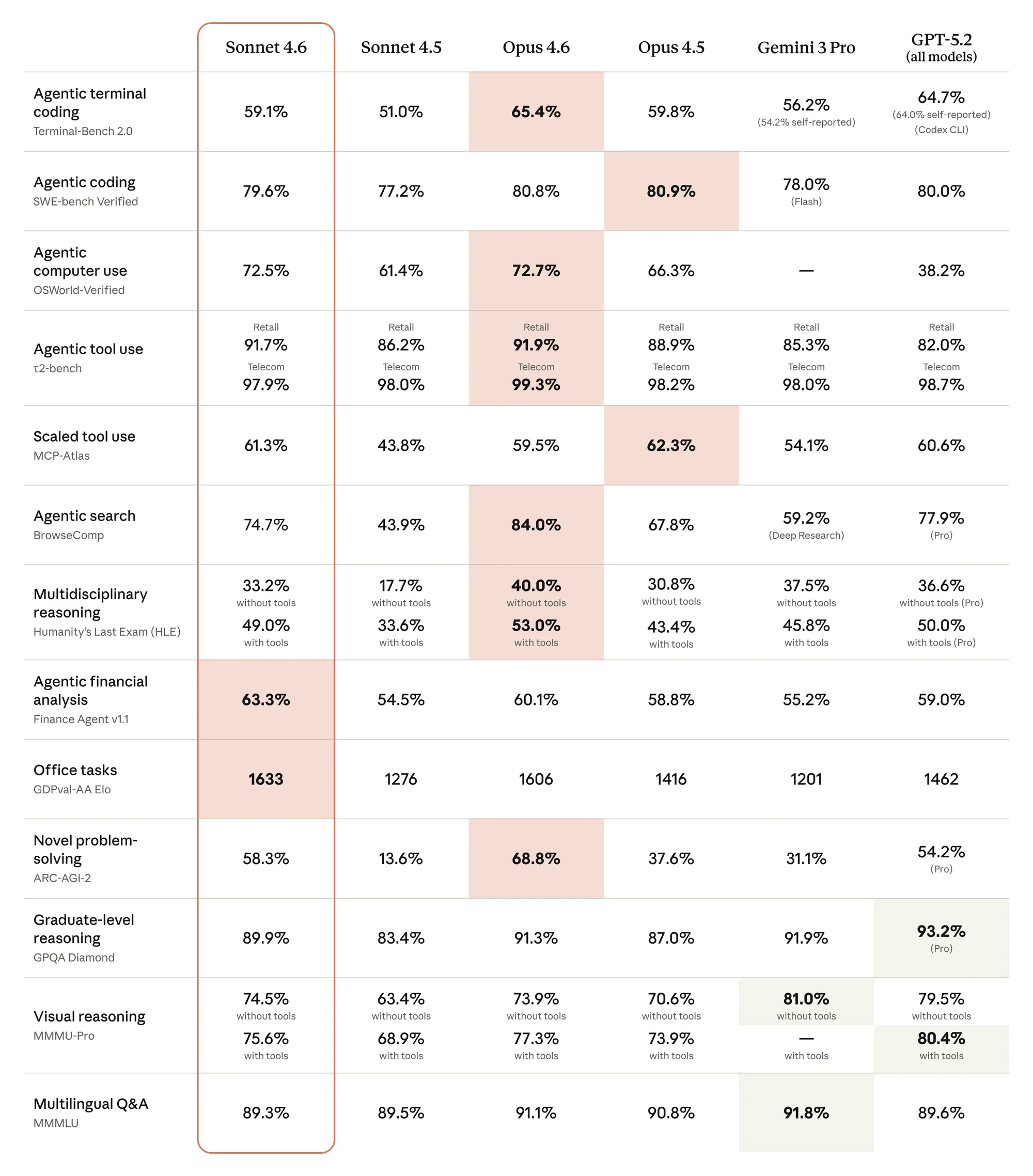
The headline changes: a 1M token context window entering beta, a new adaptive thinking mode that replaces the old binary extended thinking approach, and a suite of tools—web search, code execution, memory, and tool search—graduating to general availability. For developers building agentic applications, Sonnet 4.6 delivers the capabilities previously reserved for expensive frontier models at roughly a third of the cost.
The coding improvements are tangible. Users report better instruction-following in code generation, smarter context comprehension before making modifications, and reduced code duplication through automatic logic consolidation. Computer use reaches 94% accuracy on complex insurance workflows. The SWE-bench Verified score lands at 79.6%.
This guide covers everything you need to start building with the Claude Sonnet 4.6 API today: authentication, practical code examples in Python and JavaScript, the new adaptive thinking parameter, how to unlock the 1M context window, and how to test your integration with Apidog's visual API client.
What's New in Claude Sonnet 4.6
Adaptive Thinking Mode
The old thinking: {type: "enabled", budget_tokens: N} pattern is deprecated on Sonnet 4.6. The replacement is adaptive thinking: thinking: {type: "adaptive"}. Claude now decides dynamically how much reasoning a task needs.
Pair adaptive thinking with the effort parameter (available in GA now) to tune cost versus performance:
effort: "high"(default) — Claude almost always thinks, best for complex problemseffort: "medium"— recommended for most Sonnet 4.6 use cases, balances speed and qualityeffort: "low"— minimal thinking, fastest responses for simple tasks
Improved Coding Performance
Sonnet 4.6 brings three concrete improvements to code generation:
- Better instruction-following — generates code matching specifications more precisely
- Context comprehension — reads and understands existing code before modifying it, reducing regressions
- Logic consolidation — identifies duplicate patterns and suggests shared abstractions
Early testers running coding benchmarks reported preferring Sonnet 4.6 outputs over Sonnet 4.5 in 70% of cases and over Opus 4.5 in 59% of cases.
Computer Use Improvements
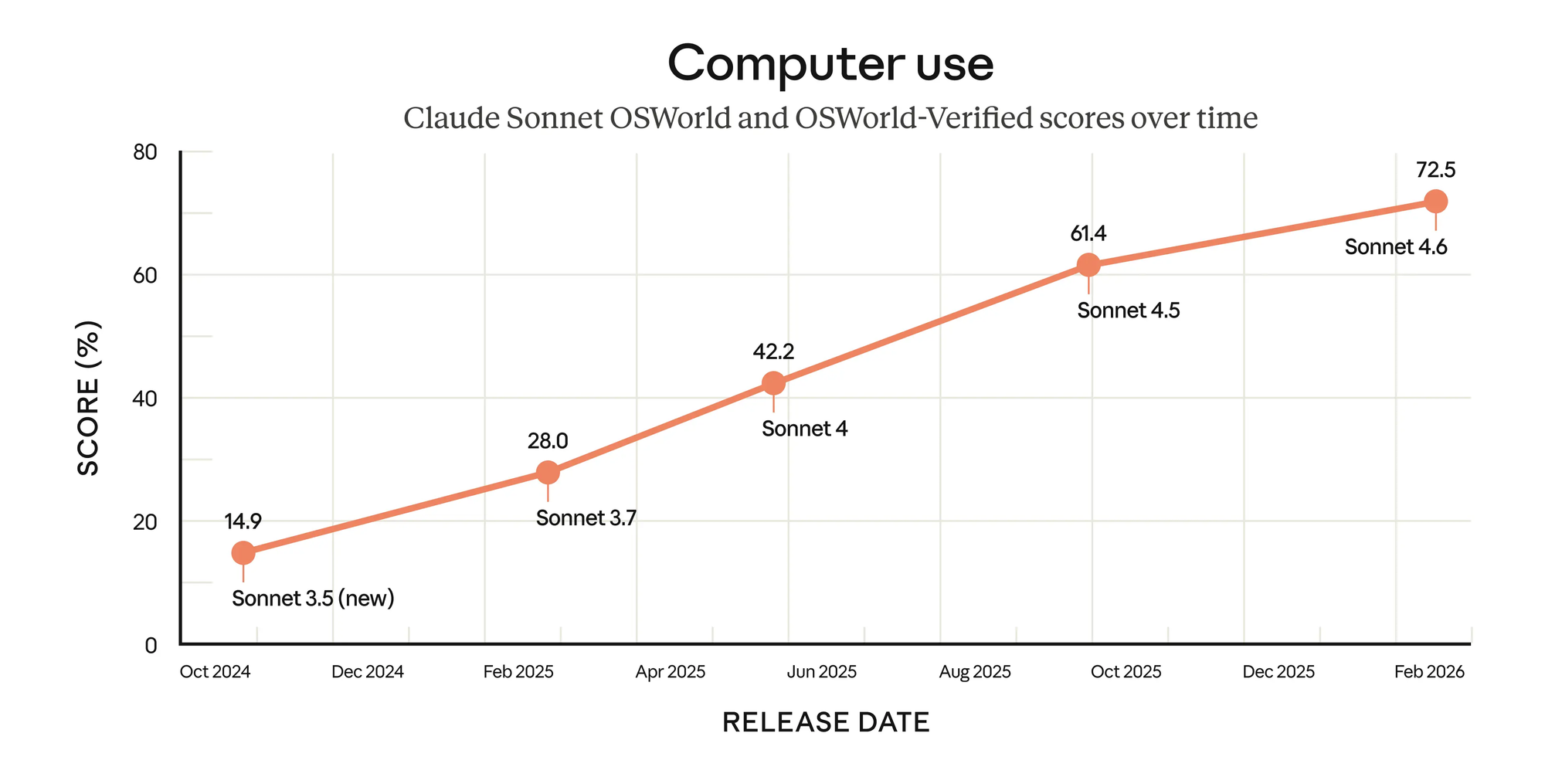
Computer use accuracy reaches 72.5% on OSWorld-Verified (within 0.2% of Opus 4.6), up significantly from Sonnet 4.5. The model shows 94% accuracy on insurance workflows requiring UI navigation, spreadsheet manipulation, and multi-step form completion. It's also more resistant to prompt injection attacks during automated tasks.
ARC-AGI-2 Breakthrough
The most striking benchmark number: ARC-AGI-2 performance jumps from 13.6% to 58.3% — a 4.3x improvement. This measures novel problem-solving on tasks the model hasn't seen patterns for, suggesting genuine reasoning improvements rather than memorization.
API Specs and Pricing
| Feature | Value |
|---|---|
| API model ID | claude-sonnet-4-6 |
| AWS Bedrock ID | anthropic.claude-sonnet-4-6 |
| GCP Vertex AI ID | claude-sonnet-4-6 |
| Context window | 200K tokens (1M beta with header) |
| Max output tokens | 64K |
| Input pricing | $3 / million tokens |
| Output pricing | $15 / million tokens |
| Prompt caching savings | Up to 90% |
| Batch API savings | Up to 50% |
| Knowledge cutoff (reliable) | August 2025 |
| Training data cutoff | January 2026 |
| Extended thinking | Yes |
| Adaptive thinking | Yes |
| Priority Tier | Yes |
Cost reduction options:
- Prompt caching: Cache static portions of your system prompt and save up to 90%
- Batch API: Process requests asynchronously for 50% off
- Long context pricing: Requests exceeding 200K tokens use a separate long-context rate
For production budgets: a million-token conversation in adaptive thinking mode at effort: "medium" costs roughly $3 in input tokens. Most single API calls fall well under a cent.
Getting Started with the Claude Sonnet 4.6 API
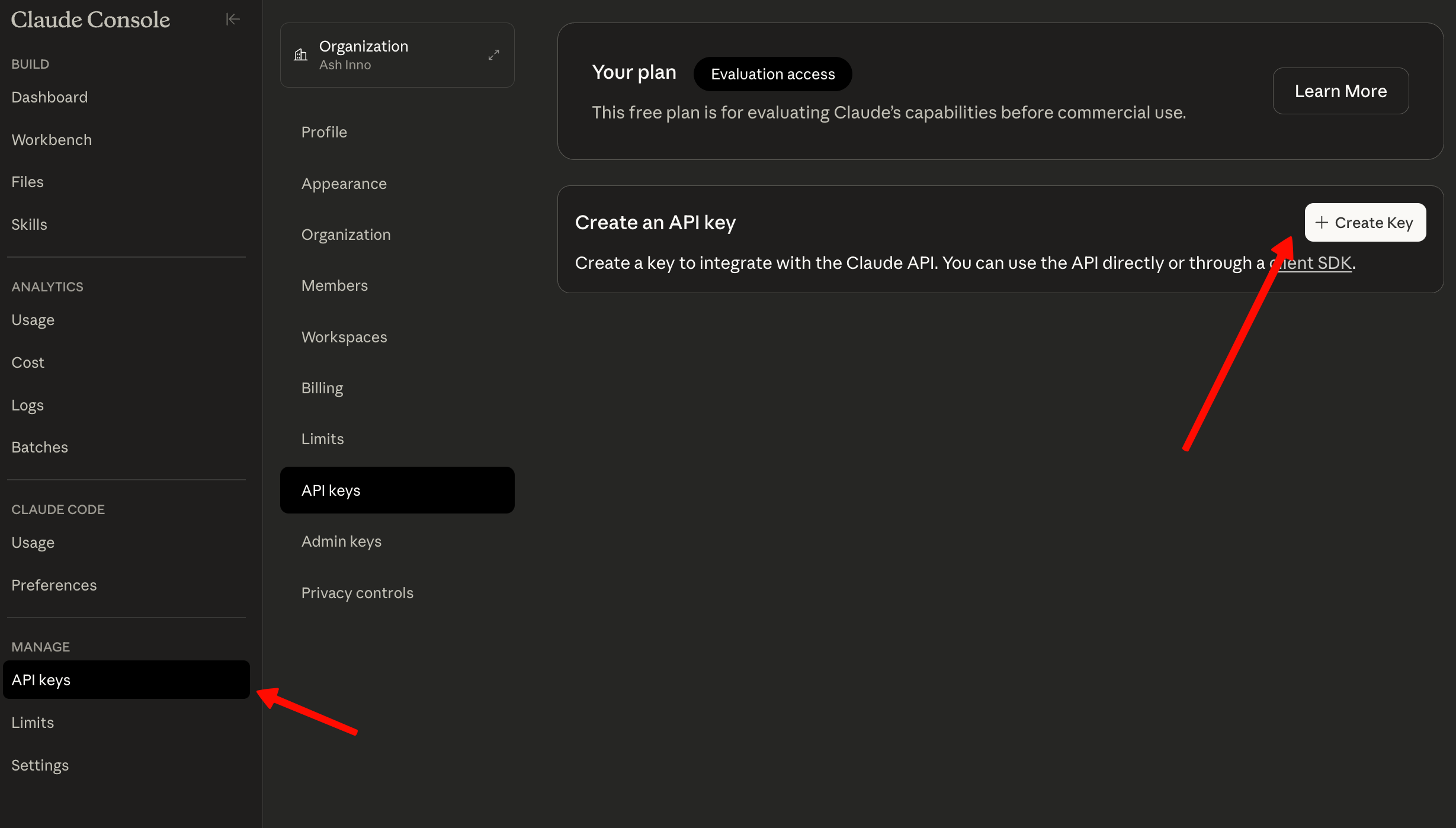
Step 1: Get Your API Key
- Log into platform.anthropic.com
- Navigate to API Keys in the settings
- Click Create Key and copy the value immediately (it's only shown once)
Store your key as an environment variable—never hardcode it:
export ANTHROPIC_API_KEY="sk-ant-..."
Step 2: Install the SDK
Python:
pip install anthropic
JavaScript/Node.js:
npm install @anthropic-ai/sdk
Step 3: Make Your First Request
import anthropic

client = anthropic.Anthropic()  # reads ANTHROPIC_API_KEY from environment

response = client.messages.create(
    model="claude-sonnet-4-6",
    max_tokens=1024,
    messages=[
        {"role": "user", "content": "Explain the difference between async/await and promises in JavaScript."}
    ]
)

print(response.content[0].text)
That's the minimum viable call. The response object includes usage stats (input tokens, output tokens), stop reason, and model version.
Python Code Examples
Basic Text Generation
import anthropic

client = anthropic.Anthropic()

def ask_claude(question: str, system: str = None) -> str:
    """Simple wrapper for Claude Sonnet 4.6 text generation."""
    messages = [{"role": "user", "content": question}]

    kwargs = {
        "model": "claude-sonnet-4-6",
        "max_tokens": 2048,
        "messages": messages,
    }
    if system:
        kwargs["system"] = system

    response = client.messages.create(**kwargs)
    return response.content[0].text

# Example usage
answer = ask_claude(
    "Review this Python function for performance issues:\n\ndef find_duplicates(lst):\n    return [x for x in lst if lst.count(x) > 1]",
    system="You are a senior Python engineer. Be specific and provide corrected code."
)
print(answer)
Streaming Responses
For long outputs or real-time UX, use streaming:
import anthropic

client = anthropic.Anthropic()

with client.messages.stream(
    model="claude-sonnet-4-6",
    max_tokens=4096,
    messages=[{
        "role": "user",
        "content": "Write a complete REST API handler in FastAPI for user authentication with JWT."
    }]
) as stream:
    for text in stream.text_stream:
        print(text, end="", flush=True)

# Get final message with usage stats after stream completes
message = stream.get_final_message()
print(f"\n\nTokens used: {message.usage.input_tokens} in, {message.usage.output_tokens} out")
Tool Calling / Function Use
import anthropic
import json

client = anthropic.Anthropic()

# Define tools
tools = [
    {
        "name": "get_repository_info",
        "description": "Fetch information about a GitHub repository including stars, forks, and recent commits.",
        "input_schema": {
            "type": "object",
            "properties": {
                "owner": {
                    "type": "string",
                    "description": "Repository owner or organization name"
                },
                "repo": {
                    "type": "string",
                    "description": "Repository name"
                }
            },
            "required": ["owner", "repo"]
        }
    }
]

response = client.messages.create(
    model="claude-sonnet-4-6",
    max_tokens=1024,
    tools=tools,
    messages=[{
        "role": "user",
        "content": "What can you tell me about the anthropics/anthropic-sdk-python repository?"
    }]
)

# Handle tool use response
for block in response.content:
    if block.type == "tool_use":
        print(f"Tool called: {block.name}")
        print(f"Arguments: {json.dumps(block.input, indent=2)}")
        # In production, call your actual implementation here
        # result = get_repository_info(block.input["owner"], block.input["repo"])
Vision and Image Analysis
import anthropic
import base64
from pathlib import Path

client = anthropic.Anthropic()

def analyze_image(image_path: str, question: str) -> str:
    """Analyze an image with Claude Sonnet 4.6."""
    image_data = base64.standard_b64encode(Path(image_path).read_bytes()).decode("utf-8")

    # Detect media type from extension
    ext = Path(image_path).suffix.lower()
    media_type_map = {
        ".jpg": "image/jpeg",
        ".jpeg": "image/jpeg",
        ".png": "image/png",
        ".gif": "image/gif",
        ".webp": "image/webp"
    }
    media_type = media_type_map.get(ext, "image/jpeg")

    response = client.messages.create(
        model="claude-sonnet-4-6",
        max_tokens=1024,
        messages=[{
            "role": "user",
            "content": [
                {
                    "type": "image",
                    "source": {
                        "type": "base64",
                        "media_type": media_type,
                        "data": image_data,
                    },
                },
                {
                    "type": "text",
                    "text": question
                }
            ],
        }]
    )
    return response.content[0].text

# Example: analyze a UI screenshot for accessibility issues
result = analyze_image(
    "screenshot.png",
    "Identify any accessibility issues in this UI design. Check contrast ratios, missing alt text indicators, and keyboard navigation concerns."
)
print(result)
JavaScript/Node.js Examples
Basic Setup and Request
import Anthropic from "@anthropic-ai/sdk";

const client = new Anthropic({
  apiKey: process.env.ANTHROPIC_API_KEY, // default, shown explicitly for clarity
});

async function askClaude(userMessage, systemPrompt = null) {
  const params = {
    model: "claude-sonnet-4-6",
    max_tokens: 2048,
    messages: [{ role: "user", content: userMessage }],
  };

  if (systemPrompt) {
    params.system = systemPrompt;
  }

  const response = await client.messages.create(params);
  return response.content[0].text;
}

// Usage
const answer = await askClaude(
  "Refactor this Express route to use async/await:\n\napp.get('/users', (req, res) => {\n  User.find({}, (err, users) => {\n    if (err) return res.status(500).send(err);\n    res.json(users);\n  });\n});",
  "You are a senior Node.js developer. Return only the refactored code with a brief explanation."
);

console.log(answer);
Streaming with TypeScript
import Anthropic from "@anthropic-ai/sdk";

const client = new Anthropic();

async function streamCodeReview(codeSnippet: string): Promise<void> {
  const stream = await client.messages.stream({
    model: "claude-sonnet-4-6",
    max_tokens: 4096,
    messages: [
      {
        role: "user",
        content: `Perform a thorough code review of this TypeScript function:\n\n\`\`\`typescript\n${codeSnippet}\n\`\`\`\n\nFocus on: type safety, edge cases, performance, and security.`,
      },
    ],
  });

  // Stream text as it arrives
  stream.on("text", (text) => {
    process.stdout.write(text);
  });

  // Get final stats
  const finalMessage = await stream.finalMessage();
  console.log(
    `\n\n---\nTotal tokens: ${finalMessage.usage.input_tokens + finalMessage.usage.output_tokens}`
  );
}
Multi-turn Conversation
import Anthropic from "@anthropic-ai/sdk";

const client = new Anthropic();

class ConversationManager {
  constructor(systemPrompt = null) {
    this.messages = [];
    this.systemPrompt = systemPrompt;
  }

  async chat(userMessage) {
    this.messages.push({ role: "user", content: userMessage });

    const params = {
      model: "claude-sonnet-4-6",
      max_tokens: 2048,
      messages: this.messages,
    };

    if (this.systemPrompt) {
      params.system = this.systemPrompt;
    }

    const response = await client.messages.create(params);
    const assistantMessage = response.content[0].text;

    // Maintain conversation history
    this.messages.push({ role: "assistant", content: assistantMessage });

    return assistantMessage;
  }
}

// Example: multi-turn debugging session
const debugSession = new ConversationManager(
  "You are an expert debugger. Ask clarifying questions and walk through issues step by step."
);

console.log(await debugSession.chat("My API keeps returning 401 errors."));
console.log(await debugSession.chat("I'm including the Authorization header."));
console.log(
  await debugSession.chat("The token is coming from localStorage after login.")
);
Adaptive Thinking: The New Extended Thinking
Adaptive thinking replaces the old extended thinking model on Sonnet 4.6. The key difference: instead of setting a fixed token budget for thinking, you set an effort level and Claude determines how much reasoning the problem actually warrants.
How to Use Adaptive Thinking
import anthropic

client = anthropic.Anthropic()

# Recommended: adaptive thinking with medium effort for most use cases
response = client.messages.create(
    model="claude-sonnet-4-6",
    max_tokens=16000,
    thinking={"type": "adaptive"},
    effort="medium",  # options: "low", "medium", "high" (default: high)
    messages=[{
        "role": "user",
        "content": """
        Design a database schema for a SaaS analytics platform that needs to:
        - Track events from millions of users
        - Support real-time queries on the last 24 hours
        - Archive historical data cost-effectively
        - Handle tenant isolation for enterprise customers
        """
    }]
)

# Thinking blocks appear before the text response
for block in response.content:
    if block.type == "thinking":
        print(f"[Claude's reasoning - {len(block.thinking)} chars]")
    elif block.type == "text":
        print(block.text)
Effort Levels in Practice
| Effort | Best For | Relative Cost | Relative Speed |
|---|---|---|---|
low |
Classification, simple Q&A, formatting | 1x | Fastest |
medium |
Code generation, analysis, most tasks | 1.5-2x | Fast |
high |
Architecture decisions, complex debugging, math | 3-5x | Moderate |
Migration note: If you're usingthinking: {type: "enabled", budget_tokens: N}, that syntax still works on Sonnet 4.6 but is deprecated. Migrate tothinking: {type: "adaptive"}witheffortbefore the next major release removes it.
1M Token Context Window
The 1M token context window lets you feed Claude entire codebases, extensive document sets, or months of conversation history. That's roughly 750,000 words or the equivalent of 5–10 full codebases in a single request.
How to Enable 1M Context
Pass the context-1m-2025-08-07 beta header in your request:
import anthropic

client = anthropic.Anthropic()

# Read an entire large codebase
with open("large_codebase.txt", "r") as f:
    codebase_content = f.read()

response = client.beta.messages.create(
    model="claude-sonnet-4-6",
    max_tokens=4096,
    betas=["context-1m-2025-08-07"],
    messages=[{
        "role": "user",
        "content": f"""
        Here is our entire backend codebase:\n\n{codebase_content}\n\n
        Find all database queries that could cause N+1 problems and suggest fixes.
        """
    }]
)

print(response.content[0].text)
// JavaScript equivalent
const response = await client.beta.messages.create({
  model: "claude-sonnet-4-6",
  max_tokens: 4096,
  betas: ["context-1m-2025-08-07"],
  messages: [
    {
      role: "user",
      content: `Review this entire codebase for security vulnerabilities:\n\n${codebaseContent}`,
    },
  ],
});
What 1M Tokens Enables
- Full codebase analysis: Send your entire repo and ask Claude to find bugs, suggest refactors, or generate tests
- Long document processing: Analyze full legal contracts, financial reports, or research papers
- Extended agentic sessions: Keep full history of long multi-step tasks without losing context
- Cross-file dependency tracing: Find all usages of a function or class across a large project
Pricing note: Requests exceeding 200K tokens use long-context pricing. Plan accordingly for high-volume use.
Web Search and Dynamic Filtering
Web search and web fetch tools now support dynamic filtering in public beta on Sonnet 4.6. Claude writes and executes code to filter search results before they enter the context window—keeping only relevant information and cutting token usage significantly.
Code execution is free when used alongside web search or web fetch tools (no separate billing).
Setting Up Dynamic Web Search
import anthropic

client = anthropic.Anthropic()

response = client.beta.messages.create(
    model="claude-sonnet-4-6",
    max_tokens=4096,
    betas=["code-execution-web-tools-2026-02-09"],
    tools=[
        {
            "type": "web_search_20260209",  # Use this version for dynamic filtering
            "name": "web_search",
        }
    ],
    messages=[{
        "role": "user",
        "content": "Find the latest CVEs for Apache Log4j published in the last 30 days and summarize the severity levels."
    }]
)

for block in response.content:
    if hasattr(block, "text"):
        print(block.text)
Web Fetch with Dynamic Filtering
import anthropic

client = anthropic.Anthropic()

response = client.beta.messages.create(
    model="claude-sonnet-4-6",
    max_tokens=2048,
    betas=["code-execution-web-tools-2026-02-09"],
    tools=[
        {
            "type": "web_fetch_20260209",  # New version with dynamic filtering
            "name": "web_fetch",
        }
    ],
    messages=[{
        "role": "user",
        "content": "Fetch the Anthropic pricing page and extract only the Claude Sonnet pricing rows."
    }]
)

print(response.content[-1].text)
Why dynamic filtering matters: Without filtering, fetching a full web page might consume 100K tokens for a page where you only need 2K tokens of relevant content. Dynamic filtering lets Claude parse the page in code and return only what's needed, reducing costs by 90%+ on content-heavy pages.
Context Compaction API
Context compaction handles long-running agentic sessions where context accumulates beyond the window limit. The API automatically summarizes older parts of the conversation server-side when approaching the limit, enabling effectively unlimited conversation length.
import anthropic

client = anthropic.Anthropic()

# Enable context compaction via beta header
response = client.beta.messages.create(
    model="claude-sonnet-4-6",
    max_tokens=4096,
    betas=["interleaved-thinking-2025-05-14"],  # Enables compaction in beta
    system="You are a long-running software development agent. Maintain context about the codebase changes made during this session.",
    messages=[
        {"role": "user", "content": "Start a refactoring session for our authentication module."},
        # ... many more turns would go here in a real session
    ]
)

# The compaction_details field shows when summarization occurred
if hasattr(response, "usage") and hasattr(response.usage, "cache_read_input_tokens"):
    print(f"Context tokens saved via caching: {response.usage.cache_read_input_tokens}")
When to use compaction: Any agentic workflow that runs for more than a few minutes and accumulates history—CI/CD agents, long coding sessions, customer support threads, or multi-step research tasks.
Testing Claude Sonnet 4.6 with Apidog
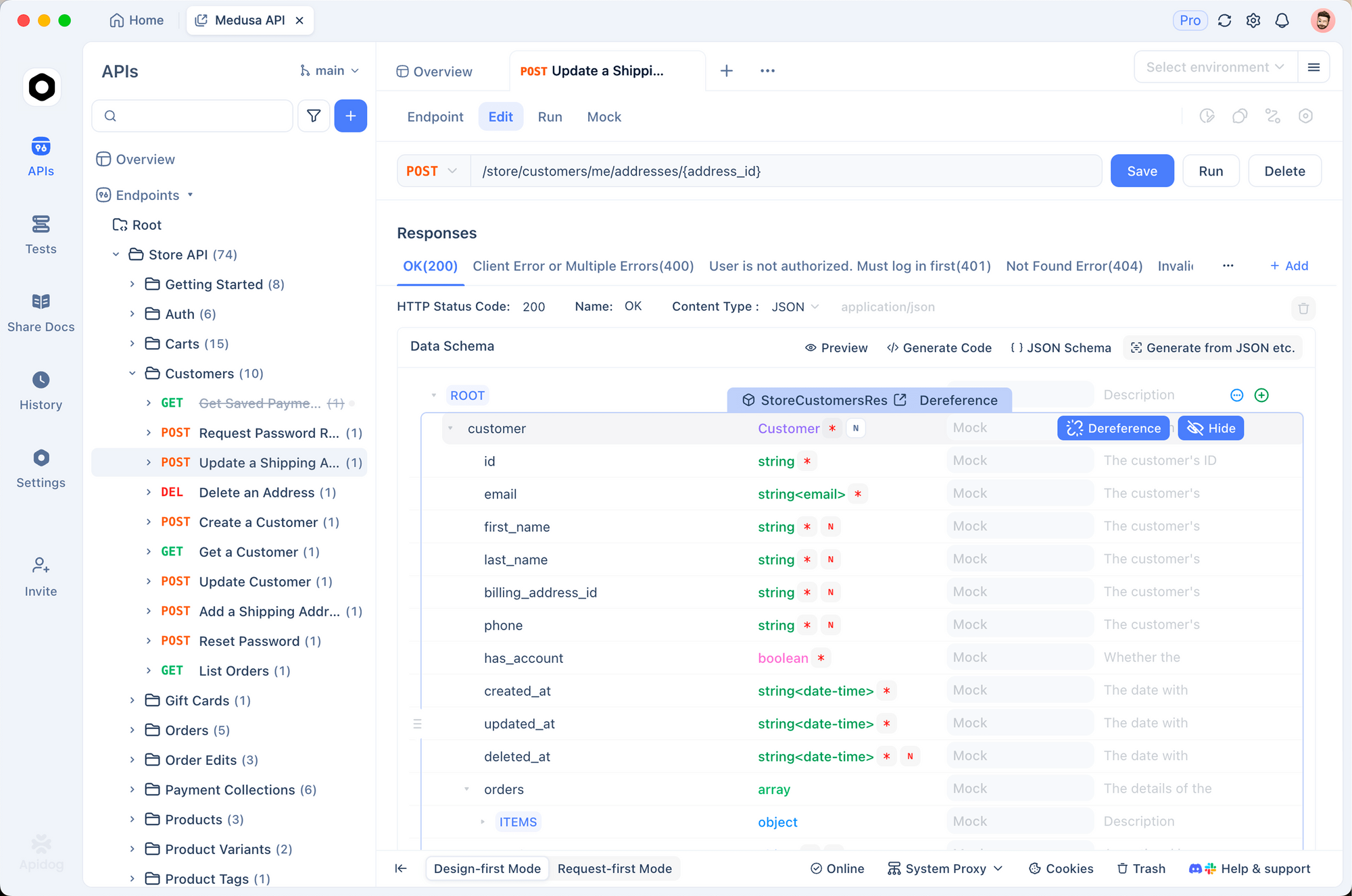
Before writing SDK code, use Apidog to explore the Claude Sonnet 4.6 API visually. Apidog speeds up development by letting you configure headers, build request bodies, and inspect streaming responses without boilerplate.
Setting Up the Anthropic API in Apidog
- Open Apidog and create a new HTTP request
- Set the method to
POSTand the URL tohttps://api.anthropic.com/v1/messages - Add these headers:
| Header | Value |
|---|---|
x-api-key |
{{ANTHROPIC_API_KEY}} |
anthropic-version |
2023-06-01 |
Content-Type |
application/json |
- Set the request body to JSON:
{
  "model": "claude-sonnet-4-6",
  "max_tokens": 1024,
  "messages": [
    {
      "role": "user",
      "content": "What are the key improvements in Claude Sonnet 4.6?"
    }
  ]
}
Testing Adaptive Thinking
To test adaptive thinking mode in Apidog, add the thinking and effort fields to your request body:
{
  "model": "claude-sonnet-4-6",
  "max_tokens": 8192,
  "thinking": {
    "type": "adaptive"
  },
  "effort": "medium",
  "messages": [
    {
      "role": "user",
      "content": "Design a rate limiting strategy for a public API serving 10M requests per day."
    }
  ]
}
Testing Beta Features in Apidog
For beta features (1M context, dynamic web search, context compaction), add the beta header:
| Header | Value |
|---|---|
anthropic-beta |
context-1m-2025-08-07 |
Or for web search dynamic filtering:
| Header | Value |
|---|---|
anthropic-beta |
code-execution-web-tools-2026-02-09 |
Apidog lets you save these configurations as presets and share them with your team, so everyone has consistent API testing environments.
New Tools Now in GA
Several tools that were previously in beta are now generally available on Sonnet 4.6, meaning no special beta headers required:
Code Execution Tool
import anthropic

client = anthropic.Anthropic()

response = client.messages.create(
    model="claude-sonnet-4-6",
    max_tokens=4096,
    tools=[{"type": "code_execution_20250522", "name": "code_execution"}],
    messages=[{
        "role": "user",
        "content": "Calculate the compound interest on $10,000 at 5% annual rate over 10 years, compounding monthly. Show the year-by-year breakdown."
    }]
)

for block in response.content:
    if block.type == "tool_result":
        print("Execution output:", block.content)
    elif hasattr(block, "text"):
        print(block.text)
Memory Tool
The memory tool lets Claude persist information across conversation sessions, useful for building stateful assistants:
import anthropic

client = anthropic.Anthropic()

response = client.messages.create(
    model="claude-sonnet-4-6",
    max_tokens=2048,
    tools=[{"type": "memory_20250416", "name": "memory"}],
    messages=[{
        "role": "user",
        "content": "Remember that our API base URL is https://api.company.com/v2 and we require Bearer token auth on all endpoints."
    }]
)
Programmatic Tool Calling
Programmatic tool calling lets Claude generate structured API calls directly:
import anthropic

client = anthropic.Anthropic()

# Claude can now call tools programmatically without human-in-the-loop
response = client.messages.create(
    model="claude-sonnet-4-6",
    max_tokens=2048,
    tools=[
        {
            "name": "execute_sql",
            "description": "Execute a SQL query and return results",
            "input_schema": {
                "type": "object",
                "properties": {
                    "query": {"type": "string", "description": "The SQL query to execute"},
                    "database": {"type": "string", "description": "Database name"}
                },
                "required": ["query", "database"]
            }
        }
    ],
    messages=[{
        "role": "user",
        "content": "Find all users who signed up in January 2026 and haven't made a purchase."
    }]
)
Sonnet 4.6 vs Previous Models
| Claude Sonnet 4.6 | Claude Sonnet 4.5 | Claude Opus 4.5 | |
|---|---|---|---|
| API ID | claude-sonnet-4-6 |
claude-sonnet-4-5-20250929 |
claude-opus-4-5-20251101 |
| Input price | $3/MTok | $3/MTok | $5/MTok |
| Output price | $15/MTok | $15/MTok | $25/MTok |
| Context window | 200K / 1M (beta) | 200K / 1M (beta) | 200K |
| Max output | 64K | 64K | 64K |
| Adaptive thinking | Yes | No | No |
| Extended thinking | Yes (deprecated) | Yes | Yes |
| SWE-bench score | 79.6% | ~72% | ~76% |
| OSWorld (computer use) | 72.5% | ~65% | ~72.7% |
| Web search filtering | Yes (beta) | No | No |
| GA tools | Code exec, web fetch, memory, tool search | Fewer GA | Full suite |
| Preferred by users vs Sonnet 4.5 | 70% | — | — |
| Preferred by users vs Opus 4.5 | 59% | — | — |
Bottom line: If you're on Sonnet 4.5, upgrading to Sonnet 4.6 is a no-brainer—same price, meaningfully better coding performance, and adaptive thinking. If you're on Opus 4.5, Sonnet 4.6 now matches or beats it in most use cases at 60% of the cost.
Best Practices and Tips
1. Use Adaptive Thinking at Medium Effort by Default
For most Sonnet 4.6 use cases, effort: "medium" provides the best cost-performance balance. Reserve effort: "high" for genuinely complex tasks like architectural design, multi-step reasoning chains, or mathematical proofs.
# Good default pattern for Sonnet 4.6
response = client.messages.create(
    model="claude-sonnet-4-6",
    max_tokens=4096,
    thinking={"type": "adaptive"},
    effort="medium",  # Sweet spot for most tasks
    messages=[...]
)
2. Use Streaming for Outputs Over 1K Tokens
Large responses benefit from streaming to avoid HTTP timeouts and give users faster perceived response times:
# For any response expected to be long
with client.messages.stream(
    model="claude-sonnet-4-6",
    max_tokens=8192,
    messages=[...]
) as stream:
    for text in stream.text_stream:
        print(text, end="", flush=True)
3. Enable Prompt Caching for Repeated System Prompts
If you use the same system prompt across many calls, cache it to save up to 90%:
response = client.messages.create(
    model="claude-sonnet-4-6",
    max_tokens=1024,
    system=[
        {
            "type": "text",
            "text": "Your lengthy system prompt here...",
            "cache_control": {"type": "ephemeral"}  # Cache this block
        }
    ],
    messages=[{"role": "user", "content": user_input}]
)
4. Handle Rate Limits Gracefully
Sonnet 4.6 has generous rate limits, but production systems should implement exponential backoff:
import anthropic
import time

def create_with_retry(client, max_retries=3, **kwargs):
    for attempt in range(max_retries):
        try:
            return client.messages.create(**kwargs)
        except anthropic.RateLimitError:
            if attempt == max_retries - 1:
                raise
            wait_time = (2 ** attempt) + 1  # 2s, 3s, 5s
            time.sleep(wait_time)
5. Migrate Away from Prefill on Sonnet 4.6
Prefilling assistant messages (last-turn prefills) is not supported on Claude 4.6 models. Use structured outputs instead:
# Old approach (breaks on Claude 4.6):
# messages = [
#     {"role": "user", "content": "Give me JSON..."},
#     {"role": "assistant", "content": "{"}  # Prefill
# ]

# New approach: use structured outputs
response = client.messages.create(
    model="claude-sonnet-4-6",
    max_tokens=1024,
    output_config={
        "format": {
            "type": "json_schema",
            "schema": {
                "type": "object",
                "properties": {
                    "name": {"type": "string"},
                    "score": {"type": "number"}
                }
            }
        }
    },
    messages=[{"role": "user", "content": "Generate a sample user object."}]
)
6. Specify AWS or GCP for Data Residency
If your compliance requirements need US-only inference, use the inference_geo parameter:
response = client.messages.create(
    model="claude-sonnet-4-6",
    max_tokens=1024,
    inference_geo="us",  # Ensures inference runs in US data centers
    messages=[...]
)
US-only inference is priced at 1.1x the standard rate on Sonnet 4.6.
Ready to build with Claude Sonnet 4.6? Download Apidog free to test your API calls visually, collaborate with your team on request configurations, and auto-generate SDK code—no credit card required.