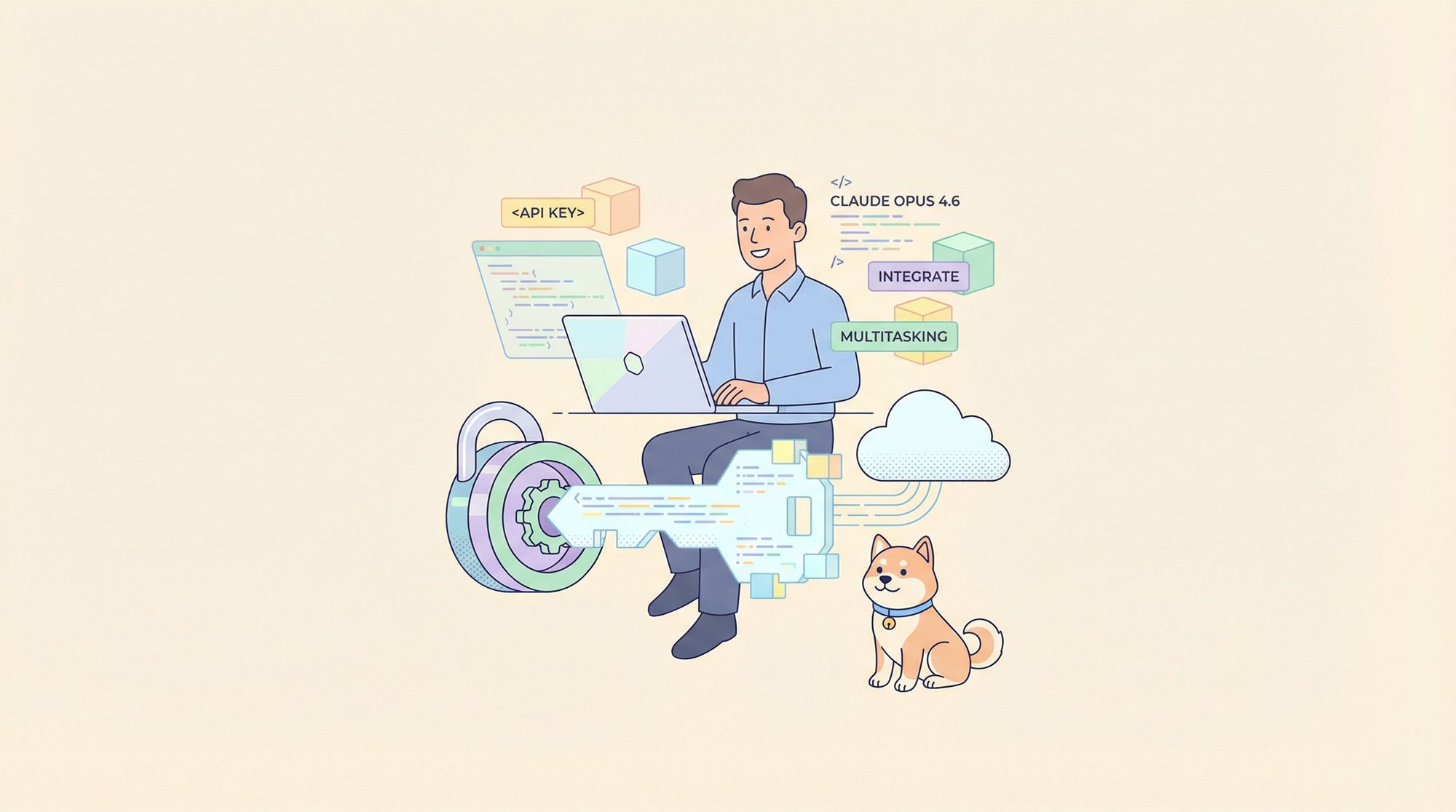
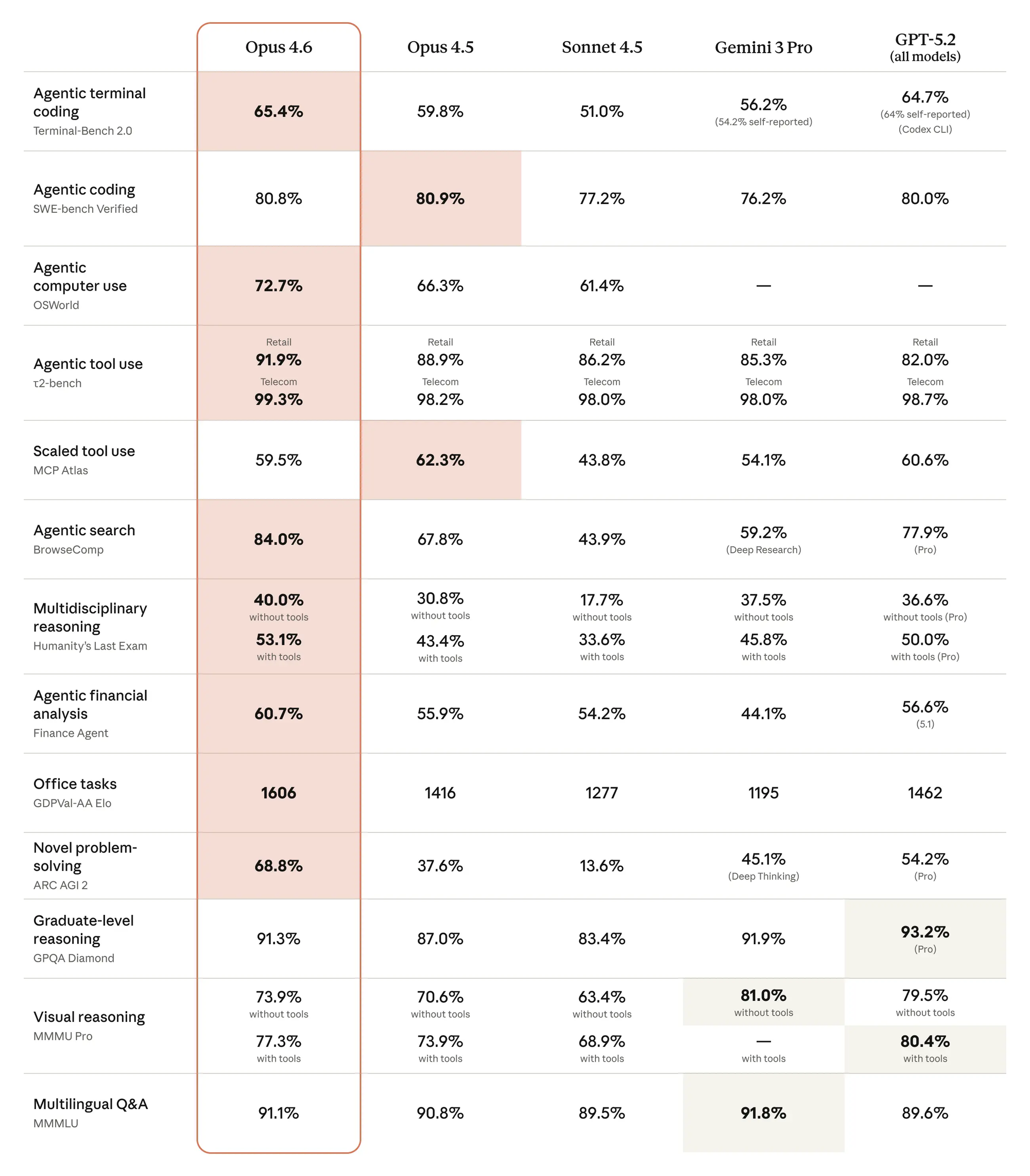
Anthropic released Claude Opus 4.6, marking a leap in AI capabilities for developers. Unlike incremental updates, Opus 4.6 introduces paradigm-shifting features: agent teams that coordinate multiple AI workers in parallel, adaptive thinking that dynamically allocates reasoning power, and a massive 1 million token context window that can hold entire codebases.
For developers building production AI applications, this means you can now tackle problems that were previously impossible. Need to refactor a complex microservices architecture? Agent teams can split the work across multiple specialists. Processing a 200-page API specification? The expanded context window handles it in a single request. Want intelligent resource allocation? Adaptive thinking decides when to use deep reasoning versus quick responses.
The API maintains backward compatibility with previous Claude versions while adding powerful new parameters for controlling agent behavior and thinking depth.
What is Claude Opus 4.6?
Claude Opus 4.6 is Anthropic's most capable AI model, designed specifically for complex reasoning tasks, agentic workflows, and enterprise-scale applications. Released as part of the Claude 4.6 model family, Opus represents the "flagship" tier optimized for accuracy and sophistication over speed.
Download Apidog to test Claude Opus 4.6 API calls with a visual interface that handles authentication, manages environments, and generates production code from your working requests.
Key Features and Capabilities
Agent Teams (Research Preview)
Agent teams enable Claude to coordinate multiple AI workers within a single API request. When you enable agent teams, Claude can:
- Decompose complex tasks into parallel sub-problems
- Instantiate specialized agents for different domains (coding, analysis, planning)
- Coordinate execution across agents with automatic dependency management
- Synthesize results into coherent final outputs
Use cases:
- Comprehensive code refactoring across multiple files
- Multi-perspective analysis (security + performance + maintainability)
- Parallel API integration testing
- Large-scale documentation generation
Agent teams are currently in research preview for API subscribers. Access is controlled via account settings in the Anthropic Console.
Adaptive Thinking
Adaptive thinking replaces the binary choice between fast responses and extended reasoning. Claude now makes real-time decisions about reasoning depth based on:
- Query complexity: Simple questions get instant responses
- Domain requirements: Technical problems trigger deeper analysis
- Contextual signals: Your conversation history influences thinking depth
- Effort level: You control the baseline (low/medium/high/max)
How it works:
# High effort (default) - Claude thinks when useful
response = client.messages.create(
    model="claude-opus-4-6",
    messages=[{"role": "user", "content": "Design a rate limiter"}],
    thinking={"type": "adaptive", "effort": "high"}
)

# Max effort - Claude always engages deep reasoning
response = client.messages.create(
    model="claude-opus-4-6",
    messages=[{"role": "user", "content": "Find bugs in this code"}],
    thinking={"type": "adaptive", "effort": "max"}
)
1M Token Context Window (Beta)
The extended context window unlocks new application patterns:
Developer workflows:
- Analyze entire codebases (most repositories < 500K tokens)
- Process complete API documentation sets
- Maintain context across multi-hour pair programming sessions
Enterprise applications:
- Legal document analysis (contracts, case files)
- Research paper synthesis (dozens of papers in one request)
- Customer support with full interaction history
To enable the 1M context beta, contact your Anthropic account manager or check the Console for beta access toggles.
Context Compaction (Beta)
Long conversations eventually hit context limits. Context compaction solves this by automatically summarizing older messages when you approach the threshold. The process is transparent:
- You configure a target token limit (e.g., 180K out of 200K)
- As the conversation grows, Claude monitors token usage
- When nearing the limit, Claude summarizes old messages
- The conversation continues seamlessly with preserved context
This enables indefinite conversation length for agentic tasks, customer support bots, and long-running coding sessions.
128K Max Output Tokens
Output capacity doubled from 64K to 128K tokens. This enables:
- Generating complete application files (React apps, API servers)
- Writing comprehensive documentation in single responses
- Producing detailed analysis reports without truncation
- Creating multi-file code generation in one request
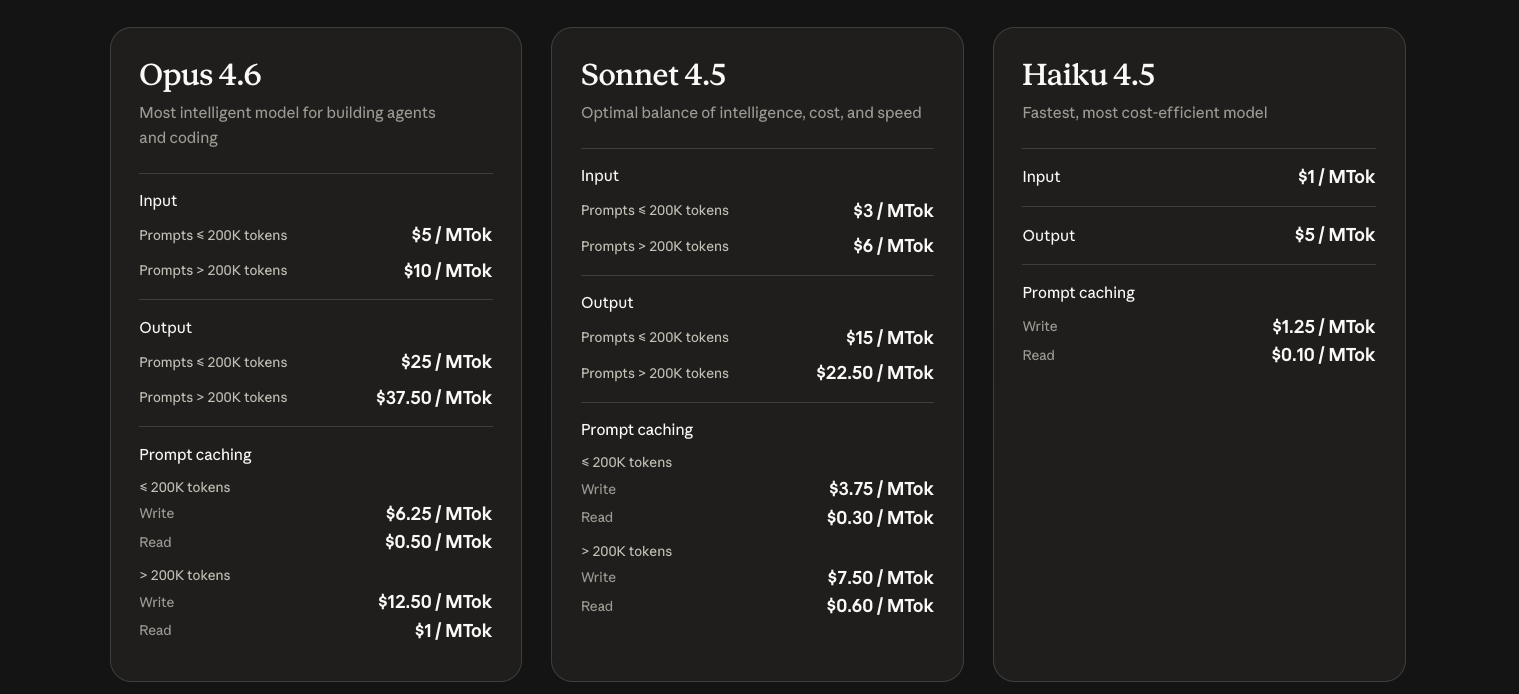
Getting Started with Claude Opus 4.6 API
Prerequisites
Before you start, ensure you have:
- An Anthropic account
- Python 3.8+ or Node.js 16+ installed
- Basic understanding of REST APIs and async programming
- A code editor (VS Code, PyCharm, etc.)
Step 1: Create Your Anthropic Account
Visit dashboard.anthropic.com to create your account:
- Click "Sign Up" and provide your email
- Verify your email address
- Complete billing setup (free tier includes $5 credit)
- Navigate to the API Keys section
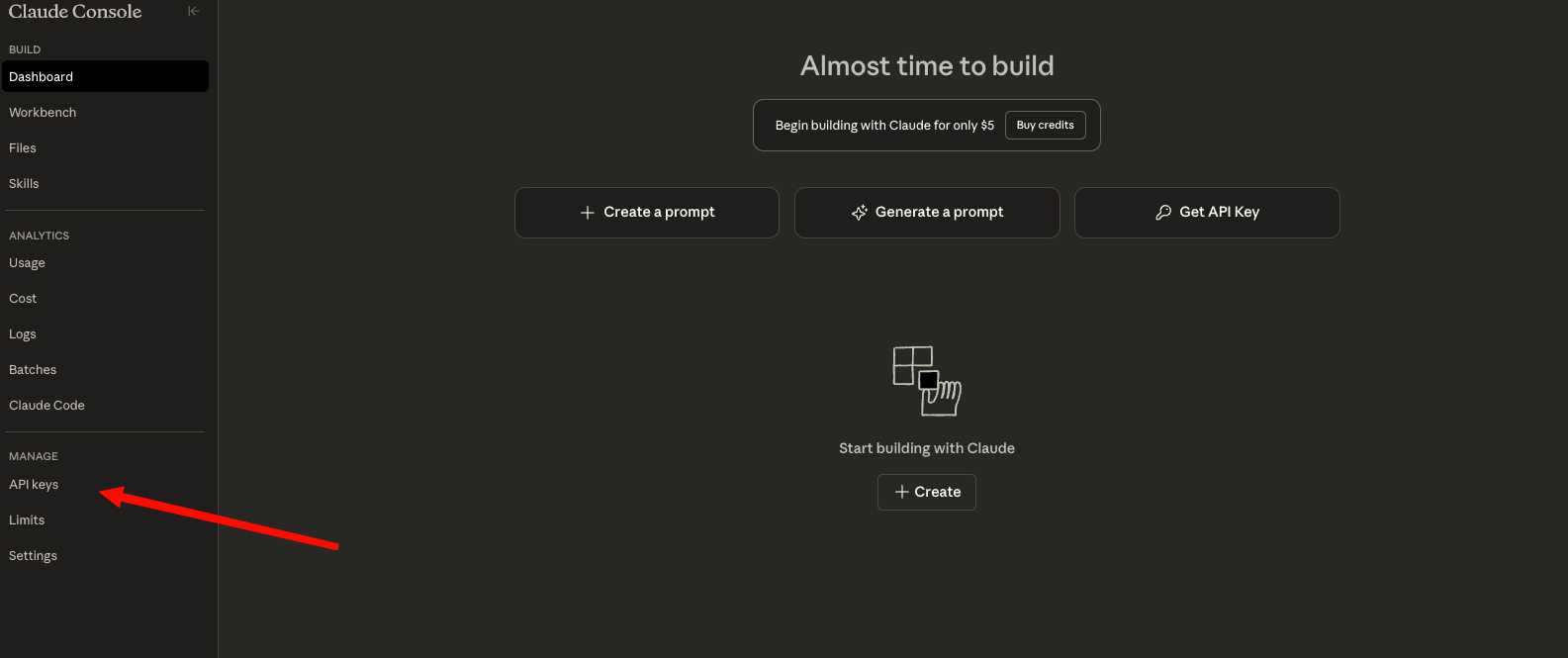
Step 2: Generate Your API Key
In the Anthropic Console:
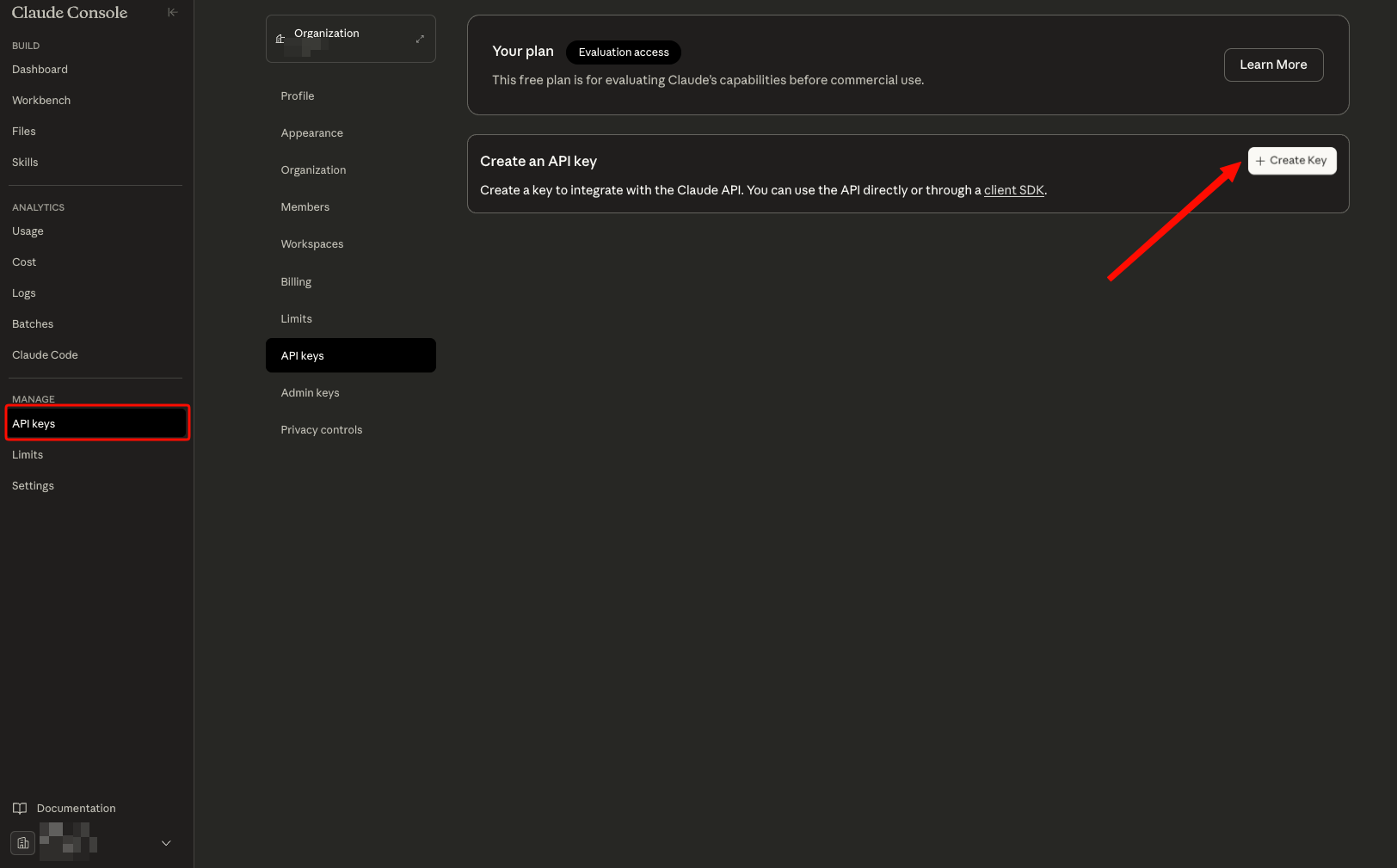
- Go to Settings > API Keys
- Click "Create Key"
- Name your key (e.g., "production-app" or "development")
- Copy the key immediately—you won't see it again
- Store it securely (password manager or secrets vault)
Security best practices:
- Never commit API keys to version control
- Use environment variables for key storage
- Rotate keys every 90 days
- Create separate keys for development and production
- Monitor usage in the Console to detect unauthorized access

Step 3: Install the SDK
For Python:
pip install anthropic
For Node.js:
npm install @anthropic-ai/sdk
For other languages:
You can use any HTTP client. The API accepts standard REST requests. See the API Reference for curl examples.
Step 4: Configure Your Environment
Set your API key as an environment variable:
macOS/Linux:
export ANTHROPIC_API_KEY="sk-ant-api03-..."
Add to ~/.bashrc or ~/.zshrc for persistence:
echo 'export ANTHROPIC_API_KEY="sk-ant-api03-..."' >> ~/.zshrc
source ~/.zshrc
Windows (PowerShell):
$env:ANTHROPIC_API_KEY="sk-ant-api03-..."
For persistence:
[System.Environment]::SetEnvironmentVariable('ANTHROPIC_API_KEY', 'sk-ant-api03-...', 'User')
Windows (Command Prompt):
setx ANTHROPIC_API_KEY "sk-ant-api03-..."
Python Code Examples
Basic Chat Completion
Here's your first Claude Opus 4.6 API call:
import os
from anthropic import Anthropic

# Initialize the client
client = Anthropic(
    api_key=os.environ.get("ANTHROPIC_API_KEY")
)

# Create a message
message = client.messages.create(
    model="claude-opus-4-6",
    max_tokens=2048,
    messages=[
        {
            "role": "user",
            "content": "Explain the difference between REST and GraphQL APIs in simple terms."
        }
    ]
)

print(message.content[0].text)
Output:
REST and GraphQL are two approaches to building APIs...
[Claude's response continues]
Streaming Responses
For real-time applications, stream responses as they generate:
import os
from anthropic import Anthropic

client = Anthropic(api_key=os.environ.get("ANTHROPIC_API_KEY"))

# Stream the response
with client.messages.stream(
    model="claude-opus-4-6",
    max_tokens=2048,
    messages=[
        {
            "role": "user",
            "content": "Write a Python function to implement a binary search tree."
        }
    ]
) as stream:
    for text in stream.text_stream:
        print(text, end="", flush=True)
This prints tokens as they arrive, creating a ChatGPT-like typing effect.
Multi-Turn Conversation
Maintain context across multiple exchanges:
import os
from anthropic import Anthropic

client = Anthropic(api_key=os.environ.get("ANTHROPIC_API_KEY"))

# Conversation history
conversation = []

def chat(user_message):
    """Send a message and get a response."""
    # Add user message
    conversation.append({
        "role": "user",
        "content": user_message
    })

    # Get Claude's response
    response = client.messages.create(
        model="claude-opus-4-6",
        max_tokens=2048,
        messages=conversation
    )

    # Add assistant response to history
    assistant_message = response.content[0].text
    conversation.append({
        "role": "assistant",
        "content": assistant_message
    })

    return assistant_message

# Example conversation
print(chat("How do I create a REST API in Python?"))
print("\n---\n")
print(chat("Can you show me how to add JWT authentication to that?"))
print("\n---\n")
print(chat("What about rate limiting?"))
Using Adaptive Thinking
Control reasoning depth with effort levels:
import os
from anthropic import Anthropic

client = Anthropic(api_key=os.environ.get("ANTHROPIC_API_KEY"))

# High effort (default) - Claude decides when to think
response = client.messages.create(
    model="claude-opus-4-6",
    max_tokens=4096,
    messages=[
        {
            "role": "user",
            "content": "Review this code for security vulnerabilities:\n\n[your code here]"
        }
    ],
    thinking={
        "type": "adaptive",
        "effort": "high"
    }
)

print(response.content[0].text)

# Max effort - Forces deep reasoning on every request
response = client.messages.create(
    model="claude-opus-4-6",
    max_tokens=4096,
    messages=[
        {
            "role": "user",
            "content": "Design a distributed rate limiter for 1M requests/second"
        }
    ],
    thinking={
        "type": "adaptive",
        "effort": "max"
    }
)

print(response.content[0].text)
Effort level guidance:
- low: Simple Q&A, factual lookups, quick edits
- medium: Standard development tasks, code review
- high (default): Complex problem solving, architecture design
- max: Critical analysis, comprehensive security audits
Async Implementation for High Performance
For applications making multiple API calls, use async/await:
import os
import asyncio
from anthropic import AsyncAnthropic

async def main():
    client = AsyncAnthropic(api_key=os.environ.get("ANTHROPIC_API_KEY"))

    # Run multiple requests concurrently
    tasks = [
        client.messages.create(
            model="claude-opus-4-6",
            max_tokens=1024,
            messages=[{"role": "user", "content": f"Explain {topic}"}]
        )
        for topic in ["REST APIs", "GraphQL", "WebSockets", "gRPC"]
    ]

    responses = await asyncio.gather(*tasks)

    for i, response in enumerate(responses):
        print(f"=== Response {i+1} ===")
        print(response.content[0].text[:200])
        print()

asyncio.run(main())
This makes 4 API calls in parallel, significantly reducing total execution time.
JavaScript/Node.js Examples
Basic Chat Completion
import Anthropic from '@anthropic-ai/sdk';

const client = new Anthropic({
  apiKey: process.env.ANTHROPIC_API_KEY,
});

async function chat(userMessage) {
  const message = await client.messages.create({
    model: 'claude-opus-4-6',
    max_tokens: 2048,
    messages: [
      {
        role: 'user',
        content: userMessage,
      },
    ],
  });

  return message.content[0].text;
}

// Usage
const response = await chat('Explain async/await in JavaScript');
console.log(response);
Streaming Responses
import Anthropic from '@anthropic-ai/sdk';

const client = new Anthropic({
  apiKey: process.env.ANTHROPIC_API_KEY,
});

async function streamChat(userMessage) {
  const stream = await client.messages.create({
    model: 'claude-opus-4-6',
    max_tokens: 2048,
    messages: [{ role: 'user', content: userMessage }],
    stream: true,
  });

  for await (const event of stream) {
    if (event.type === 'content_block_delta' &&
        event.delta.type === 'text_delta') {
      process.stdout.write(event.delta.text);
    }
  }
  console.log(); // New line after streaming completes
}

// Usage
await streamChat('Write a TypeScript interface for a user profile');
Conversation Management
import Anthropic from '@anthropic-ai/sdk';

const client = new Anthropic({
  apiKey: process.env.ANTHROPIC_API_KEY,
});

class ConversationManager {
  constructor() {
    this.messages = [];
  }

  async send(userMessage) {
    // Add user message
    this.messages.push({
      role: 'user',
      content: userMessage,
    });

    // Get response
    const response = await client.messages.create({
      model: 'claude-opus-4-6',
      max_tokens: 2048,
      messages: this.messages,
    });

    // Add assistant message
    const assistantMessage = response.content[0].text;
    this.messages.push({
      role: 'assistant',
      content: assistantMessage,
    });

    return assistantMessage;
  }

  clear() {
    this.messages = [];
  }
}

// Usage
const conversation = new ConversationManager();

console.log(await conversation.send('How do I set up a Node.js API?'));
console.log(await conversation.send('Add Express.js middleware to that'));
console.log(await conversation.send('How do I handle errors?'));
Using Adaptive Thinking
import Anthropic from '@anthropic-ai/sdk';

const client = new Anthropic({
  apiKey: process.env.ANTHROPIC_API_KEY,
});

// High effort for complex tasks
const response = await client.messages.create({
  model: 'claude-opus-4-6',
  max_tokens: 4096,
  messages: [
    {
      role: 'user',
      content: 'Architect a microservices system for an e-commerce platform',
    },
  ],
  thinking: {
    type: 'adaptive',
    effort: 'high',
  },
});

console.log(response.content[0].text);
Testing Claude API with Apidog
Testing AI APIs effectively requires understanding request/response structures, managing authentication, debugging errors, and iterating quickly. Apidog provides a comprehensive API development platform that makes working with Claude Opus 4.6 straightforward.
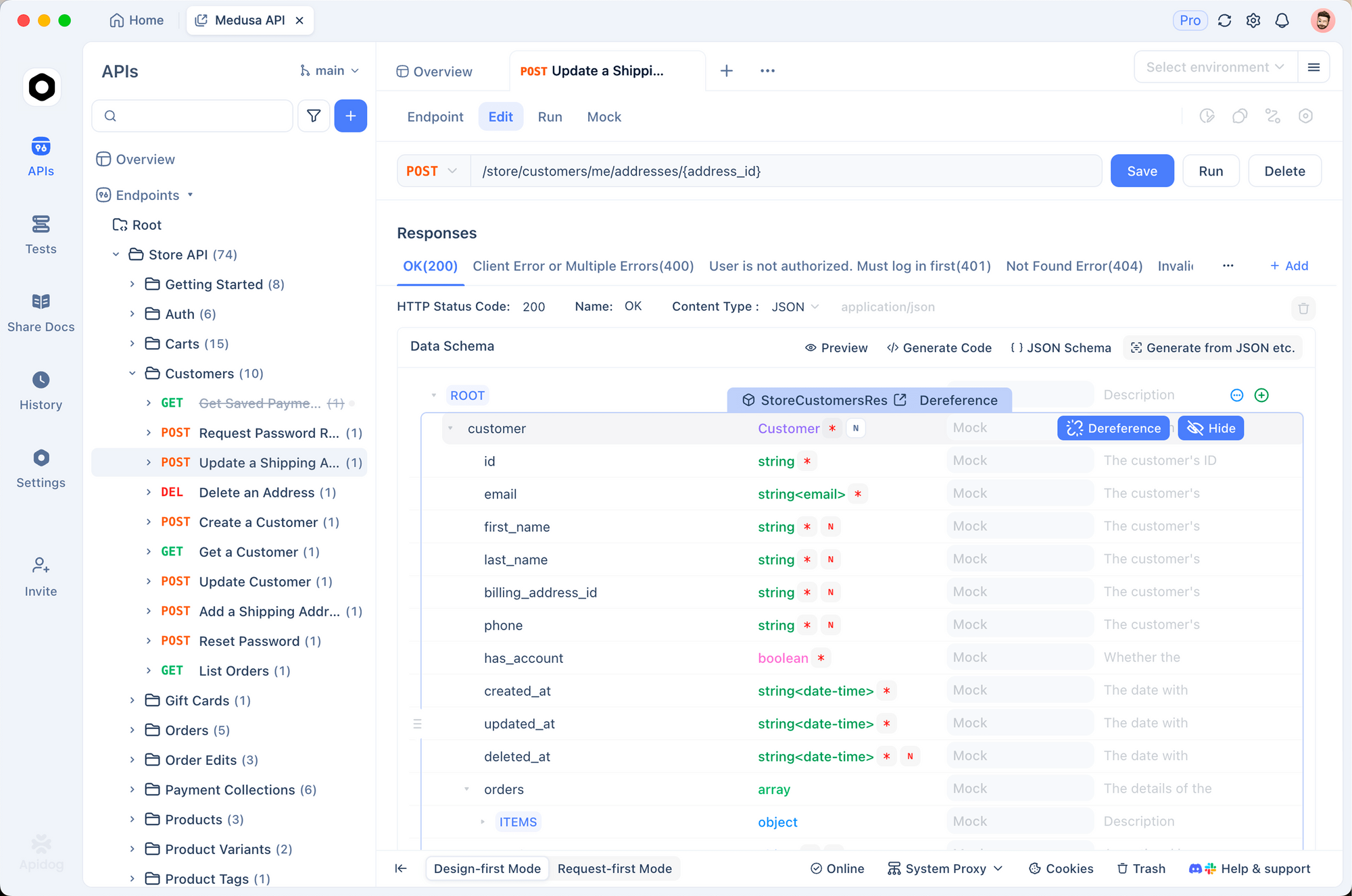
Why Use Apidog for Claude API Development?
1. Visual Request Builder
Instead of writing boilerplate code to test API calls, use Apidog's visual interface to:
- Configure headers, authentication, and request bodies
- Save requests as reusable templates
- Organize endpoints into collections
- Generate production code in multiple languages
2. Environment Management
Store API keys securely across development, staging, and production environments. Switch between environments with one click—no code changes required.
3. Response Debugging
Inspect streaming responses, view token usage, measure latency, and debug authentication errors with detailed error messages.
4. Team Collaboration
Share Claude API configurations with your team, maintain version history, and document usage patterns for consistent implementation.
Troubleshooting Common Issues
Authentication Errors
Problem: 401 Authentication Error
Solutions:
- Verify your API key is correct (check for leading/trailing spaces)
- Ensure the key hasn't been revoked in the Console
- Confirm you're using the header
x-api-key(notAuthorization) - Check that the key has proper permissions
Test your key:
curl https://api.anthropic.com/v1/messages \
  -H "x-api-key: $ANTHROPIC_API_KEY" \
  -H "anthropic-version: 2023-06-01" \
  -H "content-type: application/json" \
  -d '{"model":"claude-opus-4-6","max_tokens":1024,"messages":[{"role":"user","content":"test"}]}'
Rate Limiting
Problem: 429 Too Many Requests
Solutions:
- Implement exponential backoff (see code example above)
- Check rate limits in Console (vary by tier)
- Batch requests when possible
- Monitor the
retry-afterheader for wait time - Upgrade your tier for higher limits
Rate limit headers:
response = client.messages.create(...)

# Check remaining requests (from response headers)
print(f"Requests remaining: {response.headers.get('anthropic-ratelimit-requests-remaining')}")
print(f"Tokens remaining: {response.headers.get('anthropic-ratelimit-tokens-remaining')}")
print(f"Reset time: {response.headers.get('anthropic-ratelimit-requests-reset')}")
Context Length Exceeded
Problem: 400 Bad Request - Context length exceeded
Solutions:
- Reduce conversation history (keep only recent messages)
- Summarize older messages before sending
- Enable context compaction (beta feature)
- Split large documents into chunks
- Request access to 1M context beta if needed
Trimming conversation history:
def trim_conversation(messages, max_tokens=150000):
    """Keep only the most recent messages that fit within max_tokens."""
    # Rough estimate: 1 token ≈ 4 characters
    estimated_tokens = 0
    trimmed = []

    for message in reversed(messages):
        msg_tokens = len(message['content']) / 4
        if estimated_tokens + msg_tokens > max_tokens:
            break
        trimmed.insert(0, message)
        estimated_tokens += msg_tokens

    return trimmed

# Use before sending
conversation = trim_conversation(conversation)
response = client.messages.create(
    model="claude-opus-4-6",
    max_tokens=2048,
    messages=conversation
)
Timeout Issues
Problem: Requests timing out
Solutions:
- Increase client timeout settings
- Use streaming for long responses
- Reduce
max_tokensif possible - Lower effort level for faster responses
- Check network connectivity
Setting custom timeout:
from anthropic import Anthropic
import httpx

# Create client with custom timeout
client = Anthropic(
    api_key=os.environ.get("ANTHROPIC_API_KEY"),
    timeout=httpx.Timeout(60.0, connect=10.0)  # 60s total, 10s connect
)
Model Not Found
Problem: 404 Model not found: claude-opus-4-6
Solutions:
- Verify model name spelling (case-sensitive)
- Check if Opus 4.6 is available in your region
- Confirm your account has access (may require waitlist)
- Try the API version header:
anthropic-version: 2023-06-01
Check available models:
# List models available to your account
# (Note: As of Feb 2026, there's no official list endpoint)
# Contact support if you can't access claude-opus-4-6
Conclusion
You now possess the knowledge to effectively use the Claude Opus 4.6 API. From basic requests to advanced agentic features, this guide equips you.
Ready to build with Claude Opus 4.6? Start testing your API integration with Apidog—the all-in-one platform for API development that simplifies authentication, manages environments, and generates production code from your working requests.