TL;DR
Career-Ops is a free, open source boilerplate that turns Claude Code into a full job search command center. It evaluates offers with A-F scoring, generates tailored ATS-optimized CVs per listing, scans 45+ company portals automatically, and tracks everything in a terminal dashboard. Its creator used it to evaluate 740+ offers and land a Head of Applied AI role.
Introduction
Most developers track job applications in a spreadsheet. You open a new tab, paste a job description, scan it for keywords, update a row with "Applied, waiting." Then you repeat that for 50 more listings and wonder why the process feels like a second job.
Career-Ops flips that model. Instead of you doing the work of evaluating, formatting, and tracking, you hand the job to Claude Code. You paste a URL or a job description. The system reads your CV, reasons about fit, scores the offer across 10 dimensions, generates a tailored PDF, and logs the result. You decide whether to apply.
It's not a spray-and-pray bot. The system is built around a filter philosophy: find the few offers worth your time out of hundreds, and say no to everything below a 4.0/5. The creator, Santiago Fernández de Valderrama, used it to evaluate 740+ offers, generate 100+ tailored CVs, and land a Head of Applied AI role. The project hit 11.9k stars on GitHub in under a week.
What Career-Ops actually does
Career-Ops is a Claude Code boilerplate, not a standalone app. You clone the repo, add your CV as a markdown file, configure a profile YAML, and open Claude Code in that directory. From there, a single slash command runs the whole pipeline.
The core workflow looks like this:
You paste a job URL or description
        |
        v
Archetype detection
(LLMOps / Agentic / PM / SA / FDE / Transformation)
        |
        v
A-F Evaluation Engine
(reads your cv.md, scores 10 dimensions)
        |
   +----+----+
   v    v    v
Report  PDF  Tracker
 .md   .pdf  .tsv
Everything runs through Claude Code as the AI runtime. The system reads the same files it uses to execute, which means Claude can modify its own modes, scoring weights, and negotiation scripts when you ask it to.
The 14 slash commands
Career-Ops exposes a single /career-ops entry point with 14 modes:
/career-ops                 → Show all commands
/career-ops {paste a JD}    → Full pipeline: evaluate + PDF + tracker
/career-ops scan            → Scan 45+ company portals for new offers
/career-ops pdf             → Generate ATS-optimized CV for a listing
/career-ops batch           → Evaluate 10+ offers in parallel
/career-ops tracker         → View application pipeline status
/career-ops apply           → Fill application forms with AI
/career-ops pipeline        → Process a queue of pending URLs
/career-ops contacto        → Draft LinkedIn outreach messages
/career-ops deep            → Deep research on a target company
/career-ops training        → Evaluate a course or certification
/career-ops project         → Evaluate a portfolio project
The most-used command is the auto-pipeline: paste any job URL and Career-Ops handles everything. Auto-detection means you don't need to specify a mode; drop in raw job description text and it runs the full evaluation.
How the A-F scoring engine works
This is the core of Career-Ops. Every offer gets scored across 6 structured blocks:
Block A: Role summary: extracts job title, team, seniority, and required skills. Classifies the role archetype (LLMOps engineer, Agentic Systems, Product Manager, Solutions Architect, etc.) so the right evaluation rubric applies.
Block B: CV match: compares your actual CV against the job description by reasoning about experience, not keyword matching. Identifies skill gaps and strengths. Flags dealbreakers.
Block C: Level and comp strategy: researches compensation benchmarks for the role, location, and seniority. Builds a negotiation argument based on your proof points.
Block D: Personalization: writes the specific angle for your cover letter or outreach, based on what the company is actually building and what in your background maps to it.
Block E: Evaluation score (A-F): aggregates the above into a final score. The system recommends against applying to anything below 4.0/5. This isn't gatekeeping; it's respecting both your time and the recruiter's.
Block F: Interview prep (STAR+R): generates STAR stories from your CV for the most likely behavioral questions. The "+R" is a Reflection column that signals seniority. Stories get stored in a story-bank.md that accumulates across evaluations, so you build a master library of 5-10 reusable stories rather than reinventing them for each application.
The system also generates negotiation scripts: salary anchoring, geographic discount pushback, and competing-offer use frameworks.
ATS-optimized PDF generation
One of the most useful pieces of Career-Ops is the PDF generator. It doesn't produce a generic CV. It tailors your CV per job description:
- Reads the job description and extracts the key requirements and keywords the ATS will scan for
- Rewrites your experience bullets to front-load those keywords without fabricating anything
- Renders to PDF via Playwright/Puppeteer using an HTML template with Space Grotesk and DM Sans fonts
The result is a CV that's designed to pass ATS filters and read well to a human. The template is MIT-licensed, so you can fork and customize it.
# Generate a tailored CV for a specific listing
/career-ops pdf

# Or as part of the full pipeline
/career-ops {paste job URL or description}
Output lands in the output/ directory, gitignored by default so your personal CV data stays local.
Portal scanning at scale
Career-Ops ships with 45+ companies pre-configured for automatic scanning:
AI labs: Anthropic, OpenAI, Mistral, Cohere, LangChain, Pinecone
Voice AI: ElevenLabs, PolyAI, Parloa, Hume AI, Deepgram, Vapi, Bland AI
AI platforms: Retool, Airtable, Vercel, Temporal, Glean, Arize AI
LLMOps: Langfuse, Weights & Biases, Lindy, Cognigy, Speechmatics
Enterprise: Salesforce, Twilio, Gong, Dialpad
Automation: n8n, Zapier, Make.com
European (DACH): Factorial, Attio, Tinybird, Clarity AI, Travelperk + 31 DACH companies added by community contributors
The scanner uses Playwright to navigate career pages and queries Greenhouse, Ashby, Lever, and Wellfound APIs directly. It runs 19 pre-built search queries across major job boards. You configure target companies in portals.yml and run /career-ops scan; new listings get added to your pipeline automatically.
Batch processing with parallel sub-agents
If you have a backlog of job URLs to evaluate, the batch mode runs them in parallel:
# Drop URLs into jds/ directory, then:
/career-ops batch
Under the hood, this uses claude -p workers running in parallel, each processing one offer independently. Results get deduplicated and merged into your tracker automatically. The batch runner script (batch/batch-runner.sh) orchestrates the workers and handles failures gracefully.
This is where Career-Ops becomes genuinely powerful at scale. Evaluating 20 offers manually might take a full day. In batch mode, it runs in under an hour.
The Go TUI dashboard
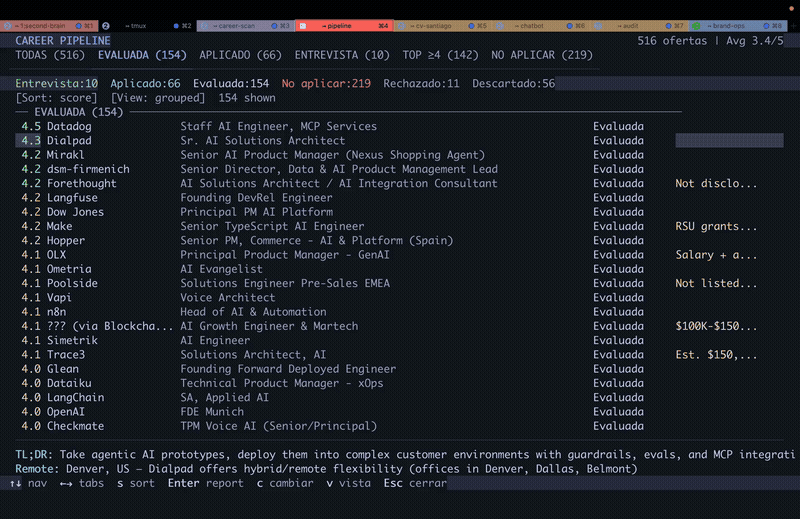
Your application pipeline lives in data/applications.md as a markdown table. The built-in terminal dashboard (written in Go with the Bubble Tea framework, Catppuccin Mocha theme) gives you a visual pipeline view:
cd dashboard
go build -o career-dashboard .
./career-dashboard
Features: 6 filter tabs (by status, archetype, score), 4 sort modes, grouped and flat view, lazy-loaded report previews, and inline status changes. You can update an application status directly from the TUI without editing the markdown file.
Setting it up in 15 minutes
The setup is straightforward:
# 1. Clone and install
git clone https://github.com/santifer/career-ops.git
cd career-ops && npm install
npx playwright install chromium

# 2. Configure your profile
cp config/profile.example.yml config/profile.yml
# Edit profile.yml: your name, location, target role, salary range, preferences

# 3. Configure target companies
cp templates/portals.example.yml portals.yml
# Add or remove companies from the scanner list

# 4. Add your CV
# Create cv.md in the project root
# Paste your CV in markdown format

# 5. Open Claude Code
claude
# Then ask Claude to adapt the system:
# "Change the archetypes to backend engineering roles"
# "Add these 5 companies to portals.yml"
# "Update my profile with this CV"
The system is designed so Claude can customize itself. Because Claude reads the same mode files it executes, you can ask it to change scoring weights, rewrite negotiation scripts, or add new archetypes and it knows exactly which files to edit.
The auto-update system
Version 1.1.0 introduced a two-layer architecture that separates system files (auto-updatable scoring rules, modes, shared context) from user files (your profile, CV, customizations). Updates apply to the system layer only; your data is never touched.
# Check for updates (runs automatically on session start)
node update-system.mjs check

# Apply update
node update-system.mjs apply

# Roll back if something breaks
node update-system.mjs rollback
A backup branch is created before every update. Post-update validation confirms no user files were modified.
What makes Career-Ops different from other job search tools
Most AI job search tools are one of two things: a resume rewriter or a mass-apply bot. Career-Ops is neither.
It's a decision system, not an application machine. The A-F scoring engine is explicitly designed to help you say no. The documentation is clear: don't apply to anything below 4.0/5. The system flags offers that don't match your profile so you don't waste time on them.
It reasons about fit, not keywords. Block B compares your CV to the job description by understanding both, not by counting keyword overlaps. A role that lists "5 years Python" when you have 3 years of Python plus production ML systems in production might still score well if the reasoning holds.
It gets better the more context you give it. The first evaluation won't be accurate because Claude doesn't know you yet. The more proof points, career stories, and preferences you add to your profile, the sharper the evaluations get. Think of it as onboarding a recruiter: the first week they learn about you; then they become useful.
Everything stays local. Your CV, applications, generated PDFs; all gitignored by default. Nothing leaves your machine except the API calls Claude makes to evaluate and search.
Limitations worth knowing
Requires Claude Code: Career-Ops is a boilerplate for Claude Code specifically. It doesn't run with other models or frontends. You need an Anthropic account with Claude Code access.
Playwright can be flaky on some portals: company career pages change their HTML structure regularly. The Playwright scanner works well for Greenhouse/Ashby/Lever-based portals (standardized APIs) but may break on custom career pages. The community tracks these in GitHub issues.
First evaluations need calibration: as the README warns, the first few evaluations will be rough. The system doesn't know your career story until you feed it. Budget an hour to properly configure your profile and add proof points before trusting the scores.
Batch mode uses claude -p: parallel workers can burn through API credits fast on large batches. Watch your usage before running a 50-offer batch for the first time.
See [internal: how-ai-agent-memory-works] for background on why AI systems need calibration time and context before they perform well.
Who this is for
Career-Ops is built for developers and technical professionals who:
- Are actively job searching and tired of manual tracking
- Apply to roles at AI companies specifically (the portal list is AI-company heavy by design)
- Want to use AI for evaluation and decision support, not mass-apply automation
- Are comfortable running a CLI tool and editing YAML files
It's not the right fit for non-technical users looking for a GUI, or anyone wanting to automate the actual application submission. The system never submits an application. That decision always stays with you.
Getting started
Clone the repo, add your CV, spend an hour configuring your profile with Claude, and run your first evaluation on a role you're genuinely interested in. The calibration process pays off quickly.
GitHub: github.com/santifer/career-ops
The project is MIT-licensed. Community contributions are welcome; open an issue before submitting a PR.
Conclusion
Career-Ops is the most complete open source job search pipeline available right now. The A-F scoring system, ATS PDF generation, parallel batch processing, and Go TUI dashboard are each useful on their own. Combined with a properly calibrated profile, they give you a workflow that filters ruthlessly and helps you apply only where it makes sense.
The core insight is right: job searching is an information problem, not a volume problem. Career-Ops treats it that way.
FAQ
Does Career-Ops cost anything?The tool itself is free and MIT-licensed. You pay for the Claude API usage, which depends on how many evaluations and PDFs you generate. A single full evaluation (evaluation + PDF + tracker entry) typically uses 10,000-30,000 tokens depending on CV and JD length. At Claude 3.5 Haiku pricing ($0.25/1M input, $1.25/1M output), a full evaluation costs under $0.05.
Can I use it with models other than Claude?Not directly. Career-Ops is built as a Claude Code boilerplate. The modes and shared context files are written for Claude's tool-use capabilities. Porting to another model would require rewriting the skill definitions.
How does the ATS optimization work?Career-Ops reads the job description, extracts required skills and keywords that ATS systems scan for, and rewrites your experience bullets to surface those keywords naturally. It doesn't fabricate experience; it reframes existing experience in the language the role uses. The HTML template renders to PDF via Playwright with fonts (Space Grotesk, DM Sans) that are ATS-safe.
What job boards does the scanner support?Greenhouse, Ashby, Lever, Wellfound, Workable, and RemoteFront directly. For companies not on these platforms, Playwright navigates their custom career pages. Community contributors have added 31 DACH/European companies. See [internal: local-vs-api-ai-models] for context on how Claude Code handles different API surfaces.
Is my CV data safe?Yes. Everything is local by default. Your CV, applications, generated PDFs, and reports are all gitignored. Nothing is sent to any third party except the API calls Claude makes during evaluation (which go to Anthropic's API, the same calls Claude Code makes normally). See [internal: claude-code] for more on how Claude Code handles data.
Can I add my own companies to the portal scanner?Yes. Copy templates/portals.example.yml to portals.yml and add any company. If the company uses Greenhouse, Ashby, or Lever, the scanner picks it up automatically via their standard API. For custom career pages, you can define Playwright selectors in the config.
How long does a full evaluation take?A single offer evaluation with PDF generation typically takes 2-4 minutes with Claude 3.5 Sonnet. In batch mode with parallel workers, 10 offers run in roughly the same time as 1.
What's the STAR+R framework?STAR (Situation, Task, Action, Result) is a standard behavioral interview format. The "+R" is Reflection: what you'd do differently, what you learned, how it changed your approach. Career-Ops adds this column because it signals seniority. Senior candidates don't just describe what happened; they demonstrate that they learned from it.