In December, Apidog brought you more surprises. From the perspective of enhancing product experience and API collaboration efficiency, we have launched a large number of new features and capabilities in the past month.
This product update focuses on:
- In the project's feature settings, the response example can be set as the default Mock method
- The steps in the test report support jumping to interface debugging
- New interface unique identification feature
- Team members can be quickly invited to the project
- Database operations now support ClickHouse and Dameng databases
- Improved the selection experience of reference data models
Default Mock Sets Response Example as Priority
Apidog's initial default Mock method is intelligent Mock, and the data generated each time is random. However, if you need the data returned each time to be a fixed value, you can choose to set the response example as the default Mock method. You can select "Response Example First" in the project's feature settings, and after setting it, it will be displayed according to the set response example priority.
Of course, if advanced Mock expectations are set, the priority is always highest for advanced Mock expectations.

When multiple response examples need to be set, you can directly add the interface document's response example as an expectation for advanced Mock, without manually filling in, helping you save more time and energy to do more important things.
You can click the M button on the right side of "Response Example" to add it directly:
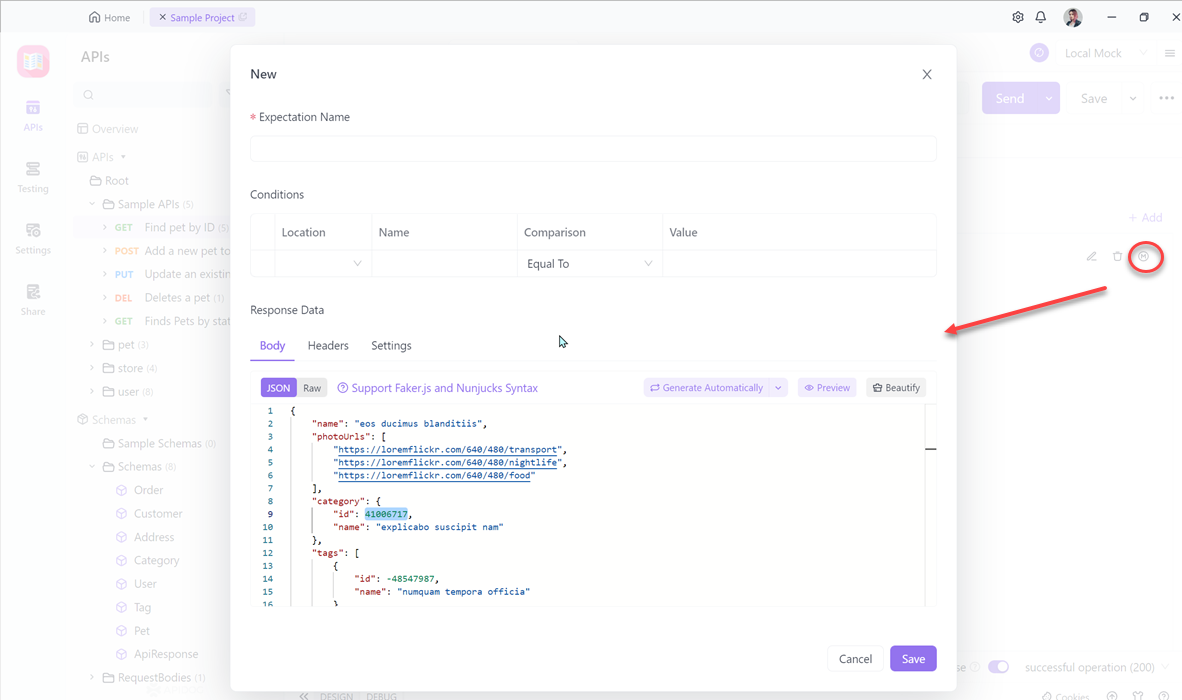
You can also choose to use the example value in "Auto Generate" when creating an expectation:

Debugging Supported in Test Report Steps
After the completion of automated testing steps, it is common to encounter an error in a certain step, requiring a quick identification of the specific error.
We have added a debug button on the interface running result page, which supports fast debugging of that step and retains the response returned at the time of the interface error, saving copying time and improving testing efficiency.
After debugging is completed, clicking "save" can immediately modify the step content.
New Functionality to Identify APIs
We have improved the rules for identifying APIs based on the OpenAPI specification to accommodate scenarios where the target service for e-commerce or payment businesses points to multiple methods through the same URL address.
To make it more convenient for users in this scenario to manage APIs, we have added a unique identifier for APIs. In addition to Method & Path, APIs can now be differentiated using operationId, Query parameters, Body parameters, and Header parameters, ensuring that teams using APIs with the same URL can use Apidog more smoothly for collaboration and management, and avoid situations such as API coverage when importing and exporting API data.
For example, suppose we have an e-commerce website with an API used for ERP order information synchronization. To better call and manage this API, we can set Query parameters as the unique identifier, set the parameter name as "action," and set the parameter value to ".erp.order.sync." This way, we can differentiate the API using this unique identifier.
Quickly Invite Team Member Join the Project
Users can directly select members who are already in the team from the list to join the project and synchronize their member permissions, increasing team collaboration efficiency.
New Database Types Supported for Database Operations
Database operations now support ClickHouse and DM databases for reading and writing, and query results can be used in API request parameters, assertions, and custom scripts.
Currently, Apidog's database operations support MySQL, SQL Server, Oracle, PostgreSQL, ClickHouse, and DM databases.
Improved Experience in Selecting Referenced Models
When referencing data models, the pop-up window now supports a search function, making it easier for users to quickly find what they're looking for.
Learn More
In addition, the Apidog product team has responded proactively to user requests and made the following improvements:
- Regular members support project data export
- API table editor has been fully upgraded
- Interface filter has added status, tag and number of responsible person display
- Shared API documentation supports custom field display configuration
- Clone project capability supports test case and test suite data
- When connecting to a MySQL database, SSH tunneling is supported
- You can switch the interface display to "name" or "URL"
- Online shared document links support copying links with passwords without manual input
- Online documents support configuring icons and text links on the right side of the top navigation bar, as well as notifications at the top
- URL Encode supports two rules: RFC 3986 and WHATWG
- You can use the shortcut ⌘/Ctrl+D to copy directories and files
In addition to new features, we have also optimized the product details and user experience. For specific modification details, please click "Read the original text" to visit the Apidog update log.
We welcome users to continue providing feedback and suggestions for Apidog. We will continue to optimize and update it, and strive to provide users with better products and better user experience!
You can go to the help documentation for more usage instructions and operations. If you have any questions, please feel free to communicate with us in the Apidog user group.