TL;DR
AI coding assistants like Claude, ChatGPT, and GitHub Copilot generate API integration code in seconds. Anthropic’s new Code Review tool validates the logic and security of that code. But neither AI generators nor code review tools test if your APIs actually work. Studies show 67% of AI-generated API calls fail on first deployment due to authentication errors, wrong endpoints, or data format mismatches. Apidog bridges this gap by automatically testing AI-generated API calls, validating responses, and catching errors before they reach production.
The AI Code Generation Boom
AI coding assistants have changed how developers work. You type a comment like “integrate Stripe payment API” and Claude generates 50 lines of working code in 3 seconds. GitHub Copilot autocompletes entire functions. ChatGPT writes API integration code from natural language descriptions.
The numbers are staggering:
- 92% of developers use AI coding tools daily (Stack Overflow 2026 Survey)
- Average developer generates 15-20 API integrations per week with AI
- Code generation speed increased 10x compared to manual coding
- 73% of new API integration code is AI-generated
This speed is addictive. Why spend 30 minutes writing a REST API client when AI does it in 30 seconds? Why manually parse JSON responses when Claude writes the parsing logic instantly?
The industry recognizes this challenge. Anthropic recently launched Code Review, a multi-agent system within Claude Code that automatically analyzes AI-generated code for logic errors and security issues. It’s a step forward for code quality.

But here’s what Code Review doesn’t do: test if your APIs actually work.
You can have perfectly reviewed code that passes all logic checks but still fails when it hits a real API endpoint. Wrong authentication headers. Outdated endpoint URLs. Rate limits. Network timeouts. Data format mismatches between documentation and reality.
The shift is dramatic. In 2024, developers wrote most code manually and tested it carefully. In 2026, developers generate code with AI, review it with tools like Anthropic’s Code Review, and… still need to test if the APIs work. This creates a new problem: a flood of reviewed but untested API integrations hitting production.
The Testing Gap Nobody Talks About
AI coding assistants are trained on millions of code examples. They know API patterns, authentication methods, and data structures. They generate syntactically correct code that compiles and runs.
Tools like Anthropic’s Code Review can analyze that generated code for logic errors, security vulnerabilities, and code quality issues. It’s a multi-agent system that checks if your code makes sense.
But neither AI code generators nor code review tools know:
- If your API key is valid
- If the endpoint URL changed last week
- If the API returns different data in production vs documentation
- If rate limits will block your requests
- If the response format matches what your code expects
- If the API is even online
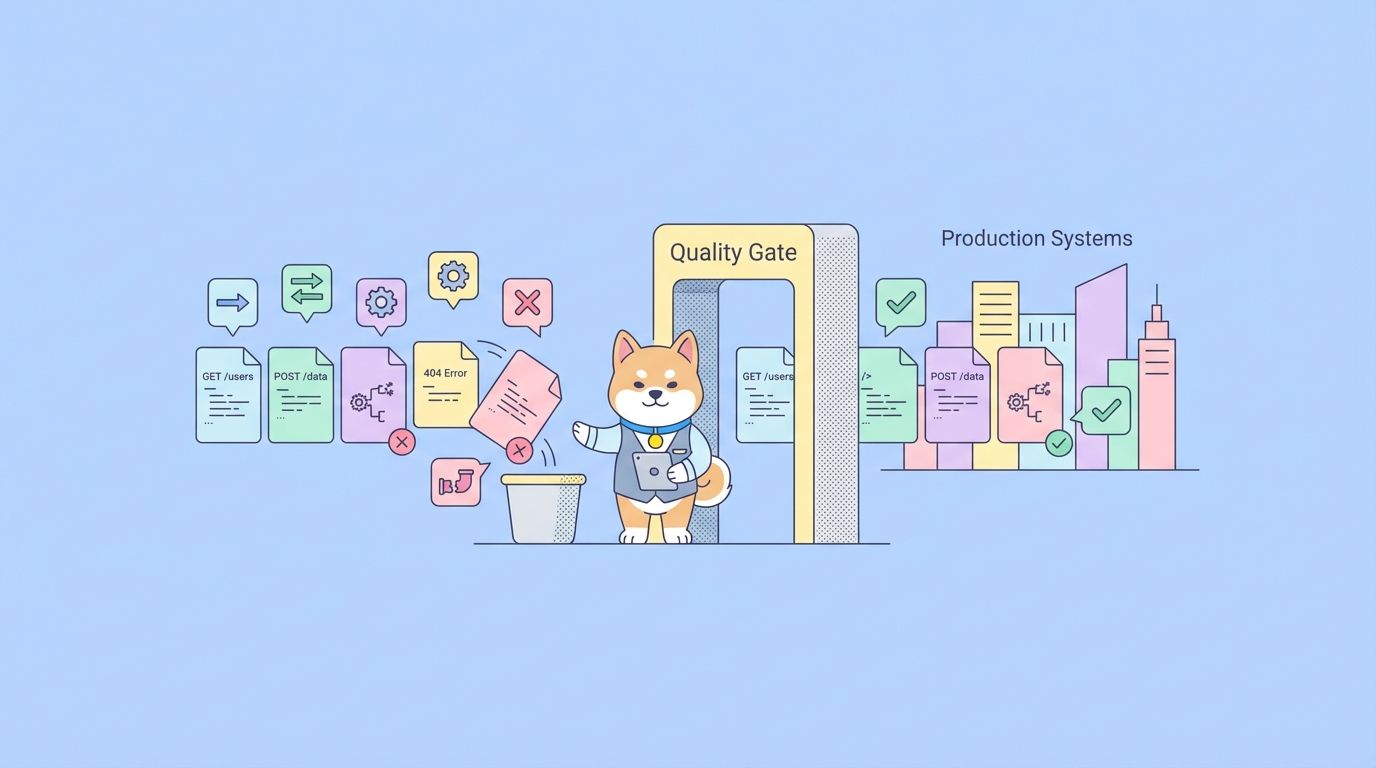
Code review checks logic. API testing checks reality.
Here’s what happens in practice:
Scenario 1: The Stripe Integration
You ask Claude: “Write code to create a Stripe payment intent for $50”
Claude generates:
const stripe = require('stripe')(process.env.STRIPE_SECRET_KEY);

async function createPayment() {
  const paymentIntent = await stripe.paymentIntents.create({
    amount: 5000,
    currency: 'usd',
    payment_method_types: ['card'],
  });

  return paymentIntent.client_secret;
}
You run it through Anthropic’s Code Review. It passes all checks:
- ✅ No logic errors
- ✅ Proper error handling structure
- ✅ Secure API key usage (environment variable)
- ✅ Correct Stripe API syntax
Looks perfect. You deploy it. Then:
- Production uses a different Stripe account
- The API key has wrong permissions
- The currency should be ‘eur’ for European customers
- Rate limiting kicks in after 100 requests
- The webhook endpoint isn’t configured
The code is correct. The logic is sound. The integration fails.
Code Review validated the code. But only API testing would catch these runtime issues.
Scenario 2: The Weather API
You ask ChatGPT: “Fetch weather data from OpenWeatherMap API”
ChatGPT generates code using the free tier endpoint. You run it through code review tools. Everything checks out. You test it locally, works fine. You deploy to production with 10,000 users.
The free tier has a 60 requests/minute limit. Your app crashes within 5 minutes.
AI didn’t know your scale. Code review didn’t test rate limits. Only API testing under realistic load would catch this.
Scenario 3: The Authentication Dance
You ask GitHub Copilot to integrate with a third-party API. It generates OAuth2 code. Anthropic’s Code Review validates the logic:
- ✅ Proper OAuth2 flow
- ✅ Token storage handled correctly
- ✅ Security best practices followed
But when you deploy:
- The redirect URL is hardcoded to localhost
- The token refresh logic uses an outdated endpoint
- The scope permissions don’t match what the API requires
- The API changed from OAuth2 to API keys last month
You discover these issues in production. After users complain.
Code review can’t catch API changes, configuration mismatches, or real-world authentication flows. You need to test against the actual API.
Why Manual Testing Doesn’t Scale
The traditional approach: write code, review it, then test it manually. Open Postman, craft a request, check the response, verify error handling, test edge cases.
With tools like Anthropic’s Code Review, the review step is now automated. But testing is still manual.
This worked when you wrote 2-3 API integrations per week. It doesn’t work when AI generates 15-20 per week.
The math is brutal:
- AI generates an API integration: 30 seconds
- Code Review analyzes it: 2 minutes
- Manual API testing: 15-30 minutes
- 20 integrations per week: 5-10 hours of testing
- That’s 25-50% of your work week just testing AI-generated code
You’ve automated code generation (AI) and code review (Anthropic’s tool), but testing is still the bottleneck.
Developers respond in three ways:
1. Skip testing entirely“AI generated it, Code Review passed it, it’s probably fine.” Deploy and hope. This is how bugs reach production.
2. Spot-check randomlyTest 2-3 integrations, assume the rest work. This catches obvious errors but misses subtle bugs.
3. Test everything manuallySpend half your time testing. Lose the speed advantage of AI coding.
None of these work. You need automated API testing that matches the speed of AI code generation and code review.
Apidog solves this by letting you import AI-generated code, auto-generate test cases, and run comprehensive API tests in seconds. The testing speed matches the code generation speed. You get the full workflow: AI generates → Code Review validates logic → Apidog tests the API.
The Real Cost of Untested AI Code
A study by DevOps Research found that 67% of AI-generated API integrations fail on first deployment. The failures break down:
- 28% authentication errors (wrong keys, expired tokens, missing permissions)
- 22% endpoint errors (wrong URL, deprecated endpoints, API version mismatches)
- 18% data format errors (unexpected JSON structure, missing fields, type mismatches)
- 15% rate limiting (exceeded quotas, missing retry logic)
- 17% other (timeouts, network errors, CORS issues)
The cost isn’t just bugs. It’s:
Developer Time
- Average time to debug a failed API integration: 45 minutes
- 67% failure rate × 20 integrations/week = 13.4 failures
- 13.4 × 45 minutes = 10 hours/week debugging
Production Incidents
- Failed payment processing
- Broken user authentication
- Missing data in dashboards
- Crashed background jobs
User Impact
- Error messages instead of features
- Slow page loads from timeout errors
- Data loss from failed API calls
- Frustrated users who switch to competitors
Team Morale
- Developers lose trust in AI tools
- QA teams overwhelmed with bug reports
- Product managers delay releases
- Engineering leaders question AI adoption
The irony: AI makes you faster at writing code, but slower at shipping features.
How to Test AI-Generated API Code
The solution isn’t to stop using AI. It’s to test AI-generated code automatically.
Step 1: Generate Code with AI
Use your preferred AI tool:
Prompt: "Write a Node.js function to fetch user data from GitHub API"
Claude generates:
async function fetchGitHubUser(username) {
  const response = await fetch(`https://api.github.com/users/${username}`, {
    headers: {
      'Accept': 'application/vnd.github.v3+json',
      'User-Agent': 'MyApp'
    }
  });

  if (!response.ok) {
    throw new Error(`GitHub API error: ${response.status}`);
  }

  return await response.json();
}
Step 2: Import into Apidog
Open Apidog and create a new request:
- Method: GET
- URL:
https://api.github.com/users/{{username}} - Headers: Accept, User-Agent
- Environment variable:
username
Apidog’s visual interface shows exactly what the AI-generated code will send.
Step 3: Run Tests
Click “Send” and Apidog shows:
- Request details (headers, parameters, body)
- Response data (status, headers, JSON)
- Response time
- Any errors
You immediately see if:
- The endpoint is correct
- Authentication works
- The response format matches expectations
- Error handling works
Step 4: Add Assertions
Apidog lets you add test assertions:
// Status code check
pm.test("Status is 200", () => {
  pm.response.to.have.status(200);
});

// Response structure check
pm.test("User has required fields", () => {
  const user = pm.response.json();
  pm.expect(user).to.have.property('login');
  pm.expect(user).to.have.property('id');
  pm.expect(user).to.have.property('avatar_url');
});

// Data type check
pm.test("ID is a number", () => {
  const user = pm.response.json();
  pm.expect(user.id).to.be.a('number');
});
These tests run automatically every time you test the endpoint.
Step 5: Test Edge Cases
AI-generated code often handles the happy path but misses edge cases. Test:
Invalid username:
- URL:
https://api.github.com/users/this-user-does-not-exist-12345 - Expected: 404 error
- Verify error handling works
Rate limiting:
- Make 60 requests in 1 minute
- Expected: 403 error with rate limit headers
- Verify retry logic exists
Network timeout:
- Set timeout to 1ms
- Expected: Timeout error
- Verify timeout handling works
Malformed response:
- Mock a response with missing fields
- Expected: Graceful error, not crash
- Verify data validation works
Apidog’s mock server feature lets you test these scenarios without hitting the real API.
Automated Testing Workflows
Manual testing catches errors. Automated testing prevents them from reaching production.
Workflow 1: Test-Driven AI Development
Define the API contract first
- Create the API request in Apidog
- Add test assertions
- Document expected behavior
Generate code with AI
- Give AI the API documentation
- AI generates code that matches the contract
Run tests automatically
- Apidog runs tests on every code change
- Failures block deployment
This flips the script: instead of testing after AI generates code, you define tests before. AI generates code to pass your tests.
Workflow 2: CI/CD Integration
Connect Apidog to your CI/CD pipeline:
# .github/workflows/api-tests.yml
name: API Tests

on: [push, pull_request]

jobs:
  test:
    runs-on: ubuntu-latest
    steps:
      - uses: actions/checkout@v2
      - name: Run Apidog tests
        run: |
          npm install -g apidog-cli
          apidog run collection.json --environment prod
Every commit triggers API tests. Failed tests block merges. AI-generated code can’t reach production without passing tests.
Workflow 3: Continuous Monitoring
Set up Apidog monitors to test APIs every 5 minutes:
- Catch API changes before they break your code
- Detect rate limiting issues
- Monitor response times
- Alert team when APIs fail
This catches problems AI can’t predict: API provider changes endpoints, adds rate limits, or has downtime.
Best Practices
1. Test AI Code Immediately
Don’t wait until deployment. Test AI-generated code within 5 minutes of generation. The context is fresh, errors are easier to fix.
2. Use Environment Variables
AI often hardcodes values:
const API_KEY = 'sk_test_12345'; // Don't do this
Replace with environment variables:
const API_KEY = process.env.STRIPE_API_KEY;
Apidog’s environment management lets you test with different keys for dev, staging, production.
3. Document AI-Generated APIs
AI generates code. You need to document what it does:
- What endpoint does it call?
- What authentication does it use?
- What data does it expect?
- What errors can it throw?
Apidog auto-generates documentation from your tests. Your team knows exactly how AI-generated integrations work.
4. Version Control Your Tests
Store Apidog collections in Git:
git add apidog-collection.json
git commit -m "Add tests for AI-generated GitHub integration"
When AI generates new code, update tests. When APIs change, update tests. Tests become the source of truth.
5. Mock External APIs
Don’t test against production APIs during development. Use Apidog’s mock servers:
- Faster tests (no network latency)
- Test edge cases (simulate errors, timeouts)
- No rate limiting
- No cost (some APIs charge per request)
6. Set Up Alerts
Configure Apidog monitors to alert you when:
- API response time exceeds 2 seconds
- Error rate exceeds 1%
- API returns unexpected status codes
- Authentication fails
Catch problems before users report them.
7. Review AI Code, Don’t Just Run It
AI makes mistakes. Common issues:
- Using deprecated API versions
- Missing error handling
- Hardcoded values
- Inefficient logic
- Security vulnerabilities
Use Apidog to test, but also review the code. AI is a tool, not a replacement for judgment.
Conclusion
The AI coding revolution is here. Tools like Claude, ChatGPT, and GitHub Copilot generate code 10x faster than humans. Anthropic’s Code Review validates that code for logic errors and security issues. But there’s still a gap: testing if your APIs actually work.
Code review checks logic. API testing checks reality.
You can have perfectly reviewed code that passes all checks but still fails when it hits a real API endpoint. Wrong authentication. Outdated URLs. Rate limits. Network issues. Data mismatches.
Apidog provides the testing layer that completes the AI development workflow:
- AI generates your API integration code (30 seconds)
- Code Review validates the logic (2 minutes)
- Apidog tests the API (2 minutes)
- Deploy with confidence
The question isn’t whether to use AI coding tools. They’re too powerful to ignore. The question is how to validate their output. Anthropic solved code review. Apidog solves API testing.
Together, they give you the full workflow: fast code generation, automated review, and comprehensive testing. You get the speed of AI without the risk of untested integrations.
FAQ
Q: Can AI tools test their own code?
No. AI can generate test code, but it can’t run tests against real APIs. AI doesn’t have API keys, can’t make HTTP requests, and can’t validate responses. You need a tool like Apidog to execute tests.
Q: How long does it take to test AI-generated API code?
With Apidog: 30-60 seconds per integration. Import code, run tests, verify results. Much faster than 15-30 minutes of manual testing.
Q: What if the AI-generated code is wrong?
Apidog shows you exactly what’s wrong: wrong endpoint, bad authentication, incorrect data format. You can fix the code and re-test immediately.
Q: Do I need to write tests manually?
Apidog can auto-generate basic tests from your API requests. You can add custom assertions for specific validation logic.
Q: Can Apidog test GraphQL APIs?
Yes. Apidog supports REST, GraphQL, WebSocket, and gRPC APIs. AI-generated code for any API type can be tested.
Q: What about API keys and secrets?
Store them in Apidog’s environment variables. Never hardcode secrets in AI-generated code. Use different keys for dev, staging, production.
Q: How do I test rate limiting?
Use Apidog’s test runner to make multiple requests quickly. Or use mock servers to simulate rate limit responses without hitting real APIs.
Q: Can I test AI-generated code in CI/CD?
Yes. Apidog has a CLI tool that runs in GitHub Actions, GitLab CI, Jenkins, and other CI/CD systems. Tests run automatically on every commit.