TL;DR
The 2Checkout API (now Verifone) enables developers to process payments, manage subscriptions, and handle e-commerce transactions programmatically. It supports RESTful endpoints for orders, customers, products, and webhooks with JSON-based authentication using API keys. This guide covers everything from initial setup to advanced webhook handling.
Introduction
Payment processing is the backbone of any online business. Get it wrong, and you lose revenue. Get it right, and you unlock global markets. The 2Checkout API (recently rebranded to Verifone) handles payments for over 45,000 merchants worldwide, processing billions in transactions annually.
Here’s the reality: 67% of shoppers abandon carts due to payment friction. A solid payment API integration directly impacts your bottom line.
This guide walks through the complete 2Checkout API integration process. You’ll learn authentication, payment processing, subscription management, webhook handling, and error troubleshooting. By the end, you’ll have a production-ready payment integration.
What Is 2Checkout API?
2Checkout (now operating as Verifone Digital Commerce) provides a RESTful API for payment processing and subscription management. The API handles:
- One-time and recurring payments
- Customer and product management
- Order lifecycle tracking
- Refund and dispute handling
- Tax and compliance automation
- Multi-currency support (100+ currencies)
Key Features
| Feature | Description |
|---|---|
| RESTful Design | Standard HTTP methods (GET, POST, PUT, DELETE) with JSON payloads |
| Sandbox Environment | Test payments without processing real transactions |
| Webhook Support | Real-time notifications for order events |
| Tokenization | Secure payment data handling without storing card details |
| Global Compliance | PCI DSS Level 1, GDPR, PSD2, and 3D Secure 2.0 |
API Architecture Overview
2Checkout uses a versioned REST API structure:
https://api.2checkout.com/1/
https://api.2checkout.com/2/
Version 2 is the current recommended version with improved subscription management and webhook handling.
Getting Started: Authentication Setup
Step 1: Create Your 2Checkout Account
Before accessing the API, you need a merchant account:
- Visit the 2Checkout (Verifone) signup page
- Complete business verification (requires business documents)
- Wait for approval (typically 24-48 hours)
- Access your Control Panel to retrieve API credentials
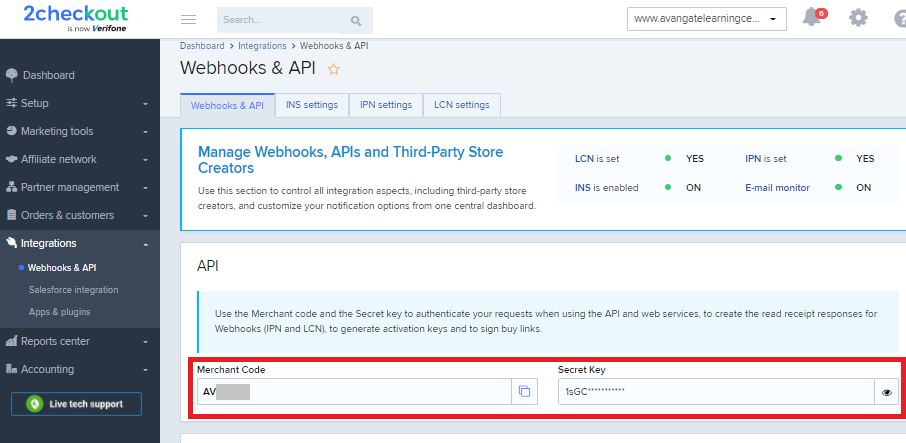
Step 2: Retrieve API Keys
Navigate to Integrations > API Keys in your Control Panel:
- Private API Key: Used for server-side authentication (keep this secret)
- Public API Key: Used for client-side tokenization (safe to expose)
- Webhook Secret: Used to verify webhook signatures
Security note: Never commit API keys to version control. Use environment variables:
# .env file
TWOCHECKOUT_PRIVATE_KEY="your_private_key_here"
TWOCHECKOUT_PUBLIC_KEY="your_public_key_here"
TWOCHECKOUT_WEBHOOK_SECRET="your_webhook_secret_here"
Step 3: Sandbox vs Production
2Checkout provides separate environments:
| Environment | Base URL | Use Case |
|---|---|---|
| Sandbox | https://sandbox.2checkout.com/api/ |
Development and testing |
| Production | https://api.2checkout.com/ |
Live transactions |
Use sandbox credentials during development. Switch to production keys only when ready to process real payments.
Step 4: Authentication Methods
2Checkout supports two authentication approaches:
Method 1: API Key Authentication (Recommended)
Include your private key in the request header:
const response = await fetch('https://api.2checkout.com/1/orders', {
  method: 'GET',
  headers: {
    'X-Api-Key': process.env.TWOCHECKOUT_PRIVATE_KEY,
    'Content-Type': 'application/json',
    'Accept': 'application/json'
  }
});
Method 2: HMAC Signature Authentication
For enhanced security, sign requests with HMAC-SHA256:
const crypto = require('crypto');

function generateSignature(payload, privateKey) {
  const hash = crypto
    .createHmac('sha256', privateKey)
    .update(JSON.stringify(payload))
    .digest('hex');
  return hash;
}

// Usage
const payload = { order_id: '12345', amount: 99.99 };
const signature = generateSignature(payload, privateKey);

const response = await fetch('https://api.2checkout.com/1/orders', {
  method: 'POST',
  headers: {
    'X-Api-Key': process.env.TWOCHECKOUT_PRIVATE_KEY,
    'X-Signature': signature,
    'Content-Type': 'application/json'
  },
  body: JSON.stringify(payload)
});
Processing Payments: Core Endpoints
Creating a One-Time Order
Process a single payment with the /orders endpoint:
const createOrder = async (customerData, productData) => {
  const payload = {
    currency: 'USD',
    customer: {
      email: customerData.email,
      first_name: customerData.firstName,
      last_name: customerData.lastName,
      phone: customerData.phone,
      billing_address: {
        address1: customerData.address,
        city: customerData.city,
        state: customerData.state,
        zip: customerData.zip,
        country: customerData.country
      }
    },
    items: [
      {
        name: productData.name,
        quantity: productData.quantity,
        price: productData.price,
        product_code: productData.sku
      }
    ],
    payment_method: {
      type: 'card',
      card_token: customerData.cardToken // From client-side tokenization
    }
  };

  const response = await fetch('https://api.2checkout.com/1/orders', {
    method: 'POST',
    headers: {
      'X-Api-Key': process.env.TWOCHECKOUT_PRIVATE_KEY,
      'Content-Type': 'application/json'
    },
    body: JSON.stringify(payload)
  });

  return await response.json();
};
Expected Response
{
  "order_id": "ORD-2026-001234",
  "status": "approved",
  "amount": 99.99,
  "currency": "USD",
  "customer_id": "CUST-789456",
  "transaction_id": "TXN-9876543210",
  "created_at": "2026-03-20T10:30:00Z"
}
Handling Payment Errors
Always implement proper error handling:
try {
  const result = await createOrder(customer, product);

  if (result.error) {
    // Handle specific error codes
    switch (result.error.code) {
      case 'CARD_DECLINED':
        // Prompt customer for different card
        break;
      case 'INSUFFICIENT_FUNDS':
        // Show appropriate message
        break;
      case 'INVALID_CVV':
        // Request CVV re-entry
        break;
      default:
        // Log and show generic error
        console.error('Payment failed:', result.error);
    }
  }
} catch (error) {
  // Network or server error
  console.error('API request failed:', error);
}
Common Error Codes
| Error Code | HTTP Status | Description | Resolution |
|---|---|---|---|
CARD_DECLINED |
402 | Card was declined | Ask for different payment method |
INVALID_CARD |
400 | Invalid card number | Validate card input |
EXPIRED_CARD |
400 | Card has expired | Request updated expiration |
INVALID_CVV |
400 | CVV verification failed | Re-request CVV |
INSUFFICIENT_FUNDS |
402 | Not enough funds | Suggest alternative payment |
DUPLICATE_ORDER |
409 | Order already processed | Check for duplicates |
INVALID_CURRENCY |
400 | Unsupported currency | Verify currency code |
API_KEY_INVALID |
401 | Authentication failed | Check API key |
Customer Management
Managing customer data is essential for subscription businesses and repeat purchases. 2Checkout provides a complete customer API.
Creating a Customer
const createCustomer = async (customerData) => {
  const payload = {
    email: customerData.email,
    first_name: customerData.firstName,
    last_name: customerData.lastName,
    phone: customerData.phone,
    company: customerData.company,
    billing_address: {
      address1: customerData.address,
      address2: customerData.address2 || '',
      city: customerData.city,
      state: customerData.state,
      zip: customerData.zip,
      country: customerData.country
    },
    shipping_address: customerData.shippingAddress || null,
    tax_exempt: false,
    language: 'en'
  };

  const response = await fetch('https://api.2checkout.com/1/customers', {
    method: 'POST',
    headers: {
      'X-Api-Key': process.env.TWOCHECKOUT_PRIVATE_KEY,
      'Content-Type': 'application/json'
    },
    body: JSON.stringify(payload)
  });

  return await response.json();
};
Customer Response
{
  "customer_id": "CUST-2026-123456",
  "email": "john.doe@example.com",
  "first_name": "John",
  "last_name": "Doe",
  "created_at": "2026-03-20T10:00:00Z",
  "updated_at": "2026-03-20T10:00:00Z",
  "payment_methods": [],
  "subscriptions": [],
  "order_history": []
}
Retrieving Customer Details
const getCustomer = async (customerId) => {
  const response = await fetch(
    `https://api.2checkout.com/1/customers/${customerId}`,
    {
      method: 'GET',
      headers: {
        'X-Api-Key': process.env.TWOCHECKOUT_PRIVATE_KEY,
        'Content-Type': 'application/json'
      }
    }
  );

  return await response.json();
};
Updating Customer Information
const updateCustomer = async (customerId, updates) => {
  const response = await fetch(
    `https://api.2checkout.com/1/customers/${customerId}`,
    {
      method: 'PUT',
      headers: {
        'X-Api-Key': process.env.TWOCHECKOUT_PRIVATE_KEY,
        'Content-Type': 'application/json'
      },
      body: JSON.stringify(updates)
    }
  );

  return await response.json();
};
Deleting a Customer
const deleteCustomer = async (customerId) => {
  const response = await fetch(
    `https://api.2checkout.com/1/customers/${customerId}`,
    {
      method: 'DELETE',
      headers: {
        'X-Api-Key': process.env.TWOCHECKOUT_PRIVATE_KEY
      }
    }
  );

  return response.status === 204; // No content on success
};
Note: Deleting a customer with active subscriptions or outstanding balances will fail. Cancel subscriptions first.
Advanced Integration Patterns
Idempotency for Safe Retries
Payment APIs should support idempotent requests to prevent duplicate charges:
const createIdempotentOrder = async (payload, idempotencyKey) => {
  const response = await fetch('https://api.2checkout.com/1/orders', {
    method: 'POST',
    headers: {
      'X-Api-Key': process.env.TWOCHECKOUT_PRIVATE_KEY,
      'Content-Type': 'application/json',
      'X-Idempotency-Key': idempotencyKey // Unique per order
    },
    body: JSON.stringify(payload)
  });

  return await response.json();
};

// Generate unique key per order (store in your database)
const idempotencyKey = `order_${userId}_${Date.now()}`;
If the request times out but 2Checkout processed it, retrying with the same key returns the original result instead of charging twice.
Handling 3D Secure 2.0 (EU Compliance)
For European customers, 3D Secure 2.0 authentication is mandatory under PSD2:
const createOrderWith3DS = async (payload) => {
  const response = await fetch('https://api.2checkout.com/1/orders', {
    method: 'POST',
    headers: {
      'X-Api-Key': process.env.TWOCHECKOUT_PRIVATE_KEY,
      'Content-Type': 'application/json'
    },
    body: JSON.stringify({
      ...payload,
      three_ds: {
        enabled: true,
        challenge_required: 'preferred', // or 'mandatory' for EU
        notification_url: 'https://your-site.com/3ds-callback'
      }
    })
  });

  const result = await response.json();

  // Handle 3DS redirect
  if (result.three_ds_redirect_url) {
    // Redirect customer to their bank for authentication
    res.redirect(result.three_ds_redirect_url);
  }

  return result;
};
Multi-Currency Pricing
Display prices in local currencies while settling in your base currency:
const getLocalizedPrice = async (basePrice, targetCurrency) => {
  const response = await fetch(
    `https://api.2checkout.com/1/rates?from=USD&to=${targetCurrency}`,
    {
      headers: {
        'X-Api-Key': process.env.TWOCHECKOUT_PRIVATE_KEY
      }
    }
  );

  const rates = await response.json();
  return basePrice * rates.rate;
};

// Usage
const eurPrice = await getLocalizedPrice(99.99, 'EUR');
console.log(`Price: EUR ${eurPrice.toFixed(2)}`);
Proration for Subscription Upgrades
When customers upgrade mid-cycle, calculate prorated charges:
const upgradeSubscription = async (subscriptionId, newPlanId) => {
  const response = await fetch(
    `https://api.2checkout.com/1/subscriptions/${subscriptionId}/upgrade`,
    {
      method: 'POST',
      headers: {
        'X-Api-Key': process.env.TWOCHECKOUT_PRIVATE_KEY,
        'Content-Type': 'application/json'
      },
      body: JSON.stringify({
        plan_id: newPlanId,
        proration: 'immediate', // Charge difference now
        invoice_proration: true  // Show line item on invoice
      })
    }
  );

  return await response.json();
};
Troubleshooting Common Issues
Issue: Webhooks Not Arriving
Symptoms: Orders process but your system doesn’t update.
Diagnosis:
// Check webhook delivery logs in 2Checkout dashboard
// Look for failed delivery attempts or non-200 responses
Solutions:
- Verify endpoint returns 200 OK within 5 seconds
- Check SSL certificate validity (must be HTTPS)
- Whitelist 2Checkout IP ranges in your firewall
- Review webhook signature verification logic
- Test with webhook simulator before production
Issue: Test Payments Fail in Sandbox
Symptoms: All test cards decline in sandbox environment.
Solutions:
- Confirm using sandbox API keys (not production)
- Verify sandbox base URL:
https://sandbox.2checkout.com/api/ - Use correct test card numbers (see Testing section)
- Check sandbox account status (may expire after inactivity)
Issue: Subscription Renewals Silent Fail
Symptoms: Subscriptions show active but renewals don’t process.
Diagnosis:
// Query subscription payment history
const history = await fetch(
  `https://api.2checkout.com/1/subscriptions/${subId}/payments`,
  { headers: { 'X-Api-Key': privateKey } }
);
Solutions:
- Check customer payment method expiration
- Review dunning settings in Control Panel
- Verify webhook delivery for
subscription.payment_failed - Confirm auto_renew flag is enabled
Issue: Currency Conversion Discrepancies
Symptoms: Charged amount differs from expected conversion.
Cause: 2Checkout uses daily exchange rates, which fluctuate.
Solution:
- Display “approximate” conversion with disclaimer
- Lock rates at cart creation with 15-minute expiry
- Store transactions in customer’s local currency
Issue: AVS (Address Verification) Failures
Symptoms: Legitimate cards decline due to address mismatch.
Solutions:
- Use address autocomplete (Google Places, Lob)
- Make ZIP/postal code required at checkout
- Implement soft AVS (warn instead of decline)
- Allow customer to update billing address
Subscription Management
2Checkout excels at recurring billing. Here’s how to manage subscriptions:
Creating a Subscription
const createSubscription = async (customerId, planId) => {
  const payload = {
    customer_id: customerId,
    plan_id: planId,
    start_date: new Date().toISOString(),
    billing_cycle: 'monthly', // or 'annual', 'weekly'
    payment_method: {
      type: 'card',
      card_token: 'tok_card_tokenized'
    },
    options: {
      trial_days: 14, // Optional free trial
      auto_renew: true
    }
  };

  const response = await fetch('https://api.2checkout.com/1/subscriptions', {
    method: 'POST',
    headers: {
      'X-Api-Key': process.env.TWOCHECKOUT_PRIVATE_KEY,
      'Content-Type': 'application/json'
    },
    body: JSON.stringify(payload)
  });

  return await response.json();
};
Subscription Response
{
  "subscription_id": "SUB-2026-567890",
  "status": "active",
  "plan_id": "PLAN-PREMIUM-MONTHLY",
  "customer_id": "CUST-789456",
  "current_period_start": "2026-03-20T00:00:00Z",
  "current_period_end": "2026-04-20T00:00:00Z",
  "trial_end": "2026-04-03T00:00:00Z",
  "amount": 29.99,
  "currency": "USD"
}
Updating a Subscription
Change plans, update payment methods, or modify quantities:
const updateSubscription = async (subscriptionId, updates) => {
  const payload = {
    ...updates
    // Examples:
    // plan_id: 'PLAN-ENTERPRISE-MONTHLY',
    // quantity: 5,
    // payment_method: { card_token: 'new_token' }
  };

  const response = await fetch(
    `https://api.2checkout.com/1/subscriptions/${subscriptionId}`,
    {
      method: 'PUT',
      headers: {
        'X-Api-Key': process.env.TWOCHECKOUT_PRIVATE_KEY,
        'Content-Type': 'application/json'
      },
      body: JSON.stringify(payload)
    }
  );

  return await response.json();
};
Canceling a Subscription
const cancelSubscription = async (subscriptionId, reason = '') => {
  const payload = {
    cancel_at_period_end: false, // true = cancel after current period, false = immediate
    reason: reason
  };

  const response = await fetch(
    `https://api.2checkout.com/1/subscriptions/${subscriptionId}/cancel`,
    {
      method: 'POST',
      headers: {
        'X-Api-Key': process.env.TWOCHECKOUT_PRIVATE_KEY,
        'Content-Type': 'application/json'
      },
      body: JSON.stringify(payload)
    }
  );

  return await response.json();
};
Webhook Integration: Real-Time Event Handling
Webhooks notify your system of payment events without polling. This is critical for subscription renewals, failed payments, and refunds.
Step 1: Configure Webhook Endpoint
In your 2Checkout Control Panel:
- Navigate to Integrations > Webhooks
- Add your endpoint URL (must use HTTPS)
- Select events to subscribe to
- Save and note your Webhook Secret
Step 2: Create Webhook Handler
const express = require('express');
const crypto = require('crypto');
const app = express();

app.post('/webhooks/2checkout', express.raw({ type: 'application/json' }), async (req, res) => {
  const signature = req.headers['x-webhook-signature'];
  const payload = req.body;

  // Verify webhook signature
  const isValid = verifyWebhookSignature(payload, signature, process.env.TWOCHECKOUT_WEBHOOK_SECRET);

  if (!isValid) {
    console.error('Invalid webhook signature');
    return res.status(401).send('Unauthorized');
  }

  const event = JSON.parse(payload.toString());

  // Route to appropriate handler
  switch (event.type) {
    case 'order.created':
      await handleOrderCreated(event.data);
      break;
    case 'order.approved':
      await handleOrderApproved(event.data);
      break;
    case 'order.declined':
      await handleOrderDeclined(event.data);
      break;
    case 'subscription.created':
      await handleSubscriptionCreated(event.data);
      break;
    case 'subscription.renewed':
      await handleSubscriptionRenewed(event.data);
      break;
    case 'subscription.cancelled':
      await handleSubscriptionCancelled(event.data);
      break;
    case 'refund.processed':
      await handleRefundProcessed(event.data);
      break;
    default:
      console.log('Unhandled event type:', event.type);
  }

  // Acknowledge receipt
  res.status(200).send('OK');
});

function verifyWebhookSignature(payload, signature, secret) {
  const expectedSignature = crypto
    .createHmac('sha256', secret)
    .update(payload)
    .digest('hex');
  return crypto.timingSafeEqual(
    Buffer.from(signature, 'hex'),
    Buffer.from(expectedSignature, 'hex')
  );
}
Critical Webhook Events
| Event Type | Trigger | Action Required |
|---|---|---|
order.created |
New order placed | Send confirmation email |
order.approved |
Payment successful | Fulfill order, grant access |
order.declined |
Payment failed | Notify customer, retry logic |
subscription.renewed |
Recurring payment | Extend access period |
subscription.payment_failed |
Renewal failed | Dunning sequence |
subscription.cancelled |
Customer canceled | Revoke access at period end |
refund.processed |
Refund issued | Update user balance |
chargeback.received |
Dispute filed | Gather evidence |
Webhook Best Practices
- Always verify signatures - Prevents spoofed webhooks
- Return 200 OK quickly - 2Checkout retries on non-200 responses
- Process asynchronously - Queue events for background processing
- Implement idempotency - Handle duplicate webhook deliveries
- Log everything - Debug payment disputes with timestamped logs
Testing Your Integration
Using the Sandbox Environment
2Checkout’s sandbox lets you test without real charges:
// Use sandbox base URL
const BASE_URL = 'https://sandbox.2checkout.com/api/1';

// Test card numbers
const TEST_CARDS = {
  APPROVED: '4111111111111111',
  DECLINED: '4000000000000002',
  INSUFFICIENT_FUNDS: '4000000000009995',
  EXPIRED_CARD: '4000000000000069'
};

// Test addresses
const TEST_ADDRESS = {
  country: 'US',
  zip: '90210' // Triggers AVS checks
};
Testing Webhooks Locally
Use ngrok to expose your local server:
# Install ngrok
npm install -g ngrok

# Start your server on port 3000
node server.js

# Expose to internet
ngrok http 3000

# Copy the ngrok URL to 2Checkout webhook settings
Apidog for API Testing
Apidog streamlines 2Checkout API testing:
- Import OpenAPI Spec - Load 2Checkout’s API definition
- Create Test Scenarios - Build collections for each endpoint
- Mock Responses - Test without hitting the API
- Validate Webhooks - Inspect payload structures
- Share with Team - Collaborate on integration testing
Create environment variables for sandbox vs production keys, then switch contexts with one click.
Production Deployment Checklist
Before going live:
- [ ] Switch from sandbox to production API keys
- [ ] Update base URL to
https://api.2checkout.com/ - [ ] Enable webhook signature verification
- [ ] Set up monitoring for failed payments
- [ ] Configure retry logic for transient failures
- [ ] Test refund and chargeback flows
- [ ] Verify PCI DSS compliance (use tokenization)
- [ ] Enable 3D Secure 2.0 for EU customers
- [ ] Set up logging for audit trails
- [ ] Create runbook for payment issues
Monitoring and Alerting
Track these metrics:
// Example: Payment success rate
const successRate = approvedOrders / totalOrders * 100;

if (successRate < 95) {
  // Alert payment team
  sendAlert('Payment success rate dropped below 95%');
}

// Track specific error codes
const errorBreakdown = errors.reduce((acc, err) => {
  acc[err.code] = (acc[err.code] || 0) + 1;
  return acc;
}, {});

// Alert on spike in specific errors
if (errorBreakdown['CARD_DECLINED'] > threshold) {
  sendAlert('Spike in card declines detected');
}
Real-World Use Cases
E-commerce Store Integration
A fashion retailer integrated 2Checkout to handle global payments. Results:
- Supported 100+ currencies automatically
- Reduced cart abandonment by 23%
- Handled EU VAT compliance automatically
- Processed $2M+ in first year
Implementation took 3 weeks using 2Checkout’s hosted checkout pages initially, then migrated to direct API integration for custom UX.
SaaS Subscription Business
A project management SaaS used 2Checkout subscriptions:
- Managed 5,000+ active subscriptions
- Handled proration for plan upgrades
- Automated dunning for failed renewals
- Reduced churn by 15% with smart retries
Key feature: Webhook-driven access control. When subscription.renewed arrives, instantly extend user access. When subscription.cancelled, schedule access revocation.
Conclusion
The 2Checkout API provides everything needed for payment processing and subscription management. Key takeaways:
- Use sandbox environment for all development and testing
- Implement HMAC signature verification for webhooks
- Handle errors gracefully with specific error code handling
- Test subscription flows thoroughly (trial, renewal, cancellation)
- Monitor payment metrics in production
- Use Apidog to streamline API testing and team collaboration
FAQ Section
What is the 2Checkout API?
The 2Checkout API (now Verifone) is a RESTful interface for processing payments, managing subscriptions, handling refunds, and automating e-commerce transactions. It supports JSON payloads, HMAC authentication, and real-time webhooks.
Is 2Checkout the same as Verifone?
Yes. 2Checkout was acquired by Verifone in 2020 and rebranded to Verifone Digital Commerce. The API endpoints and functionality remain the same, though some documentation references Verifone.
How do I get my 2Checkout API key?
Log into your 2Checkout Control Panel, navigate to Integrations > API Keys, and generate a new key. You’ll receive a private key (server-side) and public key (client-side tokenization).
Does 2Checkout have a sandbox environment?
Yes. Use https://sandbox.2checkout.com/api/ for testing. Create a separate sandbox account to get test API keys and process test transactions without real charges.
What payment methods does 2Checkout support?
2Checkout supports credit cards (Visa, Mastercard, Amex, Discover), PayPal, Apple Pay, Google Pay, bank transfers, and local payment methods across 100+ countries.
How do I handle webhooks securely?
Always verify the X-Webhook-Signature header using HMAC-SHA256 with your webhook secret. Process events asynchronously and return 200 OK immediately to prevent retries.
What happens when a subscription payment fails?
2Checkout sends a subscription.payment_failed webhook. Implement retry logic (typically 3 attempts over 7 days) and send a subscription.cancelled webhook if all retries fail.
Is 2Checkout PCI DSS compliant?
Yes, 2Checkout is PCI DSS Level 1 certified. Use client-side tokenization to avoid handling raw card data, which reduces your PCI compliance scope.
Can I test subscriptions in sandbox?
Yes. Sandbox supports full subscription lifecycle testing including trials, renewals, upgrades, downgrades, and cancellations. Use test card 4111111111111111 for successful payments.
How do I handle refunds via API?
Send a POST request to /refunds with the order ID and refund amount. 2Checkout processes partial or full refunds and sends a refund.processed webhook upon completion.